Category: Computers

  • New MSI Raider 16 Max Apex mode adds power confusion

    Key Takeaway

    – MSI Center manages power profiles, including traditional Windows modes plus unique modes like Eco Silent and Extreme Performance.
    – A new “Apex” mode raises GPU TGP from 147W to 169W, offering ~7% graphics performance boost.
    – Apex mode is poorly communicated and easily overlooked in settings, making it hard for average users to discover.
    – Enable Apex mode for better gaming performance, but expect louder fan noise compared to Extreme Performance.


    Why MSI Center Software Matters for Your Laptop

    MSI laptops come pre-installed with the MSI Center software which is a centralized UI for monitoring system vitals, changeing between discrete and integrated graphics modes, updating drivers, finding system support, and changeing between different power profiles. The latter in particular is especially important as MSI integrates unique power profiles on top of the traditional Power Saver, Balanced, and Performance modes on Windows. This year, however, MSI has introduced yet another power profile mode on top of their existing ones for even more confusion.

    The Arrival of Apex Mode Amongst Older Options

    Previously, MSI Center would traditionally offer Eco Silent, Balanced, Extreme Performance, and Cooler Boost power profile modes. Now, a new one has joined the list called Apex. When compared to Extreme Performance mode, Apex mode raises the GPU TGP ceiling from 147 W to 169 W for an approximate 7 percent boost in graphics performance as shown by our Time Spy table and screenshots below. The problem, however, is that both the new mode and its effects are easy to miss and poorly comunicated to the user.

    Why This New Mode is Easy to Overlook

    Its not obvious that Apex mode is a step up from Extreme Performance mode while the small button to toggle it is so easily overlooked in the settings menu. The layperson or average gamer who may not be familiar with the MSI ecosystem would arguably have almost no way of knowing about the performance implications of “Apex” mode. This could lead to many users leaving performance on the table without ever realising that a simple click can unlock extra power.

    Our Recommendation for Gamers

    We recomend enabling Apex mode when gaming to get more out of your system and if you don’t mind the louder fan noise when compared to Extreme Performance mode. More performance comparisons and measurements can be found on our review of the Raider 16 Max HX.
    Sources

    • Intel Unveils Project Firefly: Low-Cost Metal Laptops with Smartphone RAM

      Intel Unveils Project Firefly: Low-Cost Metal Laptops with Smartphone RAM

      Key Takeaway

      – Intel’s “Project Firefly” leverages the smartphone supply chain to create low-cost laptops.
      – Wildcat Lake processors (e.g., Core 5 320) use 2P+4E cores with a small but modern iGPU.
      – Cheap chips alone aren’t enough; Intel provides reference designs for fast, affordable manufacturing.
      – Reference laptops feature thin metal chassis (12.9mm), USB-C/USB-A/HDMI, and cost-reduced cooling.
      – Smartphone-origin memory and components are repurposed to further lower costs.


      We already reported in mid-May that Intel wants to utilize the infrastructure of the smartphone supply chain with “Project Firefly” to produce particularly affordable laptops based on the new Wildcat Lake processors, which are intended to compete with the Apple MacBook Neo ($589 on Amazon).

      Project Firefly’s Core Hardware

      In the video embedded below, Nish Neelalojanan, Senior Director of Client Products at Intel, explains some of the background to the project. According to him, Intel Wildcat Lake with chips such as the Intel Core 5 320 would be at the heart of the project, because with two performance cores and four efficiency cores, the chips should offer fast everyday performance, while the iGPU with two Xe3 cores is very small, but the modern GPU architecture should ensure that video streaming works flawlessly on all platforms.

      Why The Supply Chain Matterss

      Nish Neelalojanan emphasizes that a cheap processor alone is not enough to make good entry-level laptops. This is where Project Firefly comes into play. Intel has been working with smartphone factories in China to develop reference laptops that make it easier for laptop manufacturers to assemble the components selected by Intel and bring new laptops with Wildcat Lake to market quickly and cheaply. The already very mature smartphone supply chain should be able to produce these components relatively cheaply and supply them to the respective laptop manufacturers.

      Reference Design & Cost Saving Measures

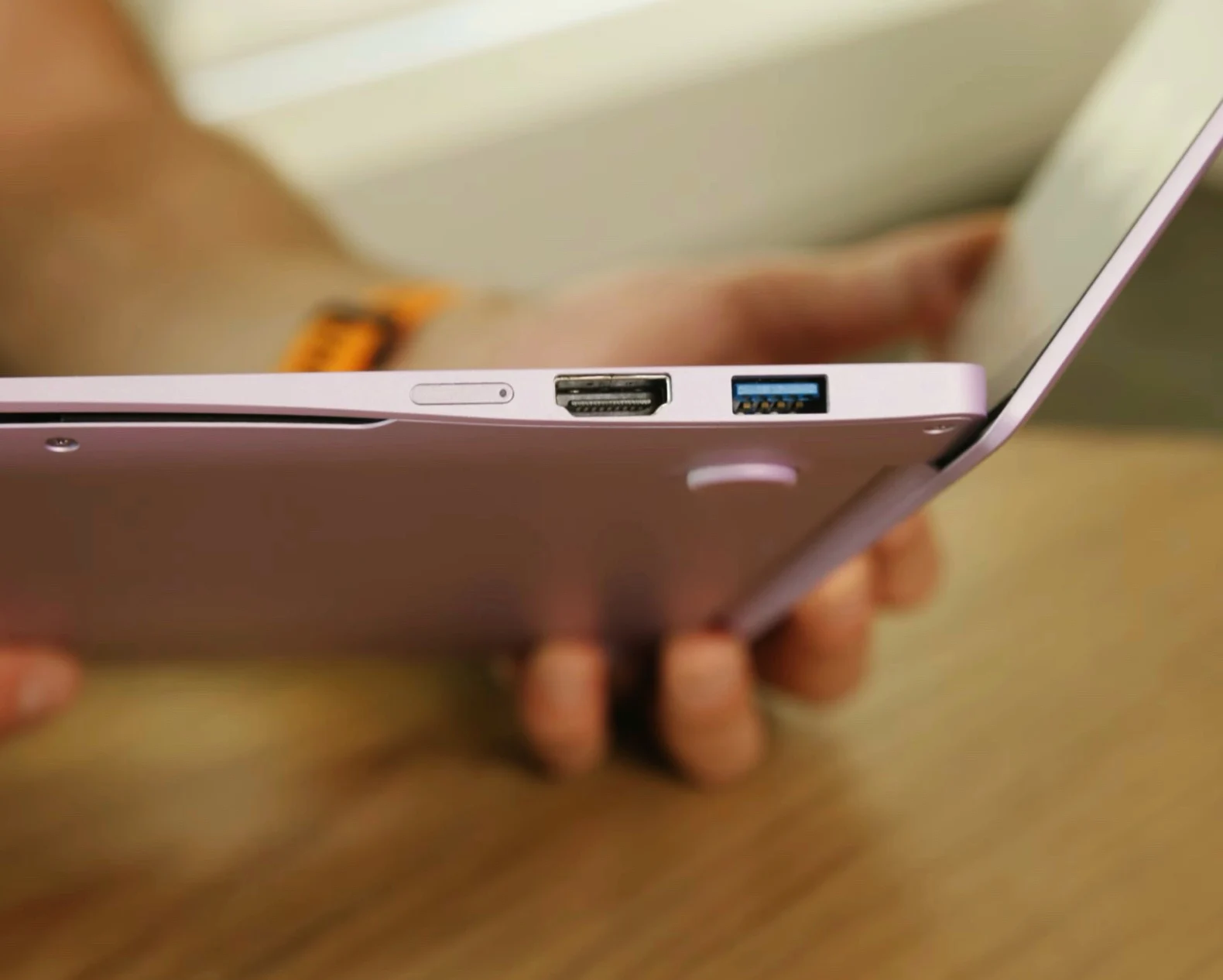
      Around 19:30 minutes into the video, Intel shows one of these reference designs. Despite its low price, the 12.9 millimeter thin notebook offers a modern, colorful metal chassis and a practical port selection with two USB-C, USB-A and HDMI. To reduce costs, Intel has developed a new cooling system with a particularly thin copper heatpipe and even a new, cheaper cable to connect the ports to the mainboard. Wildcat Lake can be combined with memory chips that were originally intended for smartphones.

      Intel Technology (YouTube), via VideoCardz


      Sources

    • macOS 28 Update Breaks Many Apple Apps

      macOS 28 Update Breaks Many Apple Apps

      Key Takeaway

      – macOS 27 will end support for Intel Macs entirely.
      – macOS 28 will remove Rosetta 2, blocking all unoptimized Intel apps.
      – Many popular apps (e.g., VLC, GOG Galaxy, OpenEmu) still lack ARM versions.
      – Paid apps like Capture One may require buying a new license for ARM compatibility.
      – Use tools like Silicon now to check which installed apps will break on macOS 28.


      The era of Intel Macs is finally coming to a end soon. Because macOS 27 cannot be installed on any Mac that has an Intel processor instead of an ARM chip. However, there will also be restrictions for Intel software on modern Macs from next year. This is because macOS 28 will discontinue support for Rosetta 2, meaning that apps that have not been optimized for Apple ARM processors can no longer be opened. This marks a huge shift for users still clinging to old hardware.

      Warnings have been showing since macOS 26.4

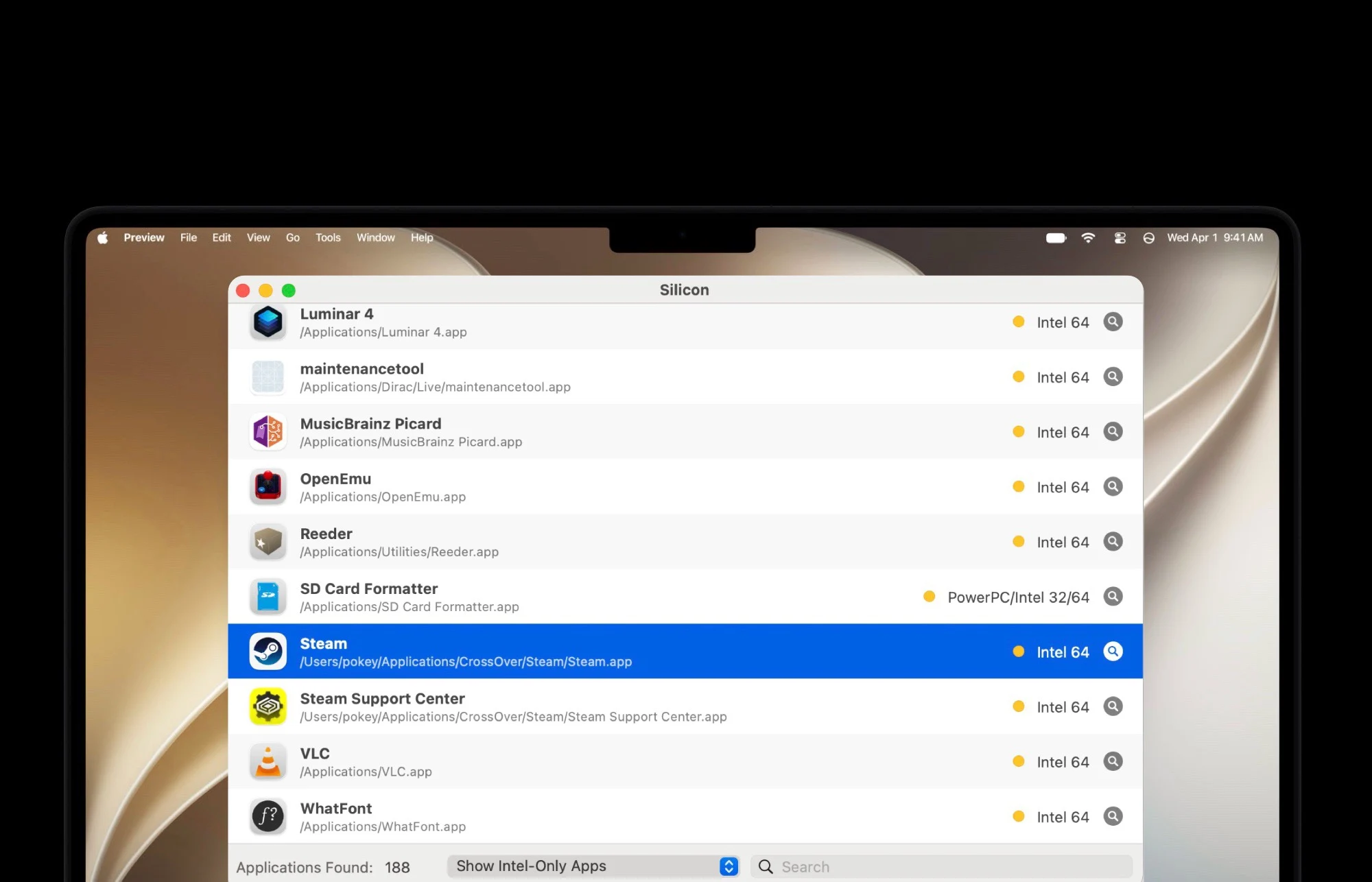
      Since macOS 26.4, Macs have displayed a warning when an app is opened that will no longer work from macOS 28 onwards. While many apps have already been optimized for Apple’s ARM chips over the past six years, this is by no means the case for all apps. For example, the game launchers GOG Galaxy and Itch.io are still distributed as Intel apps. The same applies to OpenEmu, a popular app for playing retro games. These apps remain fully functional for now, but that compatibility won’t last forever.

      Popular tools still waiting for updates

      Popular tools such as the VLC media player or the SD Card Formatter, the official tool for formatting memory cards from the SD Card Association, have also not yet received a corresponding update. For paid apps such as Capture One, it may be necessary to purchase a license for a newer version in order to continue using the software after the update to macOS 28. Users should budget for these potential costs if they rely on professional creative software or hardware utilities.

      How to check your app compatibility before upgrade

      To check which of the apps installed on your Mac have not yet been optimized for ARM chips, free apps such as Silicon can be used. Before installing macOS 28 next year, it is advisable to check whether urgently needed apps will no longer work after the update. Taking this step early can prevent workflow disruptions and data loss. Apple continues to push the platform forward, leaving Intel-based workflows and legacy software behind for good.

      Sources
    • Lenovo ThinkPad P16 Gen 3 38% Off: 192GB RAM, RTX GPU

      Key Takeaway

      – Maxed-out Lenovo ThinkPad P16 Gen 3 discounted by 38% ($5,500 off)
      – Final price still $8,999 for 192GB RAM, 4TB SSD, RTX Pro 5000 24GB GPU
      – Features Intel Core Ultra 9 275HX and tandem OLED (3200×2000, 120Hz, 1500 nits)
      – GPU limited to 105W TGP; 180W power supply can be overwhelmed at full load
      – Designed for niche professional users needing extreme RAM, VRAM, and processing power


      High-End Laptop Discounts Are Getting Rare

      Truly intriguing laptop deals are hard to come by these days, which is especially true for professional high-end machines with lots of memory, storage space and other powerful components including a dedicated graphics card with lots of VRAM. All these boxes are arguably checked by the Lenovo ThinkPad P16, which has now received a rather amusing discount.

      Specifics of the Price Cut

      More specifically, B&H Photo Video has discounted the maxed-out model variant of the ThinkPad P16 Gen 3 by $5,500 or 38 percent relative to the official list price. This applies to the model variant with an Intel Core Ultra 9 275HX, 192GB DDR5 RAM and 4TB SSD storage. Furthermore, this notebook is powered by an Nvidia RTX Pro 5000 Blackwell GPU with 24GB VRAM and features the tandem OLED panel with 3200 x 2000 pixels, 120Hz and up to 1,500 nits of peak brightness in HDR mode.

      Still A Very Expensive Machine

      That might sound like a good deal, but considering that Lenovo’s MSRP stands at a whopping $14,499, buyers still have to shell out a staggering $8,999 for this admittedly very well-equipped 16-inch laptop. For reference, Lenovo itself is currently selling a similar configuration with 128GB DDR5 RAM for a couple hundred dollars more in its official online store.

      Designed For Professionals

      Putting the insane price aside, the ThinkPad P16 Gen 3 is obviously designed for professional users who are confident that they need this amount of RAM, VRAM and processing power. We thoroughly reviewed a less expensive version of this 16-inch laptop and called it a “local AI monster” that has become more portable compared to the predecessor and still offers a lot of performance.

      Performance And Power Limitations

      On negative side, the RTX GPU is limited to a TGP of 105 watts and the notebook ships with a 180-watt power supply, which can be overwhelmed when the device runs at full load. With all that said, this is a sinfully expensive machine for a very specific group of professional users who might be looking for a huge business expense deduction on next year’s tax return.

      Disclaimer On Pricing

      Disclaimer: Price changes carried out by retailers are not our responsibility. The discounted price or deal mentioned in this item was available at the time of writing and may be subject to time restrictions and/or limited unit availability.

      Sources
    • Schenker Connect 15: From €1,000 to €1,600 Laptop

      Schenker Connect 15: From €1,000 to €1,600 Laptop

      Key Takeaway

      – Starting price is now ~€1,000 (up from €965), with Wi-Fi 7, CPU, and display included as standard.
      – RAM and storage upgrades cause the biggest price jumps: +€175 for 16GB RAM, +€355 for 32GB RAM, up to +€183 for a 1TB SSD.
      – LTE module costs an extra €79; a Secured-Core PC Level 3 option adds €29.
      – You can save €50 by choosing a 24-month warranty instead of the default 36-month warranty.
      – A fully configured review unit (32GB RAM, 1TB SSD, Windows) reaches roughly €1,655—expensive for an office laptop.


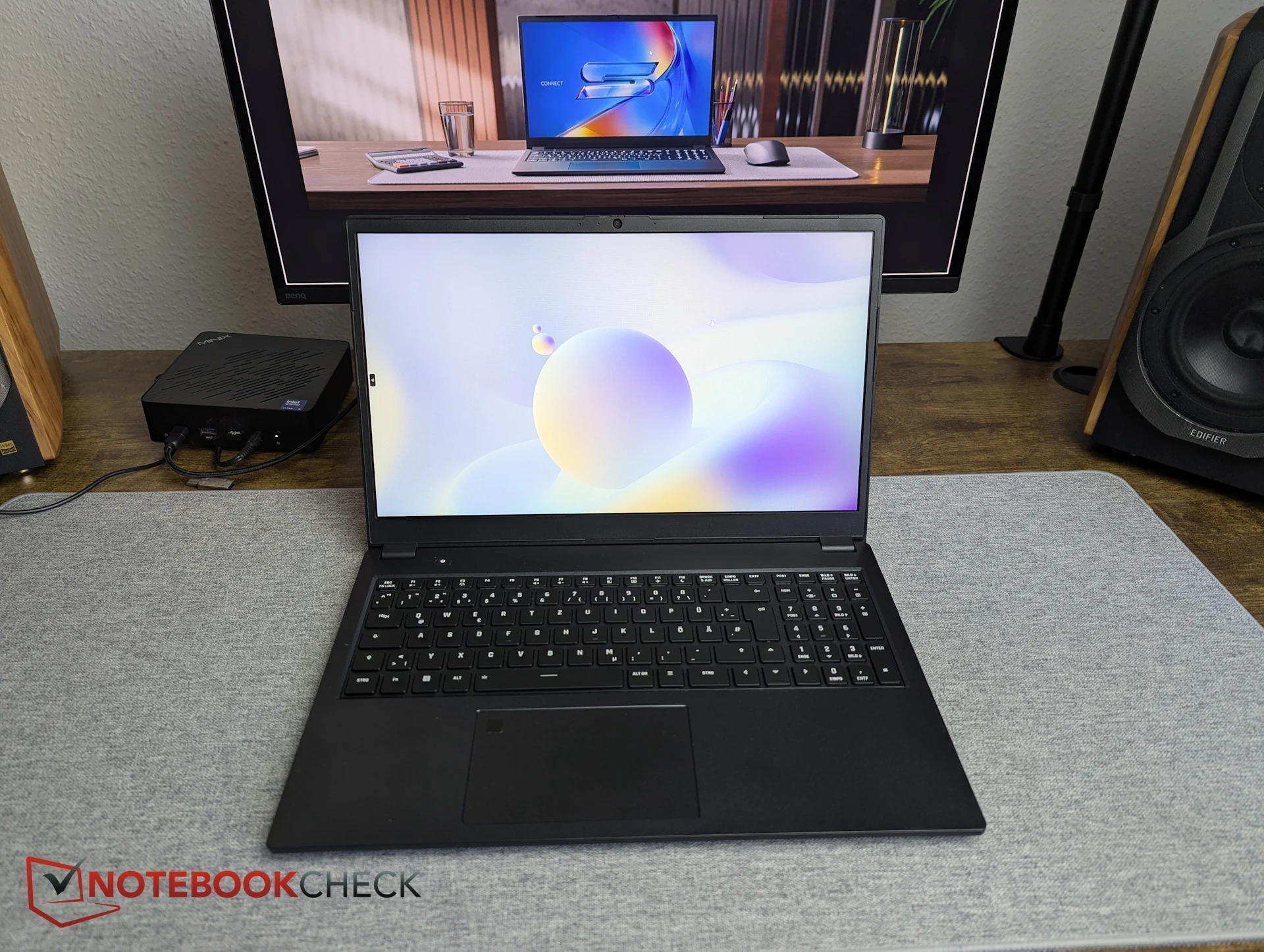
      The highly configurable business and enterprise laptop Schenker Connect 15 can be set up on bestware.com starting at 965 Euro. But what does that actually include—are LTE, smartcard support, Wi-Fi 7, and other features still part of the base package, with only RAM reduced? We spent some time configuring the system on bestware.

      Price Changes and Core Features

      Since our last visit, Schenker appears to have slightly increased prices. Instead of €965, the base configuration now shows €998.99, meaning the entry point is effectively around €1,000. The good news first: Wi-Fi 7 also appears to be included in the starting configuration at no extra cost. The same applies to the CPU and display—there are simply no alternative options available.

      Saving on the Warranty

      There is even a way to save on warranty. By default, Schenker provides a 36-month warranty on this business laptop. Those willing to accept 24 months instead can reduce the price by €50. In that case, the Connect 15 starts at €948.99.

      Add-On Features and LTE

      Unsurprisingly, the LTE module is one of the add-on features that comes at an additional cost. The Huawei ME906s module adds €79. Companies and other interested buyers can also select a Secured-Core PC Level 3 setup for €29.

      Dramatic Memory Price Jumps

      The most dramatic price jumps currently come from memory choices. The base configuration includes only 8 GB of DDR5 RAM. Upgrading to 2x 8 GB already increases the price by €175—an extreme jump for just one additional 8 GB module. Our review unit was equipped with 2x 16 GB DDR5 RAM, which adds a hefty €355 on top of the base price.

      Storage Costs and Final Summary

      Similar price jumps apply to storage. The base model comes with just 500 GB. Moving up to 1 TB costs at least €75 more, depending on the SSD model. The Samsung 990 Pro with 1 TB used in our review unit adds around €183.

      In summary, the Schenker Connect is not a low-cost business laptop. However, the premium price is not driven primarily by its core feature set. With only 8 GB of RAM and a 500 GB SSD, benchmark results would likely differ significantly compared to our test configuration. Our review setup would currently cost around €1,616—and that doesn’t even include the operating system. With a pre-configured Windows installation (without a license) the price jumps to a final 1.655 Euro, which is hardly inexpensive for an office laptop.


      Sources

      • Leaked: Microsoft Surface Laptop 8 & Surface Pro Prices Higher

        Key Takeaway

        – Snapdragon X2 Elite upgrade for Surface Laptop 8 and Surface Pro.
        – Price increase expected, with Surface Pro and 13.8″ Laptop 8 set at €1,699.
        – Surface Pro features OLED display and up to 32 GB RAM / 1 TB SSD.
        – Surface Laptop 8 uses LCD, offers up to 32 GB RAM / 2 TB SSD.
        – Battery life rated at 20 hours (13.8″) and 19 hours (15″).


        New Microsoft Surface Models Spotted Before Launch

        The next gen Surface Laptop 8 and the Surface Pro could already be seen in many images at the begining of June, the launch is expected on June 16, 2026. Both product lines are set to be upgraded to the Qualcomm Snapdragon X2 Elite, but a price increase is also to be expected according to reports.

        Pricing Details for the Upcoming Devices

        According to the latest information from Roland Quandt the next-generation Surface Pro will cost €1,699, just like the 13.8-inch Surface Laptop 8, while the Surface Laptop 8 with a 15-inch display will cost €2,299. As it is not yet known which processor and memory configurations these prices apply to, they cannot be directly compared with last years models.

        Comparing Costs With Previous Generation Models

        To put things in perspective: The 13-inch Microsoft Surface Pro with Snapdragon X, LCD, 16 GB RAM and 256 GB SSD was offered for a list price of €1,399, while the Surface Laptop 7 was offered at prices starting at €1,669 and €1,769, depending on the screen size. The next-generation Surface Pro is said to combine a Snapdragon X2 Elite with twelve CPU cores with a maximum of 32 GB RAM and a 1 TB SSD. Microsoft is reportedly installing a 120 Hz OLED display, two USB-C ports with support for USB 4 and is offering a keyboard case with space for the Surface Slim Pen 2.

        New Specifications for the Surface Pro and Laptop 8

        The Surface Laptop 8 offers similar features with a Snapdragon X2 Elite and a maximum of 32 GB RAM as well as an SSD with up to 2 TB of storage, although both the 13.8-inch and 15-inch models are said to rely on an LCD instead of an OLED display. The smaller model is expected to achieve a battery life of 20 hours with a 54 Wh battery, while the larger Surface Laptop 8 will achieve 19 hours with a 66 Wh battery. The base model is said to be equipped with a Snapdragon X2 Plus and only 256 GB of SSD storage.


      • Acemagic Anniversary 2026: Big Discounts on Mini PCs & Laptops

        Acemagic Anniversary 2026: Big Discounts on Mini PCs & Laptops

        Key Takeaway

        – Acemagic is celebrating its 4th anniversary with discounts up to 62% on mini PCs, laptops, and NAS systems.
        – The brand is known for compact, powerful hardware with a strong price-performance ratio, suitable for home offices, multimedia, and AI workloads.
        – Key deals include the Acemagic F5A (from $729), the W1 mini PC (from $309), and the Retro X5 with NES-inspired design.
        – The RX16 notebook starts at $499, and the N3A NAS supports up to 136 TB storage for $289.
        – The anniversary campaign includes limited-time offers and special promotions across a broad product range.


        Mini PC manufacturer Acemagic is celebrating its forth anniversary and is using this milestone for an extensive anniversary campaign. Technology enthusiasts can look forward to attractive discounts on numerous products from the current portfolio. From mini PCs and laptops to modern NAS solutions, the manufacturer is offering numerous opportunities to purchase high-quality hardware at particularly attractive conditions as part of its birthday sale.

        Growth and Expansion into Compact Computing

        Over the past four years, Acemagic has became a major player in the field of compact computer systems. Mini PCs in particular are becoming increasingly popular, as they combine high computing power with a small footprint. At the same time, the manufacturer has continuously expanded its range and now offers solutions for a wide variety of applications – from home offices and multimedia applications to professional workloads and AI applications.

        Performance and Build Quality Evaluated

        We have also been able to test several of the manufacturer’s products extensively over the past few years. The systems regularly impressed us with their modern features, solid build quality, and overall attractive price-performance ratio. The combination of powerful hardware and compact dimensions, in particular, makes many models an interesting alternative to classic desktop PCs. Our previous test reports indicate that Acemagic scores particularly well where users are looking for as much performance as possible in a small space.

        Attractive Discounts and Special Offers

        To mark its anniversary, the company is now offering significant discounts on numerous products. Depending on the model, discounts of up to 62 percent are possible. In addition to selected mini PCs, various laptop models and NAS systems have also been included in the promotion. The anniversary campaign is complemented by limited-time special offers and other discount promotions that will be available during the campaign period.

        Product Highlights and Key Specifications

        For those interested in technology, the anniversary campaign offers an attractive opportunity to get to know Acemagic’s current portfolio better. Whether a compact office PC, a powerful AI system, a versatile multimedia computer, or a NAS solution for the home network, the selection is correspondingly broad. The Acemagic F5A seems particularly exciting with AMD Ryzen AI 9 HX 370, which is available from just $729 as part of the promotion. Anyone looking for an affordable mini PC should also take a look at the Acemagic W1 with AMD Ryzen 7 H255, which is currently available from $309. Retro fans will be particularly interested in the Acemagic Retro X5, which evokes nostalgic memories with its NES-inspired design and also offers modern performance thanks to AMD Ryzen AI 9 HX 370.

        The anniversary promotion also has interesting offers in store for notebooks. For example, the Acemagic RX16 is available from just $499 and is aimed at users who are looking for a powerful notebook at an attractive price. For users who need a compact and cost-effective storage solution, the Acemagic N3A is also available. The NAS system currently costs $289 and – depending on the configuration – supports a storage capacity of up to 136 TB, making it suitable for both data backups and extensive media libraries.

        Where to Find Current Deals and Reviews

        If you would like to see for yourself, you can find all current offers and promotions on the Acemagic anniversary page for all current offers and promotions. If you would like to find out more about the products, our test reports on the Acemagic M1A Pro and Acemagic F3A as well as an assessment of performance, features, and suitability for everyday use.


        Sources

      • Apple MacBook Ultra: macOS 27 Touchscreen Support

        Apple MacBook Ultra: macOS 27 Touchscreen Support

        Key Takeaway

        – macOS 27 beta includes touchscreen support via Sidecar, adding credibility to MacBook touchscreen rumors.
        – Rumored “MacBook Ultra” may feature a new design with OLED touchscreen, thinner body, and punch-hole/dynamic island.
        – Expected to launch with Apple M6 Pro or M6 Max chips, between September 2026 and spring 2027.
        – Touch gestures like pinch-to-zoom and hover replacement via finger movement are now supported in macOS 27.
        – Official Apple confirmation is still pending, but the evidence strengthens speculation of a higher-priced, next-gen MacBook Pro.


        Rumors have been circulating for many months according to which the next-generation MacBook Pro will have a new design and an OLED touchscreen, and will be marketed under the name “MacBook Ultra” – at a higher price than the current MacBook Pro. Apple has not yet officially commented on these rumors. However, the first beta version of macOS 27 already contains a reference to this touchscreen support.

        Sidecar and Touchscreen Functionality in macOS 27

        If an iPad is connected wirelessly to a Mac via Sidecar, it is possible to operate macOS 27 via the tablet’s touchscreen. In macOS 26, you still had to use a mouse or trackpad to do this. It is not only possible to scroll through lists and select menu items, but simple gestures such as pinch to zoom are also supported. To simplify the selection of items, the finger can be moved over a list to highlight menu items as a replacement for the hover function of the mouse pointer.

        Credibility and Specs of the MacBook Ultra

        Although this new feature is not a definitive confirmation that a MacBook with a touchscreen is actually planned, it does lend credibility to the rumors. The MacBook Ultra will be offered with either Apple M6 Pro or M6 Max. Rumors suggest that Apple will give the notebook a completely new design, featuring a thinner body and a punch-hole or dynamic island instead of a notch. The OLED touchscreen is to be offered with a diagonal of 14.3 inches or 16.3 inches. The launch is expected between September 2026 and spring 2027.

        Sources
      • Lenovo Yoga Pro 16 Laptop: RTX 5070, 64GB RAM, Double Price

        Lenovo Yoga Pro 16 Laptop: RTX 5070, 64GB RAM, Double Price

        Key Takeaway

        – Lenovo released a high-end Yoga Pro 16 variant with RTX 5070 (12GB VRAM), 64GB RAM, and 2TB storage.
        – Priced at ~$4,865 in China (~$4,350 with subsidy), it costs about double the US Yoga Pro 9i with RTX 5060.
        – The 12GB RTX 5070 offers significantly more graphics power than the 8GB versions, targeting creatives.
        – Features include Core Ultra 9 386H, 16-inch tandem OLED touchscreen (1600 nits, 120Hz), and enhanced cooling.
        – It has a 92.5Wh battery, rich port selection, six-speaker Dolby Atmos audio, and a Wacom-powered 7-inch pen tablet touchpad.


        Yoga Pro Hits New Heights

        Lenovo has maxed out its venerable Yoga Pro convertible line of laptops with a new variant that boasts a more powerful Nvidia RTX 5070 graphics subsystem, 64 GB of RAM, and 2 TB of storage. As can be expected in this day and age when AI computing infrastructure gobbles up all the world’s chip supply at an increasing pace, the newest Yoga Pro 16 version that just got released in China is not cheap.

        Price and Config Breakdown

        The beefier 16-inch Yoga Pro convertible laptop trim, combining a 12 GB RTX 5070 GPU with 64 GB RAM and a 2 TB SSD, can be bought directly from Lenovo at a $4,865 equivalent (32,999 yuan). Lenovo seems to have chosen this moment to release such a pricey variant because it can still capitalize on the local government’s “digital device” national subsidy campaign that brings down the price to $4,350 (24,999 yuan).

        • RTX 5070 GPU with 12 GB GDDR7 VRAM and 115W TDP
        • 64 GB LPDDR5X RAM
        • 2 TB PCIe 4.0 SSD in dual-bay M.2 2280 config
        • Core Ultra 9 386H processor

        Comparing US and China Trims

        Compared to the same Yoga Pro 9i that Lenovo sells on Amazon in the US for just $2,230 with an RTX 5060 GPU, however, that is still double the money difference for doubling the memory amount and shoehorning the beefier RTX 5070 laptop GPU version with 12 GB GDDR7 VRAM and 115W TDP that Nvidia just started shipping in it. Still, Lenovo obviously thinks that there would be a market for those creatives who need to squeeze more graphics power out of their Yoga Pro convertible.

        GPU Performance Nuances

        Heretofore, both the RTX 5060 and 5070 laptop GPUs were available with 8 GB of video RAM, so the actual performance difference in benchmarks would barely hit 20%, but the 12 GB RTX 5070 is a different ballgame for those who need it. Other than the graphics power upgrade, the new Yoga Pro 16 comes with the same great specs that the US-available trims offer, namely a Core Ultra 9 386H processor, LPDDR5X memory, and a PCIe 4.0 SSD in a standard M.2 2280 dual-bay configuration.

        Cooling and Display Design

        Lenovo, however, treated this one as a gaming laptop when it comes to cooling with more openings and an increase of the effective dissipation area of the island and square heat pipe. The display is the same 16-inch tandem OLED touchscreen with top-shelf characteristics such as 1600 nits HDR peak brightness, 100% wide color gamut coverage, a 120 Hz dynamic refresh rate, and ten-point touch sensitivity.

        • 16-inch tandem OLED touchscreen
        • 1600 nits HDR peak brightness
        • 120 Hz dynamic refresh rate
        • 100% wide color gamut coverage

        Dimensions and Battery Life

        The aluminum chassis weighs a little over four pounds (1.9 kg), and the whole Yoga Pro 15 with a 12 GB RTX 5070 GPU measures just 0.68 inches (17.3 mm) thin despite also housing a large 92.5 Wh battery promising up to 18.5 hours of endurance and a smorgasbord of ports and slots: 2x Thunderbolt 4, 2x USB-A, an HDMI 2.1, a 3.5 mm headphone jack, and an SD card reader.

        Multimedia and Pen Input

        Since the Yoga Pro Aura edition laptops are billed for creatives, Lenovo payed attention to the multimedia chops of the new RTX 5070 edition by providing a rich sound subsystem supporting Dolby Atmos and Smart AMP with six speakers in a dual tweeter and four woofer crossover design as well as four surround-sound mics. Last but not least, the Wacom-powered touchpad can be used as a 7-inch writing tablet, complete with 4096 levels of pen pressure sensitivity and linear motor feedback to simulate realistic writing or drawing strokes.

        Global Availabilty Outlook

        This makes the new Yoga Pro SKU with a 12 GB 5070 GPU a well-rounded and futureproof convertible for creatives, but it remains to be seen if Lenovo will release it globally at some point, as its price seems posed to top four grand if and when it lands in the US.

        Sources
      • Mobi Fold: Logitech Compact Wireless Mouse, June 2026

        Mobi Fold: Logitech Compact Wireless Mouse, June 2026

        Key Takeaway

        – Logitech is launching the “Mobi Fold,” a foldable mouse competing with the Microsoft Arc Mouse.
        – The Mobi Fold will have a suggested price of €79.99.
        – A global announcement is teased for June 10, with listings already appearing on regional Logitech websites.
        – The mouse will be available in three launch colors and will include a ‘for Business’ variant.


        Logitech is preparing to announce a new device globally. For context, the company presented the Signature Comfort Plus Series just over a week ago. Now, it seems that Logitech is on the verge of releasing an alternative to the Microsoft Arc Mouse, less than a year after unveiling the MX Master 4 (curr. $119 on Amazon).

        Pricing and specification details from the leak

        In the meantime, Roland Quandt has discovered more details about the previously unnamed mouse he leaked almost a month ago. According to the leaker, Logitech intends to charge €79.99 for the mouse that will be known as the Mobi Fold.

        While we have been unable to confirm pricing information yet, Logitech has already listed the Mobi Fold on many of its regional websites. As the images below show, Logitech plans to sell dedicated ‘for Business’ options like the MX Master 4 before it.

        Launch date and colour options

        For the time being, the company has only teased that something will be unfolding on June 10. However, the design shown on Logitech’s German website matches that which Quandt revealed in May. Meanwhile, the company’s other websites suggest that the Mobi Fold will be available in three launch colours.

        • Pricing: €79.99 for the Mobi Fold
        • Three launch colours available
        • Dedicated ‘for Business’ options
        • Unfolding tease on June 10


        Sources