Category: Computers

  • MSI Raider 16 Max HX: Intel Arrow Lake Remains a Powerhouse

    Key Takeaway

    – Arrow Lake Core Ultra 9 290HX Plus outperforms Ryzen 9 9955HX3D and previous Intel CPUs by a few percentage points.
    – Power consumption is significantly higher, reaching up to 276W under load vs. 93W for a comparable Panther Lake system.
    – Performance-per-watt is poor, with 2x to 3x higher power draw for roughly 2x the performance.
    – The Core Ultra 9 290HX Plus is essentially an overclocked Core Ultra 9 285HX with identical cores and cache.


    A New Champion in Raw Performance

    Panther Lake may be Intel’s newest lineup of CPUs, but there’s still a lot of life left for the last generation Arrow Lake platform. The MSI Raider 16 Max HX is now shipping complete with the Arrow Lake Core Ultra 9 290HX Plus CPU instead of Panther Lake or AMD Zen 5 and the performance results are quite impressive. This chip realy packs a punch for those who need maximum compute grunt, even if it uses a older architecture.

    Benchmark Results and Comparisons

    As shown by the comparison graphs below, the Core Ultra 9 290HX Plus edges out the competing Ryzen 9 9955HX3D by just a few percentage points to be the new top dog in our raw performance charts. It ever-so-slightly outperforms both the Core Ultra 9 285HX in the much more expensive Titan 18 HX AI as well and the Dell Alienware 16X Aurora which ships with similar Arrow Lake processor options. This is a impressive showing for a chip that is not even the newest generation from Intel.

    Power Draw: The Main Trade-Off

    The main drawback as one might expect is the higher power requirement. Running Prime95 on the Raider 16 HX would consume as much as 276 W compared to only 93 W on the Razer Blade 16 with the slower but more efficient Panther Lake Core Ultra 9 386H. Thus, while the CPU may be 2x faster, expect consumption to be 2x to 3x greater as well for generally poorer performance-per-watt. After all, the Core Ultra 9 290HX Plus is arguably just an overclocked Core Ultra 9 285HX with an identical number of cores and cache sizes between them. You get the speed, but you pay for it in battery life and heat.

    Sources
    • Deal: 2026 Acer Swift Go 16 AI OLED Laptop 30% Off

      Deal: 2026 Acer Swift Go 16 AI OLED Laptop 30% Off

      Key Takeaway

      – 30% discount brings the Acer Swift Go 16 AI to $699.99, offering excellent price/performance.
      – Features a 16-inch 1920×1200 OLED touch display with 100% DCI-P3 coverage.
      – Powered by a 6-core Intel Panther Lake CPU, 16 GB RAM, and 512 GB of swappable storage.
      – Offers up to 20 hours of web browsing battery life with a 71 WH battery.
      – Key drawback: 250-nit display brightness is insufficient for outdoor or bright lighting use.


      You wont believe the deal on this Acer laptop

      The Acer Swift Go 16 AI got refreshed at CES 2026 with the latest Intel Panther Lake APUs, a big 71 WH battery, two Thunderbolt 4 ports, and an OLED display. Six months after it’s first showing, the Acer Swift Go 16 AI SFG16-I71T is now on sale at a great price, as Best Buy is offering the laptop at a 30% discount right now.

      Here is what you get for only $699.99

      Now coming in at only $699.99, the Acer Swift Go 16 AI boasts excellent price/performance. It packs a 6-core Core Ultra 5 322 Panther Lake SoC, 16 GB of RAM, and 512 GB of storage, which you can swap out for a bigger drive down the line. This is seriously a lot of machine for the money if you ask me.

      Around the front, the Acer Swift Go 16 AI rocks a 16-inch 1,920 x 1,200 OLED display with 100% DCI-P3 coverage and touch support. There is a 5 MP webcam on top of the display with a privacy shutter. The front of the chassis is rounded off by a backlit keyboard and a large glass trackpad protected by Corning Gorilla Glass.

      Ports you get and ports you dont

      Ports-wise, we are looking at:

      • Two Thunderbolt 4 ports
      • One HDMI port
      • Two USB-A ports
      • One headphone jack

      There is no SD or microSD card reader. So, you’ll want to buy a 3rd-party dongle from online if you need that.

      Why is this laptop so cheap now?

      So, the Acer Swift Go 16 AI is a lot of laptop for just $699.99. We have no doubt that this is a consequence of the MacBook Neo and the upcoming crop of affordable Windows laptops like the Dell XPS 13, which also starts at $699.99. This is a huge win for Windows laptop customers who, for the longest time, had been getting notebooks that compromised on quality in the name of affordability.

      Battery life and performance for everyday use

      While not a powerhouse by any means, the Acer Swift Go 16 AI with the 6-core Core Ultra 5 322 and 16 GB of RAM will get the job done in day-to-day tasks. Acer also claims up to 20 hours of web browsing battery life. There is no reason to doubt Acer’s claims, as the Intel Panther Lake chips are quite energy efficient and should provide solid runtime.

      Not all is good with the Acer Swift Go 16 AI, however. The 16-inch touch-sensitive OLED display can only reach 250 nits of brightness. While this is plenty for indoor use, it is woefully insufficient for use outdoors or under direct heavy lighting. The Apple MacBook Neo does so much better here with a 500-nit IPS panel, but that also costs more.

      Final thoughts on this Windows laptop value

      All in all, if you are in the market for an affordable Windows laptop that covers all the bases, the Acer Swift Go 16 AI on sale is a superb value. You get the newest Panther Lake chip, a nice OLED screen with touch, and a huge battery for under seven hundred dollars. This is hard to beat right now.

    • MSI Raider 16 Max HX: Simple Feature We Want on More Laptops

      Key Takeaway

      – First 16-inch model in the Raider family with a brand-new design, not a scaled-down 18-inch version
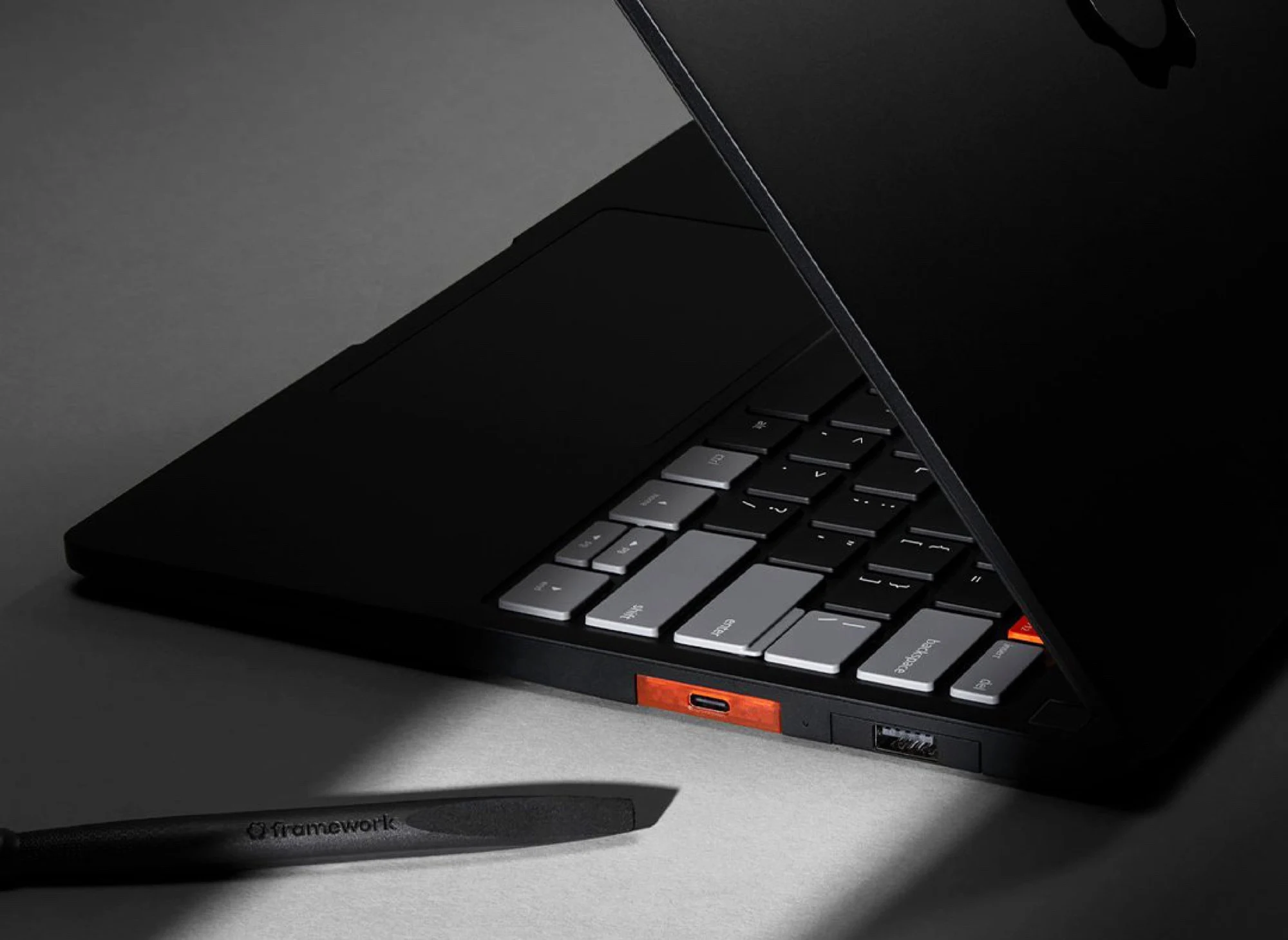
      – Built-in bottom subpanel for quick access to M.2 SSD and DDR5 SODIMM slots
      – Faster, simpler upgrades without removing the entire bottom panel
      – Avoids breaking warranty stickers or seals during upgrades
      – Reduces risk of accidental damage for less experienced users


      MSI Raider 16 Max Debuts with a Clever Upgrade Panel

      The MSI Raider 16 Max made its debut at CES 2026 as the first 16-inch model in the Raider family. Instead of taking the easy way out, however, the Raider 16 Max is a fresh new design and not simply a smaller version of the larger 18-inch Raider 18 HX. It subsequentley sports several external features not found on its older sibling including one that we find to be especially usefull.

      Innovative Subpanel Design for Quick Upgrades

      The bottom panel of the new Raider 16 Max has a built-in subpanel for quicker access to the two M.2 SSD slots and two DDR5 SODIMM slots. Thus, instead of needing to remove the entire bottom panel just for simple upgrades as on the vast majority of laptops, owners will only need to remove the two screws securing the subpanel on the Raider 16 Max. Not only does this approach save on time, but the lower barrier of entry makes it much less daunting for end users who may not be as familiar or comfortable with upgrades.

      Warranty and Practical Benefits

      Arguably the biggest advantage to the subpanel is that it circumvents the need to break any warranty stickers or warranty seals that often appear on older MSI models. The bottom panel on many laptops can be tricky to open and so any accidental damages are significantly reduced with the subpanel aproach. This is a major quality-of-life improvement for people who like to tinker but also want to keep there warranty intact.

      Limitations of the Subpanel Access

      The subpanel on the Raider 16 Max unfortunatly does not grant direct access to the removable M.2 WLAN module, main Li-Ion battery, or cooling solution, but the entire bottom panel can still be removed with relative ease should the need arise. So while it handles the most common upgrades admirably, you’ll still need to do a full teardown for battery or thermal paste replacement.

      • Pricing and specifications for the MSI Raider 16 Max vary by configuration, with the base model starting at around $2,499 featuring an Intel Core Ultra 9 processor and an NVIDIA GeForce RTX 5080 GPU.
      • Higher end models can reach up to $3,999, offering up to 64GB of DDR5 RAM and a 4TB PCIe Gen 5 SSD, along with a 16-inch 4K Mini-LED display at 240Hz.
      • Dimensions are 14.1 x 10.5 x 0.9 inches and weight starts at 5.5 pounds.

      More information can be found on our full review of the Raider 16 Max.

      Sources
      • Youyeetoo K1: Modular Intel N100 PC with GPIO from $210

        Youyeetoo K1: Modular Intel N100 PC with GPIO from $210

        Key Takeaway

        – Modular design with replaceable compute module and standalone operation
        – Industrial-grade I/O including eDP, MIPI-CSI/DSI, GPIO, UART, I2C, and SPI
        – Flexible storage: eMMC, M.2 NVMe/SATA, and dedicated SATA connector
        – Fanless N100 handles Windows, Linux, and OpenWrt for light desktop/server/router use
        – Higher price than typical N100 PCs, justified by modularity and industrial features


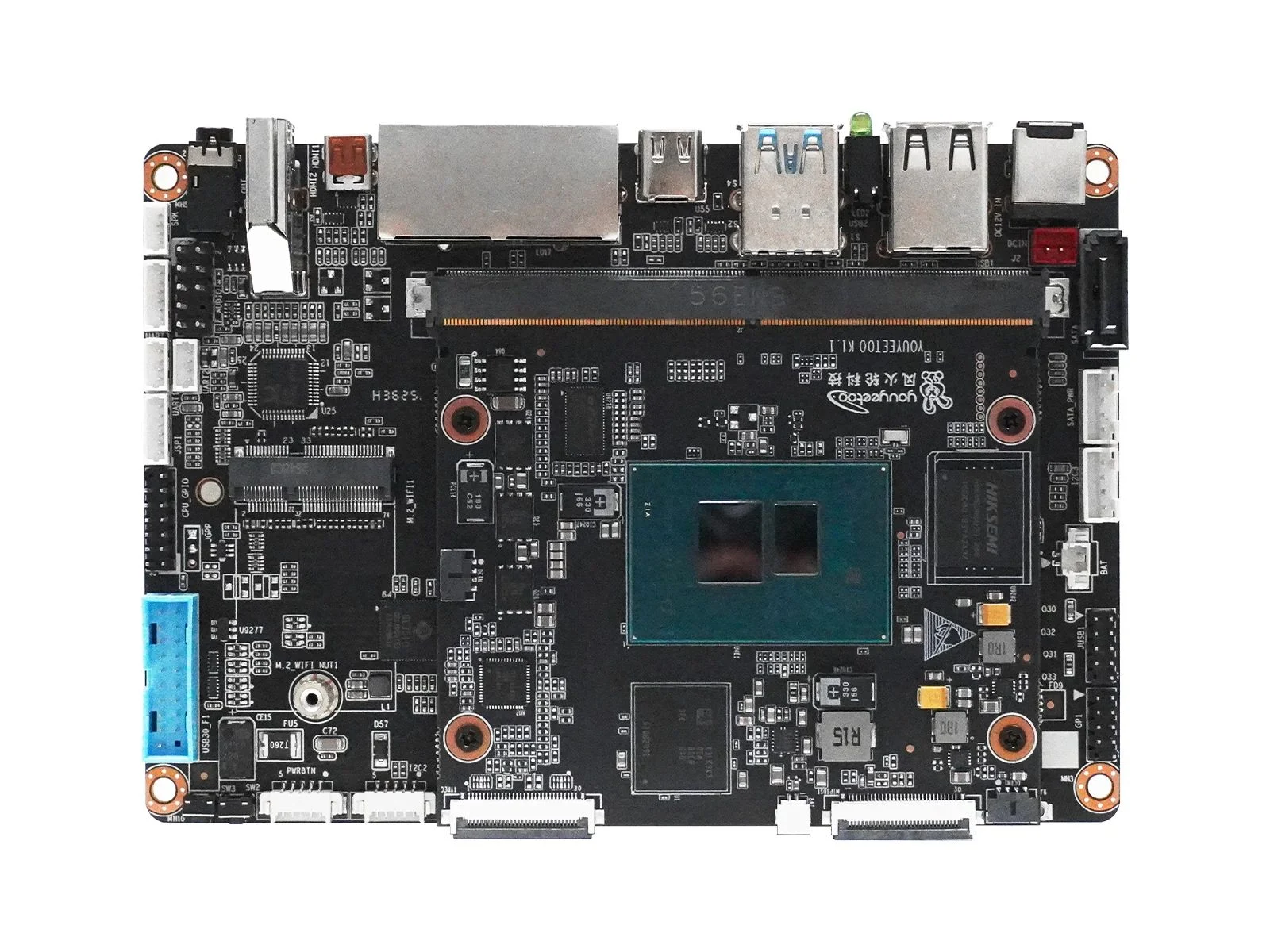
        The budget mini PC market is crowded with near-identical Intel N100 boxes, but the Youyeetoo K1 stands out through its construction rather than its silicon. Instead of a single fixed motherboard, the system splits into two parts: an 82 x 71 mm processor module carrying the quad-core Alder Lake-N chip and up to 16 GB of LPDDR5 memory, and a 134 x 92 mm carrier board it slots into, SO-DIMM-style, much like a stick of RAM. In principle, that means the compute portion can be replaced without discarding the rest of the system.

        Modular Architecture and Standalone Operation

        In principle, the compute portion can be replaced without discarding the rest of the system. Moreover, the core board can even run standalone, with its own USB-C, MIPI display output and 12 V power input for space-constrained installations. This arrangement allows for future upgrades without scrapping the entire machine, wich is a rare feature in this price bracket. The core boards compact dimensions make it suitable for embedding into custom enclosures or DIY projects.

        Carrier Board Connectivity and Expansion Options

        The carrier board is where the K1 earns its keep. Alongside the expected dual Gigabit Ethernet, HDMI, mini HDMI, USB-C and four USB Type-A ports, the full-featured carrier variant adds connectors rarely seen on consumer machines, an eDP output for driving bare laptop-style panels, MIPI-CSI and MIPI-DSI for cameras and displays, plus 27 GPIO pins and UART, I2C and SPI headers for hardware tinkering. Storage is similarly flexible, with eMMC on the compute module itself, an M.2 2280 slot supporting NVMe or SATA SSDs, and a dedicated SATA data and power connector pair. An M.2 E-key slot accepts an optional Wi-Fi 5 or Wi-Fi 6 module with Bluetooth, with 4G LTE also available as an add-on, and the board even integrates NFC for tap-to-configure deployment.

        Operating System Support and Target Use Cases

        The 6 W N100 is no powerhouse, but it runs Windows 10/11, Ubuntu, Debian and OpenWrt comfortably for light desktop work, home servers, routers and kiosk or signage duty, the use cases this fanless platform is aimed at. Value is the main question mark, however. Conventional N100 mini PCs frequently sell for less, so buyers are paying specifically for the modularity, the industrial I/O and the documented open wiki ecosystem. The system runs silently due to its passive cooling, which makes it ideal for noise-sensitive environments.

        Pricing, Availability and Import Considerations

        The Youyeetoo K1 has been shipping since January 2026 and sells from $209.99 for the 8 GB / 128 GB eMMC configuration, with a 16 GB / 256 GB version priced at $260. Buyers ordering from Youyeetoo’s store directly may face import duties or taxes depending on their region. This pricing places it above many simmilar N100 boxes, but the added flexibility and unique modular design justify the premium for specific use cases. The optional Wi-Fi and LTE modules are sold seperately, increasing the total cost for fully equipped units.


        Sources

      • Apple & Leaker Hint at MacBook Ultra Details

        Apple & Leaker Hint at MacBook Ultra Details

        Key Takeaway

        – A major MacBook Pro redesign is expected between fall 2026 and spring 2027.
        – The new model is rumored to feature an OLED panel and a touchscreen.
        – A leaker claims the inclusion of a touchscreen is “100% confirmed.”
        – Recent macOS updates include touchscreen-friendly gestures, hinting at the change.
        – The redesign would be the first significant update to the laptop’s fundamental features since 2021.


        A Shift in the Design of Apple’s Pro Laptop

        The current Apple MacBook Pro’s design ($1,549) goes all the way back to the model that came out in October 2021, which had the M1 Pro and M1 Max chips inside. Over the last five years, Apple’s flagship notebook has mainly just gotten new processors, meaning it got faster, but the company hasn’t touched core things like the overall look or the screen itself. This is all supposedly going to change pretty soon, if you believe the rumors floating around.

        New Rumors About a Touchscreen and OLED Panel

        According to whispers, a MacBook Pro with a totally new design will show up sometime between fall 2026 and spring 2027, and they might even call it the MacBook Ultra. For a while now, people have been saying this machine wont just have an OLED display, but it will also be the very first Mac to ever include a touchscreen. The usually spot-on leaker known as Instant Digital now backs up these claims, stating it’s “100% confirmed” that the next-gen model will indeed have touch capabilities.

        • The notebook could be marketed as the MacBook Ultra.
        • It will supposedly feature an OLED panel alongside the touchscreen.
        • Instant Digital claims the touchscreen is definitely coming.

        Clues Found Within Apple’s Software

        Apple themself have actually left several hints about a Mac with a touchscreen. The new operating system now allows the iPad to be controlled by its own touch when its used as an external monitor through Sidecar, and it even supports simple multitouch gestures. MacRumors dug up two other clues: first, you can refresh Safari webpages by swiping down with your finger, like on an iPhone or iPad. And second, the position and the taller shape of the new Spotlight and Siri windows look wierdly like they were made to fit around something like a Dynamic Island.

      • Keychron K Ultra-Series: 760-Hour Battery, Affordable Mechanical

        Key Takeaway

        – K8 Ultra and K2 Ultra receive same hardware/firmware upgrades as K3 Ultra, priced at $119.99
        – ZMK firmware delivers up to 760 hours (no backlight) or 225 hours (with backlight) battery life
        – Steel plate, double-shot PBT keycaps (OSA profile), and bolt-on aluminum frame for premium feel
        – New Apex switch series (Red, Brown, Banana) with box stem and clear top design
        – Fully programmable via Keychron Launcher, but south-facing RGB limits shine-through keycap options


        Hot on the heels of the new Keychron K3 Ultra low-profile keyboard that we are in the process of reviewing, Keychron has announced that its K8 and K2 keyboard models would be getting the same firmware and hardware upgrades while keeping the price of the new wireless mechanical keyboards fairly affordable. The K8 Ultra 8K and K2 Ultra 8K are launching on Keychron’s online store at $119.99, which is by far not cheap, but it is on the more affordable side when it comes to premium mechanical keyboards. Keychron’s claims about battery life and its highly customisable designs make the new keyboards viable contenders at the price.

        Alternative Options and Pricing Considerations

        It should be noted that the new K Ultra keyboards cost $5 more than Keychron’s gasket-mounted V1 Ultra (curr. $114 on Amazon), and that keyboard features full-POM switches, identical keycaps, and a programmable knob, all of which may be better features for your needs.

        Form Factors and Construction Quality

        The Keychron K2 Ultra 8K and K8 Ultra 8K are effectively the same keyboard design in different form factors, with the K8 Ultra offering a traditional TKL layout, much like the Keychron C1 Pro 8K we reviewed not too long ago, while the K2 Ultra takes the more compact 75% form factor. Both new Ultra keyboards feature case designs intended to keep the keyboards affordable.

        The bottom cases of the new keyboards are injection-moulded ABS, but they come with a bolt-on aluminium frame around the top half of the case — an add-on that previously cost extra on the K Max series keyboards and that both serves to make the keyboards look and feel more premium when in use and give them some added rigidity and durability.

        Battery Life and Firmware Efficiency

        Keychron has put the same 4,000 mAh-capacity battery in the K2 Ultra and K8 Ultra as it did in the Q13 Max we reviewed in 2025. In the case of the Q13 Max, that battery capacity delivered a respectable 83 hours with backlighting at medium brightness. With the move to ZMK firmware instead of QMK, Keychron claims that the K8 Ultra and K2 Ultra are capable of up to 760 hours on a single charge with no backlighting and up to 225 hours with backlighting enabled.

        This improvement is due to ZMK being designed specifically for wireless applications, as opposed to QMK, where wireless connectivity was more or less added as an afterthought. The efficiency claims have so far proven true in our review of the Keychron Q1 Ultra, which was able to make it through an entire workday without dropping from 100% charge.

        Keycaps, Plate, and Switch Options

        Keychron has equipped the K8 Ultra and K2 Ultra with a steel plate and double-shot PBT keycaps in the OSA profile. We have previously praised this keycap design in our review of the Keychron K4 HE, as the keycaps share the same height and cylindrical tops as a traditional OEM profile, but they have a more unique look.

        The new K Ultra keyboards are launching alongside Keychron’s new Apex switch series, which is a new switch design from Keychron featuring a box stem and a clear top, as opposed to the traditional MX stem and the opaque top and light guide in the slightly less recent Silk POM switches we tested in the Q1 Ultra. The new Apex switches come in Keychron’s usual variety of Red linear (45 gf actuation force, 4 mm travel), Brown tactile (50 gf actuation force, 4 mm travel), and Banana tactile (55 gf actuation force, 3.6 mm travel with a sharper tactile bump).

        Software Customisation and RGB Lighting

        The K2 and K8 Ultra are also customisable and programmable in Keychron Launcher, which allows you to do everything from configure macros to remap keys, and tweak per-key RGB backlighting. That RGB backlighting is, however, south-facing, which means it may prove challenging to find shine-through keycaps that actually illuminate the legend on the keycaps.

        Sources
        • Dog Shoots Gun at Neighbor, Gaming PC Saves Life

          Dog Shoots Gun at Neighbor, Gaming PC Saves Life

          Key Takeaway

          – A gaming PC saved its owner’s life by deflecting a bullet that came through a wall.
          – The gun was accidentally discharged by a neighbor’s dog, according to the neighbor.
          – The bullet destroyed the PC’s motherboard, RAM, and tempered glass, with likely additional damage.
          – No one was injured, and insurance (or the neighbor) is expected to cover the damages.


          PC Takes a Bullet, Owner Unscathed

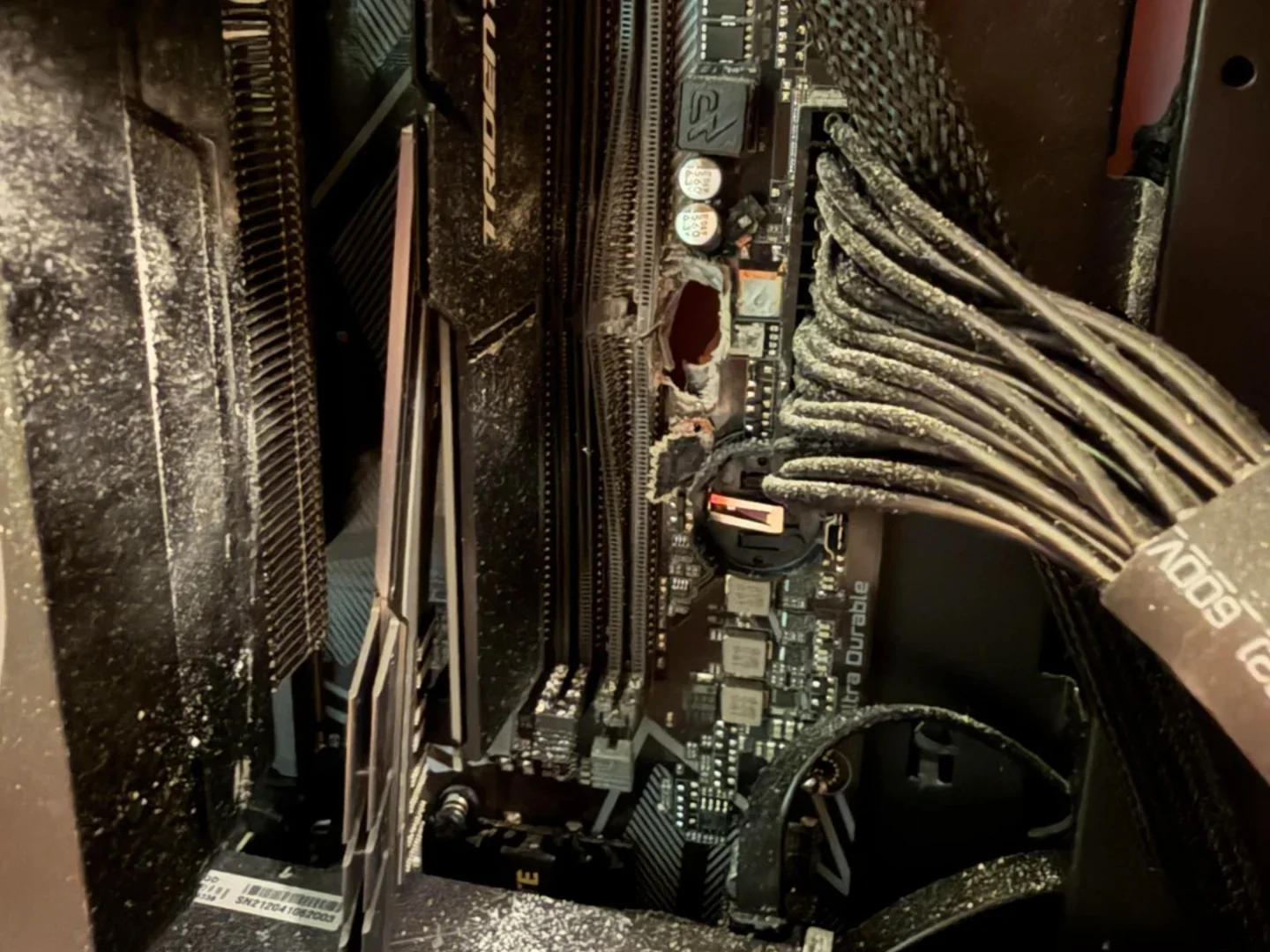
          When it comes to bizarre series of events, this one is right up there. Apperently, a gaming PC was shot, and that bullet could of hit the owner, so essencially the PC saved the users life. The weird part is that the gun was shot by a dog.

          The Incident Unfolds

          Reddit user ‘angelbabyzz’ took to the platform to detail the incident that occurred somewhere in the US. The user was fast asleep when, at some point during the night, a loud bang and broken glass hitting there face woke them up. Turns out, a gunshot came through the neighboring wall that hit their gaming PC, which changed the bullets trajectory away from the sleeping owner, as stated by the police.

          Dog Pulled the Trigger

          The neighbour then rushed in to check up on the gamer and was sincerly apologetic about the incident. She claimed that her dog accidentally discharged the gun. The logistics of how that transpired are a mystery. The gamer who was the victim in this case is unsure about how the gun went off, but beleives that it was an accident. Luckily, no one was harmed, and the insurance will likely cover the damages. If it doesnt, the neighbor assured the victim she would pay for everything.

          Hardware Casualties

          As for the gaming PC, it was mostly destroyed as the bullet seemingly entered from the back of the case behind the RAM slots, tore through the motherboard, the Trident Z RGB RAM, and shattered the tempered glass. There was debris everywhere, which likely damaged the other hardware as well. The exact model of the RAM is Trident Z RGB, and a typical price for a 32GB kit (2x16GB) is now around $150-$200, depending on speed.

          Market Timing Misfortune

          Its an unfortunate incident, and whats also unfortunate is that the RAM got hit. Given the current state of the market, the same RAM sticks now likely cost significantly more than when the user purchased them. The victim did’nt specify the exact price paid, but DDR4 RAM has seen price hikes in recent months. The motherboard, likely a mid-range B550 or Z590 model, would also cost between $150 and $300 to replace. The case itself, with shattered tempered glass, would need a full replacement too.


          Sources

        • How to Use Windows 11 Shared Audio Feature

          How to Use Windows 11 Shared Audio Feature

          Key Takeaway

          – Windows 11 now natively supports simultaneous audio streaming to two Bluetooth devices.
          – Shared Audio uses Bluetooth LE Audio and requires specific hardware (e.g., Copilot+ PCs with Snapdragon or Intel Core Ultra 200 chips).
          – Microphone input is disabled on connected Bluetooth headsets, forcing use of the laptop’s built-in mic.
          – The feature is rolling out via Controlled Feature Rollout (CFR), so it may not be visible even on compatible devices.
          – Compatible headphones include Samsung Galaxy Buds2 Pro, Galaxy Buds3/Pro, and Sony LinkBuds S.


          New Audio Sharing Feature Rolls Out

          Microsoft resolved a persistent multi-user playback limitation by baking a native audio broadcaster directly into Windows 11. Instead of forcing users to wrestle with physical splitters or finicky third-party mirroring applications, the operating system splits the audio output stream at the system level, pushing synchronized sound to two separate Bluetooth devices at the same time.

          Taskbar Icon and Volume Controls

          A new status icon will appear on the taskbar to confirm the stream is live and to provide a direct shortcut back to the configuration overlay. Each listener can dial in a distinct volume profile using independent software sliders within the menu, or by pressing the physical volume buttons on their respective headsets. Note that this routing pipeline temporarily locks out standard Bluetooth headset microphone inputs, meaning Windows will automatically default to your laptop’s built-in microphone array for any voice calls what so ever.

          Hardware and Build Requirements

          Because this tool bypasses legacy Bluetooth Classic standards in favor of modern Bluetooth Low Energy (LE) Audio protocols, it requires Windows 11 build 26100.8522 or newer alongside specific internal hardware components. Compatible PCs include modern Copilot+ laptops driven by Qualcomm Snapdragon X Elite or Snapdragon X Plus processors—such as the Microsoft Surface Laptop 7, Surface Pro 11, Samsung Galaxy Book4 Edge, and Dell XPS 13 9345—as well as newer systems built on Intel Core Ultra Series 200 silicon.

          Supported Audio Devices

          For audio playback, users must connect broadcast-ready endpoints, which include the Samsung Galaxy Buds2 Pro, Galaxy Buds3, Galaxy Buds3 Pro, Sony LinkBuds S, and modern LE Audio-equipped hearing aids from manufacturers like ReSound and Beltone. Even if a machine satisfies the required hardware criteria and runs the correct build number, the Shared Audio option might still be missing from the interface entirely.

          Controlled Feature Rollout Process

          Microsoft is deploying this utility via a Controlled Feature Rollout (CFR). This server-side staging means the software architecture remains gated behind a configuration flag until Microsoft remotely activates the tile for your specific device pool. Windows 11 users should monitor there settings app for the appearance of this option rather than expecting instant availablity after a manual update.

          Sources
        • Framework Laptop 13 Pro Delayed: Not Due to DRAM Crisis

          Framework Laptop 13 Pro Delayed: Not Due to DRAM Crisis

          Key Takeaway

          – Delivery of the Framework Laptop 13 Pro delayed by about one month (late July to early August).
          – New orders now expected between August and October, depending on configuration.
          – Delay caused by two component issues: a grounding problem in the haptic touchpad and a firmware issue with the display.
          – Both problems have been solved, but production line adjustments are needed.
          – Customers can cancel their pre-order for a full refund if they cannot wait.


          Laptop Delays and Component Fixes

          The Framework Laptop 13 Pro, announced in mid-April, was set to compete with high-end models like the Apple MacBook Pro ($1,549 on Amazon). Delivery was originally planned for June. However, Framework notified customers via email that the first production batch will likely be delayed until late July or early August. If you pre-ordered, expect your notebook around a month later than initially stated.

          New Orders and Component Issues

          Anyone ordering the laptop now should anticipate delivery between August and October, depending on configuration. The delay isn’t due to the DRAM crisis. Instead, Framework found problems with two new components shortly before mass production: the haptic touchpad and the display. According to Framework, the original touchpad mainboard design led to a grounding issue, which could reset its status if clicked multiple times rapidly.

          • Touchpad problem: grounding issue causing reset on rapid clicks
          • Display problem: resolved via firmware update
          • Panel supplier CSOT is producing corrected panels

          Solutions and Customer Options

          The display issue was fixed with a firmware update, and panel supplier CSOT is already making panels with corrected firmware. While Framework says it has found solutions, adapting production equipment will take time. Framework emphasizes that customers who can’t wait can cancel their order and get their deposit refunded. More details about the Framework Laptop 13 can be found in launch coverage.


          Sources

        • Nvidia GeForce RTX 50 Super Leak: Performance & Price/Performance Hope

          Nvidia GeForce RTX 50 Super Leak: Performance & Price/Performance Hope

          Key Takeaway

          – RTX 50 Super GPUs focus on more VRAM and higher TDP rather than core count increases.
          – Performance gains are modest (5-14%), driven by increased bandwidth and clock speeds.
          – Pricing leaks suggest minimal to no price increase over standard models.
          – Nvidia’s disinterest in the gaming market raises doubts about availability and reasonable pricing.


          Nvidia GeForce RTX 50 Super Desktop Gaming GPUs are Back on the Menu

          It appears the Nvidia GeForce RTX 50 Super desktop gaming GPUs are back on the menu. We heard a lot about an impending RTX 50 Super series refresh in 2025, which never happened. The rumors are making the rounds once again, and Moore’s Law Is Dead has shared detailed specs and performance targets of the RTX 5080 Super, RTX 5070 Ti Super, RTX 5070 Super, and RTX 5060 Super.

          VRAM and TDP Changes for the RTX 50 Super Lineup

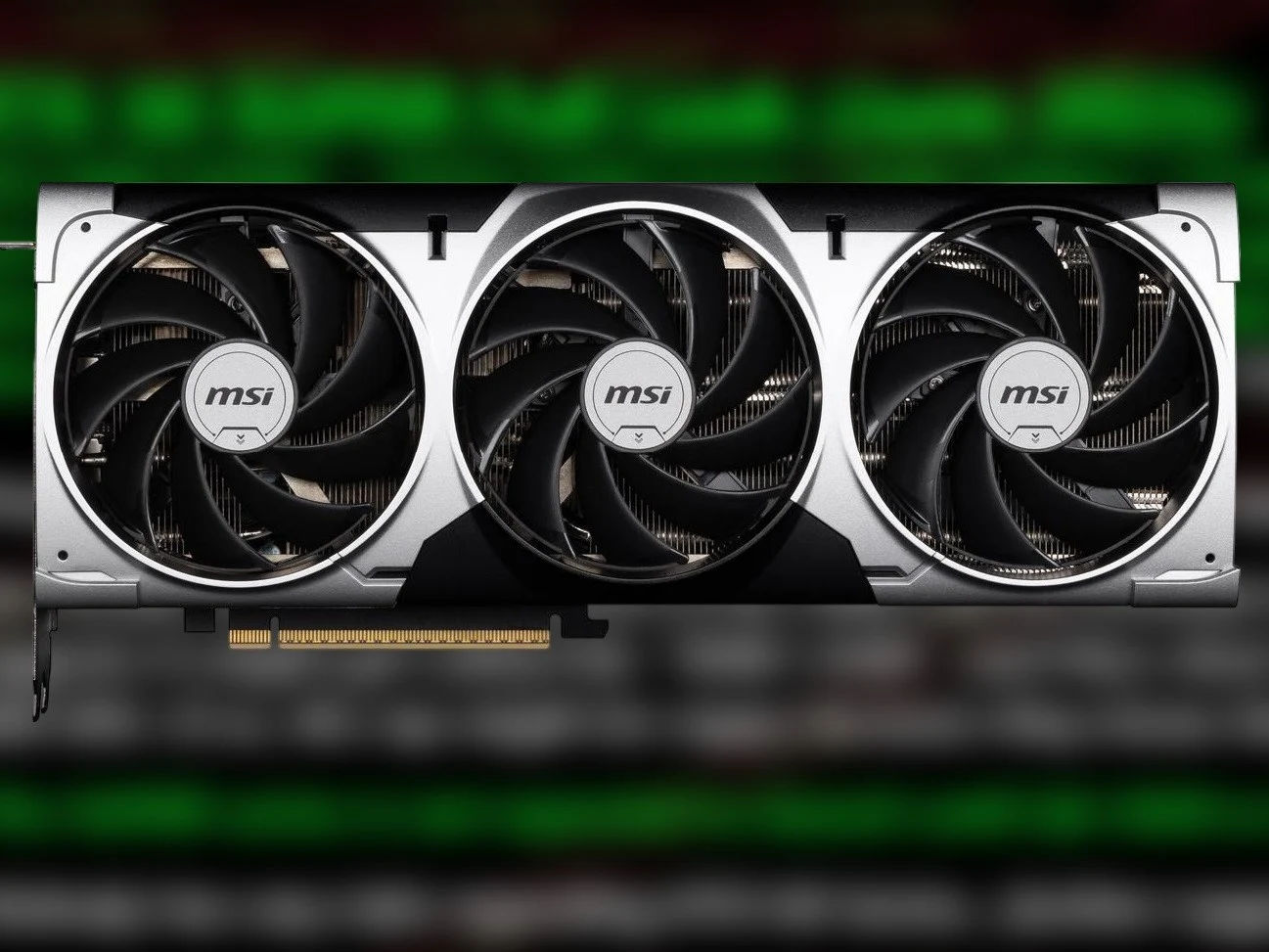
          MLID reports that the RTX 50 Super series GPUs mainly bring more VRAM, coupled with a higher TDP. At the top end, the RTX 5080 Super features the same 10,752 CUDA cores as the standard RTX 5080, while packing 24 GB of 32 Gbps GDDR7 video memory. The RTX 5080 Super reportedly has a TDP of 415 W vs 360 W for the RTX 5080.

          Sitting under the RTX 5080 Super, the RTX 5070 Ti Super also brings the same number of CUDA cores as the RTX 5070 Ti, but enjoys 24 GB of 28 Gbps VRAM. The RTX 5070 Ti features 16 GB GDDR7 VRAM. The RTX 5070 Ti Super is reportedly also more power hungry at 350 W vs 300 W for the RTX 5070 Ti.

          The RTX 5070 Super and 5060 Super Specification Details

          The RTX 5070 Super allegedly follows the same path as the other two RTX 50 Super GPUs with more VRAM and a higher TDP. Compared to the standard RTX 5070, the RTX 5070 Super seemingly carries 6 GB more VRAM for a total of 18 GB and a 25 W higher TDP at 275 W. Unlike the RTX 5080 Super and the RTX 5070 Ti Super, the RTX 5070 Super is also expected to get a 4% CUDA core count increase, resulting in 6,400 CUDA cores.

          Finally, the RTX 5060 Super, which could be called the RTX 5060 12 GB, has 12 GB of VRAM and the same 3,840 CUDA cores as the vanilla desktop RTX 5060 6 GB. MLID shares no information regarding the RTX 5060 Super’s TDP. But we can assume the GPU will get a higher power consumption limit like the rest of the RTX 50 Super lineup.

          Performance Gains and Potential Pricing Insights

          MLID alleges that the RTX 50 Super could bring some noticeable but not massive performance gains. These performance uplifts will be entirely due to the increased bandwidth and Nvidia pushing higher clocks, which is why the RTX 50 Super GPUs have higher TDPs.

          For the RTX 5080 Super, MLID reports a 7 to 14% performance gain over the RTX 5080. Considering that the leaker has previously reported a $999 to $1,199 price tag, the RTX 5080 Super might end up being a good deal, as it will bring more VRAM and performance for the same starting price as the RTX 5080.

          Market Expectations and Nvidia’s Gaming GPU Attitude

          The RTX 5070 Ti Super, which has been rumored to cost $749 to $799, could be 5 to 10% faster than the standard RTX 5070 Ti. The RTX 5070 Ti launched at a starting price of $749 in February 2025. However, the GPU has seen some of the worst price inflation and currently retails for above $900.

          Finally, the RTX 5070 Super is expected to have an 8 to 12% performance advantage over the RTX 5070. Based on the leaked $549 to $599 pricing, the RTX 5070 Super should be a pretty good deal when and if it eventually launches.

          Concerns Over Pricing and Supply for Gamers

          Sadly, Nvidia seems pretty disinterested in ensuring a good GPU market for gamers. So, we aren’t too confident that the RTX 50 Super GPUs will launch at reasonable prices. Even if they do launch at the leaked prices, Nvidia producing enough cards to satisfy demand is not a given. Until Nvidia’s attitude towards the gaming GPU market changes, we shouldn’t expect the RTX 50 Super cards to make the current market better.

          Moore’s Law Is Dead on YouTube

          Sources