Tag: ZMK firmware

  • Keychron K Ultra-Series: 760-Hour Battery, Affordable Mechanical

    Key Takeaway

    – K8 Ultra and K2 Ultra receive same hardware/firmware upgrades as K3 Ultra, priced at $119.99
    – ZMK firmware delivers up to 760 hours (no backlight) or 225 hours (with backlight) battery life
    – Steel plate, double-shot PBT keycaps (OSA profile), and bolt-on aluminum frame for premium feel
    – New Apex switch series (Red, Brown, Banana) with box stem and clear top design
    – Fully programmable via Keychron Launcher, but south-facing RGB limits shine-through keycap options


    Hot on the heels of the new Keychron K3 Ultra low-profile keyboard that we are in the process of reviewing, Keychron has announced that its K8 and K2 keyboard models would be getting the same firmware and hardware upgrades while keeping the price of the new wireless mechanical keyboards fairly affordable. The K8 Ultra 8K and K2 Ultra 8K are launching on Keychron’s online store at $119.99, which is by far not cheap, but it is on the more affordable side when it comes to premium mechanical keyboards. Keychron’s claims about battery life and its highly customisable designs make the new keyboards viable contenders at the price.

    Alternative Options and Pricing Considerations

    It should be noted that the new K Ultra keyboards cost $5 more than Keychron’s gasket-mounted V1 Ultra (curr. $114 on Amazon), and that keyboard features full-POM switches, identical keycaps, and a programmable knob, all of which may be better features for your needs.

    Form Factors and Construction Quality

    The Keychron K2 Ultra 8K and K8 Ultra 8K are effectively the same keyboard design in different form factors, with the K8 Ultra offering a traditional TKL layout, much like the Keychron C1 Pro 8K we reviewed not too long ago, while the K2 Ultra takes the more compact 75% form factor. Both new Ultra keyboards feature case designs intended to keep the keyboards affordable.

    The bottom cases of the new keyboards are injection-moulded ABS, but they come with a bolt-on aluminium frame around the top half of the case — an add-on that previously cost extra on the K Max series keyboards and that both serves to make the keyboards look and feel more premium when in use and give them some added rigidity and durability.

    Battery Life and Firmware Efficiency

    Keychron has put the same 4,000 mAh-capacity battery in the K2 Ultra and K8 Ultra as it did in the Q13 Max we reviewed in 2025. In the case of the Q13 Max, that battery capacity delivered a respectable 83 hours with backlighting at medium brightness. With the move to ZMK firmware instead of QMK, Keychron claims that the K8 Ultra and K2 Ultra are capable of up to 760 hours on a single charge with no backlighting and up to 225 hours with backlighting enabled.

    This improvement is due to ZMK being designed specifically for wireless applications, as opposed to QMK, where wireless connectivity was more or less added as an afterthought. The efficiency claims have so far proven true in our review of the Keychron Q1 Ultra, which was able to make it through an entire workday without dropping from 100% charge.

    Keycaps, Plate, and Switch Options

    Keychron has equipped the K8 Ultra and K2 Ultra with a steel plate and double-shot PBT keycaps in the OSA profile. We have previously praised this keycap design in our review of the Keychron K4 HE, as the keycaps share the same height and cylindrical tops as a traditional OEM profile, but they have a more unique look.

    The new K Ultra keyboards are launching alongside Keychron’s new Apex switch series, which is a new switch design from Keychron featuring a box stem and a clear top, as opposed to the traditional MX stem and the opaque top and light guide in the slightly less recent Silk POM switches we tested in the Q1 Ultra. The new Apex switches come in Keychron’s usual variety of Red linear (45 gf actuation force, 4 mm travel), Brown tactile (50 gf actuation force, 4 mm travel), and Banana tactile (55 gf actuation force, 3.6 mm travel with a sharper tactile bump).

    Software Customisation and RGB Lighting

    The K2 and K8 Ultra are also customisable and programmable in Keychron Launcher, which allows you to do everything from configure macros to remap keys, and tweak per-key RGB backlighting. That RGB backlighting is, however, south-facing, which means it may prove challenging to find shine-through keycaps that actually illuminate the legend on the keycaps.

    Sources
    • Framework Aims to Surpass Logitech K400 with Improved Trackpad

      Framework Aims to Surpass Logitech K400 with Improved Trackpad

      Key Takeaway

      1. The wireless keyboard features a membrane key switch with 1.5mm travel, aiming for a high-quality typing experience.
      2. It includes a large, portrait-oriented multi-touch trackpad, deemed advantageous over competitors like the Logitech K400 Plus.
      3. The combination of keyboard and trackpad is designed for portable use, such as on a couch, with multiple connectivity options (USB, Bluetooth, USB-A dongle).
      4. The keyboard supports multi-device pairing (up to four devices) with easy switching via a key combination, and customizable keys via a web interface.
      5. Launch details and pricing for the Wireless Touchpad Keyboard remain unspecified.

      Introduction of the New Wireless Keyboard

      Today, the makers of the Framework Laptop 13 Pro unveiled a new product, a wireless keyboard with an integrated trackpad. This device is modeled based on the same keyboard that was used in the Framework Laptop 12, which features a membrane mechanism and a key travel of 1.5 millimeters. This design aims to combine portability with functionality, making it an interesting addition to the Framework lineup.

      Design and Features

      The keyboard’s key feature appears to be its first-class typing experience, which Framework claims is particularly good for laptops. Located to the right of the keys is a large multi-touch trackpad, recently modelled from the core of the Framework Laptop. Interestingly, the trackpad has been rotated into a portrait format, providing a different ergonomic feel. Framework states their trackpad offers significant advantages over other popular keyboards like the Logitech K400 Plus, which is a common choice but often criticized for its performance and feel.

      Practical Usage and Connectivity

      The compact combo of a function key-enabled keyboard along with a large trackpad is especially practical for usage on a couch or when space is limited, where traditional mice are not really usable. Users can connect this keyboard to various devices via USB cable, a USB-A dongle, or Bluetooth. It can connect to up to four devices simultaneously, allowing users to switch between them effortlessly with a dedicated key combination. The device’s microcontroller, the Nordic nRF54L20, combined with ZMK firmware, makes this possible because every key can be customized via a user-friendly web interface.

      Additional Information and Availability

      At this moment, the company has not announced when or how much the wireless keyboard with trackpad will cost. For further updates and detailed specifications, interested individuals are encouraged to visit the official Framework website. Though the release date remains a secret, anticipation is high for this innovative accessory that aims to enhance portable device interaction.


      Sources

    • Open-Source Ergonomic Wireless Keyboard with Lenovo TrackPoint

      Open-Source Ergonomic Wireless Keyboard with Lenovo TrackPoint

      Key Takeaways

      1. Ergonomic Design: The PSKeeb 5 features a split design that aligns shoulders and enhances wrist and hand positioning, helping to prevent awkward hand positions and RSI symptoms.

      2. Unique Features: It includes a Lenovo ThinkPad-style track point, dual knobs, and a compact travel case that doubles as a laptop stand for improved portability and functionality.

      3. Columnar Stagger Layout: The keyboard has a 36-key layout with a columnar stagger arrangement, allowing fingers to rest comfortably on their respective keys, which enhances typing efficiency.

      4. Wireless Connectivity: Utilizing ZMK firmware, the PSKeeb 5 offers wireless connectivity between its two halves and the main device, reducing reliance on cables to just charging.

      5. Open-Source Plans: The creator plans to release the source code and build guide for the PSKeeb 5 soon, enabling others to create and improve on their own versions of the keyboard.


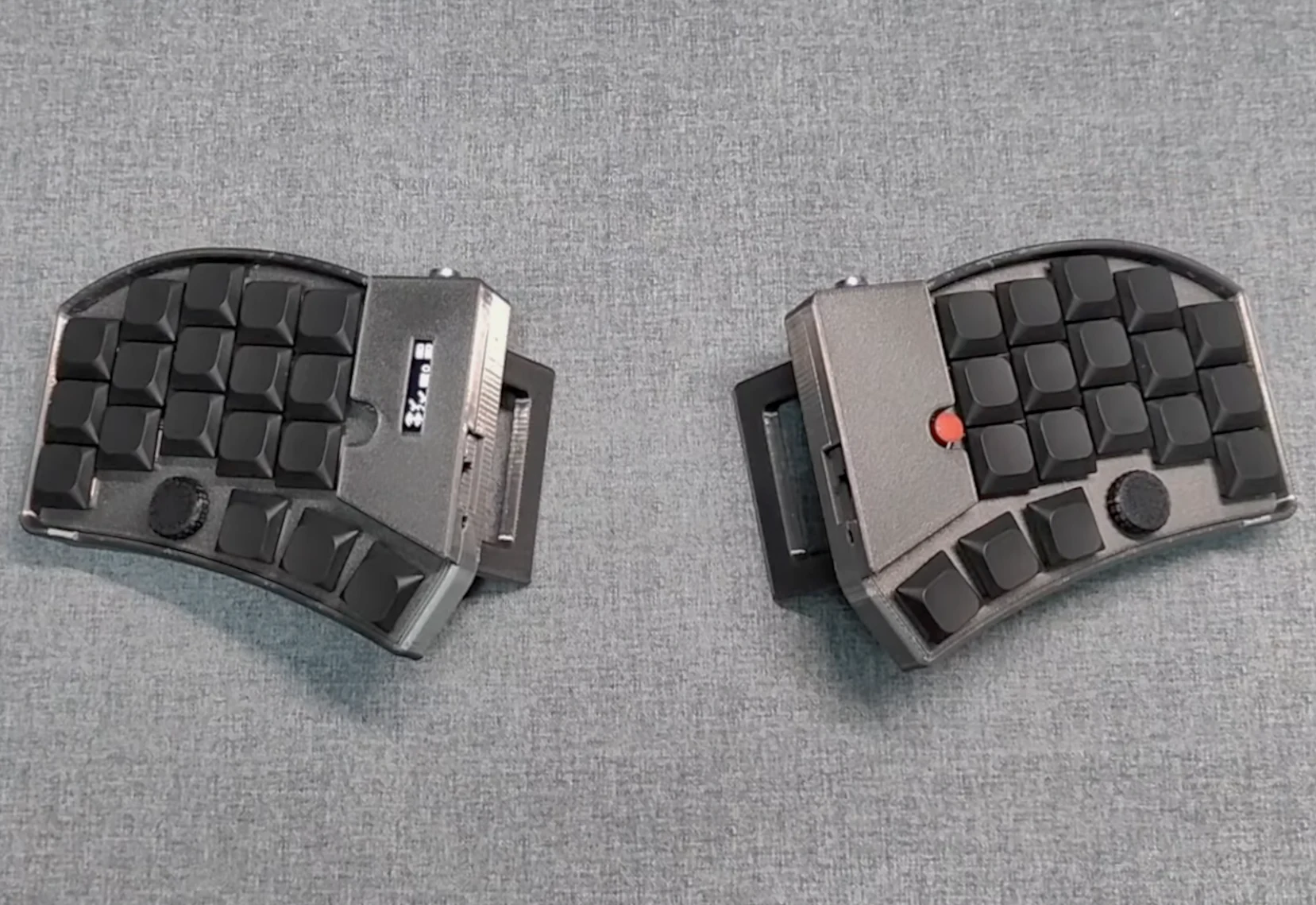
      Split mechanical keyboards are made to provide ergonomic and efficiency advantages, mainly due to their split design that helps align your shoulders and enhances wrist and hand positioning. There’s a wide range of options in the ergonomic mechanical keyboard market, especially innovative community projects like the low-profile wireless Beekeeb Toucan we recently discussed. However, a YouTuber named Tinker & Hack felt these options weren’t sufficient and has introduced the PSKeeb 5 — his version of a split wireless mechanical keyboard that combines features like a Lenovo ThinkPad-style track point, dual knobs, and a travel case that can be turned into a laptop stand.

      Key Features of the PSKeeb 5

      The PSKeeb 5 is a split wireless mechanical keyboard created with portability, comfort, and functionality in mind. It comes with a 36-key layout, featuring 5 columns, three rows, along with a three-key thumb cluster for each hand. The keys are arranged in a columnar stagger to allow each finger to rest comfortably on its respective key in the home row, preventing awkward hand positions. As mentioned in the project build log, the PSKeeb 5 is the fifth version of this project, initially conceived to help the creator with RSI symptoms, but it evolved into a quest for enhanced efficiency, portability, and comfort.

      Design and Build

      The PSKeeb 5’s cases are made through 3D printing and feature a steep tenting angle with built-in feet. The left half of the keyboard includes a small OLED display for monitoring keyboard configuration and status, while the right half features a Lenovo ThinkPad-style track point. Adjacent to each thumb cluster, there is a programmable rotary encoder, which has proven to be very beneficial in reviews of keyboards like the Keychron Q13 Max and Iqunix Magi65 Pro. This setup even includes a compact travel case that functions as a laptop stand, elevating the laptop to eye level for better ergonomics.

      Connectivity and Future Plans

      To facilitate portability and simple setup, the PSKeeb 5 employs ZMK firmware, enabling wireless connectivity between the two keyboard halves and the main device. Traditionally, split mechanical keyboards, such as the Corne V4 (sold on Amazon for $89), require a USB-C or TRRS cable to link the left and right halves, but with ZMK, these cables are only necessary for charging. The creator hasn’t yet released the source code or build guide for the PSKeeb 5, but he plans to open-source the design soon, allowing anyone motivated enough to create their own version and even improve upon it. Once available, the PSKeeb 5 split wireless keyboard will likely be posted on the creator’s GitHub page, where previous PSKeeb versions can also be found.

      The ZMK firmware that runs the PSKeeb 5 is recognized for its wireless efficiency, with some companies stating that it can provide thousands of hours of use from just 2,000 mAh. It also allows for detailed configuration of the keyboard’s functions via the ZMK Studio web interface, even wirelessly — a feature that remains quite uncommon even among custom mechanical keyboards.

      Source:
      Link


    • MoErgo Go60: Wireless Mechanical Keyboard with Dual Touchpads

      MoErgo Go60: Wireless Mechanical Keyboard with Dual Touchpads

      Key Takeaways

      1. ZMK Firmware Popularity: The open-source ZMK firmware is gaining traction in the wireless mechanical keyboard market, with brands like Keychron adopting it for its wireless functionality and efficiency.

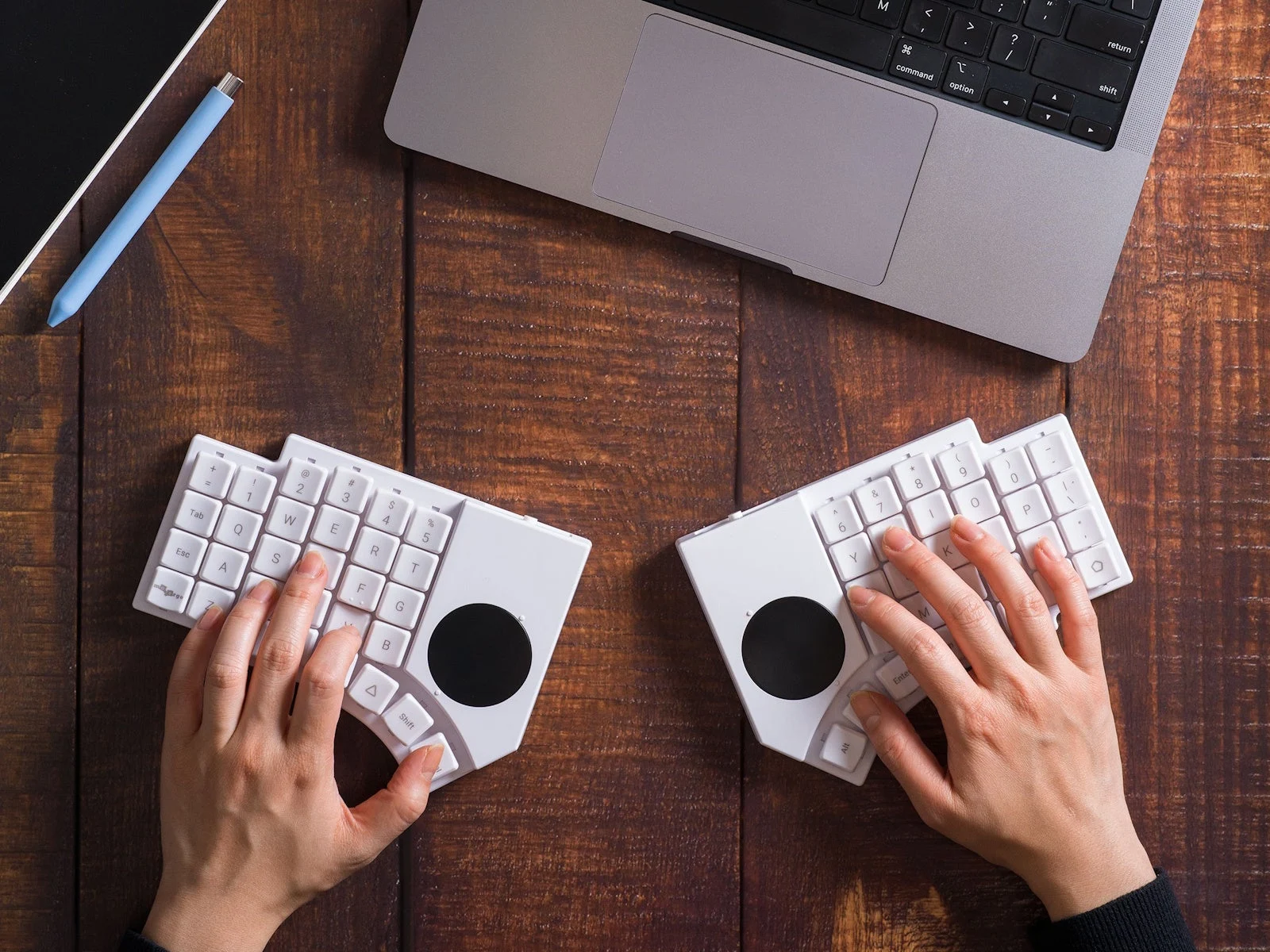
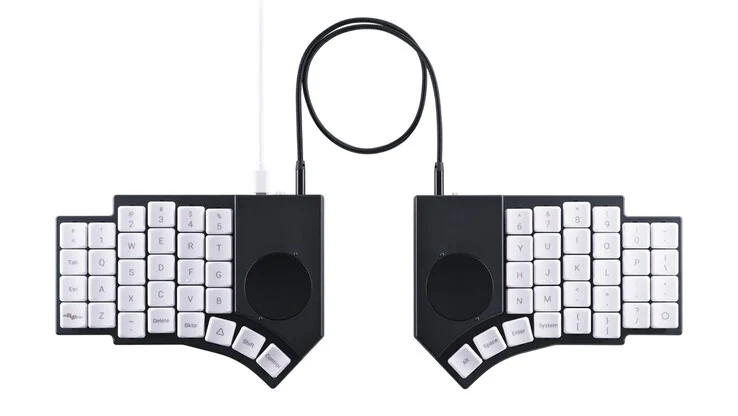
      2. Compact and Ergonomic Design: The Go60 is a 60% wireless split keyboard designed for portability while maintaining ergonomic comfort similar to the larger Glove80.

      3. Advanced Features: The Go60 features hot-swappable low-profile Kailh Choc V1 switches, exclusive silent Cherry Blossom switches, and POM keycaps for enhanced durability and touch quality. It also includes dual 40mm trackpads for better usability.

      4. Enhanced Portability: With a slim design and a bento box-style case for easy transport, the Go60 is lightweight and includes magnetic tenting attachments, offering six angle options for ergonomics on the go.

      5. Long Battery Life: The Go60 boasts a 1,000 mAh battery on each side, providing up to 336 hours of battery life, wireless connectivity for multiple devices, and a wired option for versatility.


      Recently, the ZMK firmware, which is open-source, has been gaining attention in the wireless mechanical keyboard market. Even well-known brands like Keychron are opting for ZMK due to its design that prioritizes wireless functionality and efficiency. MoErgo, the company behind the Glove80 and now the Go60, has been involved with ZMK for a while, having launched the Glove80 in early 2022. The new Go60 is a more compact wireless split keyboard aiming to offer the great comfort and ergonomic advantages of the Glove80 in a smaller and more portable form.

      Compact Design

      As indicated by its name, the Go60 is a 60% mechanical keyboard, making it smaller compared to larger models like the Lemokey L1 HE that we reviewed recently. However, beyond its split ergonomic shape, the Go60 has several unique features that distinguish it from typical mechanical keyboards.

      Advanced Features

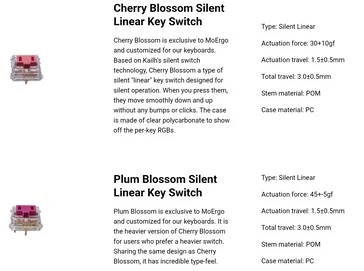
      To begin with, this new keyboard comes with hot-swappable low-profile Kailh Choc V1 switches, and it includes silent Cherry Blossom switches that are exclusive to MoErgo and the Go60. Similar to the Glove80, the Go60 uses POM keycaps, providing a premium touch and better chemical resistance when compared to materials like ABS and PBT.

      The most notable aspect of the Go60 is its dual touchpads, which are positioned like the single trackpad on the Beekeeb Toucan split wireless mechanical keyboard we reviewed earlier. The 40mm circular trackpads are located above the thumb cluster, allowing optimal use with the index finger while reducing side-to-side movement.

      Enhanced Portability

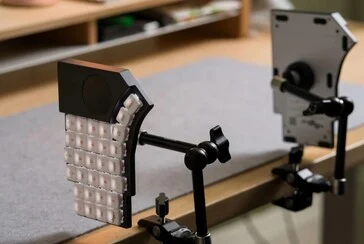
      The flat design of the Go60, which has a total height of 17.5 mm, makes it more portable than its predecessor. MoErgo has further improved portability by creating a bento box-style case that includes storage for snap-fit tenting attachments. This allows users to enjoy the ergonomic advantages of the Go60 while on the move, except for chair attachments.

      These tenting attachments are attached magnetically for easy use and offer six different angles ranging from 6.2° to 17°. Despite having a steel bottom case, the keyboard is lightweight at just 600 g, and the carrying case is a compact 178 × 135 × 43 mm, making it a perfect fit for smaller backpacks.

      Impressive Battery Life

      The MoErgo Go60 has a 1,000 mAh battery on each side, and the company claims it can last up to two weeks of continuous use when “powered-on 24/7 with ZMK sleep functionality disabled and RGB off,” which translates to about 336 hours of battery life. Previous reviews have shown that RGB lighting can significantly impact battery life, so it’s likely that enabling backlighting will reduce battery duration, even if set to the lowest setting. Wireless connectivity is supported by BLE 5.0, allowing connection to up to four devices wirelessly and one through USB.

      MoErgo has also released a selection of accessories for the Go60, such as a mounting puck and an optional walnut palm rest, and it seems many accessories from the Glove80 will also be compatible. In contrast to keyboards like the Corne split keyboards (currently $99 on Amazon), the Go60 operates fully wirelessly, meaning the two halves can work independently without a wire, making setup easier when traveling. However, it does come with a TRRS cable for those who prefer a wired connection, and it will automatically switch to wired mode when the cable is plugged in. The Go60 aims to provide a versatile input solution for people who primarily work at a desk but need the flexibility to take their ergonomic setup with them.

      Pricing Expectations

      Pricing details for the MoErgo Go60 have yet to be revealed, but it’s reasonable to expect it won’t be inexpensive. The MoErgo Glove80 is priced at $399, which includes a travel case. Nevertheless, since the Go60 is less complex, mainly due to the absence of key wells, it may turn out to be more budget-friendly, even with the inclusion of trackpads.

      Source:
      Link