
Key Takeaways
1. Ergonomic Design: The PSKeeb 5 features a split design that aligns shoulders and enhances wrist and hand positioning, helping to prevent awkward hand positions and RSI symptoms.
2. Unique Features: It includes a Lenovo ThinkPad-style track point, dual knobs, and a compact travel case that doubles as a laptop stand for improved portability and functionality.
3. Columnar Stagger Layout: The keyboard has a 36-key layout with a columnar stagger arrangement, allowing fingers to rest comfortably on their respective keys, which enhances typing efficiency.
4. Wireless Connectivity: Utilizing ZMK firmware, the PSKeeb 5 offers wireless connectivity between its two halves and the main device, reducing reliance on cables to just charging.
5. Open-Source Plans: The creator plans to release the source code and build guide for the PSKeeb 5 soon, enabling others to create and improve on their own versions of the keyboard.
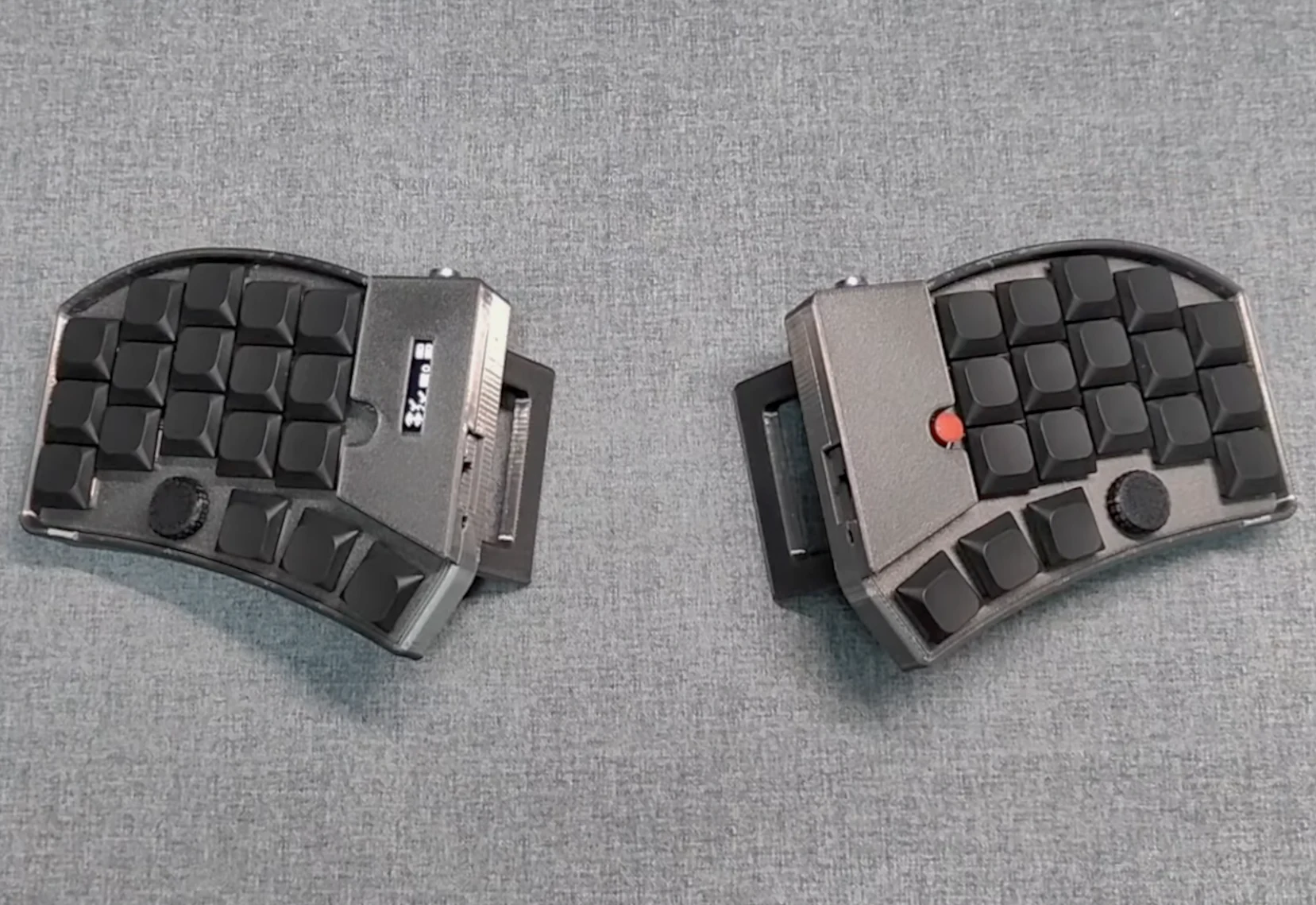
Split mechanical keyboards are made to provide ergonomic and efficiency advantages, mainly due to their split design that helps align your shoulders and enhances wrist and hand positioning. There’s a wide range of options in the ergonomic mechanical keyboard market, especially innovative community projects like the low-profile wireless Beekeeb Toucan we recently discussed. However, a YouTuber named Tinker & Hack felt these options weren’t sufficient and has introduced the PSKeeb 5 — his version of a split wireless mechanical keyboard that combines features like a Lenovo ThinkPad-style track point, dual knobs, and a travel case that can be turned into a laptop stand.
Key Features of the PSKeeb 5
The PSKeeb 5 is a split wireless mechanical keyboard created with portability, comfort, and functionality in mind. It comes with a 36-key layout, featuring 5 columns, three rows, along with a three-key thumb cluster for each hand. The keys are arranged in a columnar stagger to allow each finger to rest comfortably on its respective key in the home row, preventing awkward hand positions. As mentioned in the project build log, the PSKeeb 5 is the fifth version of this project, initially conceived to help the creator with RSI symptoms, but it evolved into a quest for enhanced efficiency, portability, and comfort.
Design and Build
The PSKeeb 5’s cases are made through 3D printing and feature a steep tenting angle with built-in feet. The left half of the keyboard includes a small OLED display for monitoring keyboard configuration and status, while the right half features a Lenovo ThinkPad-style track point. Adjacent to each thumb cluster, there is a programmable rotary encoder, which has proven to be very beneficial in reviews of keyboards like the Keychron Q13 Max and Iqunix Magi65 Pro. This setup even includes a compact travel case that functions as a laptop stand, elevating the laptop to eye level for better ergonomics.
Connectivity and Future Plans
To facilitate portability and simple setup, the PSKeeb 5 employs ZMK firmware, enabling wireless connectivity between the two keyboard halves and the main device. Traditionally, split mechanical keyboards, such as the Corne V4 (sold on Amazon for $89), require a USB-C or TRRS cable to link the left and right halves, but with ZMK, these cables are only necessary for charging. The creator hasn’t yet released the source code or build guide for the PSKeeb 5, but he plans to open-source the design soon, allowing anyone motivated enough to create their own version and even improve upon it. Once available, the PSKeeb 5 split wireless keyboard will likely be posted on the creator’s GitHub page, where previous PSKeeb versions can also be found.
The ZMK firmware that runs the PSKeeb 5 is recognized for its wireless efficiency, with some companies stating that it can provide thousands of hours of use from just 2,000 mAh. It also allows for detailed configuration of the keyboard’s functions via the ZMK Studio web interface, even wirelessly — a feature that remains quite uncommon even among custom mechanical keyboards.
Source:
Link