Category: 3D printing

  • Bambu Lab PLA Pure: Certified Food-Safe Filament

    Key Takeaway

    – PLA Pure now available in Germany in five colors (Milky Pink, Baby Blue, Apricot, Pure White, Absolute Black)
    – Prices range from €28 MSRP to €12.60 per kg (when buying 10+ spools)
    – Features UL Greenguard 2904 certification for reduced emissions (fine dust, particulates, VOCs)
    – Designed for safer prints (e.g., toys, food-contact items), but does not automatically guarantee product safety for commercial sale
    – Bambu Lab offers a Wiki article with further guidance on proper use


    Bambu Lab Brings PLA Pure to Germany

    Bambu Lab is now offering PLA Pure in Germany as well. This is 1.75 mm filament that is intended to stand out through the use of only a few ingredients and the presence of various certifications. The filament is now available in five colors: Milky Pink, Baby Blue, Apricot, Pure White, and Absolute Black. The MSRP is listed at €28. The lowest price for 10 filament spools or more is listed at €12.60. The MSRP drops to €25 if customers only need the filament without a spool and can, and want to, respool it themselves. As usual, the prices apply to 1 kg of filament.

    Target Audience and Safety Features

    We have already reported on PLA Pure before. With this filament, Bambu Lab is targeting users who want to make toys or prints intended for food contact, for example. Not only the finished products but also the printing process itself are supposed to be more or less “safer.” Compliance with the UL Greenguard 2904 certification is advertised, which is said to mean that less fine dust, particulates, and VOCs are released than are already measured in most households anyway. Comparred with other PLA filaments, Bambu Lab says emissions are indeed lower, though these figures obviously cannot be verified by us.

    Important Cautions and Additional Guidance

    Here, too, it should be clearly noted once again that using PLA Pure does not automatically result in products that can be classified as safe for people who sell creations through Etsy, for example. Other rules still apply, such as those relating to choking safety. Bambu Lab now also provides further guidance on proper use in a corresponding Wiki article. They have been very careful to not overstate what the material can do, which is good for everyone envolved. The filament seems to be a good choise for those who want to reduce their risk while printing, but its not a magic bullet for all safety concerns.
    Sources

  • Bambu Lab X2D Review: Dual Nozzle Cuts Print Time & Waste

    Key Takeaway

    – Two-nozzle printing drastically reduces waste: 20g vs 70g per 12g model.
    – Skipping priming saves time but severely degrades print quality; Bambu Lab advises against it.
    – Dual nozzles enable multi-material printing (e.g., water-soluble supports) without sacrificing part quality.
    – Printing time with both nozzles is 2.7 hours vs 5.8 hours with a single nozzle.
    – Multi-material zero waste is impossible with current technology, but waste reduction is significant.


    The Bambu Lab X2D’s tool head, featuring two distinct nozzles, was already explored in a comprehensive examination. Now, lets put that idea back into the bigger picture of 3D printing. Essentially, this is about multi-filament printing – making different colours or types of filament in one single run. Cheaper printers can do this too. The basic concept is simple: The filament gets cut, the old stuff is pulled out of the tube feeders by a filament dryer that also feeds, and then new material is pushed into the extruder.

    How a 3D Printer Actually Works

    At this stage, we need a brief detour into how 3D printers generally operate. We will keep it deliberately simple and somewhat model-like, not too technical. A 3D printer doesn’t sit still in a static balance; it moves in flow. It’s a dynamic system that needs time to settle after turning it on or when temperature or material conditions shift. Think of a garden hose, where you only get a steady stream a little while after opening the tap, and you sometimes have to twist the nozzle to make the jet better.

    Priming vs. Purging Explained

    The hot end goes through a start-up phase. After heating, there is a brief priming period where filament continuously reaches the hot end and the melt and pressure conditions stabilize; only then does extrusion become repeatable. Priming is different from purging. Purging is always needed when you change filament because the molten material already inside the hot end cannot be removed just by retracting it. In the photos, you can see the change between grey and white in the filament droplet during this middle phase. This difference between priming and purging is also fundamentally important for the X2D.

    It is this exact difference between priming and purging that matters with the X2D. Purging can be skipped completely, but priming cannot, because only one print nozzle can work at a time. In our test with the Multicolor-3D-Benchy from 3Designs, the X2D shows it is clearly better when both nozzles are used. If both nozzles are used, the 12-gram model only creates around 20 grams of waste, which is almost all from the purging tower. If only one nozzle is used and the filament has to be changed and the nozzle flushed repeatedly, about 70 grams of waste is made for every 12 grams of the real model – 52 grams are from flushing.

    Print Time and Waste Numbers

    This also fully hits the printing time. With just one nozzle, the printing time goes up from 2.7 to 5.8 hours. Two things to keep in mind: We used standard settings and the actual numbers likely depend a lot on the specific model being printed. The logical question is whether you can skip the priming process. If you could, the priming tower would not be needed and the printing time would drop to just 1.7 hours when using both nozzles.

    Should You Skip Priming?

    In our test, skipping priming didn’t make sense. Bambu Lab correctly advises against it, because it causes a big drop in print quality. Printing without priming would likely need systems with two fully independent tool heads – a specialist solution. Beyond saving material, two nozzles open up other options. For instance, printing support structures in a different material lets you use cheaper filament for supports. The PVA sold by Bambu Lab (meant for supports) is not cheap. The trick is that PVA is water-soluble, so support structures dissolve in a water bath instead of being removed by hand. That is also best seen as a specialist case.

    Does the X2D allow multi-material printing with no waste? No. That shortfall is not really due to the machine itself but more to the underlying technology. Still, waste can be cut down a lot and print time shortened, so the multi-nozzle system is both useful and efficient. As shown in the review, using both nozzles does not necessarily lower print quality – parts can still look like they were made as one single piece. The fact that the second nozzle does not support TPU and has a lower maximum speed, for example, was not a big limitation in practice. Setting up two-nozzle prints in the software is very easy, and the software suggests sensible groupings.


    Sources

  • Makera Z1 CNC Pre-Sale: Optional Laser Module

    Key Takeaway

    – Makera Z1 is available for pre-order at $1,099 (basic version), with delivery starting in July.
    – Software is still in closed beta; users currently need separate CAM and controller software.
    – Working area is 200x200x100mm, with 150W spindle and optional rotary axis and laser module.
    – Can process plastic, carbon fiber, wood, and aluminum, but requires optional laser and dust extraction add-ons.
    – As a subtractive CNC machine, it uses more material and generates waste compared to 3D printing or laser cutting.


    Makera Z1 pre-order details

    We’ve previously reported on the Makera Z1, which is now officially available for pre-order. The starting price is $1,099. Pre-orders placed by June 30 will also recieve a few small gifts, and delivery is scheduled for July. For $1,099, pre-order customers will recieve only the basic version, not the Pro version. The laser module and a dust extraction system are available for a surcharge. We are already testing the CNC machine and can at least say that the device exists, the build quality is quite decent, and the control system works in principle.

    Software and control nuances

    Speaking of controls, the Makera Studio software is intended to enable particularly simple control, but is currently still in the closed beta phase. At presnt, the use of CAM software and controller software is still required. Since Makera aims to make the Z1’s powerful features accessible to beginners, we cannot yet adequately evaluate the system. There will also be a platform for sharing projects via Makerables, a universal project-sharing platform and digital community where creators can collaborate, share design files and download ready-to-cut templates.

    Technical specifications and work area

    The Makera Z1 offers a working area of 200 x 200 x 100 millimeters. Machining via a rotary axis is available as an option. The specified spindle power is 150 watts, with a maximum speed of 13,000 revolutions per minute. According to the manufacturer, the machine can process not only plastic, carbon fiber and wood, but also aluminum. A laser module is also available as an option. Compared to a 3D printer, a CNC machine can, in the best-case scenario, produce parts capable of withstanding very high loads. Compared to a laser cutter, the depth of a component is not quite as much of a limiting factor.

    Cost considerations and manufacturing processes

    On the other hand, the costs for consumables are likely to be higher compared to a 3D printer, since a 3D printer only extrudes approximately as much (inexpensive) filament as is required for the model. The processes of drilling, milling and turning performed on CNC machines are subtractive manufacturing processes, meaning that material is removed from a blank. When using semi-finished products, a considerable amount of metal waste can accumulate quite quickly, depending on the dimensions of the model and the semi-finished product.

    • Starting price: $1,099
    • Working area: 200 x 200 x 100 mm
    • Spindle power: 150 watts
    • Max speed: 13,000 RPM
    • Materials: plastic, carbon fiber, wood, aluminum
    • Rotary axis optional
    • Laser module optional
    • Pre-order deadline: June 30
    • Delivery: July
    Sources
  • 3D Printer with Dual Nozzles & Swappable Head System

    Key Takeaway

    – IDEX systems can print with two nozzles simultaneously, unlike standard multi-head printers that only switch between them.
    – Dual-head printing boosts throughput for commercial users by producing two identical or mirror-image models at once.
    – The Sovol M1D uses a fixed head and a swappable second head (5-second change) to handle up to seven filaments without nozzle cleaning.
    – Potential waste occurs during print head changes due to the need to establish extruder equilibrium.
    – The printer offers a 300 x 300 x 350 mm build volume, camera-based monitoring, and a super early bird price of $1,499.


    Dual Extrusion Systems Explained

    Weve previously reported on 3D printers with multiple print heads. However, it is important to make a clear distinction here: Just because a printer has multiple print heads and can switch between them—and thus between different filaments—relatively quickly, this does not mean that they can be used simultaneously. IDEX systems can do exactly that, working with two print heads and thus two nozzles at the same time. We’re cautiously skeptical as to whether this is actually necessary for the end user. For commercial providers, such a system can be very useful, as it allows two identical or even mirror-image models to be produced on a single build plate, which can increase throughput, although the size of printable objects is then even more limited.

    Specs and Features of the Sovol M1D

    The Sovol M1D is a printer that can work with two print heads simultaneously. One of the two heads is fixed, while the second print head can be swapped out within 5 seconds, according to the manufacturer. This allows printing with seven different filaments without having to cut the filament or clean a nozzle. Nevertheless, there might be a little waste, at least when changing the print head. Simply put, for optimal 3D printing results, a certain equilibrium must first be established in the extruder. The Sovol M1D is said to offer smart features such as automatic, camera-based print monitoring. The build volume measures 300 x 300 x 350 millimeters, which should allow for the production of larger objects.

    Pricing and Crowdfunding Details

    Those interested in investing just $20 will be able to purchase the model for $1,399. Funding will be provided through a crowdfunding campaign, with a super early bird price of $1,499 (without VIP status) and a regular retail price of $1,799.


    Sources

  • Bambu A2L 3D Printer: 19 Filaments & Plotter Mode

    Bambu A2L 3D Printer: 19 Filaments & Plotter Mode

    Key Takeaway

    – 105% more print volume than the X2D (330 × 320 × 325 mm)
    – Targeted at cosplayers, allowing single-piece prints and increased productivity
    – Equipped with PMSM servo motor, vibration compensation, and expansion module support
    – Supports up to 19 filaments with multiple AMS units
    – Priced at $469 (standalone) / $569 (Combo with AMS Lite)


    Bambu Lab’s Newest Machine

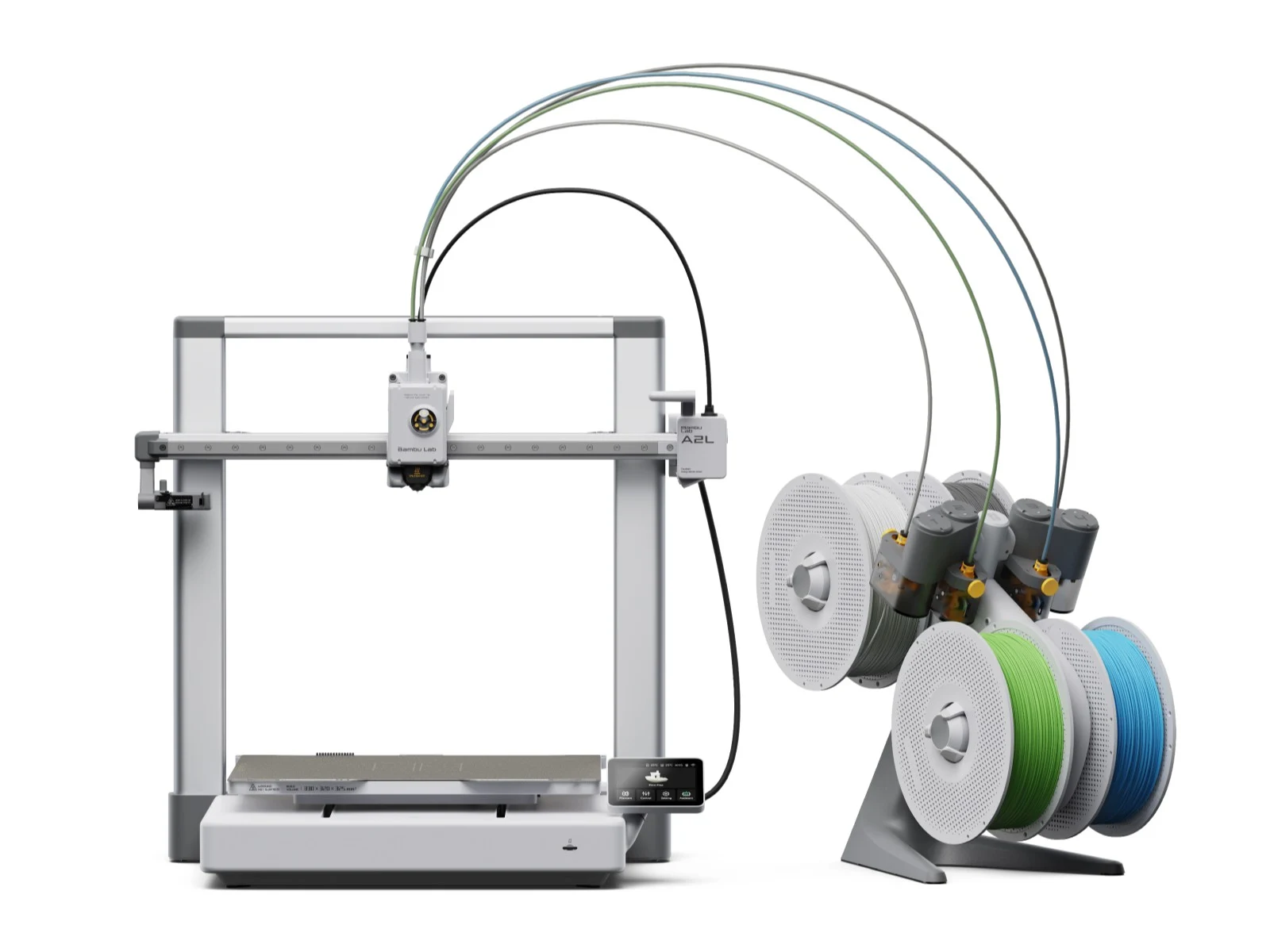
    The company is expanding its lineup of 3D printers with the A2L, an open-frame 3D printer that is designed to stand out with its large build volume of 330 × 320 × 325 mm (12.99 × 12.60 × 12.80 in). By comparison, the Bambu Lab X2D which we recently reviewed adopts a closed design and offers a build volume of 256 × 256 × 260 mm (10.08 × 10.08 × 10.24 in). While the differnce may not seem dramatic at first glance, the A2L actually provides a whopping 105% more print volume than the X2D, thanks to the square-cube law.

    Targeting Creatives and Productivity

    Bambu Lab is also positioning the A2L as a tool for cosplayers who want to create their own clothing or gear. In practice, the large build volume should allow you to produce larger objects in a single piece. The A2L can also help significantly boost productivity by letting you print more individual items on a single plate, instead of having to repeatedly clear the bed between runs. Its a huge step up from smaller machines.

    Technical Specefications and Features

    Bambu Lab describes the A2L as essentially an H2S Lite, suggesting that it delivers powerful features at an afforable price. It is equipped with a special PMSM servo motor, adaptive vibration compensation, built-in dampers, and a mounting point for expansion modules. The company also claims print quality on par with a CoreXY 3D printer. A blade-cutting kit is also available, allowing the A2L to transform into a drawing plotter and cutter for various materials.

    Size, Heat, and Multi-Material Support

    With external dimensions of 544 × 529 × 505 mm (21.42 × 20.83 × 19.88 in), it supports up to four AMS units and one AMS Lite, enabling printing with up to 19 filaments in different colors or materials. The print bed can be heated up to 80°C (176°F), and the hot end up to 300°C (572°F).

    Pricing and Configurations

    The Bambu Lab A2L Combo with an AMS Lite is priced at $569 / €489. The standalone unit, for those who dont need the multi-material system, comes in at $469 / €379. This makes it a compelling option for enthusiasts looking for a very large build volume without spending a fortune.


    Sources

  • Intel unveils MSI Claw 8 handheld with Panther Lake chipset (leaked design)

    Intel unveils MSI Claw 8 handheld with Panther Lake chipset (leaked design)

    Key Takeaway

    – Intel’s Arc G3/G3 Extreme for handhelds with 2 P-cores, 8 E-cores and 4 LP E-cores, replacing Lunar Lake-based Claw 8 AI+ line.
    – Initial partner handhelds: Acer Predator Atlas 8, MSI Claw 8 EX AI+, OneXPlayer; MSI’s Claw 8 EX AI+ imagery shows ROG Xbox Ally-style grips and revised front speakers.
    – Claw 8 EX AI+ specs/leaks: 8-inch IPS 1920×1200 @120 Hz, 32 GB RAM, 1 TB SSD, 80 Wh battery; expected Computex 2026 debut and pricing around €1,599 (~$1,550).


    Overview of the Announced Arc G3 Series

    Intel introduced its Arc G3 and Arc G3 Extreme processors on May 28, aiming at PC gaming handhelds. The pair come with Arc B370 and Arc B390 graphics, and include 2 P-cores, 8 E-cores and 4 LP E-cores. In essence, the Arc G3 family is set to replace existing Lunar Lake handhelds, like the Claw 8 AI+ that we examined in 2025, which carried a curr. $1,881 price on Amazon.

    Key Claims From Intel

    During the announcement, Intel stated that handheld designs from top partners would roll out in the coming months, starting with Acer’s Predator Atlas 8, MSI Claw 8 EX AI+, and OneXPlayer. The company framed these devices as the first wave in a broader ecosystem shift toward Arc-powered handheld gaming.

    Current Status of Partner Devices

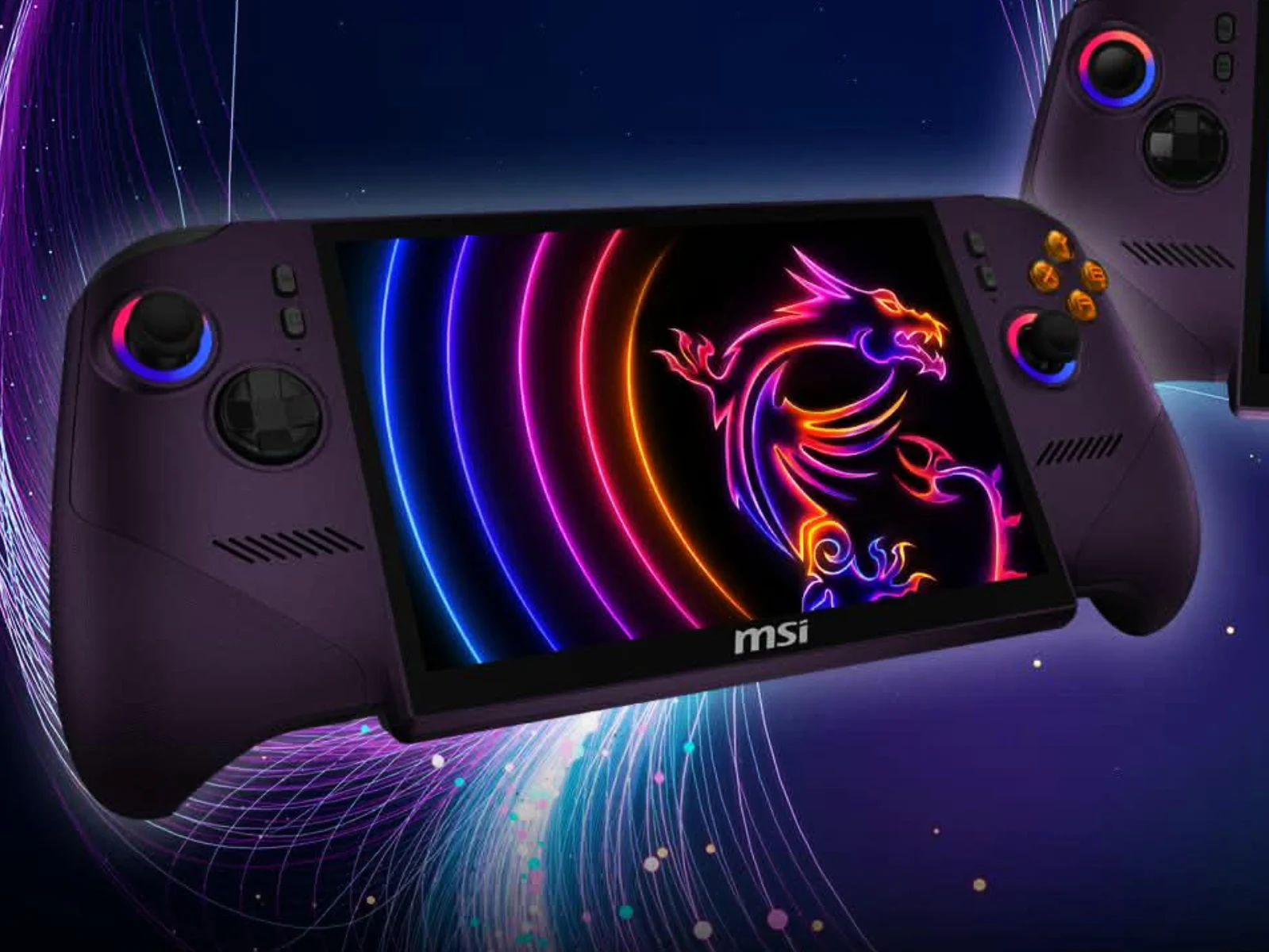
    To date, Acer and OneXPlayer have publicly shown the Predator Atlas 8 and the OneXPlayer 3. MSI has kept quiet about the Claw 8 EX AI+. Nevertheless, recent online leaks have revealed renders and details about MSI’s next 8-inch handheld, pointing to a refreshed form factor and updated internals.

    Design Cues and Ergonomics

    The leaked visuals indicate the Claw 8 EX AI+ adopts ROG Xbox Ally-like controller grips, potentially offering a more comfortable grip in long gaming sessions than earlier MSI 8-inch models, whose ergonomics have drawn mixed feedback. The device also appears to feature relocated front-facing speakers, while maintaining the familiar button layout seen in prior MSI Claw releases.

    Display and Hardware Specs

    Based on the leaks, the Claw 8 EX AI+ is expected to use the same 8-inch IPS display as the Claw AI+ 8 and the Claw A8, delivering 1,920 x 1,200 resolution at 120 Hz. In terms of memory and storage, MSI’s subsequent handheld is rumored to ship with 32 GB of RAM, a 1 TB SSD, and an 80 Wh battery, matching contemporary portable gaming expectations.

    Pricing and Debut Timeline

    Pricing for the Claw 8 EX AI+ is anticipated to reach around €1,599, roughly $1,550 before tax, should the leaks hold true and taxes are factored in. The device’s official unveiling is expected at Computex 2026 in Taipei, scheduled from June 2 to June 5, aligning with the broader rollout of Intel’s Arc G3 lineup.


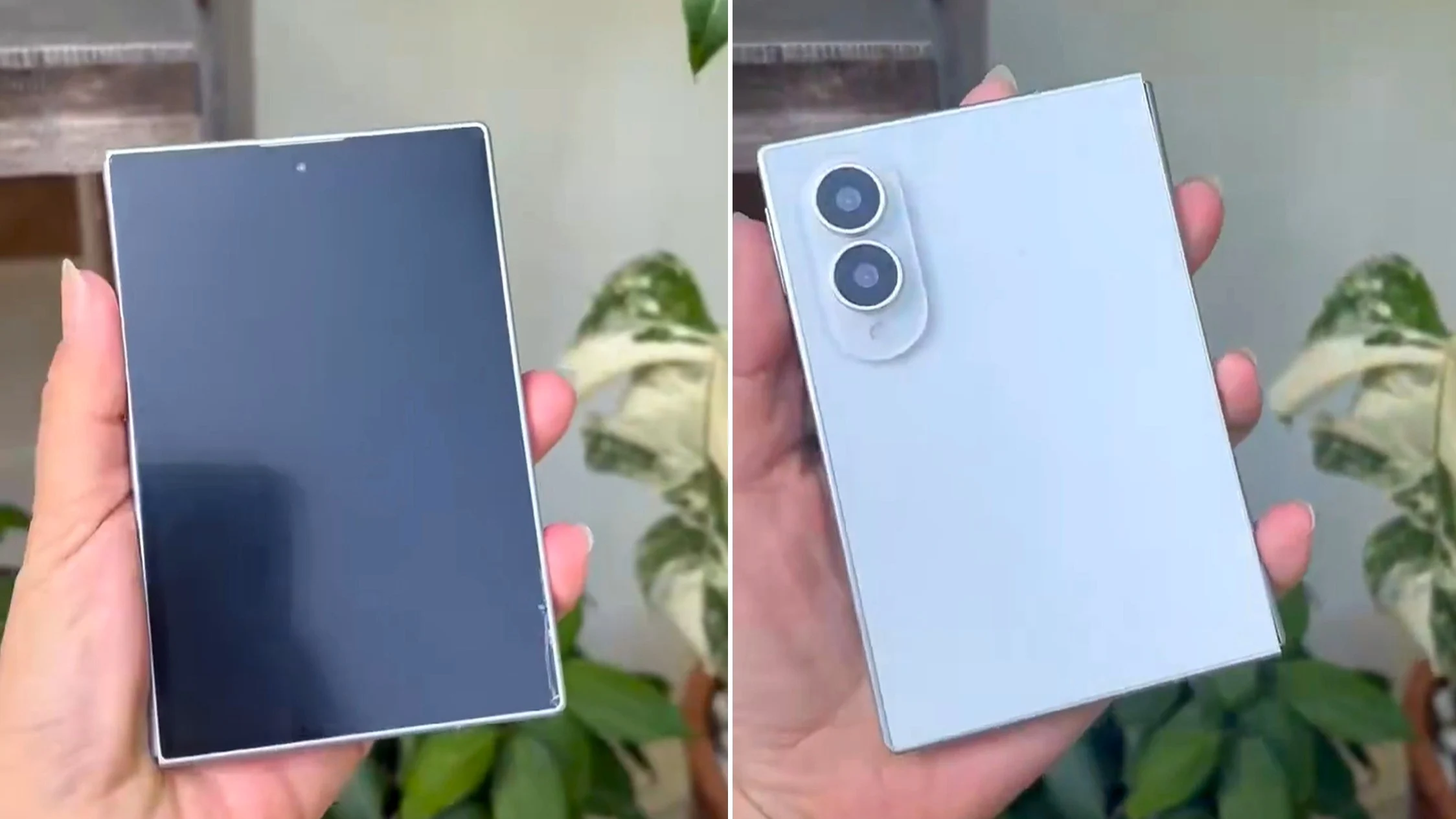
  • First hands-on: Samsung Galaxy Ultra rival feel in hand with dummy hints

    First hands-on: Samsung Galaxy Ultra rival feel in hand with dummy hints

    Key Takeaway

    – 2026: year of compact foldables with wide 3:2 or 4:3 tablet displays, led by Samsung’s wide Fold (Galaxy Z Fold 8) and followed by Apple, with Xiaomi also entering the form factor.
    – Extremely thin core design: folded thickness around 9.8 mm, thinner than the Galaxy S25 Edge, a highlight likely driving positive reception.
    – Camera setups diverge: Samsung and Apple rumored to use dual cameras; Xiaomi reportedly plans a triple-camera system.


    2026 wird das Jahr der kompakten Foldables mit breitem Tablet-Display im 3:2 oder 4:3 Format. Nach dem Huawei Pura X Max kommt bald Samsung mit dem offenbar schlicht Galaxy Z Fold 8 benannten “Wide-Fold” auf den Markt, bevor dann Apple im September mit seinem ersten faltbaren iPhone der Kategorie neue Impulse verleihen wird. Auch Xiaomi soll, jüngsten Hinweisen zufolge, bald auf diesen neuen Formfaktor setzen, der sich vor allem durch ein breiteres und kompakteres Gehäuse auszeichnet und aufgeklappt ein etwas iPad Mini artiges Tablet im Breitformat liefert.

    Laut interner Tests und frühe Eindrücke

    According to internal Samsung tests, des Wide-Fold-Laufs zu 9,8 mm zusammengefaltet scheint hier auf viel Zustimmung zu treffen. Ein erstes, noch krudes Dummy des Galaxy Z Wide Fold existierte, jetzt kursiert ein realistischeres Design-Modell, das in einem Hands-On-Video von mehreren Seiten in die Kamera gehalten wird. Die Berichte deuten darauf hin, dass das finale Gehäuse sich noch in Details unterscheiden könnte, doch das Grundkonzept bleibt klar: ein dünneres, breiteres Foldable.

    • Aufgeklappt soll das Gerät laut Gerüchten nur 4,3 mm dünn sein, noch dünner als das Galaxy S25 Edge mit 5,8 mm
    • Dual-Kamera-Setup wird erwartet, während Xiaomi angeblich eine Triple-Kamera plant

    Technische Details und Formfaktor

    As it seems, 2026 appears to be the year of compact foldables featuring a 3:2 or 4:3 wide display in tablet mode. following the release of Huawei Pura X Max, Samsung is set to launch its “wide fold” model soon, reportedly called Galaxy Z Fold 8, with Apple expected to enter later. Xiaomi soll laut aktuellen Hinweisen ebenfalls auf diesen neuen Formfaktor setzen, der sich durch ein breiteres und kompakteres Gehäuse auszeichnet und im aufgeklappten Zustand ein Tablet im Breitformat ähnlich einem iPad Mini liefert.

    Weitere Spekulationen und Design-Details

    Based on early assessments, the wide successor to the Galaxy Z Fold 7 is said to be impressively slim, with rumors of 9.8 mm thickness when folded. A hands-on video provides a glimpse of a more refined model, suggesting that the final design could deviate in a few points. When open, the device is described as thinner than the Galaxy S25 Edge, measured at the thinnest point rather than at the camera bump, hinting at a meticulous engineering approach similar to other premium foldables. Samsung’s approach reportedly includes a dual-camera system, while Xiaomi is rumored to pursue a triple-camera setup akin to Huawei.

    Sources
  • Thypoch 198g 35mm f/2 Full-Frame Lens Unveiled

    Thypoch 198g 35mm f/2 Full-Frame Lens Unveiled

    Key Takeaway

    – Ultra-compact, lightweight design: 3.5 cm length, 2.7 cm protrusion, 5.2 cm diameter, 198.6 g.
    – Optical and build features: 8 lenses in 5 groups with an aspherical element; Epoch Coating 84 for a warm retro look; ten-blade aperture; 39 mm filter thread.
    – Autofocus: Manual focus only from 0.5 m, with a noticeable tactile click below 0.7 m signaling rangefinder range; Leica M mount with adapter compatibility for other systems.


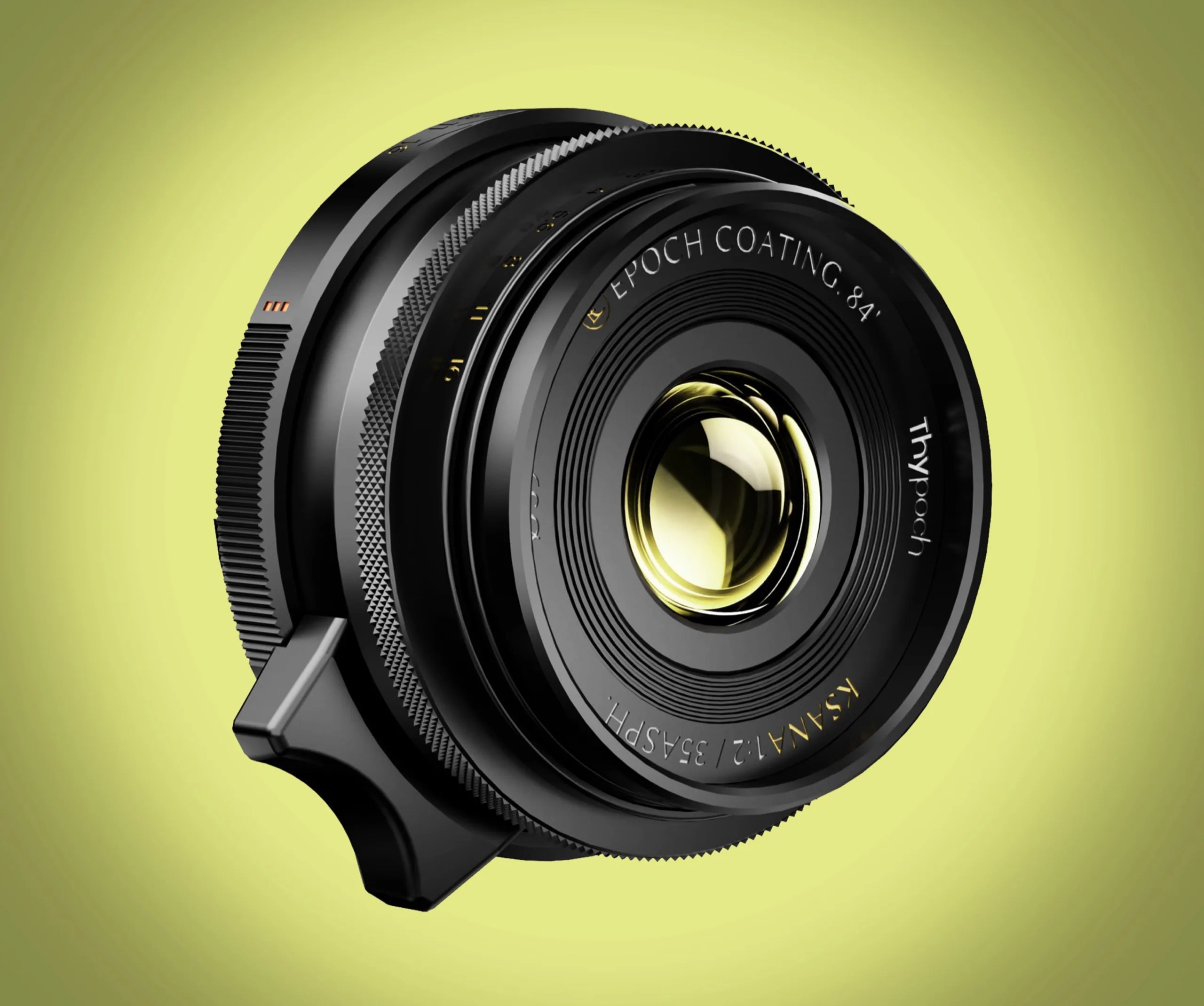
    Thypoch unveils a remarkably compact wide-angle option, claiming a body length of just 3.5 centimetres and a protrusion of 2.7 centimetres from the camera when mounted. The lens body measures 5.2 centimetres in diameter and weighs 198.6 grams, making it a notably portable choice for enthusiasts who crave portability without sacrificing specs.

    Design and optical notes

    Voigtländer counters the scene with the 35 mm f/1.4 Nokton VM II, touted as even more compact and faster, yet Thypoch pushes for superior image quality through a design that uses eight lenses in five groups, including a single aspherically ground element. This contrast highlights how different brands pursue sharpness and character in varied ways, particularly at wide angles where distortion control and micro-contrast matter.

    Focusing and coatings

    The Thypoch Ksana 35 mm f/2.0 is manually focused, with a precise minimum focus distance of 0.5 meters. A tactile click indicates when the distance falls below 0.7 meters, signaling the rangefinder-coupled focus range. The lens surface receives Epoch Coating 84, a coating meant to impart a warm retro look to captured images. The aperture features ten blades, and a 39 millimeter filter thread completes the optical package, offering compatibility with a range of filters for creative control.

    Availability and compatibility

    The Ksana 35 mm f/2.0 full-frame lens is currently sold through the manufacturer’s online store, priced at $599 without the lens hood or $649 with the hood included. In both configurations, front and rear caps are provided. Shipping is advertised as free, though the price excludes import taxes and customs duties. The lens is provisioned for Leica M mount, and adapters unlock compatibility with Sony E, Nikon Z, Fujifilm X, and Canon RF systems, broadening its usability across multiple camera bodies.

    Notes on usage

    Thypoch emphasizes that the primary mount is Leica M, yet the practical reach extends via adapters to several popular mirrorless bodies, enabling work across different ecosystems. This flexibility can be a selling point for photographers who own different brands but want a consistent focal length and rendering from a single optic.


  • Steam Machine Shipments: What the Latest Hardware Drops Mean

    Steam Machine Shipments: What the Latest Hardware Drops Mean

    Key Takeaway

    – The shipment data suggests Valve may be advancing hardware plans (Steam Machine or Steam Frame) with new imports, though not conclusive proof of a launch.
    – The goods are labeled as a “Game Console” and include 42 packages totaling ~12.5 tons, indicating potential hardware-related content.
    – Public import records alone cannot verify exact contents or confirm a release timeline; speculation remains uncertain and could reflect packaging changes, bundles, or smaller batches.


    An attentive Reddit user noticed, Valve received another shipment from China on May 20, 2026

    In this paragraph, the author describes a recently spotted shipment from China to Valve, and notes that the information is traceable via public import records from ImportGenius. The shipment was addressed to “CEVA NL c/o Valve Corporation” and delivered by a China-based company named Tech-Front Chongqing Computer Co. The tone shifts to a straightforward report, and the details about the recipient and carrier are preserved exactly as stated, including the phrasing of the names and date. Some readers might wonder about the implications for Valve’s upcoming hardware or software platforms, but the paragraph does not assert anything conclusively, instead merely laying out the facts that have been observed. Prices and specifications are not provided here, but the emphasis is on the logistics trail and the potential significance of the shipment’s description as a “Game Console.”

    Shipping details and the weight of the container

    There are 42 packages totaling around 12.5 tons in this shipment, described in the records as a “Game Console.” The mention of the weight, which is notably lighter than a prior 14.5-ton shipment, is pointed out to suggest possible changes in packaging, bundles, or batch sizes. The writing acknowledges ambiguity, stating that the contents cannot be verified, and therefore the exact nature of the hardware remains speculative. The text retains the numeric data on the number of packages and total weight, which are key details of the import record, while exploring the possible reasons behind the weight difference. The language remains cautious, avoiding definitive claims about what is inside the boxes, but highlighting the potential significance for Valve’s product strategy.

    Speculation about Valve’s hardware plans

    The article then debates whether the shipment could include Valve’s living-room PC, the Steam Machine, or the Steam Frame, or possibly the Steam Deck, all while noting that none of these conclusions are proven. The paragraph contrasts various possibilities and emphasizes that the data is not proof of an imminent launch. It keeps alternating between cautious speculation and references to external hints, such as YouTuber VoodooDE reportedly testing the Steam Frame, and it discusses the timing around 2026 as a potential window for new hardware. The paragraph uses varied phrasing to discuss uncertainty, and it keeps the focus on how import data could be interpreted without asserting a concrete product has arrived.

    Public interest and potential timelines

    Further, the article suggests that fans might expect more information soon, with some forecasting news for next Monday, while others caution that similar hopes have repeatedly been disappointed in the past. The language here emphasizes the speculative nature of the signal from the import data and the human tendency to read too much into hardware shipments. It repeats the caveat that the new data do not prove a launch, but they do add to the ongoing narrative that Valve is actively pursuing hardware development. The paragraph ends by noting that readers should temper expectations while staying attentive to further updates, maintaining a blend of optimism and skepticism.


    Sources

  • Presale Savings: Creality Falcon T1 5-in-1 Laser Cutter

    Presale Savings: Creality Falcon T1 5-in-1 Laser Cutter

    Key Takeaway

    – First 5-in-1 laser workstation with rapid 15-second module swaps and AI-assisted auto alignment for fast, batched production.
    – Versatile material compatibility (wood, acrylic, glass, leather, stainless steel) with a 30 mm cutting depth and 10,000 mm/s speed for high-efficiency production.
    – Smart workflow features: automatic parameter adjustments on module change, one-click 2D-to-3D relief, AI image optimization, smart nesting, and metal color engraving.
    – Built-in safety: fully enclosed with interlocks, sensors for smoke/temperature/door status, and dual dynamic flame detection.
    – Pricing: pre-sale discount available now at $2,249 (MSRP $2,499) starting May 29.


    Creality’s Falcon T1: A 5-in-1 Laser Workstation

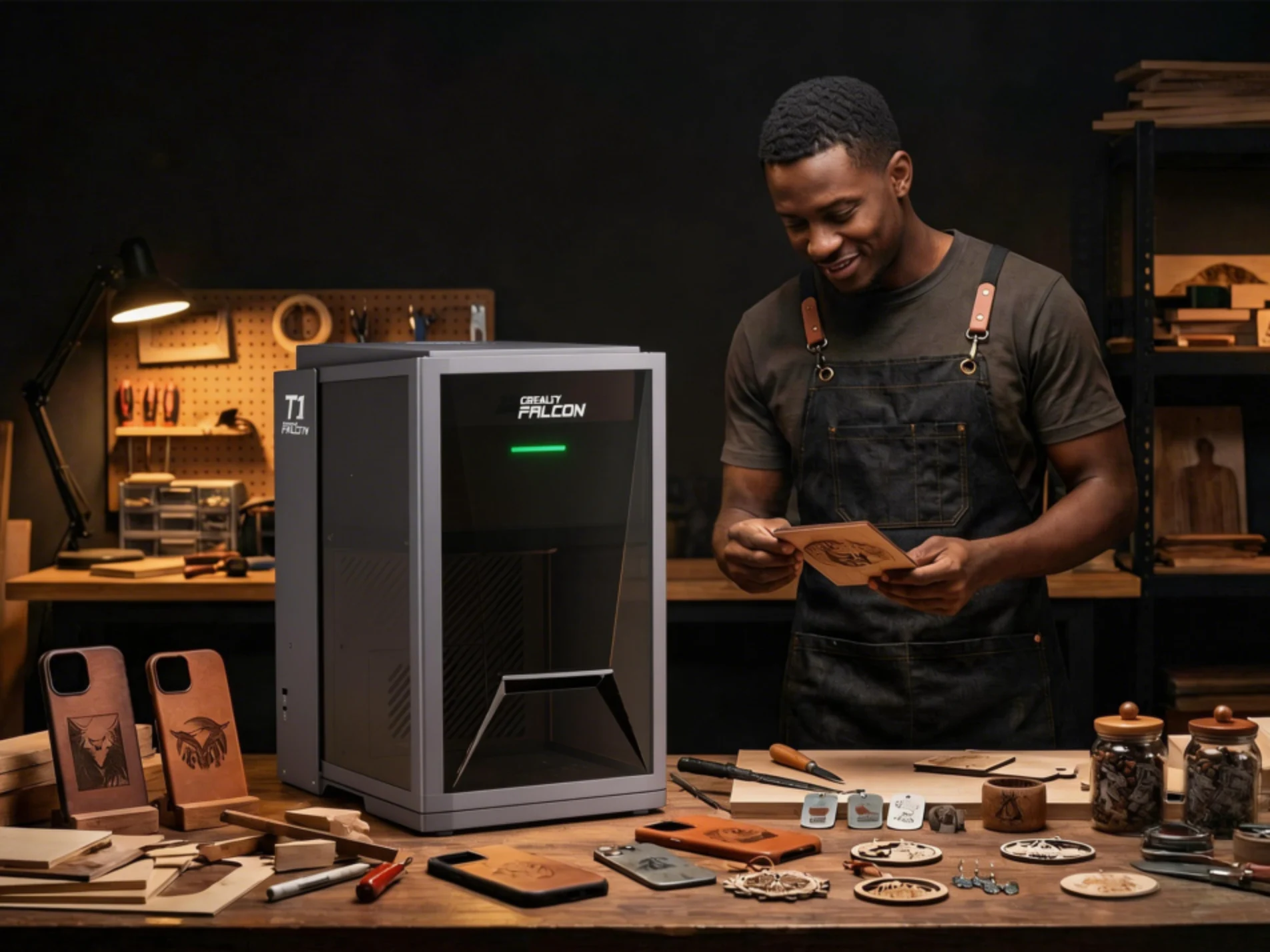
    Creality has officially launched the Falcon T1 as the world’s first 5-in-1 laser workstation, combining pro-level laser cutting and small-scale production on a variety of materials with the ease of use of a toolless modular design. Creality is marketing the Falcon T1 towards small business owners, creators, and Etsy and Shopify store owners.

    Pricing and Availability

    The Creality Falcon T1 will be available starting May 29 for an MSRP of $2,499, but it is now available for pre-sale at $2,249 for a limited time.

    Key Production Features

    One of the features that gives away that the Creality Falcon T1 is designed as a production tool is its conveyor belt, which allows for rapid batch production and product customisation, while the toolless 5-in-1 modular system allows for switching modes in as little as 15 seconds. The workstation will also automatically adjust key parameters, like working distance, processing area, power output, pulse frequency, and scanning speed when it detects a module change.

    The Falcon T1 Modules

    The Falcon T1 modules include:

    Materials and Capabilities

    The combination of different heads allows for working on a variety of materials, including wood, acrylic, glass, leather, and even stainless steel. The maximum cutting depth of 30 mm means you can do both laser engraving and profile cutting through thick materials that would usually be reserved for larger machines.

    Performance and AI Features

    The Creality Falcon T1 has a maximum cutting speed of 10,000 mm/s, for high-speed production needs, while still maintaining 0.01 mm precision. Production is accelerated by AI auto alignment, which uses a built-in camera with AI vision tech to detect material placement and automatically nest and align designs.

    Software and Workflow

    The auto alignment tools, combined with Creality’s CAM tools allows for one-click 2D-to-3D relief generation, AI background removal and image optimisation, smart nesting, automatic layer separation for engraving, and one-click metal colour engraving.

    Safety and Workplace Use

    The Creality Falcon T1 has built-in safety measures, including a fully enclosed structure with safety interlocks, smoke, temperature, and door status sensors, and dual dynamic flame detection. All of that means that the Falcon T1 is safe enough for deployment in a variety of settings, from home studios and makers paces to university design workshops.

    Pre-Sale Discount

    Check out the pre-sale discount on the Creality Falcon T1 5-in-1 laser workstation while it’s still available.

    Sources