Category: Computers

  • New Customer-Driven Sharge Power Bank in Development

    New Customer-Driven Sharge Power Bank in Development

    Key Takeaways

    1. Sharge is developing a new version of the Shargeek 140 power bank, following the success of the original launched in 2024.
    2. The original Shargeek 140 features dual charging capabilities with a 100W USB-C port and a 40W USB-A port, and has a capacity of 20,000 mAh.
    3. Customer input is being sought for the design of the next-gen Shargeek 140, including preferences for port types and battery sizes.
    4. Users can choose from various materials for the new design, such as aluminum, stainless steel, and carbon fiber.
    5. The release date for the next Shargeek 140 power bank is currently unknown.


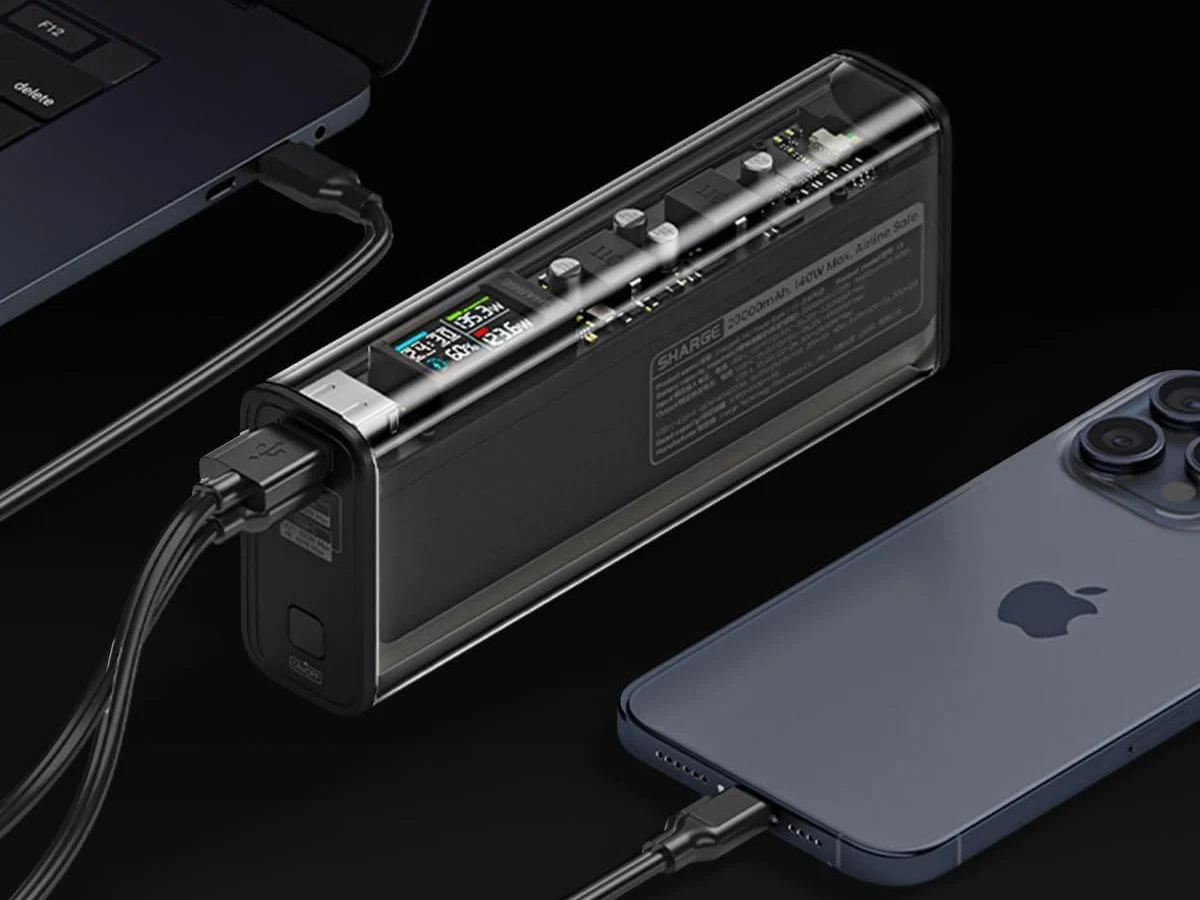
    Sharge is currently developing a new version of the Shargeek 140 power bank. The first edition of this device was introduced in 2024 through a Kickstarter campaign and is now available for purchase, with a price starting at $79.90 on Amazon.

    Charging Capabilities

    The Shargeek 140 has the ability to charge two devices at the same time, using a USB-C port that can deliver up to 100W and a USB-A port that can provide up to 40W. Notable features of the original model consist of a capacity of 20,000 mAh, compatibility with charging standards like PD3.0 and QC3.0, and a built-in screen that displays charging details and the remaining battery life.

    Customer Input Needed

    Now, Sharge is reaching out to its customers for input on the design of the upcoming “next-gen” Shargeek 140. They have created a survey asking whether users would prefer to have two USB-C ports or a combination of one USB-C and one USB-A port. Additionally, there are questions about battery sizes and power options, with choices ranging from 10,000 mAh/67W, 20,000 mAh/150W, and 25,600 mAh/300W. There’s also a part of the survey that asks what materials users would like to see used, including options like aluminum, stainless steel, and carbon fiber.

    Release Date Unknown

    At this moment, it is not known when the next Shargeek 140 power bank might hit the market. The Shargeek 2026 Product Planning Survey, which was shared on the brand’s official Discord.

    Source:
    Link


  • Top NitroSense and PredatorSense Alternatives for Acer Users

    Top NitroSense and PredatorSense Alternatives for Acer Users

    Key Takeaways

    1. Lack of Alternatives: There are no complete Acer-specific substitutes for NitroSense or PredatorSense, making it hard for users to find suitable tools for performance and system management.

    2. User-Friendly Options: Fan Control is a user-friendly application that allows users to set fan curves based on temperature readings, providing some control over fan speed.

    3. Limitations on New Models: Newer Acer laptops restrict fan control at the BIOS or embedded controller level, preventing third-party applications from accessing necessary sensors.

    4. Custom Configuration Challenges: Creating custom configuration files for tools like NotebookFanControl is difficult due to Acer’s restrictions and the lack of available profiles for newer models.

    5. Partial Solutions: While tools like MSI Afterburner and NotebookFanControl can manage some aspects of performance, they do not fully replace Acer’s proprietary software for comprehensive control.


    We’ve had it pretty good with G-Helper, a fantastic open-source app discussed in the last part of this series. Made and updated by a single developer, it’s so sleek, straightforward, and effective that it made us forget about Asus’ official software, Armoury Crate and MyAsus, along with their inbuilt tracking and advertising features.

    Finding Alternatives for Acer

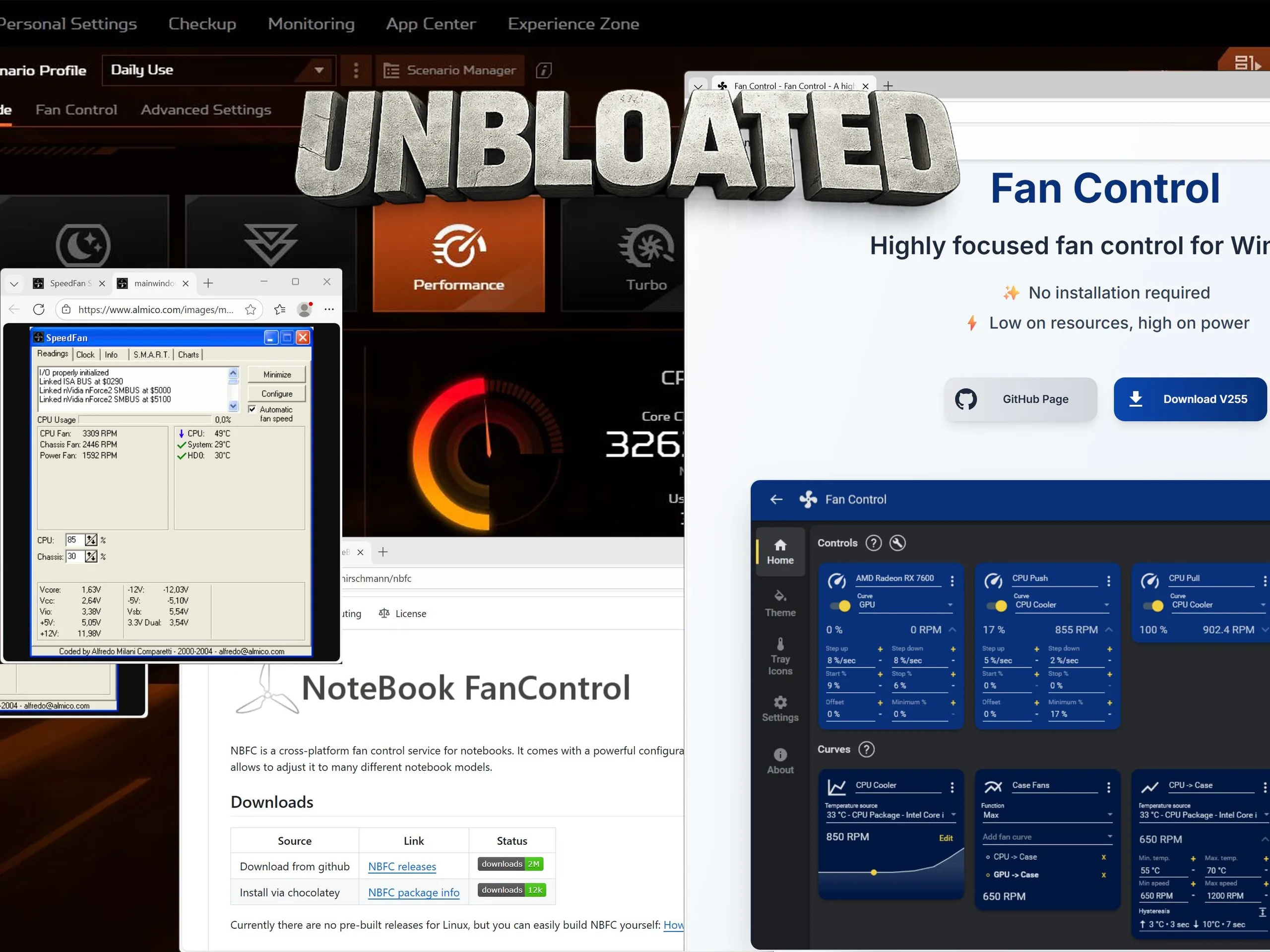
    Looking for a similar tool for Acer laptops is proving to be quite the challenge. There doesn’t seem to be a complete Acer-specific substitute for NitroSense or PredatorSense, which includes options for performance profiles and system management. Instead, users are often directed to general fan control apps like NotebookFanControl (Github) or another program simply called Fan Control (official website).

    User-Friendly Options

    Among these, Fan Control is the easier one to use. Its main advantage is the capacity to set up fan curves based on temperature readings—and even merge multiple sensors into a singular control point.

    For instance, you might set a rule like “increase fan speed to 60% when the temperature goes over 70 °C” and utilize both CPU and GPU temperature sensors (or other ones) as triggers. The component that hits the temperature limit first will initiate the pre-established fan reaction.

    Limitations on New Acer Laptops

    This method works nicely on desktop PCs—and might work on older Acer laptops too. However, on newer Acer models, the situation is quite different.

    On our Acer Nitro V 17 (review) and other recent Acer gaming laptops, Acer restricts fan control at the BIOS or embedded controller (EC) level. Consequently, firmware-controlled fans can only be accessed through NitroSense or PredatorSense. Third-party applications cannot read or manage the required sensors directly.

    NotebookFanControl (NBFC) doesn’t function right away. Instead, it needs a special configuration file—usually community-made profiles that are designed for specific laptop models. The issue here is that most available config files are for older devices, while profiles for the latest laptops are extremely limited.

    Creating Custom Configurations

    Making your own config file is a tricky task, even with the help of the Github wiki. It involves checking specific registers, which becomes significantly harder—or even impossible—due to Acer’s EC restrictions.

    Another popular universal fan control tool, SpeedFan, faces the same challenges on modern Acer laptops.

    This leaves MSI Afterburner as a less-than-ideal alternative. It’s less than ideal because it only manages GPU settings, not the CPU. Nevertheless, the 43 MB application allows users to set profiles for GPU clock speeds and fan operations, giving at least a bit of control over performance and thermal management.

    For Acer desktop PCs, NotebookFanControl and Fan Control can act as partial substitutes. While they don’t come close to matching G-Helper for Asus machines in terms of polish, they can still handle a lot of basic tasks.

    Sadly, Acer locks fan control on the majority of its current gaming laptops at the BIOS or embedded controller level. Therefore, to our knowledge, there isn’t a solid open-source alternative to NitroSense or PredatorSense on Acer laptops today. MSI Afterburner can manage GPU settings to some degree, but it doesn’t adequately replace Acer’s proprietary control software.

    Source:
    Link



  • Intel Nova Lake 52-Core CPU Power Consumption Leaks Revealed

    Intel Nova Lake 52-Core CPU Power Consumption Leaks Revealed

    Key Takeaways

    1. Intel’s Nova Lake-S desktop CPUs are expected to feature up to 52 cores and 288 MB of last-level cache, aiming to compete with AMD’s Zen 6 lineup.

    2. The K-series Nova Lake CPU may draw over 700 W under full load, indicating high power consumption, especially with power limits disabled.

    3. This high power consumption positions the Nova Lake as a High-End Desktop (HEDT) platform rather than a typical consumer CPU.

    4. The anticipated power usage of over 700 W is a significant increase compared to current Intel CPUs, like the Core Ultra 9 285K and i9-14900K.

    5. Buyers should prepare for a high price tag for the 52-core Nova Lake-S CPU and invest in a strong cooling solution.


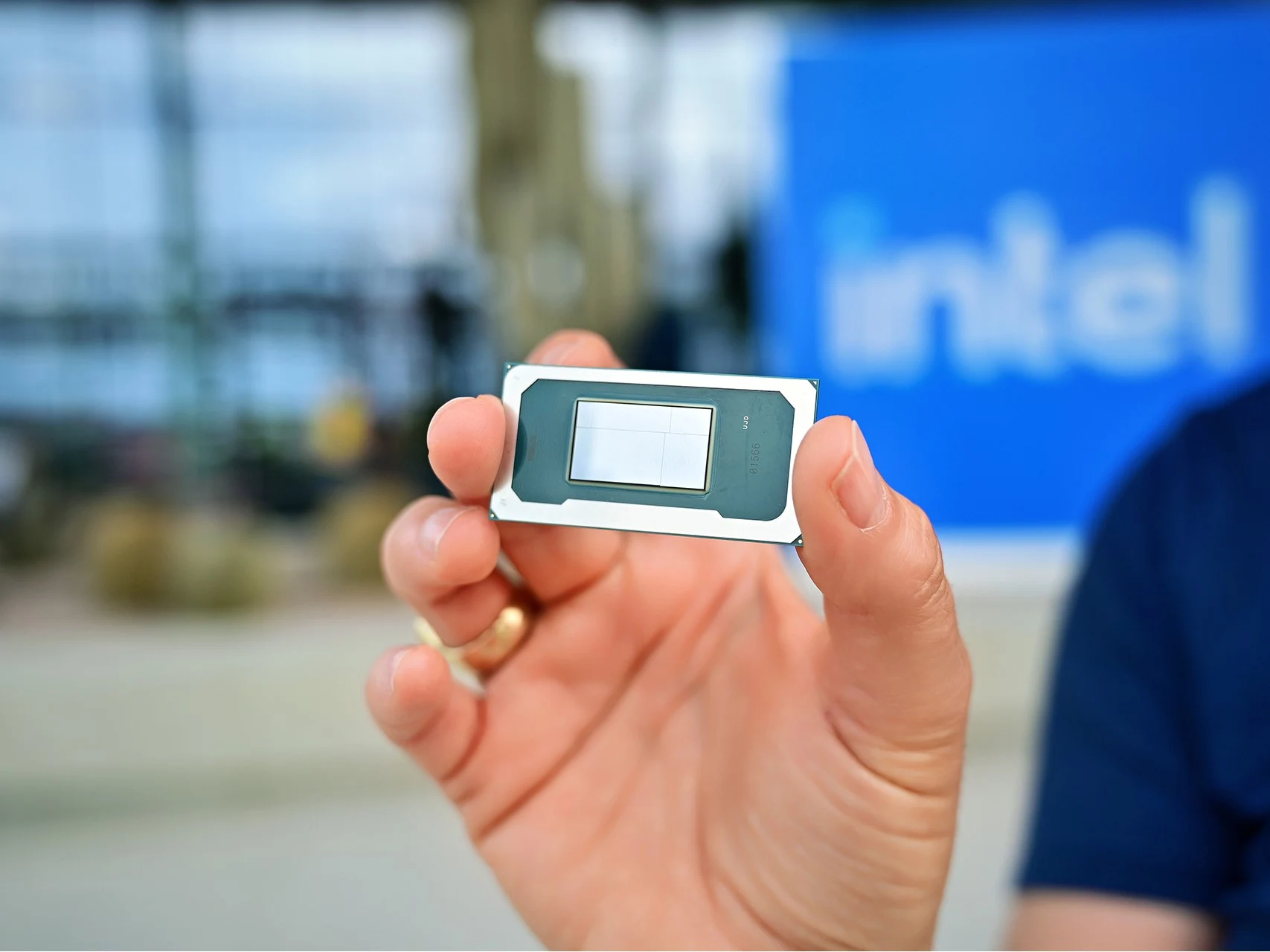
    Intel’s upcoming Nova Lake-S desktop CPUs are likely to be released later this year. These new chips are expected to feature up to 52 cores and 288 MB of bLLC, potentially allowing Intel to compete more effectively with AMD’s upcoming Zen 6 CPU lineup. Nevertheless, as previously noted, the combination of 52 cores and 288 MB of last-level cache is expected to come at a very high price.

    Expected Power Consumption

    According to Kopite7kimi, the K-series Nova Lake desktop CPU, presumed to be the 52-core version, may draw over 700 W when under full load. This power consumption figure is believed to be with the power limits disabled, so a lower yet still considerable PL2 power limit is anticipated.

    Market Positioning

    This 700+ W figure is incredibly high for a consumer CPU aimed at everyday users and gamers. However, Kopite7kimi suggests that this should be viewed more as a High-End Desktop (HEDT) platform instead of a standard flagship consumer CPU, like the Core Ultra 9 285K (which is available on Amazon).

    Comparison with Current CPUs

    When comparing the 700+ W power usage of Nova Lake to Intel’s Arrow Lake, it represents a significant jump from the existing Arrow Lake CPUs. For example, the Core Ultra 9 285K reached a maximum of 356 W during a Cinebench R15 multi-core test, while even the extremely power-hungry Core i9-14900K peaked at 548 W in the same test. Therefore, with a consumption of over 700 W, the 52-core Intel Nova Lake-S flagship seems like a bold move for a non-HEDT CPU.

    However, when we look at current HEDT platforms, such as the Intel Xeon W-2400/W-3400 series and the Ryzen Threadripper 9000X processors, the anticipated power usage starts to make more sense.

    In any case, it’s evident that if you’re planning to grab the 52-core Nova Lake-S CPU upon its release, you should be ready to fork out a significant amount for both the CPU itself and a robust cooling solution.

    Source:
    Link


  • Read the Dell XPS 14 Service Manual Before Opening 2026 Model

    Read the Dell XPS 14 Service Manual Before Opening 2026 Model

    Key Takeaways

    1. The XPS 14 and 16 models have significant design and hardware changes this year, affecting servicing methods.
    2. Users can access the motherboard by removing T5 Torx screws and using a screwdriver to detach the keyboard deck from the bottom panel.
    3. Key components like the cooling system, battery, and SSD are now accessed via the keyboard deck (C cover) instead of the bottom panel (D cover).
    4. Servicing the 2026 XPS series is more complex than older models, requiring more steps for upgrades or repairs.
    5. The new XPS chassis offers improved rigidity, making the additional servicing effort worthwhile compared to similar designs like the Framework Laptop.


    The XPS 14 and 16 models are undergoing major changes this year, from their outer designs to their internal hardware. As a result, the way to service these new models has shifted quite a bit from what previous XPS owners might be used to. Luckily, Dell has made a digital manual available for download, which can be found here, for current or potential users.

    Accessing the Motherboard

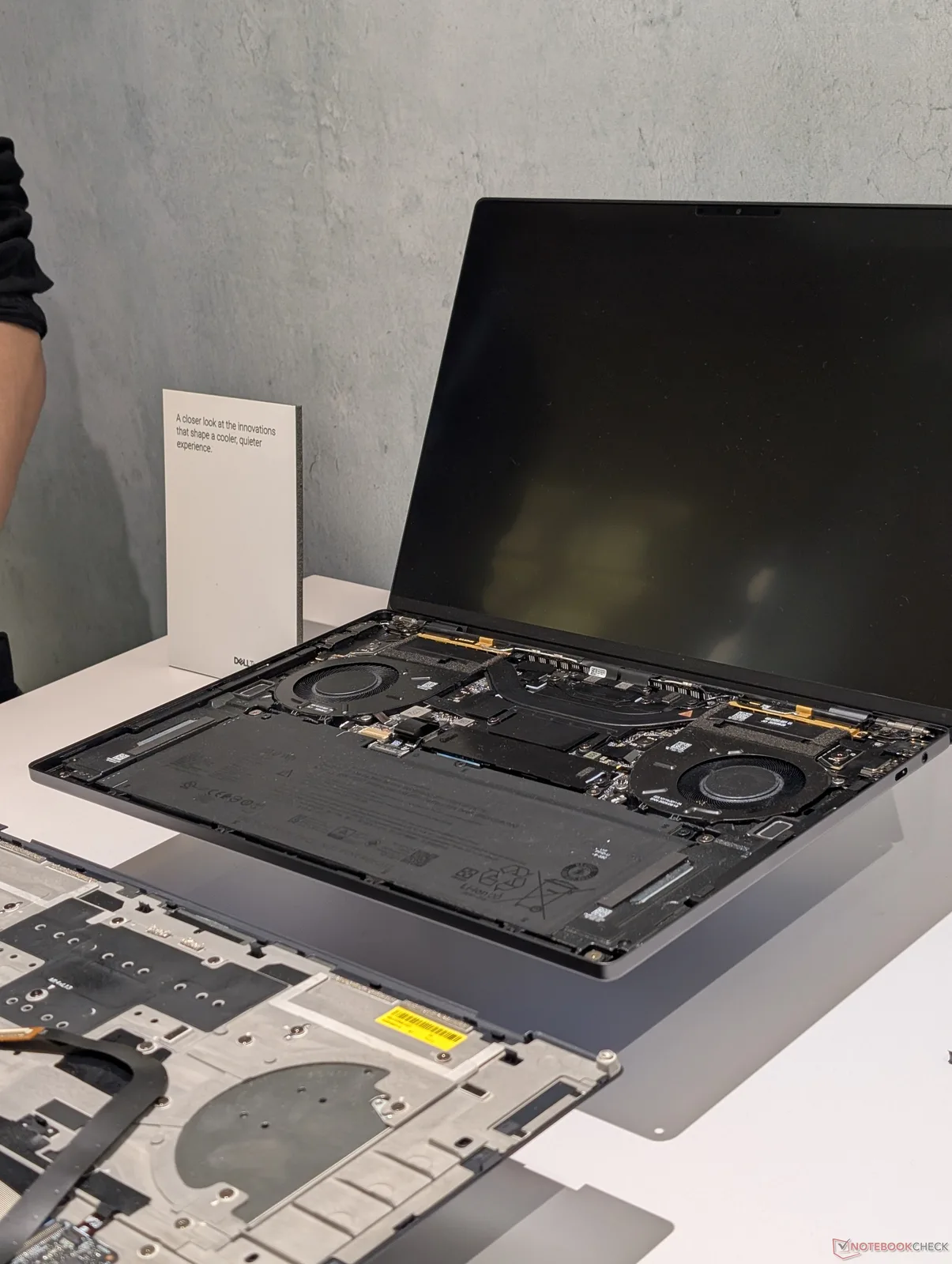
    To reach the motherboard, users will still need to take out the T5 Torx screws located on the bottom panel, just like before. After these screws are taken off, users must put the Torx screwdriver back into the holes to help push the corners of the keyboard deck (C cover) away from the bottom panel (D cover). The two panels can then be gently pulled apart at their edges using a sharp plastic tool.

    Key Components Inside

    Important parts such as the cooling system, battery, and SSD can now be accessed by taking off the C cover instead of the D cover, as illustrated in the image below. It’s crucial for users to handle the delicate ribbon cable that connects the keyboard to the motherboard with care during this process.

    Servicing Challenges

    These service procedures differ from most laptops available today, where users usually only need to remove the D cover for upgrades or repairs. Thus, servicing the 2026 XPS series is a bit more complicated than for older XPS models. However, the enhanced rigidity of the chassis makes this extra effort worthwhile.

    The Framework Laptop follows a similar servicing concept to the new Dell design, but the latest XPS shows significantly less bending and noise.


  • Lenovo Warns Buyers: Act Fast for Lowest Prices Amid Memory Shortage

    Lenovo Warns Buyers: Act Fast for Lowest Prices Amid Memory Shortage

    Key Takeaways

    1. Memory costs are expected to keep rising, prompting Lenovo’s President to advise customers to purchase quickly.
    2. Demand for AI server infrastructure remains strong, with current prices likely to be the lowest for the next 6 to 12 months.
    3. Price quotes can change rapidly, and stock availability is a significant concern for customers.
    4. Larger organizations face delays in completing orders, leading to reduced purchases or less desirable alternatives.
    5. Laptop prices may soon increase due to decreasing component inventories, making discounts less common.


    Despite the increase in memory costs, several manufacturers of laptops, desktops, and servers have been careful not to scare their customers. Nevertheless, Ryan McCurdy, the North American President for Lenovo, shared a clear view of the ongoing situation. He believes that the costs for components will keep rising. In a discussion with CRN, he emphasized that partners should consider making their purchases as soon as they can.

    AI Server Demand Stays Strong

    McCurdy pointed out that the need for AI server infrastructure is not showing any signs of letting up. Because of this constant demand, the company is urging customers to act quickly. He mentioned to the tech news outlet that the current prices are at the lowest they will be for the next 6 to 12 months.

    Sadly, some customers are discovering that the prices they get quoted can change in less than 12 hours. A systems integrator shared with CRN that the availability of stock is just as significant a worry as the pricing. His company attempted to secure a substantial number of GPU-accelerated servers from Dell, only to find out that they had sold out later that very same day.

    Challenges for Larger Customers

    Other big customers, such as schools and organizations, are also having trouble finishing their orders on time. Ideally, these transactions would be completed right away, but the entire process could take weeks. Consequently, Lenovo partners are either purchasing less equipment or opting for alternatives that are not as desirable.

    The memory shortage is also affecting smaller clients who are looking to buy laptops or desktops. McCurdy believes that deals with suppliers have positioned Lenovo in a “better spot than many to manage this situation.” However, DRAM makers like Samsung and SK Hynix are hesitant to agree on fair long-term contracts.

    Pricing and Discounts May Change

    In many instances, laptops produced by major brands have not seen a price increase compared to months ago. However, this is expected to change as component inventories decrease. Buyers might find that discounts are harder to come by, and laptop promotions may end sooner than they anticipated.

    Putting together a custom PC while keeping to a budget can be an even tougher challenge. Ultimately, prebuilt systems will start to mirror the higher prices for memory and the inflated costs of Nvidia GPUs or SSDs.

    Source:
    Link


  • Raspberry Pi 5 Alternative: SBC for Extreme Temperatures

    Raspberry Pi 5 Alternative: SBC for Extreme Temperatures

    Key Takeaways

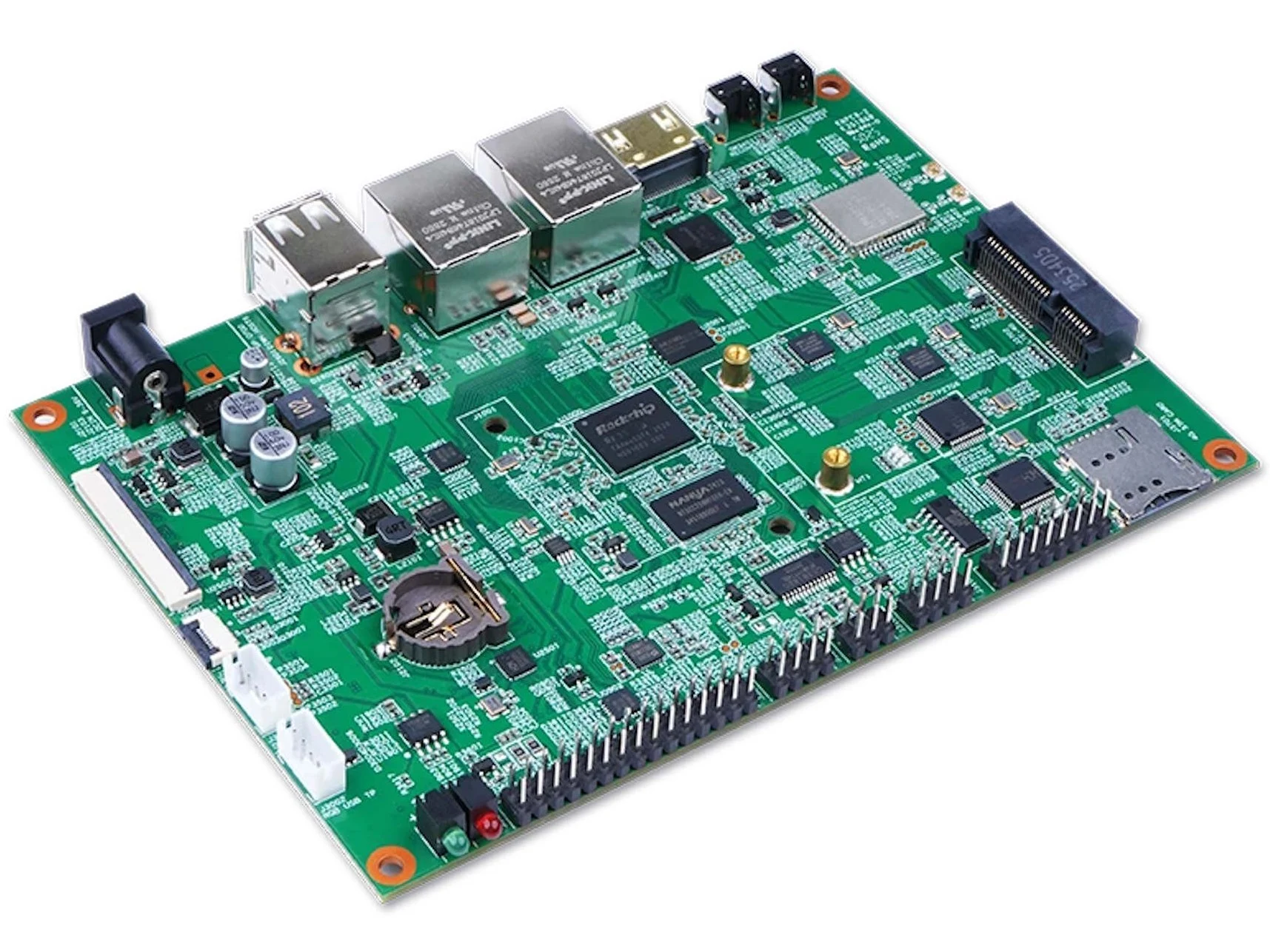
    1. Geniatech has released the DB3506, a single-board computer powered by the Rockchip RK3506 chipset, featuring three Cortex-A7 cores and one Cortex-M0 core.
    2. The board is designed for industrial applications with a temperature range of -40° to 185°F and includes RS-232/RS-485, UART, and CAN connections.
    3. It comes with 512MB of LPDDR3 memory, with options for 256MB and 1GB, and NAND flash storage of either 256MB or 512MB.
    4. Connectivity features include dual Ethernet, dual-band Wi-Fi, an optional 4G modem, HDMI, USB Type-A ports, and GPIO pins.
    5. While the DB3506 is suitable for industrial use, the Raspberry Pi 5 may be a better choice for hobbyists and everyday users.


    We have mentioned the company Geniatech several times before. Now, with the release of the DB3506, they are introducing a new single-board computer or development board that runs on the Rockchip RK3506. This chipset features four cores, consisting of three Cortex-A7 cores and a single Cortex-M0 core. The role of the Cortex-M0 core isn’t really about boosting performance; it primarily manages communication with external devices, particularly sensors and actuators.

    Specifications and Features

    The board comes equipped with RS-232/RS-485, UART, and CAN connections, making it a solid choice for industrial applications. It is designed to work in tough industrial settings with temperature ranges from -40° to 185°F, suitable for very cold outdoor conditions or quite warm machinery. The dimensions of the SBC are 5.75 x 4.02 inches and it has 512MB of LPDDR3 memory. There are options for 256MB and 1GB of RAM as well. The NAND flash storage comes in either 256MB or 512MB, depending on how it’s set up.

    Connectivity Options

    For networking, the board supports dual Ethernet and dual-band Wi-Fi, and you can also add an optional 4G modem using the mini PCIe slot. Additionally, HDMI is part of the package, along with connectors for a touchscreen. This setup allows for the display of various metrics right at the machine instead of just in a control room. There are two USB Type-A ports, but they only support USB 2.0. GPIO pins are also available. Geniatech has not released any information about pricing or availability yet, which is common for B2B products.

    Alternative for Hobbyists

    For everyday users and hobbyists, the Raspberry Pi 5 (starting at $116 on Amazon) might be a more suitable option.

    Geniatech’s new offering stands out, but for those who are just tinkering, the Raspberry Pi could be a better fit.

    Source:
    Link


  • Mix Pro II: New Mini-PC Launches with Up to 64 GB RAM

    Mix Pro II: New Mini-PC Launches with Up to 64 GB RAM

    Key Takeaways

    1. Thunderobot has launched the Mix Pro II mini-PC, competing with Asus’ ROG NUC 2025 priced at $2,449.
    2. The Mix Pro II features Arrow Lake H processors and advanced vapour chamber cooling, maintaining a 65 W TDP.
    3. It includes Thunderbolt 4 support and dual 2.5 Gigabit Ethernet in a compact metal chassis measuring 140 x 139 x 51 mm.
    4. Pricing for the Mix Pro II starts at CNY 4,999 (about $722) for the base model, with higher configurations available up to CNY 8,999 (around $1,300).
    5. Global availability details for the Mix Pro II have not yet been announced.


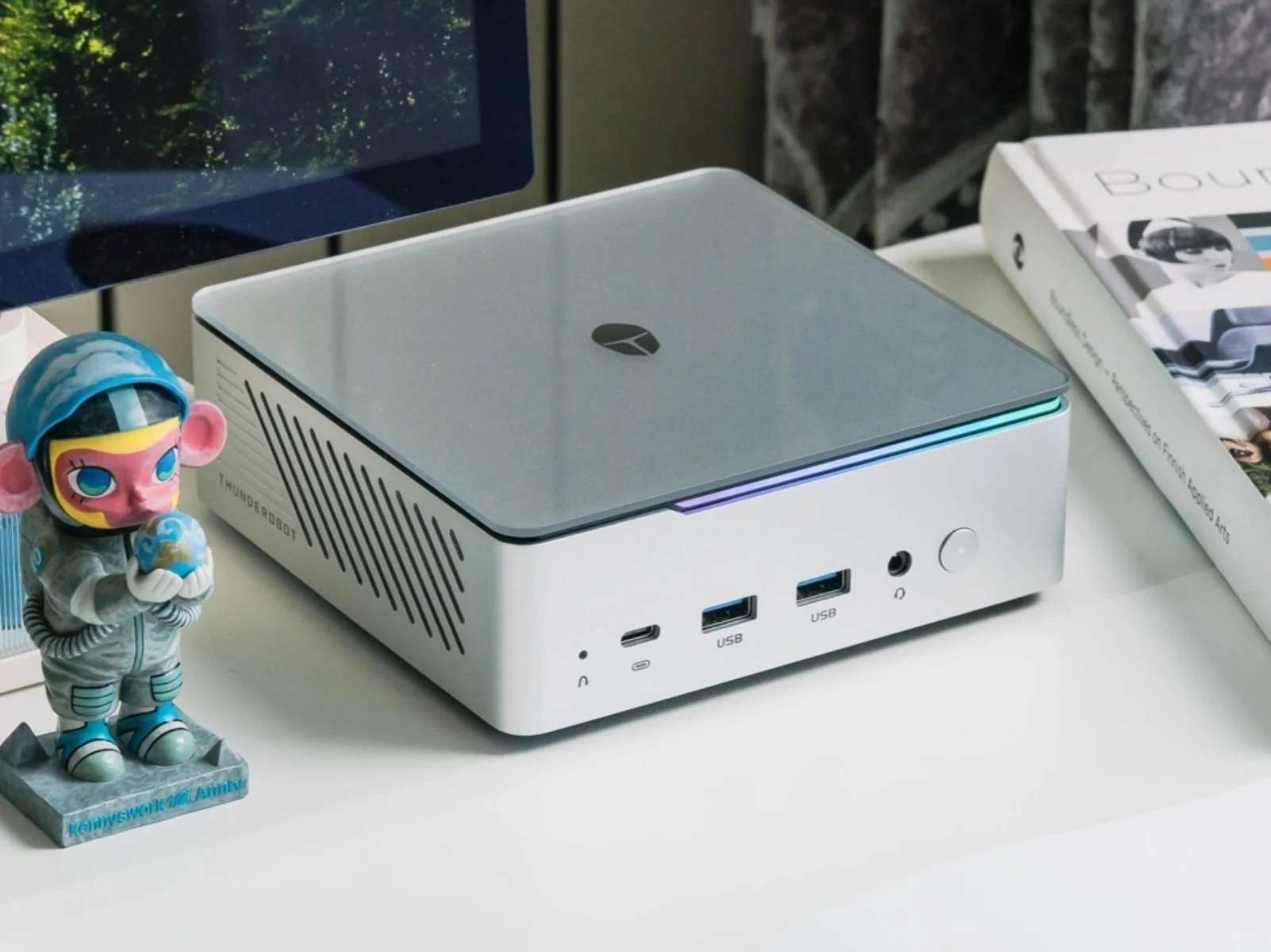
    Thunderobot has launched a new mini-PC, the Mix Pro II. To refresh your memory, the company previously unveiled the Mix G2 at the end of last year. This new model stands as a competitor to Asus’ ROG NUC 2025, which is currently priced at $2,449 on Amazon. The Mix G2 boasted configurations that included up to an Nvidia GeForce RTX 5090 laptop GPU and Arrow Lake HX series processors.

    Specifications and Features

    This time around, Thunderobot has chosen to use less powerful Arrow Lake H processors for the Mix Pro II. Measuring 140 x 139 x 51 mm, this mini-PC is still designed to deliver a maximum of 65 W TDP for the Core Ultra 5 225H, Core Ultra 7 255H, or the Core Ultra 9 285H, thanks to its advanced vapour chamber cooling system. The new model also boasts Thunderbolt 4 support and dual 2.5 Gigabit Ethernet, all neatly packed into a compact 0.9~1.0 litre metal chassis.

    Pricing and Availability

    In China, Thunderobot is presenting the Mix Pro II in four different configurations. The base model starts at CNY 4,999 (about $722) and comes with a Core Ultra 5 225H, 32 GB of RAM, and 1 TB of storage. For those looking for more power, there’s an option with a Core Ultra 7 255H and the same memory priced at CNY 6,999 (approximately $1,011), or a more robust configuration featuring a Core Ultra 9 285H and 64 GB of RAM for CNY 8,999 (around $1,300). However, Thunderobot has not revealed any details regarding the global availability of the Mix Pro II at this time.

    Conclusion

    With its new offering, Thunderobot continues to push the boundaries of compact computing. The Mix Pro II promises to deliver solid performance for users looking for a mini-PC that doesn’t compromise on power or features, despite using slightly less potent processors than its predecessor.

    Source:
    Link


  • Intel Core Ultra 5 250K Plus Gaming CPU Scores Low on Geekbench 6

    Intel Core Ultra 5 250K Plus Gaming CPU Scores Low on Geekbench 6

    Key Takeaways

    1. Intel is launching the Core Ultra 200K Plus gaming CPUs, including the Core Ultra 5 250K Plus and Core Ultra 7 270K Plus, but not the Core Ultra 9 290K Plus.

    2. The Core Ultra 5 250K Plus features 18 cores (12 efficiency and 6 performance), with 4 additional E-cores compared to the previous 245K model.

    3. Performance improvements include a 100 MHz boost for P-cores and E-cores, while the E-core base clock decreases by 100 MHz; it may support DDR5-7200.

    4. In Geekbench 6 tests, the Core Ultra 5 250K Plus scored 3,113 points in single-core performance, a slight improvement over the 245K, but only 15,251 points in multi-core performance, lower than expected.

    5. The Core Ultra 5 250K Plus has specifications of 6 MB L2 cache, 30 MB L3 cache, a base clock of 4.2 GHz, and a boost clock of 5.3 GHz, using the LGA 1851 socket.


    Intel is set to launch its Core Ultra 200K Plus gaming CPUs very soon. The lineup has been confirmed to include the Core Ultra 5 250K Plus and the Core Ultra 7 270K Plus. As mentioned previously, the Core Ultra 9 290K Plus will not be released.

    New Benchmarking Insights

    Previously, we had only seen leaked performance tests for the Core Ultra 7 270K Plus and the Core Ultra 9 290K Plus. Recently, it seems the more budget-friendly 250K Plus has made an appearance on Geekbench 6. According to the listing, the Core Ultra 5 250K Plus features a configuration of 18 cores, which includes 12 efficiency cores and 6 performance cores. This new chip adds 4 E-cores compared to its older sibling, the 245K.

    Performance Expectations

    There are likely to be improved clock speeds as well; the P-cores and E-cores will see an increase of 100 MHz (boost), while the E-core base clock will decrease by 100 MHz. It’s also been suggested that the CPU might support DDR5-7200. This testing was conducted on an Asus Prime Z890-P motherboard, with the CPU coupled with 32 GB of DDR5 RAM (Crucial Pro kit currently priced at $366.26 on Amazon).

    In single-core performance, the Intel Core Ultra 250K Plus achieved a notable score of 3,113 points. To put this in perspective, the previous 245K usually scores around 3,000 points in the same benchmark, which shows a slight improvement. However, in multi-core performance, the situation isn’t as promising—the 250K only managed to reach approximately 15,251 points, significantly lower than the expected 18,000 points from its predecessor.

    Changes Still Possible

    Being an initial benchmark, these scores can definitely change over time. Given that the 250K Plus has more physical cores and higher boost clocks for the P-cores, it’s puzzling why it is falling behind its predecessor.

    Additional specifications for the Core Ultra 5 250K Plus indicated by the benchmark include 6 MB of L2 cache, 30 MB of L3 cache, a base clock of 4.2 GHz, and a maximum boost clock of 5.3 GHz. Expectedly, the CPU will still use the LGA 1851 socket.

    Source:
    Link


  • China’s Shenlong Spacecraft Completes Fourth Secret Mission

    China’s Shenlong Spacecraft Completes Fourth Secret Mission

    Key Takeaways

    1. China successfully launched its reusable experimental spacecraft for the fourth time, showcasing advancements in its space program.
    2. The spacecraft, named “Shenlong” by fans, parallels the US Space Force’s X-37B and emphasizes China’s commitment to orbital control technology.
    3. The launch was conducted from the Jiuquan Satellite Launch Center using a Long March-2F rocket, although specific mission details were not disclosed.
    4. The operational duration of the spacecraft has significantly increased, with recent missions lasting 276 and 268 days compared to just two days for the first mission in 2020.
    5. China and the United States are currently the only countries with reusable spaceplanes, following the retirement of the US Space Shuttle in 2011.


    China has successfully launched its reusable experimental spacecraft for the fourth time, making strides in a program that mirrors the United States’ abilities in orbital control. The secretive craft lifted off on Saturday from the Jiuquan Satellite Launch Center located in Northwest China, riding on a Long March-2F rocket.

    Launch Details

    While state media announced that the launch aimed for “technology verification” and the “peaceful use of outer space,” there was no information shared on photos, specific launch timings, or mission details. In spite of this lack of transparency, Chinese space fans have affectionately named the spacecraft “Shenlong,” meaning “Divine Dragon,” seeing it as a rival to the US Space Force’s X-37B.

    Mission Progression

    This latest launch shows a trend of enhanced operational duration. The program originally started in September 2020, with its first mission lasting merely two days. In comparison, the second and third missions, which took place in 2022 and 2023, remained in orbit for 276 and 268 days, respectively.

    Current Landscape

    As of now, China and the United States are the only nations operating reusable spaceplanes, especially after the US Space Shuttle was retired in 2011. The US X-37B is currently ahead in this domain, having initiated its eighth mission last August to examine quantum inertial sensors and high-bandwidth laser connections.

    Source:
    Link


  • 2026 Dell XPS 14 Addresses Major User Complaints and Issues

    2026 Dell XPS 14 Addresses Major User Complaints and Issues

    Key Takeaways

    1. The 2022 XPS 13 received mixed reactions due to its dramatic design changes, which made it feel less sturdy and more prone to damage.
    2. The 2026 XPS 14 features a redesigned exterior that improves usability and durability while maintaining an attractive look.
    3. The keyboard and clickpad on the XPS 14 have been updated to appear more conventional, enhancing the overall structure’s robustness.
    4. The 2026 model boasts an upgraded 8 MP webcam, significantly improving video quality compared to previous models.
    5. Despite the improvements in the 2026 XPS 14, the lack of a physical webcam shutter remains a downside for users.


    When Dell launched the updated XPS 13 in 2022, the alterations to the chassis were dramatic enough that they seemingly turned away loyal XPS fans. The introduction of touch-sensitive keys, a zero-lattice keyboard, an “invisible” haptic clickpad, and a sleeker profile resulted in the 2022 XPS 13 feeling less sturdy, harder to handle, and more susceptible to damage compared to its predecessors.

    A Fresh Start for the XPS 14

    In 2026, the new XPS 14 features a completely redesigned exterior that retains the appealing aesthetics of the 2022 model while significantly enhancing usability and durability. The keyboard and clickpad have been updated to look more conventional, and the front edge is now straighter, contributing to a more robust structure. Even more crucial are the internal upgrades; the motherboard is now positioned upside down compared to most laptops, meaning that the fan, SSD, and battery can only be accessed by removing the keyboard deck or C cover.

    Enhanced Webcam and Competitive Features

    The webcam quality has been boosted to 8 MP, whereas earlier XPS 13 and 14 models were stuck at 1080p or lower resolutions. Competing devices like the HP EliteBook X G1i and Lenovo Yoga have been offering 5 MP webcams or higher for a while, so Dell has finally made some progress here. However, the absence of a physical shutter remains a downside for the Dell.

    These updates might seem small on paper, but they really make a noticeable difference in real life, making us strongly recommend the 2026 model over the earlier generations of the XPS 14 or XPS 13 series. In contrast, the criticism of the designs from 2022 to 2025 has arguably made the reliable designs from 2021 or earlier more appealing to long-time XPS enthusiasts.