
Tag: XPS 14

  • Read the Dell XPS 14 Service Manual Before Opening 2026 Model

    Read the Dell XPS 14 Service Manual Before Opening 2026 Model

    Key Takeaways

    1. The XPS 14 and 16 models have significant design and hardware changes this year, affecting servicing methods.
    2. Users can access the motherboard by removing T5 Torx screws and using a screwdriver to detach the keyboard deck from the bottom panel.
    3. Key components like the cooling system, battery, and SSD are now accessed via the keyboard deck (C cover) instead of the bottom panel (D cover).
    4. Servicing the 2026 XPS series is more complex than older models, requiring more steps for upgrades or repairs.
    5. The new XPS chassis offers improved rigidity, making the additional servicing effort worthwhile compared to similar designs like the Framework Laptop.


    The XPS 14 and 16 models are undergoing major changes this year, from their outer designs to their internal hardware. As a result, the way to service these new models has shifted quite a bit from what previous XPS owners might be used to. Luckily, Dell has made a digital manual available for download, which can be found here, for current or potential users.

    Accessing the Motherboard

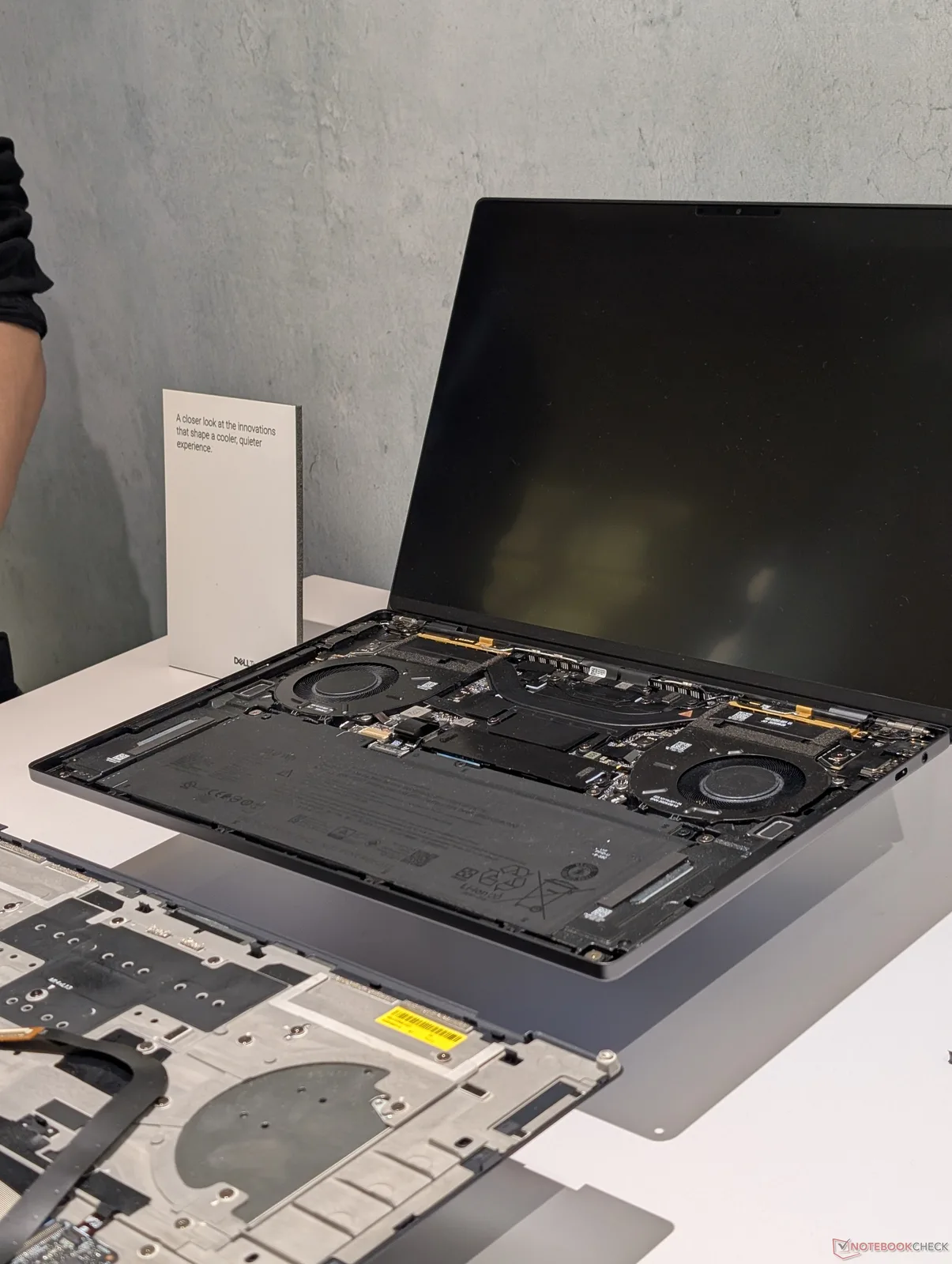
    To reach the motherboard, users will still need to take out the T5 Torx screws located on the bottom panel, just like before. After these screws are taken off, users must put the Torx screwdriver back into the holes to help push the corners of the keyboard deck (C cover) away from the bottom panel (D cover). The two panels can then be gently pulled apart at their edges using a sharp plastic tool.

    Key Components Inside

    Important parts such as the cooling system, battery, and SSD can now be accessed by taking off the C cover instead of the D cover, as illustrated in the image below. It’s crucial for users to handle the delicate ribbon cable that connects the keyboard to the motherboard with care during this process.

    Servicing Challenges

    These service procedures differ from most laptops available today, where users usually only need to remove the D cover for upgrades or repairs. Thus, servicing the 2026 XPS series is a bit more complicated than for older XPS models. However, the enhanced rigidity of the chassis makes this extra effort worthwhile.

    The Framework Laptop follows a similar servicing concept to the new Dell design, but the latest XPS shows significantly less bending and noise.
     

  • 2026 Dell XPS 14 Addresses Major User Complaints and Issues

    2026 Dell XPS 14 Addresses Major User Complaints and Issues

    Key Takeaways

    1. The 2022 XPS 13 received mixed reactions due to its dramatic design changes, which made it feel less sturdy and more prone to damage.
    2. The 2026 XPS 14 features a redesigned exterior that improves usability and durability while maintaining an attractive look.
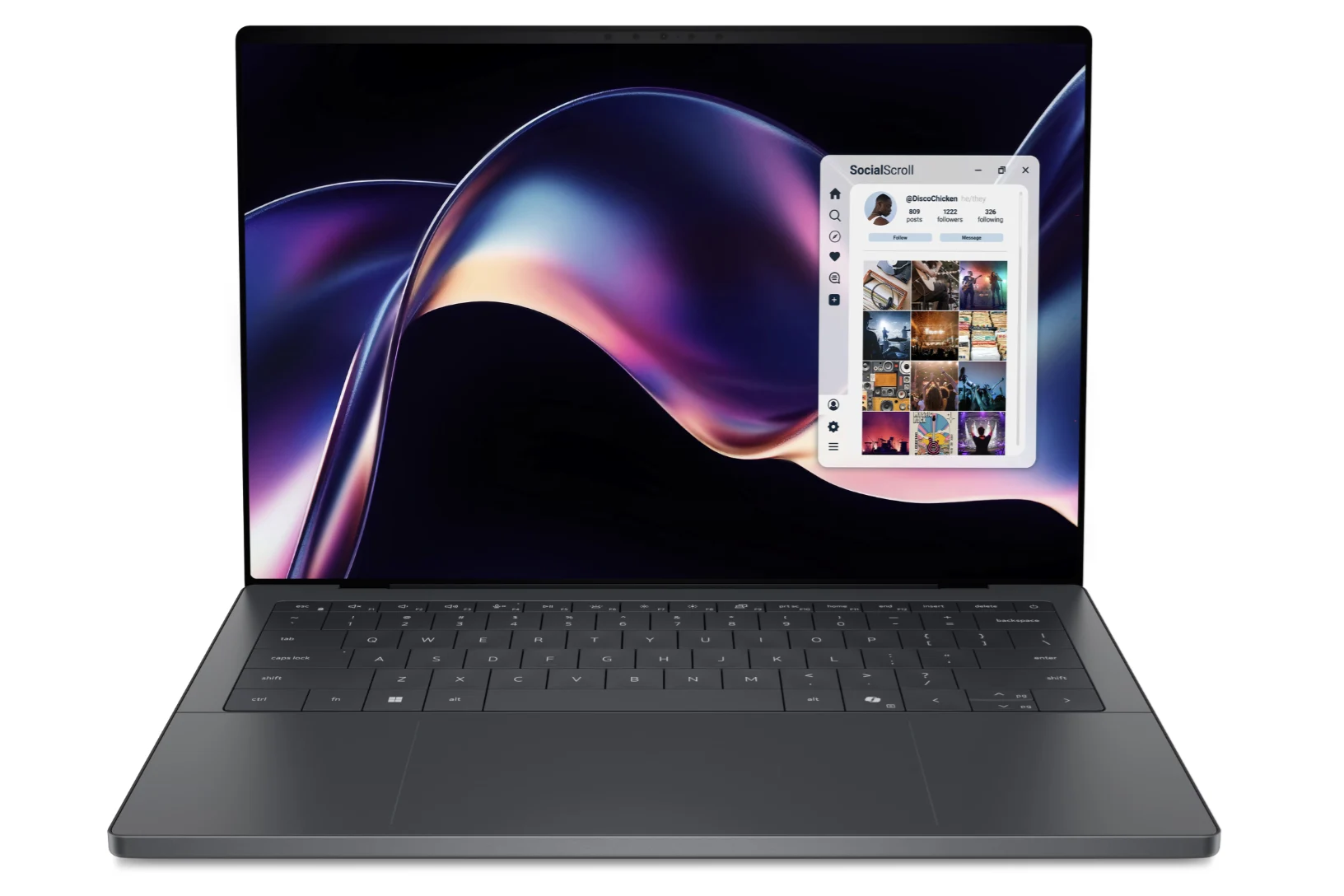
    3. The keyboard and clickpad on the XPS 14 have been updated to appear more conventional, enhancing the overall structure’s robustness.
    4. The 2026 model boasts an upgraded 8 MP webcam, significantly improving video quality compared to previous models.
    5. Despite the improvements in the 2026 XPS 14, the lack of a physical webcam shutter remains a downside for users.


    When Dell launched the updated XPS 13 in 2022, the alterations to the chassis were dramatic enough that they seemingly turned away loyal XPS fans. The introduction of touch-sensitive keys, a zero-lattice keyboard, an “invisible” haptic clickpad, and a sleeker profile resulted in the 2022 XPS 13 feeling less sturdy, harder to handle, and more susceptible to damage compared to its predecessors.

    A Fresh Start for the XPS 14

    In 2026, the new XPS 14 features a completely redesigned exterior that retains the appealing aesthetics of the 2022 model while significantly enhancing usability and durability. The keyboard and clickpad have been updated to look more conventional, and the front edge is now straighter, contributing to a more robust structure. Even more crucial are the internal upgrades; the motherboard is now positioned upside down compared to most laptops, meaning that the fan, SSD, and battery can only be accessed by removing the keyboard deck or C cover.

    Enhanced Webcam and Competitive Features

    The webcam quality has been boosted to 8 MP, whereas earlier XPS 13 and 14 models were stuck at 1080p or lower resolutions. Competing devices like the HP EliteBook X G1i and Lenovo Yoga have been offering 5 MP webcams or higher for a while, so Dell has finally made some progress here. However, the absence of a physical shutter remains a downside for the Dell.

    These updates might seem small on paper, but they really make a noticeable difference in real life, making us strongly recommend the 2026 model over the earlier generations of the XPS 14 or XPS 13 series. In contrast, the criticism of the designs from 2022 to 2025 has arguably made the reliable designs from 2021 or earlier more appealing to long-time XPS enthusiasts.

  • Dell Shifts Focus Away from AI Marketing at CES 2026

    Dell Shifts Focus Away from AI Marketing at CES 2026

    Key Takeaways

    1. Dell has announced new devices like the XPS 14, XPS 16, and Alienware 16 but has chosen not to emphasize AI in their promotions.
    2. AI is mentioned only once in Dell’s materials, suggesting a shift in focus compared to previous years.
    3. Dell’s Head of Product, Kevin Terwilliger, indicated that consumers aren’t prioritizing AI features in their purchasing decisions.
    4. Many AI features in laptops are rebranded standard functionalities, leading to confusion about their true capabilities.
    5. The value of AI tools, such as Microsoft Copilot, is questionable for users who need offline access, raising concerns about their practical usefulness.


    Like other big companies, Dell has released specification sheets and press updates before CES to announce its upcoming devices. The new Dell XPS 14 and XPS 16, along with the Alienware 16 Area-51 laptop and desktop, share a commonality that may not be immediately clear.

    Dell’s Silence on AI

    Although these three devices are equipped with chipsets that other brands heavily advertise for their AI features, Dell chooses not to highlight AI in its promotional content. In fact, AI is mentioned only once in their materials, and that’s in a single sentence that acts as the conclusion in the “About Dell” section found in every press release. There’s no further discussion on AI. Has Dell neglected AI and simply forgot to refresh the footer?

    Insights from Dell’s Head of Product

    PCGamer sought clarification and reached out to Dell. Kevin Terwilliger, who leads product at Dell, provided a clear response:

    “We’re really focused on maximizing the AI potential of our devices—in fact, all of our new releases include an NPU—but what we’ve seen this year, especially from a consumer standpoint, is that they aren’t making purchases based on AI. I think AI may confuse them more than it clarifies a specific result.”

    With this statement, Dell seems to be taking a step back at CES this year by reintroducing the XPS line while downplaying AI. Last year, AI was a prominent focus in Dell’s press communications.

    A Practical Approach to AI

    Dell’s reasoning makes sense. For most consumers, accessing local AI tools for tasks like text, image, or video creation remains quite challenging. Additionally, AI features preinstalled by brands and Microsoft often lack real usefulness. For instance, the 2023 LG Gram 17 came with presence detection as a standard feature. However, starting with the 2025 model, the same feature is now being promoted as an AI capability. Similar occurrences can be seen with Dell, Acer, Asus, and other laptop manufacturers, who have recently rebranded standard software as AI functionalities. To be fair, these programs now leverage the NPU in the new Intel and AMD processors for improved efficiency.

    Concluding Thoughts on AI Features

    Finally, there’s Copilot+. Given that Microsoft Copilot doesn’t function offline, much like Gemini, ChatGPT, and Grok, the added value of this feature remains unclear unless users conduct more thorough research.

    Source:
    Link