Tag: iFixit

  • iFixit Teardown: iPhone 17e Repairability and MagSafe Upgrade

    iFixit Teardown: iPhone 17e Repairability and MagSafe Upgrade

    Key Takeaways

    1. The iPhone 17e has a compatible MagSafe backplate with the iPhone 16e, making upgrades easier.
    2. Apple’s Self Service Repair Store does not currently offer spare parts for the iPhone 17e, but third-party options may emerge.
    3. The disassembly process for the iPhone 17e is similar to the iPhone 16e, making repairs more straightforward.
    4. Replacing the USB-C port is complicated and requires significant disassembly of the phone.
    5. The iPhone 17e received a repairability score of 7 out of 10 from iFixit, indicating good repair potential.


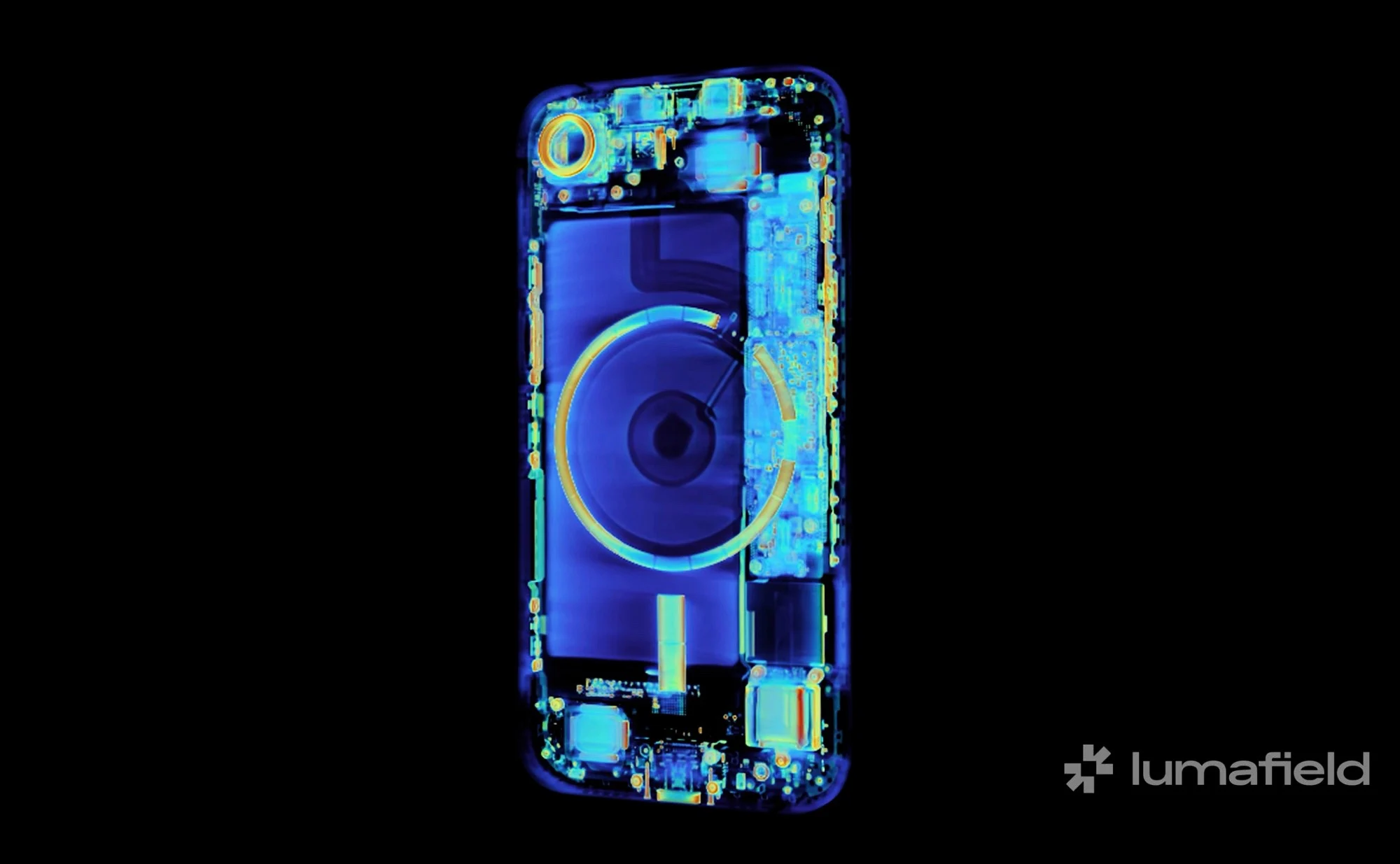
    Apple’s basic devices for 2026 are surprisingly simple to fix. The MacBook Neo impressed testers during a teardown with its high repairability. Now, experts from iFixit have taken apart the iPhone 17e (check out the video below), and they found something unexpected: the new MagSafe-enabled backplate is actually compatible with the iPhone 16e.

    Compatibility Insights

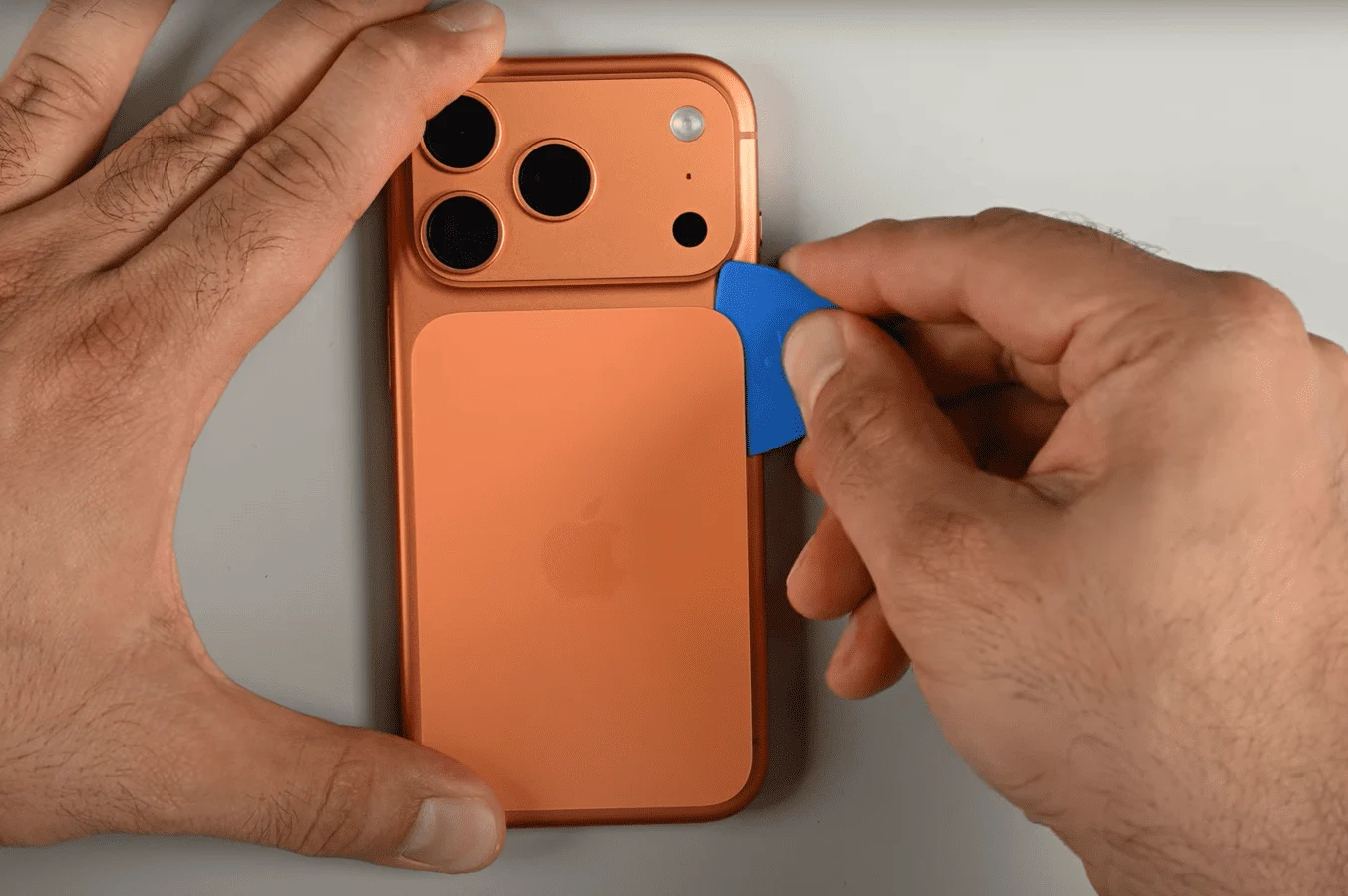
    This means that adding MagSafe to the iPhone 16e should not be too hard. However, purchasing a replacement directly from Apple might cost a lot. Currently, Apple’s Self Service Repair Store has not listed any spare parts for the iPhone 17e, but backplates for both the iPhone 16e and 17 are priced at a hefty $159 each. It’s likely just a matter of time before third-party companies start providing cheaper options.

    Similarities in Design

    Besides the MagSafe back glass, taking apart the iPhone 17e is very much like the process for its predecessor. To open the smartphone, you need to remove two screws at the bottom, then detach the backplate, which is held in place by clips and adhesive, from the frame. Once you can access the internals, replacing the device’s 4,005 mAh battery, 48 MP main camera, and 12 MP front camera is relatively straightforward.

    Repair Challenges

    iFixit points out that replacing the USB-C port is still quite time-consuming, as it requires nearly complete disassembly of the phone. On the positive side, the iPhone 17e can also be accessed from the front for screen replacements, which cuts down on unnecessary teardown steps. Since many spare parts for the iPhone 16e also work with the iPhone 17e, Apple’s newest budget-friendly iPhone has earned a solid repairability score of 7 out of 10 from iFixit.

    Source:
    Link


  • iFixit Teardown Reveals Apple iPad Pro M5 Details

    iFixit Teardown Reveals Apple iPad Pro M5 Details

    Key Takeaways

    1. The latest iPad Pro features the powerful Apple M5 chip and has a one-year warranty with potential repair costs after that period.
    2. Opening the iPad Pro is complicated due to adhesive securing the display, making repairs risky and time-consuming.
    3. The iPad Pro has a modular design, allowing for separate replacement of components like the USB-C port and cameras.
    4. Apple provides a self-service repair shop with guides and tools, and replacement parts are expected to be available soon.
    5. The iPad Pro M5 received a repairability rating of 5 out of 10 from iFixit, primarily due to the difficulty of battery replacement.


    The latest iPad Pro, powered by the Apple M5 chip, has already wowed us with its impressive performance and stunning display in our detailed review. However, it’s worth noting that Apple only provides a one-year warranty at no extra cost, meaning that any repairs needed after that will either require payment or must be handled by the user themselves.

    Teardown Insights

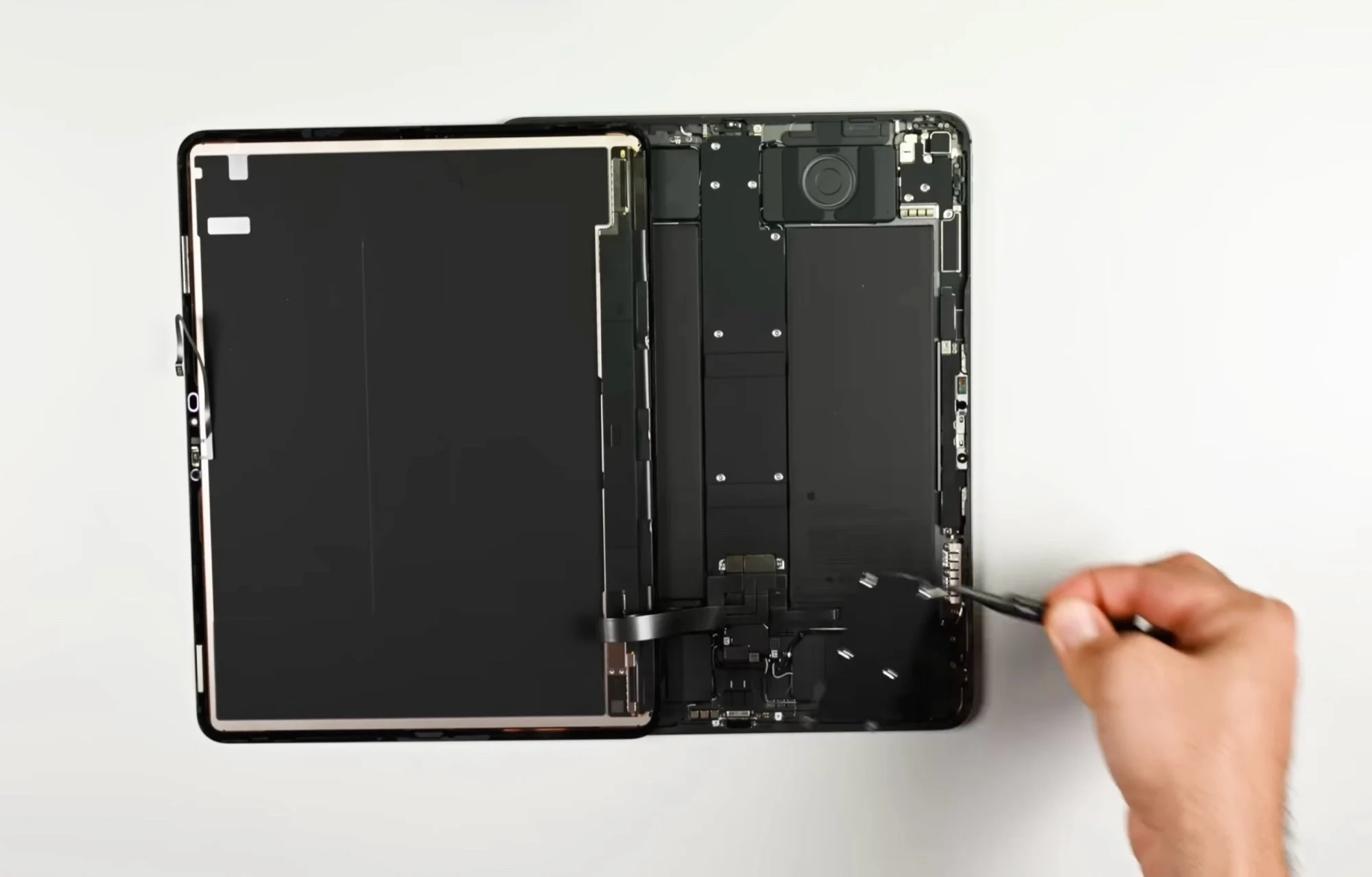
    According to the recent iFixit teardown, opening the tablet is similar to that of its predecessor; you need to detach the display from the frame. The process is complicated because Apple uses adhesive to secure the screen, making it a time-consuming and risky endeavor since the display can break quite easily. Once that’s done, you’ll need to extract ten adhesive strips to access and replace the two battery cells.

    Modular Design

    Inside, the iPad Pro is relatively modular, which means components like the USB-C port, cameras, ambient light sensor, LiDAR scanner, and speakers can be replaced separately. Apple uses two different screw types for assembly, and their self-service repair shop offers repair guides along with the necessary tools. It’s expected that replacement parts will also be made available there soon.

    Repairability Rating

    Due to the challenges involved in opening the tablet, the new iPad Pro M5 only earns a 5 out of 10 on iFixit’s repairability scale. The battery replacement, which is a common repair needed after a few years of usage, is too complicated for many average users to manage effectively.

    Source:
    Link


  • iFixit Teardown: MacBook Pro M5 Shows Repair Challenges and Upgrades

    iFixit Teardown: MacBook Pro M5 Shows Repair Challenges and Upgrades

    Key Takeaways

    1. The 14-inch MacBook Pro features updates like the new Apple M5 ARM chip and a quicker SSD, but its design remains unchanged.
    2. Loud fan noise during heavy use and the lack of Wi-Fi 7 are notable criticisms of the device.
    3. Battery replacement is difficult, requiring removal of twelve adhesive strips and is sold only with a new upper case.
    4. Most repairs necessitate removing the motherboard, making the process complicated despite some minor improvements.
    5. The MacBook Pro received a low repairability score of four out of ten from iFixit, indicating significant challenges for users needing repairs.


    The 14-inch MacBook Pro has had some updates, especially with the new Apple M5 ARM chip and a quicker SSD, but the overall design hasn’t changed. In our thorough review, we noted some criticisms like the excessively loud fans during heavy use, the absence of Wi-Fi 7, and the limited maintenance options similar to the last version.

    Teardown Insights

    The teardown specialists at iFixit took the new MacBook Pro apart to check for any internal changes beyond the exterior design. One major issue is that changing the battery is still a hassle. After unscrewing the bottom and disconnecting the trackpad cable, users must remove twelve adhesive strips to free the six battery cells. It seems Apple doesn’t trust users to handle this, as they only sell the battery together with a new upper case that includes the keyboard. To do the repair as Apple suggests, almost the entire MacBook Pro needs to be disassembled.

    Repair Process

    While both speakers can be replaced quite easily, nearly all other repairs require the motherboard to be taken out, which involves dealing with many screws and unplugging various cables. Once that’s done, replacing connections, the trackpad, and the fan can be accomplished. Some minor improvements have been made compared to the last model. For instance, you can now swap the battery without needing to take out the trackpad, and Apple provides a repair manual on launch day. However, the repair process can still be quite complex, leading to a score of only four out of ten on the iFixit repair scale.

    Conclusion

    Overall, while there are some upgrades, the 14-inch MacBook Pro still faces significant challenges in terms of repairability, keeping it from being user-friendly for those who might need to fix it themselves.

    Source:
    Link


  • Google Pixel Watch 4: World’s Most Repairable Smartwatch, iFixit

    Google Pixel Watch 4: World’s Most Repairable Smartwatch, iFixit

    Key Takeaways

    1. Apple charges $99 for battery replacement, making DIY repairs difficult.
    2. Google Pixel Watch 4 features easy access to repairs with screws instead of adhesive.
    3. Smart design choices include a vibration motor connected via metal pins and a battery held by screws.
    4. The Pixel Watch 4 has impressive specs, including a Qualcomm Snapdragon W5+ Gen 2 chip and 32 GB of storage.
    5. The watch received a high repair score of 9/10 from iFixit, with future plans for direct consumer spare parts and repair manuals.


    Anyone looking to swap out the battery in an Apple Watch will need to fork out $99 to Apple, as attempting to do it yourself is nearly impossible. However, the new Google Pixel Watch 4 shows that fixing smartwatches doesn’t have to be a hassle.

    Easy Access to Repairs

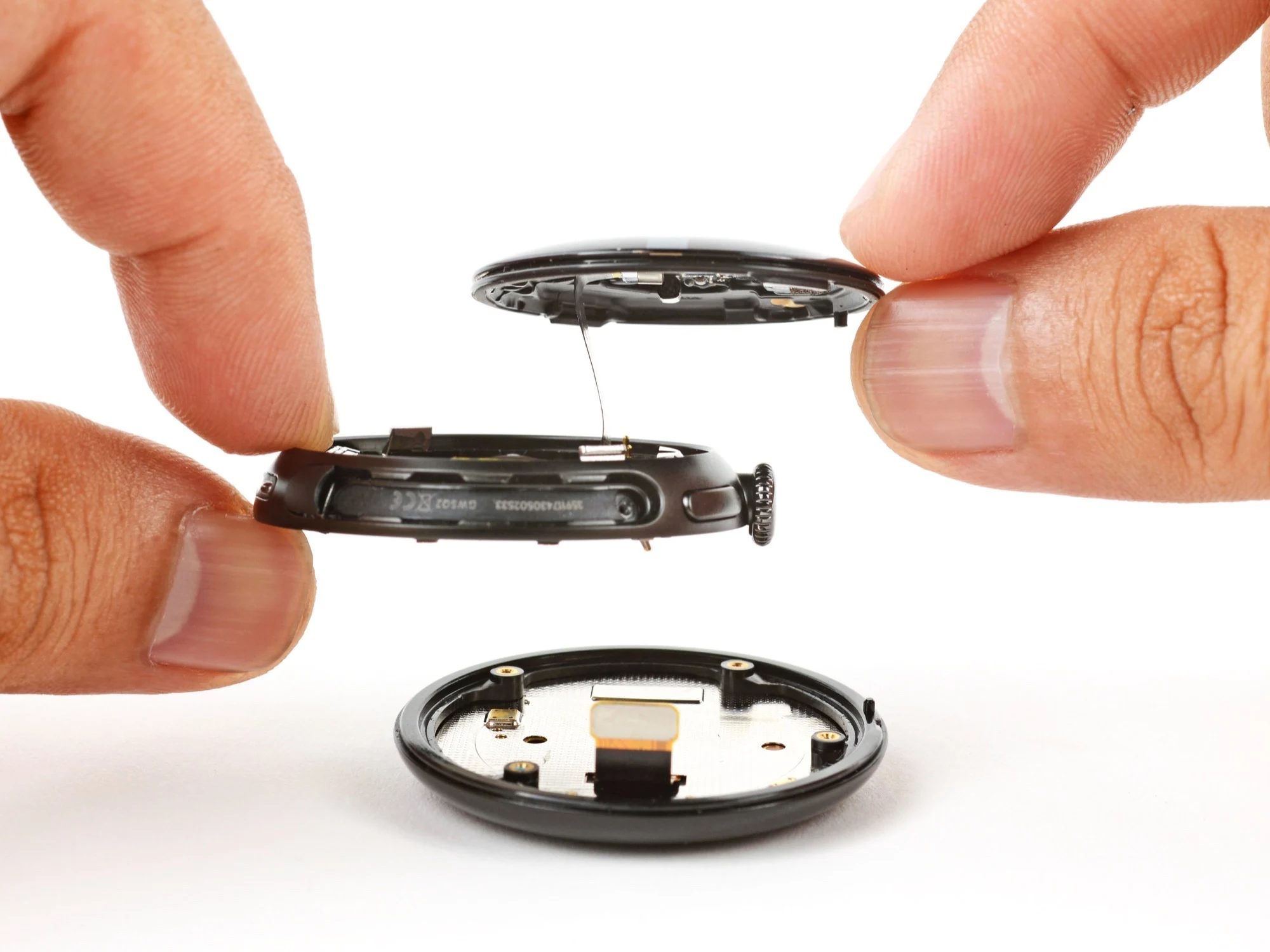
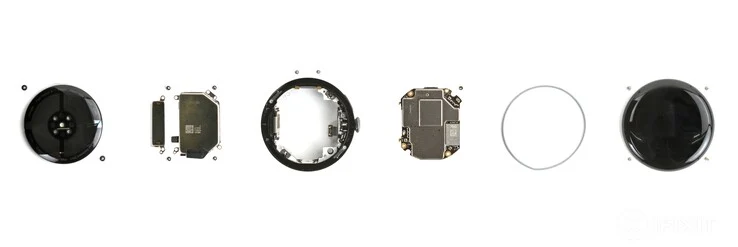
    Right from the moment you open it up, you can see the difference. Instead of using a ton of adhesive to connect the display and back, Google cleverly opts for two screws along with a rubber ring to keep the watch waterproof. After loosening these screws, which are cleverly hidden beneath the strap connector, the back can be taken off easily. This rubber ring effectively prevents water from reaching the electronics.

    Smart Design Choices

    The vibration motor connects via metal pins, eliminating the need for a flex cable that could easily get damaged during repairs. Ingeniously, the screws that secure the motor also hold the battery in position, along with two extra screws; no adhesive is used for the battery. Notably, the display is also attached with screws and a rubber ring, completely avoiding adhesive.

    Impressive Specs and Repair Rating

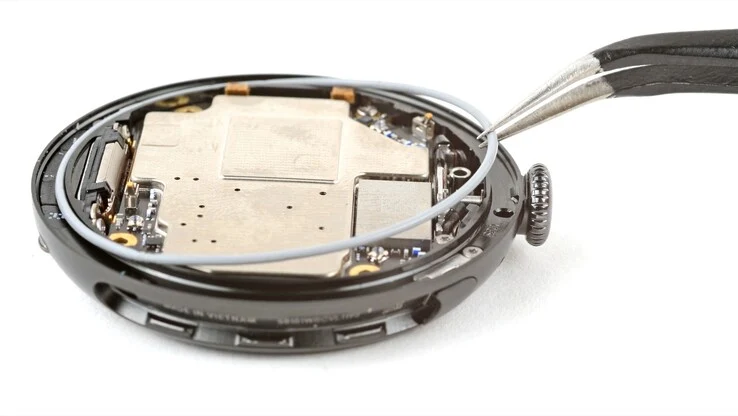
    Inside, the Qualcomm Snapdragon W5+ Gen 2 chip works alongside 2 GB of RAM and 32 GB of flash storage on a motherboard that is also fairly easy to replace. Overall, the Pixel Watch 4 earns an iFixit repair score of 9 out of 10 possible points—points were deducted mainly because the replacement display costs more than a new screen for many smartphones. In the future, spare parts will be sold directly to consumers, and official repair manuals are already accessible.

    Source:
    Link


  • Google Pixel Watch 4 Gets High Repairability Score from iFixit

    Google Pixel Watch 4 Gets High Repairability Score from iFixit

    Key Takeaways

    1. The Google Pixel Watch 4 features improved repairability, using screws and gasket seals instead of adhesive for its casing.
    2. The design includes concealed screws and o-rings that maintain water resistance while ensuring the back panel is securely fastened.
    3. The battery is also secured with screws, making replacement easier compared to other smartwatches that use adhesive.
    4. The Pixel Watch 4 received a high repairability score of 9 out of 10 from iFixit, a significant improvement over most smartwatches.
    5. Current Pixel Watch users may not find enough reasons to upgrade, as the new model does not offer significantly different hardware.


    The Google Pixel Watch 4 has been introduced as a refreshed smartwatch that brings only slight upgrades compared to its earlier model. While the enhancements may not appear revolutionary at first glance, the company has put a strong focus on how easy it is to repair the device, and iFixit has verified these assertions.

    Unique Design Features

    iFixit discovered that, unlike many smartwatches available today, the Google Pixel Watch 4 utilizes gasket seals and screws instead of adhesive to secure its casing. This design choice marks a notable step forward in repairability. However, this non-standard approach might raise doubts about the sturdiness of the chassis, making it possibly prone to disassembling by itself.

    Enhanced Protection Measures

    Nevertheless, iFixit pointed out that the screws activate a set of hinged arms that firmly secure the back panel. To maintain water resistance, Google cleverly concealed these screws beneath the band lugs and included special o-rings to keep the interior of the smartwatch sealed tight.

    Battery and Component Accessibility

    Another fascinating aspect of the Google Pixel Watch 4’s design is that even its battery is secured with screws. In contrast, most other smartwatches rely heavily on adhesive, which complicates battery replacement, even if the device can be taken apart easily.

    Regarding other internal parts, the trend continues, and iFixit notes that everything within the watch seems to be crafted with the idea of replaceability. This focus on repairability earned the Google Pixel Watch 4 a commendable score of 9 out of 10 on iFixit’s repairability scale, which is quite rare for smartwatches—most others assessed by the team received scores around 3 or 4.

    Considerations for Current Pixel Watch Users

    Though this impressive repairability rating may not be sufficient reason for existing Pixel Watch 3 (41 mm currently priced at $199.99 on Amazon) or 2 users to make the switch, it’s worth noting that the new smartwatch does not feature significantly different hardware. Nonetheless, this is a positive development, and if Google continues with this design philosophy, future smartwatches with enhanced hardware could prove to be more appealing than the current model.

    Source:
    Link


  • Affordable Replacement Parts for Google Pixel 10 Pro (XL) Available

    Affordable Replacement Parts for Google Pixel 10 Pro (XL) Available

    Key Takeaways

    1. iFixit now offers replacement parts, tools, and repair guides for Google Pixel 10 Pro and Pixel 10 Pro XL, enabling DIY repairs.
    2. Many components, like the rear triple camera, are cheaper than those for the Pixel 9 Pro, with significant price drops.
    3. Battery prices have decreased by $10, now costing $49, despite increased capacity.
    4. Prices for some parts, such as the display and glass back panel, have slightly increased compared to the previous model.
    5. Users can save money by repairing their smartphones themselves using the provided guides and parts.


    iFixit has started providing replacement parts, tools, and repair guides for the Google Pixel 10 Pro and Pixel 10 Pro XL. This enables users to fix their smartphones on their own if needed. The company offers the essential tools, but those who don’t need them can save a few bucks.

    Price Drops on Some Components

    It’s quite unexpected that many parts are significantly cheaper compared to the Pixel 9 Pro. For instance, the rear triple camera and tools are now priced at just $199, a decrease from $266 for the earlier model. This change occurs even though Google has continued using the same hardware, which includes a 50MP f/1.7 main camera with a 1/1.31-inch sensor, a 48MP f/1.7 ultra-wide camera with a 1/2.55-inch sensor, and a 48MP f/2.8 telephoto camera with a 1/2.55-inch sensor featuring 5x zoom. Interestingly, the batteries are $10 less than those for the Pixel 9 Pro, costing $49, despite having a higher capacity.

    Slight Price Increase for Some Parts

    For those looking to replace the display, they will need to spend a bit more than previously, with prices around $259. The glass back panel has seen a slight price increase as well, ranging from $99 to $109. The front camera price stays the same at either $66 or $76, based on the model. As shown in the teardown video linked below, users can indeed repair the Google Pixel 10 Pro and Pixel 10 Pro XL (starting at $1,199 on Amazon) by themselves to save some cash.

    Source:
    Link


  • iFixit Rates AirPods Pro 3 as Irrepairable with 0/10 Score

    iFixit Rates AirPods Pro 3 as Irrepairable with 0/10 Score

    Key Takeaways

    1. Repairability Score: The AirPods Pro 3 received a score of 0 out of 10 for repairability from iFixit, indicating severe challenges in fixing them.

    2. Battery Replacement Difficulty: The process of removing and replacing the battery is extremely challenging, often resulting in the destruction of the earbuds during attempts.

    3. Charging Case Issues: The charging case also faced irreparability, primarily due to Apple’s use of glue to secure the batteries, making them difficult to access.

    4. Consistent Trend: This poor repairability rating is consistent across all of Apple’s wireless earbuds, with previous models also receiving a 0/10 score.

    5. Limited Repair Options: Once the batteries fail, users have few choices other than to discard the device and buy a new one, as repairs are risky and complicated.


    The new AirPods Pro 3 might have great sound quality, but they miss the mark in a significant aspect for users.

    Repairability Issues

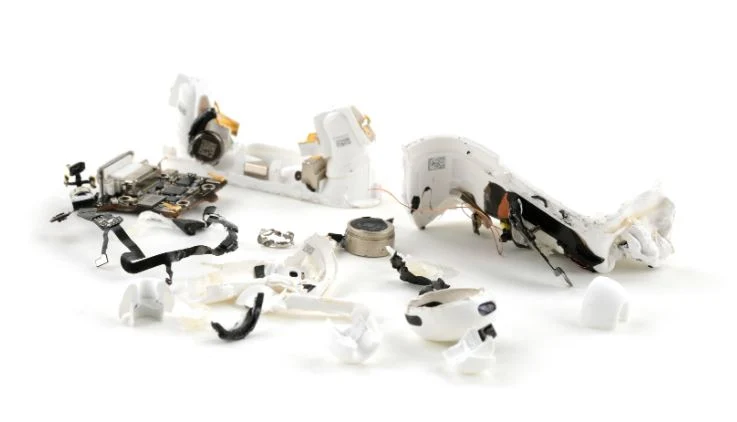
    This is the view of well-known repair site iFixit, which gave Apple’s new TWS earbuds a score of 0 out of 10 for repairability. The main issue is the extremely challenging process of removing and replacing the battery. During their last teardown of the AirPods Pro 3, iFixit completely destroyed the earbuds while trying to access the battery, causing major damage to the device.

    Charging Case Challenges

    The charging case didn’t perform any better, facing a similar fate that made it irreparable. The main reason for the difficulty in replacing the battery is Apple’s method of securing the batteries in both the earbuds and the case with glue, which makes removal nearly impossible.

    As noted by iFixit, this trend has been consistent with Apple’s wireless earbuds. The original AirPods received a 0/10 rating as well, along with every other base model or Pro version since then. Consequently, once the batteries in the earbuds or the charging case fail, consumers are left with few options other than to throw them away and purchase a new pair.

    Not Completely Unrepairable

    It should be mentioned that while the AirPods Pro 3 are not entirely beyond repair, it’s akin to saying you’re technically never safe from a lightning strike; the repair process is so complicated that even skilled technicians risk causing permanent damage during a teardown (which is why they got the 0/10 score).

    Source:
    Link


  • iPhone 17 Pro Scratchgate: iFixit Reveals Aluminum Damage Risk

    iPhone 17 Pro Scratchgate: iFixit Reveals Aluminum Damage Risk

    Key Takeaways

    1. Scratchgate Issue: Reports of scratches, especially around the camera area of the iPhone 17 Pro, have been confirmed by iFixit through detailed examination.

    2. Material Weakness: The anodized aluminum layer is more fragile at sharp edges, leading to chipping and exposing the underlying metal when subjected to pressure.

    3. Repairability Changes: The iPhone 17 Pro features a battery secured with screws for easier replacement, but repairs are now more complicated as most require access through the display.

    4. Heat Management Improvement: A new vapor chamber has been added for better heat distribution and thermal efficiency, helping to manage the heat from the A19 Pro chip.

    5. User Recommendations: Owners should consider using a protective case, avoid contact with hard objects, and clean the phone gently to minimize the risk of scratches.


    From the time users started to use the iPhone 17 Pro, reports of scratches have emerged, particularly around the camera area. In a recent teardown, iFixit validated this concern through a microscope, revealing how the anodized aluminum layer peels off at sharp edges, exposing the shiny aluminum beneath. This issue has been labeled Scratchgate and has raised significant questions about Apple’s choices in materials and the overall design.

    Expert Analysis on the Problem

    iFixit enlisted the help of materials experts and utilized the Evident DSX2000 microscope to scrutinize the finish under pressure. They conducted tests using picks that simulate the hardness of coins or keys. On flat surfaces, the anodized finish fared better, with most scratches appearing superficial. However, at the sharp corner of the camera bump, the oxide layer suffered severe chipping. According to iFixit, “when faced with a pick similar to a penny, the iPhone 17 Pro’s anodized coating chips away, exposing the shiny aluminum underneath.”

    Understanding the Weakness

    To gain a clearer picture of the issue, iFixit spoke with materials scientist David Niebuhr. He indicated that the anodized layer is more fragile around sharp transitions. He noted that thickening the oxide layer wouldn’t solve the problem, as it would lead to more flaking and loss of the underlying material. As Niebuhr stated, “Apple could have avoided this by designing a smoother curve and steering clear of sharp corners.”

    Changes in Repairability

    The teardown also disclosed various modifications concerning repairability. For the first time, the iPhone’s battery is housed in a tray secured by fourteen Torx Plus screws. iFixit mentioned this as a positive change since it eliminates the messy adhesive removal usually required during battery swaps. However, Apple has removed the dual-entry repair layout. The back panel now solely allows access to the wireless charging components, while most repairs need to be done through the display, which heightens the risk of damage during servicing.

    In addition, Apple has integrated a vapor chamber for heat management in the iPhone 17 Pro. This chamber helps distribute heat via a copper lattice and enhances thermal efficiency compared to previous models. CT scans from iFixit demonstrated its placement between the battery and the logic board, effectively directing heat away from the A19 Pro chip. So far, Apple has not publicly addressed the Scratchgate issue or announced any measures to assist affected users.

    Recommendations for Users

    If you currently own or are thinking about purchasing an iPhone 17 Pro, it would be wise to use a case that shields the camera plateau, as this is the best method to minimize scratches. Refrain from tossing the phone into pockets with coins or keys, clean it gently with a soft cloth, and document any scratches right away if they show up. Although Scratchgate does not impact the phone’s performance, at this price point, any cosmetic damage can be quite frustrating for owners.

    Source:
    Link


  • iPhone Air Teardown Reveals Details of MagSafe Power Bank

    iPhone Air Teardown Reveals Details of MagSafe Power Bank

    Key Takeaways

    1. The iPhone Air has a 3,149mAh battery, slightly smaller than the iPhone 15 Pro’s 3,274mAh battery.
    2. Early reviews indicate decent battery life, but heavy users may need additional power support.
    3. Apple offers a MagSafe battery for $99, claiming to increase the iPhone Air’s battery life by 65%.
    4. The MagSafe battery is thicker than the iPhone Air and makes the combined thickness 48% greater than a Samsung Galaxy Z Fold 7.
    5. The MagSafe battery uses the same 12.26Wh battery as the iPhone Air, but energy loss limits its charging capability to 65%.


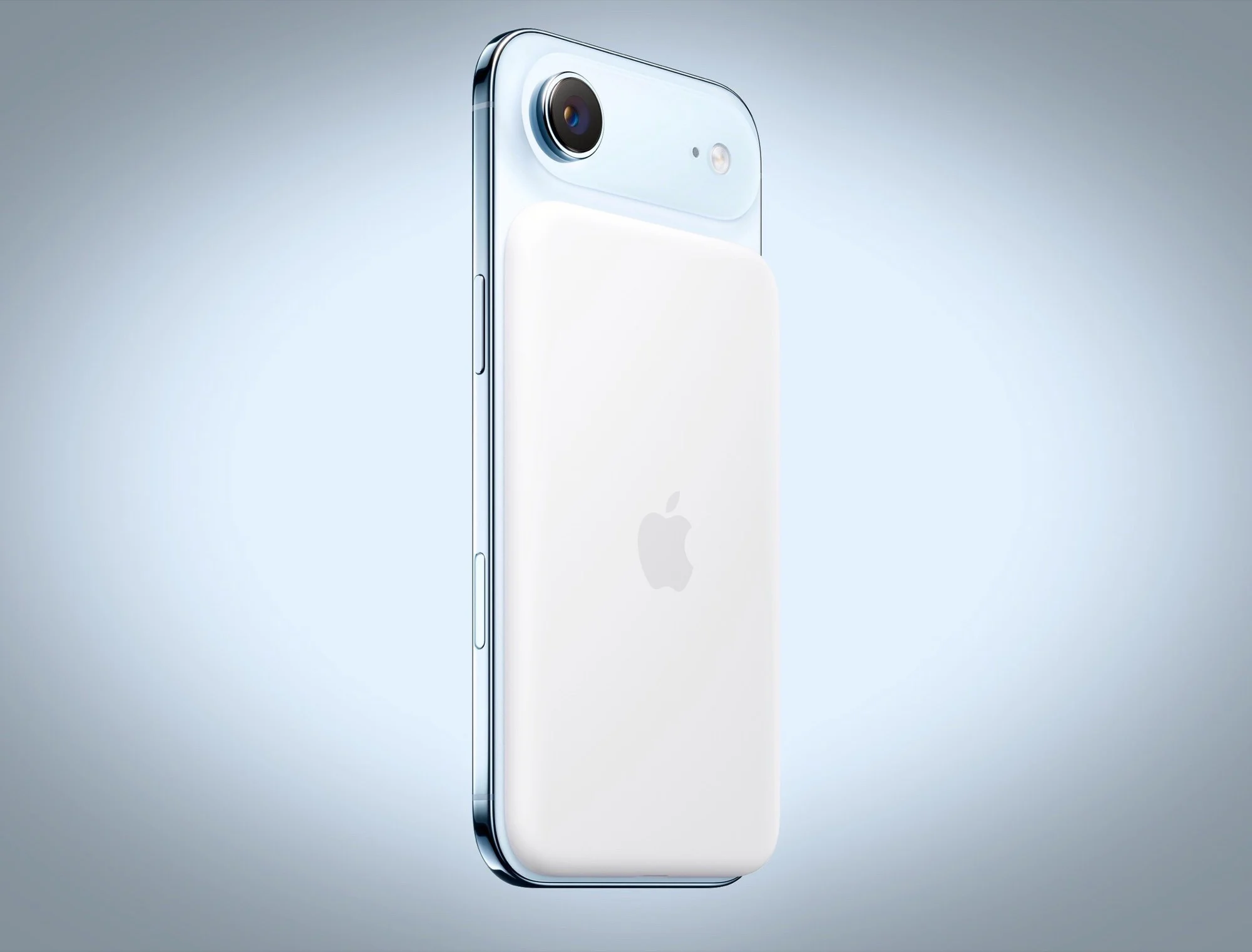
    The iPhone Air has a battery with a capacity of only 3,149mAh. While this amount is lower than most other smartphones on the market, it’s just slightly less than the iPhone 15 Pro’s 3,274mAh battery. Early reviews suggest that the slim smartphone offers reasonably good battery life, but users who rely heavily on their phones may struggle to make it through the day. For those users, Apple sells an iPhone Air MagSafe battery priced at $99, which claims to boost the phone’s battery life by 65%.

    Disassembly Insights

    iFixit has recently taken apart this pricey magnetic power bank, and the video linked below reveals that the MagSafe battery, measuring about 0.3 inches in height, is actually thicker than the iPhone Air. When paired with the smartphone, the total thickness hits 0.52 inches, making the combined device 48% thicker than a Samsung Galaxy Z Fold 7. To access the power bank, the glued back cover must be ripped off, complicating the repair process significantly. The battery itself is secured in the housing with the same adhesive used in the iPhone, allowing it to be released through voltage application.

    Battery Specs Surprises

    Interestingly, Apple has used the same 12.26Wh battery in the power bank as in the iPhone Air. This could simplify the process for obtaining replacement parts. However, the reason the power bank can only charge the iPhone Air up to 65% is due to energy loss during wireless charging. Notably, the power bank is nearly three times thicker than the 0.11-inch battery, as the plastic casing would not be sturdy enough if it were any thinner.

    Source:
    Link


  • Google Pixel 10 Teardown Reveals Major Repair Enhancements

    Google Pixel 10 Teardown Reveals Major Repair Enhancements

    Key Takeaways

    1. The Google Pixel 10 has reduced camera quality compared to the Pixel 9 but improved repairability.
    2. The back cover can be removed easily without heat or special tools, allowing for straightforward access to internal parts.
    3. The battery is simpler to replace, requiring only a few screws and cables to be detached.
    4. Key components like the speaker and USB-C port are individually replaceable, but the three rear cameras are a single module.
    5. The Pixel 10 has a repairability rating of 6 out of 10, highlighting its easier maintenance despite some challenges with the display.


    The Google Pixel 10 may have seen significant reductions in camera quality when compared to its predecessor, the Pixel 9, but it has certainly compensated for this with various enhancements in repairability. The teardown video from iFixit, which is included below, reveals that getting the back cover off the Pixel 10 to access its internal parts is quite straightforward.

    Easy Access to Components

    Although the back cover is typically glued to the body, the adhesive can be taken off without needing heat or special tools. Once the adhesive is loosened, only a single cable has to be disconnected, allowing for the back cover and Qi charging coil to be swapped out easily. Also, there’s good news regarding the battery, which is now simpler to replace than it was in previous models. Just by taking out a few screws and detaching two more cables, you can extract the battery using a large, green tab. The battery does have glue holding it in, but the adhesive is less strong compared to what is found in many other smartphones.

    Replaceable Parts

    Additionally, parts like the speaker, USB-C port, and mmWave antenna can be replaced one by one. However, the three rear cameras come as a single module, meaning if one camera fails, you’ll likely have to change the whole module. Changing the display remains a challenge because the screen is firmly attached to the frame with tough adhesive, increasing the risk of causing damage when trying to take it off. According to iFixit, the Google Pixel 10 scores a repairability rating of 6 out of 10.

    Final Thoughts

    Overall, while there are some setbacks with the camera, the improvements in repairability could be a strong point for users looking to maintain their devices longer. The video from iFixit provides useful insights for those interested in DIY repairs.

    Source:
    Link