Tag: iFixit

  • Samsung Galaxy Z Fold 7 Reparability: Current Assessment Guide

    Samsung Galaxy Z Fold 7 Reparability: Current Assessment Guide

    Key Takeaways

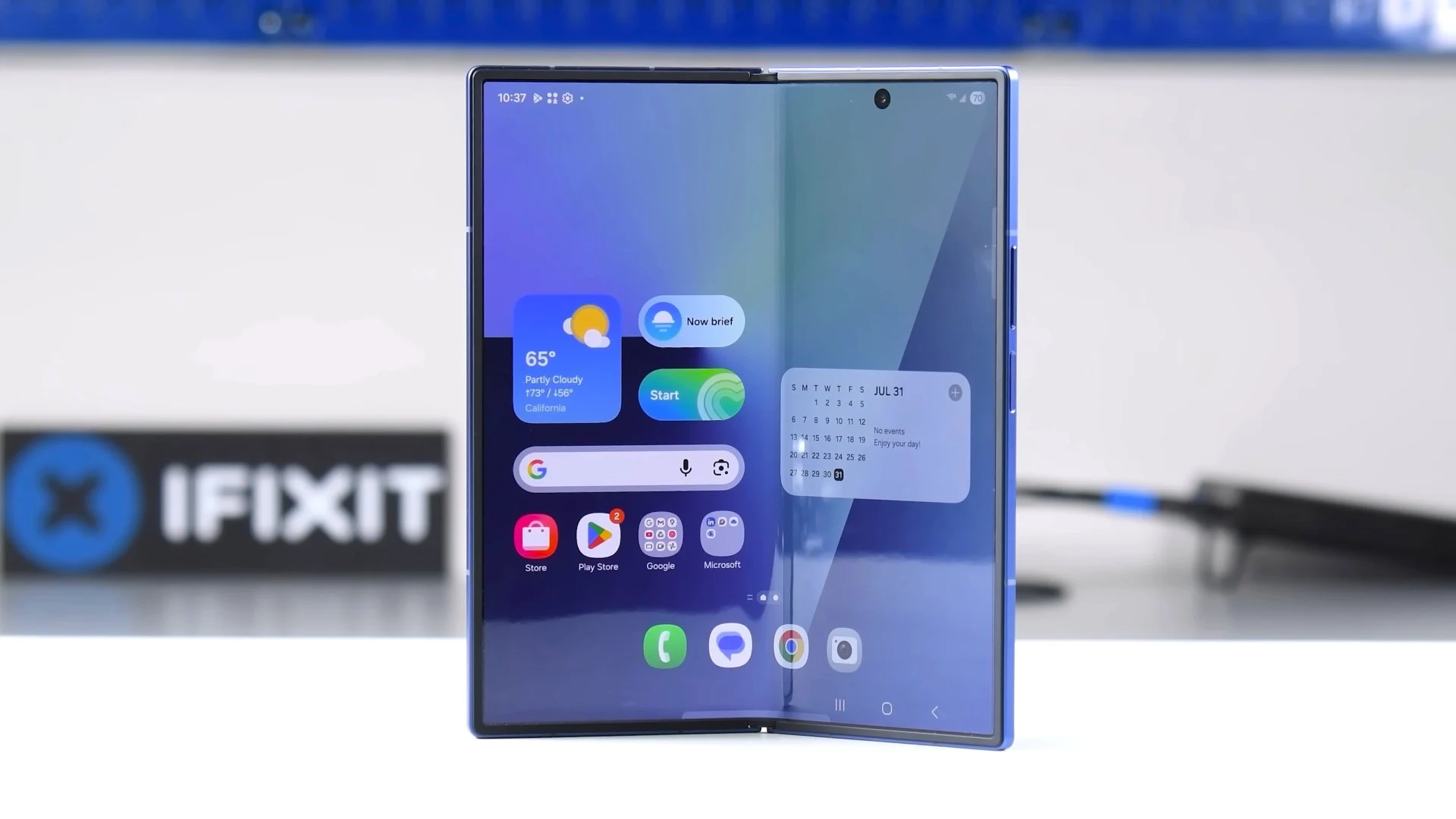
    1. Design and Display: The Galaxy Z Fold7 features a foldable 8-inch OLED display with a resolution of 2160 x 2480 pixels and a 120 Hz refresh rate, along with a 6.5-inch cover display.

    2. Performance: It is powered by a Snapdragon 8 Elite processor, with options for up to 16 GB of RAM and 1 TB of storage, ensuring strong performance.

    3. Camera System: The device has a triple camera setup including a 200 MP main sensor, capable of recording 8K video, and two 12 MP front cameras for UHD video.

    4. Repairability Issues: The Galaxy Z Fold7 has low repairability, scoring only 3 out of 10 on iFixit, with challenging battery removal and no available spare parts in the USA.

    5. Software and Updates: It runs on Android 16 with One UI 8.0 and promises seven years of software updates, enhancing longevity for users.


    The Samsung Galaxy Z Fold7 measures 4.2 mm in thickness when open and 8.9 mm when closed. It has an IP48 rating, making it resistant to dust and water. The front is made of Gorilla Glass Ceramic 2, while the back uses Victus 2. The device features a foldable 8-inch OLED display with a resolution of 2160 x 2480 pixels and a refresh rate of 120 Hz. Its 6.5-inch cover display is slightly bigger than the previous model. The Snapdragon 8 Elite processor ensures strong performance, accompanied by up to 16 GB of RAM and 1 TB of storage. It includes UWB, DeX, USB 3.2, and Wi-Fi 7, but support for the S-Pen has been dropped. The triple camera setup consists of a 200 MP main sensor (23 mm), a 12 MP ultra-wide lens, and a 10 MP telephoto lens with 3x zoom, capable of recording videos at 8K/30 fps and HDR in UHD. The two front cameras, both 12 MP (23 mm and 17 mm), can shoot in UHD at 60 fps. A linear vibration motor enhances feedback, while biometric security includes a fingerprint sensor in the power button and face recognition. The software runs on Android 16 with One UI 8.0, promising seven years of updates.

    Repairability Concerns

    iFixit reports that the repairability of the Galaxy Z Fold7 (buy here on Amazon) is notably low. Battery removal is challenging due to malfunctioning pull tabs, forcing professionals to use solvents. The process of taking off the cover display is also complex, as the adhesive is very hard to remove, even with heat. Changing the flexible AMOLED inner display is especially tricky; it requires the difficult removal of the plastic bezel, which risks damaging the delicate panel. iFixit points out that there are no repair manuals or spare parts available, not even for the older model. This led to a low score of 3 out of 10 for repairability, which is quite disappointing.

    Availability of Parts

    While iFixit’s concerns are not completely off base regarding the repair difficulty, it’s worth noting that Samsung does offer a repair manual for the Galaxy Z Fold7 for download. Additionally, many replacement parts have been listed by Samsung, although they are currently unavailable or not yet priced, particularly in the EU and UK. These parts typically become available a bit later. As of now, spare parts have not been released in the USA, but technically skilled users may be able to fix a malfunctioning Fold7 on their own.


  • Samsung Galaxy Z Fold 7 Repairability Rating by iFixit Teardown

    Samsung Galaxy Z Fold 7 Repairability Rating by iFixit Teardown

    Key Takeaways

    1. Samsung’s Galaxy Z Fold7 has tougher battery removal compared to previous models like the Galaxy S25 Ultra.
    2. Repairing the foldable device presents multiple challenges, including difficult cover display removal due to strong glue.
    3. Changing the flexible AMOLED screen is complicated and risky, with a high chance of damaging the display.
    4. The Galaxy Z Fold7 received a low repairability score of 3 out of 10, indicating poor design for repairs.
    5. The device lacks repair manuals and replacement parts, contributing to high official repair costs.


    Samsung’s past performance has been better than what we see now. According to iFixit’s teardown, taking out the batteries from the Galaxy Z Fold7 is a lot tougher than what we usually expect from this South Korean brand. It was pretty simple with the Galaxy S25 Ultra, but with the new foldable, repair experts had to use solvents since the pull tabs just don’t work as they should.

    Difficult Repairs Ahead

    This issue is just one of many complaints about Samsung’s much thinner and nearly record-setting Galaxy foldable. Taking off the cover display is also very hard because the glue used is tough to loosen, even when applying heat. An even bigger challenge comes with changing the flexible AMOLED screen inside. The plastic edge has to be removed painstakingly, which is nearly impossible to do without damaging the delicate flex display, as noted by iFixit.

    Poor Repairability Score

    Additionally, the device comes with no repair manuals or replacement parts, leading to a repairability score of only 3 points out of a possible 10. This is a terrible score, especially considering Samsung’s extremely high official repair costs.

    Source:
    Link


  • iFixit Critiques Nintendo Switch 2 Pro Controller Repairability

    iFixit Critiques Nintendo Switch 2 Pro Controller Repairability

    Key Takeaways

    1. Nintendo will not raise the price of the Switch 2, but accessories, including the Pro Controller, have seen price increases.
    2. iFixit’s teardown highlights concerns about the Pro Controller’s durability and repairability due to adhesive and difficult-to-access screws.
    3. The Pro Controller lacks Hall effect analog sticks, relying on potentiometers, which raises concerns about potential stick drift issues.
    4. Feedback on the controller’s performance is generally positive, but iFixit criticizes its high price compared to more affordable alternatives with better features.
    5. Nintendo’s repair policy remains accommodating, offering services for stick drift issues and indicating potential free repairs for new accessories beyond warranty periods.


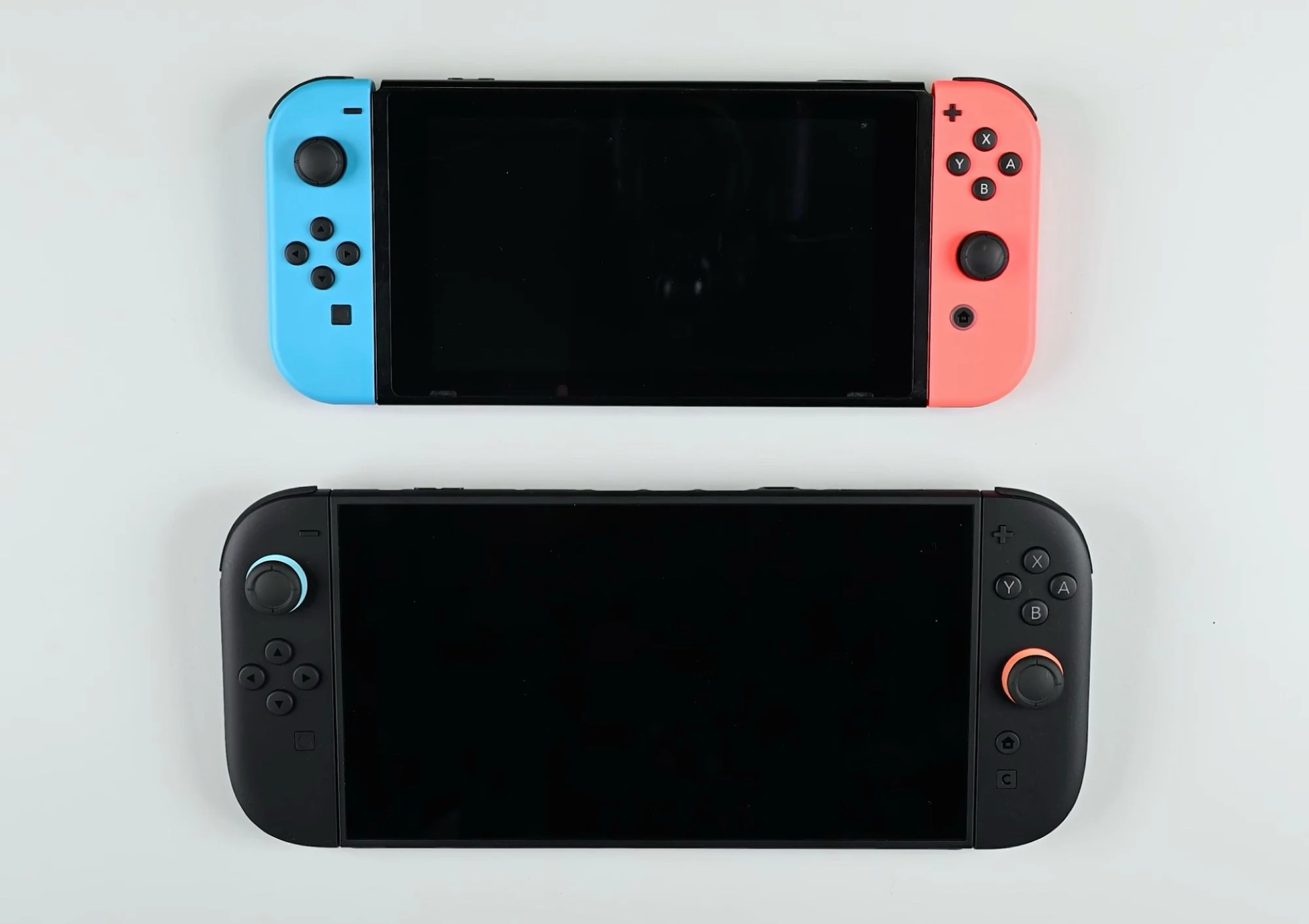
    Nintendo decided against raising the price of the Switch 2, but several accessories faced price hikes. An examination by iFixit of the new Pro Controller sought to determine if its build quality justifies the $84.99 sticker price. While the focus of the site is on how easy it is to repair, they also expressed worries about the durability of the device. One of the main points of criticism was the choice to not include Hall effect analog sticks in the Switch 2 Pro Controller.

    Teardown Insights

    iFixit began their teardown by taking off the outer casing of the new Switch 2 controller. The adhesive used by Nintendo around the faceplate might weaken after putting it back together. Additionally, some internal parts are secured with small screws that are not easy to access. The site specifically pointed out the challenge in reaching the rechargeable lithium battery, which is a part that is often replaced.

    Durability Concerns

    A frequent issue with the original Pro Controller and Joy-Cons was the problem of analog stick drift. As time passed, mechanical components would degrade, leading to incorrect directional inputs. Many gamers hoped that Nintendo would use Hall effect sensors for the upcoming controllers. However, it became clear that the Switch 2 Pro Controller still relies on potentiometers. While these parts are a bit simpler to detach, iFixit raises doubts about whether this will lead to less stick drift.

    Performance Reviews

    Overall, feedback about the controller’s performance has been mostly favorable. Nevertheless, iFixit criticizes Nintendo for the high price of the accessory. Their teardown revealed that a more affordable wireless Switch 2 controller equipped with Hall effect sensors is available. Though it doesn’t have features like a C button, the $29.99 8BitDo Ultimate 2C is compatible with the new handheld.

    For consumers, one silver lining is that Nintendo has been quite accommodating with its repair policy. In various areas, they have serviced the original Joy-Cons and Pro Controller that had issues with stick drift. There are signs that free repairs beyond the warranty period will also apply to the new accessories.

    Repairability Challenges

    The Switch 2 Pro Controller isn’t the only Nintendo item that could put a strain on repair shops. iFixit had previously examined the Switch 2 console, noting how challenging the repairs could be.

    Source:
    Link

  • Fairphone 6 Teardown Reveals Easy Display, Battery, USB-C Replacement

    Fairphone 6 Teardown Reveals Easy Display, Battery, USB-C Replacement

    Key Takeaways

    1. The Fairphone 6 continues the trend of easy repair, featuring T5 Torx screws for simple disassembly.
    2. Battery replacement is quick and adhesive-free, allowing for damage-free changes in minutes.
    3. Display replacement requires removing the upper half of the back and eight screws, also adhesive-free.
    4. Most components, including cameras and speakers, are designed for easy modular replacement.
    5. The Fairphone 6 received a perfect repair score of 10/10 from iFixit, with an eight-year update guarantee and a wide range of affordable spare parts available.


    The Fairphone 5 was known for its ease of repair, and the Fairphone 6 keeps that trend going. The teardown video from iFixit below demonstrates how simple or challenging it is to fix this mid-range phone. This is great news for users who prefer to do repairs on their Fairphone 6 by themselves: the device is held together with T5 Torx screws, and you can take off the back after removing just two of them.

    Battery Replacement Made Simple

    The phone has a 4,415 mAh battery secured by four screws, and there’s no adhesive used at all, allowing for a quick and damage-free replacement in just a few minutes. To change the display, you only need to take off the upper half of the back and unscrew a total of eight screws. The 6.31-inch LTPO OLED display is also free from adhesive, making it far easier to swap out compared to many other smartphones. Even parts like the USB-C port, the two rear cameras, the selfie camera, and the speakers can be replaced easily and modularly.

    Ease of Repair

    The only components that take a bit more time to replace are the lock button and volume buttons, as they require the motherboard to be taken out first. However, the Fairphone 6 achieves a flawless repair score of 10 out of 10 from iFixit, which is partly due to its eight-year update guarantee and the extensive selection of spare parts available in the Fairphone online store. Customers will find new batteries, displays, speakers, USB-C ports, and other parts available at reasonable prices in the future.

    Source:
    Link

  • Framework Laptop 12 Teardown: Easy Repair Guide and Insights

    Framework Laptop 12 Teardown: Easy Repair Guide and Insights

    Key Takeaways

    1. Affordable Pricing: The Framework Laptop 12 starts at a base price of $549, making it a budget-friendly option, especially for students.

    2. Convertible Design: It features a 360-degree hinge and a touchscreen, allowing it to function as a convertible device.

    3. Easy Repairs: The laptop is designed for easy repairs, with tools not required for replacing ports and easy access to internal components.

    4. Smart Internal Connections: The motherboard and keyboard connect via pogo pins, reducing the risk of damage during repairs, and internal components have QR codes linking to repair guides.

    5. User-Friendly Upgrades: Users can easily replace key components like the battery, RAM, and SSD, and the lack of adhesive on the display simplifies future replacements.


    The Framework Laptop 12 comes at a much lower price compared to the Framework Laptop 13, with the base price starting from $549. While the entry-level model packs an Intel Core i3-1315U, which is not very high-powered, it’s still a great choice for students. This laptop features a 360-degree hinge and a touchscreen, making it usable as a convertible device. Plus, all its parts can be swapped out with relative ease.

    Easy to Repair

    A teardown video by iFixit (linked below) illustrates how simple it is to fix the Framework Laptop 12. True to the design of Framework laptops, the four ports can be replaced without needing any tools, enabling upgrades to include HDMI, Ethernet, or even an SD card reader. Accessing the inner parts of the laptop is straightforward since both the keyboard and trackpad can be detached easily without tools.

    Smart Design Choices

    One smart design feature is that the motherboard and keyboard connect through pogo pins rather than a flex cable, which could be damaged during replacement. The trackpad can be changed independently from the keyboard by just loosening a few screws. Most internal components have QR codes that link to repair guides, and replacement screws are conveniently stored inside the case.

    User-Friendly Upgrades

    In just a few steps, users can replace the battery, power button, speakers, RAM, and the small M.2 2230 SSD. Even the mainboard can be swapped out by loosening a few screws, allowing for future processor upgrades. Furthermore, Framework avoids using adhesive on the display, making it easier to replace when necessary. With all these repair-friendly features, the Framework Laptop 12 earns a perfect repair score of 10 from iFixit.

    Source:
    Link


  • Nintendo Switch 2 Gets Poor Repair Rating in iFixit Teardown

    Nintendo Switch 2 Gets Poor Repair Rating in iFixit Teardown

    Key Takeaways

    1. iFixit downgraded the repairability score of the Nintendo Switch and Nintendo Switch OLED to 4 points, and the new Nintendo Switch 2 received a score of 3 points.
    2. The Joy-Con 2s are easier to open, but the glued battery complicates replacement; the Nintendo Switch 2 uses traditional joysticks, raising questions about drift issues.
    3. Nintendo missed the chance to use TMR sticks, which could have fixed the drift problem permanently.
    4. Repairing the console is difficult due to hidden screws and tough adhesive, making battery replacement challenging.
    5. Key components like USB-C ports and the game module slot are soldered to the mainboard, and Nintendo has not provided spare parts for repairs.


    iFixit has recently downgraded the repairability score of the Nintendo Switch from 8 to 4 points. The Nintendo Switch OLED shares the same low rating of 4 points. Meanwhile, the newly announced Nintendo Switch 2 has been given a score of just 3 out of 10, as detailed in the video linked below.

    Repair Challenges

    The Joy-Con 2s are fairly simple to open, however, the tiny battery is glued into the casing, complicating the battery swap process. The original Nintendo Switch gained a bad reputation for Joy-Con drift, prompting Nintendo to provide free repairs. In contrast, the Nintendo Switch 2 incorporates traditional joysticks. It’s still unclear if drift will be a major issue like it was before, especially since both the Sony PlayStation 5 and Xbox Series X utilize similar analog stick technology, yet experience much less drift than the Switch.

    Missed Opportunities

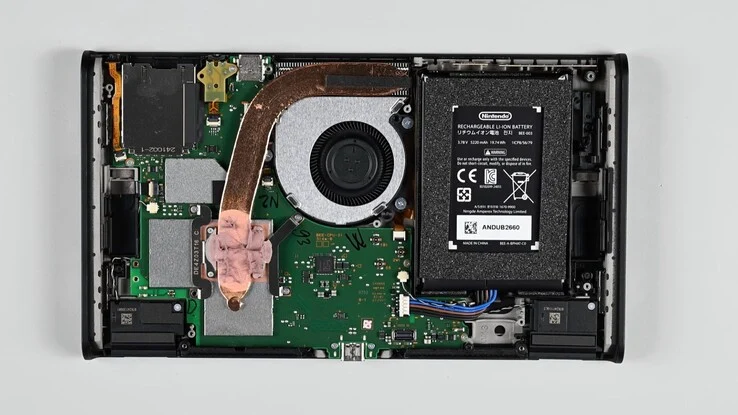
    It’s unfortunate that Nintendo opted not to implement TMR sticks, which could have permanently resolved this issue. Opening the console itself is significantly tougher than accessing the Joy-Con, as there are four screws that are hidden beneath stubborn stickers, which only become visible after removing the magnetically attached Joy-Con. Once inside the console, multiple connectors and screws must be loosened to extract the heat shield and microSD Express card reader from the main housing.

    Complicated Repair Process

    The battery replacement is possible, but it is secured to the housing with tough adhesive, making the process much harder. Additionally, both USB-C ports and the game module slot are soldered directly to the mainboard, rendering it nearly impossible for users to repair or swap them out. Compounding the issue is the fact that Nintendo still has not provided any spare parts for these devices.

    Source:
    Link


  • iFixit Ranks Original Nintendo Switch, Switch Lite, and OLED Models

    iFixit Ranks Original Nintendo Switch, Switch Lite, and OLED Models

    Key Takeaways

    1. iFixit has updated the repairability scores for the original Nintendo Switch, Switch OLED, and Switch Lite, reducing them to half of their original ratings.
    2. The Nintendo Switch’s repairability score dropped from 8 to 4, while the Switch Lite’s score decreased from 6 to 3, reflecting its shortcomings compared to newer handheld devices.
    3. Key identified flaws include the glued battery, lack of official repair guides, and absence of original replacement parts for the Switch and its variants.
    4. Newer gaming handhelds, like the Legion Go and ROG Ally, are highlighted as having better modular designs, making them easier to repair.
    5. iFixit suggests that Nintendo could improve repairability scores by providing a repair manual and original replacement parts, with the upcoming Switch 2 likely to be assessed soon.


    With only a few days remaining until the Nintendo Switch 2 launches, iFixit has updated its repairability ratings for the original Nintendo Switch, the Switch OLED, and the Switch Lite. The new scores are exactly half of what the three consoles initially received, and iFixit elaborated on this change in a recent blog entry.

    Changes in Repairability Scores

    Back in 2017, the Nintendo Switch had a repairability score of 8. However, since then, a significant amount of time has elapsed, during which many new handheld devices have been introduced. iFixit has pointed out that its criteria for scoring has also changed and improved, which has highlighted the Switch’s shortcomings more clearly.

    Identified Flaws

    Among these shortcomings are the glued battery, the absence of official repair guides, and the lack of original replacement parts. When compared to newer gaming handhelds, the Nintendo Switch and its variants lag behind. Devices like the Legion Go (currently priced at $538.78 on Amazon), ROG Ally, and Playdate feature a more modular setup, allowing for easy storage replacement and access to spare parts.

    The Nintendo Switch and Switch OLED have now received a repairability rating of 4, while the Switch Lite’s score has decreased from 6 to 3. These updated scores are believed to better represent their repairability in relation to competing handhelds.

    Possibility of Re-evaluation

    iFixit mentions that there is still potential for the Nintendo Switch to undergo another evaluation. In fact, it could potentially gain two additional points if Nintendo were to issue a repair manual and provide original replacement parts.

    Nintendo has the opportunity to demonstrate improvements with the upcoming Switch 2. iFixit has already indicated that the new console will be assessed very soon, making it interesting to see what advances Nintendo has made regarding repairability.

    Source:
    Link

  • iFixit Teardown: Sony WH-1000XM6 Easy Repair Insights

    iFixit Teardown: Sony WH-1000XM6 Easy Repair Insights

    Key Takeaways

    1. The Sony WH-1000XM6 headphones feature a new metal hinge for improved sturdiness compared to the previous model.
    2. Ear pads are secured with clips, allowing for easy removal without tools.
    3. Accessing the internal components requires only five screws and one plug disconnection.
    4. The battery can be replaced easily with just two screws, avoiding the use of glue.
    5. Sony does not sell spare parts, so users may need to source replacements from another set of WH-1000XM6 headphones.


    The Sony WH-1000XM6 headphones are claimed to be much sturdier than the previous model. This is mainly due to a new metal hinge replacing the often faulty one in the last version. However, even the toughest Bluetooth headphones will eventually need a battery replacement, which can be quite tricky for many models.

    Easy Repairs Inside

    Recently, iFixit managed to take apart these over-ear headphones and discovered several unexpected improvements that simplify repairs. Instead of magnets, the ear pads are secured with clips, making them easy to remove without any tools. To get inside each ear cup, one only needs to unscrew five screws and disconnect one plug. The driver can then be taken out of its housing by simply unplugging the cable, allowing for a quick replacement in just a few minutes.

    Convenient Battery Access

    Even more interesting is that the 3.99 Wh battery in the right ear cup is fixed to the housing with merely two screws, rather than glue. This design not only makes battery removal easier but also allows for simple reattachment without needing to apply glue again. Additionally, components like the mainboard, the 3.5 mm headphone jack, and the USB-C port can all be replaced with ease. Unfortunately, Sony does not provide spare parts for sale, leaving users with the option of using parts from another set of WH-1000XM6 headphones.

    Source:
    Link

  • Sony WH-1000XM6 Review: Improved Repairability Over WH-1000XM5

    Sony WH-1000XM6 Review: Improved Repairability Over WH-1000XM5

    Key Takeaways

    1. The Sony WH-1000XM6 features 12 microphones, enhancing noise-cancelling capabilities but maintains the same battery life as the WH-1000XM5 at 30 hours.
    2. The battery size has been reduced by 12.5%, from 4.56 Wh in the XM5 to 3.99 Wh in the XM6.
    3. The design improvements include replacing adhesive tape with screws for better assembly and easier access to high-wear components.
    4. The WH-1000XM6 is more repairable than its predecessor, but users cannot currently replace internal components due to the lack of available spare parts.
    5. Sony has not released a repair manual or replacement parts for the WH-1000XM6 or its predecessor, the WH-1000XM5.


    The Sony WH-1000XM6 (currently priced at $448 on Amazon) has been available for a few weeks now, having made its official entrance on May 15. This gave iFixit the chance to examine Sony’s newest over-ear wireless headphones and uncover their inner workings.

    Microphone and Noise Cancelling Features

    As anticipated, Sony has added four more microphones, bringing the total to twelve in the WH-1000XM6. While the company has enhanced noise-cancelling capabilities from previous models, the same cannot be said for battery life. Officially, the WH-1000XM6 is rated for 30 hours of use, which is the same as the WH-1000XM5, even though it features the new Processor QN3 technology. The reason for this seems to be that Sony has opted for a battery that is 12.5% smaller, decreasing from 4.56 Wh in the XM5 to 3.99 Wh in the XM6.

    Improvements in Design

    On the bright side, there are some commendable hardware upgrades between the two versions. For instance, Sony has swapped out the adhesive tape that secured the battery in the XM5s for two screws and a compact housing. Moreover, only five screws are used for each ear cup, which are also held in place by clips. Additionally, high-wear parts such as the 3.5 mm jack and USB Type-C cable are placed on modular boards, making them easier to access.

    Repairability Concerns

    In summary, the WH-1000XM6 is designed to be more repairable compared to its predecessor. However, users currently cannot replace any components inside these latest headphones if they happen to fail or break. At this time, Sony has not released a repair manual or begun selling replacement parts. To make matters worse, the WH-1000XM5 never saw the release of spare parts, even though a repair manual was listed by Sony. For more details, check out the video from iFixit below and our launch article on the WH-1000XM6.

    Source:
    Link

  • M4 MacBook Air Teardown by iFixIt: Complete Repair Guide

    M4 MacBook Air Teardown by iFixIt: Complete Repair Guide

    Key Takeaways

    1. The M4 MacBook Air closely resembles its predecessors, the M3 and M2 models, in design.
    2. iFixIt awarded the M4 MacBook Air a repairability score of 5 out of 10, indicating moderate ease of repair.
    3. Key repair-friendly features include an accessible battery and replaceable ports, but the fused keyboard poses a challenge.
    4. The System Configuration tool is necessary for proper display functionality, limiting repairs to certified technicians or Apple’s Self Service Repair.
    5. While the laptop is generally easy to repair for common issues, Apple’s replacement part policies complicate right-to-repair efforts.


    The M4 MacBook Air has undergone a teardown, revealing it closely resembles its predecessors.

    A recent teardown video and report from iFixIt illustrates that Apple has not deviated from its usual design choices with the latest model. The M4 MacBook Air, currently priced at $999 on Amazon, was fully taken apart by iFixIt and appears nearly identical to the M3 MacBook Air, which itself mirrored the M2 MacBook Air’s design.

    Repairability Score

    iFixIt awarded the laptop a repairability score of 5 out of 10. Notable features include the presence of a repair manual, a battery that is easy to access (along with its connector), and ports that can be disconnected and replaced without much hassle. On the downside, the M4 Air has a keyboard that is fused, making it tough, if not impossible, to change. The Touch ID sensor is also a pain to reach, and there’s a major issue affecting screen replacements.

    System Configuration Tool

    The main obstacle is Apple’s System Configuration tool, which is required for the laptop to recognize a new display and activate its full features. In short, if a display is not installed by an Apple Certified Repair Technician or through Apple’s Self Service Repair program, the laptop will turn off some display capabilities like True Tone.

    Overall, the MacBook Air is relatively easy to repair, especially concerning components that typically wear out over time, such as the battery and ports. Nevertheless, it remains a challenge for right-to-repair advocates due to Apple’s policies on replacement parts.

    Source:
    Link