Category: Computers

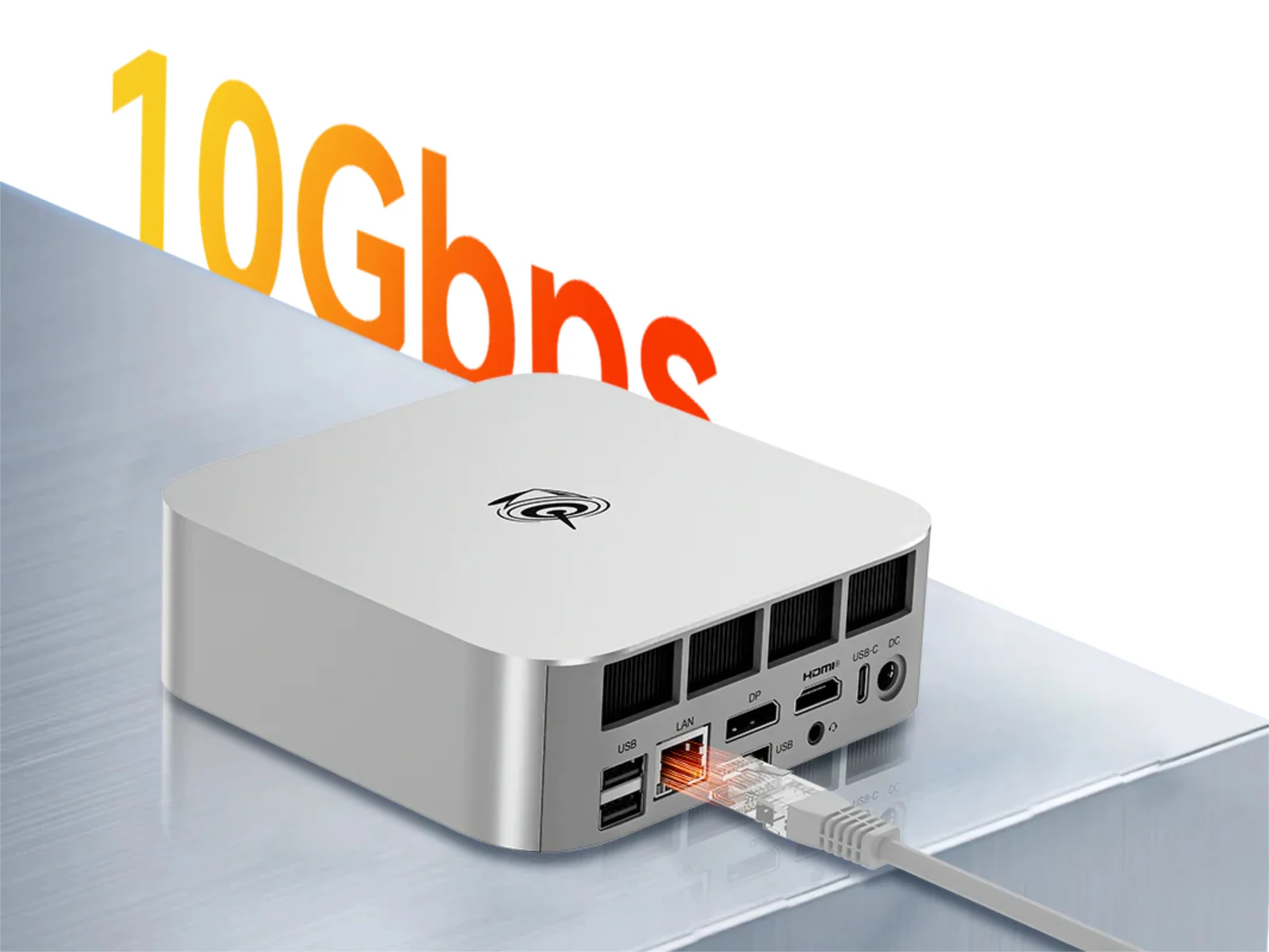
  • Beelink SER10 Pro and Max Mini-PCs: 10 Gbps Ethernet, DDR5 RAM

    Beelink SER10 Pro and Max Mini-PCs: 10 Gbps Ethernet, DDR5 RAM

    Key Takeaways

    1. Beelink is updating its SER9 mini-PC lineup with new SER10 models.
    2. The new SER10 and SER10 Max will use AMD’s Ryzen AI 9 HX 470 APU.
    3. The Ryzen AI 9 HX 470 offers slightly improved RAM support and clock speeds over the Ryzen AI 9 HX 370.
    4. Performance improvements in the new models may be minimal compared to the previous generation.
    5. Pricing and release dates for the SER10 models have not yet been announced.


    Beelink is set to update its SER9 mini-PC lineup. Last year, the firm released the SER9, SER9 Pro, and SER9 Max (currently $678.99 on Amazon) with options for AMD APUs, including the Ryzen 7 H 255 and the Ryzen AI 9 HX 370.

    New Models On The Horizon

    In an interesting turn of events, Beelink is gearing up to introduce two new SER10 mini-PCs based on AMD’s latest Gorgon Point architecture. Instead of launching the SER10 first, the focus will be on the SER10 and SER10 Max, which will utilize the Ryzen AI 9 HX 470 APU. The differences between the Ryzen AI 9 HX 470 and its predecessor, the Ryzen AI 9 HX 370, are minimal, mainly offering quicker RAM support and higher clock speeds for both CPU and GPU.

    Performance Expectations

    As a result, these new models might only show slight improvements compared to the older Ryzen AI 9 HX 370-based mini-PCs. Unfortunately, Beelink has yet to disclose any information regarding pricing or when these devices will be available. For now, they have simply hinted that both models are expected to be released soon. Beelink plans to differentiate the SER10 Pro and SER10 Max in a few specific aspects.

    Source:
    Link


  • Dell’s €1,500 Laptops Need Better Screens, Not Cheap Options

    Dell’s €1,500 Laptops Need Better Screens, Not Cheap Options

    Key Takeaways

    1. The Dell Pro 14 Plus offers impressive display options, including WQXGA and Low Power WUXGA displays with good brightness and color coverage.
    2. The review model tested had a basic WUXGA IPS screen with poor brightness (below 300 cd/m²) and only 56% sRGB color coverage.
    3. This limited display quality makes the laptop unsuitable for color-sensitive tasks, ranking it poorly among 14-inch business laptops.
    4. Better display options are not easily available and require customization directly from Dell, which can be expensive.
    5. Manufacturers should ensure better display options are accessible, especially for laptops priced around €1,500.


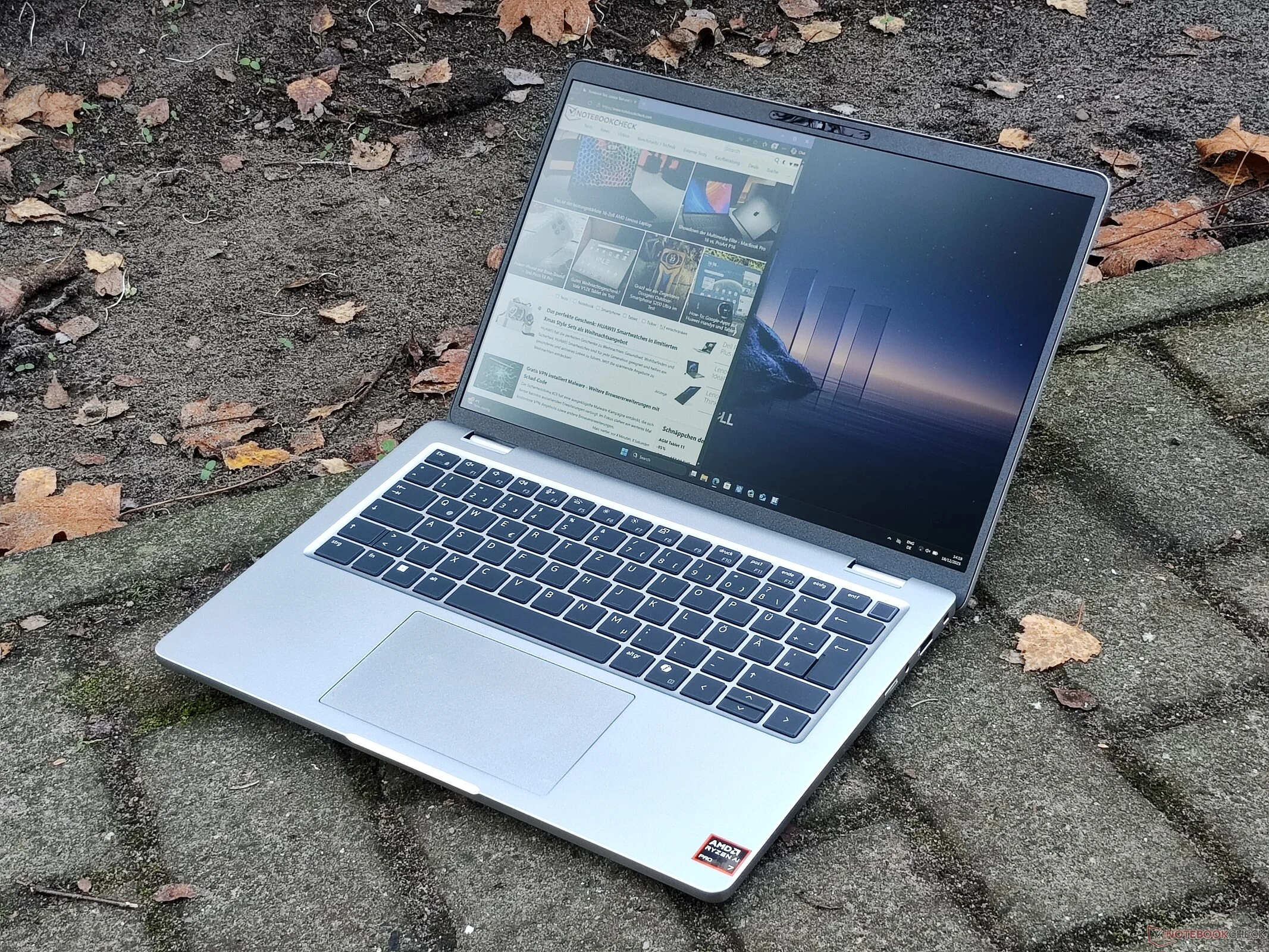
    The Dell Pro 14 Plus offers some impressive display options. Among them is a WQXGA (2,560 x 1,600) IPS display with a refresh rate of 90 Hz, alongside a Low Power WUXGA (1,920 x 1,200) display. Both of these screens have a brightness of 400 cd/m² and cover the small sRGB color space, making them suitable for simple photo editing tasks.

    Disappointing Display in Review Model

    However, there is a significant issue: the Dell Pro 14 Plus PB14255 that we recently assessed does not come with either of those preferred screens. Instead, our review unit was equipped with the most basic display available, a WUXGA IPS screen that only reaches 300 cd/m² in brightness.

    In our evaluation, the screen failed to hit the 300 cd/m² threshold, and even more concerning was the limited color coverage. With only 56 percent of the sRGB gamut, the colors appeared dull and inaccurate, rendering the display unsuitable for any color-sensitive work. Among all the 14-inch business laptops we compared, the Dell Pro 14 Plus stood out for having the poorest display quality.

    Limited Options for Better Screens

    One might wonder why we opted to test this particular model instead of one with a superior screen. The reason is that such models are not readily available. In Germany, the only way to obtain the Dell Pro 14 Plus with a better display is to customize it directly from Dell, which can be quite costly. If you’re purchasing from a typical retailer, like we do, even the highest-spec version of the Dell Pro 14 Plus PB14255 (available on dell.com) priced at around €1,500 still features the most basic screen.

    Manufacturers should ensure that better display options are accessible. Offering a basic, lower-cost screen is acceptable, but it should not be the standard for a laptop priced at €1,500.

  • Dell Pro Laptops Skip Concept Luna: Soldered Memory Persists

    Dell Pro Laptops Skip Concept Luna: Soldered Memory Persists

    Key Takeaways

    1. Dell’s “Concept Luna” aimed to create modular, easily repairable laptops, but full implementation is lacking after five years.
    2. The Dell Pro 14 Plus uses recycled materials and plastic-free packaging, aligning with sustainability goals but lacks modularity.
    3. Key components like the Wi-Fi card and RAM are soldered to the motherboard, limiting repair options.
    4. The keyboard design is bottom-loaded and fused into the palm rest, making replacement difficult, unlike competitors like Lenovo.
    5. Dell still has significant work to do to realize the full potential of Concept Luna in their laptop designs.


    Back in 2021, Dell introduced a new concept called “Concept Luna.” This idea represented a completely different way of creating laptops compared to their existing models, such as the Dell XPS. The aim was to make laptops easier to repair through a modular design.

    Lack of Full Implementation

    Fast forward five years, and it appears that Dell hasn’t fully adopted the principles of this concept. The recently reviewed Dell Pro 14 Plus is a prime example of this issue. Although this Dell laptop with AMD Ryzen processors does use recycled materials and comes in plastic-free packaging, which aligns with the sustainability goals of Concept Luna, it falls short on modularity.

    Repairability Concerns

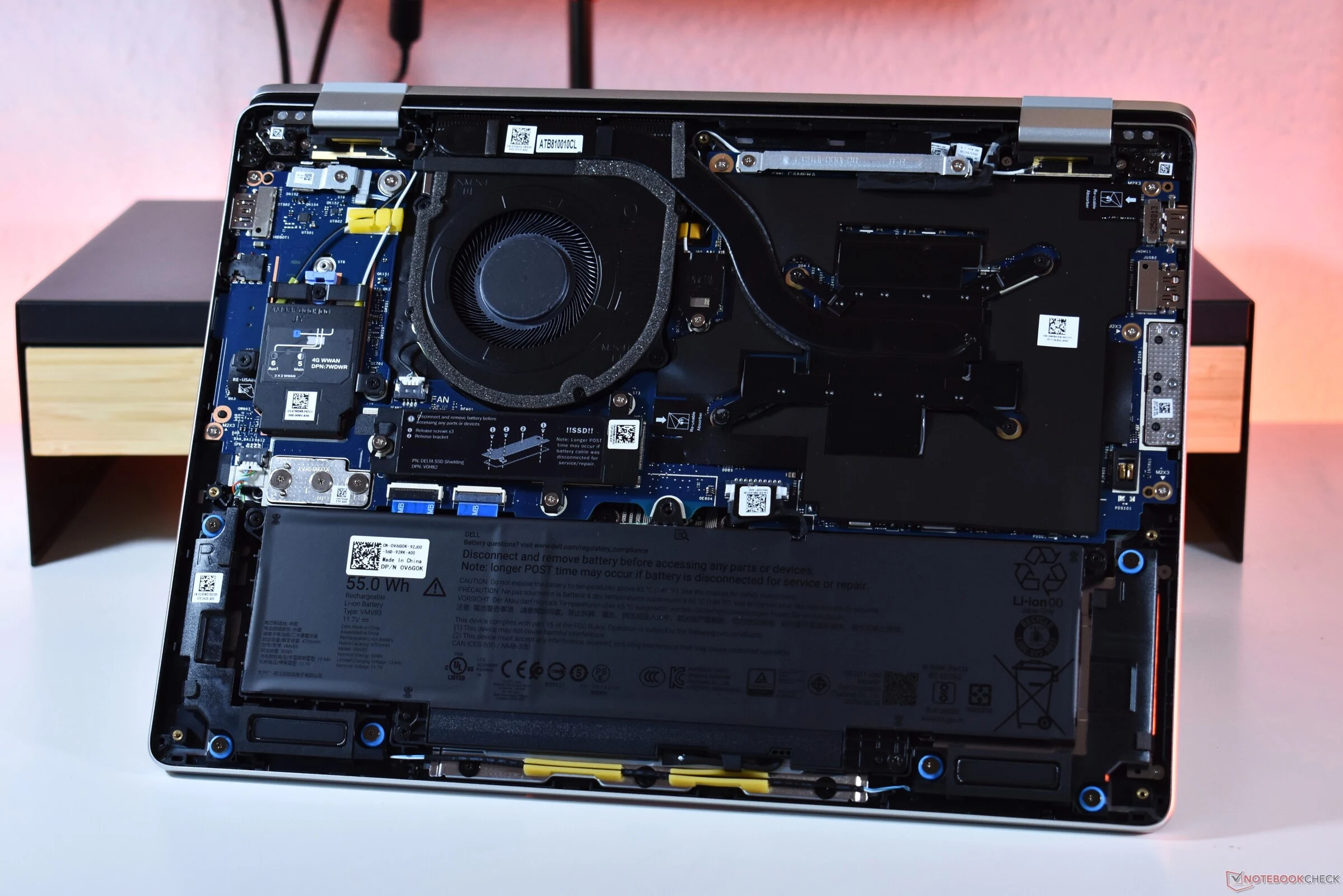
    One major issue we found was that the Wi-Fi card is soldered onto the motherboard. This is a common practice today, but manufacturers could easily avoid this by offering M.2 solutions as an option. Other brands, like Lenovo, face the same problem with their systems.

    Another point to consider is the keyboard design. It’s bottom-loaded and fused into the palm rest, which gives a cleaner look but makes it difficult to replace. For business laptops expected to last five years or more, having a keyboard that users can easily swap out would be very useful, as keyboards tend to wear out. Competing models from Lenovo, such as the ThinkPad T14 or L14, provide this feature.

    Modular Design Missed

    Finally, the RAM in the Dell Pro 14 Plus (which you can find on Amazon) is also soldered. In contrast, competitors like Lenovo and HP offer socketed RAM with SO-DIMM slots. This makes the Dell Pro 14 Plus the least modular option among major business laptop brands.

    Concept Luna was and still is an inspiring vision, but Dell has a long way to go before fully realizing it, even after five years.

  • Why ThinkPad P16v Gen 3 Lacks Fastest Mobile Workstation Parts

    Why ThinkPad P16v Gen 3 Lacks Fastest Mobile Workstation Parts

    Key Takeaways

    1. The ThinkPad P16v Gen 3 features a Core Ultra 7 255H and Nvidia RTX PRO 2000, providing solid performance for professional software despite being lower in Lenovo’s lineup.
    2. Priced around €2,800, the RTX PRO 2000’s performance is limited due to Lenovo choosing a 60W version, resulting in about 30% lower performance compared to the consumer GeForce RTX 5060.
    3. The workstation’s cooling system is relatively weak, capping total CPU and GPU consumption at 80 Watts, which is disappointing for a 16-inch chassis.
    4. In comparison, the Lenovo Legion 7 16 gaming laptop can handle up to 145 Watts, offering significantly better performance under load.
    5. While the RTX PRO 2000 comes with certified drivers ensuring stability for professional software, its higher price may not justify the performance differences compared to consumer GPUs.


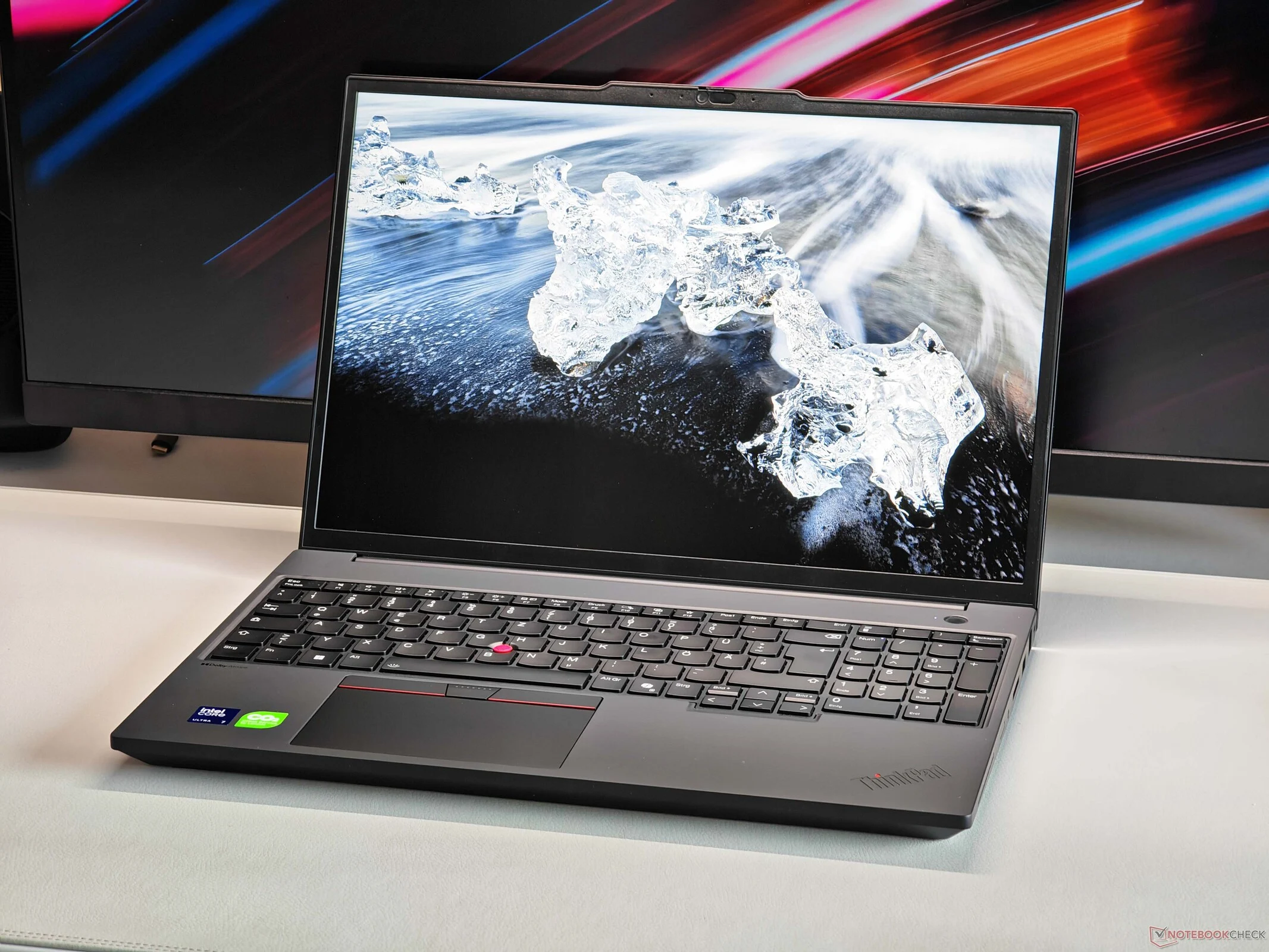
    We recently took a close look at the ThinkPad P16v Gen 3 mobile workstation, which is positioned lower than both the ThinkPad P16 and the ThinkPad P1 in Lenovo’s lineup. This positioning means we miss out on the most powerful hardware, but the combo of the Core Ultra 7 255H and the Nvidia RTX PRO 2000 (from the Blackwell Generation) still packs a punch. Notably, the professional GPU stands out because it comes with certified drivers, ensuring stability and reliability for professional software like AutoDesk, Adobe, Blender, Dassault Systems, and Siemens Digital Industries Software.

    Pricing Overview

    Our review unit of the ThinkPad P16v Gen 3 is priced at approximately €2,800, which isn’t exactly a steal, and the inclusion of the RTX PRO 2000 contributes to that cost. However, a closer look at the GPU’s performance might reveal that Lenovo has opted for the 60W version of the RTX PRO 2000, even though it has a TGP limit of 115 Watts. In our tests, we compared the RTX PRO 2000 with the 115W version of the consumer GeForce RTX 5060 (which shares the same specs), and we found that the raw performance of the consumer GPU is roughly 30% higher. This indicates that while you pay full price for the RTX PRO 2000, you don’t get the complete performance.

    Cooling Concerns

    One of the main issues here is the relatively weak cooling system. Under combined workloads, the CPU and GPU are limited to a total consumption of 80 Watts, which is disappointing given the large 16-inch chassis. For reference, the Lenovo Legion 7 16 gaming laptop, equipped with a much more powerful processor and the 115W version of the GeForce RTX 5060, can manage up to 145 Watts—almost double what the pricier ThinkPad P16v Gen 3 can handle. While we acknowledge that the Legion is noisier under load, the performance difference remains significant.

  • Chinese Firms Plan 200,000 Satellites as Beijing Criticizes SpaceX

    Chinese Firms Plan 200,000 Satellites as Beijing Criticizes SpaceX

    Key Takeaways

    1. Chinese firms plan to launch over 200,000 internet satellites into low Earth orbit, presenting their proposals to the International Telecommunication Union (ITU).
    2. Two main projects, CTC-1 and CTC-2, aim to deploy 96,714 satellites each.
    3. The applications were submitted by the newly established Institute of Radio Spectrum Utilisation and Technological Innovation in Hebei province.
    4. The move highlights the growing rivalry between the U.S. and China in the space-based internet market, with SpaceX currently leading with its Starlink network.
    5. The U.S. Federal Communications Commission (FCC) recently approved SpaceX’s expansion of its satellite fleet, emphasizing the competitive nature of orbital regulation and the importance of early applications.


    According to a report from Xinhua, Chinese firms have officially laid out their ambitions to send an astonishing number of internet satellites—over 200,000—into low Earth orbit. These plans were presented to the International Telecommunication Union (ITU), a United Nations agency, around the same time Beijing raised concerns about the congestion of space resources caused by SpaceX, led by Elon Musk.

    Project Details

    The documents reveal that around a dozen proposals were submitted by various Chinese operators at the end of last month. Most of the satellites are part of two main projects called CTC-1 and CTC-2, each designed to launch 96,714 satellites. The applications were filed by the newly established Institute of Radio Spectrum Utilisation and Technological Innovation, which was registered in Hebei province on December 30—just a day after the submissions were sent to the ITU.

    Competitive Landscape

    This significant increase in filings underscores the growing rivalry between the U.S. and China to dominate the market of space-based internet systems. At present, SpaceX has a considerable advantage with its Starlink network. The rush to file applications is driven by the nature of orbital regulation, where radio frequencies and orbital slots are limited; thus, early applicants, referred to as “first movers,” are often given priority in securing their rights.

    Recent Developments

    This decision comes shortly after the Federal Communications Commission (FCC) in the U.S. approved SpaceX’s plan to deploy an extra 7,500 second-generation satellites. These satellites must be operational by 2031, which would expand the authorized Starlink fleet to 15,000, although the company has requested permission for as many as 30,000.

    Source:
    Link


  • Affordable Cuktech 6 Mini: 3-Port 90W Fast Charger Launch

    Affordable Cuktech 6 Mini: 3-Port 90W Fast Charger Launch

    Key Takeaways

    1. Compact Design: The Cuktech 6 mini charger is 50% smaller than similar chargers with the same output, offering high power density.

    2. Maximum Power Output: It has a maximum output of 90W, capable of charging a Xiaomi 17 battery from 0% to 70% in just 30 minutes.

    3. Charging Protocols: The charger supports multiple charging protocols (FCP, PD, PPS, SCP), making it compatible with various devices, including laptops and gaming handhelds.

    4. Port Configuration: It features three ports (two USB Type-C at 90W max and one USB-A at 22.5W), allowing simultaneous charging of three devices.

    5. Affordability and Availability: Priced at CNY 109 (about $15), the Cuktech 6 mini may soon be available outside China, as the company often expands its market reach.


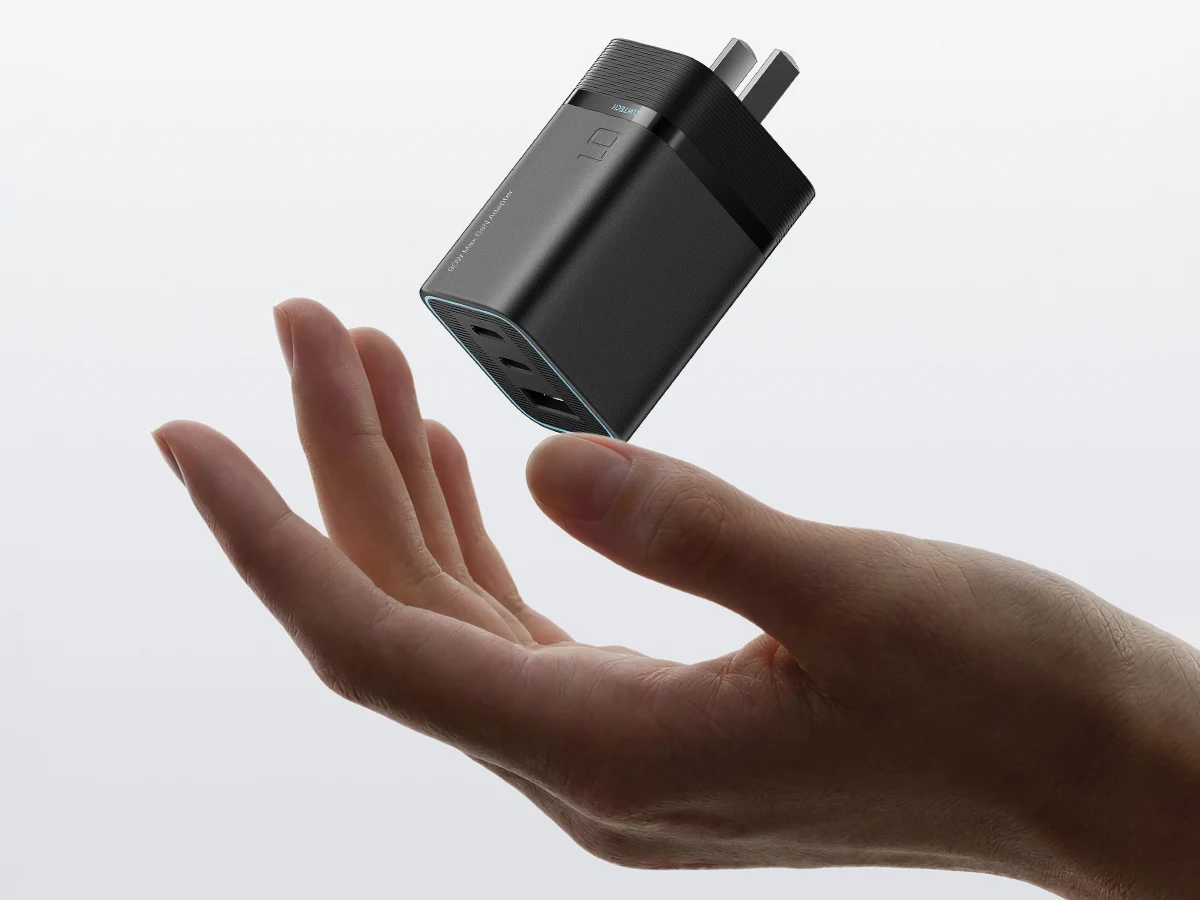
    Cuktech has launched a new charger in China called the Cuktech 6 mini. This charger boasts a high power density, and it is claimed to be 50% smaller than other chargers that offer the same output rating.

    Maximum Power Output

    The maximum output power for this charger is 90W. Thanks to its fast charging capabilities, it is said that the charger can boost the Xiaomi 17 battery from 0% to 70% in just 30 minutes. It also supports various charging protocols such as FCP, PD, PPS, and SCP, which means it can work with a wide range of devices, including laptops and gaming handheld devices.

    Charging Limitations

    It is important to mention that Cuktech does not advertise the 90W fast charging for laptops (currently, a 2-pack of 100W Ugreen 3.3-feet USB-C cables is available for $7.49 on Amazon). Instead, their promotional materials indicate a cap of 65W, which allows the charger to charge a MacBook Air M3 from 0% to 53% in half an hour.

    Port Configuration

    In terms of ports, this charger has three total, enabling users to charge three devices simultaneously. Out of these, two are USB Type-C ports that can reach a maximum of 90W. The third is a USB-A port, which has a maximum output of 22.5W.

    While this charger lacks a built-in display like some recently released ones, it includes various protective features. Additionally, the foldable prongs make it convenient for travel.

    As for the price, the Cuktech 6 mini charger was introduced in China at a price of CNY 109, which is approximately $15. The company has a reputation for bringing most of its products to markets outside of China, so this charger might make its global debut in the near future.

    Source:
    Link


  • MSI Mini PC: 20-Core CPU, 64GB DDR5 RAM, Versatile Ports

    MSI Mini PC: 20-Core CPU, 64GB DDR5 RAM, Versatile Ports

    Key Takeaways

    1. The MSI PRO DP10 A14MG mini PC features desktop-grade 14th Gen Intel processors, including options up to a powerful 20-core Core i7 14700.
    2. It has a compact design with a volume of just 1.1 liters and supports up to 64 GB of DDR5-5600 RAM.
    3. Integrated graphics are limited, making it suitable for basic tasks but not ideal for gaming or graphics-intensive applications.
    4. Connectivity options include WiFi 6E/7 and Bluetooth 5.0/5.3/5.4, with unique features like powering on via certain MSI monitors.
    5. Pricing and availability are currently unclear, and potential buyers might consider alternatives like the AMD Hawk Point-powered GMKtec K12.


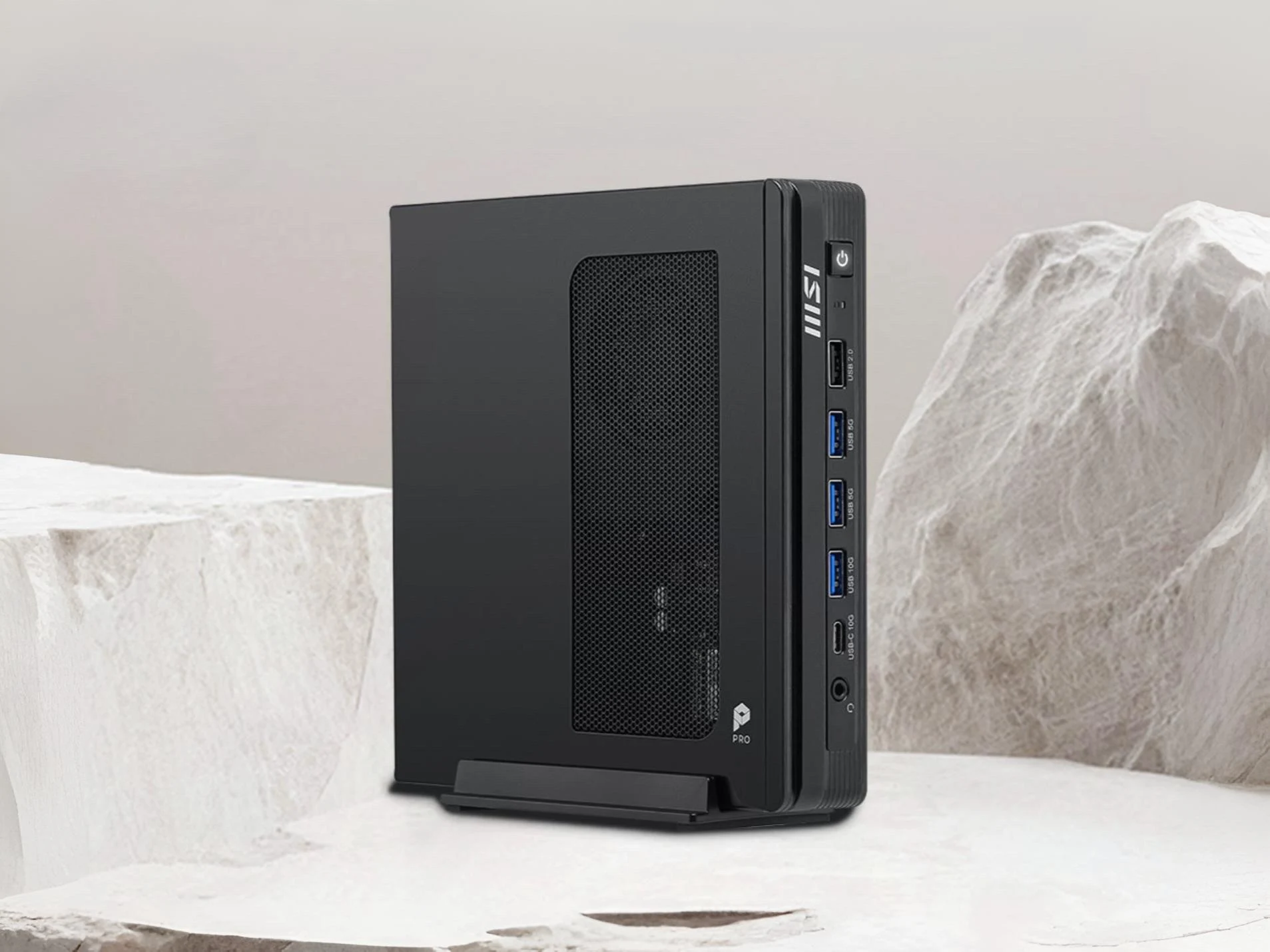
    MSI has been in the mini PC game for a while, and their newest offering showcases desktop-grade Intel processors in a compact design. Aimed primarily at the office and business sectors, the latest mini PC named the PRO DP10 A14MG comes with some appealing specifications.

    Performance and Specifications

    This MSI PRO DP10, which has a volume of just 1.1 liters, is equipped with the latest 14th Gen Intel Raptor Lake CPUs, including the powerful 20-core Core i7 14700. For those on a budget, there’s also the option of the dual-core Pentium Gold G7400 CPU. Other available options include the quad-core i3 14100 and the 10-core i5 14400 CPU.

    The top-tier 20-core Core i7 14700 should deliver solid performance in synthetic benchmarks, competing closely with the AMD Ryzen 7 9700X. While synthetic benchmarks provide only part of the picture, it’s clear that the i7 14700 is more than capable of handling nearly any task. It also has two SO-DIMM slots, which can support up to 64 GB of DDR5-5600 RAM. Storage is via a single M.2 2280 (PCIe Gen3 x 4) slot.

    Graphics and Connectivity

    However, the GPU performance of the MSI PRO DP10 mini PC leaves a bit to be desired, as there isn’t an option for dedicated graphics. The integrated graphics on these processors are only suitable for the simplest tasks, and they struggle with even mid-range gaming. On the connectivity front, the I/O options are quite good, outlined below:

    For wireless networking, it supports WiFi 6E/7 along with Bluetooth 5.0/5.3/5.4. A unique feature of the DP10 mini PC is its ability to be powered on using the monitor’s power button, provided it’s connected to certain MSI monitors. Enterprise users will appreciate additional features like dTPM 2.0 support and chassis intrusion detection. For further information, customers can check out MSI’s official website for the DP10 mini PC.

    Pricing and Alternatives

    The details regarding pricing and availability remain uncertain at this moment, but updates should come soon. The absence of robust GPU options or even an OCuLink port may disappoint many mini PC fans. For those individuals, alternatives like the AMD Hawk Point-powered GMKtec K12 could be a more suitable choice, which is currently sold for $600 on Amazon.

    MSI via TechPowerUp

    Source:
    Link


  • Affordable Minisforum N5 Air NAS with OCuLink and 144TB Support

    Affordable Minisforum N5 Air NAS with OCuLink and 144TB Support

    Key Takeaways

    1. High Storage Capacity: The Minisforum N5 Air offers a total storage capacity of 144 TB with five HDD bays and three M.2 slots, surpassing competitors like the Synology DiskStation DS1525+.

    2. Powerful Performance: It features an AMD Ryzen 7 255 APU with a Radeon 780M integrated GPU, allowing for GPU-accelerated tasks and external GPU support through an OCuLink port.

    3. Expandable Options: The device includes a PCIe x16 slot for SSD cache and network interface cards, and supports various RAID modes for enhanced storage management.

    4. User-Friendly Design: The design allows users to easily slide the motherboard out for straightforward upgrades of SSDs and RAM, simplifying maintenance.

    5. Competitive Pricing: The barebone version starts at $499, while the model with 16 GB of RAM is priced at $679, offering a cost-effective NAS solution.


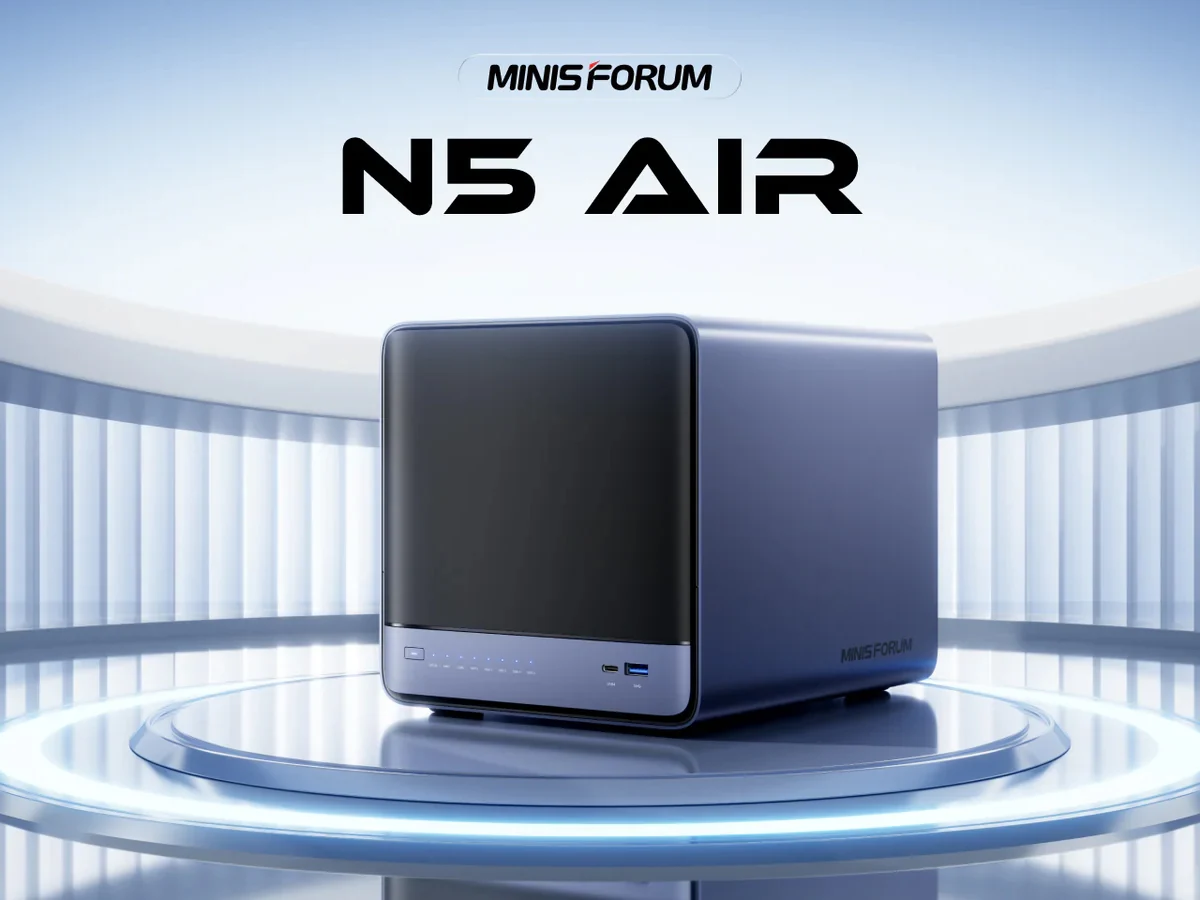
    The Minisforum N5 Air quietly made its entrance in January 2026, and now the company has officially unveiled its NAS. This is a cost-effective network-attached storage solution that features five HDD bays and three M.2 slots for PCIe 4.0 SSDs.

    Impressive Storage Capacity

    With the combination of HDD bays and M.2 slots, the total storage capacity reaches 144 TB, making it a superior choice compared to other 5-bay NAS options like the Synology DiskStation DS1525+ (found on Amazon). Additionally, the Minisforum N5 Air is equipped with more robust hardware than many of its rivals.

    Powerful Performance

    It is driven by the AMD Ryzen 7 255, which is a Hawk Point APU with a Radeon 780M integrated GPU. This built-in graphics processor is sufficient for certain GPU-accelerated tasks, but users can enhance their NAS experience by connecting an external GPU via the OCuLink port on the N5 Air.

    Another important expansion option is the PCIe x16 slot, which can be utilized for SSD cache arrays and network interface cards (NICs). The device supports various RAID modes, and Minisforum claims that the cooling system helps maintain optimal performance of the installed drives even during high usage.

    User-Friendly Design

    In terms of design, the Minisforum N5 Air resembles the Beelink ME Pro, allowing users to easily slide the motherboard out of the case. This feature is said to facilitate simple upgrades of SSDs and RAM while also making maintenance more convenient.

    The NAS supports up to 96 GB of DDR5 RAM, features a comprehensive connectivity setup including a USB4 port, runs on MinisCloud OS, and supports Docker. The initial launch price for the barebone version of the N5 Air AI NAS is set at $499, while the model with 16 GB of RAM is priced at $679.

    Source:
    Link


  • Asus Rep Discusses Memory Shortage Impact on Laptop Prices

    Asus Rep Discusses Memory Shortage Impact on Laptop Prices

    Key Takeaways

    1. Delayed Price Effects: The impact of rising memory prices on consumer electronics will take time to reach retail prices, possibly a few months.

    2. Current Price Stability: Companies like Asus have not raised prices yet due to securing supplies in advance, but this may change as inventory depletes.

    3. Future Price Increases: Rising memory costs are expected to gradually affect the prices of laptops and other devices, with potential improvements in shortages by 2027.

    4. Inconsistent Seller Responses: Not all manufacturers will react the same way to price changes, with some potentially keeping prices high even after increases become standard.

    5. Impact on Smaller Businesses: Smaller companies may struggle more during the memory shortage, leading to price hikes, while larger companies like Sony might have better protection against rising costs.


    Even with growing worries about the rising prices of memory, not all products relying on these components have been impacted yet. Some companies have made changes, but many laptops remain at similar prices as they were a few months ago. The Director of Technical Marketing at Asus discussed with Tom’s Guide when we might start to notice the full effects of this situation.

    Delayed Effects on Prices

    Sascha Krohn pointed out that customers will be taken aback by “how long it takes for that shockwave to travel through the supply chain until it actually affects the price of devices that you see in Best Buy, Walmart, or Amazon.” He mentioned it “takes a couple of months,” suggesting that shoppers who act quickly can still dodge higher prices for laptops, smartphones, and consoles.

    Why Prices Haven’t Increased Yet

    The main reason companies like Asus haven’t raised prices widely is their preparedness. Manufacturers often secure a reliable supply of parts well ahead of potential market changes. However, eventually, these reserves will run low, pushing companies to pass on the increased costs to consumers.

    Krohn thinks that the rising memory prices will gradually affect the costs of laptops and other devices. In another article by Tom’s Guide, he forecasts that the shortage may begin to improve by 2027. This prediction is a bit more hopeful than what RAM makers like Micron have indicated. The Asus representative believes that factories have not been running at full capacity. Boosting production will help more than just AI data centers.

    Varied Responses from Sellers

    Regardless of when DDR5 RAM becomes less expensive, not every seller will react similarly. Krohn foresees that once high laptop prices become standard, some manufacturers may be reluctant to lower them back to previous levels. This could mean tighter budgets for gamers and workers even after 2027.

    Smaller businesses may struggle more than Asus during the memory shortage. Framework has already increased notebook prices since they can’t absorb the losses as easily.

    Console gamers might also experience rising costs for gaming systems at different intervals. There’s speculation that Microsoft and Nintendo may not have long-term agreements with Micron, Samsung, or SK Hynix. On the other hand, Sony reportedly has a substantial DRAM reserve, potentially shielding the PS5 from price hikes.

    Source:
    Link



  • Keychron Lemokey P3 HE: Hall-Effect Gaming Keyboard for Modding

    Keychron Lemokey P3 HE: Hall-Effect Gaming Keyboard for Modding

    Key Takeaways

    1. New Model Introduction: Keychron has released the P3 HE, an 80% TKL keyboard under the Lemokey sub-brand, featuring an F-row and additional keys but no numpad.

    2. Consistent Switches: The P3 HE uses Gateron Double-Rail Magnetic Nebula switches, providing a smooth and stable typing experience, though not compatible with other magnetic switches.

    3. Tool-Free Design: The keyboard features a tool-free quick-release design for easy modifications, a unique aspect not found in other Keychron keyboards.

    4. Battery Life and Connectivity: It offers compatibility with Mac and Windows, connecting via Bluetooth, 2.4 GHz wireless, or USB-C, with a battery life of up to 120 hours.

    5. Pricing and Availability: The Lemokey P3 HE is priced at $169.99 and is available for purchase on both Lemokey and Keychron websites.


    Keychron has broadened its selection of Hall effect magnetic keyboards with a fresh 80% TKL model under the Lemokey sub-brand. The new P3 HE builds upon the Lemokey P Series, which features solid keyboards like the recently reviewed P2 HE. Specifically, this model is an 80% version of that keyboard, providing a larger layout with an F-row and additional keys but still lacking a numpad. Notably, Keychron has also eliminated the customizable knob in this latest design.

    Similar Switches for Smooth Typing

    We appreciated the Gateron Double-Rail Magnetic Nebula switches in our evaluation of the Lemokey P2 HE, and the new P3 HE utilizes the same switches. This choice should ensure a comparable smooth and stable typing experience. However, these switches are incompatible with other magnetic options like the Gateron Jade Pros or Wooting Lekker switches, and they may become tiring during extended typing sessions. On the bright side, the keyboard features a gasket-mounted design that includes various layers of sound-dampening foam along with double-shot Cherry profile PBT keycaps, enhancing both comfort and sound quality.

    Tool-Free Quick Release Design

    Another significant feature is the quick-release design. Like other keyboards in the Lemokey P series, the top case can be taken apart without any tools for easy modifications. This feature is not found in any other Keychron keyboards at the moment. The keyboard sports a full metal case, which is available in both black and white. Additional features include enhanced stabilizers, a 1,000 Hz polling rate, north-facing RGB backlighting, and a comprehensive suite of Hall effect functions such as rapid trigger, adjustable actuation with 0.01 mm sensitivity, SOCD, and DKS.

    Compatibility and Battery Life

    The keyboard is compatible with both Mac and Windows and can connect via Bluetooth, 2.4 GHz wireless, or USB-C. The battery life is rated at up to 120 hours, which is rather modest when compared to Keychron’s newer Q Ultra keyboards, like the Q3 Ultra (currently priced at $229.99 on Amazon), which claims up to 660 hours. The Lemokey P3 HE wireless magnetic keyboard is now available for purchase from both the Lemokey and Keychron websites for $169.99, matching the price of the P2 HE.

    Source:
    Link