Category: Computers

  • Honor MagicBook Art 14 2025 Brightness: 1600 nits vs 740 nits

    Honor MagicBook Art 14 2025 Brightness: 1600 nits vs 740 nits

    Key Takeaways

    1. The MagicBook Art 14 2025 features updated Intel Arrow Lake processors and a redesigned keyboard.
    2. The OLED touchscreen boasts a high refresh rate of 120 Hz and a peak brightness claim of 1600 nits.
    3. Achieving the claimed peak brightness requires enabling HDR mode and using compatible content, which may not be typical for laptops.
    4. The review found a maximum brightness of around 740 nits, which is lower than expected compared to other OLED models.
    5. Despite the brightness limitation, the display maintains excellent image quality, color accuracy, and no screen-door effect.


    The MagicBook Art 14, known for its sleek design, has received a refresh for 2025. Now, it comes with the latest Intel Arrow Lake processors and a revamped keyboard. The OLED touchscreen, which boasts a resolution of 120 Hz, was already impressive last year, and Honor asserts that its peak brightness has notably increased to a remarkable 1600 nits, despite the other specifications remaining the same. Typically, such brightness levels in laptops are found only in Mini-LED or Tandem OLED displays.

    Brightness Specifications

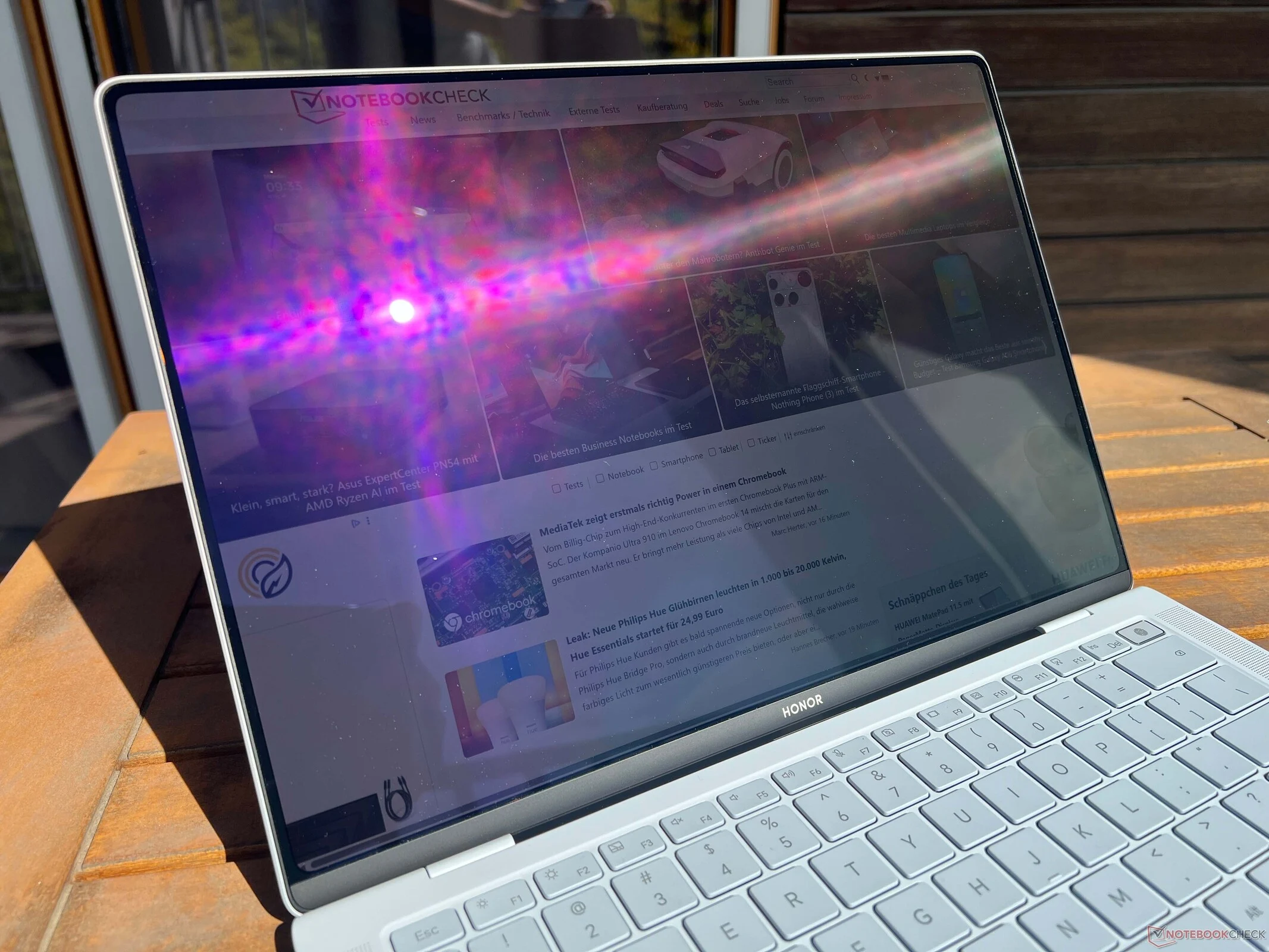
    The manufacturer outlines the peak brightness scenario in the technical specifications, but the details are somewhat vague. To access the maximum brightness, users need to enable HDR mode and utilize compatible HDR content, or ensure that the brightness sensor is turned on. This behavior is familiar to smartphone users, who can achieve higher brightness levels outdoors. Yet, this is not the norm for laptops. We attempted to reach the claimed peak brightness, but unfortunately, we were unsuccessful. We experimented with various settings, including the automatic brightness feature in Windows and a dynamic backlight option in Honor’s PC Manager software. Despite placing the laptop in direct summer sunlight and trying different external light sources to mimic bright conditions, we could only achieve a maximum brightness of around 740 nits.

    Performance Assessment

    While this is certainly not a poor outcome, many displays, such as Lenovo’s current OLED models, often hit peak brightness levels of 1,000-1,100 nits. Even though our review model didn’t meet the promised peak brightness, it doesn’t detract from the overall image quality, which remains superb with 120 Hz and precise color profiles. We even managed to enhance the color accuracy further with our calibration (the calibration profile is available for free download in our review). There’s no screen-door effect on bright backgrounds, and the DC dimming at 120 Hz with a very low amplitude is unlikely to cause any problems. For more details, check out our complete review of the new Honor MagicBook Art 14 2025.
  • AMD Ryzen 5 9500F & Ryzen 7 9700F Budget CPU Prices Leaked

    AMD Ryzen 5 9500F & Ryzen 7 9700F Budget CPU Prices Leaked

    Key Takeaways

    1. AMD is likely to launch new AM5 Granite Ridge CPUs soon, with the Ryzen 7 9700F and Ryzen 5 9500F spotted online again.
    2. The Ryzen 7 9700F is priced at $294 and has eight cores, while the Ryzen 5 9500F is priced at $218 and has six cores.
    3. Both CPUs lack integrated graphics, making them more affordable compared to other Ryzen models like the 9700X and 9600.
    4. Performance is expected to be similar to existing models due to their nearly identical configurations.
    5. While an official release date has not been confirmed, an announcement is anticipated in the coming weeks.


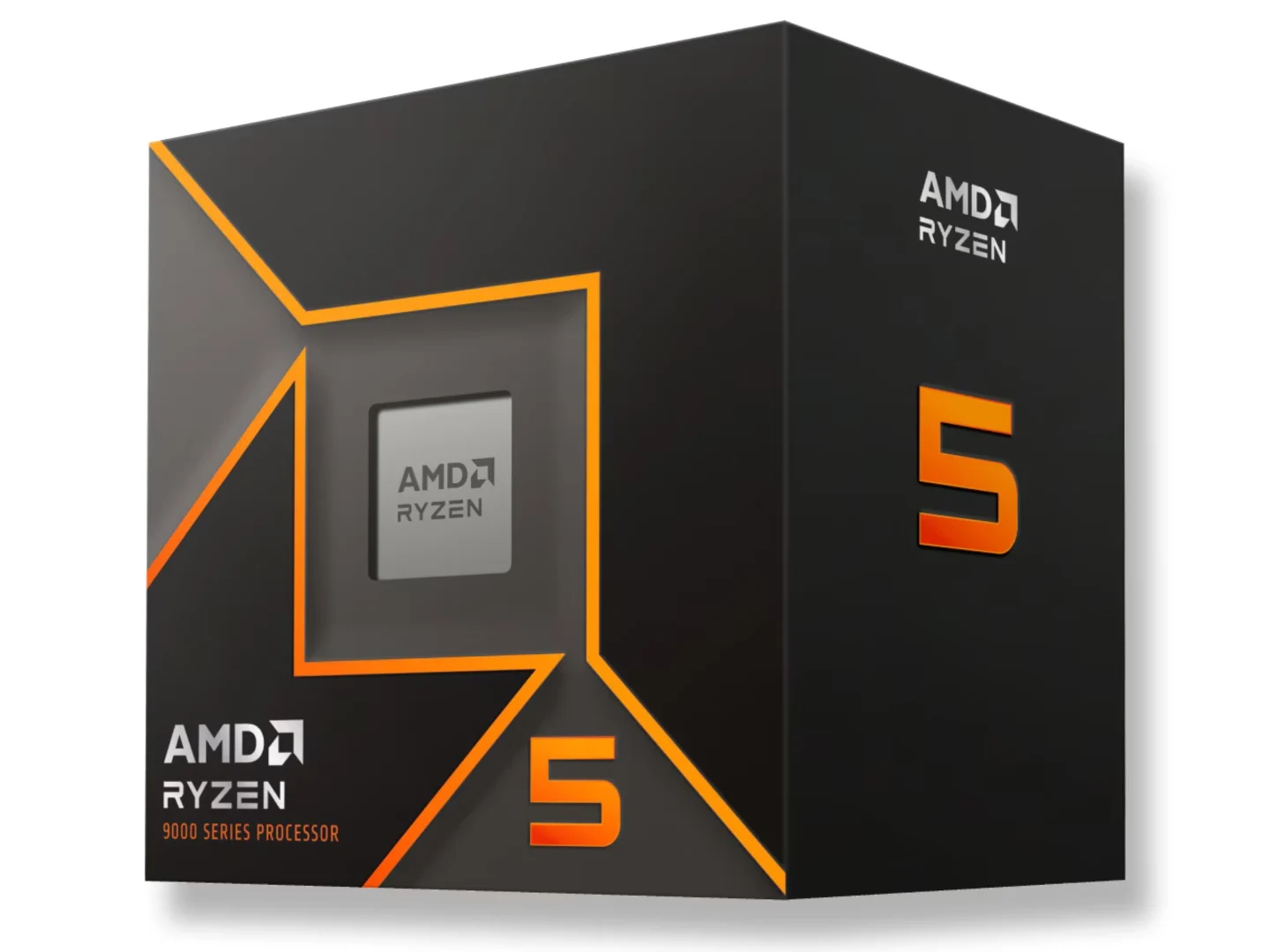
    AMD seems to be preparing to launch new AM5 Granite Ridge CPUs soon. The ‘F’ versions, which lack integrated graphics, of two Ryzen 9000 CPUs have appeared online again, this time on a retail site along with their prices. Although AMD hasn’t confirmed a release date for these CPUs, they were anticipated to arrive in August, and since it’s already September, a launch is likely just around the corner.

    New Listings Found!

    A user named harukaze5719 spotted and shared two listings on ShopBLT for the Ryzen 7 9700F and the Ryzen 5 9500F. The Ryzen 7 9700F, which features eight cores and twelve threads with a 65W power draw, is priced at $294, while the Ryzen 5 9500F, which has six cores and twelve threads, is available for $218. This isn’t the first occasion these CPUs have been seen online. The Ryzen 7 9700F appeared on Asus’ CPU support page, showing a clock speed of 3.8 GHz and a cache of 32 MB, maintaining the same 65W TDP. On the other hand, the Ryzen 5 9500F was found on Geekbench with matching clock speed and cache specifications.

    Pricing Insights

    Since these CPUs do not come with an integrated GPU, they are expected to be more affordable options compared to the Ryzen 7 9700X and Ryzen 5 9600 (AMD has yet to introduce a Ryzen 5 9500X). For context, the Ryzen 7 9700X is currently listed on Amazon for $329, but the availability of the Ryzen 5 9600 in the US is still uncertain, making its price unclear at this moment. There are speculations suggesting that the price would be around $200 to $220. Considering this, the listed price of $218 for the 9500F appears somewhat misleading.

    Meanwhile, the Ryzen 5 9600X is being sold for $190, which is $90 lower than its original price of $280.

    Performance Expectations

    In terms of performance, the new CPUs are expected to perform similarly to their counterparts due to nearly identical configurations. As noted before, AMD hasn’t provided a release date for these CPUs yet, but an announcement could be expected within the next few weeks.

    Source:
    Link


  • Microsoft and Phison Refute SSD Failure Claims After Windows 11 Update

    Microsoft and Phison Refute SSD Failure Claims After Windows 11 Update

    Key Takeaways

    1. SSD malfunctions linked to recent Windows 11 update have raised concerns for Microsoft and Phison.
    2. Phison conducted over 4,500 hours of testing but could not replicate the SSD failure issue.
    3. Microsoft found “no connection” between the SSD failures and the August 2025 Windows 11 security update.
    4. Initial complaints primarily came from users in Japan, with some reports from other countries.
    5. Phison recommends using a heatsink or thermal pad on SSDs to prevent overheating during demanding tasks.


    The latest news regarding SSD malfunctions tied to the most recent Windows 11 update has caught the eye of both Microsoft and Phison. For those who might not know, several users have experienced issues where their drives became unreachable while trying to perform large, continuous file transfers.

    Update from Phison

    Phison, the manufacturer of SSD controllers, recently provided an update on this situation. The company stated that they couldn’t recreate the problem, after more than 4,500 hours of testing combined. This evaluation included conducting 2,200 test cycles across various drives.

    Microsoft’s Findings

    Microsoft has shared a similar update regarding the situation. They reported that they found “no connection” between the SSD failures and the Windows 11 security update from August 2025. The conclusions drawn by both companies are not unexpected, considering the issue wasn’t as prevalent as some other Windows-related problems that have occurred in the past.

    Regional Reports

    It is important to note that the initial complaints originated from users in Japan. As pointed out by @Necoru_cat on X, the Japanese version has been updated since these reports surfaced. This might suggest that the SSD failure issue is primarily affecting the Japanese version of Windows 11, although some users from other countries have also reported similar problems.

    Phison, however, has not completely disregarded the issue. The company mentioned that they will “closely monitor the situation.” Furthermore, they advise users to install a heatsink or thermal pad on their SSDs when handling demanding tasks (2 TB Samsung 990 Pro with heatsink curr. $169.99 on Amazon). This measure could help maintain performance and reduce the risks of overheating and related malfunctions.

    Source:
    Link


  • Free Starlink Dish and 100 Mbps Internet Beat Fiber for Rural Aid

    Free Starlink Dish and 100 Mbps Internet Beat Fiber for Rural Aid

    Key Takeaways

    1. Starlink has won a state auction to provide broadband Internet to underserved rural areas, supported by federal subsidies.
    2. The Broadband Equity Access and Deployment (BEAD) program has over $42 billion allocated to improve Internet access across the U.S., including satellite providers like Starlink.
    3. Ohio’s proposal includes significant funding for Starlink, with $53 million allocated to cover 43% of eligible locations, while fiber provider Spectrum will receive over $80 million for just 14%.
    4. The new BEAD rules favor satellite Internet providers for quick rollouts, allowing Starlink to meet basic requirements with minimal costs, while fiber providers face higher standards.
    5. States are prioritizing speed and cost-effectiveness over quality, with Starlink’s current offerings being more accessible compared to fiber’s higher capabilities.


    Starlink has secured another state auction to deliver broadband Internet to so-called “underserved areas,” which primarily include rural locations in sparsely populated states where installing expensive fiber would not be economically practical without federal subsidies.

    Broadband Equity Access and Deployment Program

    The Broadband Equity Access and Deployment (BEAD) initiative has allocated more than $42 billion to all US states and territories, aiming to ensure that all Americans, even those in remote areas, have access to broadband Internet.

    During Elon Musk’s short period at the White House, BEAD adjusted its definitions of broadband Internet to include satellite Internet providers like Starlink. This controversial adjustment was met with disbelief from traditional fiber optics Internet providers, as it places their expensive efforts at a disadvantage when competing for funding.

    Funding Allocations in Ohio

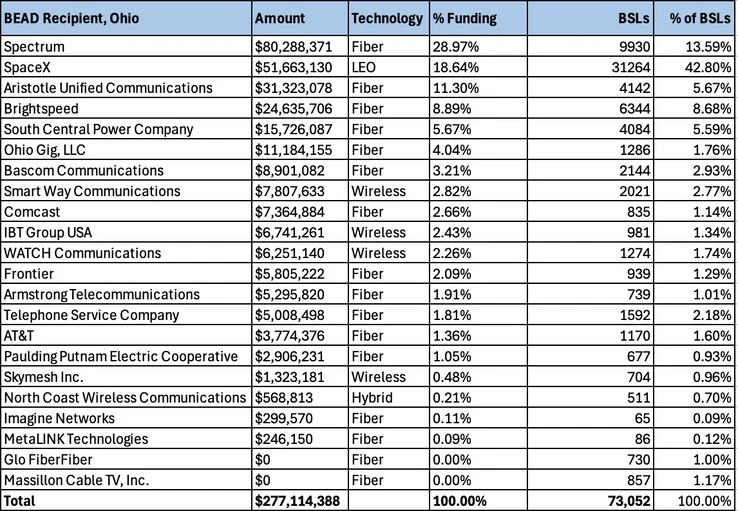
    For example, Ohio received $793 million under the BEAD program, but will only utilize $227 million in its final proposal, paying Starlink $53 million to cover 43% of the Broadband Serviceable Locations (BSL) eligible for government funding.

    In contrast, Ohio plans to pay Spectrum the largest portion of the allocated funds, which is over $80 million, to cover just 14% of the BSL list with fiber. According to the new BEAD rules, satellite Internet providers like Starlink could consistently come out on top, as demonstrated in Montana, where Starlink received $119 million in federal subsidies for 28% of the local BSL, while Amazon’s Project Kuiper only got $26 million for 37% of BSLs.

    Prioritizing Speed Over Quality

    States are understandably favoring quick and easy rollouts over the quality of Internet services provided to rural and underserved areas. Under these conditions, satellite Internet providers will always have the edge over fiber, as the requirements for Starlink in Ohio are simply to provide a free dish and a download speed of 100 Mbps, rather than reducing the monthly service fee. This is the most cost-effective way for Starlink to expand, as they frequently lower the price of their Standard Kit to sell it at cost and use it as a promotional gateway to later charge substantial monthly fees.

    In comparison, fiber can offer speeds of up to 1 Gbps, a capability that Starlink will not achieve until next year when it launches its V3 satellites using the Starship 3 rocket. This will only be possible for those who purchase the expensive Performance dish, which may be beyond the reach of the federal BEAD program.

    Source:
    Link


  • Smartphones and Computers Set for Performance Boost from Discovery

    Smartphones and Computers Set for Performance Boost from Discovery

    Key Takeaways

    1. MIT researchers discovered a new method to improve computer chip performance while studying nuclear reactor safety and material deterioration.
    2. They used a focused X-ray beam to simulate high radiation levels and finely tune strain in the crystal structure of nickel, an alloy used in reactors.
    3. The discovery offers a new technique for strain engineering, which enhances the optical and electrical characteristics of materials in microelectronics.
    4. Engineers can now use X-rays during the manufacturing process to adjust strain in microelectronics, achieving dual benefits from the research.
    5. The study achieved its original goal of real-time 3D observation of material failure in simulated nuclear reactor settings, marking a significant advancement in material science.


    A team of researchers at MIT has been exploring ways to enhance the safety and longevity of nuclear reactors. In the process, they stumbled upon a new method that could significantly improve computer chip performance. Their initial research aimed to understand how materials deteriorate and develop cracks in the extreme conditions found inside nuclear reactors.

    Key Discoveries

    The findings were shared in the journal Scripta Materialia. The researchers employed a strong, focused X-ray beam to simulate the high levels of radiation that exist within a nuclear reactor. During experiments involving nickel, a widely used alloy in modern nuclear reactors, the team made an unexpected discovery. They realized they could use the X-ray beam to finely “tune” the strain within the material’s crystal structure.

    Implications for Microelectronics

    This breakthrough could greatly influence microelectronics development. Engineers in the semiconductor manufacturing field utilize strain engineering, a method that introduces and alters strain in materials to enhance their optical and electrical characteristics. This novel discovery offers a fresh technique for strain engineering.

    “Our technique allows engineers to use X-rays to adjust the strain in microelectronics during the manufacturing process. Although this was not our initial intention, it feels like achieving two results for the price of one,” said Ericmoore Jossou, the senior author of the study.

    Success in Original Research Goals

    Additionally, the research met its primary objective. The team successfully created a method for real-time 3D observation of material failure in a simulated nuclear reactor setting. They found that extended exposure to the X-ray relaxed the internal strain of the material, enabling precise 3D reconstruction of the crystal while experiencing stress. Jossou claims that this is a significant achievement that no one has accomplished before.

    Source:
    Link


  • Dell 14 Premium: The Evolved XPS 14 with Minimal Changes

    Dell 14 Premium: The Evolved XPS 14 with Minimal Changes

    Key Takeaways

    1. The Dell 14 Premium replaces last year’s XPS 14, maintaining a familiar design with updated internal processors.
    2. It features Arrow Lake-H processors, offering up to 35% better multi-thread performance and 15% enhanced graphics compared to the previous model.
    3. Performance enthusiasts may find Turbo Boost limitations frustrating, particularly with the Core Ultra 7 255H CPU.
    4. The laptop retains the same 1800p Samsung OLED display and GeForce RTX 4050 options as its predecessor.
    5. Lack of a brighter screen with improved HDR capabilities and newer RTX 5050 options limits standout features for gaming fans.


    Dell has just introduced the Dell 14 Premium, which takes the place of last year’s XPS 14. While the new name might imply a completely new look, the company has chosen to stick with a familiar design, opting to update only the internal processors.

    Processor Improvements

    In our examination, we noted that the Dell 14 Premium comes equipped with Arrow Lake-H processors, swapping out the Meteor Lake-H ones used in last year’s model. This new CPU delivers up to 35 percent better multi-thread performance and 15 percent enhanced graphics capabilities compared to the XPS 14, marking a solid improvement from last year. However, performance enthusiasts might find the Turbo Boost limitations a bit frustrating. The powerful Core Ultra 7 255H CPU, typically seen in larger laptops, has a narrower Turbo Boost range in the compact Dell 14 Premium.

    Display and Graphics

    Aside from the upgraded CPU, the laptop still features the same stunning 1800p Samsung OLED display and GeForce RTX 4050 options as its predecessor. A brighter screen with better HDR capabilities and newer RTX 5050 options would have really made the Dell 14 Premium stand out for gaming fans. Consequently, for the average user or for those engaged in multimedia tasks, the experience remains nearly the same between the Dell 14 Premium and the XPS 14.

    Source:
    Link


  • Cirrus7 Launches Nimbini v4 Pro Fanless Mini PC with Intel CPUs

    Cirrus7 Launches Nimbini v4 Pro Fanless Mini PC with Intel CPUs

    Key Takeaways

    1. Growing Demand for Quiet PCs: There is an increasing interest in quiet computing solutions, particularly in compact mini PCs.
    2. Fanless Cooling Solutions: Silent PC builders are successfully cooling mid-range CPUs without fans, using models like Cirrus7’s Nimbini v4 Pro Edition.
    3. Extensive CPU and RAM Options: Users can choose from a wide range of CPU options and RAM capacities, with support for DDR5 and M.2 PCIe 4.0 SSDs.
    4. Rich Connectivity Features: The NUC 15 Pro motherboards offer multiple ports, including Thunderbolt 4, USB-A, HDMI, and Wi-Fi 7 connectivity.
    5. Competitive Pricing and Value: Prices range from €728 to €2,796.20, with the Core Ultra 7 255H configuration offering the best value at €1,485.


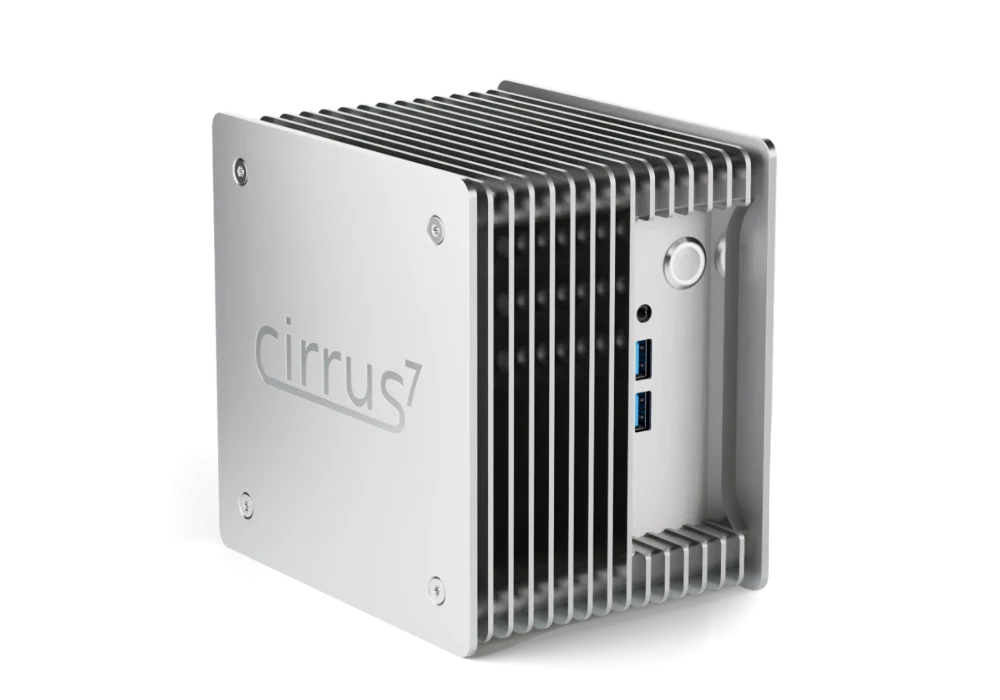
    Demand for quiet PCs is increasing, with compact mini PCs likely to gain the most from this movement. Although it’s not practical to cool high-end laptop processors and dGPUs in small cases without fans, silent PC builders are managing to efficiently cool mid-range and even some high-mid-range CPUs from AMD’s Ryzen G or Intel’s Core Ultra 200H series. The latest Nimbini v4 Pro Edition mini PCs from Cirrus7 exemplify this trend, utilizing the newest NUC 15 Pro motherboards. These models come in specially designed fanless cases that can house up to a Core Ultra 7 265H CPU and an integrated Arc 140T iGPU. Cirrus7 also provides two upgraded case options that include additional radiator fins for improved cooling performance if needed.

    CPU Options Available

    The comprehensive list of CPU choices is extensive. For RAM, users can select from capacities starting at 8 GB, extending up to 128 GB for DDR5-5600 and up to 64 GB for DDR5-4800. This model accommodates just one M.2 PCIe 4.0 SSD slot, with storage options ranging from 1 TB to 4 TB provided by Cirrus7.

    Connectivity and Features

    Port offerings remain consistent with the NUC 15, which includes 2 Thunderbolt 4 ports, 3 USB-A 3.2 Gen 2 ports, 1 USB 2.0 port, 2 HDMI 2.0b ports, an IR receiver, and a 2.5 GbE NIC. Additionally, there are two slots for Wi-Fi antennas. Wireless connectivity is ensured by an Intel BE201 Wi-Fi 7 + BT 5.4 card.

    Cirrus7 also presents an optional VESA mounting system and dust seals, along with the choice to include free Linux distributions such as Ubuntu 24/25 LTS and Mint 22, as well as paid Windows 11 Home/Pro licenses. The standard warranty covers issues for 3 years, with an option to extend it to 5 years for an additional charge.

    Pricing and Best Value

    Prices for these models begin at €728 for the Core 3 100U version, equipped with 8 GB of RAM and a 250 GB PCIe 3.0 SSD, and can rise to €2,796.20 for a fully loaded Core Ultra 7 265H model. The best value is found in the Core Ultra 7 255H configuration, featuring 32 GB DDR5-5600, a 2 TB Samsung 990 EVO Plus SSD, and sealed ventilations, priced at €1,485.

    Source:
    Link


  • Dell 14 Premium Price Matches Lighter, Powerful Razer Blade 14

    Dell 14 Premium Price Matches Lighter, Powerful Razer Blade 14

    Key Takeaways

    1. The Dell 14 Premium starts at $1500, with the advanced version priced at $2000, similar to the Razer Blade 14.
    2. The Razer Blade 14 features a faster RTX 5060 GPU, offering nearly twice the graphics performance for the same price.
    3. The Dell 14 Premium has a slightly larger screen (14.5 inches), touchscreen capabilities, and double the RAM (32 GB).
    4. Both laptops have 120 Hz Samsung OLED displays, making them competitive in visual quality.
    5. Users focused on text, data, or editing may prefer the higher resolution and RAM of the Dell model, despite Razer’s superior GPU performance.


    The Dell 14 Premium starts at a price of $1500 for its basic setup, while the advanced version, which includes discrete GeForce RTX 4050 graphics and a 3.2K 120 Hz OLED touchscreen, is currently priced at $2000. Although we didn’t think the XPS-like Dell 14 Premium would be budget-friendly, its steep cost could be seen as excessive, especially since it’s priced the same as the new Razer Blade 14, which features the significantly faster RTX 5060 GPU.

    Comparison of Designs

    As illustrated in the comparison charts below, the Razer laptop is a bit thinner and lighter than the Intel-based Dell 14 Premium, yet it matches the processor performance with its Ryzen AI 9 365. Both laptops also come with 120 Hz Samsung OLED displays. What really sets Razer apart is its RTX 5060 GPU, which offers nearly twice the graphics performance for the same $2000 price tag. This will likely attract gamers, performance enthusiasts, or students looking for better value.

    Dell’s Strong Points

    However, Razer doesn’t have everything going for it. The Dell model boasts a slightly bigger screen (14.5 inches compared to 14 inches) and touchscreen capabilities, along with double the RAM (32 GB rather than 16 GB) and a marginally higher resolution (3200 x 2000 vs. 2880 x 1800). Individuals who deal with a lot of text, data, or editing programs might appreciate the added resolution and memory. Still, the faster GPU offered by Razer could be hard to resist.

    For more insights on its performance and features, we suggest reading our review of the Dell 14 Premium.

  • Transform Raspberry Pi 5 into a NAS with 2.5GbE Kit

    Transform Raspberry Pi 5 into a NAS with 2.5GbE Kit

    Key Takeaways

    1. The Pironman 5 NAS kit simplifies turning the Raspberry Pi 5 into a network storage system, accommodating both HDDs and M.2 SSDs.
    2. The kit supports up to two 3.5-inch or 2.5-inch hard drives, providing substantial data storage at a reasonable price.
    3. Users can choose between RAID 0 or RAID 1 configurations, but maintaining an external backup is recommended.
    4. The kit features a single 90mm fan, utilizes the Raspberry Pi 5’s Gigabit Ethernet, and includes an extra 2.5 Gbps LAN port.
    5. Additional components include an OLED screen, two HDMI outputs for media playback, and a microSD card for the operating system, with no official pricing available yet.


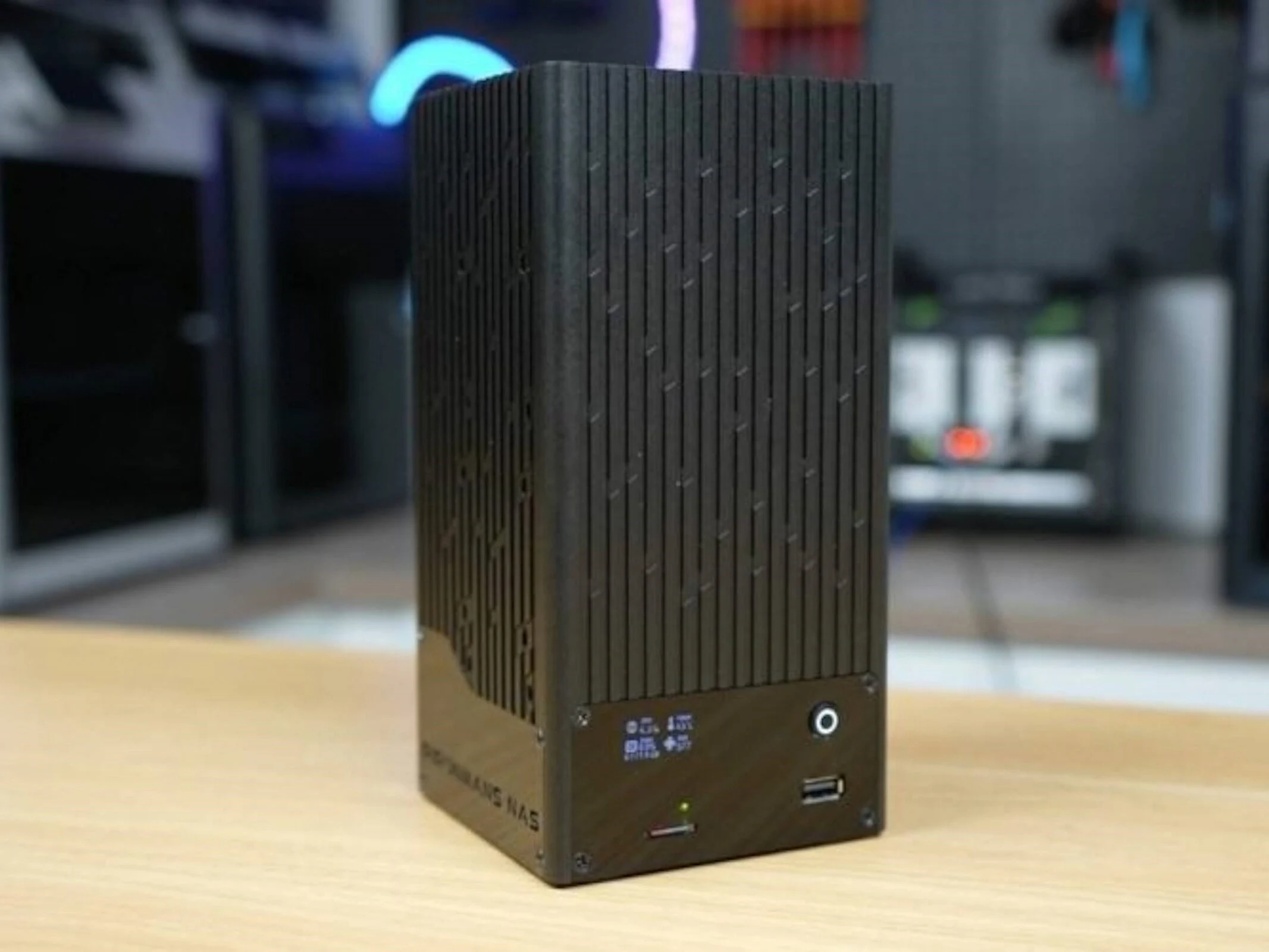
    We have previously discussed various projects involving the Raspberry Pi 5, a well-liked single-board computer that can be used for a wide range of purposes. Recently, SunFounder has released a new kit that simplifies the process of transforming the SBC (the 8GB model starting at $83 on Amazon) into a network storage system. There is already an extensive review along with a YouTube video done by “The DIY Life” available online.

    Kit Features and Dimensions

    As expected, the Pironman 5 NAS kit comes with an enclosure that measures 4.3 x 4.3 x 8.5 inches. It provides room for both traditional HDDs and M.2 SSDs. Users can install as many as two 3.5-inch or 2.5-inch hard drives, allowing for substantial data storage at a relatively affordable cost.

    SSD vs. HDD Considerations

    While a NAS that relies solely on SSDs can be more space-efficient, the cost per gigabyte is considerably higher. Nonetheless, SSDs bring their own benefits, such as quicker access times. The Pironman 5 NAS supports RAID 0 or RAID 1 configurations for its two drives, but it’s important to remember that having a backup not linked to the NAS is always a smart move.

    Additional Features

    This DIY NAS is equipped with a single 90mm fan, and the Raspberry Pi 5’s inbuilt Gigabit Ethernet port can still be utilized. Furthermore, there’s an extra LAN port that offers a faster bandwidth of 2.5 Gbps. Included in the kit is an OLED screen, along with two HDMI outputs for seamless media playback. A microSD card is provided for the operating system, and the 40-pin GPIO header is still available for connecting various sensors and actuators. Unfortunately, no official pricing information for the Pironman 5 NAS kit is available as of now.

    SunFounder, “The DIY Life”

    Source:
    Link


  • Mars’ Lumpy Interior Due to 4.5 Billion-Year-Old Collisions

    Mars’ Lumpy Interior Due to 4.5 Billion-Year-Old Collisions

    Key Takeaways

    1. NASA’s InSight lander operated from 2018 to 2022 and focused on detecting seismic waves from marsquakes.
    2. InSight recorded a total of 1,319 marsquakes, providing valuable data for understanding Mars’ mantle.
    3. A recent study revealed that Mars’ interior is uneven, with specific areas causing seismic waves to slow down and distort.
    4. The slowdown of seismic waves is linked to lumps of material formed by asteroid impacts approximately 4.5 billion years ago.
    5. Mars lacks tectonic plates, allowing these lumps to remain stable over time, similar to conditions on Venus and Mercury.


    NASA’s InSight lander was a robotic device that functioned from 2018 to 2022. It was designed to sense seismic waves produced by marsquakes. These waves travel deep into the mantle of the planet. As they move through various materials in the mantle, their speed and shape change.

    Findings from Marsquakes

    Throughout InSight’s mission, it recorded 1,319 marsquakes. Scientists have been analyzing this data to understand the make-up of Mars’ mantle. A recent study released on August 28 showed that the interior of the red planet is uneven.

    Researchers pinpointed eight marsquakes that generated seismic waves with high-frequency energy. As these waves journeyed deep into Mars’ mantle, they slowed down, sending back distorted signals. To investigate this phenomenon, scientists utilized global computer simulations.

    The Nature of Mars’ Interior

    They found that the slowdown occurred in a small, specific area. More in-depth research indicated that this area is made up of lumps of material. The scientists think these lumps formed from asteroid impacts that took place 4.5 billion years ago. It is widely accepted that during those formative years, asteroids and protoplanets frequently collided with the younger planets.

    In contrast to Earth, Mars does not have tectonic plates. This absence means these lumps have remained in place for a very long time. Similarly, Venus and Mercury also do not feature tectonic plates. This research has offered scientists a glimpse into what could exist within those planets’ interiors.

    Source:
    Link