Tag: ETA Prime

  • “How a Copper Plate Could Enhance MacBook Neo’s Speed and Coolness”

    “How a Copper Plate Could Enhance MacBook Neo’s Speed and Coolness”

    Key Takeaways

    1. The Apple MacBook Neo features a passive cooling system that operates silently but can lead to overheating and reduced performance under stress.
    2. Performance drops significantly during heavy usage, as seen in stress tests where power usage decreased from 8.8 W to around 5 W.
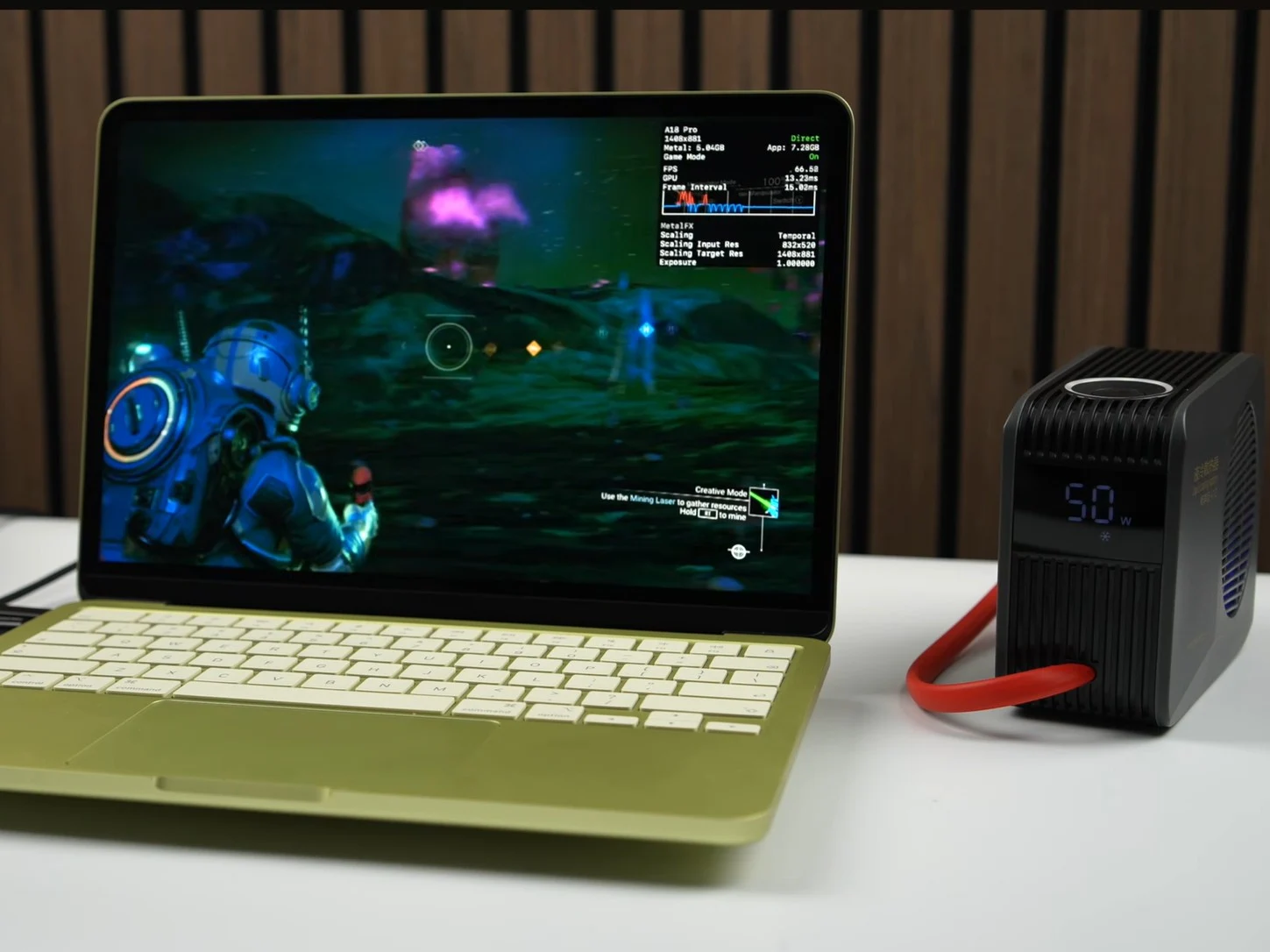
    3. Adding a copper plate and thermal paste can significantly improve performance and reduce temperature, increasing FPS from 30 to nearly 60 in gaming scenarios.
    4. Advanced cooling solutions, like thermoelectric water coolers, have shown even greater performance enhancements, with notable improvements in Geekbench benchmarks.
    5. Future iterations of the MacBook Neo could benefit from active cooling solutions to address performance issues and enhance user experience.


    The Apple MacBook Neo has a unique passive cooling system that has its pros and cons. It operates silently due to the lack of internal fans, but this can lead to overheating, causing a noticeable dip in performance when under stress. For example, during our stress test, we observed that the power usage of the Apple A18 Pro reduced from 8.8 W to around 5 W.

    Performance in Everyday Use

    This drop in performance might not be significant for normal tasks, but the MacBook Neo does face challenges during extended heavy usage like gaming. YouTuber ETA Prime demonstrated that adding a simple copper plate without fans can greatly enhance the MacBook Neo’s sustained performance.

    Cooling Solutions

    By applying thermal paste and placing a copper plate on the Apple A18 Pro, ETA Prime successfully lowered the SoC temperature from 105 C to the mid-80s while playing No Man’s Sky. This impressive temperature reduction led to a marked improvement in performance, with the average frames per second (FPS) rising from 30 FPS to almost 60 FPS.

    The performance boost can also be seen in benchmark tests. The modified MacBook Neo showed an increase of about 9.7% in multi-core performance and 15.2% in single-core performance in Geekbench 6.6.

    Advanced Cooling Tests

    Additionally, ETA Prime explored the potential of a thermoelectric water cooler to see how it could enhance the MacBook Neo’s performance. This cooler managed to bring the Apple A18 Pro’s operating temperature down to the mid-70s while playing No Man’s Sky, keeping the FPS just below 60. In Geekbench 6.6, the MacBook Neo achieved even higher speeds, with single-core and multi-core performance improvements of 17.5% and 18.6%, respectively.

    The MacBook Neo aims to be a cost-effective alternative to the MacBook Air, providing a solid solution for most users. It excels in this regard, but there are several aspects where Apple could have enhanced the MacBook Neo further.

    Future Improvements

    ETA Prime’s cooling modifications suggest that active cooling or even a basic copper heat plate would have greatly benefited the MacBook Neo. The significant increase in average FPS in No Man’s Sky and cooler operating temperatures are not to be overlooked.

    We’re hopeful that Apple takes these results into consideration for the next iteration of the MacBook Neo and incorporates some form of cooling.

    Source:
    Link


  • Best Gaming Handhelds of 2025: Surprising Winner Revealed

    Best Gaming Handhelds of 2025: Surprising Winner Revealed

    Key Takeaways

    1. Marques Brownlee reviews the top and bottom smartphones of 2025, gaining over 3 million views.
    2. ETA Prime focuses on x86-based gaming handhelds, amid the rise of budget and premium ARM devices.
    3. GPD Win 5 is highlighted as the most powerful handheld, followed by MSI Claw 8 AI+ and ROG Xbox Ally X for battery life.
    4. The Steam Deck OLED and Legion Go 2 are praised for their superior OLED displays, with the Legion Go 2 named ETA Prime’s top choice for 2025.
    5. The handheld gaming market has significantly evolved, showcasing advancements in technology and design.


    With 2025 nearing its end, creators are evaluating their favorite gadgets of the year. Just this week, Marques Brownlee expressed his opinions on the top and bottom smartphones of 2025. His video has already been watched over 3 million times and discusses various ‘bests’, which we have detailed in a separate piece.

    Gaming Handhelds Take the Stage

    Now, ETA Prime has added his own insights, focusing on gaming handhelds. He has only looked at x86-based devices this time. A few years back, this would have been clear-cut, but now there are many budget and premium ARM-based devices available. For example, Anbernic is still leading in the budget Linux sector. In addition, Ayaneo has teamed up with Ayn Technologies to introduce several high-end Android handhelds.

    Top Picks of the Year

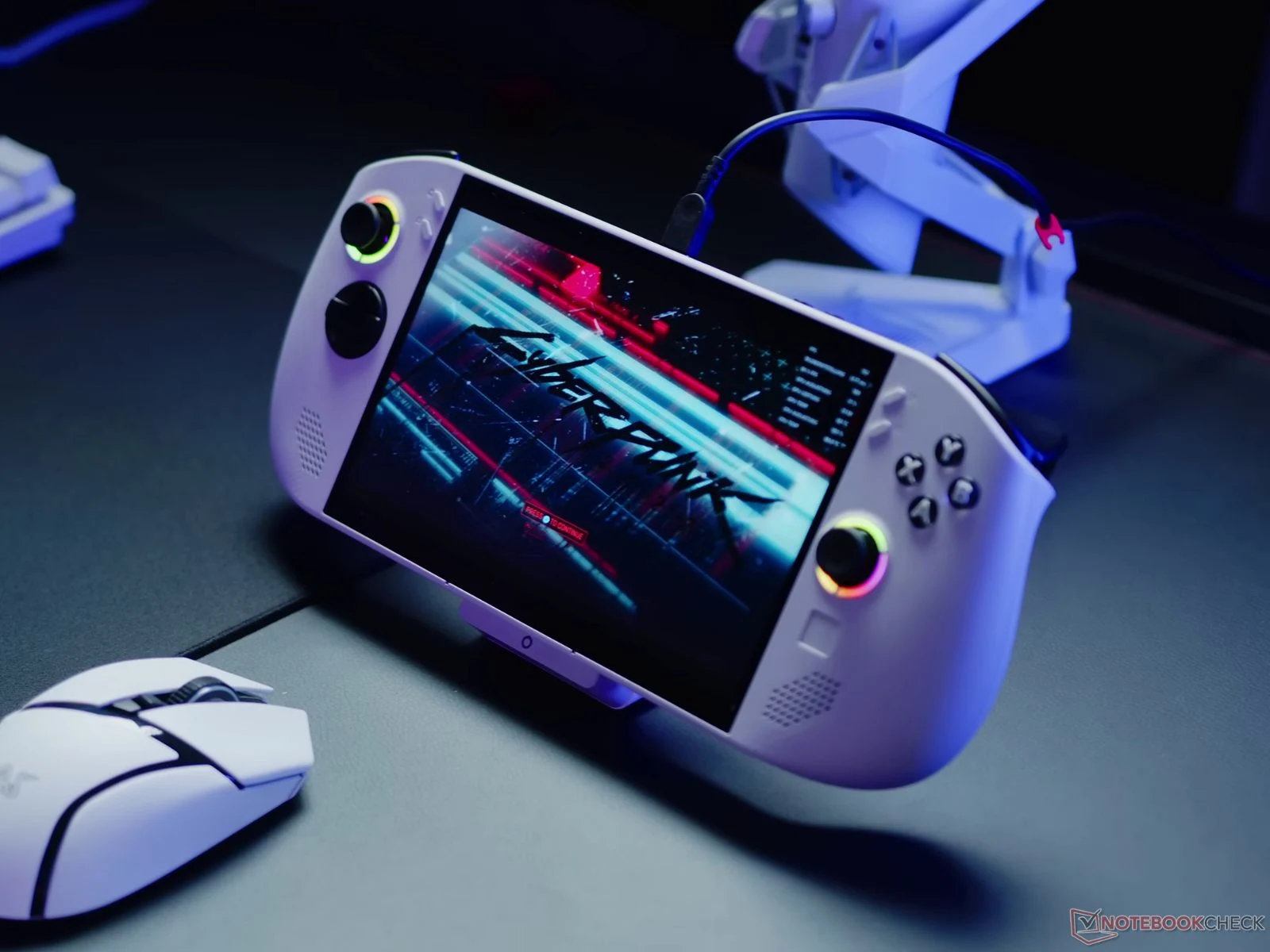
    ETA Prime primarily evaluates devices launched this year, highlighting the GPD Win 5 as the most powerful option thanks to its AMD Strix Halo processors, with the MSI Claw 8 AI+ following in second place. The ROG Xbox Ally X is noted for having the longest battery life, ranking just below the Legion Go S (currently priced at $899 on Amazon) for the most comfortable x86 handheld of the year.

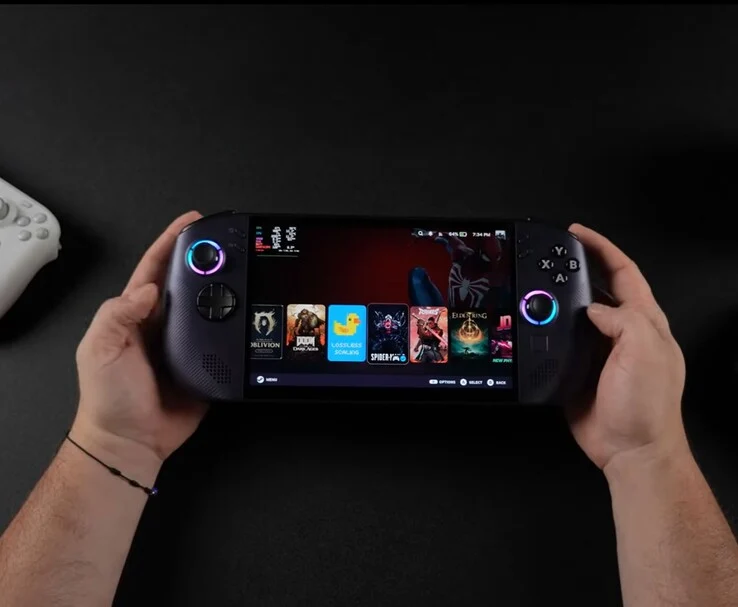
    At present, ETA Prime believes the Steam Deck OLED and Legion Go 2 boast the finest displays since they utilize OLED technology instead of IPS panels. The MSI Claw A8 also receives an honorable mention for its design and overall look. After all that has been said, ETA Prime names the Legion Go 2 as his top choice for 2025, thanks to its 144 Hz OLED display, the powerful Ryzen Z2 Extreme chipset, and detachable controllers. On the other hand, the Steam Deck OLED continues to be a favorite due to its impressive price-to-performance ratio. For more details, check out the video above and our hands-on review of the Legion Go 2 below for a complete overview of Lenovo’s latest gaming handheld.

    ETA Prime’s findings showcase how much the handheld gaming landscape has evolved in a short time.

    Source:
    Link


  • Thunderbolt 5 eGPU Dock: 4K Ultra Cyberpunk 2077 at 90 FPS

    Thunderbolt 5 eGPU Dock: 4K Ultra Cyberpunk 2077 at 90 FPS

    Key Takeaways

    1. The Razer Core X V2 enclosure features a Thunderbolt 5 port and supports high-powered GPUs, including the Nvidia GeForce RTX 5090, with a price of $349.
    2. YouTuber ETA PRIME tested the eGPU dock with both an Asus ROG Strix Scar G18 laptop and a smaller MSI Claw A8 handheld gaming PC.
    3. In Cyberpunk 2077, the RTX 5090 in the eGPU dock achieved 90 FPS compared to 52 FPS in the laptop version, showcasing significant performance differences.
    4. Performance in Horizon Zero Dawn Remastered was nearly identical between the laptop and eGPU setups, indicating game-specific performance variability.
    5. Connecting the eGPU to the MSI Claw A8 resulted in 70-80 FPS in Cyberpunk 2077, which increased to 276 FPS with Nvidia DLSS Frame Generation enabled.


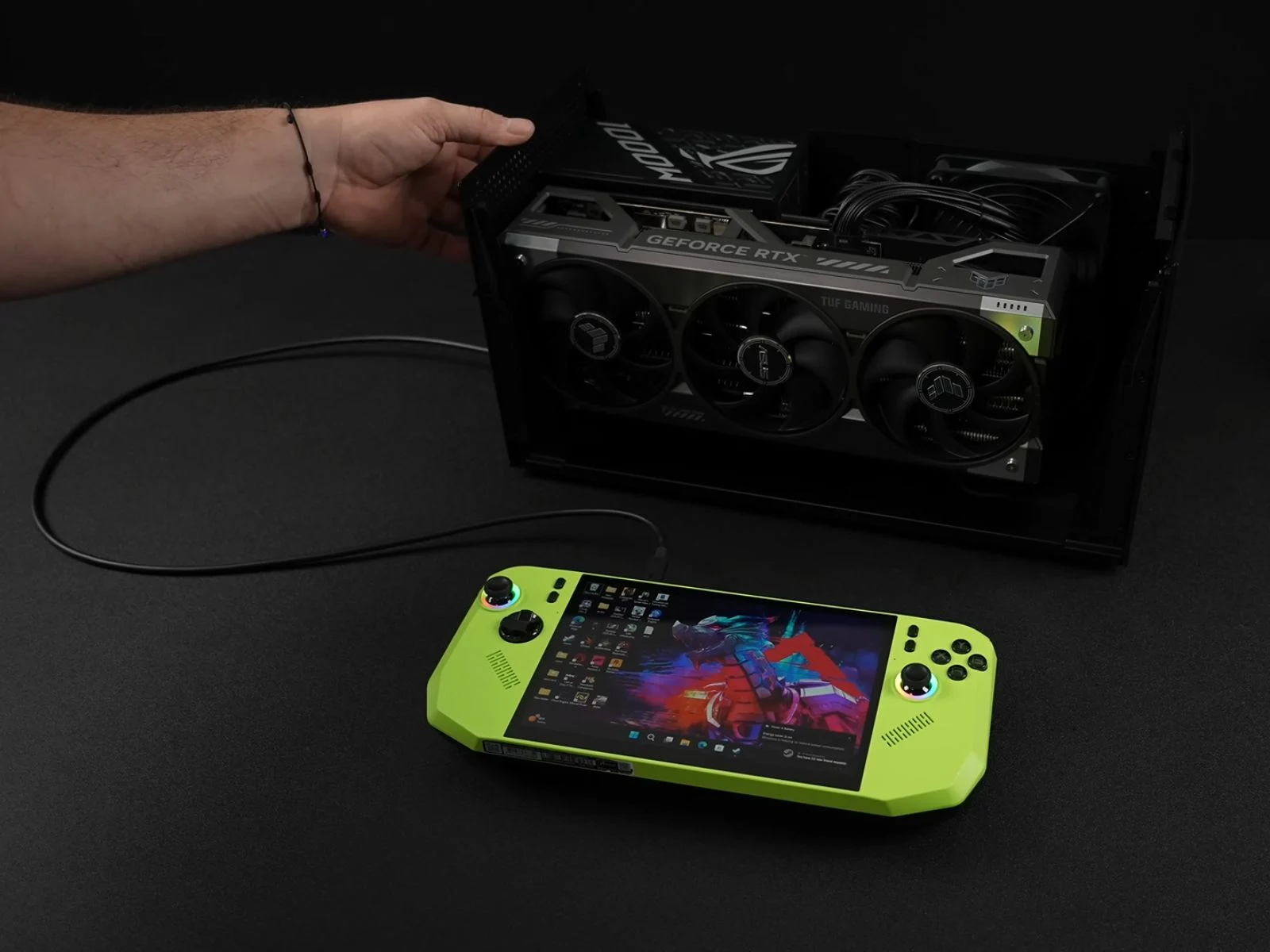
    A few months back, Razer introduced the Core X V2 enclosure featuring a Thunderbolt 5 port, and it’s currently priced at $349 on Amazon. It supports 140 W PD charging, which is pretty neat. What makes this eGPU dock special is its capacity to hold an Nvidia GeForce RTX 5090 or a comparable AMD graphics card. In simple terms, there’s plenty of room inside this enclosure. It also has a 120 mm fan that adjusts its speed automatically based on usage, plus built-in ventilation holes for better airflow.

    Unique Testing Approaches

    Recently, YouTuber ETA PRIME decided to test the Razer Core X V2 in an interesting way. Initially, the eGPU dock was used with an Asus ROG Strix Scar G18 laptop. Then, it was connected to a smaller handheld gaming PC, the MSI Claw A8. While the Scar G18 is a logical choice for the eGPU dock, given its 18-inch size, Intel Core i9 processor, and Nvidia GeForce RTX 5090, the MSI Claw A8 presents a fascinating alternative due to its compactness and lesser power.

    Performance Comparisons

    In the first test, ETA PRIME connected the eGPU dock to an Nvidia GeForce RTX 5090 GPU and compared its performance with the RTX 5090 found in the laptop. It’s important to note that this was done via the Thunderbolt 5 port on the Scar G18.

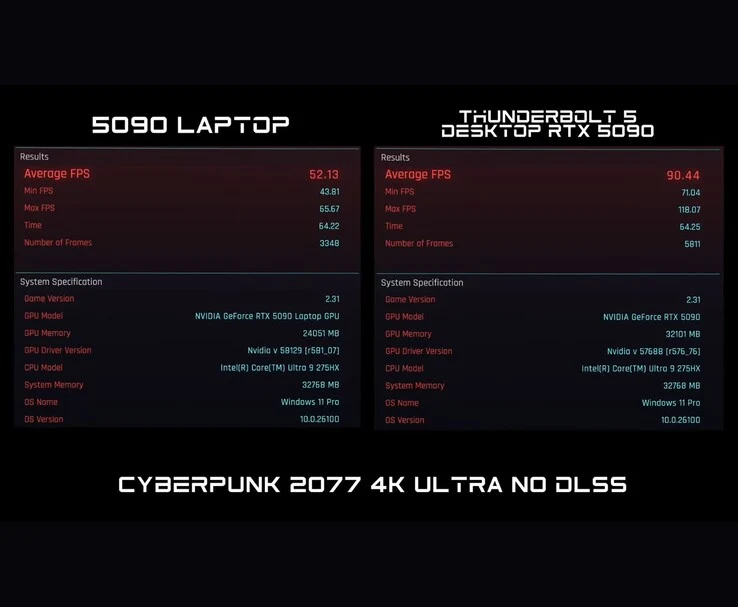
    While playing Cyberpunk 2077, the differences between the two setups became quite clear. At 4K Ultra settings without DLSS, the RTX 5090 in the laptop managed 52 FPS, while the RTX 5090 through the eGPU dock hit 90 FPS. The total graphics power (TGP) was also notably different; the laptop version consumed about 170 W, whereas the Razer eGPU dock drew approximately 460 W.

    Game-Specific Performance

    However, when running Horizon Zero Dawn Remastered, both the laptop and desktop 5090 performed similarly, with the laptop scoring 83 FPS and the desktop scoring 84 FPS at 4K Very High settings, again without DLSS.

    In the case of Borderlands 4, the laptop RTX 5090 achieved around 40 FPS, while the desktop 5090 connected via eGPU managed between 45–50 FPS at 4K Ultra settings without DLSS. The reason for these performance discrepancies in the two games remains uncertain, and the YouTuber did not clarify this in the video.

    Testing with Handheld Gaming

    Next, they connected the Razer Core X V2 to the MSI Claw A8 and tested Cyberpunk 2077 using USB 4. With limited bandwidth, the RTX 5090 delivered between 70-80 FPS, occasionally dropping below 70 FPS during explosive scenes.

    After that, they enabled Nvidia DLSS Frame Generation, which increased the average frame rate to as high as 276 FPS. The YouTuber noted that playing the game this way felt quite ‘smooth.’

    ETA PRIME also recently conducted a similar experiment where they connected an eGPU through OCuLink to a handheld gaming device. If you’re interested, you can find more information about that here.

    Source:
    Link


  • Affordable 16GB AI Workstation Card Runs Cyberpunk 2077 at 85 FPS

    Affordable 16GB AI Workstation Card Runs Cyberpunk 2077 at 85 FPS

    Key Takeaways

    1. The Intel Arc Pro B50 is a top-selling workstation GPU with 16 GB of GDDR6 VRAM, aimed at small workstation setups, compact gaming PCs, and beginner AI projects.
    2. In testing, the GPU performed well in AI tasks while consuming only 50-55 W and includes ECC memory support for stability in professional applications.
    3. Benchmark scores indicate that the Arc Pro B50’s performance is lower than dedicated gaming GPUs like the RTX 5060 but comparable to the RTX 4050 mobile GPU.
    4. The GPU can achieve decent gaming performance, reaching 80-90 FPS in Cyberpunk 2077 with optimized settings and maintaining over 100 FPS in Forza Horizon 5 at 1440p Ultra.
    5. Despite being primarily designed for work tasks, the Arc Pro B50 showcases surprising gaming capabilities, especially when utilizing Intel’s XeSS and frame generation features.


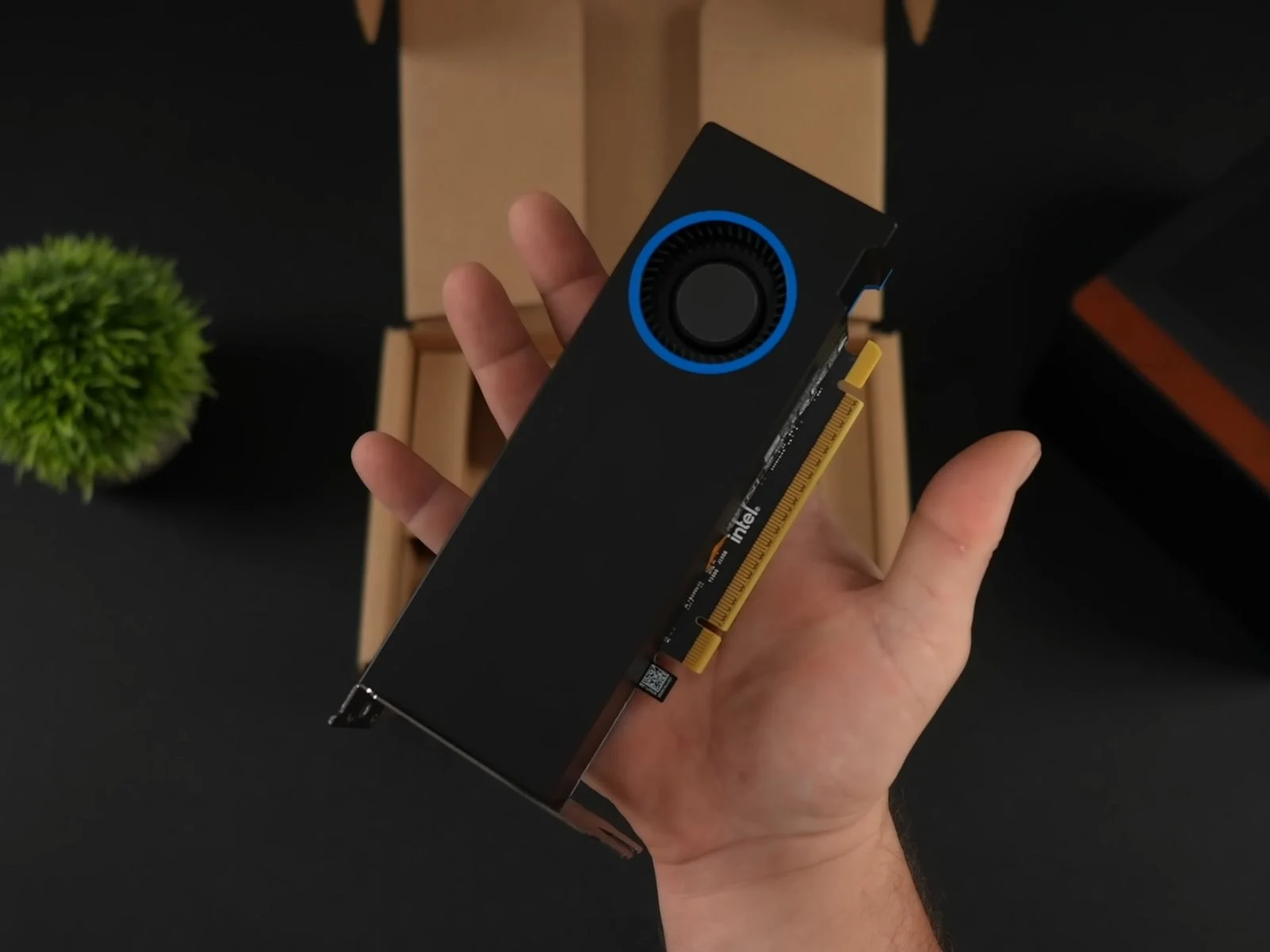
    Intel’s new Arc Pro B50 is currently the top-selling workstation GPU on Newegg, but content creator ETA Prime decided to test its performance beyond just work tasks. With 16 GB of GDDR6 VRAM, a board power of 70 W, and a dual-slot low-profile design, the Arc Pro B50 is aimed at small workstation setups. However, its specs also make it appealing for compact gaming PCs and beginner AI projects.

    Specifications Overview

    In ETA Prime’s testing setup, the GPU was combined with an AMD Ryzen 7 8700G, 32 GB of DDR5-6000 RAM, and placed in a Jonsbo NV10 case powered by a 500 W power supply. Thanks to its compact form, the B50 fit snugly into the case’s low-profile dual-slot area.

    Using Intel’s AI Playground, the GPU managed text generation and image creation tasks fully while consuming only about 50-55 W. It also offers ECC memory support to enhance stability in professional applications.

    Benchmark Performance

    When it came to synthetic benchmarks, the Intel Arc Pro B50 fell short compared to gaming GPUs like the RTX 5060. It scored approximately 73,000 points in Geekbench 6 OpenCL, 1,631 points with an average of 16.3 FPS in 3DMark Steel Nomad, and 8,376 points in 3DMark Time Spy.

    For context, data from Notebookcheck shows the RTX 5060 achieving 14,083 in Time Spy and 129,886 in OpenCL. Performance-wise, the Intel Arc Pro B50 is more comparable to an Nvidia GeForce RTX 4050 mobile GPU, which scored 7,980 in Time Spy and 77,854 in OpenCL.

    Gaming Tests

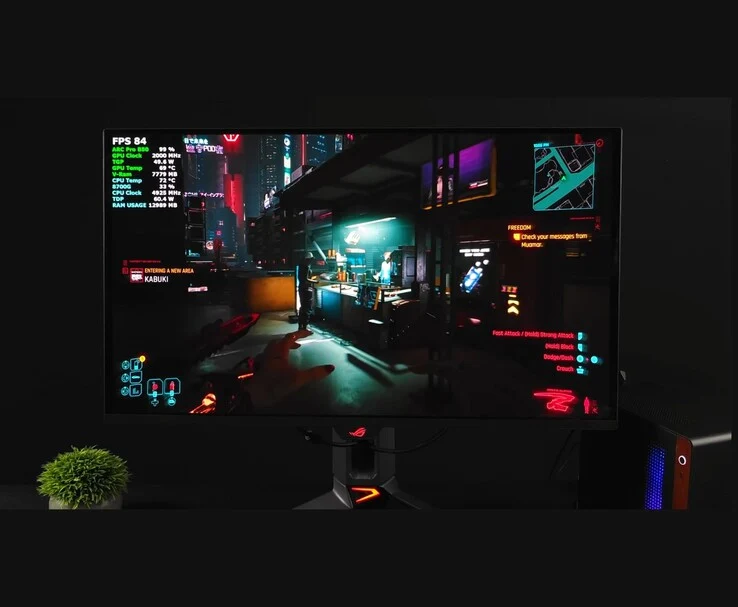
    After switching from the Pro driver to Intel’s gaming driver, ETA Prime tested various games on the Arc Pro B50. In Cyberpunk 2077 at 1440p Ultra with XeSS Super Resolution 2.0 set to Quality, the game ran at 40-50 FPS. By changing XeSS-SR to Balanced, performance improved to 50-60 FPS. Ultimately, enabling Intel XeSS Frame Generation, setting the Intel Xe Low Latency Frame Rate Target to zero, and returning XeSS to Quality, allowed the game to reach 80-90 FPS.

    In Marvel Rivals at 1440p High with XeSS Quality, the frame rate consistently stayed above 60 FPS, even during intense action scenes.

    Doom: The Dark Ages averaged around 71 FPS at 1080p with Nightmare settings and no scaling, while Forza Horizon 5 performed exceptionally well, averaging over 100 FPS at 1440p Ultra without scaling. Throughout all these tests, the GPU’s power draw remained around 50 W, with utilization staying between 98 and 100%.

    Even though the Intel Arc Pro B50 isn’t designed specifically for gaming, ETA Prime’s tests reveal it can offer surprisingly good performance in modern games, especially when using features like XeSS and frame generation. For a deeper dive into the full build and how the card performed across different games, it’s definitely worth checking out the complete video for more insights into both the setup and gameplay results.

    Source:
    Link


  • Boost Elden Ring FPS on Lenovo Legion Go S with Lossless Scaling

    Boost Elden Ring FPS on Lenovo Legion Go S with Lossless Scaling

    Key Takeaways

    1. The Lenovo Legion Go S benefits significantly from Lossless Scaling, which boosts FPS in games without native support.
    2. The device features an 8-inch IPS display with a 120 Hz variable refresh rate, 32 GB of RAM, and an 8-core Ryzen Z1 Extreme processor.
    3. Performance tests showed Elden Ring’s FPS increased from 40-50 to 70-80 FPS with Lossless Scaling enabled.
    4. Oblivion Remastered’s FPS improved from 40 FPS to around 70 FPS after activating Lossless Scaling, resulting in smoother gameplay.
    5. Lossless Scaling enhances performance and battery life on handheld devices, making them more efficient for users.


    A recent experiment conducted by YouTuber ETA PRIME shows how the Lenovo Legion Go S (now priced at $729 on Amazon) greatly advantages from Lossless Scaling. This is a frame generation tool that increases FPS in games that do not have native support. The video features the handheld device running SteamOS while playing games like Elden Ring and Oblivion Remastered at noticeably higher frame rates.

    Specifications Overview

    The Legion Go S showcased in the video comes equipped with an 8-inch IPS display that has a 120 Hz variable refresh rate. It also includes 32 GB of RAM and is powered by an 8-core, 16-thread Ryzen Z1 Extreme processor. This version, which runs on SteamOS, is distinct from the Windows version that uses the Ryzen Z2 Go APU, which we have previously reviewed, although many hardware design aspects are similar.

    Previously, we pointed out its comfortable grip, solid build quality, and the upscale feel of its large 8-inch screen. These features continue to highlight the unique aspects of the Legion Go S. For a detailed exploration of its design and user-friendliness, you can check out our complete review of the Windows version or watch the video.

    Performance Insights

    In performance evaluations, ETA PRIME observed that Elden Ring at 900p on high settings achieved around 40–50 FPS while using 18 W TDP. However, once Lossless Scaling was activated, the frame rate improved dramatically, averaging between 70 and 80 FPS.

    On the other hand, Oblivion Remastered initially provided an average of 40 FPS at 900p with medium settings when frame generation was off. After enabling FSR, it saw an increase to 60 FPS but experienced occasional drops to 55 FPS or lower. When ETA PRIME turned on Lossless Scaling at 2x, the game played smoothly, maintaining around 70 FPS and even hitting 80 FPS in some areas.

    Conclusion

    The core concept behind Lossless Scaling is straightforward: it seeks to enhance performance while consuming less power, thus prolonging battery life on handheld devices and making them more efficient for users on the go.

    ETA PRIME delves deeper into how Lossless Scaling functions on the SteamOS-powered Lenovo Legion Go S, so be sure to check out the complete video below. In it, they also examine Lossless Scaling in Cyberpunk 2077, where they encounter some ghosting issues, but you’ll gain a clearer understanding by watching it for yourself.

    Source:
    Link


  • MSI Claw 8 AI+ Boosts Performance and Battery Life with New Drivers

    MSI Claw 8 AI+ Boosts Performance and Battery Life with New Drivers

    Key Takeaways

    1. The MSI Claw 8 AI+ received updates that significantly boost gaming performance, particularly with the new Intel graphics driver (version 32.0.101.6987 WHQL).
    2. Forza Horizon shows a performance increase from 66 FPS to 88 FPS at 1200p resolution and Medium settings after the driver update.
    3. Other games also benefit from performance improvements, although specific performance numbers were not provided.
    4. Updates to the MSI Center and BIOS have improved battery life on the MSI Claw 8 AI+, though no direct comparisons were made.
    5. The Intel Core Ultra 7 258V model is more power-efficient at lower TDPs compared to the Z2 Extreme version, which is noted to be slightly superior in early reviews.


    Since it came out, the MSI Claw 8 AI+ has undergone several updates aimed at boosting performance. As shown by ETA Prime, the newest Intel graphics driver, version 32.0.101.6987 WHQL, brings a significant increase in performance for the gaming handheld.

    Performance Benchmarks

    In the recent video, ETA Prime started by testing Forza Horizon at a 17 W TDP, 1200p resolution, and Medium settings. Before the update, the game used to run at an average of 66 FPS, but now, post-update, the handheld is performing at an average of 88 FPS under the same conditions. The YouTuber didn’t offer much in the way of before-and-after comparisons for other games, though.

    General Improvements

    Nonetheless, ETA mentions that the latest driver does improve performance across other titles as well. The additional games tested on the updated gaming handheld included various popular titles, although specific performance numbers weren’t disclosed.

    In addition to the performance enhancements, ETA Prime also pointed out that updates to the MSI Center and BIOS have led to better battery life. While a direct before-and-after comparison wasn’t conducted, battery tests were performed on the updated Core Ultra 258V-powered MSI Claw 8 AI+.

    Battery Life Testing

    The games used for battery life benchmarking had the screen brightness set at 50%, a refresh rate of 60 Hz, and fan settings on auto. Plus, WiFi, Bluetooth, and RGB lighting were all kept enabled. Here’s how the battery life varied at different TDP levels:

    Overall, the Intel Core Ultra 7 258V gaming handheld appears to perform better now than it did at launch, thanks to these updates. Early reviews suggest that the Z2 Extreme version of the MSI Claw might be slightly superior, but it’s important to note that the Intel model is more power-efficient at lower TDPs. For more information, check out ETA Prime’s latest video on YouTube.

    Source:
    Link


  • Framework Desktop with AMD Ryzen AI Max+ 395 Beats RTX 4060

    Framework Desktop with AMD Ryzen AI Max+ 395 Beats RTX 4060

    Key Takeaways

    1. Framework has launched a modular desktop PC that can be pre-ordered, featuring the AMD Ryzen Max+ 395 or Max 385 chips.
    2. The tested Framework Desktop model with the Max+ 395 chip showed impressive thermal performance, maintaining a TDP of 95 W and temperatures averaging around 69.5°C.
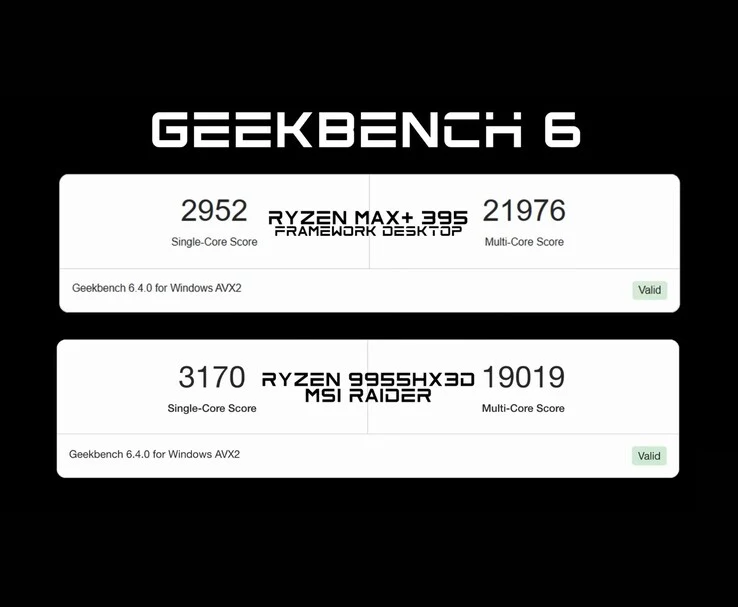
    3. In benchmark tests, the Framework Desktop scored 2,952 in single-core and 21,976 in multi-core performance, outperforming the AMD Ryzen 9 9955HX3D in multi-core tasks.
    4. The desktop achieved a score of 11,251 in 3DMark Time Spy, comparable to a laptop GPU setup with an RTX 4060.
    5. In gaming tests, the desktop managed 73 FPS in Cyberpunk 2077 and over 100 FPS in Forza Horizon 5 at high settings, showcasing strong gaming performance for integrated graphics.


    We’ve recently looked at the performance of the AMD Ryzen AI Max+ 395 chip in a forthcoming 16-inch gaming laptop. Now, we’re taking another look at the Max+ 395’s capabilities, but this time it’s in the Framework desktop PC.

    Framework’s New Desktop

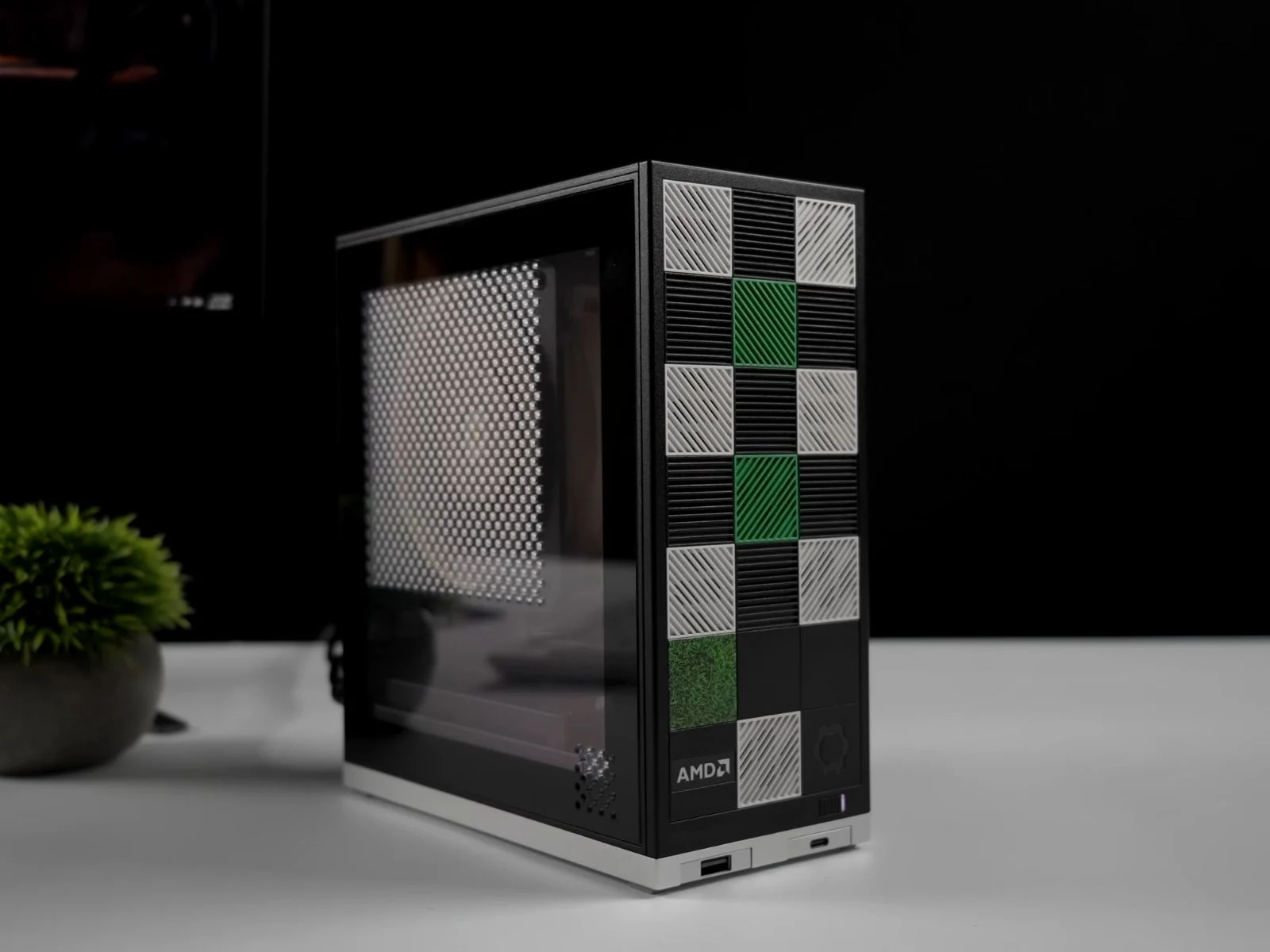
    For those who might not know, Framework is known for its modular laptops that can be upgraded over time. A few months back, they introduced their first desktop, specifically a modular mini-PC. You can now pre-order the Framework Desktop, which comes with either a 16-core, 32-thread AMD Ryzen Max+ 395 or an 8-core, 16-thread Max 385.

    Performance Insights

    After the launch, we’ve got our first glimpse at the real-world performance of the Framework Desktop thanks to YouTuber ETA PRIME. The tested model was equipped with the Max+ 395 chip and 128GB of LPDDR5X RAM. Again, we have revisited the AMD Ryzen AI Max+ 395 chip’s performance in this desktop setup.

    The YouTuber built the unit using just the provided screwdriver, making it easy for beginners. He added a 2TB Western Digital Black SSD and chose the Noctua fan variant from the three cooling options offered by Framework. The fan was installed using a shroud supplied with the unit and connected to the APU-labelled 4-pin header inside.

    Impressive Thermal Performance

    Under maximum load, the chip maintained around 95 W TDP, reaching temperatures of 75.9°C at peak, while averaging around 69.5°C. ETA PRIME noted that this was impressive thermal performance for such a compact PC. In the Geekbench 6 benchmark, the Framework Desktop achieved a score of 2,952 in the single-core test and 21,976 in the multi-core test. It surpassed the AMD Ryzen 9 9955HX3D in multi-core performance, although it lagged a bit in single-core performance.

    The Framework Desktop also scored 11,251 in 3DMark Time Spy, which is comparable to an RTX 4060 laptop GPU paired with an AMD Ryzen 9 7940HS setup, even though it uses only integrated graphics.

    Gaming Performance

    In actual gaming scenarios, Cyberpunk 2077 ran at 73 FPS at 1440p High with FSR Balanced, while Spider-Man 2 reached 130 FPS with FSR Frame Generation enabled at 1440p High. Borderlands 3 averaged between 70 to 85 FPS at 1440p Ultra, and Forza Horizon 5 delivered over 100 FPS at 1440p Extreme and 78 FPS at 4K Ultra.

    Source:
    Link


  • Lossless Scaling 3 Boosts FPS by Up to 3x on Gaming Handhelds

    Lossless Scaling 3 Boosts FPS by Up to 3x on Gaming Handhelds

    Lossless Scaling 3 has recently launched on Steam, bringing significant upgrades. The new version includes a frame generation mode that can reach up to 20x, while also enhancing performance in the 2x and 3x modes. YouTuber ETA Prime has thoroughly tested these improvements.

    Overview of Testing

    In his video, ETA Prime begins by explaining the core features of Lossless Scaling 3, showcasing its various modes and settings. He specifically put the updated software through its paces on the ROG Ally X, which features the previous-generation Ryzen Z1 Extreme chip. Among the games evaluated was Doom Eternal.

    Performance Metrics

    When playing Doom Eternal without Lossless Scaling 3 or any form of scaling, the game ran at an average of 60 FPS at 900p on the High settings. However, when using LSFG 3.0 with the scaling mode set to “X2,” the frame generation effectively doubled the FPS while keeping frame latency minimal. Another game examined was Hogwarts Legacy, notorious for challenging the integrated graphics of older handhelds (Z1 Extreme ROG Ally currently priced at $499.99 on Best Buy).

    At 720p on High settings, the Z1 Extreme handheld achieved an average of 44 FPS. With Lossless Scaling 3 applied under the same conditions, the average FPS increased to approximately 74. Additionally, ETA Prime tested Starfield, which saw an improvement from around 30 FPS to nearly 60 FPS.

    Further Testing

    For the 3x mode, ETA Prime evaluated it using Forza Horizon 5. Without Lossless Scaling 3, the game averaged about 40 FPS at 1080p on Ultra settings. However, with the “X3” mode enabled, the FPS soared to around 100. The YouTuber highlighted that even in this mode, the frame generation tool does not significantly impact frame latency. To delve deeper into the update, be sure to check out the attached video below.