
Key Takeaways
1. The Razer Core X V2 enclosure features a Thunderbolt 5 port and supports high-powered GPUs, including the Nvidia GeForce RTX 5090, with a price of $349.
2. YouTuber ETA PRIME tested the eGPU dock with both an Asus ROG Strix Scar G18 laptop and a smaller MSI Claw A8 handheld gaming PC.
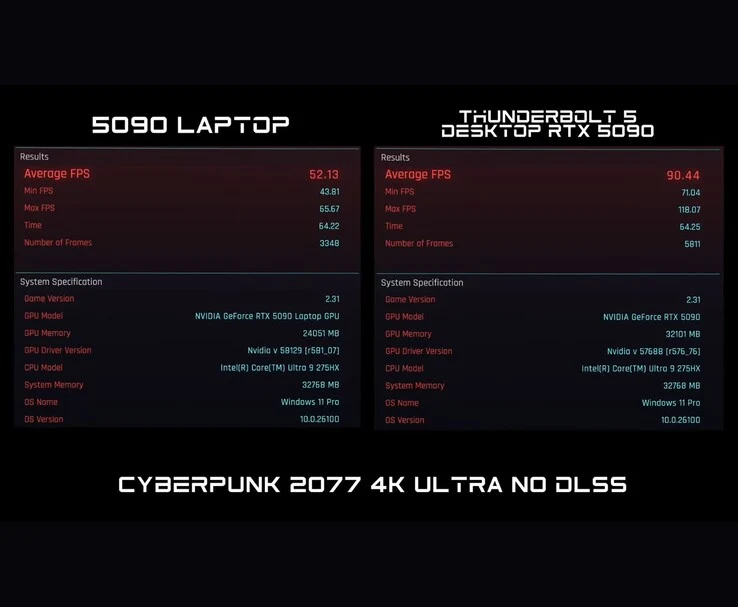
3. In Cyberpunk 2077, the RTX 5090 in the eGPU dock achieved 90 FPS compared to 52 FPS in the laptop version, showcasing significant performance differences.
4. Performance in Horizon Zero Dawn Remastered was nearly identical between the laptop and eGPU setups, indicating game-specific performance variability.
5. Connecting the eGPU to the MSI Claw A8 resulted in 70-80 FPS in Cyberpunk 2077, which increased to 276 FPS with Nvidia DLSS Frame Generation enabled.
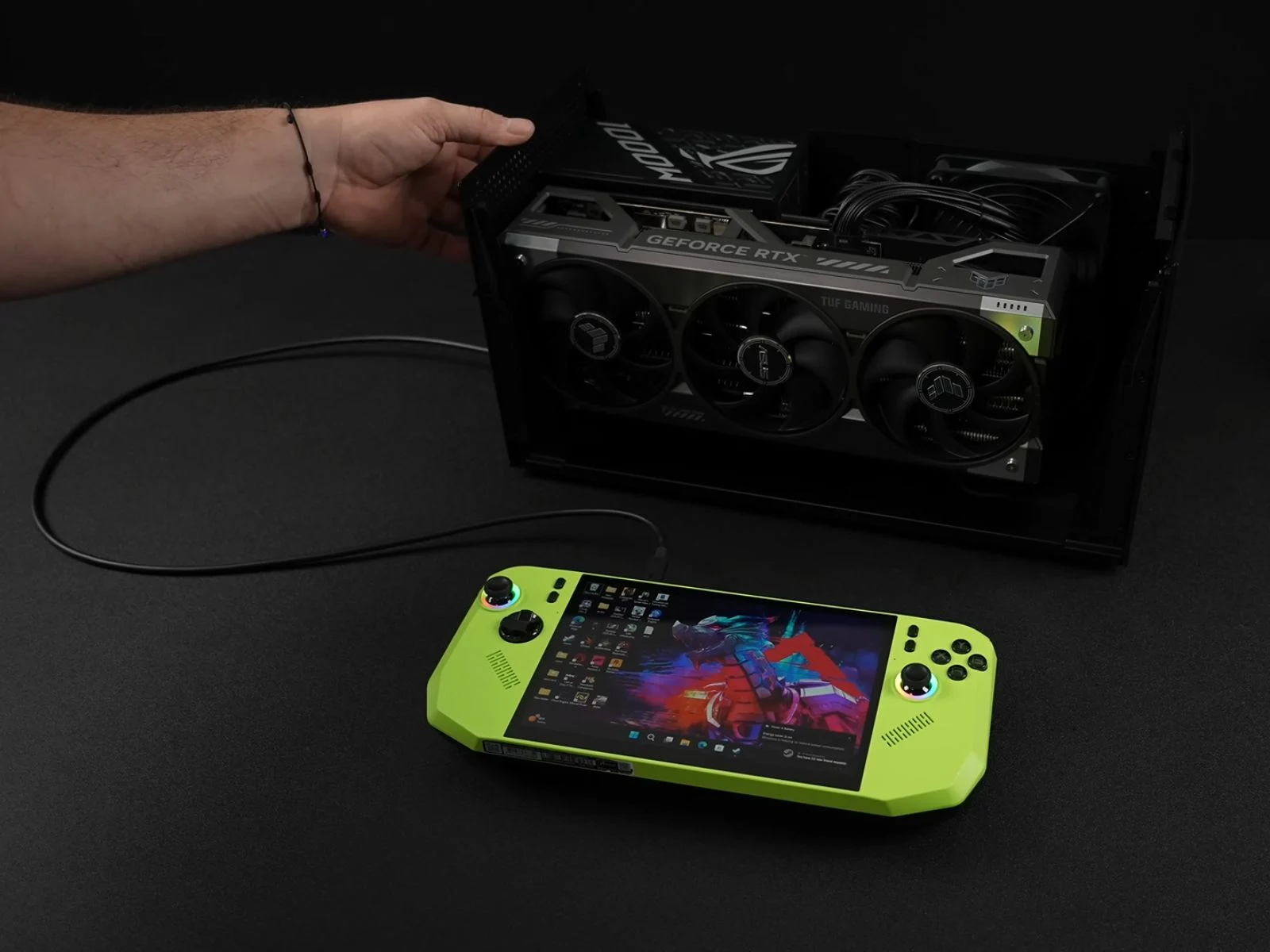
A few months back, Razer introduced the Core X V2 enclosure featuring a Thunderbolt 5 port, and it’s currently priced at $349 on Amazon. It supports 140 W PD charging, which is pretty neat. What makes this eGPU dock special is its capacity to hold an Nvidia GeForce RTX 5090 or a comparable AMD graphics card. In simple terms, there’s plenty of room inside this enclosure. It also has a 120 mm fan that adjusts its speed automatically based on usage, plus built-in ventilation holes for better airflow.
Unique Testing Approaches
Recently, YouTuber ETA PRIME decided to test the Razer Core X V2 in an interesting way. Initially, the eGPU dock was used with an Asus ROG Strix Scar G18 laptop. Then, it was connected to a smaller handheld gaming PC, the MSI Claw A8. While the Scar G18 is a logical choice for the eGPU dock, given its 18-inch size, Intel Core i9 processor, and Nvidia GeForce RTX 5090, the MSI Claw A8 presents a fascinating alternative due to its compactness and lesser power.
Performance Comparisons
In the first test, ETA PRIME connected the eGPU dock to an Nvidia GeForce RTX 5090 GPU and compared its performance with the RTX 5090 found in the laptop. It’s important to note that this was done via the Thunderbolt 5 port on the Scar G18.
While playing Cyberpunk 2077, the differences between the two setups became quite clear. At 4K Ultra settings without DLSS, the RTX 5090 in the laptop managed 52 FPS, while the RTX 5090 through the eGPU dock hit 90 FPS. The total graphics power (TGP) was also notably different; the laptop version consumed about 170 W, whereas the Razer eGPU dock drew approximately 460 W.
Game-Specific Performance
However, when running Horizon Zero Dawn Remastered, both the laptop and desktop 5090 performed similarly, with the laptop scoring 83 FPS and the desktop scoring 84 FPS at 4K Very High settings, again without DLSS.
In the case of Borderlands 4, the laptop RTX 5090 achieved around 40 FPS, while the desktop 5090 connected via eGPU managed between 45–50 FPS at 4K Ultra settings without DLSS. The reason for these performance discrepancies in the two games remains uncertain, and the YouTuber did not clarify this in the video.
Testing with Handheld Gaming
Next, they connected the Razer Core X V2 to the MSI Claw A8 and tested Cyberpunk 2077 using USB 4. With limited bandwidth, the RTX 5090 delivered between 70-80 FPS, occasionally dropping below 70 FPS during explosive scenes.
After that, they enabled Nvidia DLSS Frame Generation, which increased the average frame rate to as high as 276 FPS. The YouTuber noted that playing the game this way felt quite ‘smooth.’
ETA PRIME also recently conducted a similar experiment where they connected an eGPU through OCuLink to a handheld gaming device. If you’re interested, you can find more information about that here.
Source:
Link
Leave a Reply