Category: Software

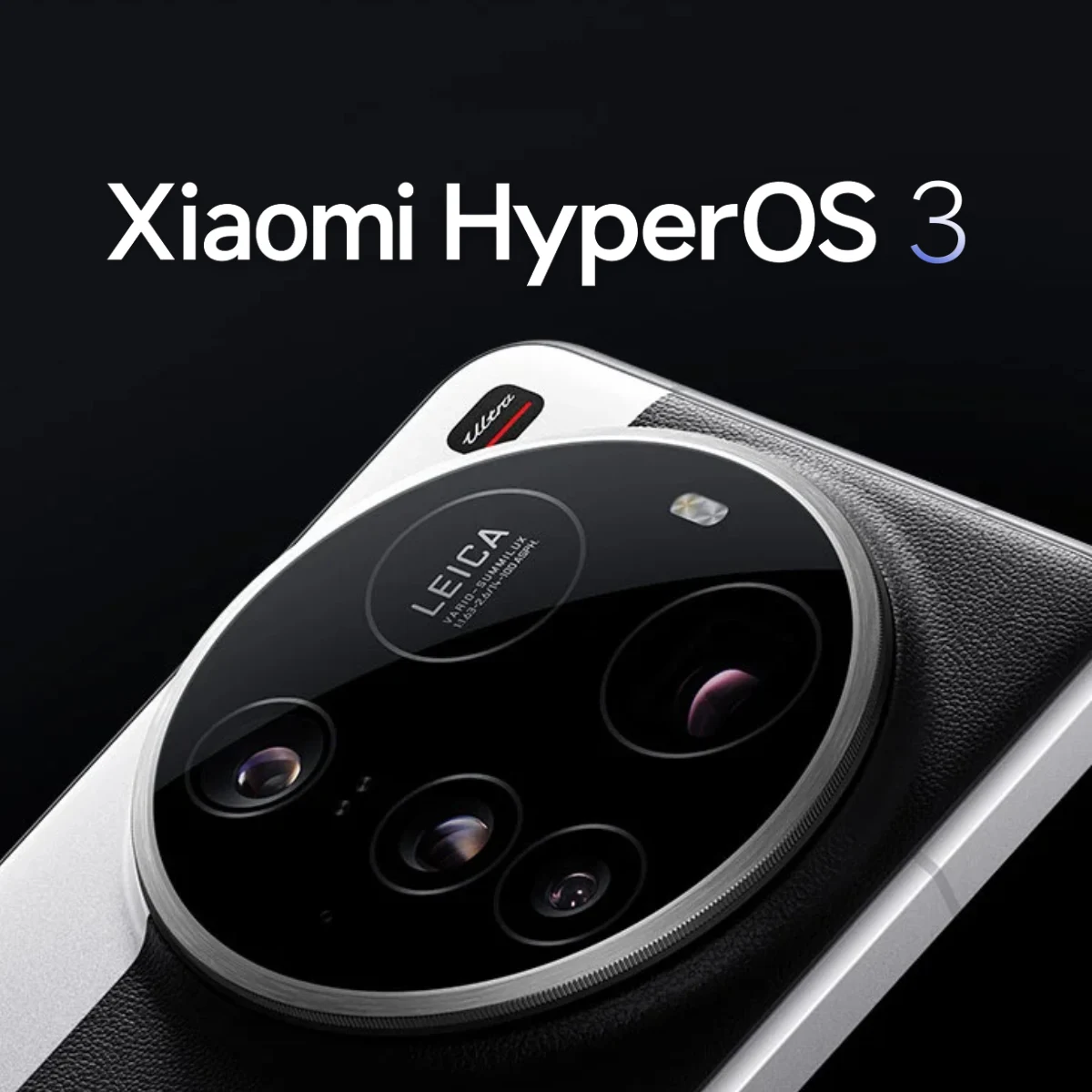
  • Xiaomi Global Launch of HyperOS 3 Update for Xiaomi 15 Ultra

    Xiaomi Global Launch of HyperOS 3 Update for Xiaomi 15 Ultra

    Key Takeaways

    1. Xiaomi is updating many devices with HyperOS 3, but not all updates use Android 16.
    2. The Xiaomi 15 Ultra is now receiving HyperOS 3 with Android 16, identified as version 3.0.5.0.WOAEUXM.
    3. The update for Xiaomi 15 Ultra is an 8.9 GB over-the-air (OTA) download and is available only for EU and UK models.
    4. HyperOS 3 includes features like Xiaomi HyperIsland and improved cross-ecosystem connectivity.
    5. Some recent HyperOS 3 updates have caused negative impacts on gaming performance.


    Xiaomi has recently been updating many of its devices with HyperOS 3. As mentioned before, not every one of these updates uses Android 16. Xiaomi has also been quietly releasing Android 15-based versions of HyperOS 3 for devices such as the Poco F5 Pro (currently priced at $449.99 on Amazon).

    Update Details

    However, the Xiaomi 15 Ultra is different, as it can now get HyperOS 3 with Android 16 worldwide. The update is specifically identified as 3.0.5.0.WOAEUXM and should be available soon as an over-the-air (OTA) update. It’s important to know that this version is meant only for Xiaomi 15 Ultra models sold in the EU and the UK. Additionally, the HyperOS 3.0.5.0.WOAEUXM update is said to be an 8.9 GB download.

    Features and Performance

    The update, as shown in the screenshots below, includes all the main features of HyperOS 3, such as Xiaomi HyperIsland and better cross-ecosystem connectivity. It seems that Xiaomi has sent out HyperOS 3.0.5.0.WOAEUXM to Xiaomi 15 Ultra devices that missed out on HyperOS 3.03.WOAEUXM for some unknown reason. For complete information on the changes brought by this update, visit Xiaomi’s HyperOS 3 website. Also, it’s noteworthy that some recent updates of HyperOS 3 have negatively impacted gaming performance in certain cases. More information regarding this issue can be found in our related article.

    via GSMArena

    Source:
    Link


  • iPhone 17 Pro and Other Models to Get Exciting New Features

    iPhone 17 Pro and Other Models to Get Exciting New Features

    Key Takeaways

    1. Apple is planning over 30 new products, with updates expected in iOS 26 or iOS 27.
    2. A new subscription service, Apple Health+, will enhance the health app with AI-driven features.
    3. Siri will receive new capabilities, including IntelligenceFlow and SpotlightPersonalAnswersSiri, by spring 2026.
    4. Third-party apps will be able to auto-fill credit card information from Apple Pay starting fall 2026.
    5. Various smaller updates include live captions in more languages, improved Apple Wallet notifications, and enhanced features in the Journal and Photos apps.


    After digging through the code of an internal beta version of iOS 26, it has been discovered that Apple is planning more than 30 new products. MacRumors has found solid clues in the same code about fresh features for the upcoming Apple iPhone 17 and other devices. These updates are expected to roll out in the next few months, either as part of iOS 26 or iOS 27.

    New Subscription Service for Health

    One of the most exciting revelations is the introduction of Apple Health+, a new paid subscription service that will enhance the Apple Health app with advanced health features, driven by AI. However, the specific features included in this subscription are still a mystery. Additionally, Siri is set to get a variety of new capabilities in spring 2026. This reinforces earlier speculations that Apple’s AI-enhanced version of Siri will finally be launched by next spring. The iOS 26 code shows new features like IntelligenceFlow, PlanOverrides, SpotlightPersonalAnswersSiri, and SpotlightSearchToolLLMQueryUnderstanding.

    Enhancements to Payment and Apps

    Beginning in fall 2026, third-party applications will gain the ability to automatically enter credit card information if it is saved in Apple Pay. Furthermore, Apple Wallet will start notifying users about upcoming payments during the summer. The Journal app from Apple will also be capable of comprehending follow-up prompts come spring. The code also hints at various smaller updates, such as the addition of live captions in more languages, folder functionalities in the Freeform app, shared collections in the Photos app, and enhanced sleep tracking features in Apple Health.

    These updates promise to enhance the user experience across Apple’s ecosystem as they continue to innovate and expand their product offerings.

    Source:
    Link


  • Android Adaptive Icons Made Easy: Complete Icon Pack Solution

    Android Adaptive Icons Made Easy: Complete Icon Pack Solution

    Key Takeaways

    1. iOS liquid glass offers a unique feature that themes icons for a uniform home screen appearance.
    2. The concept of themed icons originated from the Pixel Launcher, but full theming is limited on Android devices.
    3. Developers are responsible for incorporating themed icons; inconsistencies can be frustrating for users.
    4. The Pix Material You icon pack can be used with various third-party launchers for a cohesive look, featuring over 19,000 icons and dynamic color support.
    5. Custom launchers can enhance home screen customization beyond the limitations of the default Pixel launcher.


    Whether you like iOS liquid glass or not, one standout feature it has is the ability to theme icons. Every app, regardless of which it is, gets themed, providing a cohesive and uniform appearance for your home screen.

    Origin of the Feature

    This concept was first seen in the Pixel Launcher, which comes pre-installed on Pixel smartphones (currently available on Amazon with a 22% discount). However, since Android 12 was launched back in 2021, almost 5 years have passed, yet Adaptive icons still do not allow full theming of your home screen.

    Developer Responsibility

    It’s not completely Google’s fault since it’s up to each app’s developer to incorporate a themed icon. Nonetheless, it can be quite annoying when you want an app on your home screen, but it looks different from the other themed icons. QPR2 tries to fix this by providing “tinted” icons, but these tints often result in all icons looking dull and maintain an inverted color scheme when matched with properly themed icons.

    Limitations of Adaptive Icons

    Moreover, adaptive icons are only compatible with the Pixel launcher. If you don’t own a Pixel, or prefer not to use their launcher even on your own device, your choices may be limited.

    Fortunately, for those seeking that themed appearance, there’s a third-party icon pack that covers nearly all icons, including those pesky localized apps. Priced at just $1.99, it’s nearly a no-brainer.

    Installing Pix Material You

    Pix Material You can be used with almost any third-party launcher like Lawnchair, Octopi, and Hyperion. As long as your launcher allows for custom icon packs, you can easily apply these icons.

    This icon pack is designed to support both light and dark themes along with dynamic colors. When you set a custom wallpaper, the icons adapt their colors to blend in with the system accents.

    With over 19,000 icons available, there’s a high chance that you’ll find icons for all your apps. In the rare case that a couple of apps aren’t themed, picking manual icons for those few won’t take much time.

    Additional Features

    Additionally, there’s a variety of widgets, including clocks, dates, and weather, that perfectly align with the icons, helping you to create a stunning and uniform home screen.

    There are many reasons you might wish to switch from the default Pixel launcher, whether it be the constant search box, lack of support for even Google’s own foldable devices, or the inability to add custom icons.

    If you desire any form of customization, the default Pixel launcher may not be sufficient. However, using a custom launcher along with Pix Material You offers one of the few ways to achieve a truly consistent home screen.

    Source:
    Link


  • Beginner-Friendly 3D Printing Tool for Small Printers

    Beginner-Friendly 3D Printing Tool for Small Printers

    Key Takeaways

    1. Automatic Model Division: 3D Splitter simplifies the process of dividing STL and OBJ files into smaller parts for easier printing, especially benefiting beginners and users of compact printers.

    2. Advanced Cutting Features: It allows multiple cuts along a single plane, independent movement of cutting planes, and the creation of alignment holes and dovetails for seamless reassembly.

    3. User-Friendly Interface: The tool includes pre-configured printer profiles and an intuitive interface with clear labels and tooltips, making it accessible for users of all experience levels.

    4. Beta Status and Reliability: While still in beta, 3D Splitter has successfully tested complex models with up to 2.5 million triangles, indicating a stable performance for users.

    5. Target Audience: The tool is particularly useful for beginners and those looking to handle larger, intricate projects, enhancing their 3D printing experience.


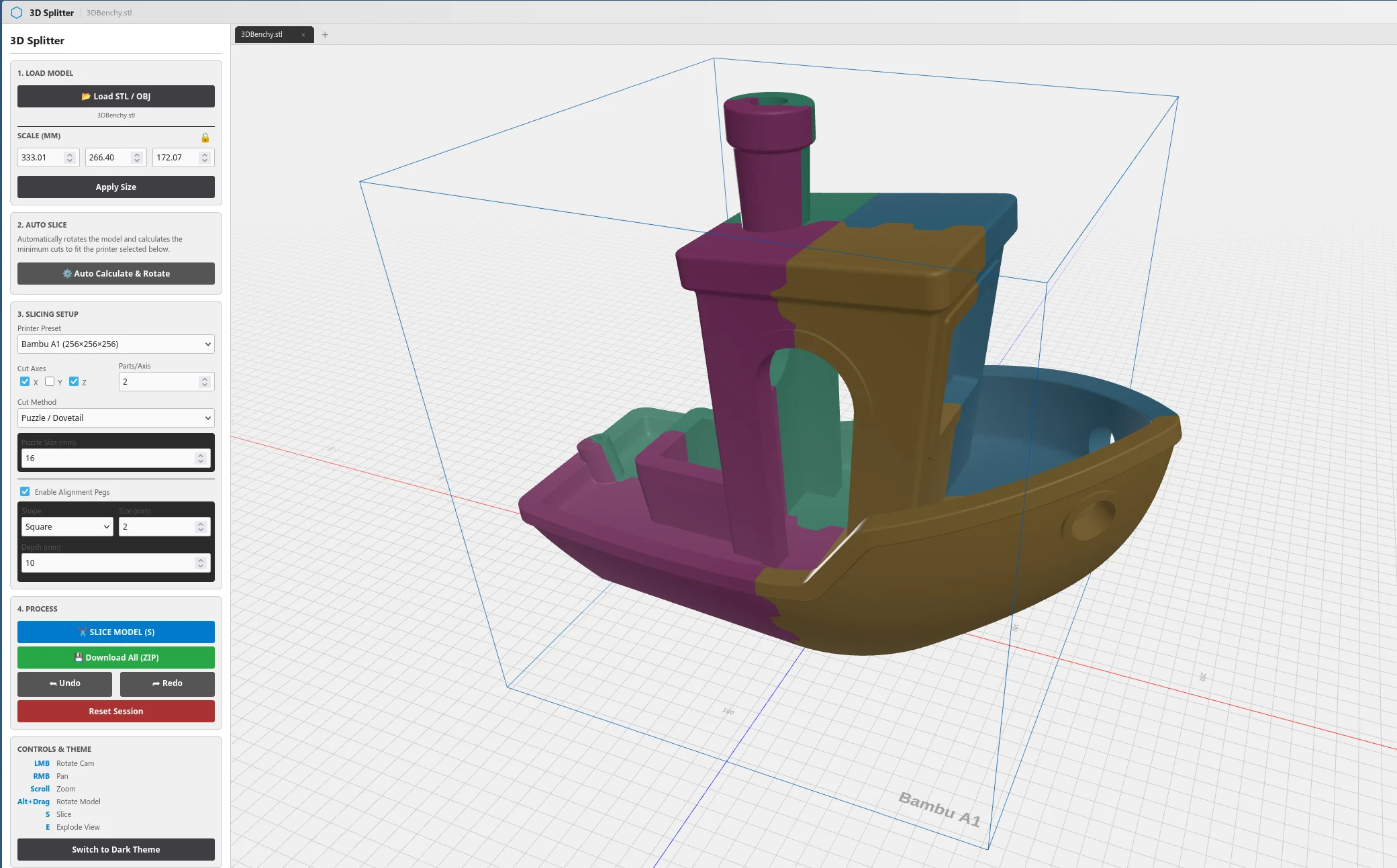
    Splitting 3D prints into smaller sections for use with compact printers has been around for a while. However, aside from a few specialized 3D printer slicers that can automate this process with different levels of control, most of the work is done manually. This typically involves dividing the model into pieces and adding features that make reassembly easy post-printing. A creative developer recently shared an exciting project, 3D Splitter, on Reddit. This tool aims to be a user-friendly, cross-platform solution for automatically dividing STL and OBJ files into smaller parts for printing. It seems especially beneficial for beginners in 3D printing or those with some experience, like users of the Anycubic Kobra 3 V2 we recently evaluated (current price is $359.99 on Amazon), and for those aspiring to tackle larger and more intricate projects.

    Features of 3D Splitter

    3D Splitter provides all the standard features expected from a tool that manages 3D models. This includes options for scaling, transforming, and rotating parts, as well as splitting the model into several pieces and slicing it along different planes. What stands out about 3D Splitter, however, is its ability to make multiple cuts along a single plane, move the cutting planes independently across all axes, and create both alignment holes and dovetails for easy assembly after printing. Users can adjust the diameter and depth of alignment holes, modify the size of the dovetails, and choose either square or round holes or opt for a straight cut rather than using the dovetail method.

    User-Friendly Interface

    In addition to automatically splitting parts based on user-defined parameters, 3D Splitter comes with several pre-configured 3D printer profiles. These profiles help determine if the resulting parts will fit within the print area and automatically rotate and slice the model to ensure compatibility with the chosen print profile. The user interface is designed to be intuitive, featuring clear labels and tooltips to clarify more complex functions when necessary.

    Current Status and Reliability

    The creator of 3D Splitter admits that the tool is still in beta and that some issues need to be addressed. Nevertheless, the developer has successfully tested quite complex models with up to 2.5 million triangles without encountering any problems. The beta version is considered stable, making it a valuable tool for both newcomers and experienced users in the 3D printing community.

    u/TemporaryLevel922 on Reddit, 3Dsplitter.com

    Source:
    Link


  • Xiaomi Launches HyperOS 3 for 10 More Xiaomi and Redmi Phones

    Xiaomi Launches HyperOS 3 for 10 More Xiaomi and Redmi Phones

    Key Takeaways

    1. Xiaomi has rolled out HyperOS 3 updates to recent flagship and premium mid-range Poco smartphones, focusing now on older models from 2023 and 2024.

    2. The stable update has been distributed to several devices, including the MIX Fold 3, Xiaomi 13 Ultra, and various Redmi Note models.

    3. The update includes a total of 10 additional phones, with the Redmi Note 14 Pro Plus and Pro being the first to receive it.

    4. HyperOS 3 features a redesigned user interface, smoother animations, new lock screen designs, enhanced privacy controls, and innovative tools like HyperIsland for live updates.

    5. The rollout will be gradual, with users in China expected to receive the update soon; global users can check Xiaomi’s HyperOS 3 roadmap for availability.


    Xiaomi has already rolled out updates for most of its recent flagship and premium mid-range Poco smartphones to HyperOS 3, the new software based on Android 16. The company is now focusing on older models released in 2023 and 2024. Specifically, Xiaomi has begun distributing the stable update to several Xiaomi and Redmi devices, which include the MIX Fold 3, Xiaomi 13 Ultra, Redmi Note 15 Pro, and the Redmi Note 14 and 13 series.

    Update Announcement

    Xiaomi shared on its Chinese community forum that the new update is now available for 10 additional phones. This release comes shortly after the global versions of the Redmi Note 14 Pro Plus and Note 14 Pro became the first to receive the stable build, expanding Xiaomi’s refreshed software experience to more flagship and mid-range devices.

    Device Coverage

    The recent update includes four Xiaomi devices and six Redmi models. On the high-end side, the MIX Fold 3 is being updated to OS3.0.3.0.WMVCNXM, while both the Xiaomi 13 Ultra and 13 Pro receive OS3.0.3.0.WMACNXM and OS3.0.3.0.WMBCNXM, respectively. The standard Xiaomi 13 is also part of this update with OS3.0.2.0.WMCCNXM.

    New Features

    HyperOS 3 introduces a redesigned user interface along with many new features and improvements. These include smoother animations, new lock screen designs, and the innovative HyperIsland feature that provides live updates at a glance. The update also enhances privacy controls and enables quicker device-to-device handoffs within Xiaomi’s expanding ecosystem of smartphones, tablets, wearables, and smart home products. Users can also expect new generative AI tools integrated into the system, including closer interaction with Google’s Gemini assistant.

    The rollout will be gradual, with users in China likely to see the OTA prompt in the next few days. If you own a global variant and are curious about when your device will receive the update, be sure to check Xiaomi’s global HyperOS 3 roadmap available online.

    Source:
    Link


  • IBM Acquires Confluent for $11B to Enhance WatsonX AI Streaming

    IBM Acquires Confluent for $11B to Enhance WatsonX AI Streaming

    Key Takeaways

    1. IBM is acquiring Confluent for $11 billion, paying $31 per share, which is over a 30% premium from its previous price.
    2. The acquisition aims to enhance real-time data flow for enterprise AI, addressing a major challenge in AI model and agent performance.
    3. Confluent’s technology, based on Apache Kafka, will be integrated into IBM’s hybrid cloud and WatsonX AI framework to create a “smart data platform.”
    4. This marks IBM’s largest software acquisition since Red Hat, part of a strategic shift towards increasing revenue from cloud and software services.
    5. Confluent’s CEO, Jay Kreps, will join IBM Software post-acquisition, with a focus on transforming data streaming into crucial infrastructure for AI applications.


    IBM is shelling out $11 billion to buy Confluent, a company that specializes in data streaming. This acquisition aims to tackle a significant challenge in enterprise AI: ensuring that clean, real-time data flows into models and agents effectively.

    Deal Details

    As part of the agreement, IBM will acquire all outstanding shares of Confluent at $31 each, which puts the total value of the Mountain View-based firm at around $11 billion. This price reflects a premium of over 30% compared to its price before the announcement. The deal is expected to wrap up by mid-2026, pending approvals from regulators and shareholders.

    Technology Integration

    Confluent has created a platform centered on Apache Kafka that manages event streams and real-time data pipelines for over 6,500 clients globally. IBM has plans to integrate this technology into its hybrid cloud and WatsonX AI framework, promoting the combination as a “smart data platform” that efficiently connects, processes, and governs data across on-premises, multi-cloud, and edge environments.

    Strategic Shift

    This acquisition marks IBM’s biggest purchase in the software sector since its acquisition of Red Hat, and it comes after the 2024 purchase of HashiCorp. CEO Arvind Krishna is steering the company towards generating more revenue from cloud and software services with higher margins. IBM anticipates that the Confluent acquisition will positively impact core earnings within a year after the deal closes and will enhance free cash flow shortly thereafter.

    Confluent’s co-founder and CEO, Jay Kreps, will transition to IBM Software once the acquisition is finalized, with his unit being overseen by senior vice president Rob Thomas. Both IBM and Confluent are emphasizing this acquisition as a means to transform data streaming into the “railroads” of the AI age, serving as the essential infrastructure that supplies models and applications with reliable, up-to-date data.

    Source:
    Link


  • Weak Security in WhatsApp and Signal Lets Attackers Track Users

    Weak Security in WhatsApp and Signal Lets Attackers Track Users

    Key Takeaways

    1. A security flaw in end-to-end encrypted messaging apps, particularly WhatsApp and Signal, has been discovered by scientists at the University of Vienna.
    2. The flaw allows tracking of devices through Round-Trip Time (RTT) data using silent delivery receipts from messages.
    3. A new tool on GitHub exploits this vulnerability to encourage WhatsApp to address the security issue and improve user privacy.
    4. Accumulated RTT data can reveal user habits, device activity, and network types, potentially compromising privacy.
    5. Current protections against this tracking are limited, with no alerts for users, no blocking options, and the only drastic measure being to uninstall affected messaging apps.


    A team of scientists from the University of Vienna has discovered a small yet significant security flaw in end-to-end encrypted (E2EE) messaging applications. Their research, which came out on November 17, 2024, is titled “Careless Whisper: Exploiting Silent Delivery Receipts to Monitor Users on Mobile Instant Messengers.” It emphasizes how devices can be tracked using Round-Trip Time (RTT) data when applications like WhatsApp or Signal are used.

    New Tool on GitHub

    Recently, a new program has been made available on GitHub that can take advantage of this vulnerability in WhatsApp. Although the existence of such a tool raises ethical questions, its main aim is to encourage WhatsApp to fix the security issue and enhance user privacy.

    The concept behind this tool is quite straightforward. The tracker dispatches reaction messages to fake message IDs. The target device still sends back a delivery receipt. This response, which the user cannot see, discloses the time needed to send and receive the altered request—the RTT.

    Implications of RTT Data

    Even though these data points do not immediately pinpoint a user’s location, they can be quite useful when accumulated over time. Patterns in the RTT data can show when a device is being actively used or is in standby. It may also reveal the type of network connection, whether it’s Wi-Fi or cellular. By examining these usage patterns over several hours or days, attackers could infer user habits. Moreover, the continuous requests drain the battery and mobile data of the targeted smartphone.

    At present, users have very few ways to protect themselves against this tracking technique. There are no alerts on smartphones notifying users of such surveillance. The attacker’s phone number is not available, making it impossible to block them. Neither Signal nor WhatsApp currently provide an option to turn off delivery receipts. A drastic measure is the only choice available right now: uninstalling all affected end-to-end encrypted messaging apps from your device.

    Device Activity Tracker on GitHub

    The Device Activity Tracker by gommzystudio is now on GitHub. The research “Careless Whisper: Exploiting Silent Delivery Receipts to Monitor Users on Mobile Instant Messengers” is available via Arxiv.

    Source:
    Link


  • Google Maps Introduces iPhone-Exclusive Feature Like Waze and Apple Maps

    Google Maps Introduces iPhone-Exclusive Feature Like Waze and Apple Maps

    Key Takeaways

    1. Google Maps now offers an automatic parking location feature that activates when connected to the car via USB, Bluetooth, or CarPlay.
    2. The app saves your parking spot automatically when you arrive at your destination and removes the pin when you start driving again.
    3. This feature is currently only available for iOS users; Android users still have to use it manually.
    4. Users can now customize car icons instead of using the standard pin for their parking location.
    5. Similar parking features have existed in other navigation apps like Apple Maps and Waze.


    Google Maps has offered the option to remember where you parked your car for some time, but it was not automatic until recently. This new automatic parking location feature was introduced by Google’s Rio Akasaka in a LinkedIn post, where he discussed the latest update.

    How It Works

    According to Akasaka, this new feature activates when Google Maps is linked to the car through USB, Bluetooth, or CarPlay. When you arrive at your destination, the app saves your parking spot. Then, when you start driving again, the pin that marks your parking location is automatically removed. Here’s what Akasaka shared:

    “Don’t worry anymore, because Google Maps will do the remembering for you. No more snapping pictures in parking garages or messing around with app settings or taking screenshots to keep track. Just hop in your car with Google Maps, connect via USB, Bluetooth, or CarPlay, and once you’re done driving, there’s a little pin waiting for you next time you open Google Maps—a personal parking valet, just for you. When you get back on the road, that pin disappears, just like that.”

    Availability Issues

    For now, this feature is only available for iOS users and started rolling out about a month ago. Unfortunately, Android users will still need to use the feature manually. Recently, it seems that users have the option to select custom car icons instead of the standard pin, which is a nice touch.

    Interestingly, similar features have been available on rival navigation apps like Apple Maps and Waze. It’s unclear why Google took so long to add this to their list of features, but it’s certainly better late than never. It’s also puzzling why this function hasn’t been released for Android users, who still have to do it manually.

    Source:
    Link


  • The Best USB Boot Tool: Better Than Rufus and BalenaEtcher

    The Best USB Boot Tool: Better Than Rufus and BalenaEtcher

    Key Takeaways

    1. USB boot drives can become unorganized and hard to locate without proper labeling.
    2. Ventoy simplifies the process by allowing multiple image files on a single USB stick.
    3. It features a menu for selecting which image to load or install when booting.
    4. Setting up Ventoy involves a simple two-step process, unlike other applications.
    5. Ventoy is compatible with Windows and Linux, and it’s available for free.


    Maybe some of you are familiar with this situation: over time, you gather a lot of USB boot drives that you can’t seem to locate when you really need them. Firstly, it’s because you have several drives, and secondly, like myself, you probably didn’t label them properly—or at all. To make matters worse, most software requires you to completely overwrite the drive each time there’s an update to an image file, which can be very annoying.

    Simplifying the Process

    With the open-source program Ventoy, everything gets a lot easier. What sets it apart is that Ventoy allows you to keep as many image files as you like on a single USB stick. When you boot from it, a convenient menu pops up, enabling you to choose which image you want to load or install.

    A Two-Step Setup

    Here’s how it works: in contrast to Rufus, BalenaEtcher, or similar applications, where you pick just one image file that is written to the drive along with its boot data, preparing a USB stick with Ventoy involves a simple two-step process:

    In this way, one USB boot stick can store a Windows 11 image, a variety of Linux distributions, rescue tools, Tails, or other operating systems. If you ever wish to change an image, just remove the old one and insert a new one—there’s no need to reconfigure the stick. For me, it’s the ideal tool for flashing OS ISOs. Ventoy is compatible with both Windows and Linux, and you can download it for free right here.

    Source:
    Link


  • Philips Hue App Update: Exciting New Features for Users

    Philips Hue App Update: Exciting New Features for Users

    Key Takeaways

    1. The Philips Hue app version 5.57.0 is now available for both iOS and Android.
    2. Users can migrate multiple Hue Bridge units to a Bridge Pro and see connected devices in the app settings.
    3. Hue Secure Wired Camera can detect sounds from smoke and carbon monoxide alarms, with customizable app notifications.
    4. A daily peak activity view has been added to the Insights section of the Security Center for Hue Secure users.
    5. The app can be downloaded from the Apple App Store and Google Play Store, potentially being the last update for 2025.


    A recent update has been released for the Philips Hue app. The new version, 5.57.0, is out for both iOS and Android, just two weeks after the previous version, 5.56.0, which introduced some small stability enhancements and bug fixes for users.

    New Features in Version 5.57.0

    The updated Philips Hue app version 5.57.0 brings a range of new features. First off, users now have the option to migrate several Hue Bridge units to a Bridge Pro. This transition is also supported by software updates for the Hue Bridge v2 and Hue Bridge Pro. Additionally, you can easily see the number of devices connected in your home by navigating to Settings > Devices. There’s also a new feature that allows you to filter Lights for each Hue Bridge.

    Updates for Hue Secure Users

    There are a couple of updates for Philips Hue Secure device users. The Hue Secure Wired Camera (currently $77.99 at Amazon US) can now pick up sounds from smoke or carbon monoxide alarms. Users can configure app notifications for these alerts in the Detections section within the camera settings. Moreover, a new daily peak activity view has been added to the Insights section of the Security Center. Lastly, Philips Hue has included helpful details like battery replacement instructions and troubleshooting tips on the edit screen for all switches and sensors.

    Downloading the Latest Version

    You can download the Philips Hue app version 5.57.0 from the Apple App Store and the Google Play Store. Since this release is close to the holiday season, it might be the last update for the Philips Hue app in 2025.

    Source:
    Link