
Key Takeaways
1. Automatic Model Division: 3D Splitter simplifies the process of dividing STL and OBJ files into smaller parts for easier printing, especially benefiting beginners and users of compact printers.
2. Advanced Cutting Features: It allows multiple cuts along a single plane, independent movement of cutting planes, and the creation of alignment holes and dovetails for seamless reassembly.
3. User-Friendly Interface: The tool includes pre-configured printer profiles and an intuitive interface with clear labels and tooltips, making it accessible for users of all experience levels.
4. Beta Status and Reliability: While still in beta, 3D Splitter has successfully tested complex models with up to 2.5 million triangles, indicating a stable performance for users.
5. Target Audience: The tool is particularly useful for beginners and those looking to handle larger, intricate projects, enhancing their 3D printing experience.
Splitting 3D prints into smaller sections for use with compact printers has been around for a while. However, aside from a few specialized 3D printer slicers that can automate this process with different levels of control, most of the work is done manually. This typically involves dividing the model into pieces and adding features that make reassembly easy post-printing. A creative developer recently shared an exciting project, 3D Splitter, on Reddit. This tool aims to be a user-friendly, cross-platform solution for automatically dividing STL and OBJ files into smaller parts for printing. It seems especially beneficial for beginners in 3D printing or those with some experience, like users of the Anycubic Kobra 3 V2 we recently evaluated (current price is $359.99 on Amazon), and for those aspiring to tackle larger and more intricate projects.
Features of 3D Splitter
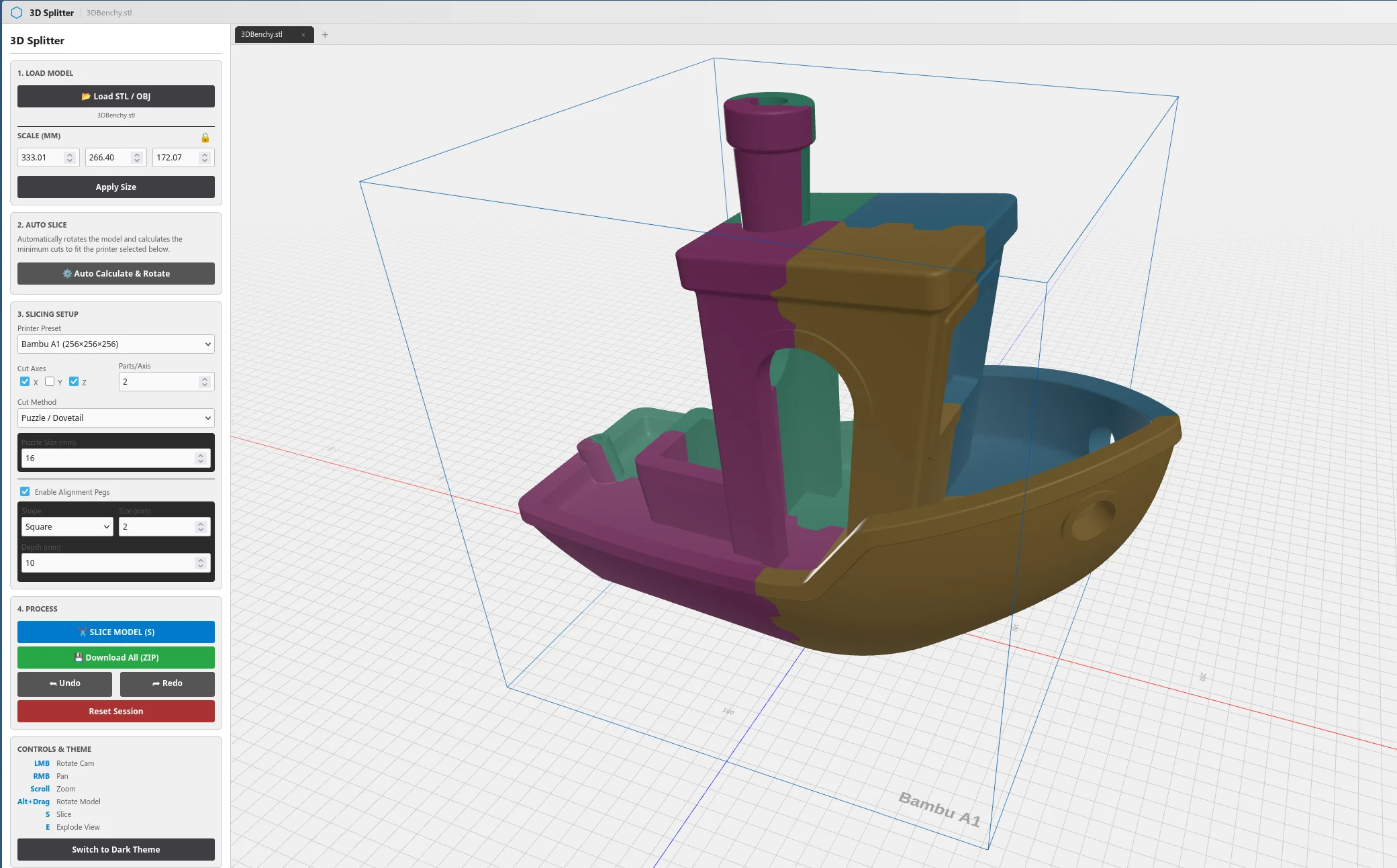
3D Splitter provides all the standard features expected from a tool that manages 3D models. This includes options for scaling, transforming, and rotating parts, as well as splitting the model into several pieces and slicing it along different planes. What stands out about 3D Splitter, however, is its ability to make multiple cuts along a single plane, move the cutting planes independently across all axes, and create both alignment holes and dovetails for easy assembly after printing. Users can adjust the diameter and depth of alignment holes, modify the size of the dovetails, and choose either square or round holes or opt for a straight cut rather than using the dovetail method.
User-Friendly Interface
In addition to automatically splitting parts based on user-defined parameters, 3D Splitter comes with several pre-configured 3D printer profiles. These profiles help determine if the resulting parts will fit within the print area and automatically rotate and slice the model to ensure compatibility with the chosen print profile. The user interface is designed to be intuitive, featuring clear labels and tooltips to clarify more complex functions when necessary.
Current Status and Reliability
The creator of 3D Splitter admits that the tool is still in beta and that some issues need to be addressed. Nevertheless, the developer has successfully tested quite complex models with up to 2.5 million triangles without encountering any problems. The beta version is considered stable, making it a valuable tool for both newcomers and experienced users in the 3D printing community.
u/TemporaryLevel922 on Reddit, 3Dsplitter.com
Source:
Link
Leave a Reply