Key Takeaways
1. Startup Speed: Windows 8.1 outperformed other versions in startup speed due to its “Fast Boot” feature, while Windows 11 had the slowest startup experience.
2. Storage and RAM Usage: Windows 7 used the most disk space, while Windows XP used the least. Windows 8.1 was efficient in RAM usage, outperforming Windows 11, which had the highest RAM consumption.
3. Tab Management: Windows XP and Windows 11 struggled with tab management, opening only 50 and 49 tabs respectively, while Windows 8.1 excelled with 252 tabs.
4. Performance Tests: Windows 11 scored poorly in various performance tests, including battery life, audio exporting, and video editing, and had issues with basic tasks like opening MS Paint.
5. Optimization Insight: Later Windows versions, especially Windows 11, are less optimized compared to earlier versions like Windows 8.1, leading to a subpar user experience on modest hardware.
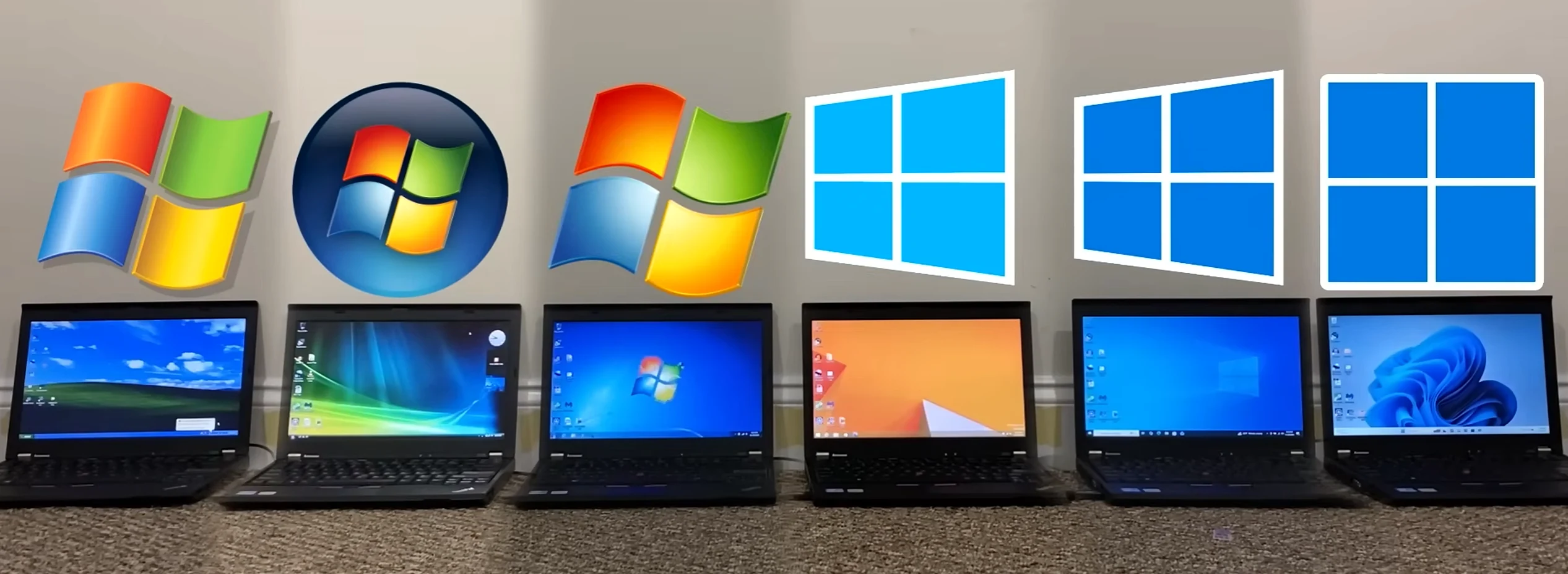
Given the rise in computing power over the last two decades, it might seem logical to think that Windows XP would be the most efficient and quickest operating system on contemporary 64-bit hardware. However, YouTuber TrigrZolt has conducted benchmarks on every Windows version, revealing some unexpected findings.
Testing Setup
All Windows versions were thoroughly updated and assessed using identical hardware: a Lenovo ThinkPad X220 equipped with an i5-2520M CPU, 8GB of RAM, Intel HD 3000 Graphics, and a 256GB hard drive. While this setup may not be the quickest or the latest, it was essential for maintaining compatibility with the older Windows XP.
Start-Up Speed
Windows 8.1 took the lead in the startup test by a large margin, likely because Microsoft introduced the “Fast Boot” feature. This feature allows the system to save the RAM contents to the hard drive, enabling quicker startups on subsequent boots.
The difference in performance here is considerable, probably due to Windows 8.1 needing fewer resources than other fast-boot-capable systems. Even though Windows Vista and Windows 7 took much longer because they lacked Fast Boot, Windows 11 ended up in last place, struggling to load the taskbar despite a relatively fast desktop launch.
Storage and RAM Usage
When it comes to storage, Windows 7 used the most disk space, with Windows XP (as expected) consuming the least. Interestingly, Windows 8.1 performed admirably, using even less space than its older counterpart, Vista.
In terms of RAM consumption after startup, Windows 8.1 was only outperformed by XP, while Windows 11 had the highest RAM usage.
Tab Management
Using Superemium (noted for its compatibility with older Windows versions) yielded intriguing outcomes regarding RAM. Windows XP managed to open only 50 tabs, most likely due to issues with virtual memory management. In a surprising turn, Windows 11 fared even worse, maxing out at 49 tabs. In contrast, every other Windows version could easily open over 100 tabs, with Windows 8.1 achieving an impressive 252.
Performance Tests
Windows 11 ranked lowest in the battery test, second to last in audio exporting, and was the last in video editing tests (among operating systems that could run it). It also came in last for file manager openings and embarrassingly couldn’t open MS Paint effectively. Additionally, Windows 11 struggled with opening videos and loading websites, including Microsoft’s own login page.
Multi-core benchmarks didn’t show any clear leaders, but in single-threaded performance, Windows 11 again fell behind during the CPU-Z test.
Conclusion
According to the creator’s own words, this isn’t a flawless test. Nonetheless, some insights can be gathered.
Windows 11 is quite a RAM consumer, and although the system requirements state a minimum of 4GB RAM, even having 8GB isn’t really adequate. In a time when RAM is scarce and manufacturers might limit mid-range models to just 8GB, that amount is insufficient for optimal performance with Windows 11. If you are in the market for a new PC (like the ASUS ROG Strix G16 with an RTX 5060), be sure to select one that offers at least 16GB of RAM.
The findings also shed light on how the later versions of Windows have become less optimized. As resources continue to grow, developers no longer have the same incentive to optimize. Software can be created to run adequately, purely based on raw performance. This test illustrates that even modest hardware, meeting Windows 11’s system requirements, can lead to a less than satisfactory user experience.
Finally, among all of Microsoft’s operating systems, Windows 8 was notably one of the best optimized. At the time, we didn’t realize it, as we were too focused on criticizing the revised Start menu.
Source:
Link