Category: Software

  • Google and Mozilla Take Offense at Apple’s Browser Rule Modification

    Google and Mozilla Take Offense at Apple’s Browser Rule Modification

    Apple is making some big changes to how browsers work on iPhones and iPads in Europe, and it’s all because of new rules from the European Union. These rules are supposed to help other companies compete better with big ones like Apple. Now, browsers like Chrome and Firefox can use their own technology on iOS devices, but there’s a catch – this is only happening in Europe.

    Apple’s Changes for European Browsers

    The European Union is responsible for this change. Google and Mozilla, the companies behind Chrome and Firefox, aren’t too happy about this. They say that by making these changes only in Europe, Apple is making things complicated for them. They’ll have to work on two different versions of their browsers, one for Europe and another for the rest of the world. Mozilla thinks this is unfair and makes it hard for any browser other than Safari to compete.

    Discontent Among Google and Mozilla

    Google’s Chrome team agrees. They think Apple’s not really trying to make it easier for other browsers to compete on iPhones and iPads. Right now, if you download Chrome or Firefox on an iOS device, you’re basically using Safari with a different look. That’s because Apple hasn’t let other browsers use their own tech until now.

    Competition and Safari’s Improvement

    People have been complaining about Safari for a while, saying it’s slow to add new features that other browsers have. But Safari is getting better, and having more competition could push it to improve even faster. The problem is, with Apple’s new rules, this competition is only happening in Europe.

    Even though these changes are a big deal for Europe, they don’t help everyone else. Google and Mozilla have been getting ready for this by working on their browsers for iOS, hoping to bring new features to users. But with Apple’s restrictions, it looks like the rest of the world will have to wait to see any real change in how they browse the web on their iPhones and iPads.


  • Threads Emerges as a Prominent Player in Social Media Space with a Whopping User Base of 130 Million

    Threads Emerges as a Prominent Player in Social Media Space with a Whopping User Base of 130 Million

    Threads, Instagram‘s latest venture, has quickly become a crowd favorite, with Mark Zuckerberg, the CEO of Meta, announcing it has attracted over 130 million monthly users. This impressive growth comes amid the evolving social media landscape following Elon Musk’s takeover of Twitter, now called X. Threads is holding its own in a competitive field that includes Bluesky, Mastodon, and others, showcasing its potential to be a key player.

    Can Threads Hit the Billion-User Mark?

    Zuckerberg shared that Threads is on a solid growth path, even surpassing the buzz it generated at its launch. This momentum hints at Threads’ potential to hit the billion-user mark, a target Zuckerberg previously mentioned, and this clearly shows confidence in its future.

    Meta’s Expanding Reach

    Meta’s family of apps continues to expand its reach, with billions of people logging in daily across platforms like Facebook, WhatsApp, and Instagram. Threads, in particular, has seen a significant boost in downloads, ranking it among the top apps worldwide in December. This spike in interest can be traced back to Meta’s efforts to integrate Threads more closely with its existing network, encouraging a resurgence in its popularity.

    A Resurgence in Popularity

    Despite a dip in interest after its initial launch, Threads has bounced back, thanks in part to strategic promotions that have reintroduced the app to a wider audience. Estimates now place its total user base at around 160 million, a figure that speaks to its growing appeal. On the financial front, Meta reported strong earnings, surpassing analyst expectations and announcing its first-ever cash dividend, signaling a period of financial health and optimism for the company.

  • Color-Coded Video Feeds: YouTube’s Newest Experiment

    Color-Coded Video Feeds: YouTube’s Newest Experiment

    YouTube is shaking things up with a colorful new experiment. Imagine opening your YouTube app and being greeted not just by the usual mix of videos but by streams of content curated by color. That’s right, YouTube is currently trying out a feature that sorts videos into red, blue, and green feeds, aiming to offer a unique and visually engaging browsing experience.

    This experiment is available only to a few Android & iOS devices

    Reports from 9to5Google and user discussions on Lemmy shed some light on this concept, where users are prompted to select a color theme for their video feed. This approach is still in the testing phase, available to a handful of users on both Android and iOS devices. YouTube’s own Allison Toh has confirmed the experiment, though the reasons behind this move and its potential rollout remain a mystery.

    The idea is simple yet intriguing

    When you choose a color, a new feed springs up, adding a splash of your selected hue to your homepage without overtaking your existing feed. The specifics of how videos are chosen for each color filter are a bit of a puzzle, with the selection seemingly based on the dominant colors in video thumbnails or possibly even the video content itself.

  • Snap Inc. Announces 500 Employee Layoffs

    Snap Inc. Announces 500 Employee Layoffs

    Snap Inc., the company behind Snapchat, is letting go of 10% of its workforce, about 500 people. This move is part of a plan to make the company work better together and more efficiently. Snap’s decision reflects a bigger trend in the tech world, where many companies are trimming down to stay agile and competitive. Some other recent layoffs include Discord’s layoff of 17% of its employees and Microsoft’s layoff of almost 1900 employees.

    Tech Sector Job Cuts

    The tech sector has seen nearly 24,000 job cuts in the month of January alone. The layoffs are meant to help Snap reduce layers within the company and improve face-to-face work among teams. This is a strategic step to keep the company strong and focused, especially during a time when the tech industry is facing a lot of changes. Other tech firms, including big names like Okta and Zoom, have also been cutting jobs recently. In fact, the tech sector saw nearly 24,000 job cuts in January alone.

    Ongoing Restructuring

    Snap has been through this before, with several rounds of job cuts starting in 2022. This is part of an ongoing effort to align the company’s structure with its goals for growth and innovation. These latest layoffs are expected to cost between $55 million to $75 million.

    Challenges and Efforts

    The company is also under the spotlight for the impact of social media on young people, with CEO Evan Spiegel recently speaking to the Senate Judiciary Committee about this issue. Despite these challenges, Snap has managed to increase its revenue from digital ads recently and has started buying back $500 million in shares.

    Even with these efforts, Snap’s stock price is still below its initial public offering price and far from its peak in 2021. This shows the company is working through some tough times, trying to find the best path forward in a fast-changing tech landscape.

  • OnePlus 10 Pro and OnePlus 8T Now Getting OxygenOS 14.0.0.402 and OxygenOS 14.0.0.300 Updates in Order

    OnePlus 10 Pro and OnePlus 8T Now Getting OxygenOS 14.0.0.402 and OxygenOS 14.0.0.300 Updates in Order

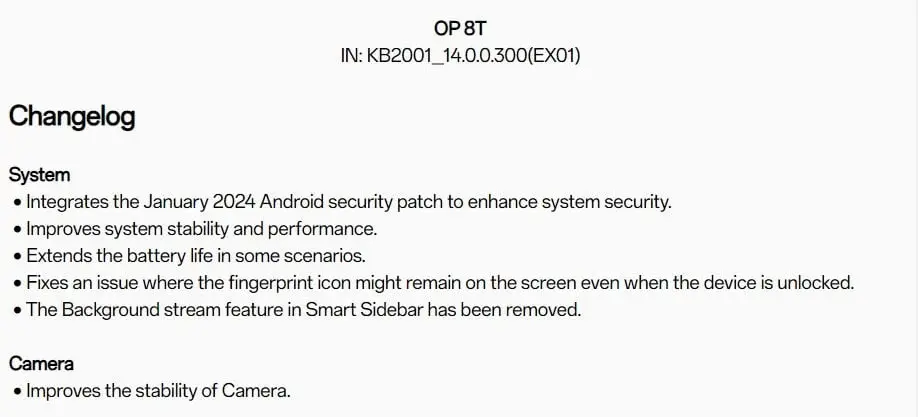
    OnePlus 10 Pro and OnePlus 8T are receiving a new firmware update bringing some new improvements and fixes along with the January 2024 Android Security patch. OxygenOS 14.0.0.300 for the OnePlus 8T and OxygenOS 14.0.0.402 for the OnePlus 10 Pro are now available for the Indian variant. The update is currently seeding and may reach each unit over the coming few days. Below are the details for each update on the respective smartphone:

    OnePlus 8T Update Details

    OnePlus 8T is bringing the latest security patch, along with system stability and performance improvements. It even enhances the battery life and fixes the fingerprint icon that keeps showing even after unlocking the smartphone. Further, the background stream feature in the Smart Sidebar is now removed. It even adds some stability fixes for the smartphone camera.

    OnePlus 10 Pro Update Details

    On the other hand, the OnePlus 10 Pro is also receiving the latest security patch via Oxygen OS 14.0.0.402. It adds an auto-brightness button in Quick Settings and improves the system’s stability and performance. OnePlus 10 Pro fixes certain issues, like the inability to switch between apps, and the flicker issue is gone, which was quite annoying when you tapped the ongoing call bubble in the status bar. Even the Smart Sidebar issue of getting inadvertently stopped is fixed.

    Both the updates to the respective devices are rolling out in a staggered way. It may take a few days for the update to reach each unit. Users can also check for updates by heading to the device Settings > About Device > Software Update > Download Now. In case of bugs or issues, users can always submit them by heading to the OnePlus Community or by dialing *#800# on Google Dialer.

    Additionally, OnePlus is already seeding OxygenOS 14 for its compatible smartphones, including the OnePlus 11 Series, OnePlus 10 Pro, OnePlus 10R, OnePlus Nord 3, and OnePlus Pad. We expect the remaining smartphones to receive the ColorOS 14 update soon.

  • The latest version of Google Play Store APK (39.5.18) is currently being released.

    The latest version of Google Play Store APK (39.5.18) is currently being released.

    Google has recently released an updated version of the Google Play Store, marked as version 39.5.18, for Android users. This latest update is part of Google’s routine enhancements, although the company has not disclosed specific details regarding the changes or improvements made.

    Compatibility and How to Download

    This update is designed for Android devices running Android 5.0 (Lollipop) or higher, ensuring broad compatibility. While the update typically installs automatically, users have the option to manually initiate the download and installation process. It’s worth noting that the download size may vary based on the device.

    Play Store Search Feature Overhaul

    Google is currently experimenting with a notable modification to the Play Store’s search functionality. This involves introducing a dedicated search page and relocating the search bar to the top of the Search tab, adding an additional step to initiate searches. Although this redesign aims to enhance monetization opportunities through advertising, it has received mixed feedback from users concerned about usability and the potential for more aggressive advertising tactics.

    Expanding Real-Money Gambling App Support

    In a strategic move, Google plans to broaden the availability of real-money gambling apps in select countries, including India, Mexico, and Brazil, starting June 2024. This decision comes with strict adherence to age and location restrictions to promote safety and legal compliance. This expansion is anticipated to increase competition among app developers while also spotlighting the significance of responsible gaming practices. This follows Google’s 2021 policy adjustments that allowed an increased presence of gambling apps in the US market, tailored to meet region-specific regulations.

    Installing the Google Play Store APK

    To manually install the Google Play Store APK on your Android device, follow these steps:

    1. Open your device’s Settings.
    2. Navigate to Applications or Security, depending on your device.
    3. Enable the Unknown Sources option to allow app installations from sources other than the Google Play Store.
    4. Download the Google Play Store APK.
    5. Locate the downloaded APK file and tap it to start the installation.
    6. Follow the on-screen prompts to complete the installation process.
    7. Once installed, the Google Play Store icon should appear on your home screen or in the app drawer.

    By following these instructions, you can ensure that your device runs the latest version of the Google Play Store, keeping you up to date with the newest features and improvements.

  • HyperOS update released for Redmi Note 12 Turbo

    HyperOS update released for Redmi Note 12 Turbo

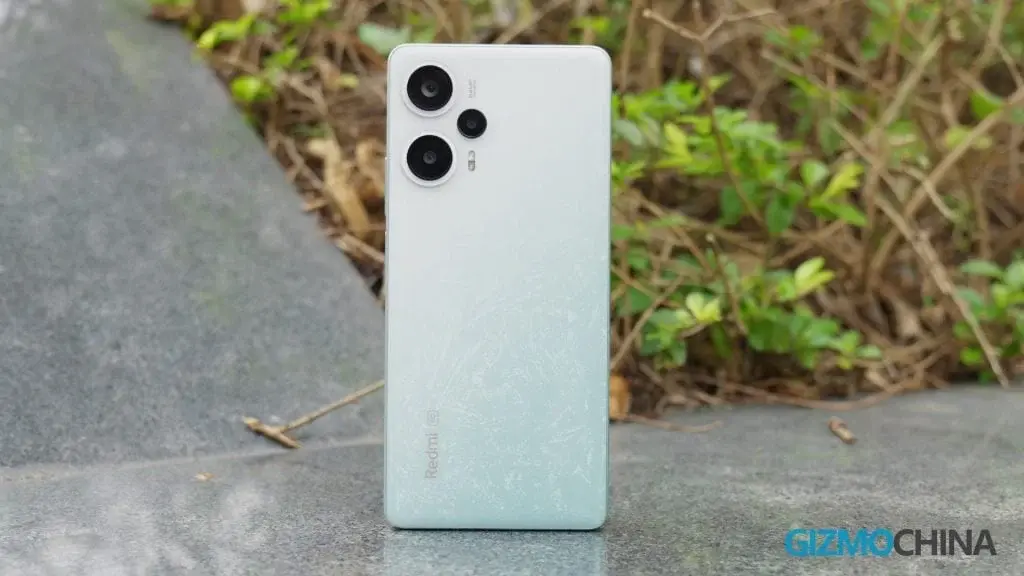
    The Redmi Note 12 Turbo, also known as the Poco F5 in global markets, was released in China almost a year ago. Since then, it has remained one of the most powerful mid-range smartphones available. Now, Xiaomi is rolling out the first major software update for this device.

    Redmi Note 12 Turbo Receives HyperOS Update

    The Redmi Note 12 Turbo is currently receiving the HyperOS update in China. This update is based on Android 14, while the device initially debuted with MIUI 14 based on Android 13. The new software, with build number 1.0.2.0.UMRCNXM, is currently limited to beta testers and weighs 5.5GB.

    Rollout to All Users Expected Soon

    If there are no major bugs found during the beta testing phase, the same build should roll out to all users in the coming days. However, if any issues are discovered, the company may release a new build with fixes. It is also expected that the Poco F5 will receive the HyperOS update soon.

    Powerful Features and Specifications

    The Redmi Note 12 Turbo boasts impressive features and specifications. Its main highlight is the Qualcomm Snapdragon 7 Plus Gen 2 chipset, which is also used in the Realme GT Neo 5 SE. This powerful chipset is paired with LPDDR5 RAM and UFS 3.1 storage.

    The smartphone features a 6.67-inch centered punch-hole OLED display with a resolution of 2400 x 1080 pixels (FHD+) and a 120Hz refresh rate. The display has minimal bezels and supports Dolby Vision, providing a stunning visual experience.

    Triple Camera System and Selfie Camera

    In terms of photography, the Redmi Note 12 Turbo is equipped with a triple camera system. It includes a 64MP primary sensor, an 8MP ultrawide unit, and a 2MP macro snapper. On the front, there is a 16MP selfie camera for capturing high-quality self-portraits.

    Dual Stereo Speakers and 3.5mm Headphone Jack

    One of the standout features of the Redmi Note 12 Turbo is its dual stereo speakers, which deliver immersive audio experiences. Additionally, the device includes a 3.5mm headphone jack, allowing users to connect their favorite wired headphones.

    Long-Lasting Battery and Fast Charging Support

    To keep up with the demands of power-hungry users, the Redmi Note 12 Turbo is equipped with a 5,000mAh battery. This ensures long-lasting usage without the need for frequent charging. Furthermore, the device supports 67W wired charging, enabling quick and convenient charging when needed.

    In conclusion, the Redmi Note 12 Turbo remains a formidable mid-range smartphone, and Xiaomi is now rolling out the HyperOS update to enhance its software capabilities. With its powerful chipset, impressive display, versatile camera system, and long-lasting battery, this device continues to offer a compelling package for smartphone users.

  • Exciting Advances in GPU Software Await as Huawei’s HarmonyOS for PC is in Development

    Exciting Advances in GPU Software Await as Huawei’s HarmonyOS for PC is in Development

    Huawei Takes on the PC Market with HarmonyOS Project

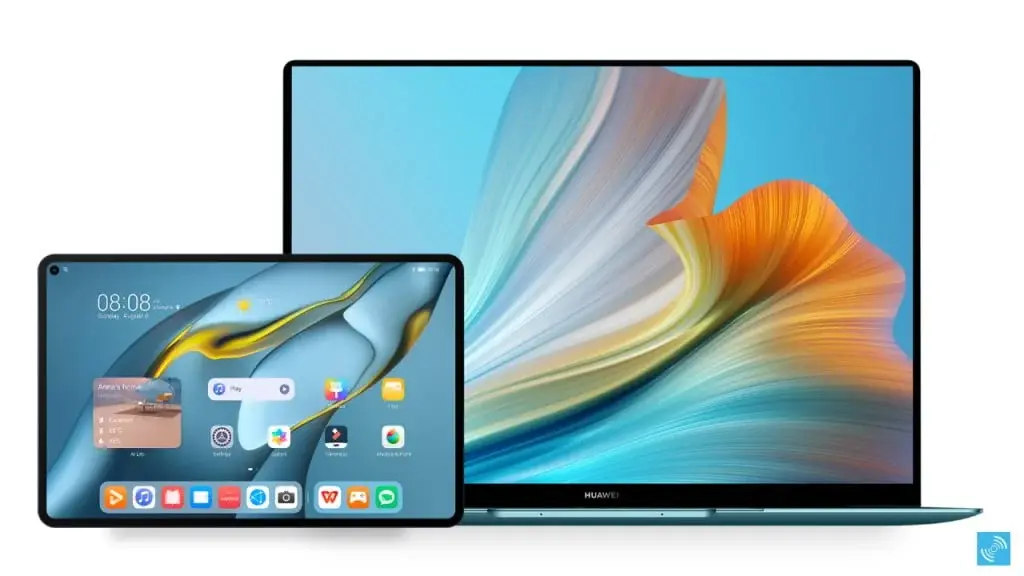
    Huawei, known for its innovative smartphones and smart appliances, is now venturing into the PC market with its HarmonyOS PC project. This move signifies Huawei’s determination to challenge the dominance of the Android ecosystem and carve out a unique space for itself in the market.

    Ambitious Plans for HarmonyOS PC

    Huawei’s plans to develop a HarmonyOS PC come as no surprise, as the company’s former executive Wang Chenglu had previously hinted at an official release of HarmonyOS for PCs in 2024. According to insider reports from Weibo tipster Fixed Focus Digital, Huawei is also planning to introduce significant innovations in GPU software, aiming to provide an unmatched user experience for Huawei PC users.

    Impressive Specifications

    The tipster has also shed light on Huawei’s Kirin PC processor, showcasing its technical prowess. The processor boasts advanced core configurations, including 4×TSV big cores and 4×TSV medium cores, along with high-end components like the Maleoon 910 GPU and dual NPU setups to enhance AI capabilities. These specifications highlight Huawei’s commitment to delivering top-notch performance in its upcoming PCs.

    Exciting Laptops and HarmonyOS Next

    In addition to its PC project, Huawei is gearing up to launch some exciting laptops this year, focusing on impressive specifications and features. Meanwhile, the company is diligently working on HarmonyOS Next, its version of HarmonyOS for mobile devices. This represents a significant departure from Android, as Huawei aims to challenge the dominance of Google’s Android and Apple’s iOS in China. The developer version of HarmonyOS Next has already been released, with plans for a commercial launch in the fourth quarter of this year.

    Building an Ecosystem

    Huawei is not just focusing on developing new products; the company is also building an ecosystem and gaining support from industry partners. It has made substantial investments in this endeavor, aiming to redefine the smartphone OS landscape and potentially surpass iOS in China by 2024, despite facing challenges from US restrictions.

    In conclusion, Huawei’s foray into the PC market with its HarmonyOS PC project demonstrates the company’s determination to compete with the established Android ecosystem. With impressive specifications and a focus on innovation, Huawei aims to create a unique space for its HarmonyOS PCs in the market. Additionally, the company’s plans to launch exciting laptops and its development of HarmonyOS Next further solidify Huawei’s commitment to challenging the dominance of Android and iOS in China.

  • Another firmware update set to arrive for OnePlus Nord 3 within a week

    Another firmware update set to arrive for OnePlus Nord 3 within a week

    OnePlus Nord 3 Receives Firmware Update with January 2024 Android Security Patch

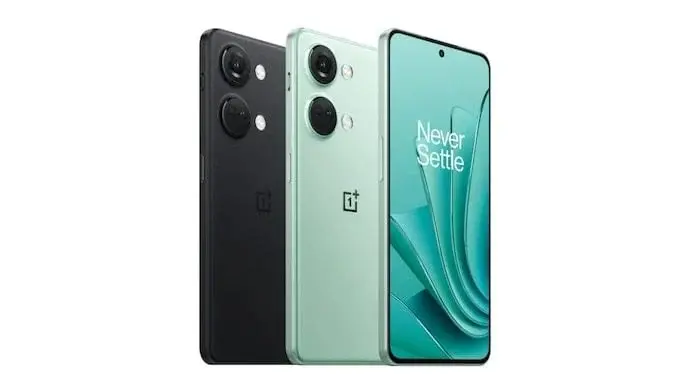
    OnePlus has recently released a new firmware update for the OnePlus Nord 3, bringing the device up to speed with the latest Android Security Patch for January 2024. The update, identified as OxygenOS 14.0.0.300, is currently being rolled out to various regions worldwide, including India, Europe, and global variants.

    Previous Update Paused Due to Issues

    In addition to this new firmware update, the OnePlus Nord 3 India Variant had recently received another update with firmware version 14.0.0.201. However, it appears that some issues arose with this previous update specifically on the India Variants. As a result, OnePlus has decided to pause the rollout of the OxygenOS 14.0.0.201 firmware and make the new OxygenOS 14.0.0.300 update available to all users instead.

    Improved Security and Bug Fixes

    The latest firmware update, OxygenOS 14.0.0.300, brings the OnePlus Nord 3 up to date with the January 2024 Android Security Patch. This ensures that users can enjoy enhanced security and protection against potential threats. Additionally, the update includes various bug fixes and improvements to further optimize the device’s performance and user experience.

    Availability

    OnePlus is gradually rolling out the OxygenOS 14.0.0.300 firmware update for the OnePlus Nord 3. Users in India, Europe, and other global regions can expect to receive the update in the coming days. To check for the update manually, users can go to Settings > System > System Updates on their OnePlus Nord 3 devices.

    It is recommended that users ensure their devices are connected to a stable Wi-Fi network and have sufficient battery power before initiating the update process. OnePlus also advises users to backup their important data before installing the firmware update to prevent any potential data loss.

    Stay tuned for further updates from OnePlus regarding any additional features or improvements that may be included in future firmware updates for the OnePlus Nord 3.

  • Microsoft Edge Outshines Google Chrome by Enhancing Android Experience with Extensions

    Microsoft Edge Outshines Google Chrome by Enhancing Android Experience with Extensions

    Microsoft Edge’s Game-Changing Move: Extensions Coming to Android

    Microsoft is working hard to increase Edge’s popularity, but claiming success might not be entirely accurate. According to 2023 data, Google Chrome leads the browser market with 66.39%, while Microsoft Edge holds the third position at 11.09%, behind Safari. Despite being preinstalled on all Windows PCs, Edge faces challenges, especially on mobile, where it has less than 5%. However, there’s potential for a game-changer as Microsoft Edge for Android is gearing up to support extensions. Here are the details…

    Microsoft Edge for Android is gaining support for extensions.

    Microsoft Edge for Android is gaining support for extensions. This means you can install various extensions, just like you would on desktop browsers. Moreover, this feature is something almost none of its mainstream competitors offer. According to information revealed by Twitter user Leopeva64, this feature is currently in the testing phase and will soon be available for Android users to enjoy.

    A Potential Game-Changer for Microsoft Edge

    Microsoft is in a much worse position in the mobile browser market than it is on PC. However, this move could truly propel the company ahead, positioning it differently from its competitors. While beneficial for useful add-ons, it also comes with some challenges. For instance, many users employ ad blockers on their PCs. Yes, nobody likes seeing ads, but almost all digital content you encounter online relies on these ads for revenue.

    Impact on Digital Content Creators

    If Microsoft Edge becomes more popular by adding extensions, it might prompt competitors like Google Chrome and Safari to follow suit. This could impact digital content creators who rely on ads, especially since mobile users often don’t use ad blockers. It’s important to note that just because a feature is available on mobile doesn’t mean it should be misused.

    Conclusion

    When Edge introduces extension support, you can explore various functional extensions, while ad blockers could be handy for websites with excessive ads. Keep in mind that the release timing for this feature is currently uncertain, so some patience might be needed.