Category: Software

  • Is Biometrics Insufficient? Learn How Apple’s New Feature Safeguards Your Stolen iPhone

    Is Biometrics Insufficient? Learn How Apple’s New Feature Safeguards Your Stolen iPhone

    Protect Your iPhone Like Never Before: A Guide to Stolen Device Protection

    Smartphones have become an integral part of our lives, storing a wealth of personal information and sensitive data. With the iOS 17.3 update, Apple has introduced a new feature called Stolen Device Protection, which aims to provide an additional layer of security for iPhone users. This feature is particularly useful in situations where a thief gains access to your password and attempts to compromise your device’s security.

    The Importance of Stolen Device Protection

    When a theft occurs and unauthorized access to our passwords is possible, the risk of personal and financial information being compromised is significant. For example, a thief could access accounts and passwords through Safari or gain entry to our bank accounts through SMS verification. Stolen Device Protection mitigates these potential disasters by requiring biometric authentication, such as Face ID or Touch ID, in scenarios where your device may be stolen.

    The Added Security of Stolen Device Protection

    Stolen Device Protection goes beyond the existing biometric features of Face ID and Touch ID. In the event that your biometric security is bypassed and the thief attempts to change your Apple ID password, Apple provides a one-hour window for this change to take effect. This security delay aims to prevent a thief from taking crucial actions with your stolen iPhone. It gives you the necessary time to mark your device as lost and secure your Apple account, as explained by Apple.

    Enabling Stolen Device Protection on Your iPhone

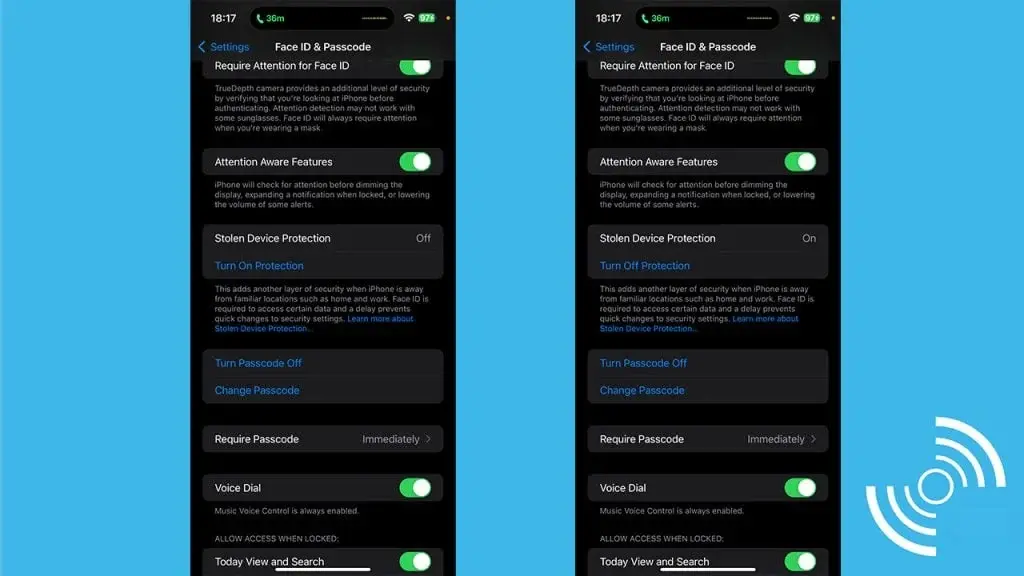
    To activate Stolen Device Protection on your iPhone, follow these simple steps:

    1. Open Settings on your iPhone.
    2. Depending on your iPhone model:
      • For Face ID: Tap Face ID & Passcode.
      • For Touch ID: Tap Touch ID & Passcode.
    3. Enter your device passcode.
    4. Scroll down to the Stolen Device Protection section.
    5. Tap the toggle switch next to Turn On Protection.

    By enabling Stolen Device Protection, you can enhance the security of your iPhone and protect your personal information in case of theft.

    In conclusion, the introduction of Stolen Device Protection with the iOS 17.3 update is a significant step towards bolstering the security of iPhones. By requiring biometric authentication in situations where a thief gains access to your password, Apple aims to prevent unauthorized access to your device and mitigate potential risks. Take advantage of this feature by enabling Stolen Device Protection on your iPhone and enjoy added peace of mind knowing that your personal information is safeguarded.

  • Improved User Experience with Google Assistant and Voice Responses in Android Auto Revamp

    Improved User Experience with Google Assistant and Voice Responses in Android Auto Revamp

    The most recent Android Auto update introduces a much-needed redesign, enhancing the user interface for improved usability and intuitiveness.

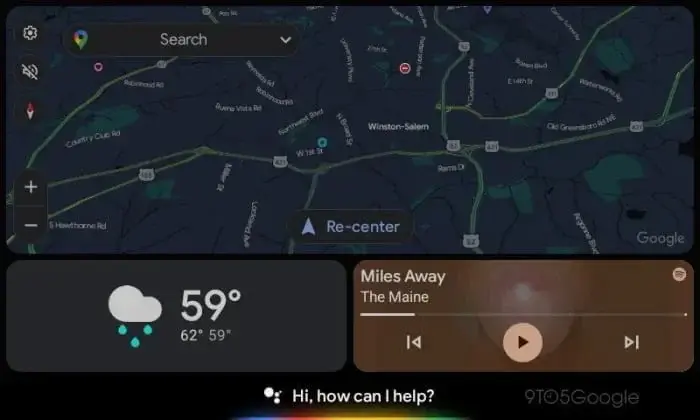
    Centralizing the navigation panel, positioning the call and music cards at the panel’s bottom, and integrating Google Assistant at the UI’s base eliminates empty space. Let’s delve deeper into the significant modifications within the Android Auto redesign.

    Key Alterations in Android Auto Redesign

    Google has once again revamped the Assistant interface on Android Auto, offering users a more sophisticated and polished experience. Notable changes include the introduction of a "listening" UI on the bottom bar, which supersedes app icons. This UI transcribes the user’s speech across the bar, facilitating interaction with the Assistant. Furthermore, voice replies have been revamped and are now visible alongside maps.

    Restructured Google Assistant Experience

    The updated Google Assistant now greets users with a welcoming "Hi, how can I help you?" prompt during quiet moments. As soon as the user speaks, the Assistant transcribes voice commands along the bar. It’s important to note that the Assistant’s responses are still vocalized and not displayed on the screen.

    Enhanced Voice Response Mechanism

    Alongside the visual enhancements, Google has enhanced the voice reply experience on Android Auto. Voice replies now optimize any vacant screen space, maximizing the available display area. The interface includes a "Speak now" cue in one panel, transcribing messages while providing distinct "Cancel" and "Send" buttons. Additionally, the recipient’s profile image, name, and app icon (e.g., Telegram) are showcased.

    Artificial Intelligence-Powered Auto Replies

    Google is leveraging its generative AI capabilities to enrich the auto-reply function on Android Auto. Following the introduction of generative AI to Chrome, Google intends to introduce similar functionalities to Android Auto. While a preview video has displayed several design elements, these specific features are not yet live but are anticipated to be available soon. These features entail AI-generated message summaries on Android Auto and context-aware auto-replies.

    Acquire the Latest Android Auto Version

    The redesign is a part of Android Auto version 11.2 and seeks to elevate the overall user experience. The update will be progressively distributed to users within the upcoming weeks. Users can anticipate a more streamlined and intuitive interface, improved voice interactions, and the forthcoming AI-driven auto reply capabilities.

    (via)

  • Meta Enforces Tighter Safety Rules for Teens on Instagram/Facebook

    Meta Enforces Tighter Safety Rules for Teens on Instagram/Facebook

    Meta Platforms Enhances Safety Measures for Teenagers on Instagram and Facebook

    Meta Platforms is introducing enhanced safety measures on Instagram and Facebook to safeguard teenagers, implementing novel features that shield young individuals from unsolicited correspondence. This proactive step underscores Meta’s attentiveness to issues surrounding the digital well-being of adolescents.

    Context

    Previously, Meta encountered accusations of being cognizant of teenagers being exposed to detrimental material. Nevertheless, subsequent dialogues with regulators prioritizing children’s safety on social media led Meta to enforce limitations on specific content accessible to teenage users.

    The gravity of this situation intensified when a former Meta employee testified before the U.S. Senate, unveiling Meta’s awareness of negative encounters, including harassment, that youths endured on its platforms but failed to take decisive action. This disclosure captured broad attention, placing Meta in a position that demanded prompt addressing of the concern.

    Fresh Additions and Adjustments

    Instagram

    • Messaging settings will now automatically permit receipt of messages solely from people whom teenagers follow.
    • Any alterations to app settings will necessitate parental authorization.

    Messenger

    • Individuals under 16 years of age (or under 18 in specific regions) will solely receive messages from Facebook friends or contacts in their network.
    • Adult users above 19 years old will be unable to message teenagers unless reciprocal following exists.

    Importance

    Meta Platforms’ dedication to confronting the safety predicaments faced by teenagers on Instagram and Facebook is commendable. By rolling out these innovative features and controls, Meta aims to furnish a more secure online milieu for young users. Nonetheless, continual surveillance and adjustments are imperative to ascertain the efficacy of these measures in shielding teenagers from unsolicited messages and objectionable content.

  • S22 Owners Remain Uninformed as Samsung Announces Galaxy AI Deployment for Older Flagships

    S22 Owners Remain Uninformed as Samsung Announces Galaxy AI Deployment for Older Flagships

    Samsung’s Galaxy S24 series has introduced a range of AI-powered features that promise an enhanced user experience. These features are currently exclusive to the new phones, but there is good news for owners of older flagships.

    In an interview with TechRadar, Patrick Chomet, Samsung’s Head of Customer Experience, confirmed that select 2023 flagship devices will receive the new Galaxy AI features. The devices included in the list are the Galaxy S23, S23 FE, Z Fold 5, Z Flip 5, and Tab S9. These devices will receive the new AI features through the One UI 6.1 update in the first half of 2024.

    However, there is a surprising exception to this rollout plan. The company’s 2022 devices, including the Galaxy S22 series, will not be receiving the new AI features, despite being eligible for the One UI 6.1 update. Samsung has not provided any specific reasons for this omission.

    When questioned about this, Chomet simply stated that they are “limiting” the initial rollout to last-gen devices “for now.” This leaves Galaxy S22 owners uncertain about whether they will eventually have access to the full potential of their devices.

    Adding to the confusion is the inclusion of the Galaxy S23 FE in the rollout, which is equipped with the same chipset as the S22 in some regions. While it is possible that S22 owners may eventually receive the Galaxy AI features, Samsung has not provided a concrete timeline or guarantee.

    Now, let’s take a look at the Galaxy AI features that will be coming to more Galaxy devices:

    With this feature, users can use their finger to draw a circle around an object or text on the screen to instantly learn more about it.

    Live Translation

    This feature allows users to translate spoken and written content in real-time, both online and offline. It enables users to have conversations with people in different languages, understand signs and menus while abroad, and even translate documents on the go.

    Chat Assistant

    The Chat Assistant feature automatically translates messages while users are chatting, eliminating the need to switch between languages.

    Note Assistant

    This feature helps users summarize and organize their notes, making them easier to review and find relevant information.

    Voice Recording Assistant

    With this feature, users can turn their voice recordings into text with speaker identification. It also provides transcripts, the ability to translate recordings, and even summarizes key points.

    While the new Galaxy AI features are currently exclusive to the Galaxy S24 series, Samsung has confirmed that select 2023 flagship devices will receive these features through the One UI 6.1 update in the first half of 2024. However, the omission of the Galaxy S22 series from this rollout has left owners uncertain about the future capabilities of their devices. Samsung has not provided a clear timeline or guarantee for when or if the Galaxy AI features will be available to S22 owners.

  • ColorOS 14 Reveals Exciting Features and Beta Program for Eligible Devices

    ColorOS 14 Reveals Exciting Features and Beta Program for Eligible Devices

    Oppo Improves User Engagement through ColorOS 14 Innovation

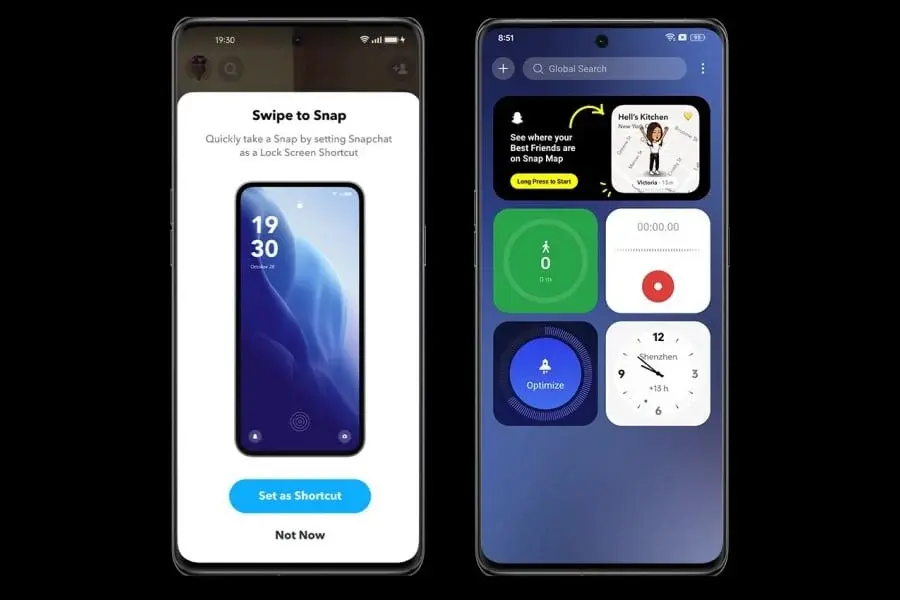
    Oppo, a well-known smartphone manufacturer, is committed to enhancing the hardware and software experiences of its customers. In a move to prioritize user satisfaction, Oppo has recently unveiled ColorOS 14, an update designed to elevate user experience. While early responses pinpointed areas for enhancement, Oppo is proactively tackling user issues via a beta initiative and introducing fresh functionalities and updates. Let’s delve into the specifics of this thrilling upgrade.

    ColorOS 14 Response and Dedication to Progress

    Through the beta trial phase, ColorOS 14 gleaned valuable insights from users, which have been pivotal in its evolution. The ColorOS team values this support and is actively scrutinizing user experience feedback. They are committed to advancing and enriching the overall user journey based on this valuable input.

    Fresh Additions and Refinements

    The comprehensive update agenda for ColorOS 14 integrates user feedback and presents a host of new features and refinements. Some prominent inclusions are:

    • Implementation of floating window support for home screen applications.
    • Introduction of "Shake to change song/intercept notifications" feature.
    • Customizable status bar font styles.
    • Refined display transitions, audio effects, and lock screen layout.
    • Enhanced lock screen bounce animation and facial recognition speed.
    • Improved vibration effects and clearer presentation of system notifications.
    • Provision for setting individual app custom screen refresh rates.
    • Enhanced color display optimization in eye protection and ambient color adaptation modes.
    • Gallery now supports photo editing with the ability to revert to the original state.

    Update Distribution Timeline

    The initial release of the ColorOS 14 update is slated for February 2024. The following Oppo models will be among the first to receive the update:

    • Find N5
    • Find N3 Flip
    • Find X7 series
    • Find X6 series
    • Reno11 series
    • OnePlus Ace 3

    Subsequent Oppo models will receive the update in March and April 2024, ensuring a broad spectrum of users can enjoy the improved features and enhancements.

    In Closing

    Oppo’s ColorOS 14 update underscores the company’s commitment to delivering outstanding user experiences. By actively assimilating user feedback and introducing new features and enhancements, Oppo aims to elevate overall user satisfaction. With the deployment strategy in motion, users can anticipate reaping the rewards of ColorOS 14 in the near future.

  • Examining Apple’s £1 Billion App Store Fee Disagreement and Legal Confrontations in the UK

    Examining Apple’s £1 Billion App Store Fee Disagreement and Legal Confrontations in the UK

    Apple Faces $1 Billion Lawsuit Over App Store Policies in the UK

    Apple, the well-known technology giant, is currently facing a major lawsuit in the United Kingdom that has put its App Store policies in the spotlight. The lawsuit, which demands a staggering $1 billion, has been filed by more than 1,500 app developers who believe that they have been treated unfairly by Apple’s fee structure.

    Unfair Commission Fees

    The main point of contention in this lawsuit is Apple’s commission fees, which can be as high as 30% on app purchases. The developers argue that these fees are excessive and that Apple, with its dominant position in the market, is overcharging them for the privilege of being on the App Store. This is a significant concern because, for many developers, being on the Apple App Store is essential for reaching a wide audience.

    Apple’s Defense

    Apple is not backing down in the face of this lawsuit. The company’s defense relies on an interesting argument: the majority of their developers, around 85%, do not pay any commission at all. This is because these developers offer free apps or apps that do not have in-app purchases. Apple’s lawyers are vigorously pushing to have the case dismissed, claiming that it lacks merit and that only those who were charged via the UK App Store can make claims.

    A Larger Battle

    This lawsuit, which has been filed at the Competition Appeal Tribunal (CAT) in London, is not an isolated incident. It is part of a larger narrative in which Apple is facing multiple legal challenges regarding its App Store practices. This includes another massive lawsuit involving approximately 20 million UK users over App Store commissions, as well as a separate case related to iPhone batteries.

    Implications for Apple and App Developers

    The outcome of these legal battles will have far-reaching implications for both Apple and app developers. For Apple, it is about defending its business model and practices, which have been integral to its success. For the developers, it is a fight for fairer terms and a more level playing field. As these cases progress, they have the potential to reshape how tech giants operate and interact with smaller players in the industry. With trials not expected until 2025, the entire tech world is watching closely to see how this legal drama unfolds.

  • macOS Monterey and macOS Ventura welcome Safari 17.3

    macOS Monterey and macOS Ventura welcome Safari 17.3

    Amid the latest updates from Apple, including iOS 17.3 and iPadOS 17.3, the company has also released Safari 17.3 for macOS Monterey and macOS Ventura. This new update brings several improvements to system security, particularly addressing a privacy issue related to user data displayed in Settings. Additionally, it enhances the handling of user preferences in Settings. Let's take a closer look at the changes and enhancements brought by Safari 17.3.

    Enhanced System Security

    One of the key focuses of the Safari 17.3 update is to improve system security. Apple has addressed a privacy issue that previously allowed user's private data to be displayed in Settings. This fix ensures that sensitive user information remains protected and inaccessible to unauthorized individuals.

    Improved Handling of User Preferences

    Another important improvement in Safari 17.3 is the enhanced handling of user preferences in Settings. This means that users will have a smoother experience when managing their preferences within the browser. Apple has worked on optimizing this aspect to provide a more intuitive and user-friendly interface for customizing Safari settings.

    Other Notable Features

    While the primary focus of Safari 17.3 is on system security and user preferences, there may be additional features and bug fixes included in the update. Apple has not provided specific details about these changes, but users can expect a more stable and reliable browsing experience with Safari 17.3.

    Pricing and Compatibility

    Safari 17.3 is available for macOS Monterey and macOS Ventura. The update is free for all users of these operating systems and can be downloaded and installed through the Software Update section in System Preferences.

    In conclusion, the latest Safari 17.3 update for macOS Monterey and macOS Ventura brings important enhancements to system security and user preference handling. By addressing a privacy issue and improving the handling of preferences in Settings, Apple aims to provide a more secure and user-friendly browsing experience. Users can download and install the update for free through the Software Update section in System Preferences.

  • Introducing the ‘Bento Button’: ChromeOS 120 Update is Now Available

    Introducing the ‘Bento Button’: ChromeOS 120 Update is Now Available

    ChromeOS 120 has recently been released, bringing a range of updates and improvements to the ChromeOS experience. This latest version introduces new functionalities for virtual desk management and also marks the beginning of the phase-out of support for certain legacy media formats.

    New Features in ChromeOS 120

    Bento Button for Virtual Desk Management

    One of the standout features of ChromeOS 120 is the introduction of the ‘Bento Button’. This new shelf button is designed to streamline the management of virtual desks. With the Bento Button, users can easily visualize, switch, create, and order virtual desks. This enhancement greatly improves multitasking efficiency, especially for those who frequently use multiple virtual desks.

    Phase-Out of Support for MPEG4 Part 2 and AVI Container

    ChromeOS 120 also marks the start of the phase-out of support for the MPEG4 Part 2 video codec and AVI container. Users who still require these formats can temporarily re-enable support by using the chrome://flags/#cros-legacy-media-formats link. However, this workaround will only be available until the release of ChromeOS 125.

    Additional Updates in ChromeOS 120

    • Mouse and Keyboard Customization: Users now have the ability to disable mouse scroll acceleration and adjust scroll speed. Keyboard settings have also been enhanced, allowing customization for actions such as right-click, home, end, and page up.
    • Resizable Picture-in-Picture (PiP): ChromeOS 120 introduces the ability to resize PiP windows using a pinch gesture, adding convenience to multitasking.
    • Revamped Emoji Picker: The emoji and GIF picker now features a dynamic color palette, making the selection process more engaging and visually appealing.
    • XDR Authentication Events: As part of Extended Detection and Response (XDR) on ChromeOS, authentication events such as login, logout, lock, and unlock can now be enabled, providing valuable insights into device security posture.
    • App Management and Details: Users can now view detailed information about installed apps, including storage usage, version number, and installation source.

    Admin Console Updates for Administrators

    For administrators, ChromeOS 120 brings new or updated policies in the Admin console. These policies, such as PowerManagementIdleSettings, ScreenLockDelays, LidCloseAction, and more, provide greater control over device management and security.

    Overall, ChromeOS 120 introduces several exciting features and improvements that enhance the ChromeOS experience. From streamlined virtual desk management to enhanced mouse and keyboard customization, users can expect a more efficient and personalized workflow. Administrators also benefit from new policies that offer greater control over device management and security.

  • Xiaomi HyperOS Introduces Android 13 for Legacy Phones

    Xiaomi HyperOS Introduces Android 13 for Legacy Phones

    Xiaomi Continues its Old Ways with HyperOS Update

    Xiaomi has been gradually rolling out the HyperOS update to eligible devices over the past few months. While initially only newer models received the update, the company has now started beta testing the software for older products. However, an interesting detail has emerged during this process.

    HyperOS: A Familiar Experience

    When Xiaomi introduced HyperOS, many expected it to mark a fresh chapter in the company's software journey. Unfortunately, that doesn't seem to be the case. Despite being built from the ground up with a focus on interconnectivity and optimizations, HyperOS is essentially MIUI through and through. While this isn't necessarily a bad thing, it does mean that Xiaomi is retaining an archaic feature.

    The Persistence of Multiple Android Versions

    Previously, Xiaomi maintained MIUI based on multiple Android versions. With the introduction of HyperOS, many hoped that this trend would come to an end. However, it seems that the company is continuing to follow this practice.

    Recently, HyperOS builds for three older Xiaomi devices were made available on the company's server. These devices include the Redmi K40, Xiaomi 12X, and Redmi Note 12 Pro 4G. Surprisingly, the software builds for these handsets are based on the older Android 13 instead of the newer Android 14. As a result, these devices will miss out on their third Android update but will still receive the latest HyperOS.

    No Promises Broken, but Criticism Persists

    It's important to note that Xiaomi never promised three Android updates for any of these devices. Therefore, the company cannot be blamed for its decision. However, it is still worth criticizing Xiaomi, especially considering that competitors have been stepping up their software game.

    Despite this, it's good to know that users of these older Xiaomi smartphones will still get to experience HyperOS. Additionally, it's worth mentioning that the Redmi K40 is also known as the Poco F3 and Mi 11X, while the Redmi Note 12 Pro 4G is a rebadged version of the Redmi Note 10 Pro (Max). Therefore, these three handsets should also receive the HyperOS update.

    Overall, while Xiaomi may be continuing its old ways with the HyperOS update, it's still a positive development for users of older devices to have access to the latest software improvements.

  • Motorola Unveils Devices to Receive Android 14 Update, but Omits Timing Information

    Motorola Unveils Devices to Receive Android 14 Update, but Omits Timing Information

    Motorola Announces Android 14 Update Plans

    Motorola has recently announced its update plans for Android 14, following the release of the latest operating system. While some smartphone makers have already updated their devices, others are still in the process. Samsung has been efficient in updating its range of phones, from budget-friendly to mid-range models.

    Motorola’s Update List

    Motorola has updated its website with a list of devices that are scheduled to receive the Android 14 update. However, finding out if your specific phone model is on the list can be a bit of a hassle as you need to search for it individually. To make things easier, the team at YTECHB has created a more user-friendly list, which we’re sharing here.

    Here is the list of Motorola devices that will eventually be upgraded to Android 14:

    Motorola Razr Phones:

    • Motorola Razr 40 Ultra / Razr+ 2023
    • Motorola Razr 40 / Razr 2023
    • Motorola Razr 2022

    Motorola Edge Series Phones:

    • Motorola Edge+ (2023)
    • Motorola Edge (2023)
    • Motorola Edge (2022)
    • Motorola Edge+ 5G UW 2022
    • Motorola Edge 40 Pro
    • Motorola Edge 40 Neo
    • Motorola Edge 40
    • Motorola Edge 30 Ultra
    • Motorola Edge 30 Pro / Motorola Edge+ (2022)
    • Motorola Edge 30 Neo
    • Motorola Edge 30 Fusion
    • Motorola Edge 30

    Motorola G Series Phones:

    • Moto G (2023)
    • Moto G Stylus 5G (2023)
    • Moto G Stylus (2023)
    • Moto G Power 5G
    • Moto G84
    • Moto G54
    • Moto G73
    • Moto G53
    • Moto G23
    • Moto G14

    Others:

    • Motorola ThinkPhone

    Updates in Progress

    It’s worth noting that the Moto G53 has already started receiving the Android 14 update, while the Moto G54 is currently in beta testing. This indicates that the rollout for other devices on the list will begin soon.

    Future Updates

    Motorola may add more devices to the update list in the future. So, even if your phone isn’t on the list right now, there is still hope. Stay tuned for any further announcements from Motorola.