Tag: Microsoft Edge

  • Pwn2Own Berlin 2026: Windows 11, Microsoft Exchange Hacks

    Pwn2Own Berlin 2026: Windows 11, Microsoft Exchange Hacks

    Key Takeaway

    – Total prizes exceed $908,000 for 39 zero-days across Windows 11, Exchange, Edge, RHEL, Nvidia infrastructure, and AI platforms, with Day 3 results pending.
    – Orange Tsai (DEVCORE) was the standout, earning $175,000 on Day 1 for four Edge sandbox-escape bugs and $200,000 on Day 2 for a fully patched Exchange Server RCE (highest so far).
    – Windows 11 was breached across multiple days, with AI-related targets (Cursor AI, OpenAI Codex, etc.) also heavily featured.
    – Event hit capacity for the first time in its 19-year history, with over 150 researchers turned away; vendors get 90 days to patch disclosed flaws.

    Pwn2Own Berlin 2026 is wrapping up today at the OffensiveCon conference, and across two confirmed days the numbers is significant. Researchers have collected over $908,000 in prizes after demonstrating 39 unique zero-day vulnerabilities across Windows 11, Microsoft Exchange, Microsoft Edge, Red Hat Enterprise Linux, Nvidia infrastructure, and a string of AI platforms. Day 3 results are still to come.

    Overview

    Day 1 paid out $523,000 across 24 zero-days. The standout was Orange Tsai of the DEVCORE Research Team, who chained four logic bugs to escape the Microsoft Edge sandbox and earn $175,000 in a single demonstration. Windows 11 was hacked three separate times by three independent researchers, each earning $30,000 for privilege escalation zero-days. Valentina Palmiotti of IBM X-Force collected $70,000 across two separate exploits targeting the NVIDIA Container Toolkit and Red Hat Linux. The AI category was equally active: LiteLLM, OpenAI Codex, NVIDIA Megatron Bridge, Chroma, and LM Studio all fell on Day 1.

    Day totals and exploits

    Day 2 paid out $385,750 across 15 zero-days. Orange Tsai appeared again, this time chaining three bugs to gain remote code execution with SYSTEM privileges on a fully patched Microsoft Exchange Server, the single highest-earning exploit of the competition so far at $200,000. Windows 11 was hacked again on Day 2, as was the Cursor AI coding agent. OpenAI Codex was also targeted for a second time by a different researcher. The event hit capacity for the first time in its 19-year history, with over 150 researchers turned away due to scheduling limits, and some choosing to drop zero-days publicly rather than waiting for next year.

    Attendance and patch policy

    All vendors have 90 days from disclosure to patch the flaws demonstrated at Pwn2Own. This rule applies regardless of the vendor’s size or how critical the bug might be, and organizers warn that delayed patches could leave users exposed during the post-disclosure window. The event showcases the accelerating pace of security research, while also reminding vendors to keep patch processes tight, tested, and transparent, so the next Berlin edition builds on lessons learned this year.
  • Ubuntu-Based Winux 11.26.03 Launches with Package Updates

    Ubuntu-Based Winux 11.26.03 Launches with Package Updates

    Key Takeaways

    1. Winux, formerly known as Wubuntu and LinuxFX, has a long history dating back to 2007 and is designed to resemble Windows 10/11.
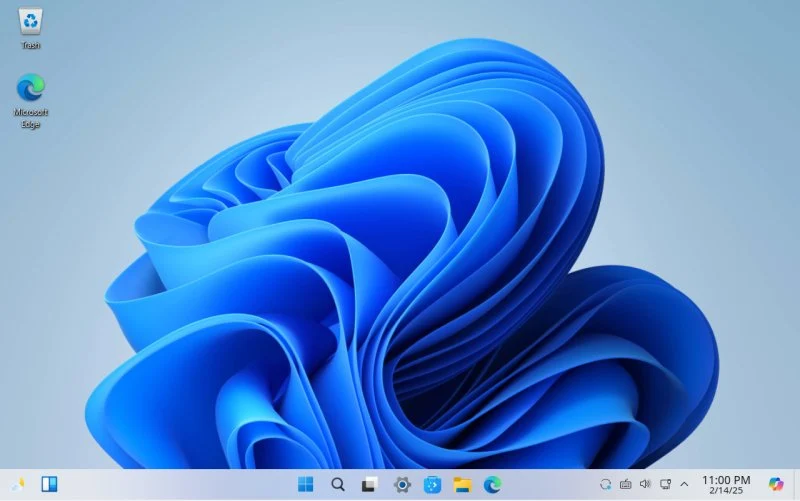
    2. The latest release, Winux 11.26.03, is based on Ubuntu/Kubuntu 24.04.4 LTS and includes various applications like OnlyOffice, Microsoft Edge, and Mozilla Thunderbird.
    3. Users can access Winux for free, despite some paid features, but there are concerns about potential trademark violations and scam allegations.
    4. Key features of the new release include live wallpapers, older processor compatibility, Android PlayStore integration, and a revamped login screen for Active Directory users.
    5. The software is available for download from SourceForge as a single 6.2 GB ISO file, and users are advised to be cautious and avoid purchasing a license until more information is confirmed.


    With a story that goes back to 2007, Winux, which was once called Wubuntu and LinuxFX, has evolved over the years. This operating system has some paid features and includes applications like OnlyOffice and Microsoft Edge, all wrapped up in a design that mimics Windows 10/11. There have been claims that it violates trademarks of Canonical and Microsoft, and even allegations that it may be a scam. Still, the good news is that you can use this distro without spending any money, and it has a number of interesting applications beyond the two already mentioned.

    New Release Announcement

    Just yesterday, Winux 11.26.03 was unveiled, marked as the “Pre-March 2026” edition, based on Ubuntu/Kubuntu 24.04.4 LTS. Some of its standout features are as follows:

    Along with those, Winux includes Mozilla Thunderbird, live wallpapers, compatibility with older processors, Android PlayStore integration, and OpenGL for PowerTools. Additionally, there’s a revamped login screen for Active Directory users.

    Download Information

    You can download the software from SourceForge on their dedicated page. There is just one ISO file available, which you can burn to a DVD or USB stick, and it is 6.2 GB in size.

    Based on an article from ZDNET discussing the potential scam aspect of this distro (see the second link in the first paragraph), we advise our readers to be careful and not to purchase a license. We will get in touch with the developers to learn more about the current situation of this operating system and provide an update as soon as we can.

    Source:
    Link


  • Microsoft Launches Copilot Vision Beta for Select Pro Subscribers

    Microsoft Launches Copilot Vision Beta for Select Pro Subscribers

    Microsoft Copilot Labs has launched beta testing for Copilot Vision, which is exclusive for some invited Copilot Pro subscribers. This new Vision AI monitors what users are doing in the Microsoft Edge browser to offer help, information, and tips in real-time.

    Integration with Microsoft Products

    The Copilot AI is built into the newest editions of Microsoft Windows, Edge, and Office. It responds to user prompts through text input, providing answers and support. With the addition of Copilot Vision, users no longer need to describe visual elements like objects and maps in text, as the AI can recognize everything happening within Microsoft Edge.

    Enhancing the Gaming Experience

    Gamers can benefit from the advice and insights Vision provides during gameplay, although it currently can’t control games directly. While users browse the web, the Vision AI identifies objects, assisting them in comparing items for purchases such as hotels, toys, or other goods. It can also provide specific product details, like washing instructions for clothing. For those who are unsure about what to buy or how to spend their day, they can ask the AI for recommendations, making life easier for busy individuals.

    Limited Availability and Data Management

    At the moment, Copilot Vision is restricted to a small number of websites during its beta phase, but this selection will grow in the future. The visual information and user interactions that Copilot Vision gathers during a session are erased once the session concludes, but Microsoft retains all the responses generated by the AI.

    People bogged down by endless meetings might find it helpful to get a Plaud AI voice recorder (available on Amazon) that can automatically transcribe and summarize what they missed.

    For more information, visit Microsoft Copilot Labs, check out the Microsoft Copilot blog, or watch Microsoft Copilot on YouTube, and don’t forget to review the Microsoft Privacy Statement.

  • Microsoft Edge Outshines Google Chrome by Enhancing Android Experience with Extensions

    Microsoft Edge Outshines Google Chrome by Enhancing Android Experience with Extensions

    Microsoft Edge’s Game-Changing Move: Extensions Coming to Android

    Microsoft is working hard to increase Edge’s popularity, but claiming success might not be entirely accurate. According to 2023 data, Google Chrome leads the browser market with 66.39%, while Microsoft Edge holds the third position at 11.09%, behind Safari. Despite being preinstalled on all Windows PCs, Edge faces challenges, especially on mobile, where it has less than 5%. However, there’s potential for a game-changer as Microsoft Edge for Android is gearing up to support extensions. Here are the details…

    Microsoft Edge for Android is gaining support for extensions.

    Microsoft Edge for Android is gaining support for extensions. This means you can install various extensions, just like you would on desktop browsers. Moreover, this feature is something almost none of its mainstream competitors offer. According to information revealed by Twitter user Leopeva64, this feature is currently in the testing phase and will soon be available for Android users to enjoy.

    A Potential Game-Changer for Microsoft Edge

    Microsoft is in a much worse position in the mobile browser market than it is on PC. However, this move could truly propel the company ahead, positioning it differently from its competitors. While beneficial for useful add-ons, it also comes with some challenges. For instance, many users employ ad blockers on their PCs. Yes, nobody likes seeing ads, but almost all digital content you encounter online relies on these ads for revenue.

    Impact on Digital Content Creators

    If Microsoft Edge becomes more popular by adding extensions, it might prompt competitors like Google Chrome and Safari to follow suit. This could impact digital content creators who rely on ads, especially since mobile users often don’t use ad blockers. It’s important to note that just because a feature is available on mobile doesn’t mean it should be misused.

    Conclusion

    When Edge introduces extension support, you can explore various functional extensions, while ad blockers could be handy for websites with excessive ads. Keep in mind that the release timing for this feature is currently uncertain, so some patience might be needed.

  • The Catch: Microsoft Now Allows Uninstalling of Edge, Bing, and Cortana

    The Catch: Microsoft Now Allows Uninstalling of Edge, Bing, and Cortana

    Microsoft Allows Users to Uninstall Edge, Bing, and Cortana in Europe

    Microsoft is bringing a new update for Windows users in Europe that allows them to uninstall some of its basic apps like Edge (browser), Bing (search), and Cortana (voice assistant). However, this change is not for an improved user experience and choice freedom. It is being implemented to comply with the Digital Markets Act (DMA) announced by the European Union. The DMA requires Microsoft to make all of its basic apps removable. It is important to note that this act will come into effect from March 2024 in the European Economic Area (EEA), which includes all EU nations, Iceland, Liechtenstein, and Norway.

    Compliance with the Digital Markets Act

    In an official blog post, Microsoft clarified that this change is exclusive to Europe and is not global. Therefore, users in Europe can now uninstall the Edge web browser and switch to a different search engine instead of Bing. This update has been long-awaited by many Windows users in Europe who have been requesting more control over the pre-installed apps on their devices.

    Increased User Choice and Freedom

    With this new update, Microsoft aims to provide its users in Europe with increased choice and freedom. By allowing users to uninstall basic apps like Edge, Bing, and Cortana, Microsoft is giving them the opportunity to personalize their Windows experience according to their preferences. Users can now choose alternative browsers, search engines, and voice assistants that better suit their needs.

    Implications for Windows Users

    Windows users in Europe can now easily remove the default Microsoft apps that they may not use or prefer. This update empowers users to customize their devices and install apps that align with their individual requirements and preferences. It also promotes healthy competition among app developers, as users now have the freedom to explore and choose from a wider range of apps and services.

    Conclusion

    Microsoft’s latest update for Windows users in Europe allows them to uninstall basic apps such as Edge, Bing, and Cortana. This change is in compliance with the Digital Markets Act (DMA) enforced by the European Union. By offering increased choice and freedom, Microsoft aims to enhance the user experience and cater to individual preferences. This update empowers users to personalize their devices and explore alternative apps and services. With the implementation of the DMA in March 2024, users in the European Economic Area (EEA) can look forward to a more customizable Windows experience.

    Source: 1