Tag: AI features

  • Apple unveils macOS 27 Golden Gate with AI-packed MacBook features

    Apple unveils macOS 27 Golden Gate with AI-packed MacBook features

    Key Takeaway

    – “Liquid Glass” design overhaul with adjustable transparency, new sidebar, colorful icons, and up to 30% faster app startup.
    – Siri AI chatbot replaces standard Siri, offering natural language answers, screen access, and app control.
    – AI-powered Safari can generate custom browser extensions from user prompts.
    – System-wide AI Writing Tools and Image Playground for generating/editing text and images.
    – Photo AI features include expanding images (AI-generated zoom-out) and “Spatial Reframing” to change perspective.


    Major macOS 27 Update Unveiled

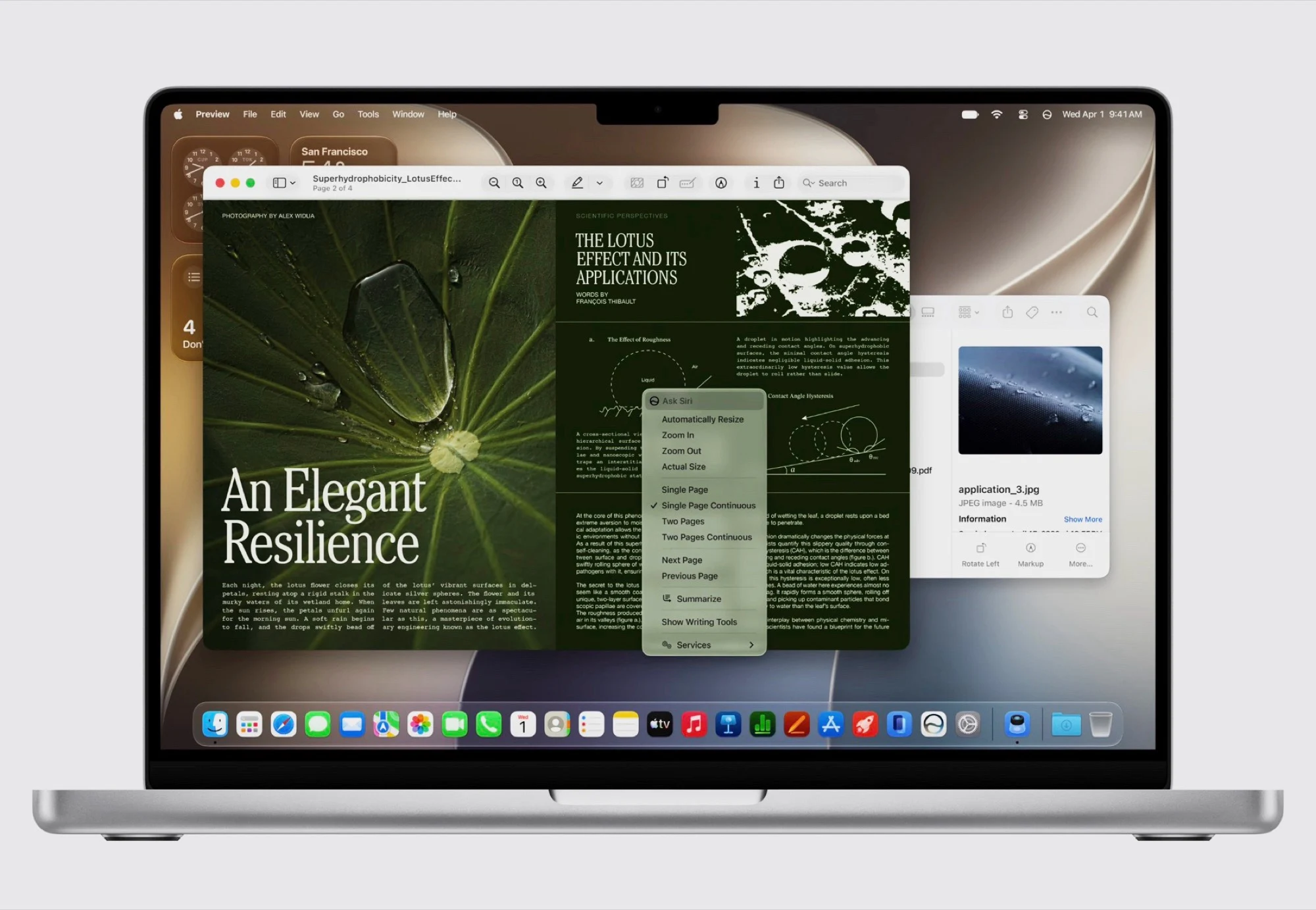
    With macOS 27, Apple today unveiled the next major operating system update for the Mac. The system receives many of the new features that are also coming to the iPhone with iOS 27, starting with an optimized “Liquid Glass” design that allows users to adjust how transparent the “glass” actually looks in the system settings.

    Visual and Performance Tweeks

    The sidebar on macOS now has a sloping edge, app icons are more colorful and the corner radius of windows has been standardized. Thanks to these adjustments and improved app icons, Liquid Glass should look better than ever and apps should start up to 30 percent faster by preloading parts of the code into the RAM. AirDrop can transfer data up to 80 percent faster after the update.

    AI Highlights and Siri Replacement

    In addition to the performance and design optimizations, the new AI features are the highlight of macOS 27 Golden Gate. The biggest innovation is Siri AI, Apple’s brand new AI chatbot, which replaces Siri as the voice assistant. Siri can either be used in the new Siri app or accessed directly via Spotlight.

    Siri AI gives answers in natural language, similar to ChatGPT. A special feature is that Siri AI can access the screen and open apps so that, for example, questions about a text or image can be answered on the screen or apps can be controlled. Apple Intelligence also receives innovations in other areas of the operating system

    Home, Safari, and Writing Tools

    For example, the Home app can now recognize objects via HomeKit cameras so that users can be notified when a package is delivered. Apple’s Safari web browser in macOS 27 can not only group tabs using AI, but can even generate browser extensions based on a prompt, for example to be notified when a new article is published.

    Apple’s Writing Tools are now available system-wide to generate or rewrite texts. Image Playground can now generate images using artificial intelligence, either in a realistic style or based on a photo. Generated images can be further edited using prompts.

    New Photo Editing Capabilities

    Apple also introduces numerous AI features for editing captured photos. Photos can be expanded in macOS 27 and iOS 27 so that they can be “zoomed out”, so to speak, and the missing pixels are generated. A feature called “Spatial Reframing” can subsequently change the perspective of a photo, ultimately generating a completely new image.


    Sources

  • LG 25G590B: 1080p Monitor with 1000Hz Native Refresh Rate

    LG 25G590B: 1080p Monitor with 1000Hz Native Refresh Rate

    Key Takeaway

    – LG UltraGear 25G590B can achieve native 1000Hz at 1080p, not relying on dual-mode upscaling.
    – 24.5-inch IPS panel with Motion Blur Reduction Pro and AI-powered features (AI Scene Optimization, AI Sound).
    – Launch expected in H2 2026; pricing not announced yet.


    LG looks set to launch the fastest 1080p gaming monitor this year. To recap, we’ve already seen plenty of high-refresh gaming monitors unveiled, including the Philips Evnia 27M2N5500XD and the Samsung Odyssey G6 (G60H), both of which can hit 1000Hz and 1040Hz refresh rates, respectively. However, both monitors need to drop down to 720p to reach those refresh rates.

    UltraGear 25G590B: Native 1000Hz on 1080p

    The UltraGear 25G590B is the first gaming monitor announced that can run at a native 1000Hz refresh rate without using a dual-mode feature. Specifically, the monitor supports 1000Hz at its native 1080p resolution, which means you get both smoother motion and sharper image quality than the 720p dual-mode alternatives. Needless to say, it’s going to take a much more powerful PC to push 1000Hz at 1080p. That said, the 25G590B comes in an esports-friendly 24.5-inch size, which LG says “allows gamers to keep key visual elements within their natural field of view.”

    Design and Panel Technology

    LG hasn’t revealed the full specifications of the UltraGear 25G590B yet, but we do know it’s built around an IPS panel instead of OLED, unlike many of the recent high-refresh gaming monitors we’ve seen. The monitor will also support Motion Blur Reduction Pro, which LG says improves motion clarity and makes “fast-moving objects sharper and easier to track.” Additionally, AI features like AI Scene Optimization and AI Sound will come baked in, just like on most of LG’s 2026 monitors.

    Launch Window and Pricing

    According to LG, the UltraGear 25G590B will launch in the second half of 2026, but there are no pricing details at this point. This means enthusiasts will be waiting for more concrete specs, including brightness, contrast, inputs, and adaptive sync support, before forming a full opinion on value.


    Sources

  • Apple macOS 27 to Enhance Liquid Glass and Launch New Features

    Apple macOS 27 to Enhance Liquid Glass and Launch New Features

    Key Takeaway

    1. macOS 26 introduces a modernized design language similar to iPhone, though limited by hardware differences such as display type and sensor availability on Macs.
    2. The initial implementation of Liquid Glass on Macs faces aesthetic and functional limitations, with planned improvements in macOS 27.
    3. macOS 27 will feature enhanced transparency, shadows, and overall design cleanup, alongside performance optimizations and bug fixes.
    4. New AI features, including a redesigned Siri resembling chatbots like ChatGPT, and tab grouping in Safari, are slated for macOS 27.
    5. The release of macOS 27 is expected around WWDC 2026 in June, with availability in September or October.

    Introduction to Apple’s New macOS Update

    With the recent launch of macOS 26, Apple has really refreshed the overall look and feel of its desktop software. They has taken some design cues from the iPhone OS, making the interface more unified and modern. But, the “Liquid Glass” effect, which looks pretty sleek on iPhones, don’t quite translate as well on laptops like the MacBook Air, which costs $949. This is mainly because MacBooks don’t feature a high-contrast OLED screen or a motion sensor that can tweak the lighting effects maybe when you move it around.

    Design Challenges and Future Improvements

    Sources from Bloomberg report that Apple’s software engineers had some trouble getting the Liquid Glass effect to look exactly how the designers envisioned. For macOS 27, the plan is to fix this, especially focusing on transparency and shadows. These tweaks should make it easier to read sidebars and quick settings in the Control Center. The company is also using this update to clean up the overall UI and fix bugs, making everything run more smoothly and efficiently.

    Exciting New Features and Release Timeline

    Besides making the interface look better and improving performance, macOS 27 is set to bring some major new AI-powered features. The biggest one is a new Siri app with more advanced capabilities. This new Siri will more closely resemble AI chatbots like ChatGPT, making interactions more natural. Apple will also upgrade Safari to enable automatic grouping of tabs, which should help with better management of your browsing. The update is expected to debut at WWDC 2026 in June, with availability likely in September or October.

    Sources
  • Samsung Releases One UI 8.5 to 40+ Galaxy Phones and Tablets

    Samsung Releases One UI 8.5 to 40+ Galaxy Phones and Tablets

    Key Takeaway

    1. Samsung has begun rolling out One UI 8.5, starting in Korea with a wider release in mid-May.
    2. The update is available for the Galaxy S26 series, Galaxy S26+, Galaxy S26 Ultra, and other smartphones and tablets.
    3. One UI 8.5 introduces a redesigned user interface, new AI features like Photo Assist, and improvements to Bixby voice assistant.

    Latest Updates on Samsung’s Software Rollout

    After the release of the Galaxy S26, along side the Galaxy S26+ and the Galaxy S26 Ultra, which is priced at $1,299, the company has already begun shipping devices equipped with One UI 8.5. This new software update brings many fresh features both in terms of AI capabilities and user interface improvements. Samsung has officially announced that the update started rolling out today, initially in Korea, and other countries should get it by mid-May. This rollout includes several selected smartphones and tablets, but don’t expect it to be immediately available for all devices on supporting lists.

    Coverage and Deployment Timeline

    Just an heads up, it’s going to take a few more months for the update to reach all eligible Samsung smartphones and tablets. The process of releasing the update is gradual and will vary by region and device. It’s always best to check your device settings regularly for new updates. We’ve gone through the new features in this article so you can stay informed about what’s coming to your device soon.

    What’s New in One UI 8.5

    On the design front, One UI 8.5 makes some visual overhauls, especially with fresh menus and navigation bars that look more modern and intuitive. On the software side, the update is packed with AI-enhanced features. For example, Photo Assist now offers improved AI-generated images, making your photos look even better. Additionally, Bixby’s voice assistant has been upgraded to be smarter, allowing more natural and effective voice commands. All these features aim to enhance your overall Samsung experience, offering smoother interactions and more personalized options.

    Sources
  • Firefox Update Gives Users Control Over AI Features

    Firefox Update Gives Users Control Over AI Features

    Key Takeaways

    1. Users are frustrated with the strong push for AI features in popular web browsers like Firefox, Chrome, and Edge.
    2. Mozilla is introducing new AI controls in Firefox 148, allowing users to manage or disable AI features starting February 24, 2026.
    3. The “Block AI Enhancements” switch in Firefox lets users turn off all AI capabilities with one click, retaining this setting through updates.
    4. Users can customize their experience by turning off specific AI tools while keeping others active.
    5. Community feedback on the Firefox subreddit is mostly positive, with suggestions for optional AI add-ons and a standardized opt-in system for AI features.


    Artificial intelligence can be useful in certain situations, but a lot of users are becoming increasingly annoyed by the strong push for it in popular web browsers. For example, Firefox has added an AI chatbot to its sidebar. Google Chrome is now closely linked with Gemini, while Microsoft Edge includes its own Copilot assistant. More and more users are rejecting AI altogether and want a browser that doesn’t keep urging them to use these features.

    New AI Controls in Firefox

    Mozilla is making moves to give users more options with the new AI controls in Firefox 148. Starting from February 24, 2026, users will find a dedicated settings area in the desktop version of the browser where they can manage or even turn off AI features completely. This update was first showcased in an official video released on January 31 and was later explained in a blog post in early February. A key part of this update is a clear off switch that lets users eliminate all AI functionalities with just one click.

    Disabling AI Features

    The new “Block AI Enhancements” switch turns off all AI capabilities in Firefox from that point on. Once this feature is turned on, the browser will stop suggesting or showing any AI-related functions. The setting is meant to stay in place even after browser updates, but it can be changed back at any time. Users also have the option to manage specific AI tools individually—like turning off automatic website translation and the built-in chatbot, while still keeping AI-driven link previews active.

    Community Reactions

    The feedback on the Firefox subreddit has been mostly positive, with many users appreciating the increased control. However, Mozilla hasn’t tackled every issue raised. Some members of the community are pushing for AI features to be available as optional add-ons, so that the browser can remain lightweight. Others are requesting a standardized opt-in system—where AI is turned off by default and only activated if the user decides to enable it.

    Source:
    Link


  • Google Photos Enhances AI with Prompt Editing and New Ask Button

    Google Photos Enhances AI with Prompt Editing and New Ask Button

    Key Takeaways

    1. Google Photos now allows users to make edits based on prompts, available for iOS users.
    2. The “Help me edit” feature includes the fun Nano Banana for creative photo transformations.
    3. AI templates are introduced for quick image creation, launching initially on Android in India and the US.
    4. AI-powered search functionality is now available in over 100 countries and supports 17 new languages.
    5. A new “Ask” button lets users interact with images and start conversations about them.


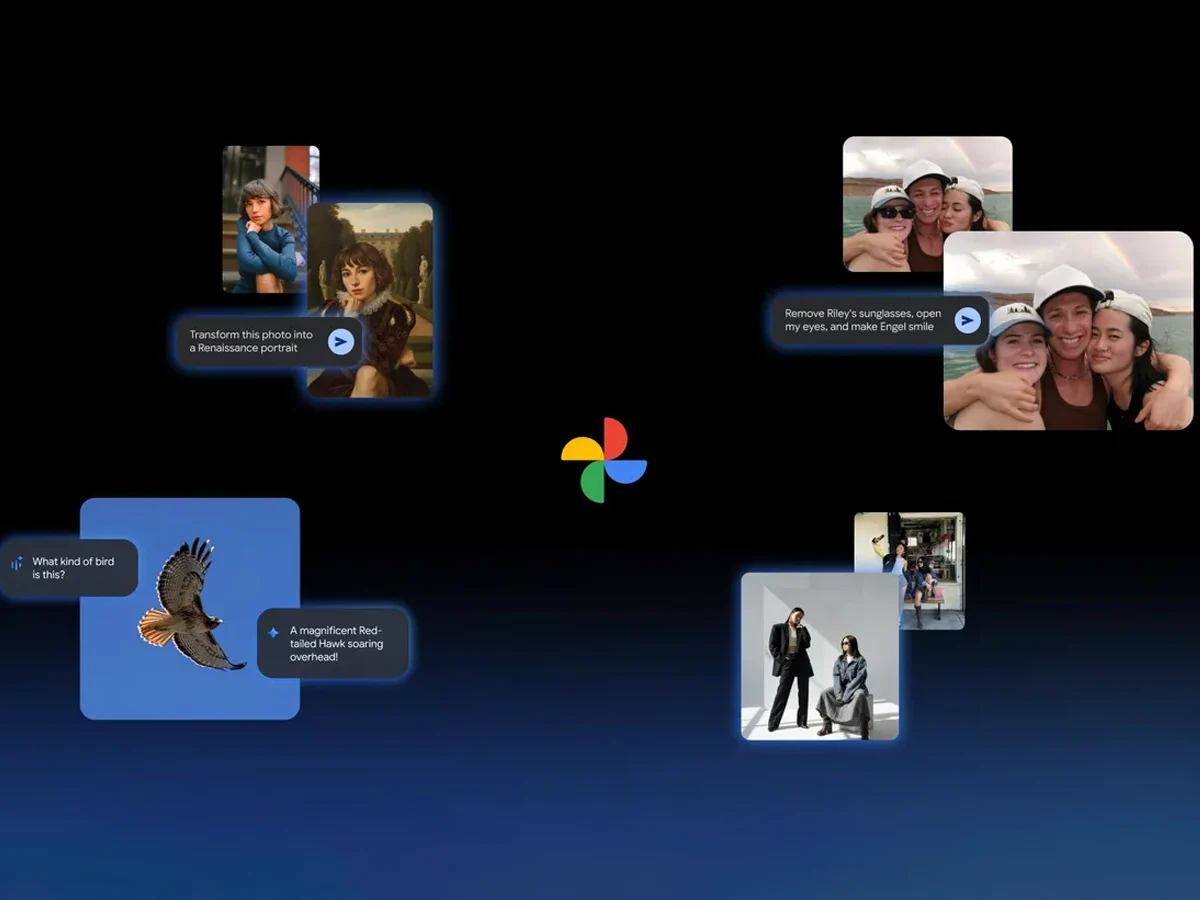
    Google has rolled out several new artificial intelligence features for the Google Photos application. One notable addition is the capability to make edits based on prompts, a feature that was previously limited to the Pixel 10 series. Now, with this update, users on iOS can also take advantage of this AI-driven editing functionality.

    Easy Editing with AI

    After updating the app, users can use the “Help me edit” option in Google Photos to request their desired changes. This enhancement also includes the integration of Nano Banana, which adds a fun twist to photo editing.

    As per the company’s announcement, the inclusion of Nano Banana allows users to customize their images in a variety of artistic styles. Google demonstrated how a simple photo could be transformed into a Renaissance-style portrait, and the feature appears to perform effectively within the application.

    AI Templates for Quick Creation

    Another exciting feature added to Google Photos is the introduction of AI templates. The brand claims these templates will help users easily generate images based on a reference they provide. Initially, this feature will launch on Android in both India and the United States.

    The company also emphasized the growth of its AI-powered search function, which was first launched in the US. This search capability is now accessible in over 100 countries and supports more than 17 new languages, including Japanese, Bengali, and Arabic.

    New Interactive Features

    Lastly, there’s a fresh “Ask” button available in Google Photos. This new option empowers users to engage more deeply with the images they see. For instance, they can immediately start a dialogue with Gemini about any photo with just a click of that button.

    Google Blog

    Source:
    Link


  • Google Pixel Feature Drop: Maps Power-Saving Mode & AI Updates

    Google Pixel Feature Drop: Maps Power-Saving Mode & AI Updates

    Key Takeaways

    1. The November 2025 Google Pixel Feature Drop is available for compatible Pixel smartphones, including the Pixel 10 Pro priced at $964 on Amazon.
    2. Users can now “remix” photos in Google Messages by describing desired edits, utilizing AI for photo editing.
    3. Google Photos’ AI features become more personalized, allowing users in the US to edit group photos by naming individuals for changes.
    4. Enhanced scam detection and VIP message display are currently limited to US users, with AI summarizing incoming messages on Pixel 9 and newer devices.
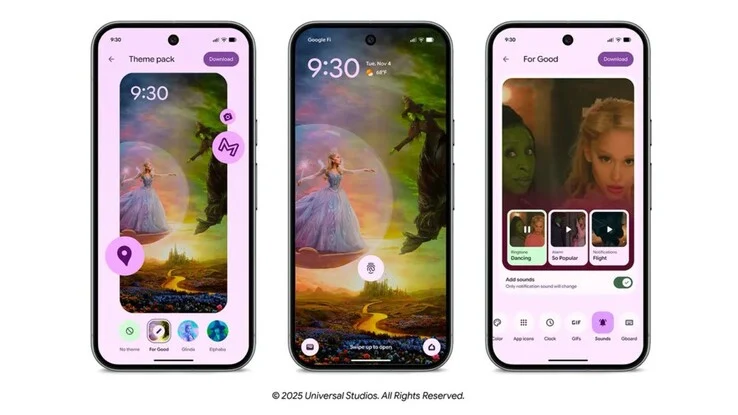
    5. The update introduces new customization options, including the “Wicked: For Good” theme package, allowing users to change system colors, wallpapers, app icons, and sound effects.


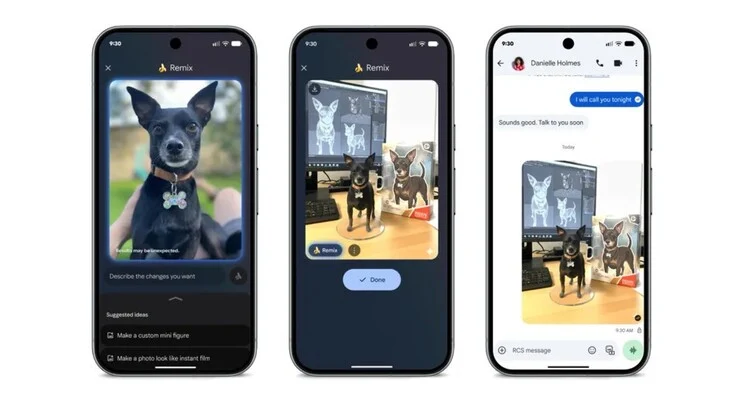
    The newest Google Pixel Feature Drop for November 2025 has arrived and will be ready for download for all users with compatible Pixel smartphones in the coming days. This update includes the Pixel 10 Pro, which is priced at $964 on Amazon. One of the highlights of the new software is the ability to “remix” photos directly in Google Messages, enabling users to edit images using AI by simply describing what changes they wish to see.

    Personalized AI Features

    After this update, Google Photos has made its AI features more personalized. Users can now tell the AI the name of a person in a group picture that needs editing. For instance, users can remove sunglasses, open closed eyes, or alter facial expressions. However, it’s worth noting that this specific feature is currently accessible only to users located in the US.

    Enhanced Scam Detection

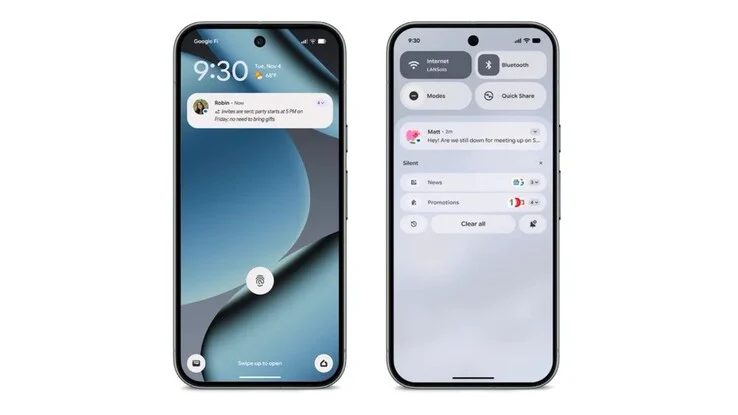
    Similarly, scam detection for incoming texts is also limited to US users, as Google is providing warnings only to them regarding possible fraud attempts. Moreover, messages from contacts designated as “VIPs” are now more prominently shown, reducing the chances of them being overlooked. The Feature Drop introduces a new option for Pixel 9 and newer devices, which leverages AI to summarize incoming messages right in the push notification.

    Starting in December, users will also have the ability to identify less important messages using AI and hide their notifications. Additionally, Pixel 10 series users can benefit from a new power-saving mode in Google Maps that can increase battery life by up to four hours by concealing non-essential information.

    New Customization Options

    Finally, the November 2025 Feature Drop brings a “Wicked: For Good” theme package that allows users to customize system colors, wallpapers, app icons, and even sound effects. Users can choose from three new themes, giving them a chance to personalize their device further.

    Source:
    Link


  • Adobe Max 2025: New AI Features for Photoshop, Premiere, and More

    Adobe Max 2025: New AI Features for Photoshop, Premiere, and More

    Key Takeaways

    1. Photoshop now features generative AI models for image creation using text prompts and includes the Harmonize feature for seamless blending of AI-generated images with existing photos.
    2. Premiere Pro introduces the AI Object Mask feature for easier rotoscoping and offers GPU-accelerated, real-time transitions and effects for improved editing.
    3. Illustrator enhancements include live brush previews and the ability to rotate 2D vector images into 3D using Firefly AI.
    4. Firefly allows for user personalization by generating AI images based on uploaded references, and the Firefly Foundry service secures a company’s intellectual property for exclusive content creation.
    5. Adobe Max 2025 showcased numerous AI enhancements across Creative Cloud products, accessible to all Adobe Creative Cloud subscribers.


    Adobe recently shared a wide range of new features for its Creative Cloud offerings during Adobe Max 2025, an annual event that showcases its software tools. Many of these updates harness the power of AI, helping artists to produce their work more swiftly and with greater ease.

    Exciting Updates for Photoshop

    Photoshop is getting a boost with additional generative AI models that enable users to create images simply by typing in text prompts. The newly introduced Harmonize feature allows these AI-generated images to blend seamlessly into existing photos. Additionally, users can take advantage of AI image upscaling through Topaz Labs.

    Enhancements in Premiere Pro

    Premiere Pro now includes the AI Object Mask feature, which makes it easier to create precise masks for special effects rotoscoping. Furthermore, it introduces numerous GPU-accelerated, real-time transitions and effects, enhancing the editing experience significantly.

    Illustrator Improvements

    Illustrator has rolled out various quality-of-life enhancements, such as live brush previews while drawing. It also offers the ability to rotate a 2D vector image into 3D, automatically adjusting characters and objects from this new viewpoint, thanks to the integration of Firefly AI.

    Personalization with Firefly

    Firefly now allows for user personalization, generating AI images that align with the style and appearance of uploaded references. Businesses can take advantage of the newly launched Firefly Foundry, a managed service that securely holds all of a company’s intellectual property (IP) for generating matching audio, images, and videos for exclusive usage.

    To catch a glimpse of the numerous other AI enhancements added to Adobe Creative Cloud products, be sure to watch the opening keynote from Adobe Max 2025 or explore further details here. All applications are available to anyone with an Adobe Creative Cloud subscription.

    Source:
    Link


  • Xiaomi Launches HyperOS 3 Globally with AI Tools and Hyper Island

    Xiaomi Launches HyperOS 3 Globally with AI Tools and Hyper Island

    Key Takeaways

    1. Xiaomi has launched HyperOS 3, its new operating system based on Android 16, featuring a new user interface and enhanced AI capabilities.

    2. The stable update is initially rolling out to the Xiaomi 15T and 15T Pro in Europe, with beta program participants likely receiving it first.

    3. Future updates for other devices, including the Xiaomi 15 series and Poco F7 series, are planned from October 2025 to March 2026.

    4. Key features include Hyper Island for notifications, AI tools for note writing, voice translation, noise reduction, and AI-powered photo search.

    5. System performance has improved by up to 30%, with faster app launches, better energy efficiency, and enhanced animations for smoother navigation.


    Xiaomi has started the global release of HyperOS 3, its new operating system based on Android 16. This update brings a new user interface, better performance, and enhanced AI features to devices from the Xiaomi, Redmi, and Poco brands.

    Initial Rollout

    The Xiaomi 15T and 15T Pro are the first to get the stable update, which is rolling out in Europe in phases. Users who took part in the global beta program are likely to be the first to receive this update. To see if the update is available, users can go to Settings > About Phone > System Update.

    Future Updates

    According to Xiaomi’s official timeline, more devices will get the update in the next few months. The Xiaomi 15 series, Xiaomi 15 Ultra, Redmi Note 14 series, Poco F7 series, and Poco X7 range are anticipated to receive HyperOS 3 between October and November 2025.

    Following that, devices like the Xiaomi 14 series, Poco F6 series, and various Redmi models will be updated between November and December. A third wave, from December 2025 to March 2026, will see older devices like the Xiaomi 12 and 13 series receive the upgrade.

    New Features and Improvements

    HyperOS 3 brings Hyper Island, which is Xiaomi’s version of a dynamic notification center that shows live activities and media controls at the screen’s top. This feature supports over 70 different services and lets users interact with notifications without needing to open apps.

    Another key feature is the AI tools, which include AI-assisted note writing using DeepThink mode for creating detailed content, AI voice translation for real-time conversations, and AI noise reduction for audio recordings. Additionally, the Gallery app now has AI-powered search that can recognize photos by their content, including special features for pets, which create albums automatically. Users also have access to a system-wide AI search to find files and apps, plus tools for image descriptions and summarizing content.

    Performance Enhancements

    Moreover, Xiaomi claims that system performance has improved by up to 30%, with app launch times enhanced by about 21%. The company also reports a 10% boost in energy efficiency, less frame loss during gaming sessions, and over 100 improved system animations for a smoother navigation experience.

    Source:
    Link


  • OnePlus Launches OxygenOS 16 with AI Features and Apple Integration

    OnePlus Launches OxygenOS 16 with AI Features and Apple Integration

    Key Takeaways

    1. OxygenOS 16 is built on Android 16 and focuses on AI to enhance user experience and connectivity.
    2. New features include voice note transcription, AI contextual searches, and tools for optimizing scanned images and low-light photography.
    3. Enhanced connectivity with O+ Connect allows for improved file sharing and screen mirroring between OnePlus devices and other platforms, including iPhones.
    4. User convenience features include remote control of computers, fitness app compatibility with Apple Watch, and smoother animations with upgraded performance.
    5. The update will be pre-installed on the upcoming OnePlus 15, with a beta program launching for older devices starting October 17.


    OnePlus has unveiled its new mobile operating system, OxygenOS 16. This update is built on Android 16 and emphasizes artificial intelligence (AI), while also enhancing connectivity across devices, including those from Apple.

    AI-Driven Design

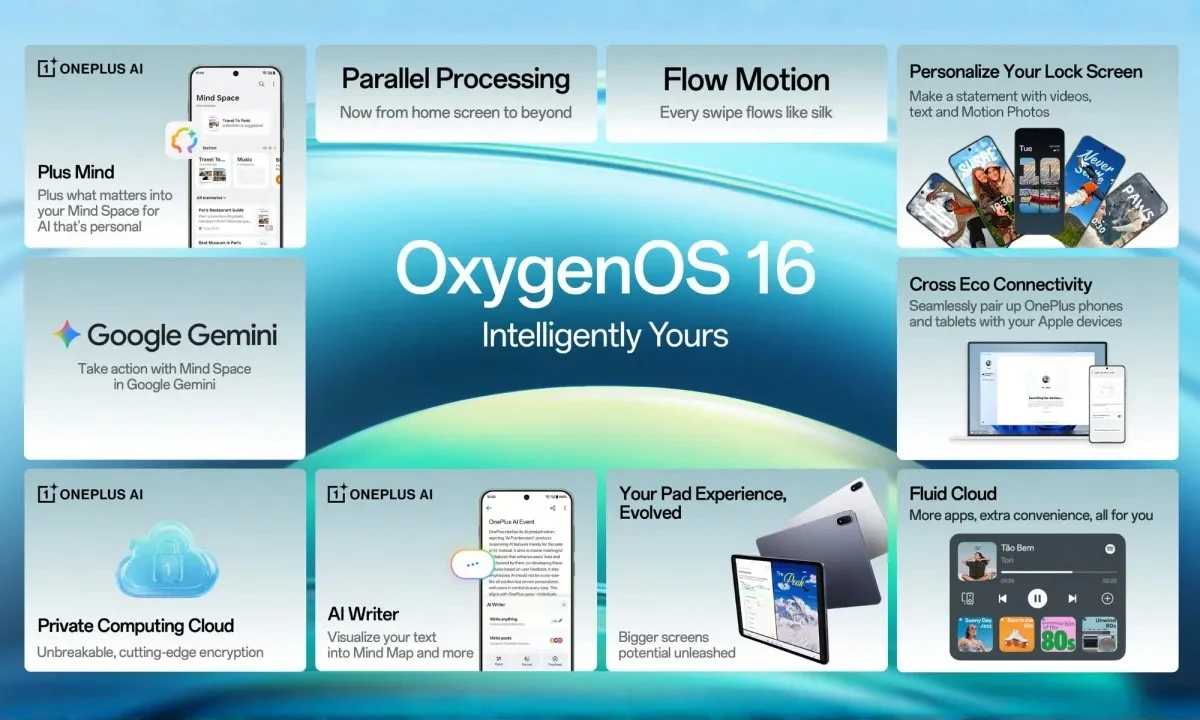
    The design philosophy of OnePlus is now centered around AI, which is showcased in OxygenOS 16. With the help of AI, the OS introduces Plus Mind, a feature that acts like a digital bank for user data, named Mind Space. Additionally, the Collections feature has taken inspiration from the organized app libraries seen in Apple iOS, effectively grouping saved content in a smart way.

    New Features and Tools

    OxygenOS 16 brings several new capabilities, such as voice note transcription and summarization, AI-driven contextual searches, and mind mapping from notes. A fresh tool is also introduced that enhances scanned images by automatically adjusting the brightness and angles prior to converting them into optimized PDFs.

    Among other innovative AI-driven features is “YumSee,” which creates images of dishes by scanning menus, and “Party Up,” which generates short videos from photos, similar to Google’s Flow tools. Furthermore, OnePlus phones will leverage AI to improve low-light photography, although these tools are still in the experimental phase.

    Enhanced Connectivity

    The new OxygenOS 16 incorporates Google’s Gemini into Plus Mind, enabling OnePlus users to search their phone data, the internet, and Gemini’s knowledge base at once. There’s also a new AI writing assistant that can proofread, summarize, and refine text, much like the features found in Apple Intelligence.

    OnePlus has introduced the O+ Connect feature with this latest update, which promises effortless file sharing and improved device interactivity. Notably, it allows screen mirroring between OnePlus devices and PCs or Macs, and it also facilitates quick data transfers with iPhones using a tool akin to the NameDrop function.

    User Convenience

    The Remote Control feature enables users to manage their computers remotely from their phones or tablets, as the name implies.

    For those into fitness, OxygenOS 16 is compatible with the Apple Watch via the OHealth app, allowing users to view notifications, manage calls, and sync health information.

    OnePlus claims that animations will be smoother thanks to the upgraded Flow Motion engine. The company also asserts that multitasking will be more efficient with Parallel Processing 2.0.

    OxygenOS 16 will be pre-installed on the upcoming OnePlus 15. However, starting October 17, OnePlus will launch a beta program for older devices. Below is the list of devices that can receive the update:

    OnePlus’

    Source:
    Link