Category: Software

  • iOS 26 Liquid Glass UI Criticized for Poor Readability Issues

    iOS 26 Liquid Glass UI Criticized for Poor Readability Issues

    Key Takeaways

    1. User Feedback on Readability: Many users, including a notable response on X, criticize the new Liquid Glass UI design for negatively impacting readability, suggesting it may not meet user needs.

    2. Apple’s Vision: Apple aims to create a visually appealing and dynamic UI with Liquid Glass that enhances user focus on content, as highlighted during the WWDC25 keynote.

    3. Achievements in Design: The updated iOS 26 UI showcases impressive animations and sleek design, but the visual effects are causing readability challenges, particularly in the Lock Screen.

    4. Proposed Solutions: Suggestions for improvement include using a more intense background blur, adding color tints to UI elements, and incorporating features like drop shadows to enhance visibility.

    5. Opportunity for Improvement: With iOS 26 still in Beta, Apple has time to address user feedback and make necessary adjustments to enhance the user experience before the full release.


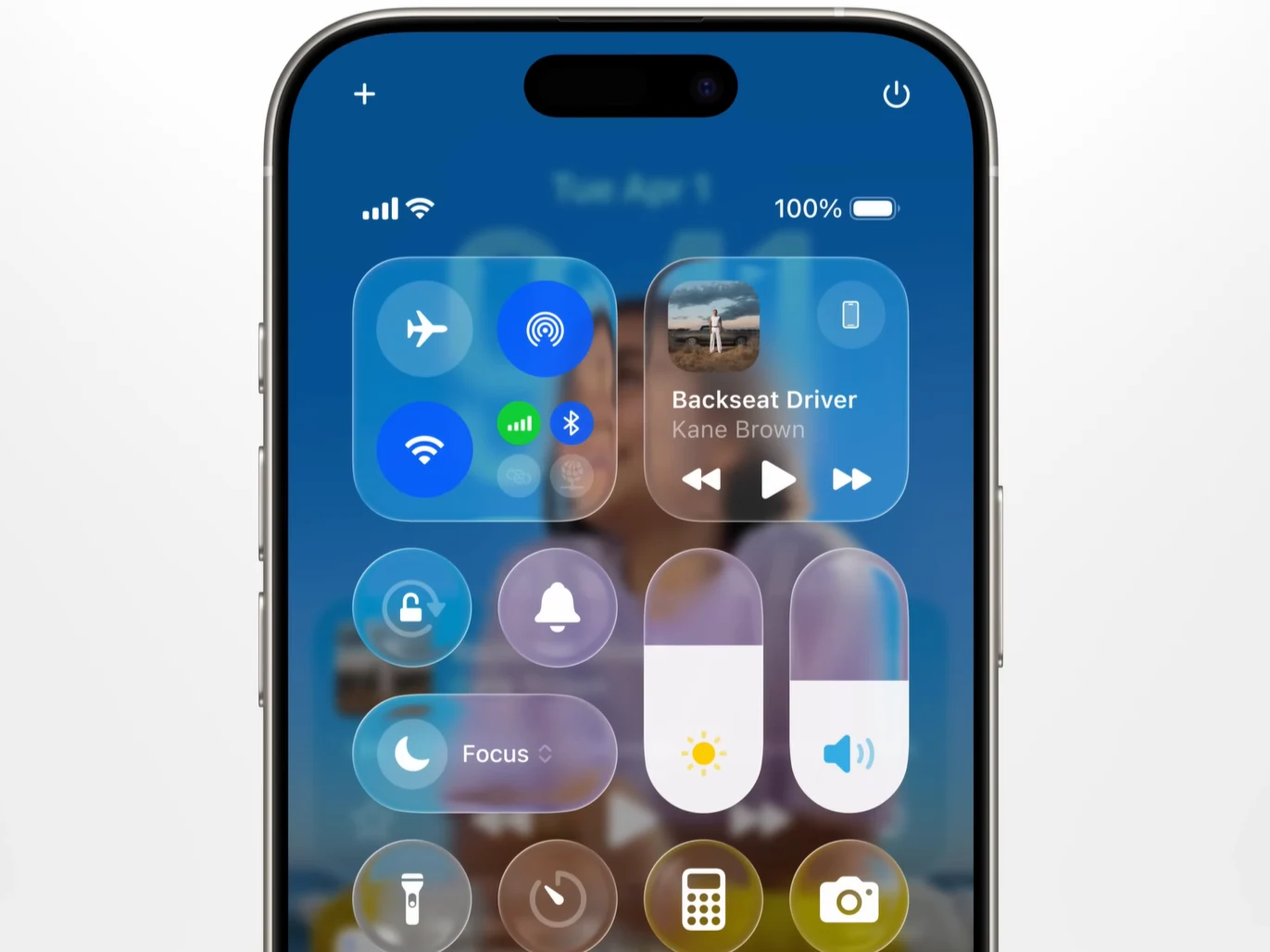
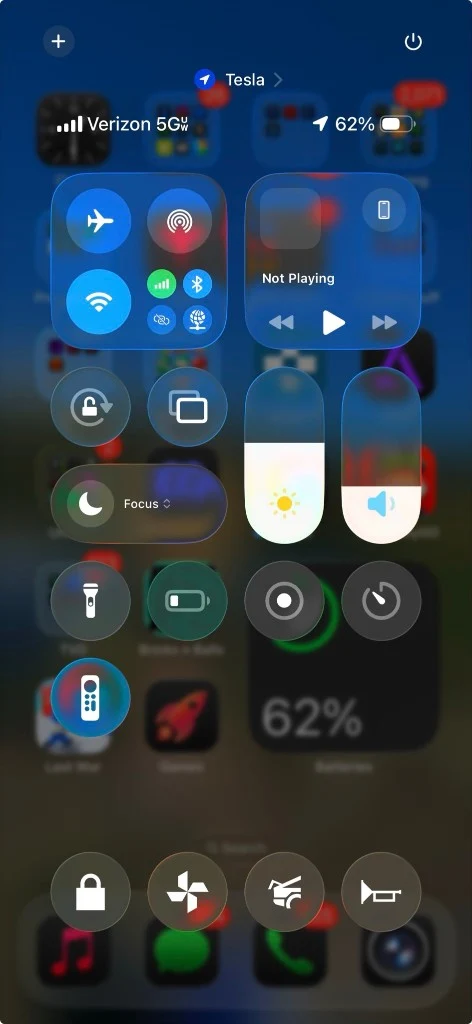
    “Steve Jobs would have fired everyone” was the response of a user on X after witnessing Apple’s innovative “Liquid Glass” software design in use. This post has racked up over 18.5 million views on X, pointing out that the iOS Control Center with the new user interface (UI) design reveals how the transparent quality and gentle blur can negatively impact readability.

    Apple’s Vision for Liquid Glass

    During the WWDC25 keynote, Apple highlighted that the UI components made from Liquid Glass are designed to be “more expressive and delightful,” and they “dynamically transform to help enhance focus on content.” It’s evident that Apple’s goal with this new UI, which spans its ecosystem from macOS 26 to TVOS 26, is to create a modern, visually appealing UI redesign that doesn’t sacrifice functionality.

    Achievements and Challenges

    Overall, Apple has made significant strides. For example, the updated iOS 26 UI is impressively sleek, featuring some of the industry’s finest animation techniques. The individual UI elements seem to come alive with a gentle bounce and responsive interactions. Yet, the visual aspects of the Liquid Glass design appear to be the source of most issues.

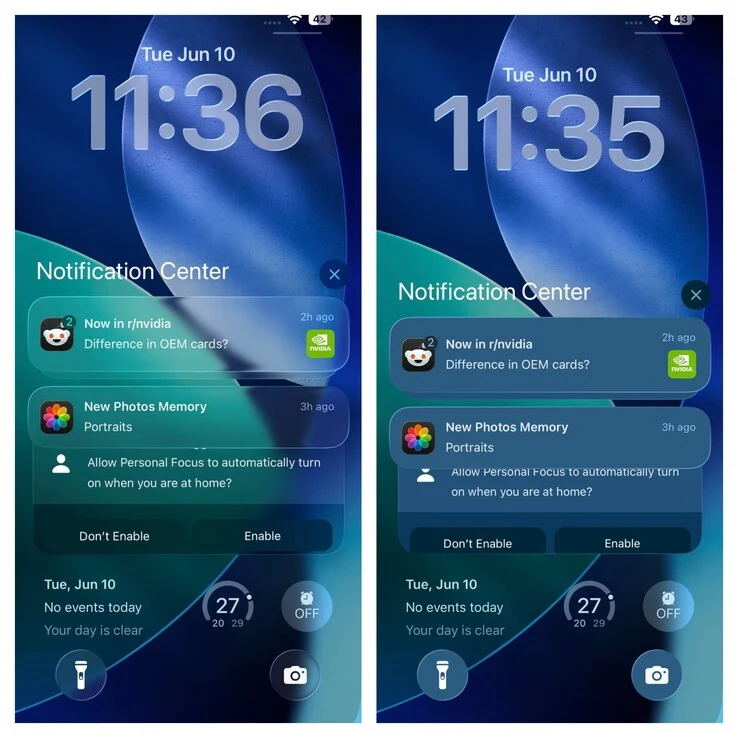
    Consider the iOS Lock Screen, where our own Vaidyanathan S. demonstrates on X that the iOS 26 Lock Screen looks much clearer and simpler to read when transparency is disabled.

    Readability Issues

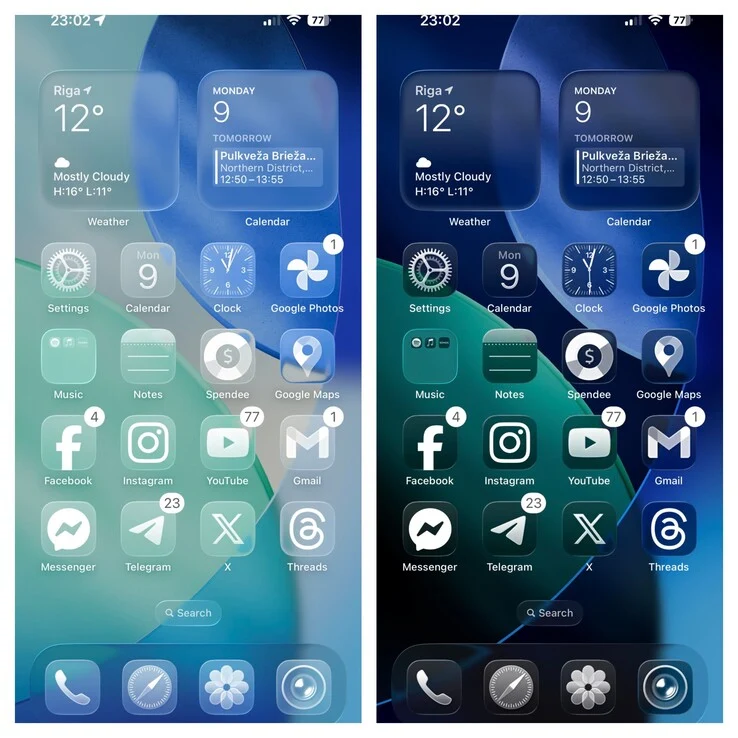
    Readability takes a hit when the UI is set to the new “Clear Light” mode. Thanks to the translucent effects of Liquid Glass, iOS 26 is more visually appealing when displayed in “Clear Dark” mode.

    One straightforward solution would be for Apple to apply a more intense background blur, allowing the foreground UI elements to pop. Right now, the background blur is somewhat too soft, making information-dense elements like the Control Center harder to read.

    Another potential solution could be to add a color tint to the Liquid Glass material, which would help clear UI elements stand out against a bright background.

    Additionally, @XorDev, a graphics programmer, proposes enhancements like Drop Shadows, Tone Mapping, and more as possible improvements.

    Looking Ahead

    Fortunately, iOS 26 remains in Beta and won’t be fully released for several more months. This gives Apple ample time to consider this feedback and make necessary adjustments.

    Source:
    Link


  • Android 16 Launches Today, June 10: What You Need to Know

    Android 16 Launches Today, June 10: What You Need to Know

    Key Takeaways

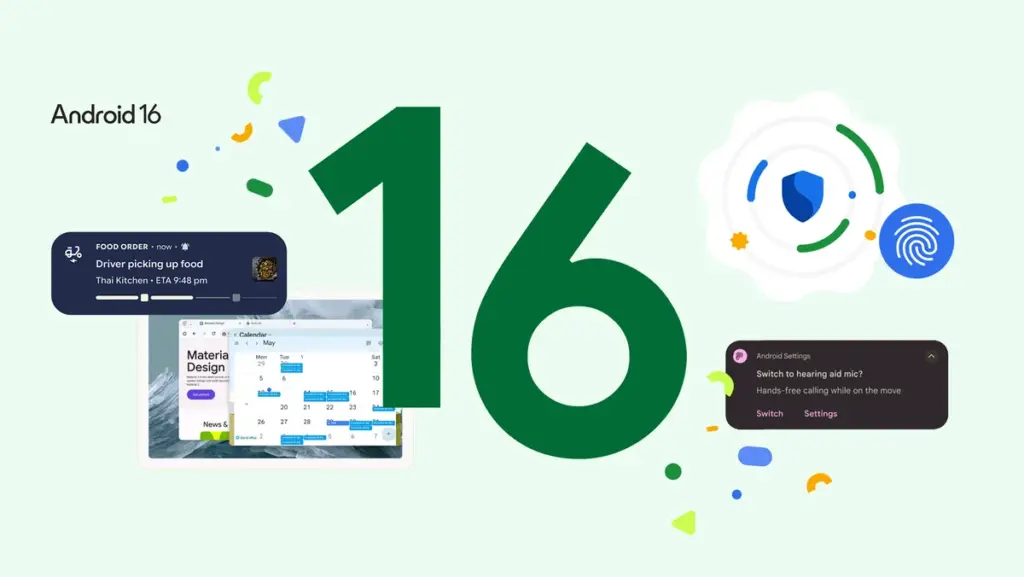
    1. Android 16 is set to launch on June 10, following hints from the Android Developers account on social media.
    2. The update will first roll out to Pixel smartphones starting from the Pixel 6 and select models from Samsung, Xiaomi, OnePlus, Motorola, and Nothing.
    3. New features in Android 16 include Advanced Protection, Live Activities, quick controls for Google Wallet, and battery health indicators.
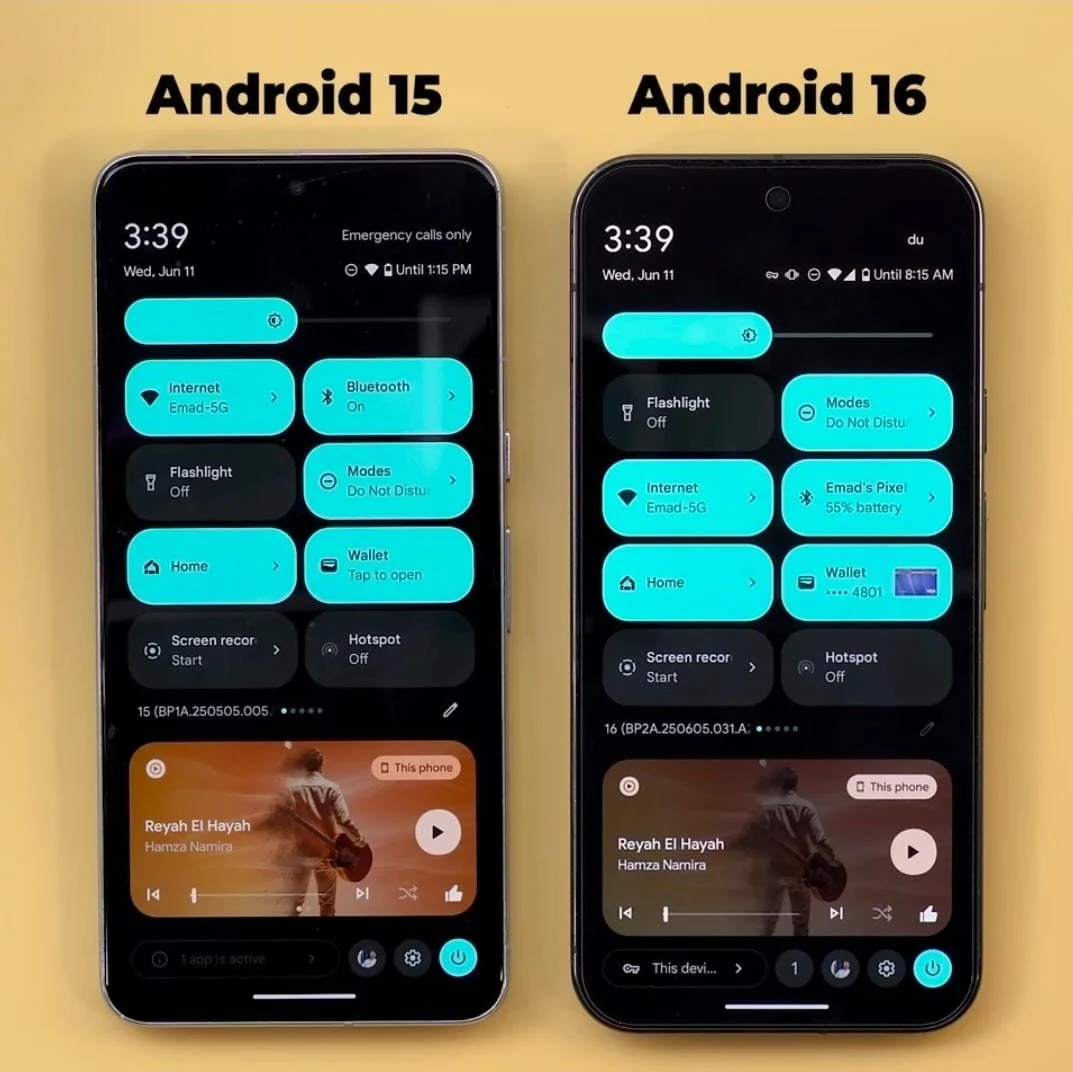
    4. The significant visual overhaul, known as the Material 3 Expressive update, will enhance various settings and menus but will be released in a few months.
    5. This Android update is being launched three months earlier than previous versions to give manufacturers more time for their flagship devices.


    With Apple updating its branding and improving the software experience across its devices, Google has also shared when the next Android update will come out. Most of the features for this update have already been disclosed in earlier beta versions, and the final version of Android 16 is set to launch later today, June 10. However, the fresh Material design is still expected to be released later in the year.

    Exciting Announcement on Social Media

    The Android Developers account on X shared a brief message on June 9, hinting that the final release of Android 16 is nearly here with a simple note saying, “It’s almost time for the Android 16 final release,” along with “See you back here tomorrow,” and added a winking emoji. This indicates that the final version of Android 16 will be available today, June 10, though the exact timing remains uncertain. The update will be rolled out to Pixel smartphones starting from the Pixel 6 (Buy on Amazon), as well as Samsung S22 and newer models, Xiaomi 13 and newer, OnePlus 11 and newer, Motorola Razr 50 (Buy Razr 2024 on Amazon) and Edge 40 (Buy Edge 2023 on Amazon), plus all Nothing phones.

    A Broader List of Compatible Devices

    This list is just a part of the devices expected to receive the update. Naturally, Pixel models will be the first to enjoy Android 16, with other brands likely following afterwards.

    It’s important to highlight that while the Android 16 update will introduce new features such as Advanced Protection, Live Activities, quick controls for Google Wallet, battery health indicators, and various cosmetic tweaks, the major overhaul is still several months away. The Material 3 Expressive update, which is included in Android 16 QPR1 (Quarterly Platform Release 1), will be coming in a few months, but no specific date has been provided yet.

    Major Visual Changes Ahead

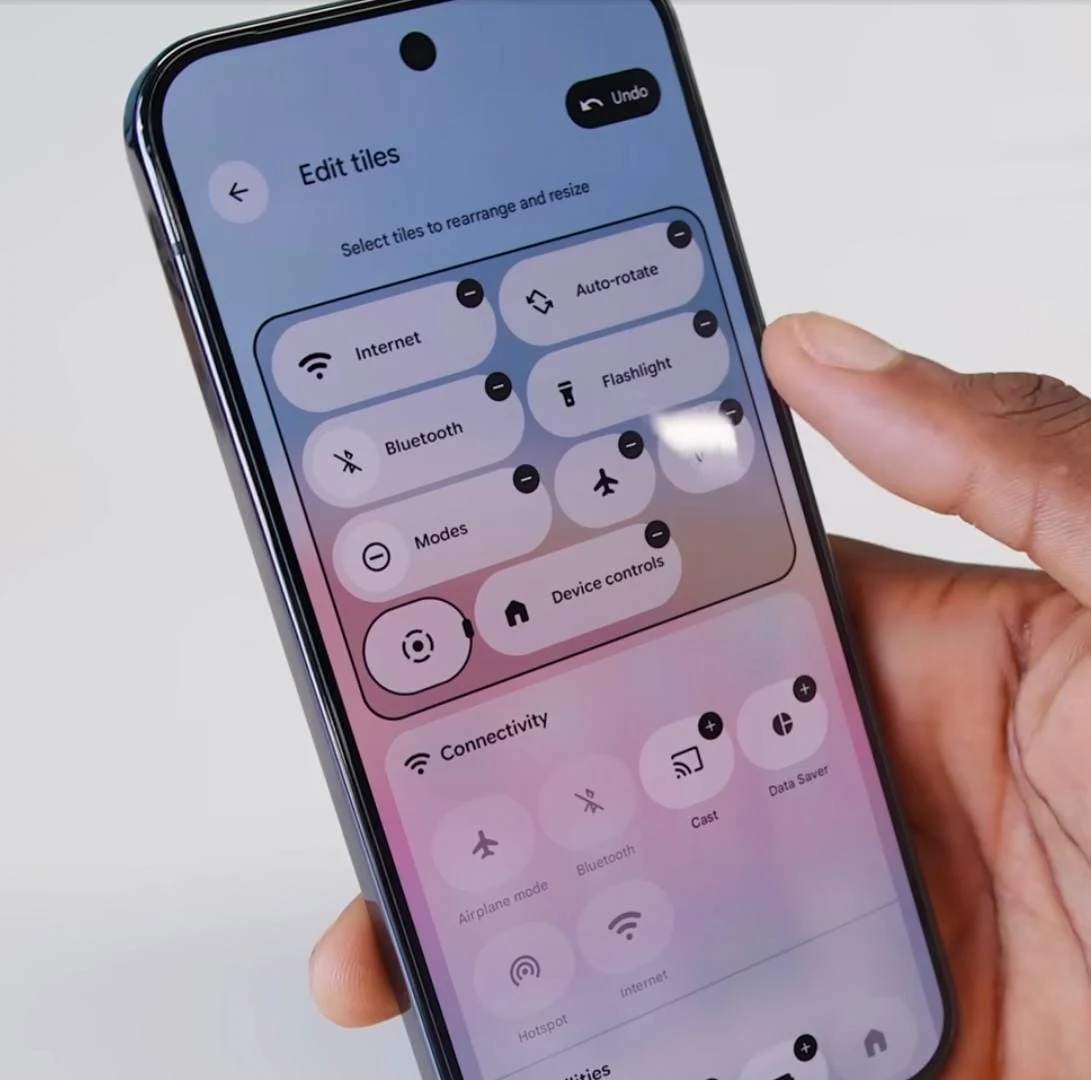
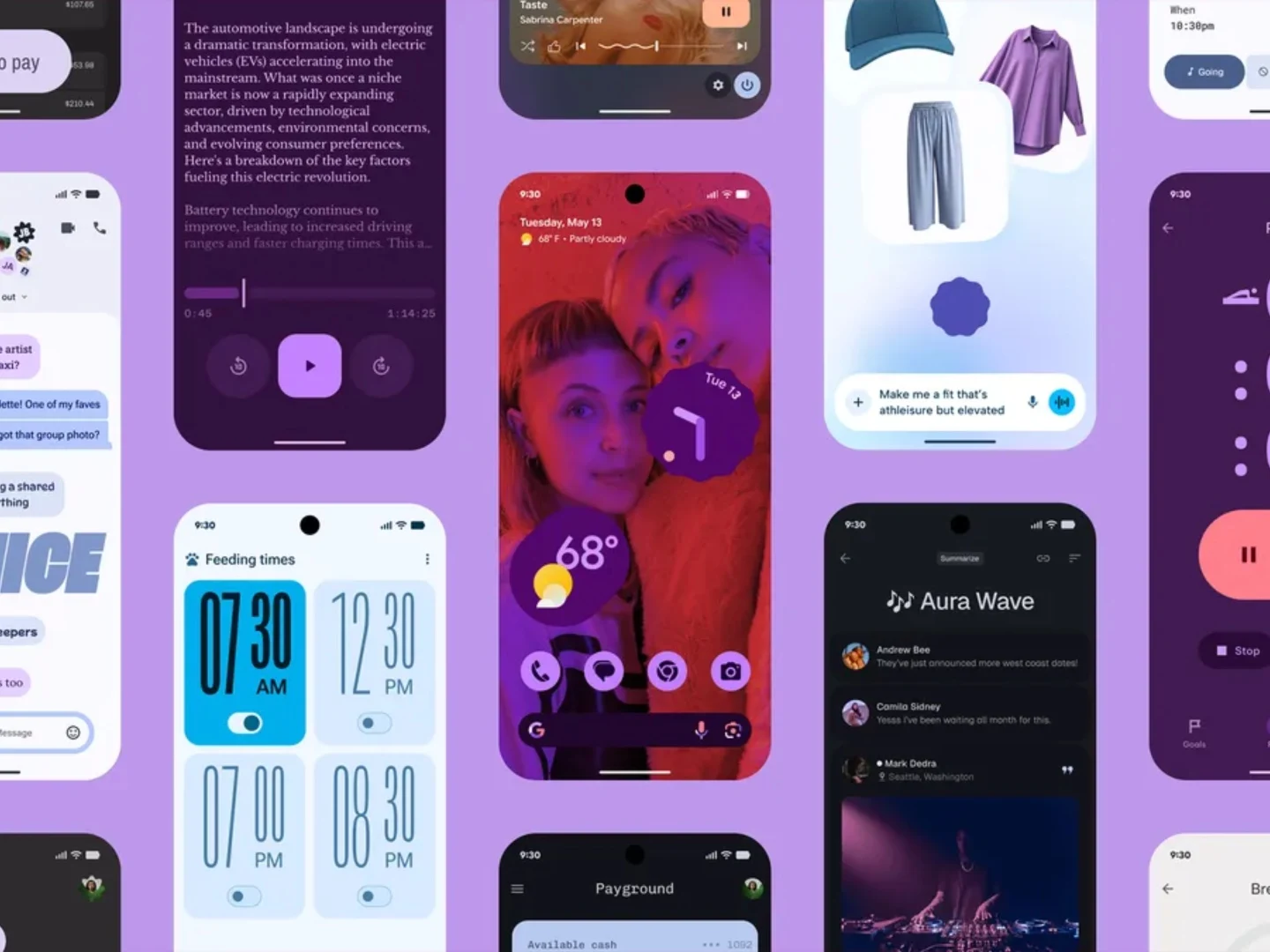
    The Material 3 Expressive update represents the significant visual overhaul associated with Android 16. It will enhance the Quick Settings panel and the Settings menus, introduce new options alongside cosmetic updates to previous ones, and more.

    This Android update is being launched roughly three months earlier than previous versions. Google has previously stated that it is speeding up the release cycle to allow manufacturers additional time to launch their latest flagship devices featuring the most current Android version.

    Source:
    Link

  • Google Pixel 9 Pro and Phones Get Android 16 Update and Features

    Google Pixel 9 Pro and Phones Get Android 16 Update and Features

    Key Takeaways

    1. Android 16 update is now available for Pixel smartphones, featuring design changes, Live Updates, and security enhancements.
    2. New “Pixel VIPs” feature allows users to organize important contacts’ calls, messages, and birthdays in one spot, with notifications enabled during “do not disturb” mode.
    3. Gboard introduces AI-generated stickers and the Pixel Recorder app can create AI-driven summaries of voice memos in multiple languages.
    4. Camera app now includes a tutorial button for functions and the Magnifier app can scan for text through the camera.
    5. Google Photos introduces an AI-powered one-click feature to enhance images.


    Today, Google has rolled out the Android 16 update for its Pixel smartphones. If you own a Pixel 9 Pro (starting at $999 on Amazon) or another compatible device, you can already get the newest operating system. The Android 16 update mainly brings design changes, Live Updates akin to those on the Apple iPhone, along with security enhancements.

    Exciting New Features

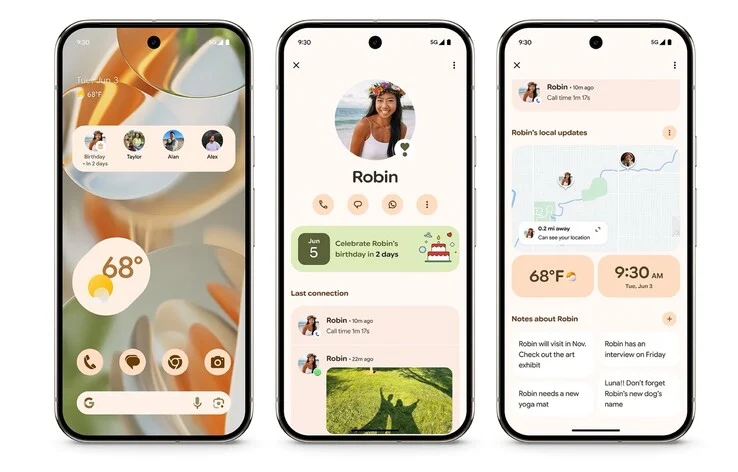
    Pixel users can also take advantage of a bunch of exclusive functionalities with the latest Feature Drop for June 2025. One of the highlights is the introduction of “Pixel VIPs,” which gather previous calls, messages, or birthdays from selected contacts into a single spot. You can even display this information on your home screen using a widget. Notably, calls from these VIPs will still ring through when “do not disturb” mode is activated.

    Enhancements in Applications

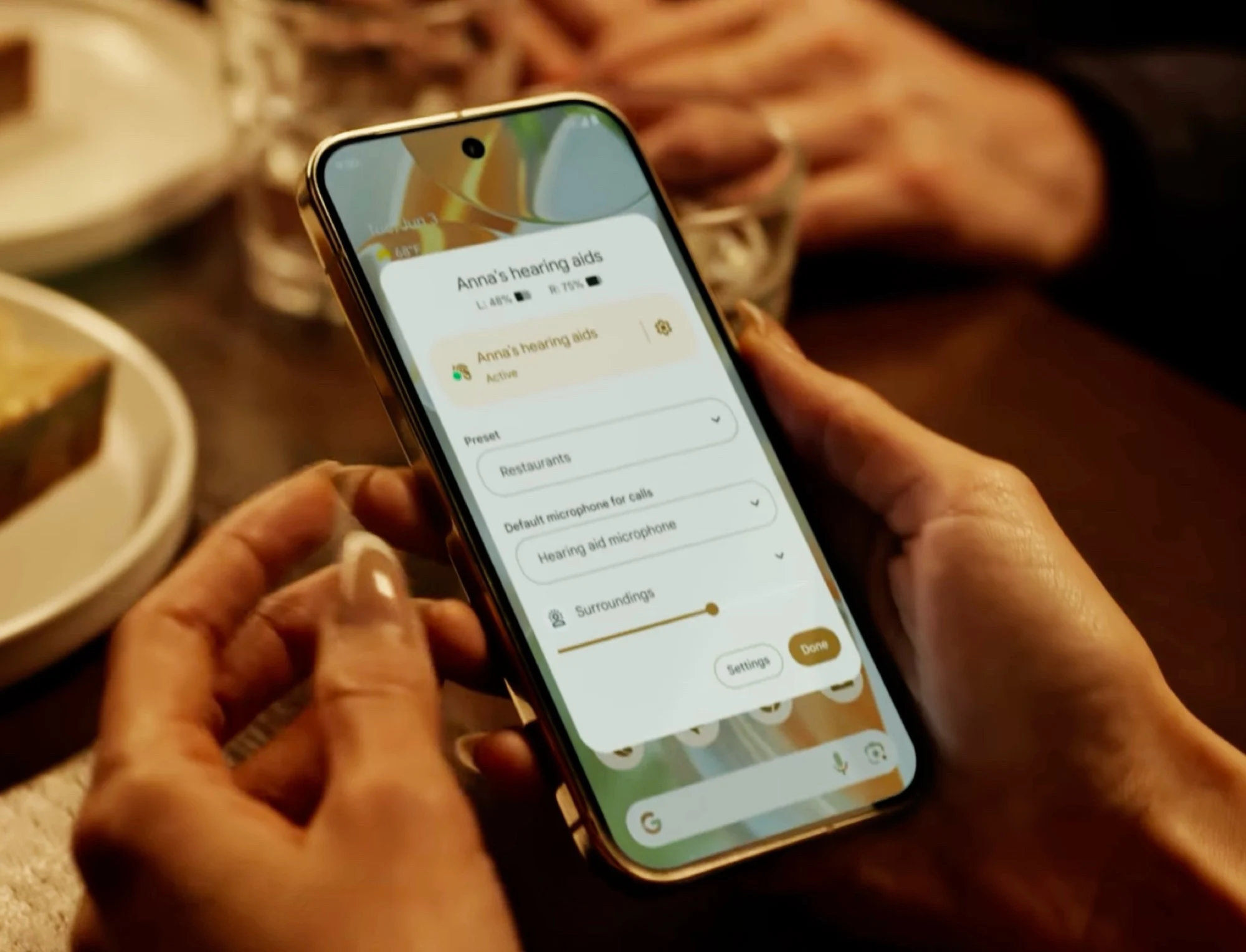
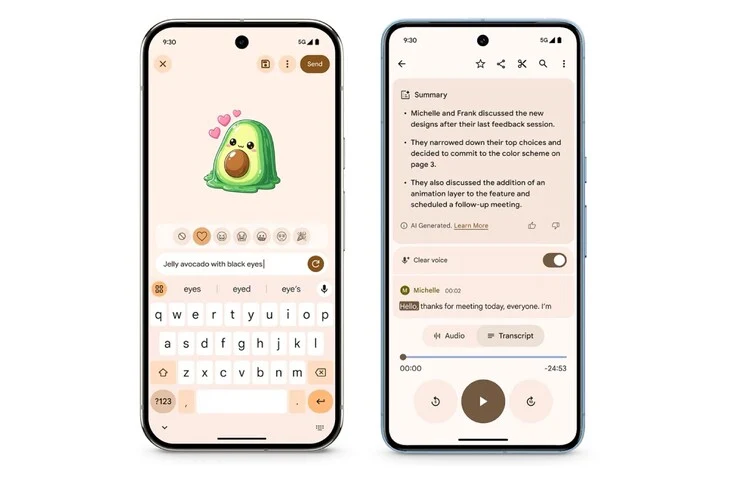
    In a fun twist, Gboard can now create stickers using AI and text input, so users don’t need to toggle between different apps. Also, the Pixel Recorder app is now capable of generating AI-driven summaries of voice memos in several languages, including German. Furthermore, the Feature Drop brings “Clear Voice” to the Pixel 8 series, a tool that aims to eliminate unwanted background noise from voice memos.

    Camera and More Improvements

    For those who love photography, the Camera app on Pixel devices has a new question mark button that opens a tutorial detailing its various functions. Additionally, Google’s Magnifier app can now scan for text visible through the phone’s camera, such as restaurant menus. Finally, Google Photos has introduced a new one-click feature that leverages AI to enhance images.

    Source:
    Link


  • iOS 26 Boosts iPhone Battery Life but Reduces Performance

    iOS 26 Boosts iPhone Battery Life but Reduces Performance

    Key Takeaways

    1. iOS 26 will be available in the fall for iPhone models from 11 to 16, featuring design changes and new AI capabilities.
    2. The new “Adaptive Power” feature slows down the processor and dims the screen to extend battery life, in addition to the existing Low Power Mode.
    3. A warning in settings indicates that certain tasks may take longer when Adaptive Power is active.
    4. iOS 26 will automatically switch to Low Power Mode when the battery level drops to 20%.
    5. The update may support future iPhone models like the rumored iPhone 17 Air, which could benefit from energy-saving features.


    Apple revealed iOS 26 on Monday, marking the next significant upgrade for the iPhone. This new operating system will be available in the fall for all models ranging from the iPhone 11 to the iPhone 16. The update brings a variety of design changes, innovative AI features, an overhauled camera app, and the introduction of a new gaming app. One noteworthy addition is the “Adaptive Power” feature, which users can turn on alongside the existing “Low Power Mode” found in the system settings.

    Understanding Adaptive Power

    While Low Power Mode mainly limits background tasks, like fetching new emails, Adaptive Power takes a different approach. It slows down the iPhone’s processor and dims the screen brightness. By focusing on these two energy-hungry elements, this feature aims to prolong battery life. It’s important to note that a message in the system settings warns users that certain tasks might take longer when Adaptive Power is in use. Additionally, when the battery level falls to 20%, iOS 26 will automatically switch to Low Power Mode.

    Future Prospects

    This feature seems particularly designed for the upcoming iPhone 17 Air, which is rumored to have a 6.6-inch display while housing a small 3,000 mAh battery. Therefore, users might rely heavily on features like Adaptive Power to make it through the day without needing to recharge. Speculations have also emerged that iOS 26 might utilize AI to monitor user habits and intelligently lower power usage. However, there’s no evidence of this feature in the initial beta version of iOS 26, at least not yet.

    Apple | The Verge | MacRumors

    Source:
    Link


  • Samsung’s Reaction to Apple’s WWDC Announcements 2023

    Samsung’s Reaction to Apple’s WWDC Announcements 2023

    Key Takeaways

    1. Apple revealed new software updates with a Liquid Glass design, generating excitement and criticism.
    2. Samsung openly mocked Apple’s design choices and AI capabilities on social media, highlighting similarities to their own products.
    3. The Liquid Glass design has been compared to Windows Vista’s Aero UI, raising concerns about app visibility and readability.
    4. Samsung showcased its advanced Galaxy AI features, claiming superiority over Apple’s offerings in real-time translations and smart capabilities.
    5. Apple adopted a cautious approach regarding AI at WWDC 2025, focusing on user privacy and mentioning Siri only twice during the presentation.


    Apple has just revealed its newest software updates, which include fresh names and a Liquid Glass design. These innovations have not only intrigued Apple fans but have also drawn the ire of Samsung, Apple’s main competitor in the Android space. Rather than remain silent, Samsung decided to poke fun at Apple’s offerings, criticizing the “familiar” designs and lackluster AI capabilities.

    Samsung’s Response to Apple’s Announcements

    Samsung’s reaction to Apple’s announcements at WWDC 2025 was quite vocal. A tweet from Samsung Mobile US on X stated, “Customizable apps? Floating bars? That sleek glass UI? Looks… familiar.” The Liquid Glass design has been compared to the Aero UI from Windows Vista, while the new app icons in iOS 26 and macOS 26 arguably make it more difficult to identify apps or read text clearly.

    Flexing Galaxy AI

    In addition to calling out Apple, Samsung took the chance to showcase its Galaxy AI, which has been delivering features that Apple is just starting to test out. Posts from Samsung’s X account included remarks like, “New to live translations? Welcome aboard! We’ve been translating text and speech in real-time for a while now… #GalaxyAI,” and “AI is coming to your watch? Cute. Ours already knows when you’re too tired to care #GalaxyAI.”

    Apple Treads Carefully

    Unlike recent AI-focused presentations from Google and Samsung, Apple’s WWDC was notable for its minimal mention of AI. Siri was only mentioned twice throughout the 90-minute duration. It seems that Apple is being cautious, prioritizing user privacy while gradually incorporating AI features, which gives Samsung (and Google) some leeway to boast about their advancements, at least for the time being.


  • Apple’s Major Updates for iPhones, iPads, and Macs This Year

    Apple’s Major Updates for iPhones, iPads, and Macs This Year

    Key Takeaways

    1. Apple introduced iOS 26, iPadOS 26, macOS 26, and watchOS 26 featuring a new “Liquid Glass” design with enhanced transparency and light effects.
    2. Public beta testing for all new operating systems will start in July, with final versions available in the fall.
    3. iOS 26 is not compatible with all iPhones currently running iOS 18; specific compatible models were listed.
    4. iPadOS 26 introduces desktop-like multitasking and an improved file manager, available on select iPad models.
    5. watchOS 26 features a redesigned interface and AI capabilities like “Workout Buddy,” but these features require pairing with iPhone 15 Pro (Max) or iPhone 16 series devices.


    During the keynote event at WWDC yesterday, Apple unveiled iOS 26, iPadOS 26, macOS 26, and watchOS 26, among others. These new operating systems showcase Apple’s “Liquid Glass” design, which incorporates a variety of transparency effects and light reflections. This design approach makes widgets, app icons, menu bars, and pop-up windows appear much more contemporary than in previous versions.

    Public Beta and Release Timeline

    All the new operating systems will begin public beta testing in July, with the final versions expected to be available as a free update in the fall. iOS 26 boasts a plethora of new features but is not supported on all iPhones that are currently running iOS 18. The compatible iPhone models for iOS 26 include:

    The iPad is finally receiving desktop-like multitasking capabilities, along with an enhanced file manager, a sharper mouse cursor instead of a rounded one, and Apple’s fresh aesthetic. The new iPadOS runs on the following iPad models:

    Updates in macOS and Gaming Features

    A significant portion of macOS 26 centers around Apple’s comprehensive design overhaul. Surprisingly, this update also highlights numerous new gaming functionalities. However, support for older Intel-based Macs is somewhat restricted, as the system is compatible with the following Mac models:

    The Apple Watch is set to receive not only a revamped design through watchOS 26 but also innovative AI capabilities. One such feature is “Workout Buddy,” which aims to encourage users during their exercise routines. However, these AI features are only accessible when the Apple Watch is paired with an iPhone 15 Pro (Max) or an iPhone 16 series device. The watchOS 26 operates on the following smartwatch models:

    Apple.

    Source:
    Link


  • macOS Tahoe 26: iPhone Call Support, New Interface, AI Tools

    macOS Tahoe 26: iPhone Call Support, New Interface, AI Tools

    Key Takeaways

    1. New Interface: macOS Tahoe 26 introduces a Liquid Glass design with a translucent Dock, customizable folder colors, and new Control Center layouts.

    2. Phone App Integration: Users can make and receive calls directly from their Mac with the new Phone app, featuring Call Screening and Hold Assist.

    3. Spotlight Enhancements: Spotlight now allows users to perform actions directly from the search bar, with improved filtering tools and relevance-based sorting.

    4. Apple Intelligence Upgrades: Live Translation will be available in Messages and FaceTime, with new AI capabilities for Shortcuts and the option to connect with ChatGPT.

    5. New Apple Games App: The Apple Games app will consolidate games and features a Game Overlay for in-game adjustments and social interactions.


    Apple has given a sneak peek of macOS Tahoe 26, the upcoming version of its desktop operating system. The announcement was made during WWDC 2025. This update presents a new look called Liquid Glass, enhanced Continuity tools like the Phone app and Live Activities, and modifications to Spotlight which introduce more functions and integration capabilities.

    New Interface Features

    With macOS Tahoe 26, the interface gets a fresh look, featuring a translucent Dock, revamped sidebars, and a new menu bar. Users can personalize folder colors, change the Control Center layout, and toggle between various icon styles. There are new settings that enable the addition of emojis and symbols to folders, along with extra options for themes and appearance.

    Phone App and Live Activities

    For the first time, the Phone app will be available on macOS, allowing users to make and receive cellular calls directly from their nearby iPhone. The Mac version will include familiar features such as Recents, Voicemail, and Favorites, plus new functionalities like Call Screening and Hold Assist.

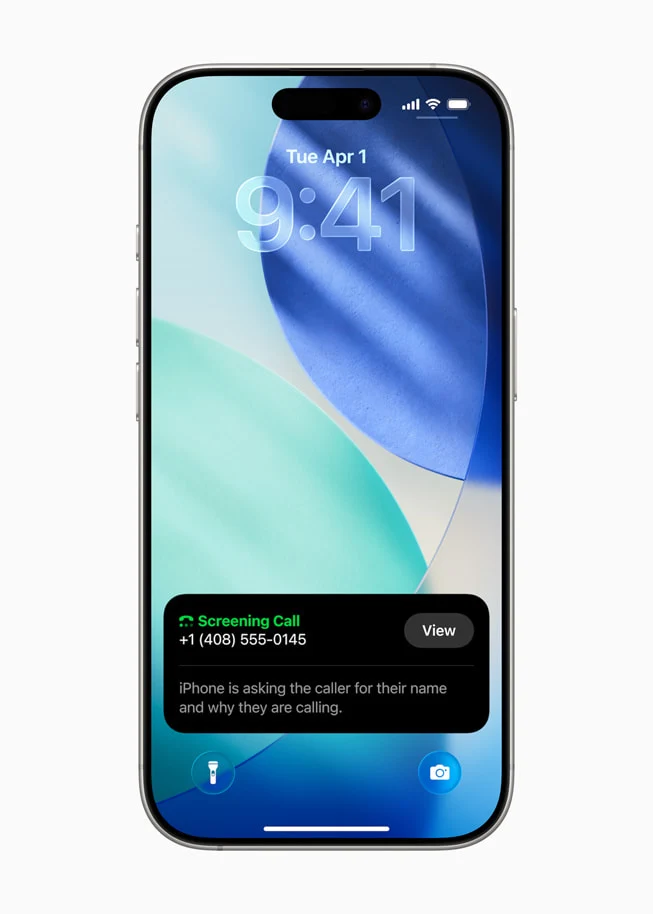
    Call Screening will automatically prompt unknown callers to identify themselves before the call connects. Hold Assist helps keep the user’s place in line while waiting for a live agent, enabling them to continue working without interruptions.

    Enhanced FaceTime and Spotlight

    Live Activities from the iPhone will also make their way to macOS. These real-time updates, including flight arrivals, Uber rides, and sports scores, will show up in the menu bar of the Mac. Clicking them will launch a mirrored view of the related iPhone app.

    FaceTime is getting a fresh layout with Contact Posters for recent callers, repositioned controls using the new design, and a More button for options like SharePlay and Live Translation. These changes will also be seen on iPhone and iPad.

    Spotlight Improvements

    Spotlight is also getting significant upgrades in macOS Tahoe 26. Users will have the ability to perform actions straight from the search bar, such as sending emails, starting timers, or creating notes.

    Furthermore, Spotlight will now feature filtering tools and quick keys—short character strings that trigger specific actions. Search results will be sorted and grouped based on their relevance as determined by the system, reflecting recent user behavior. Similar updates are expected for iOS and iPadOS as well.

    Apple Intelligence Expansion

    Apple Intelligence will see enhancements with this release. Live Translation will be available in Messages, FaceTime, and Phone, providing real-time transcription and language conversion. Shortcuts can now utilize both on-device and cloud-based AI models for multi-step workflows, such as comparing transcripts to notes or creating images with tools like Genmoji and Image Playground. Users will also have the option to connect with ChatGPT for more extensive text or image generation tasks. These features will also be rolled out on iPhone and iPad.

    The New Apple Games App

    macOS Tahoe will also introduce the Apple Games app, which consolidates all installed games and adds a Game Overlay. This floating panel allows gamers to adjust settings, chat with friends, or invite others to join in without leaving their current session. Games like Crimson Desert, Cyberpunk 2077, and Lies of P: Overture are being optimized for Apple’s latest M-series chips, featuring ray tracing and MetalFX.

    Safari and Other Updates

    Safari is set to undergo a redesign and is claimed to load frequently visited sites up to 50 percent quicker than Chrome, according to Apple’s internal testing. The Messages app will add polling features and customizable backgrounds. A new journaling app is also on the way for macOS. Accessibility updates will include Magnifier support via Continuity Camera and a new Braille Access interface. Many of these features are also coming to iOS, iPadOS, and visionOS.

    Photos and Notes Apps Upgrades

    The Photos app will be enhanced with a new interface and features like pinned collections, quick filtering and sorting tools, and adjustable tile sizes. These updates will align with the redesigned Photos experience on iPadOS.

    The Notes app will support importing and exporting markdown files, as well as saving and transcribing phone call recordings. Similar features will also be available on iPhone and iPad.

    Password Management Enhancements

    The Passwords feature is receiving version tracking, allowing users to see changes made to saved credentials along with timestamps. This functionality will be consistent across all Apple devices.

    macOS Tahoe 26 is currently available for developers, and a public beta is anticipated in July. The update will be released as a free software upgrade for compatible Macs in the United States and other areas this fall. A limited selection of Intel-based models, such as the 2019 Mac Pro and 2020 iMac, will still be supported. The Apple Intelligence features will require an M1 chip or newer (like the one found in this Mac mini on Amazon) and will initially be available in select languages.

    Source:
    Link

  • Apple tvOS 26 Transforms Apple TVs into Karaoke Machines

    Apple tvOS 26 Transforms Apple TVs into Karaoke Machines

    Key Takeaways

    1. Karaoke Feature: tvOS 26 allows Apple TVs to function as karaoke machines using iPhones as microphones, with music, lighting effects, and real-time translations.

    2. Expanded Language Support: Enhanced Live Captions during FaceTime calls now available in multiple languages, including French, German, Japanese, Korean, Mandarin, and Spanish.

    3. Interface Redesign: The new Liquid Glass design features semi-transparent elements and updated poster art, aiming to reduce distractions while watching content.

    4. User Profiles and Recommendations: Personalized suggestions linked to user profiles for easier access; new APIs simplify app and watchlist transfers to new Apple TV devices.

    5. Stunning Screen Savers: Users can enjoy beautiful aerial photographs of various landscapes as screen savers when their Apple TVs are on.


    Apple has introduced tvOS 26 for its streaming media devices, Apple TV. This update brings a variety of new features and a redesigned interface. Developers can start using the OS right away, while the general public will get access to a beta version next month.

    Karaoke Feature

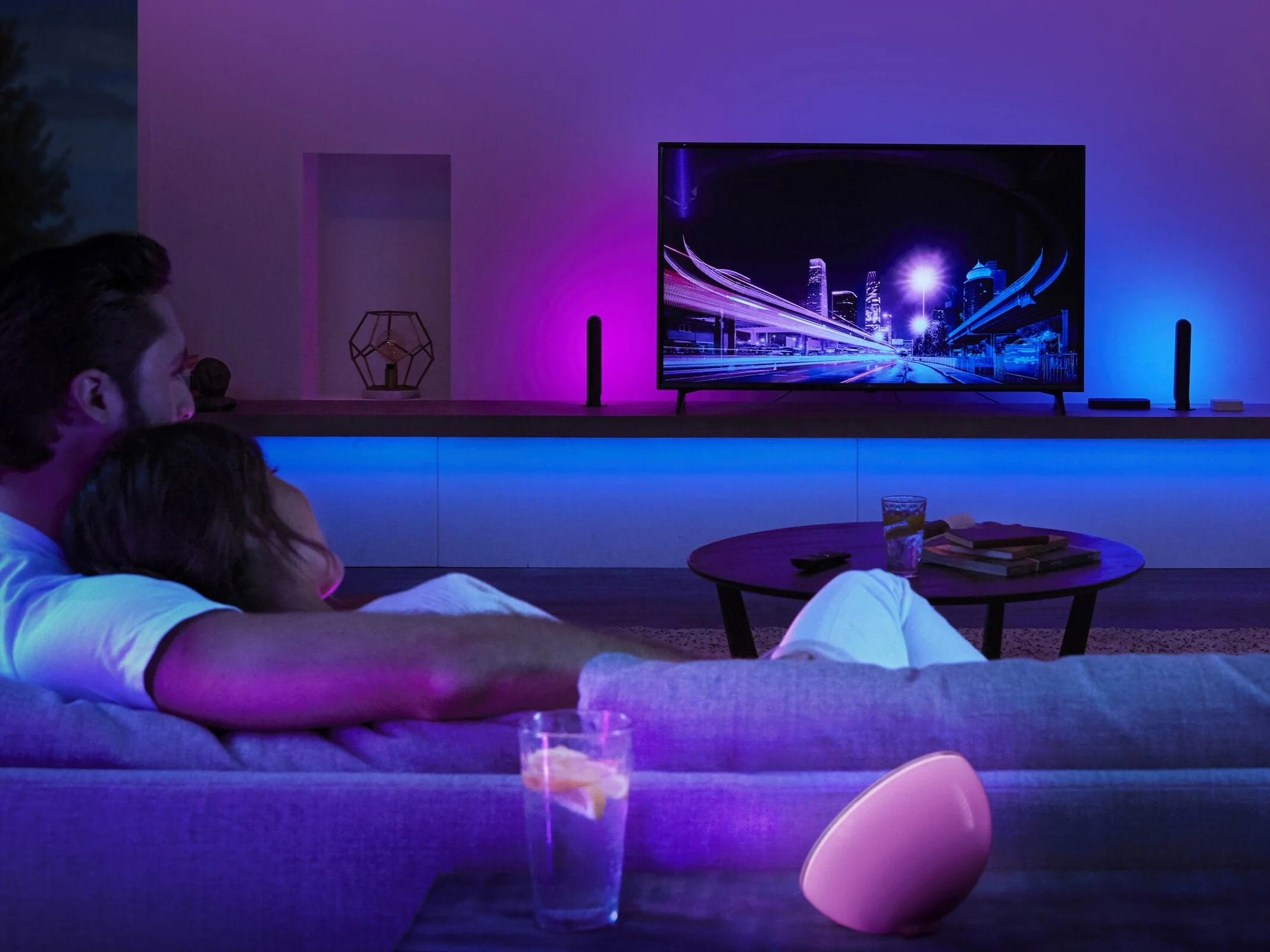
    One of the standout features of tvOS 26 is its capability to transform Apple TVs (2nd generation or later, like the one available on Amazon) into karaoke machines when used with iPhones (11 or newer) as microphones. The Apple Music app will provide music alongside lighting effects, real-time translations, and pronunciation of lyrics for songs in supported languages. Viewers can cheer on singers by sending emojis that appear on screen. Users have the option to choose any AirPlay-compatible speaker (for instance, this HomePod on Amazon) as the main output speaker for their Apple TVs.

    Expanded Language Support

    Apple TV users will benefit from enhanced language support for Live Captions during FaceTime calls, now available in French, German, Japanese, Korean, Mandarin, and Spanish. Users can also personalize their contacts with photos, making it easier to recognize them at a glance.

    Interface Redesign

    The interface has been updated with a Liquid Glass design, showcasing movies and shows with new poster art. The design features buttons and GUI elements that are semi-transparent, allowing for lighting effects from the images beneath them.

    These subtle interface elements aim to avoid distractions while watching content, but they could present challenges for users with limited vision. It still needs to be determined if a high-contrast version of the user interface can be activated in tvOS 26.

    User Profiles and Recommendations

    Personalized suggestions and watchlists are linked to user profiles, which appear on the screen when the Apple TV is woken up for quick login options. Developers will find it easier to transfer watchlists and apps to new Apple TV devices, thanks to new APIs that connect app logins to user accounts, simplifying the transition from older models to the latest ones.

    For users who keep their Apple TVs on, they can enjoy stunning aerial photographs of cityscapes, earth, landscapes, or underwater scenes as screen savers.

    Source:
    Link


  • iOS 16 Unveiled: Exciting Redesign and New Features Revealed

    iOS 16 Unveiled: Exciting Redesign and New Features Revealed

    Key Takeaways

    1. Apple has renamed all software updates to a unified version number, now at 26, including iOS 26.
    2. iOS 26 introduces significant lock screen enhancements with 3D wallpapers and dynamic elements, plus a revamped Phone app with AI call screening.
    3. The update features Live Translation across all apps and real-time text translation during phone calls and music playback.
    4. iMessage receives new updates, including themes, typing indicators, an automatic spam filter, and the ability to create polls.
    5. The iOS 26 developer beta is available for iPhone 11 and newer, with specific features exclusive to iPhone 15 Pro and newer models; a public beta will launch in July.


    As mentioned by Bloomberg’s Mark Gurman, Apple has made a significant change in how it names its software updates. Everything is now numbered 26, including iOS 26. This update introduces a major visual change that aligns with Apple’s new Liquid Glass style. There’s a lot to anticipate in this update, although some may justifiably claim that many of these features have already been seen on Android for some time.

    Exciting Lock Screen Enhancements

    The first noticeable upgrades with iOS 26 pertain to the lock screen, which now offers 3D wallpapers and elements that change dynamically based on what’s shown on the screen. The Phone app has also undergone a much-needed makeover and has added some new functionalities. With Call Screening, AI technology can now answer calls for you. This feature has been available on Google Pixel phones for a while, so it’s nice to see iOS finally catch up.

    Live Translation and More

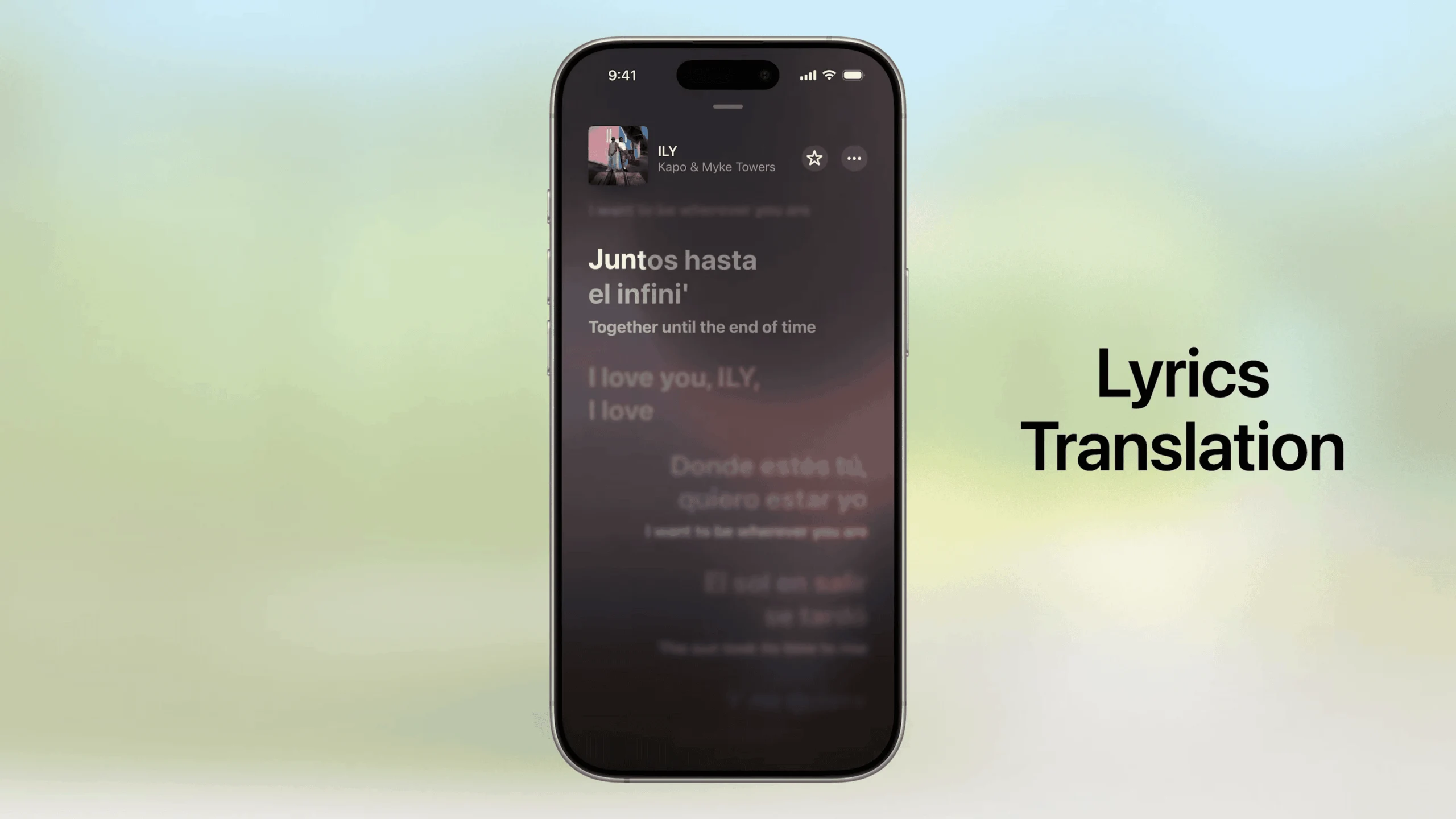
    Another impressive feature in iOS 26 is Live Translation. It operates across all apps, including iMessage, and can even translate text in real-time during phone calls. Additionally, song lyrics in the Music app can be translated as they play. Apple Music now includes a mixer-like feature that allows for smooth transitions between songs. iMessage has finally updated to compete with giants like WhatsApp and Telegram, offering themes for individual conversations and ‘typing’ indicators.

    Moreover, iMessage now includes an automatic spam text filter. Messages from unknown contacts will remain hidden in your notifications unless you choose otherwise. Users can also create polls. Apple Maps now remembers places you’ve visited, similar to Google Maps. Apple has taken another cue from Google with Apple Games, a centralized hub for all your games.

    Availability and Compatibility

    The iOS 26 developer beta is currently available for download on the iPhone 11 and newer devices. Features that utilize Apple Intelligence will only function on the iPhone 15 Pro, Pro Max, and newer models. A public beta for iOS 26 is set to launch in July, with a stable version expected to follow shortly after.

    Source:
    Link


  • New Garmin Timing Gates Feature Coming Soon

    Key Takeaways

    1. Garmin is developing a new Timing Gates feature for its smartwatches, targeting mountain biking enthusiasts.
    2. Timing Gates will allow users to store up to 10 GPS locations and may enhance GPS accuracy with 5Hz data recording.
    3. The feature may also be useful for other sports like snow sports, water activities, and multisport events such as triathlons.
    4. The Forerunner 970 smartwatch already includes an Auto Lap by Timing Gates feature for triathletes.
    5. The release timeline for the Timing Gates feature is uncertain, but it may be available in the coming months.


    Garmin is said to be developing a new feature called Timing Gates for its smartwatches. This news comes on the heels of rumors about fresh walking and swimming workouts. Additionally, Garmin has introduced various new features with its Forerunner 570 and Forerunner 970 smartwatches, including Running tolerance, Running economy, and Evening Report.

    Timing Gates for Mountain Biking

    A report from the5krunner suggests that the Timing Gates feature is primarily aimed at mountain biking enthusiasts, enabling users to store up to 10 GPS locations. It seems that these Timing Gates function more like a course instead of a standard route. There’s also talk of 5Hz data recording to enhance GPS accuracy, especially at higher speeds.

    Potential Uses Beyond Biking

    There’s speculation that Timing Gates might also be applicable in snow sports, water activities, or multisport events like triathlons. It’s important to mention that Garmin smartwatches already have an Autolap by position feature available for a while now. The newly launched Forerunner 970, tailored for triathletes, includes an Auto Lap by Timing Gates feature that automatically records a lap when users navigate a mile or kilometer course, triggered by GPS-determined distances.

    Compatibility and Release Timeline

    At this point, it’s uncertain which Garmin smartwatches will support the Timing Gates feature. Regarding when it might be available, some suggest that this feature could be released in the upcoming months. The5krunner attributes this information to their reliable source, @Johnw, who provided insight into the rumor.

    Source:
    Link