
Tag: Pixel 8

  • Pixel 8 refused fix prompts owner to turn it into retro gaming console

    Pixel 8 refused fix prompts owner to turn it into retro gaming console

    Key Takeaway

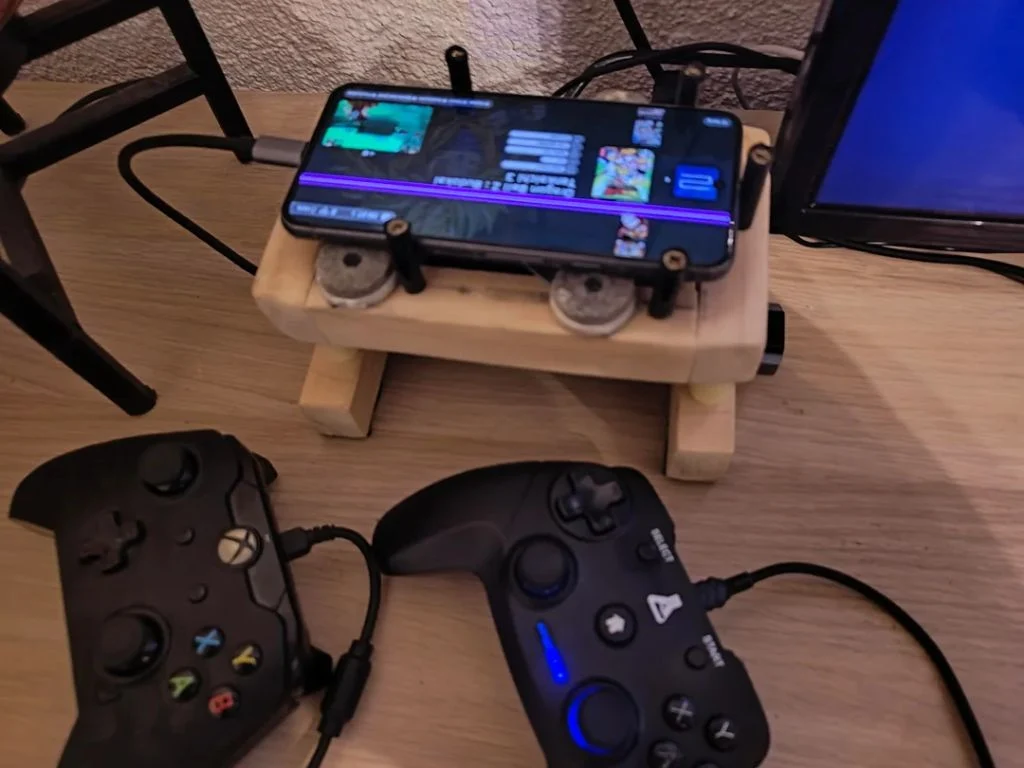
    – Repurposed a damaged Google Pixel 8 into a mini retro gaming hub with USB-C power, USB hub, wired controllers, mouse, and an active cooling fan.
    – Used the Pixel’s HDMI over USB-C output and EmulationStation Desktop Edition for a console-like, retro gaming experience.
    – Demonstrates a resourceful reuse path for a non-functional display: keep the phone functional via external peripherals and emulation software rather than recycling it.


    From Broken Screen to Mini Gaming Hub

    Average smartphone users might simply replace a broken device, but one inventive owner refused to throw away his Google Pixel and instead repurposed it into a compact gaming setup. The outcome is a quick, mini gaming hub that can be hooked up to a TV with wired controllers, a mouse, and an active cooling system to prevent performance throttling. This narrative demonstrates a creative salvage of a once useless gadget into something surprisingly functional, with a dash of nostalgia for retro titles.

    Retaining Pricing and Specification Details

    The Pixel 8, though afflicted by a stubborn pink vertical stripe, still powers up and drives a display through its USB-C HDMI output. The build leverages a 45W USB-C charger to power both the device and a central 4-port USB hub that feeds two wired controllers, a mouse, and a 50mm PC fan. This setup preserves the original hardware’s core specs while enabling a console-like experience that emphasizes cooling efficiency and controller versatility, all without changing the device’s essential components.

    Retro Vibe, Modern Hardware

    To recreate a nostalgic, console-inspired vibe, the builder installed EmulationStation Desktop Edition, pairing it with ES-DE for a cohesive retro interface. The library is organized by home console emulator, and games are displayed with original box art to enhance the old-school feel. Despite the Pixel 8 being nearly new in daily usage, the damaged screen rendered regular smartphone tasks impractical, pushing the creator to transform the Tensor G3 device into a dedicated retro gaming partner instead.

    Practical Build Details

    The central feature is a budget-friendly 4-port USB hub that sits at the heart of the project. It draws power from a 45W USB-C charger and distributes it to two wired controllers, a mouse, and a 50mm PC fan blowing cool air directly onto the back of the Pixel 8. This unorthodox cooling approach is notable because high-demand tasks like emulation can push Google’s Tensor CPUs to higher temperatures, making active cooling a sensible addition.

    Community and Documentation

    The entire journey was shared by the owner and Redditor Prior_Explanation_52 on r/EmulationonAndroid, who explained the motivation, setup, and improvements along the way. The thread highlights a practical path from a non-functional portion of hardware to a functioning, space-saving gaming hub, providing insights into hardware reuse, cooling strategies, and software choices that keep performance steady during retro play sessions.

    Sources
  • Google Introduces Pixel Desktop Mode for Pixel 8 and 9 Updates

    Google Introduces Pixel Desktop Mode for Pixel 8 and 9 Updates

    Key Takeaways

    1. Google has launched Android 16 as a stable update for Pixel smartphones, including the Pixel 6, 7, 8, and 9 series.
    2. The company is currently developing QPR1 Beta 2, following the recent release of Beta 1.1.
    3. QPR1 Beta 2 introduces Material 3 Expressive design in the Pixel Launcher and Settings menu.
    4. A new desktop mode is included, allowing users to have multiple desktops and resizable windows, similar to desktop operating systems.
    5. Desktop mode can be activated on compatible Pixel devices through Developer options and is expected to be available on all Pixel 8 and 9 models.


    Google has launched Android 16 as a stable update for Pixel smartphones, which includes the Pixel 6, Pixel 7, Pixel 8, and Pixel 9 series, just this week. However, the tech giant is already working on QPR1 Beta 2, following the release of Beta 1.1 around a week ago. To give you an idea, it’s unlikely that Android 16 QPR1 will become stable until at least September.

    New Features in QPR1 Beta 2

    While waiting for the stable version, QPR1 Beta 2 reveals some exciting features. It showcases a greater use of Material 3 Expressive design in both the Pixel Launcher and the Pixel Settings menu. Additionally, this beta brings in the much-anticipated desktop mode from Google. This mode serves as a counterpart to options like Motorola’s Ready For and Samsung’s DeX. Users can activate this desktop mode on any Pixel that supports DisplayPort Alt Mode through the USB Type-C port. All Pixel 8 and Pixel 9 devices are expected to be compatible, including the Pixel 8a, which is currently priced at $288 for refurbished units on Amazon.

    Early Insights into Desktop Mode

    From the videos shared below, it seems that Google’s new desktop mode is quite powerful even at this early phase. It features multiple desktops similar to a traditional desktop operating system, along with resizable windows and the ability to pin windows. If you want to try out Google’s desktop mode, you can do so by enabling Developer options and then selecting ‘Desktop experience features’. Check out the videos below for more information.

    Google’s advancements in Android continue to excite users, paving the way for more innovative features to come in future updates.

    Source:
    Link

  • Android 16: Terminal and Full Linux VM Support with GPU Acceleration

    Android 16: Terminal and Full Linux VM Support with GPU Acceleration

    Chromebook users have been able to set up a Linux virtual machine (VM) for a while now, which adds more capabilities. Soon, it looks like Android might also join in on the Linux experience, according to the latest updates in the Android Open Source Project (AOSP).

    Expanding Android’s Possibilities

    The Android Runtime (ART) operates on a Linux kernel, yet Google is getting ready to give developers and advanced users the chance to run a complete Linux desktop. This concept is reminiscent of the Ferrochrome project that Google showcased a few months ago, which demonstrated the ability to run Chrome OS on Pixel devices.

    What makes this possible is the Android Virtualization Framework (AVF), which first appeared in Android 13. With Android 15, AVF will be enhanced to support GUI operating systems in a VM, complete with full GPU acceleration. Unfortunately, the earlier Chrome OS on Pixel 8 initiative was merely a proof-of-concept.

    Real-World Applications Ahead

    Now, actual benefits could be on the horizon. Mishaal Rahman from Android Authority reports that Google is developing a Terminal app for Android. Rahman points out new “ferrochrome-dev-option” patches submitted to AOSP, which include a toggle for a “Linux terminal” in the Developer options.

    While there have long been terminal emulator apps on the Play Store that provide a Linux-like environment, Google’s version will integrate the terminal right into Android. This new Terminal app will let users run a full Linux distribution in a VM, connecting through a local IP address to send Linux commands from the Android device.

    Making Things Simpler for Users

    At the moment, using the Terminal app involves manually setting up a Debian image and creating a vm_config.json file. However, Rahman believes the final version will simplify this process by introducing a LinuxInstaller app that automates these steps.

    Furthermore, Google seems to be planning to transform this basic Terminal app into a more robust tool by incorporating features like disk resizing, port forwarding, and partition recovery. Additionally, AVF will receive upgrades like snapshot backups and restores, nested virtualization, and support for x86_64 devices.

    A New Era for Android Developers

    While most users may not feel inclined to use a terminal on their smartphones, developers could greatly benefit from having certain command line tools available on-the-go. With AVF enabling GUI applications, we might see something akin to what Samsung previously demonstrated with Linux on DeX. There may even be a chance to run Windows on ARM almost natively on your phone. The potential is vast.

    Rahman anticipates that the new Terminal app with Linux capabilities could arrive with Android 16 next year. It’s still uncertain if this feature will be included in OEM-specific ROMs, but Pixel devices are likely to support it.

    Android Authority

    @MishaalRahman on X

    @cozy_OSS on X