Tag: Pixel devices

  • Android 17 Beta 1 Released: Pixel 6 Support Expanded, Junk Removed

    Android 17 Beta 1 Released: Pixel 6 Support Expanded, Junk Removed

    Key Takeaways

    1. Android 17 beta focuses on enhancing privacy, security, performance, and adaptable applications, along with improved camera and media functionality.
    2. The preview SDK label is “CinnamonBun,” and the emulator system image is called “Baklava.”
    3. Beta 1 is available for various Pixel devices, including Pixel 6, 7, 8, and newer models, with specific build identifiers for different devices.
    4. Users can enroll in the beta program via their Google Account, but should be aware of potential bugs and data loss when opting out.
    5. Notable updates include runtime improvements, dynamic camera session updates, and changes in connectivity, with an aim for better experiences on larger screens.


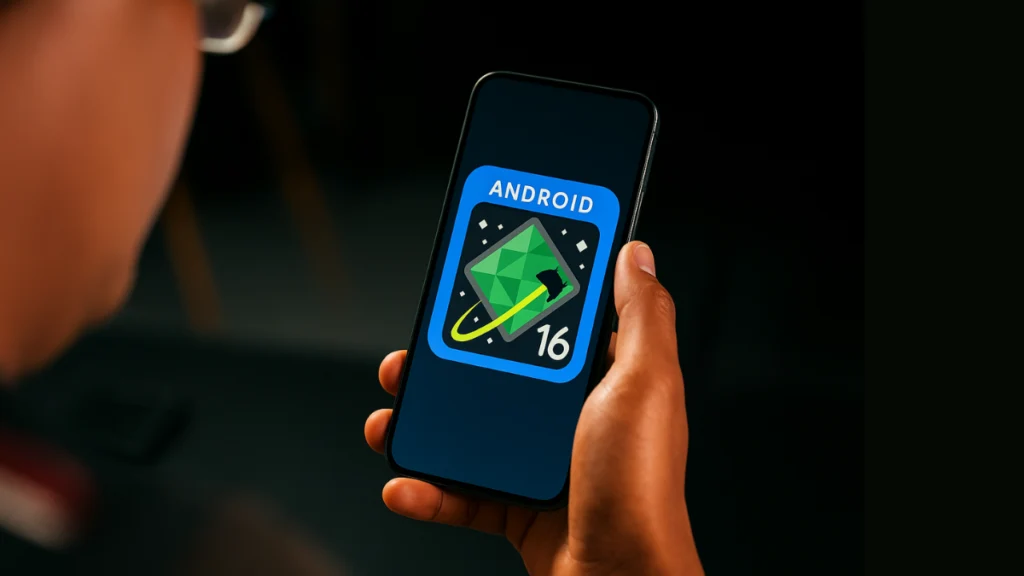
    Google has just rolled out the initial beta of Android 17, allowing users to test the upcoming major version of Android. In their announcement, Google emphasizes that Android 17 continues its commitment to enhancing privacy, security, and overall performance. The new version also brings enhancements for adaptable applications, improvements in camera and media functionality, upgraded connectivity tools, and profiles for companion devices.

    Avoiding Confusion with Labels

    To clarify any potential misunderstandings regarding internal designations, Google identifies targetSdkPreview = “CinnamonBun” as the preview SDK label found in the Beta documentation. Meanwhile, the emulator system image for Android 17 is referred to as “Baklava” in the official download guidelines provided by Google.

    Compatible Pixel Devices

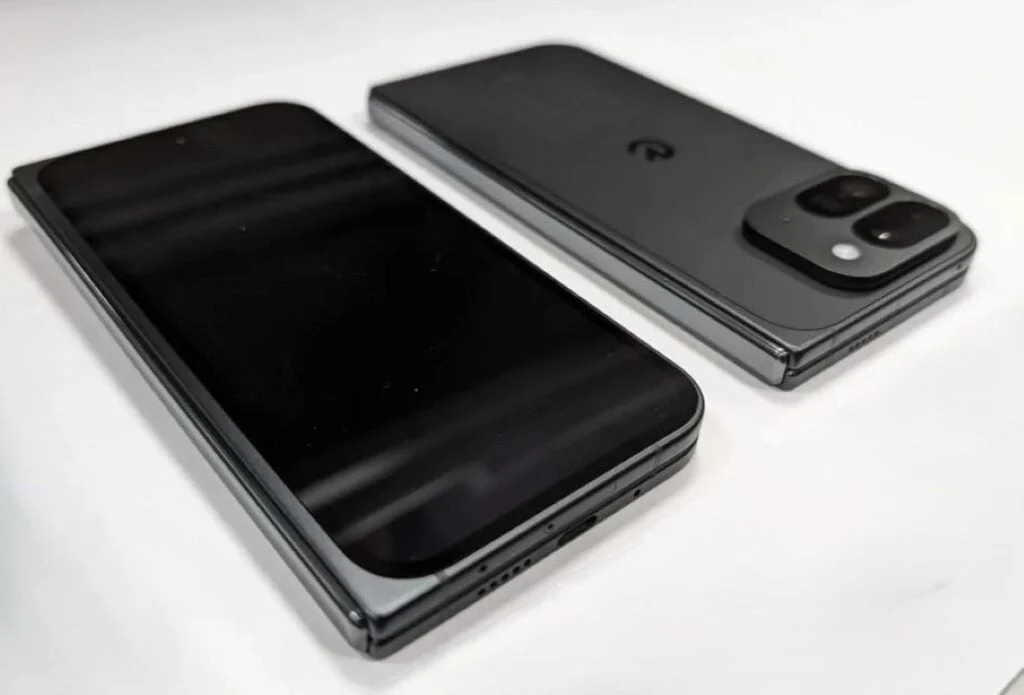
    According to Google’s official Android 17 webpage, Beta 1 over-the-air updates and downloads are available for a range of Pixel devices. These include the Pixel 6, 6 Pro, and 6a; Pixel 7, 7 Pro, 7a; Pixel Tablet; Pixel Fold; and the Pixel 8, 8 Pro, and 8a, along with the Pixel 9 series and Pixel 10 series.

    In the release notes for Android 17, Beta 1 is identified as build CP21.260116.011.B1, with the build CP21.260116.011.A1 specifically for the Pixel 6 Pro, Pixel 6, Pixel 6a, Pixel 7 Pro, and Pixel 7. The security patch level for Beta 1 is noted as 2026-01-05.

    Enrolling in the Beta Program

    The easiest way to access this beta version is through Google’s Android Beta for Pixel program. Users can sign in using their Google Account, enroll their compatible Pixel device, and then check for the OTA in Settings > System > System update.

    Google cautions that beta versions might have bugs that could disrupt normal device functionality. Additionally, they state that users typically cannot opt-out and revert to a stable public version of Android without first erasing any locally stored data, and that availability may vary by carrier.

    Notable Updates in Beta 1

    The documentation for Beta 1 highlights various changes, such as enhancements for adaptable apps and larger screens, runtime and performance improvements, and updates related to camera and media. Other platform updates include changes in connectivity and companion-device profiles.

    For applications targeting Android 17 (API level 37) on larger screens (with a width of 600dp or more), the new version eliminates the developer opt-out for specific orientation and resizing restrictions. This aims to ensure a more consistent experience across larger devices.

    Google also mentions that Android 17 features a lock-free MessageQueue implementation (for apps targeting SDK 37 and above) designed to minimize missed frames. Furthermore, generational garbage collection support has been integrated into ART’s Concurrent Mark-Compact collector to help lower the garbage collection costs.

    Beta 1 introduces dynamic camera session updates through CameraCaptureSession.updateOutputConfigurations(), allowing users to switch use cases without needing to close the session. Google’s release notes also highlight platform support for VVC (H.266) along with various other media and camera enhancements.

    Source:
    Link


  • Android 16 QPR3 Beta 2.1 Now Available for Google Pixel Devices

    Android 16 QPR3 Beta 2.1 Now Available for Google Pixel Devices

    Key Takeaways

    1. Android 16 QPR3 Beta 2.1 was released on February 10, 2026, for supported Pixel devices, featuring automatic updates and quick installation.
    2. The update maintains the January 5, 2026 security patch level and does not provide a specific list of fixes, focusing instead on stability and usability improvements from Beta 2.
    3. Supported devices include Pixel 6, 6 Pro, 6a, 7, 7 Pro, 7a, Pixel Fold, Pixel Tablet, Pixel 8, 8 Pro, 8a, and the Pixel 9 and 10 families.
    4. Switching between beta and production versions requires a complete device reset, so users should back up their data beforehand.
    5. Google encourages users to report issues via the Issue Tracker and Android Beta Feedback app, and suggests checking release notes for known issues before submitting new reports.


    Google has released Android 16 QPR3 Beta 2.1 for the Pixel beta track, on February 10, 2026. If you’re part of the program, you can expect this update to appear automatically, install swiftly, and then be done with it.

    Device Specifications

    According to Google’s notes, the majority of supported devices are marked as CP11.251209.009.A1. The Pixel 6 Pro, Pixel 6, Pixel 6a, Pixel 7 Pro, and Pixel 7 are specifically noted on CP11.251209.009. The update maintains the same security patch level from January 5, 2026, identifies Google Play services version 25.47.33, and still lists emulator support as “TBA.”

    Update Details

    Here’s the thing: the Beta 2.1 update is essentially just a label set—date, builds, patch level, and Play services—without any specific list of fixes for Beta 2.1 in the official notes. So if you’re hoping for a tidy changelog that says “fixed X, fixed Y,” you won’t find it.

    For a bit of background, Google does explain what Beta 2 was aiming to address in the same document, highlighting a range of stability and usability improvements, such as crashes, freezes, battery management, connectivity problems (like slow Wi-Fi and missed calls), along with some UI issues. This context pertains to Beta 2, not a definitive fix list for Beta 2.1, but it gives insight into the type of challenges this QPR3 version has been focusing on.

    Supported Devices

    Google lists support for Android 16 QPR3 beta on Pixel 6, 6 Pro, 6a, 7, 7 Pro, 7a, Pixel Fold, Pixel Tablet, Pixel 8, 8 Pro, 8a, along with the Pixel 9 family (including Fold), and lastly the Pixel 9a and the Pixel 10 family (including Fold). It’s also important to note that once you join the beta program, your phone will receive constant OTA beta updates until you decide to leave the program.

    If you like to do things manually, Google suggests using the Android Flash Tool as the recommended method for flashing.

    Important Considerations

    Google is quite clear on this point: switching from the production version to beta, or back again, necessitates a complete device reset that wipes all user data. Always remember to back up your data first!

    Additionally, Google makes OTA images available for QPR beta builds and promotes them as a useful option for testing—and, in certain situations, for restoring a device after a troublesome OTA update.

    For reporting any issues, Google directs testers to the Issue Tracker and the Android Beta Feedback app included in preview builds. It also recommends checking the release notes and looking at “top open issues” before submitting a new report, to avoid submitting something that’s already been reported.

    Source:
    Link


  • Android 16 QPR2 Beta 2 Launches for Supported Pixel Devices

    Android 16 QPR2 Beta 2 Launches for Supported Pixel Devices

    Key Takeaways

    1. Android 16 QPR2 Beta 2 locks the API surface and finalizes app-facing behaviors.
    2. New security features include mandatory developer verification for app installations starting in September 2026 in certain regions.
    3. Users can download 64-bit system images to experience the beta on the Android Emulator, even without a supported Pixel device.
    4. Existing Android Beta program users will receive an over-the-air upgrade to Beta 2.
    5. This update significantly enhances user safety and experience as the final stable version approaches.


    Last week, users of compatible Pixel devices began engaging with Android 16 QPR2 Beta 2. This new update has locked the API surface, finalized app-facing behaviors, and brings us closer to the final stable version.

    Enhanced Security Features

    In this release, Google is rolling out developer verification to enhance safety for users. As stated in the Android Developers Blog, “Starting in September 2026 and in certain regions, Android will mandate that apps be registered by verified developers for installation on certified Android devices, with an exemption for installations done via the Android Debug Bridge (ADB).” Alongside this, Android 16 QPR2 Beta 2 includes several key highlights:

    Accessing the Beta

    For those without a supported Pixel device who wish to experience Android 16 QPR2 Beta 2, they can download the 64-bit system images to use with the Android Emulator in Android Studio. Users already enrolled in the Android Beta program will receive an over-the-air upgrade to Beta 2.

    Conclusion

    The enhancements in this update are a significant move towards improving user safety and experience. As we inch closer to the stable build, the excitement among developers and users alike is certainly palpable.

    Source:
    Link


  • Android 16: New Features and Visual Enhancements Unveiled

    Android 16: New Features and Visual Enhancements Unveiled

    Key Takeaways

    1. Live Updates Feature: Users can now monitor delivery progress without constantly checking apps, initially supporting select ride-share and food delivery apps.

    2. Visual Improvements: The status bar text is bolder for better readability, and control panel tiles can be customized with refreshed brightness and volume sliders.

    3. Streamlined Notifications: Notifications from the same app are now grouped together, making it easier to find specific alerts.

    4. Enhanced Features for Large Screens: Desktop Windowing is introduced for larger devices, enhancing productivity on foldables and tablets, with custom keyboard shortcuts available.

    5. Advanced Protection: Google’s strongest mobile device protection is now available, activated with one tap to safeguard against online threats and scams.


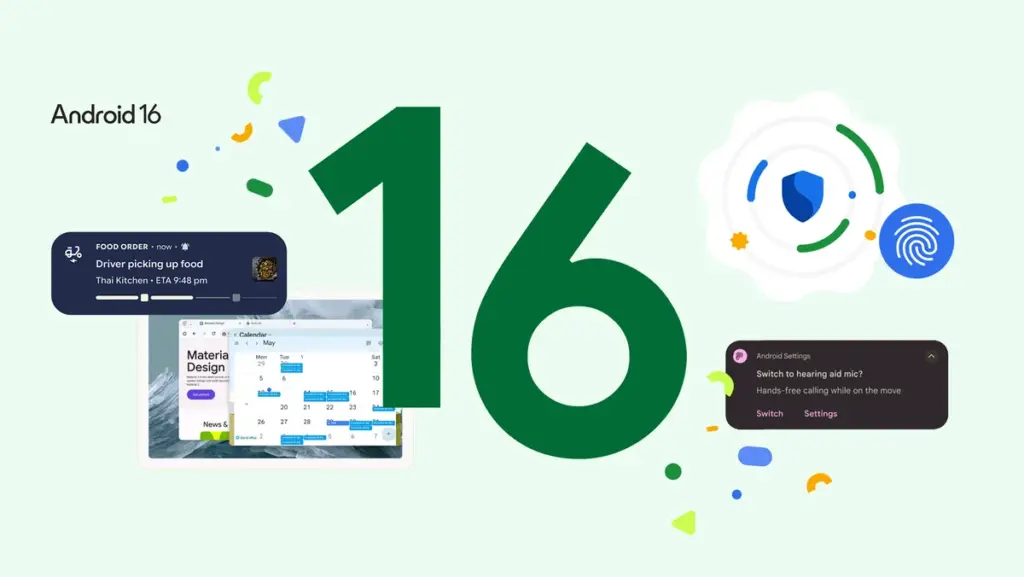
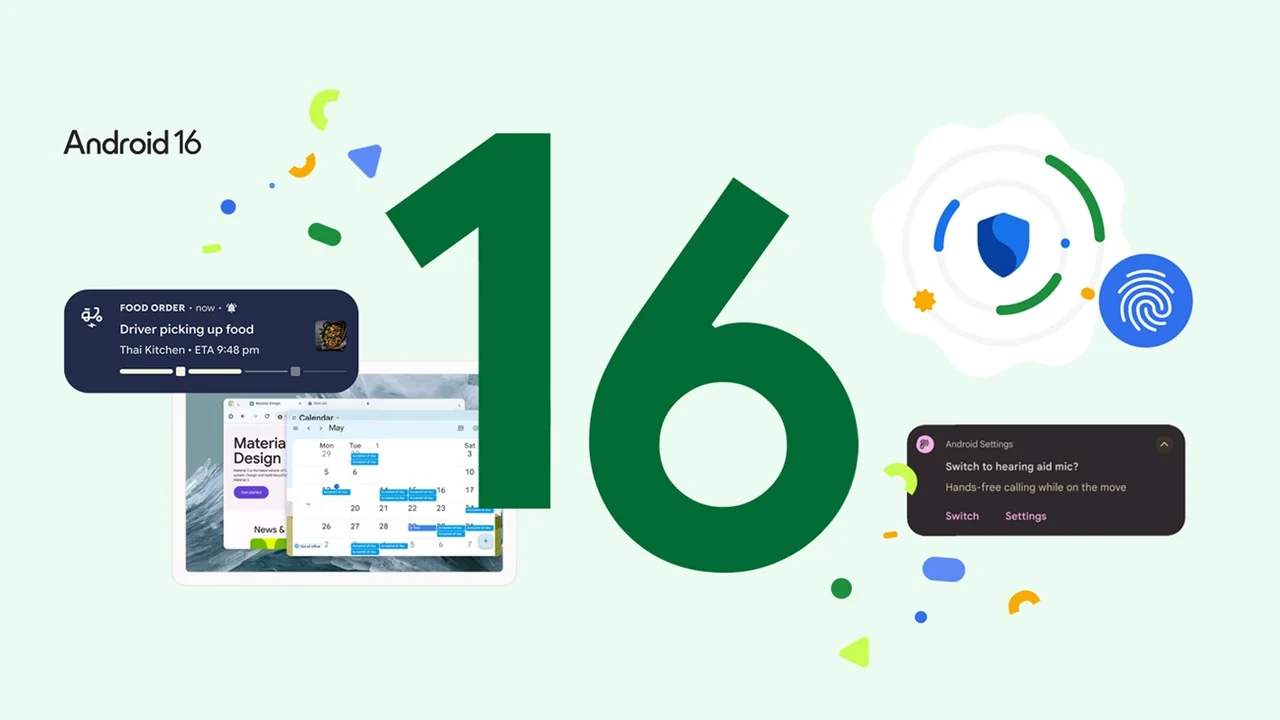
    Android 16 has arrived, bringing several visual updates that enhance user experience. This release is notable as it is the earliest major Android launch in many years and sets the stage for Google’s new Material 3 Expressive design language. The version currently available is the Android 16 QPR1 beta release (Google has recently issued QPR1 Beta 2, which includes some fixes), and it is ready for supported Pixel devices. Let’s dive into the new features.

    New Live Updates Feature

    One small yet handy addition is the Live Updates feature. Now, instead of constantly checking a delivery app, you can monitor the progress quickly. Initially, it supports a few ride-share and food delivery apps, but more are likely to come as development continues. Samsung’s Now Bar and OPPO and OnePlus’ Live Alerts will also incorporate this feature to improve the overall Android experience.

    Visual Improvements

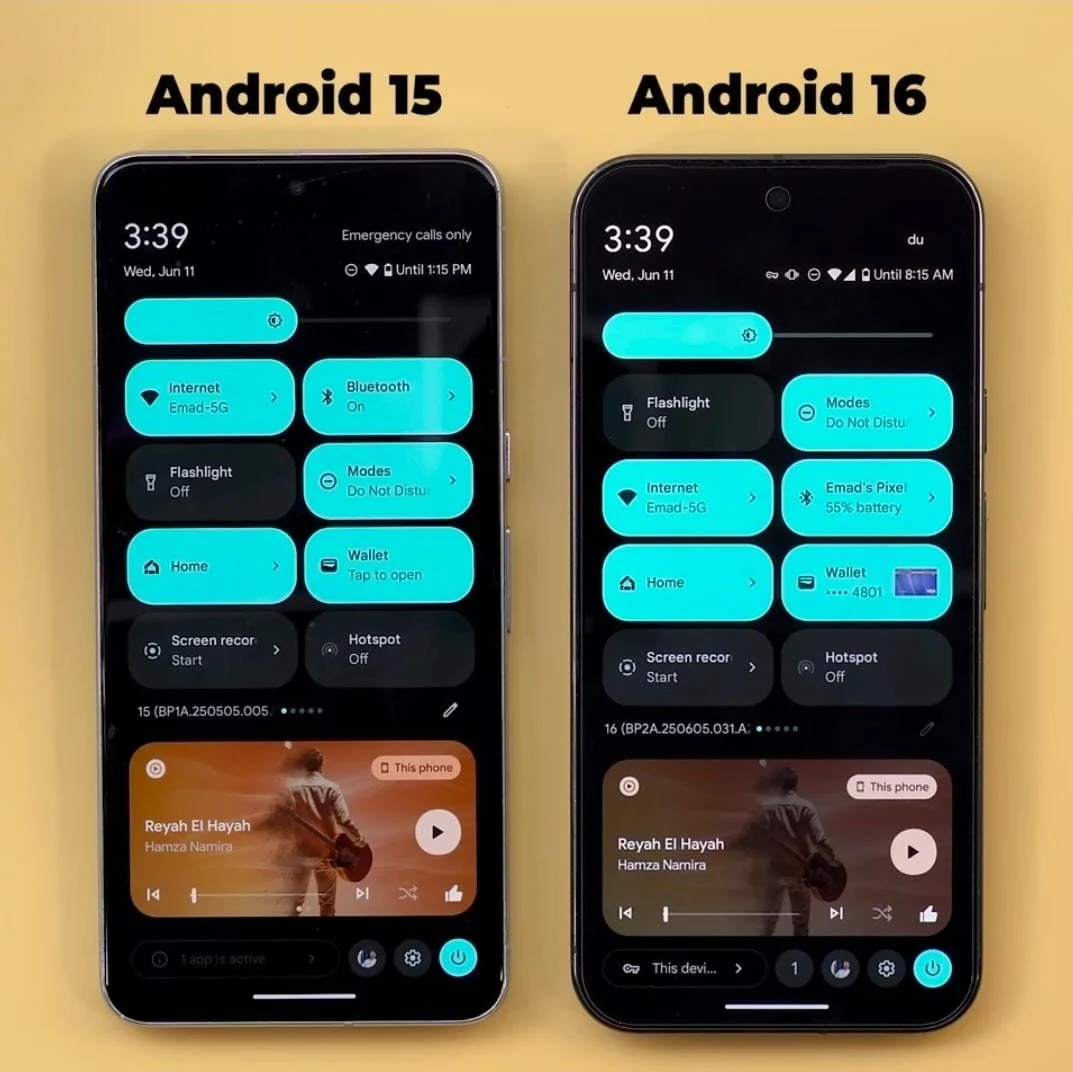
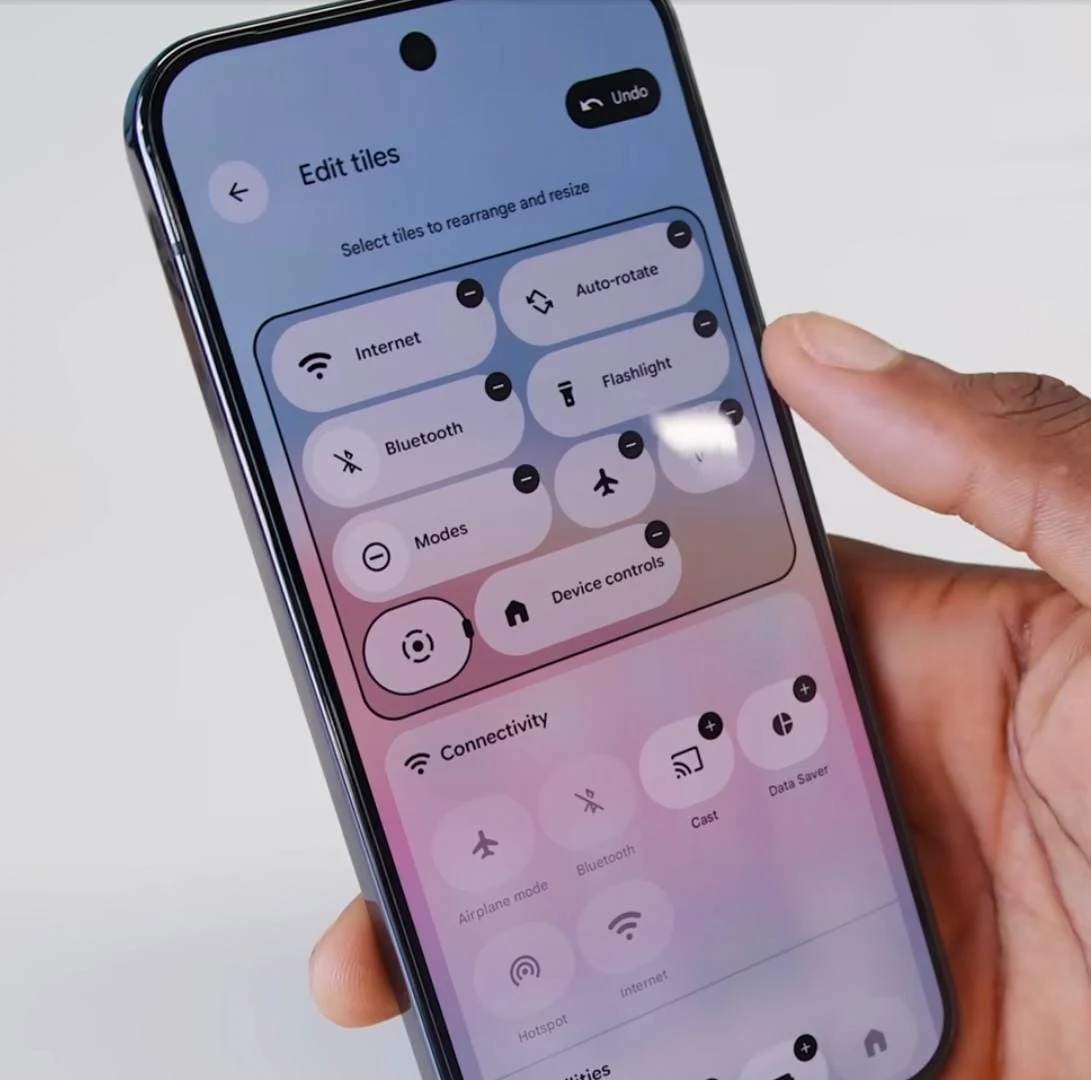
    Regarding visual updates, there are several noteworthy changes. The status bar text now features a bold font, making it clearer and easier to read. Additionally, the tiles in the control panel can be customized, and both the brightness and volume sliders have received a fresh look.

    Streamlined Notifications

    Tired of scrolling through endless notifications or having trouble locating the one you need? Android 16 now organizes notifications from the same app together, which simplifies the process of finding what you’re after.

    Enhanced Features for Large Screens

    For larger devices, Android 16 brings Desktop Windowing, inspired by Samsung’s DeX. There’s a video available that showcases how this feature works and how it can enhance productivity on foldable devices or Android tablets. Users can also set up custom keyboard shortcuts to maximize the utility of their lightweight, efficient, yet powerful device.

    Advanced Protection

    Another significant addition is Advanced Protection, which Google describes as its “strongest mobile device protection” to date. It can be activated with just one tap and is designed to safeguard users against online threats, malicious apps, unsafe websites, scam calls, and more.


  • Android 16 Release Date, Eligible Devices, and Features Guide

    Android 16 Release Date, Eligible Devices, and Features Guide

    Key Takeaways

    1. Release Date: Android 16 is set to launch in the second quarter of 2025, likely by June, making it the earliest Android version release in recent years.

    2. Device Compatibility: The beta version of Android 16 is currently available for select Pixel and non-Pixel devices, with a wider range of devices expected to support it upon official release.

    3. Key Features: Notable features include progress-centric notifications, an enhanced photo picker, predictive back improvements, better adaptive refresh rate support, and richer haptic feedback.

    4. Camera and Video Enhancements: Android 16 offers improved camera controls, hybrid auto-exposure models, and the Advanced Professional Video (APV) codec for high-quality video recording.

    5. Privacy Improvements: The update includes enhancements to Health Connect and the Privacy Sandbox, focusing on user privacy and data protection in mobile advertising.


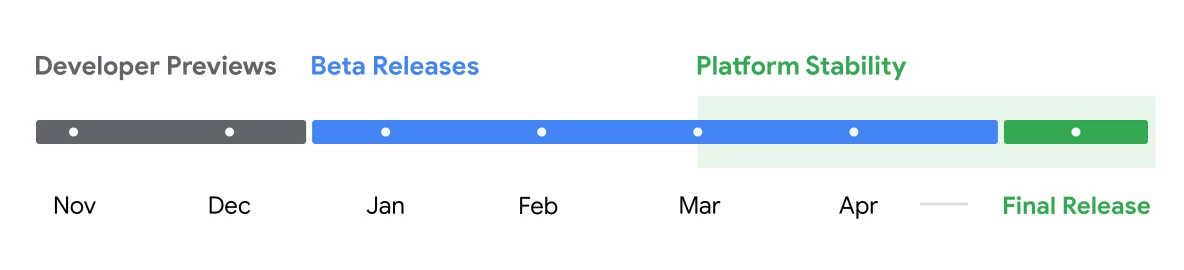
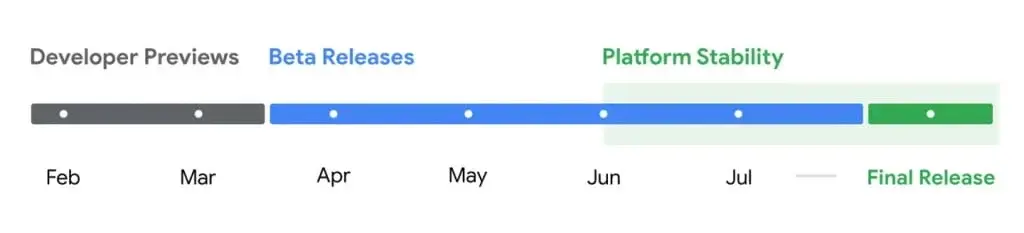
    Android 15 may still be coming for many Android smartphones, but Google is already hard at work on Android 16. The new operating system has now reached its platform stability stage, indicating that we are getting closer to its official launch.

    Developer Previews and Beta Versions

    Google has rolled out two developer previews of Android 16, along with a few beta versions. These beta releases provide us with a sneak peek at what Google has planned for Android 16 ahead of its public launch. Below is a summary of all the details we have about Android 16, which includes the release timeline, compatible devices, and exciting new features.

    Release Date of Android 16

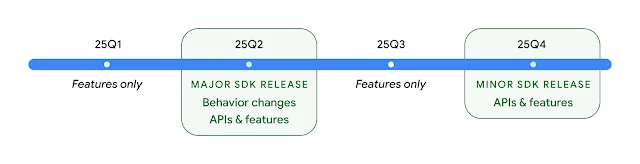
    Google has announced that Android 16 will be launched in the second quarter of 2025. Sameer Samat, President of the Android Ecosystem (via Android Police), noted that everything is proceeding as planned. This means Android 16 should be officially available by June 2025, although there are speculations about a possible earlier launch in May.

    This would make Android 16 the earliest Android version to be released in a while. Usually, Google unveils the latest Android version in August or later, but Android 16 is set to arrive at least a month earlier. Additionally, Google has indicated there will be a minor release in the fourth quarter of 2025, but it’s uncertain whether it will be called Android 16.1 or something different.

    Devices That Can Run Android 16

    Currently, the Android 16 beta can be accessed on several Pixel and non-Pixel devices. Here’s the complete list:

    – Pixel 9
    – Pixel 9 Pro
    – Pixel 9 Pro XL
    – Pixel 9 Pro Fold
    – Pixel 8
    – Pixel 8 Pro
    – Pixel 8a
    – Pixel 7
    – Pixel 7 Pro
    – Pixel 7a
    – Pixel 6
    – Pixel 6 Pro
    – Pixel 6a
    – Pixel Fold
    – Pixel Tablet
    – Xiaomi 15
    – Xiaomi 14T Pro
    – OnePlus 13

    If you possess any of these phones or tablets, you can experiment with Android 16 right now by downloading the beta version. Keep in mind that beta releases often have bugs and might not function perfectly.

    The list above is limited, but when the stable version launches, it will be available for a wider range of Android devices. We will update our website once manufacturers announce their official Android 16 upgrade lists.

    Exciting New Features in Android 16

    1. Progress-centric Notifications
    Android 16 brings a fresh type of notifications that allows users to keep track of important ongoing activities like rideshare, delivery, and navigation. This is somewhat similar to iOS’s Live Activities, but with some distinctions. Google prioritizes these notifications on the lock screen, making them more visible.

    The progress-centric notifications, also referred to as Live Updates, are also integrated with the status bar and always-on display. As reported by Android Authority, they appear as a chip in the status bar, and during that time, all other notifications are hidden. Tapping on the chip reveals detailed information in a pop-up.

    2. Enhanced Photo Picker
    The photo picker has been a valuable privacy feature in Android, allowing users to share specific photos and videos instead of their whole library. Android 16 improves this functionality by enabling searches across cloud media providers directly within the photo picker.

    Google has introduced new APIs that allow apps to incorporate the photo picker seamlessly into their interfaces, making media selection feel like an integral part of the app rather than a separate overlay.

    3. Predictive Back Improvements
    This feature gives users a glimpse of the screen they will return to before completing the back navigation. Android 16 adds predictive back support to three-button navigation, allowing users to long-press the back button for a screen preview.

    4. Better Adaptive Refresh Rate Support
    This feature lets the display refresh rate on compatible devices adjust according to the content being displayed. This helps to lower power consumption and eliminates the need for manual refresh rate adjustments. Although adaptive refresh rates were first introduced in Android 15, Android 16 simplifies their use for developers.

    5. Richer Haptics
    With Android 16, Google is providing app developers greater control over haptic feedback on Android devices. New haptic APIs enable apps to define the amplitude and frequency of haptic effects.

    More refined haptics can enhance gaming experiences with dynamic vibrations for actions like explosions and collisions. Phone manufacturers can also use this to create unique vibration patterns for different notifications (e.g., texts, calls, alarms), making it simpler for users to recognize alerts without looking at their screens.

    6. Camera Enhancements
    Android 16 introduces new hybrid auto-exposure models that give users manual control over certain exposure aspects while letting the auto-exposure algorithm manage the rest. This offers significantly more flexibility than the current system, which requires either full manual control or complete reliance on auto-exposure.

    The new OS also brings support for fine color temperature and tint adjustments, catering to professional video recording applications. Below are examples of how photos appear after applying various color temperature and tint modifications.

    ![image]

    With improved night mode scene detection, third-party apps can better identify low-light conditions and switch to night mode for better photo capture, assuming the device supports it. Android 16 also expands HDR capabilities by adding support for UltraHDR images in the HEIC file format, with Google also working on AVIF support for UltraHDR in the stable release.

    7. Advanced Professional Video
    Android 16 introduces the Advanced Professional Video (APV) codec tailored for high-quality professional video recording and post-production.

    Google states that the APV codec has several features, including:
    – Perceptually lossless video quality, which is close to raw video quality
    – Low complexity and high throughput intra-frame-only coding to better support editing
    – High bit-rate range support for 2K, 4K, and 8K content, enabled by a lightweight entropy coding method
    – Frame tiling for immersive content and allowing parallel encoding and decoding
    – Support for various chroma sampling formats and bit-depths
    – Capability for multiple decoding and re-encoding without significant visual quality loss
    – Support for multi-view video and auxiliary video like depth and alpha
    – Compatibility with HDR10/10+ and user-defined metadata

    8. Health Connect Updates
    Google is refreshing Health Connect with a new data type that adheres to WHO guidelines for moderate and vigorous activity. Each record will now include the start time, end time, and intensity of the activity.

    9. Privacy Sandbox Enhancements
    Android 16 features the updated version of Privacy Sandbox, fostering a more privacy-focused ecosystem for mobile advertisement and measurement. The aim is to safeguard user privacy by limiting intrusive tracking methods while still allowing businesses to display relevant ads and evaluate their effectiveness.


  • Google’s Auto-Reboot Feature: Reboots Locked Android After 72 Hours

    Google’s Auto-Reboot Feature: Reboots Locked Android After 72 Hours

    Key Takeaways

    1. Automatic Restart Feature: Android devices will automatically restart after being locked for three consecutive days to enhance security.

    2. Before First Unlock (BFU) Mode: The reboot puts devices in BFU mode, encrypting data and making it harder to access until unlocked.

    3. Biometric Unlock Disabled: During the BFU mode, biometric unlock methods (like fingerprint or facial recognition) are not accepted, adding an extra layer of protection.

    4. Widespread Availability: This security feature will be available through Google Play Services, allowing many Android devices, even those no longer supported, to receive it without a full OS update.

    5. Optional for Flexibility: Users with specific needs, such as always-on tablets, can opt out of this feature to maintain their device’s usual functionality.


    Google is introducing a new security feature for Android devices through the latest update of Google Play Services. When your phone or tablet is locked for three consecutive days, it will automatically restart. This ensures your data remains secure, no matter where your device goes. This capability, included in version 25.14, focuses on keeping your personal information safe.

    Automatic Reboot After 72 Hours of Lock

    According to the security changelog, “With this feature, your device automaticly restarts if locked for 3 consecutive days.” This applies to both phones and tablets, but currently does not include devices like TVs or Wear OS gadgets.

    How It Enhances Security

    But what’s the actual advantage? A reboot puts your device into a Before First Unlock (BFU) mode, which means your data is encrypted and hard to access until you unlock it for the first time. This could also account for the slight delay you might feel as you unlock your device post-reboot.

    Extra Layer of Protection

    Your device won’t accept biometric unlock methods like fingerprint or facial recognition during this time, adding another level of security. Pixel users may see a lockscreen message: “Unlock for all features and data.” This is somewhat similar to the Inactivity Reboot seen in iOS 18.1 from Apple.

    The good news is that because this feature is delivered through Play Services, most Android devices will receive it without needing a full operating system update. This is especially helpful since many active Android devices are no longer supported. Even if your device is past its support period, it might still receive this new security enhancement through the Google Play Services update. However, this feature may disrupt certain situations, like with always-on tablets, so Google is making it optional for users who need that flexibility. The rollout has started, but it might take some time before it appears on your device.

    Source:
    Link

  • Android 15 Beta 3 Update Achieves Platform Stability

    Android 15 Beta 3 Update Achieves Platform Stability

    Google has rolled out the third beta version of Android 15, its upcoming mobile operating system. This update, identified by the build number AP31.240517.022, marks a significant milestone as Android 15 has now achieved its “Platform Stability” phase.

    In layman’s terms, Platform Stability indicates that the core features and the way apps interact with the system are now set. This allows developers to conduct final compatibility tests for their apps ahead of the official release later in the year.

    New User-Facing Tweaks

    Apart from developer-centric updates, Beta 3 brings a few minor refinements for users. Notably, Credential Manager for autofill has been integrated, simplifying the process of logging into apps and websites by using saved passwords. Users can also benefit from single-tap sign-up and sign-in through biometric methods like fingerprint or facial recognition. Additionally, WebSQL has been deprecated in Android WebView.

    Bug Fixes and Improvements

    Beta 3 also addresses several bugs reported in earlier versions. Issues such as faulty Bluetooth LE scans, connection crashes in the Android Emulator, and issues with the system share sheet have been fixed. Here are all the fixes Google has implemented in Android 15 Beta 3:

    • Resolved an issue where disabling polling with the setDiscoveryTechnology method didn’t actually disable polling. (Issue #341196917)
    • Fixed a bug that prevented the system sharesheet from loading in certain scenarios. (Issue #340936670)
    • Corrected a problem that caused the system Settings app to crash when accessing screen saver options. (Issue #340917853)
    • Fixed an issue where the screen unlock icon sometimes appeared when notifications were on screen. (Issue #340923963)
    • Solved a problem that prevented changes to mobile network security settings. (Issue #335438231)
    • Fixed a crash in the Android Emulator caused by Simpleperf when running a CPU profile.
    • Addressed an issue where Bluetooth LE scans persisted in the system after an app crash.
    • Corrected a bug in Bluetooth LE legacy advertising where AdvertisingSet.setScanResponseData did not return ADVERTISE_FAILED_DATA_TOO_LARGE when scan response data exceeded the 31-byte limit.
    • Resolved LE connection failures on the GATT server by passing the address type from BluetoothGattServer.connect to native.

    Device Availability

    Android 15 Beta 3 is available for various Pixel devices, ranging from the Pixel 6a to the latest Pixel Fold and Pixel Tablet. Users who are part of the Android Beta Program will automatically receive the update over-the-air (OTA).

    Do note that Android 15 is still in development, which means you might experience compatibility issues with apps or other system-related problems. Google advises users to report any issues through the Android Beta Feedback app or the Android Beta community forum. Though an official release date for Android 15 has yet to be announced, it is expected to launch sometime in 2024.

  • Google releases Android 14 QPR3 Beta 2 update fixing issues and bricking Pixel phones

    Google releases Android 14 QPR3 Beta 2 update fixing issues and bricking Pixel phones

    Google's software updates are on a fast track once again! Following the recent Pixel Feature Drop, the company has introduced Android 14 QPR3 Beta 2 for eligible Pixel devices, starting from the Pixel 5a and newer models.

    Bug Fixes in Android 14 QPR3 Beta 2 Update

    The latest beta version aims to address various issues that users encountered with the initial QPR3 beta release. These fixes include resolving device crashes during specific events such as app updates or user switching, as well as solving problems like displays failing to wake after a reboot, malfunctions in the always-on display feature, and missing battery status information. Moreover, backup and restore processes are expected to function correctly with this update.

    Bricking Concerns with Android 14 QPR3 Beta 2

    Despite the improvements, a significant risk accompanies these fixes. Reports from sources like 9to5Google indicate that sideloading Android 14 QPR3 Beta 2 could potentially soft-brick Pixel devices, rendering them unable to boot properly. This issue extends even to Google's upcoming flagship devices, the Pixel 8 Pro and the foldable Pixel Fold.

    While the allure of immediate bug fixes may be tempting, it is advisable to refrain from sideloading the update at this time. Opting for the OTA (over-the-air) update seems to avoid the bricking problem. In case sideloading becomes necessary, AndroidPolice recommends enabling the 'OEM Unlock' option in the device's developer settings as a precautionary measure.

    Given the risks involved, it is advisable to avoid sideloading for now, especially if your Pixel device serves as your primary gadget.

  • Pixel Devices Receive Android 14 QPR2 Beta 3 Update

    Pixel Devices Receive Android 14 QPR2 Beta 3 Update

    Update for Pixel Devices: Android 14 QPR2 Beta 3

    Google has recently launched the Android 14 QPR2 Beta 3 update for eligible Pixel devices. Released on January 10th, this update primarily focuses on addressing bugs and enhancing stability.

    Compatibility and Installation

    Similar to the previous QPR2 Beta 2, this update is compatible with a range of Pixel devices, including the 5a, 8 Pro, Pixel Fold, and Tablet. To receive the update via over-the-air, enrollment in the Android Beta Program is required. Alternatively, manual download and installation are also options.

    New Features in Android 14 QPR2 Beta 3

    The Android 14 QPR2 Beta 3 update, identified with build number AP11.231215.007, includes a security patch dated January 2024. The update addresses the following issues:

    Developer and User-Reported Problems

    • Resolved an issue concerning SPIR-V sequences of OpShiftLeft followed by OpShiftRight not producing expected results for ARM Vulkan driver versions 43.0 and 44.0 (Issue #314048080).
    • Fixed Bluetooth connectivity interruptions for specific devices (Issue #315324137, Issue #317798832).
    • Addressed device crashes or unresponsiveness after restarts (Issue #317282987, Issue #316689583, Issue #316188779).
    • Resolved occurrences of devices rebooting in idle mode (Issue #316903919, Issue #316557374).
    • Fixed a bug causing live wallpapers to stop animating (Issue #312869160).
    • Fixed an issue preventing Google Assistant activation in certain scenarios (Issue #311934282).

    Other Resolved Problems

    • Resolved multi-finger gesture failures.
    • Corrected the screen not turning on initially when double-tapped or when using the power button.
    • Addressed higher than normal CPU usage during video playback.
    • Fixed audio quality and power issues during calls.
    • Corrected keyboard display even when the "Swipe up to start search" setting was disabled.
    • Resolved lack of haptic feedback when unlocking the device using fingerprint recognition.
    • Fixed an issue with Pixel Fold devices where the inner display failed to activate after unfolding but was unlocked while folded.
    • Resolved various stability, performance, connectivity, camera, and accessibility issues.

    Updating Instructions

    To check for the Android 14 QPR2 Beta 3 update, navigate to Settings > System > Software updates on your Pixel device. If the update is available, tap on "System update" to download and install it. For manual installation, you can obtain the OTA or factory image.

    Considerations

    Quarterly Platform Releases (QPRs), such as Android 14 QPR2 Beta 3, are generally suitable for regular use. However, since this version is still in beta, there may be minor glitches present. For a more stable experience, it might be advisable to wait for the official release.

  • Android 14 QPR1 Update: New Features & December Security Patch Released

    Android 14 QPR1 Update: New Features & December Security Patch Released

    Great news for Pixel users! Pixel devices have officially begun receiving the Android 14 QPR1 update, which includes the December 2023 security patch. This software update delivers a range of fresh features, bug fixes, and enhancements to both Pixel phones and Pixel Tablet.

    Latest Pixel Update: Android 14 QPR1 Brings Exciting Features

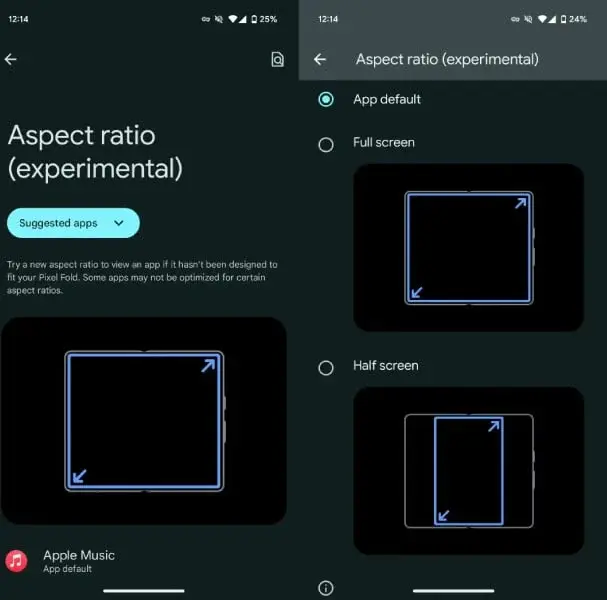
    One standout feature in the Android 14 QPR1 update is the new capability to set an app to a specific aspect ratio on Pixel Fold and Tablet devices. This experimental feature allows users to select between full screen, half screen, or a 16:9 aspect ratio (on tablets) for a more customized viewing experience. Users can access this feature by navigating to Settings > Apps > Aspect Ratio.

    Enhanced Battery Information and Visuals

    Moreover, this update introduces fresh battery details like "Manufacture data" and "Cycle count," accessible via Settings > About phone > Battery information.

    Not forgetting aesthetics, Pixel users can now enjoy a new "Metro" lock screen clock, adding to the total clock styles available to nine. Furthermore, when changing backgrounds, the Wallpaper & style section introduces a subtle particle effect. Improvements in the Pixel Launcher include refined search preferences and a more visible settings shortcut.

    Improved Quick Settings and Security Enhancements

    Android 14 QPR1 enhances Quick Settings by using a lighter background to differentiate between selected and unselected tiles for easier navigation. On the Pixel Tablet, an improved toast message now appears when your fingerprint is unrecognized, enhancing security and user experience.

    Additionally, the Clock app now displays weather information for stored cities, with the World widget showing current temperature alongside highs and lows.

    Beyond the visual and experiential alterations, the December 2023 security patch addresses 33 vulnerabilities in the Android OS, varying from moderate to critical severity. Google devices receive an extra 33 security fixes to bolster protection against potential threats.

    Supported Devices and Update Instructions

    The update is currently being rolled out to the following devices: Pixel 5a, 6, 6 Pro, 6a, 7, 7 Pro, 7a, Tablet, Fold, 8, and 8 Pro. You can manually check for the update by heading to Settings > System > System updates.

    If you’re eager to experience the new functionalities, you have the option to download the factory images or await the over-the-air update for your device. Below are the download links for each device:

    • Pixel 8 Pro: UQ1A.231205.015 — Factory Image — OTA
    • Pixel 8: UQ1A.231205.015 — Factory Image — OTA
    • Pixel Fold: UQ1A.231205.015 — Factory Image — OTA
    • Pixel Tablet: UQ1A.231205.015 — Factory Image — OTA
    • Pixel 7a: UQ1A.231205.015 — Factory Image — OTA
    • Pixel 7 Pro: UQ1A.231205.015 — Factory Image — OTA
    • Pixel 7: UQ1A.231205.015 — Factory Image — OTA
    • Pixel 6a: UQ1A.231205.015 — Factory Image — OTA
    • Pixel 6 Pro: UQ1A.231205.015 — Factory Image — OTA
    • Pixel 6: UQ1A.231205.015 — Factory Image — OTA
    • Pixel 5a: UQ1A.231205.014 — Factory Image — OTA