Category: Software

  • Kali Linux 2025.3 Removes ARMel Support, Updates Nexmon Firmware

    Kali Linux 2025.3 Removes ARMel Support, Updates Nexmon Firmware

    Key Takeaways

    1. Kali Linux 2025.3 update includes improved HashiCorp Packer & Vagrant software with new build-scripts and examples.
    2. Enhanced Nexmon support adds compatibility for more wireless chips, including the Raspberry Pi 5.
    3. Introduction of 10 new tools, including Caido, Detect It Easy, and krbrelayx.
    4. Support for ARMel-powered devices has been removed, affecting older models like the ODROID-W and Raspberry Pi 1.
    5. Future version 2025.4 is anticipated to feature user interface updates, a better MSF screen terminal, and a refreshed Simulator app.


    Focused on offering a Debian-based environment for penetration testing and digital forensics, Kali Linux has released its first update since June. Labeled as 2025.3, this update features three main highlights: updates to HashiCorp Packer & Vagrant software, enhanced Nexmon support, and the introduction of 10 new tools.

    Update Details

    The updates to the HashiCorp tools, which focus on virtual machines, come with consistent pre-seed examples, v2 Packer build-scripts, and adjustments to existing VM build-scripts. Enhanced Nexmon support brings compatibility with more updated wireless chips, including support for the Raspberry Pi 5 (the 16 GB version is currently priced at $119.99 on Amazon). Additionally, Kali Linux 2025.3 has added several new tools: Caido and Caido-cli, Detect It Easy, Gemini CLI, krbrelayx, ligolo-mp, llm-tools-nmap, mcp-kali-server, patchleaks, and vwifi-dkms.

    Device Support Changes

    Moreover, it’s worth noting that this Kali Linux update, similar to its Debian 13 “Trixie” base, has removed support for ARMel-powered devices. The devices that fall under this category are quite limited, including the outdated ODROID-W (an end-of-life product), the original Raspberry Pi 1, and the Pi Zero W.

    Kali NetHunter is now compatible with the older Samsung Galaxy S10, and it has also received a number of tweaks and fixes for various other devices. For more detailed information, take a look at the release blog post (link is provided below the video). Anticipation for version 2025.4 should rise, as it promises more updates to the user interface, a better MSF screen terminal, a refreshed Simulator app, and additional features.

    Kali Linux Blog

    Source:
    Link


  • iOS 26 Wallet App to Store U.S. Passports This Year

    iOS 26 Wallet App to Store U.S. Passports This Year

    Key Takeaways

    1. U.S. passport holders can soon store digital copies of their passports in the Wallet app with iOS 26.
    2. Travelers must still carry physical passports for international flights and not all TSA checkpoints accept digital IDs.
    3. Apple’s integration of digital passports into the Wallet app aims for better compatibility, following similar features in Android’s Google Wallet.
    4. Several U.S. states offer digital versions of driver’s licenses and state IDs, indicating a shift towards digital identification.
    5. Concerns about security and hacking highlight the importance of keeping physical documents alongside digital IDs.


    The new iOS update has a clear aim: to simplify travel for people in the U.S.

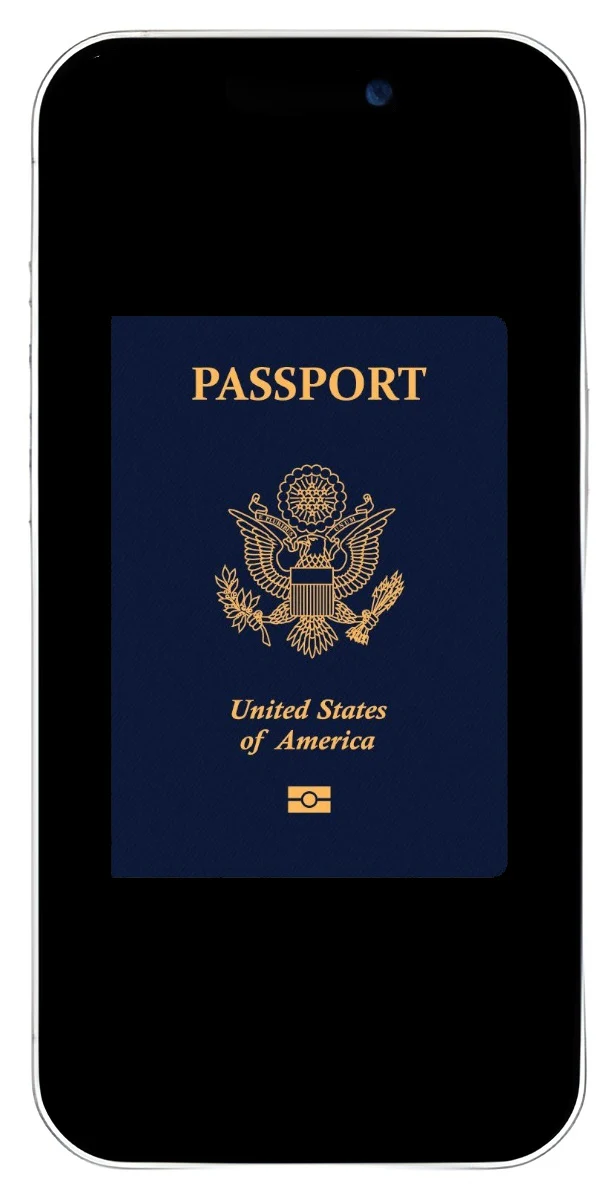
    This week, Apple announced that U.S. passport holders will soon be able to save a digital copy of their passport in the Wallet app of iOS 26, set to launch later this year. Currently, this feature is only available for U.S. passports, according to information from Apple’s site.

    Digital vs. Physical Passports

    While the ability to store passport details is a fresh feature for iOS, Android’s Google Wallet app introduced digital passports last year. Nevertheless, travelers are still required to carry their physical passports when flying internationally. Even when flying domestically, not all TSA checkpoints in the U.S. accept digital IDs, making it wise to have a physical form of ID handy.

    Existing Alternatives and Compatibility

    There are some apps that let travelers keep digital copies of their passports on their phones, but Apple is integrating this feature directly into their Wallet app. This could lead to better compatibility with iPhones, although only time will tell if that’s the case.

    Beyond just passports, a variety of states in the U.S. now permit digital versions of driver’s licenses, state IDs, and other government-issued IDs. This trend suggests that we might be nearing an era where all our identification and banking needs can be handled through one device.

    Concerns About Security

    Given how vulnerable computers and smartphones can be to hacking and theft, it raises questions about whether this is the kind of future we desire for our personal security. For now and likely in the foreseeable future, it’s still smart to carry physical documents and cards with you.

    The digital ID feature will be added to the Wallet app in iOS 26, expected to arrive later this year.


    Source:
    Link


  • Xiaomi Launches Stable HyperOS 3 Global Rollout for Smartphones

    Xiaomi Launches Stable HyperOS 3 Global Rollout for Smartphones

    Key Takeaways

    1. Xiaomi has launched HyperOS 3 worldwide after its initial release in China last month.
    2. Over 20 devices will receive stable updates for HyperOS 3 by the end of October.
    3. The Xiaomi 15T and 15T Pro will come with HyperOS 3 pre-installed in the global market.
    4. More than a dozen Poco, Redmi, and Xiaomi devices will receive stable updates by the end of November.
    5. Older models like the Xiaomi 14 and Poco F6 series will be upgraded to HyperOS 3 in November and December.


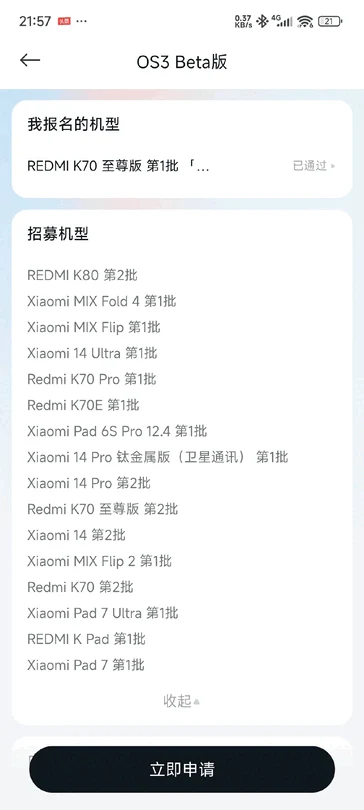
    Xiaomi has launched HyperOS 3 worldwide after revealing its new OS update in China just last month. To give you an idea, there are more than a dozen devices that can access the HyperOS 3 beta software in China, such as the Xiaomi 15, Pad 7, and Pad 7 Pro (currently priced at $633 on Amazon).

    Upcoming Updates

    In addition, Xiaomi has announced that over 20 devices will begin receiving stable updates for HyperOS 3 by the end of October. The company has now shared similar plans for its global users, which will also be starting in October.

    Global Rollout

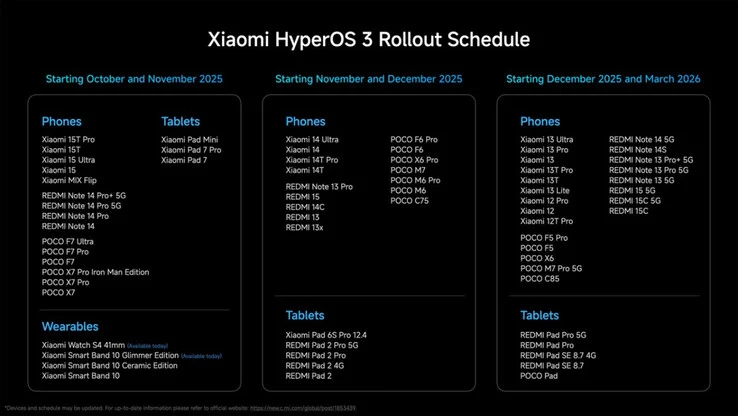
    As illustrated in the image above, Xiaomi has included the Xiaomi 15T and Xiaomi 15T Pro in its global update timeline. Both of these devices are expected to come with HyperOS 3 pre-installed. Furthermore, the new Watch S4 41 mm, Smart Band 10 Glimmer Edition, the Redmi Pad 2 Pro series, and the Xiaomi Pad Mini will also be part of this update. In essence, HyperOS 3 will not be ‘rolling out’ to any of these devices.

    Future Plans

    Despite that, more than a dozen Poco, Redmi, and Xiaomi devices are set to get stable updates for HyperOS 3 by the end of November. Following that, in November and December, older models like the Xiaomi 14 and Poco F6 series will also be upgraded to HyperOS 3. Lastly, the third group of devices will extend back to the Xiaomi 12 series and most of the Redmi Note 13 series. For additional details, please refer to the image above.

    Source:
    Link


  • Starlink Updates Outage Log to Track All Network Events

    Starlink Updates Outage Log to Track All Network Events

    Key Takeaways

    1. Introduction of Event Log: Starlink app now includes an Event Log to alert users about service outages and gather local network reports.

    2. Enhanced Monitoring: The Event Log tracks not only major satellite failures but also interruptions from router disconnections and other connectivity issues.

    3. Improved User Understanding: The purpose of the Event Log is to help subscribers understand issues better and reduce the workload for customer service agents.

    4. Diagnostic Resource: The information in the Event Log is similar to what tech support uses, aiding customers in troubleshooting and enhancing their overall experience.

    5. Growing Subscriber Base: Starlink’s subscriber numbers are rising as download speeds improve, highlighting the need for better tools to analyze service disruptions, especially after recent outages.


    After experiencing its second significant “Starlink down” incident within a couple of weeks, Elon Musk’s satellite internet service has opted to enhance the Outage Log feature in its app.

    Event Log Introduction

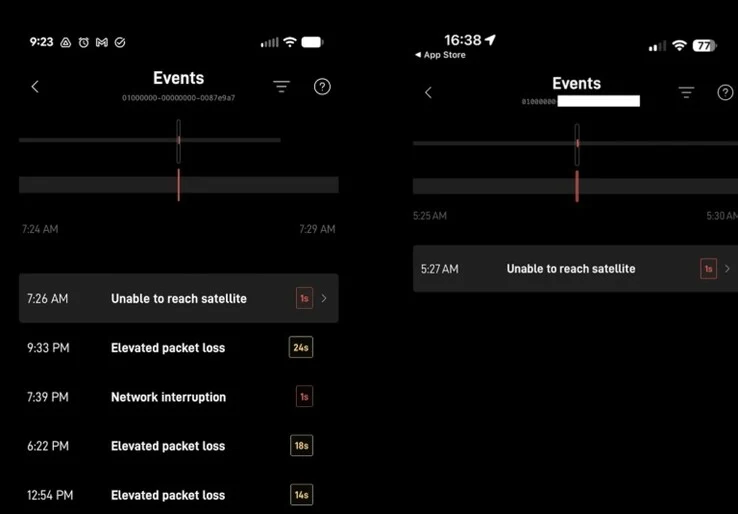
    The Starlink application now features what is called the Event Log. This new addition not only alerts users about major service outages like before but also gathers local network reports.

    The main aim of this updated Starlink network event log is to enhance subscribers’ understanding of the reasons behind any issues while also reducing the burden on customer service agents. In the past, the outage section in the Starlink app merely indicated the duration during which the terminal was offline.

    Expanded Tracking Capabilities

    Now, the Starlink event log monitors more than just significant satellite connectivity failures; it also accounts for service interruptions caused by the router being turned off or disconnected.

    Moreover, if there is a substantial loss of packet data or if a Starlink Mini terminal reboots in a remote area, these events will also be recorded by the app. This makes it a more beneficial diagnostic resource for both the end user and customer service when assistance is required.

    Starlink claims that the information available to users in the new Event Log is similar to what tech support sees during troubleshooting. Over time, they plan to add more connectivity issues to the reporting list. The intention is to keep subscribers updated about potential causes of disruptions during video calls or sudden drops in frame rates while gaming. Although these issues might seem minor from a support standpoint, they can negatively impact the user’s overall experience with the network.

    Rising Subscriber Numbers

    As Starlink’s download speeds improve thanks to significant additions in satellite capacity, the number of subscribers to the satellite internet service is increasing rapidly. There have already been two major global outages: one was a man-made error linked to a firmware update at ground network stations, and the other was caused by a geomagnetic storm. Any tools that assist in analyzing Starlink service disruptions will be beneficial for resolving connectivity problems as Starlink prepares for its ambitious gigabit network upgrade.

    Source:
    Link


  • ZimaOS 1.5.0 Becomes Paid: Community Disappointment Grows

    ZimaOS 1.5.0 Becomes Paid: Community Disappointment Grows

    Key Takeaways

    1. CasaOS started as an open-source project for a user-friendly home cloud solution, allowing easy deployment of applications in a Docker environment.

    2. IceWhale transitioned from CasaOS to create ZimaOS, which offers more features while maintaining ease of use.

    3. ZimaOS v1.4.4 introduced new capabilities, but version 1.5.0 will have a paid tier: the free CE-Edition and a new Plus Edition costing $29 for a lifetime license.

    4. The free CE-Edition has limitations, including a cap on the number of apps, disks, and users, while the Plus Edition offers expanded functionality.

    5. IceWhale justifies the pricing by comparing it to other costly NAS operating systems and plans to reinvest a portion of revenue back into community support and development.


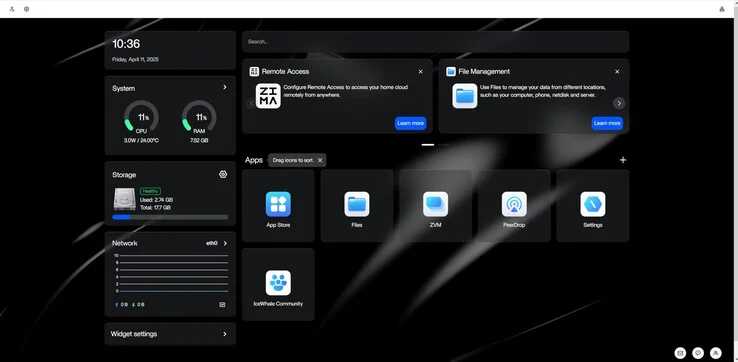
    CasaOS began as an open-source initiative aimed at building a straightforward, user-friendly, and attractive home cloud solution. With its sleek web interface, users can conveniently deploy applications like Nextcloud, Jellyfin, or AdGuard Home in a Docker-based setting.

    Evolution of ZimaOS

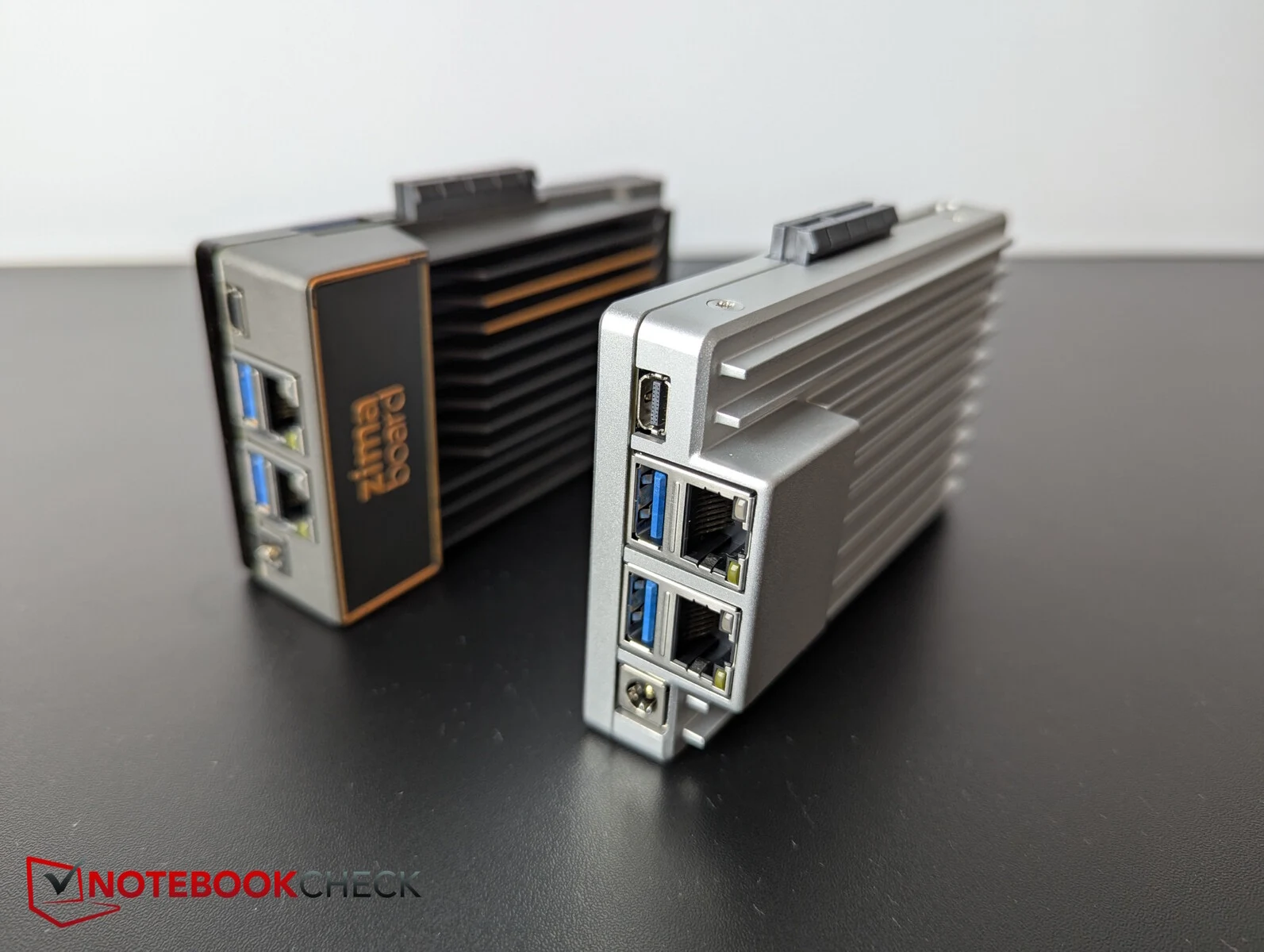
    IceWhale originally integrated CasaOS into its early offerings, such as the ZimaBoard (review), ZimaBoard 2 (review), ZimaBlade (review), and ZimaCube. However, over time, the company diverged and created ZimaOS, which is based on CasaOS but comes with a wider array of features while still being easy to use.

    New Features and Pricing

    Recently, ZimaOS v1.4.4 was launched, which introduced multiple new capabilities. Up until now, every iteration of ZimaOS has been completely free, and most users believed this would continue indefinitely.

    This is why many were surprised when IceWhale revealed that from version 1.5.0 onward, ZimaOS would incorporate a paid tier. The operating system will now be divided into two versions: a free, limited CE-Edition, and a new Plus Edition. The Plus Edition will initially be available for a one-time cost of $29, providing a lifetime license.

    Limitations of the Free Edition

    The free CE-Edition has some limitations: it includes all core functionalities but restricts usage to 10 apps, 4 disks, and 3 users. While unlimited cloud services and UDisks will still be on hand, the rest of the system will face restrictions compared to the paid version.

    Naturally, the community’s reaction was one of surprise and disappointment. In reply, IceWhale put out a clarification to ease concerns. The company expressed appreciation for the community’s backing and highlighted that all officially supported devices—including the ZimaBoard 1/2, ZimaBlade, and ZimaCube—will automatically get the Plus Edition when they upgrade from version 1.4.x or earlier to 1.5.0.

    In simpler terms, existing users can upgrade for free—as long as they do so before the deadline of June 30, 2026. IceWhale has provided a generous timeframe for users to transition.

    Justification for Pricing

    Regarding the pricing choice, IceWhale notes that other NAS operating systems typically cost “hundreds of dollars,” and the $29 lifetime license aids in covering ongoing development, upkeep, and community management expenses—ensuring ZimaOS’s long-term viability. The company also mentions plans to reinvest 33% of the revenue from ZimaOS Plus back into community contributors. Conversations are already in progress with community members to determine the optimal approach for implementing this initiative.

    press release

    ZimaOS is gearing up to unveil version 1.5.0. From this version onward, ZimaOS will be split into two editions: the free CE Edition and the Plus Edition priced at a $29 lifetime license.

    Source:
    Link


  • SysLinuxOS 13 Mate Released, Gnome Edition Coming Next Week

    SysLinuxOS 13 Mate Released, Gnome Edition Coming Next Week

    Key Takeaways

    1. SysLinuxOS 13 Mate is a new Linux distribution based on Debian 13 “Trixie.”
    2. The distro features the Mate desktop environment and has a software package size of nearly 6 GB.
    3. Wine is included for running Windows applications and games.
    4. It uses a custom Liquorix kernel version 6.16.8-1 with enhanced performance features.
    5. Key kernel features include Zen Interactive Tuning, optimized schedulers, and improved virtual memory management.


    In addition to the ability to create systems from the ground up, network admins and system integrators have numerous distros available to them, with SysLinuxOS being one based on Debian. This new release, SysLinuxOS 13 Mate, which is based on Debian 13 “Trixie,” was launched yesterday. It is the first version in its series, while the Gnome edition is expected to come out next week.

    Software and Features

    Naturally, SysLinuxOS 13 Mate features the desktop environment of the same name. The software package is quite extensive, as the image file nearly reaches 6 GB. For those who need to run specific Windows applications or simply want to enjoy a Windows-only game, Wine is part of the bundle. The distro includes a variety of tools across different categories:

    Custom Kernel

    The kernel utilized is a custom variant known as Liquorix, with a version number of 6.16.8-1. Key features include Zen Interactive Tuning for better responsiveness, a PDS/BMQ scheduler optimized for diverse workloads, aggressive preemption, a 1000 Hz tick rate, the BFQ I/O scheduler by default, improved virtual memory management, and compressed swap using LZ4, along with TCP BBR2 enhancements.

    Source:
    Link


  • Samsung One UI 8.5 Leak Unveils Exciting New AI Features

    Samsung One UI 8.5 Leak Unveils Exciting New AI Features

    Key Takeaways

    1. Samsung has launched One UI 8.0 for the Galaxy S25 and S24 series, while the Galaxy S23 lineup is still in beta.
    2. One UI 8.5 will focus on artificial intelligence to enhance everyday device functions.
    3. New AI features in One UI 8.5 include Touch Assistant, Smart Clipboard, Social Composer, and Meeting Assist.
    4. Design changes may include floating buttons with a frosted glass effect, similar to iOS 26.
    5. One UI 8.5 is expected to launch with the Galaxy S26 series in early 2026 and will run on Android 16.


    Samsung has begun to launch One UI 8.0 for compatible devices, including the Galaxy S25 and Galaxy S24 series. On the other hand, phones like the Galaxy S23 lineup are still running in beta mode. However, fresh details have surfaced regarding Samsung’s next software update, One UI 8.5, which highlights a strong focus on artificial intelligence. The upcoming update seems to incorporate AI into everyday functions of the devices to make daily tasks easier.

    New Features Unveiled

    According to a leak from NirmalSri, there are several exciting new features on the way. The post shared on X/Twitter indicates that One UI 8.5 will introduce at least four new AI-enhanced tools: Touch Assistant, Smart Clipboard, Social Composer, and Meeting Assist.

    Touch Assistant aims to enhance reading efficiency by processing text displayed on the screen. The Smart Clipboard is expected to automatically recommend actions like summarizing, translating, or correcting text. For social media interactions, the Social Composer will generate posts and reviews automatically. Finally, Meeting Assist is said to provide real-time translation during meetings and presentations.

    Design Expectations

    Earlier leaks have hinted at potential design changes coming with One UI 8.5. This update is rumored to introduce floating buttons with see-through backgrounds, resembling features found in iOS 26, but Samsung is likely to apply its distinctive “frosted glass” effect.

    The new features are anticipated to launch alongside the Galaxy S26 series in the first quarter of 2026. This would be the initial rollout of the new software on flagship devices, with other compatible devices receiving it later. It’s worth mentioning that One UI 8.5 will still operate on Android 16. In contrast, One UI 9.0, which is rumored to be the next major OS update, will be built on Android 17.

    Source:
    Link


  • HyperOS 3 with Android 15 Found on 16 Xiaomi and Redmi Devices

    HyperOS 3 with Android 15 Found on 16 Xiaomi and Redmi Devices

    Key Takeaways

    1. Xiaomi is beta-testing its HyperOS 3 update on various devices, targeting a stable release by the end of October for top models like the Xiaomi 15 series and Redmi K80 Pro.
    2. Internal tests for Android 15-based builds of HyperOS 3 are underway for at least 16 additional Xiaomi and Redmi smartphones, including the Redmi K50 Ultra and Xiaomi 12.
    3. The internal test builds are based on Android 15, which may disappoint some users since newer devices have Android 16 betas, but major improvements are related to the custom HyperOS skin.
    4. No public beta programs have been launched for the newly tested models yet, but access to the new software is expected soon.
    5. The official roadmap states that HyperOS 3 will be available for the Xiaomi 12 series and other models in January 2026.


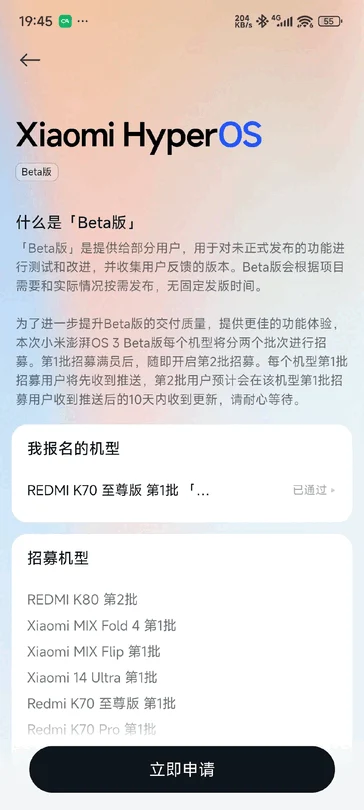
    Xiaomi has been actively beta-testing its HyperOS 3 update on many devices, aiming to roll out the stable version for its newest and top-tier models by the end of October. Users who own the Xiaomi 15 series, Redmi K80 Pro, and Xiaomi Pad 7 Pro can already experience an early version of the HyperOS 3 skin, which is based on Android 16. Now, even more devices are on the verge of joining this testing phase.

    New Devices in Testing

    XiaomiTime reports that Xiaomi is conducting internal tests of Android 15–based builds of HyperOS 3 for a new wave of Xiaomi and Redmi smartphones. At least 16 models have been identified running the internal firmware OS3.0.250923, which includes well-known devices such as the Redmi K50 Ultra, Xiaomi 12, Redmi Note 13 5G, and POCO F5 Pro.

    What’s Inside the Update?

    These internal test builds are said to be built on Android 15, which might be a letdown for some, since newer Xiaomi gadgets have already received HyperOS 3 betas based on Android 16. However, this shouldn’t concern most users too much, as the significant changes and enhancements are mostly connected to Xiaomi’s custom skin, HyperOS, anyway.

    Looking Ahead

    Xiaomi has not yet launched any public beta programs for these particular models, but since internal testing is ongoing, users will likely not have to wait too long before they can access the new software.

    And if you’re curious about when the stable update will arrive, Xiaomi’s official roadmap indicates that HyperOS 3 is set to be available for the Xiaomi 12 series, MIX Fold 2, Redmi Note 12T Pro, and Redmi K50 Ultra in January 2026.

    Source:
    Link


  • Apple Stops Signing iOS 18.6.2, No Downgrade to iOS 26

    Apple Stops Signing iOS 18.6.2, No Downgrade to iOS 26

    Key Takeaways

    1. Apple has stopped signing iOS 18.6.2, preventing downgrades from iOS 26.
    2. iOS 26 was released on September 15 for iPhone models 11 to 17, including iPhone SE.
    3. The only available signed version for compatible iPhones is iOS 26.0.
    4. Users cannot revert to iOS 18 versions after upgrading to iOS 26.
    5. Apple has also ceased signing iPadOS 18.6.2 and tvOS 18.6.


    Apple has ceased signing iOS 18.6.2, meaning that anyone who has upgraded to iOS 26 can’t go back.

    Release Details

    iOS 26 was officially launched on September 15 for iPhone models from 11 to 17, including the iPhone SE. With Apple halting the signing of the prior update, iOS 18.6.2, users are unable to downgrade to it or revert from iOS 26.

    Currently, the only signed version of iOS available for compatible iPhones is iOS 26.0. Although Apple did roll out an update labeled iOS 18.7, this was exclusively an OTA update for devices that can run iOS 26, meaning that no IPSW files are available. As a result, users have no way to go back to any iOS 18 version after upgrading to 26.

    Signing Firmware Updates

    Apple signs firmware updates to verify that they are authentic, unaltered, and authorized for installation on specific devices. Once an iOS or iPadOS update is no longer signed, it cannot be installed. This restriction can limit users from downgrading to older, possibly less secure versions.

    As it stands, iPhone users who are on older iOS 18 versions can only move up to iOS 26, without any option to downgrade afterward. Luckily, users can keep using iOS 18.6.2 as long as they wish, though they might miss crucial security updates or face compatibility issues with certain apps.

    Other Updates

    In addition to iOS 18.6.2, Apple has also stopped signing iPadOS 18.6.2 and tvOS 18.6.

    Source:
    Link


  • Budget DIY Radio Hotspot with Beofeng UV-5R for Email and SMS

    Budget DIY Radio Hotspot with Beofeng UV-5R for Email and SMS

    Key Takeaways

    1. The project features a budget-friendly radio transceiver based on the Beofeng UV-5R, known for its low price and modifiability.
    2. Essential components include a Ham radio all-in-one-cable (AIOC), Raspberry Pi Zero 2 W, USB battery pack, and ferrite beads for noise reduction.
    3. The software used is DigiPi, which supports various data modes like FT8, JS8Call, and APRS for versatile communication options.
    4. The setup allows for sending and receiving messages, including instant messaging, email, and SMS, through a self-hosted web interface.
    5. This project offers a low-cost entry point for those interested in creating a flexible, off-grid communication tool.


    Ham Radio operator KM6LYW recently presented his new budget-friendly build for a basic radio transceiver that can manage various data modes for different communication needs. This project is based on the well-known Beofeng UV-5R, blending the radio’s features with several components to establish a hotspot setup that includes its own web interface. Although it might not boast the highest signal strength, it compensates with flexibility and affordability.

    Heart of the Setup

    The core component of this build is the Beofeng UV-5R. Celebrated for its low price, modifiability, and dedicated following, this radio costs around $23 and is key for transmitting data. To connect with the radio, this project also requires a Ham radio all-in-one-cable (AIOC) and a Raspberry Pi Zero 2 W. Additional items needed include a USB battery pack, a variety of USB cables, ferrite beads to eliminate noise, and an SD card to install the software image for the setup.

    Software Magic

    On the software front, the project utilizes DigiPi to manage the intricacies of data transmission via RF. This specially configured image serves as an all-in-one solution, allowing various message types to be sent through its self-hosted web client. The protocols supported include FT8, JS8Call, and APRS, enabling services like instant messaging, email, and SMS to be both sent and received. Furthermore, networking features such as APRS Packet Radio network IGate and node services can be set up through the web interface.

    A Great Starting Point

    There’s plenty more to explore in this project, and with its low entry cost, it could be an ideal option for those wanting to create a flexible, off-grid communication tool. For those interested, additional details on the project can be found in the link below.