Category: Software

  • Amazon Halts Drone Deliveries in Arizona Due to Crane Issues

    Amazon Halts Drone Deliveries in Arizona Due to Crane Issues

    Key Takeaways

    1. Amazon’s drone delivery service has been operational in the U.S. for nearly nine years, with significant advancements in technology.
    2. Two Amazon MK30 drones crashed in Tolleson, Arizona, due to a collision with crane cables, resulting in one hospitalization.
    3. The Federal Aviation Administration (FAA) is investigating the crash and working with Amazon, leading to a pause in all drone deliveries in Arizona.
    4. The MK30 drones can carry loads of up to five pounds and weigh around 80 pounds.
    5. Amazon’s drone delivery service in Tolleson had previously faced interruptions for software updates and FAA approvals after an earlier crash in Oregon.


    Drone deliveries have been around in the US for nearly nine years, with the first successful delivery dating back to that time. However, the technology has advanced significantly, making it more common. Still, instances occur where obstacles, like crane cables, cause problems that require further investigation. This is exactly what transpired with two Amazon drones in Tolleson, Arizona, resulting in a pause of the service for an inquiry.

    Incident Details

    According to reports from ABC15 Arizona and 12 News, two Amazon MK30 delivery drones either departing from or returning to a delivery site collided with a crane and crashed. One individual was hospitalized due to smoke inhalation stemming from the wreckage, and the victim’s spouse shared images of the damaged drones. The crash happened at around 10 a.m. local time, and a bystander who witnessed the event noted that the drones struck the crane’s cable, which appeared to be supporting an AC unit.

    Aftermath of the Crash

    The drones ended up approximately 100 to 200 feet apart in separate parking areas. The MK30 models weigh around 80 pounds and can transport loads of up to five pounds. The Federal Aviation Administration (FAA) has initiated an investigation and is collaborating with Amazon on this matter. In the meantime, Amazon has ceased all drone deliveries in Arizona for an indefinite period.

    History of Drone Deliveries

    Drone deliveries commenced in Tolleson last November, but the service faced a halt in January this year for software updates and FAA approvals after a crash occurred at a testing site in Oregon. Since that incident, there had been no further crash reports until this latest event.

    Source:
    Link


  • Google Confirms Android Sideloading Remains, But With Limitations

    Google Confirms Android Sideloading Remains, But With Limitations

    Key Takeaways

    1. Google is enhancing security for sideloaded apps on Android by introducing a developer verification system.
    2. The new requirement mandates a valid digital signature for all sideloaded apps to increase protection against harmful software.
    3. Concerns have been raised within the community, particularly from the F-Droid team, regarding the impact on open-source app distribution.
    4. If a developer distributes malicious software, Google can revoke their certificate, disabling their apps on users’ devices.
    5. While sideloading will not disappear, the process will evolve, requiring verification requests for app distribution or using ADB as a workaround.


    Google is working on enhancing the security of a key feature in Android: the option to install apps from sources outside the official Play Store. Although sideloading is still an essential part of the Android experience—and Google reassures everyone that it is “absolutely not going away”—the unregulated era of installing unverified apps on Android is coming to an end. The company has recently shared more information about the new developer verification system for Android.

    Addressing Community Concerns

    Google has taken steps to tackle worries about this upcoming change. Recently, the team behind F-Droid, a well-known alternative app store that focuses on open-source applications, expressed that the new regulations “will end the F-Droid project and other free/open-source app distribution sources as we know them today.” Statements like these from respected voices have raised alarms within the community.

    New Mandate for Sideloaded Apps

    In a blog post, Google revealed that the shift revolves around a new requirement: developer verification for all apps that are sideloaded. This adjustment adds an important security layer intended to shield regular users from harmful software. On the flip side, it could make it more complicated for users who enjoy installing APKs that are not usually found on the Play Store.

    For many years, users who explored beyond the Play Store faced significant risks. Google points out that apps from outside the store carry malware at a rate 50 times higher than those found in its official marketplace. To bridge this gap, Google is instituting a requirement for a valid digital signature on each sideloaded app. Think of this signature as a digital ID card linked to the software. If a certified Android device tries to install an app that doesn’t have this verified signature, the installation fails automatically.

    Accountability Measures

    This digital ID ensures accountability. If a developer is found distributing harmful software, Google can quickly revoke their certificate. Such action immediately disables all related apps on users’ devices, making it much more difficult for “bad actors” to operate unchecked.

    The blog post also notes that developers can still use Android Studio to create, debug, and test apps locally without needing to go through the verification process. Tools like ADB will provide a “workaround” to evade the verification.

    In conclusion, while it’s accurate to say that app sideloading isn’t disappearing entirely, it is certainly going to evolve. Once these new measures are in place, anyone wishing to provide an Android app will need to either file a verification request or guide their community on using ADB for installation.

    Source:
    Link


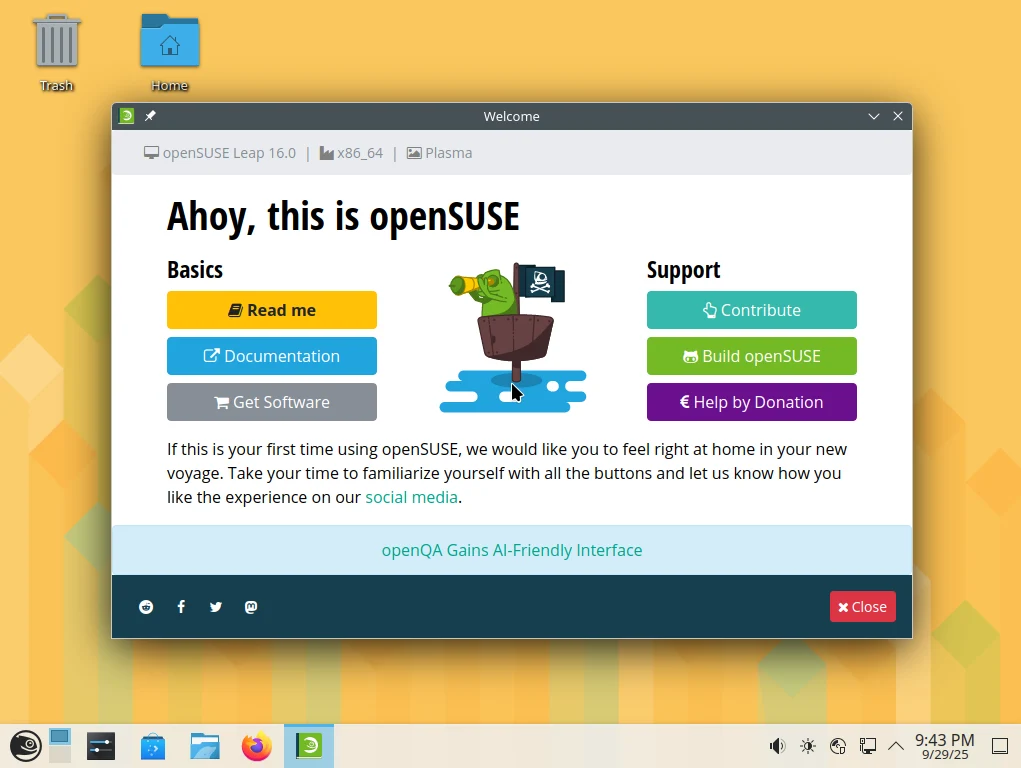
  • openSUSE Leap 16.0: New Installer and Easy Migration Options

    openSUSE Leap 16.0: New Installer and Easy Migration Options

    Key Takeaways

    1. openSUSE has a legacy of over 40 years, originating from SUSE Linux in Germany.
    2. The latest update, openSUSE Leap 16.0, offers enhanced maintenance and security support, alongside a redesigned installer and new software stack.
    3. Future minor releases will focus on automation, containerization, system tools, and hardware encryption.
    4. The openSUSE team is dedicated to improving user experience and innovation with each release.
    5. Leap 17 is expected to be released in 2032, continuing the platform’s evolution.


    With a legacy spanning more than forty years, the initial version of SUSE Linux from Germany laid the foundation for today’s openSUSE, which has been active since late December 2006. This open-source, RPM-based operating system is supported by the openSUSE team, who also developed and continue to manage related tools like Snapper, Portus, KIWI, and the Open Build Service. The stable release known as Leap has recently seen a significant update, bringing it to version 16.0.

    New Features and Improvements

    Thanks to this latest update, openSUSE Leap is entering a new phase. The official release notes highlight that openSUSE Leap 16.0 “brings an unparalleled maintenance and security support cycle,” along with a redesigned installer, a new software stack, and easier migration procedures. Other notable features include:

    Looking ahead, the upcoming minor releases of Leap 16 will focus on enhancing automation, containerization, system tools, and hardware encryption. If all goes well, Leap 17 is anticipated to be released in 2032.

    Future Developments

    The openSUSE team aims to continue improving the user experience with each release. The commitment to innovation and support ensures that users can rely on the platform for both personal and professional use. As the open-source community grows, so does the potential for exciting new features and updates in the coming years.

    Source:
    Link


  • New Jailbreak for Select Kindles: First WinterBreak, Now AdBreak

    New Jailbreak for Select Kindles: First WinterBreak, Now AdBreak

    Key Takeaways

    1. The WinterBreak exploit is no longer available for easy jailbreaking of Kindles after firmware version 5.18.1.
    2. The new AdBreak exploit allows jailbreaking for most Kindle users, excluding Kindle Scribe and Colorsoft.
    3. Jailbreaking provides root access, enabling extra features not available on standard Kindles.
    4. Requirements for installing AdBreak include a PC with a Kindle cable, a registered Kindle with ads enabled, and firmware version higher than 5.18.1.
    5. Users are advised to turn off WiFi during installation to prevent Amazon from patching the exploit.


    Since the release of Kindle firmware version 5.18.1, the WinterBreak exploit was the last chance for users to jailbreak their devices easily. Sadly, for those who didn’t know what jailbreaking could do for their Kindle, they were left hoping for a new way to do it. Luckily, the developers at KindleModding.org have just introduced a new exploit called AdBreak. This new tool allows Kindle users, except for those using Kindle Scribe and Colorsoft, to unlock their devices.

    Understanding Kindle Jailbreaking

    If you’re not familiar with the concept of jailbreaking a Kindle, it basically means giving users root access to their device. With this root access, users can unlock many extra features that are not available on standard Kindles, such as:

    Installing this exploit is fairly straightforward, but it does come with a few requirements. You will need a PC that has a Kindle cable, a registered Kindle that is not blacklisted and has ads enabled, and the firmware version must be higher than 5.18.1. Once you meet these conditions, the installation process is just a matter of copying some files and executing a script. Fortunately, the Kindle Modding website provides a comprehensive tutorial and FAQ section to assist users throughout the installation. Although the exploit works for now, it’s important to note that Amazon could patch it at any moment. As a precaution, users wishing to jailbreak their devices might consider turning off the WiFi until they can complete the installation. For further details on the exploit and how to install it, please check the links below.

    Source:
    Link


  • Philips Hue Update Introduces New Feature for Apple Home Users

    Philips Hue Update Introduces New Feature for Apple Home Users

    Key Takeaways

    1. The Philips Hue app has been updated to version 5.52.0 for iOS, with an Android version coming soon.
    2. Users can now export their lighting scenes to Apple Home via Matter for easier activation.
    3. The update includes support for the new Philips Hue Secure video doorbell and smart chime.
    4. Philips Hue now integrates with Sonos, allowing remote control of lights using Sonos Voice Control.
    5. The Sonos voice assistant in this update currently supports only English and French.


    A fresh update is out for the Philips Hue app. The software version 5.52.0 is now ready for iOS users, and it will soon be available for Android devices as well. This update comes just a week after the previous one, which introduced new scenes inspired by the fall season.

    New Features You Can Enjoy

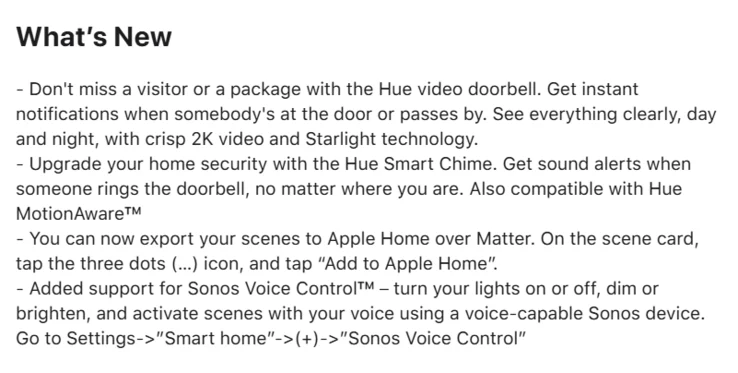
    According to the change log for version 5.52.0, users now have the ability to export their scenes to Apple Home via Matter. To utilize this feature, select your desired scene, press the (…) icon, and choose “Add to Apple Home.” This means that scenes from Hue smart lighting can now be activated by devices within your Apple Home setup. Additionally, this update includes support for the newly launched Philips Hue Secure video doorbell and the Philips Hue Secure smart chime.

    Exciting Integrations

    Philips Hue has also highlighted the new integration with Sonos in this latest update. As Sonos announced a few weeks back, users can now control their Philips Hue smart lights remotely using Sonos Voice Control. The functions available include turning lights on or off, changing brightness levels, and activating various scenes. To set this up, navigate to Settings in the Philips Hue app, then Smart Home, and tap on (+) for Sonos Voice Control. It’s important to mention that the Sonos voice assistant currently supports only English and French.

    You can get the Philips Hue app version 5.52.0 update from the Apple App Store. Once it’s available, Android users will be able to download the update from the Google Play Store.

    Source:
    Link


  • Synopsys and Nvidia Unveil F1-Style Digital Twin Racetrack

    Synopsys and Nvidia Unveil F1-Style Digital Twin Racetrack

    Key Takeaways

    1. Collaboration for Innovation: Synopsys and Nvidia have partnered to create a digital twin racetrack for STEM Racing, combining Ansys Discovery and Nvidia’s Omniverse.

    2. Cost and Time Efficiency: The digital platform allows students to conduct virtual test laps, reducing the need for expensive and time-consuming physical prototypes.

    3. Engaging Learning Experience: Demonstrations at the World Finals let participants modify vehicle components and see real-time effects on performance, enhancing engagement.

    4. Global Educational Impact: Synopsys supports over 400,000 students in 65 countries with free software and training, making advanced simulation tools more accessible.

    5. Advancement in Engineering Education: The digital platform promotes data-driven design validation, preparing students for careers in next-gen engineering and aligning education with industry practices.


    Synopsys, a well-known American technology firm, has teamed up with Nvidia through its Ansys division to launch a cutting-edge digital twin racetrack for STEM Racing. This innovative platform merges Ansys Discovery with Nvidia’s Omniverse, enabling students to create, evaluate, and fine-tune miniature F1-style vehicles entirely within a virtual setting. The complete launch is scheduled for the STEM Racing season of 2025–2026, while a basic version was showcased at the Aramco STEM Racing World Finals in Singapore from September 27 to October 2.

    Transforming Prototyping

    In the past, student teams had to construct and perfect physical models, which was often expensive and required a lot of time. However, with the new digital platform, they can conduct countless virtual test laps on a replica of the actual racetrack. By simulating factors such as airflow, drag, and downforce, students can access the same aerodynamic knowledge that professionals in motorsport and aerospace fields use.

    Engaging Demonstrations

    During the World Finals, a simplified demonstration allowed younger participants to change components like spoilers and car bodies, instantly observing how these alterations affected speed and overall performance. More advanced teams can upload intricate designs into Ansys Discovery for Computational Fluid Dynamics (CFD) analysis, with the outcomes visualized in Omniverse.

    As the exclusive global CFD partner for STEM Racing, Synopsys is already aiding over 400,000 students in 65 countries by providing free software, training, and support. This new project further enhances this initiative by reducing barriers to advanced simulation and high-performance computing, creating a scalable method to introduce engineering tools into classrooms around the globe.

    A New Era of Learning

    Andrew Denford, who is the founder and chairman of STEM Racing, referred to digital twins as a significant advancement for student innovation and performance. Tim Costa, the GM of industrial and computational engineering at Nvidia, underscored how Omniverse can assist in optimizing cars for specific track conditions. Synopsys has emphasized that the platform incorporates “AI-driven capabilities” to equip students for careers in next-gen engineering.

    This partnership signifies a change in the approach to design validation in STEM Racing. By shifting testing into the digital domain, Synopsys and Nvidia are establishing a system that is quicker, more accessible, and driven by data. For students, this translates to learning with tools that are influencing real-world industries, and for the competition, it signifies a significant advancement in the future of engineering education.

    Synopsys’

    Source:
    Link


  • Samsung Galaxy S23 and S23 FE Receive One UI 8 Update

    Samsung Galaxy S23 and S23 FE Receive One UI 8 Update

    Key Takeaways

    1. One UI 8, based on Android 16, is rolling out to the Galaxy S23 series, starting in South Korea.
    2. The update improves user experience significantly, especially with enhancements in DeX and security features.
    3. The Secure Folder has better security protocols, and Quick Share is redesigned for easier file transfers.
    4. Daily use is enhanced with new features in the Camera app, and improved management tools for Alarms, Calendar, and Reminders.
    5. Samsung is also working on One UI 8.5, expected to launch with the Galaxy S26 series.


    Samsung is taking steps to update its latest operating system on its top devices from the last few years. The stable version of One UI 8, which is built on Android 16, has started to roll out to all models in the Galaxy S23 series, including the well-liked Galaxy S23 FE.

    Quick Rollout in South Korea

    The rollout began in South Korea, and for the Galaxy S23, Samsung is ahead of its planned schedule. This suggests that the global release will likely happen quickly in the next days and weeks.

    For the Galaxy S23, Galaxy S23+, and Galaxy S23 Ultra, One UI 8 comes with the build number S91xNKSU6EYI7. In contrast, the firmware for Galaxy S23 FE is labeled S711NKSU9DYI5.

    Major Overhaul in User Experience

    One UI 8 represents a significant overhaul, providing important improvements to how users interact with their devices.

    The update brings major changes that enhance both productivity and security. To start, the whole DeX experience has been significantly improved. Utilizing the native Desktop Mode of Android 16, the revamped DeX offers a tidier, more organized interface when you link your phone to an external display.

    Samsung has also prioritized utility. The Secure Folder now features better security protocols, while the Quick Share function has undergone a complete redesign, making it easier and faster to transfer files between Galaxy devices than ever before.

    Smarter Daily Use

    Daily interactions with the device are getting a boost too. The Camera app now includes a new gesture for quick access, streamlining photo capturing. Key apps like Alarms, Calendar, and Reminders have better management tools. Additionally, the Modes and Routines feature is enhanced with new actions, providing users with more powerful options for automating their daily tasks.

    If you have a Galaxy S23 model, be on the lookout for updates in your software settings. You should receive some exciting news soon. At the same time, Samsung is also developing One UI 8.5, which is expected to launch alongside the Galaxy S26 series.

    Source:
    Link


  • New Philips Hue Smart Lighting Scenes Unveiled Unexpectedly

    New Philips Hue Smart Lighting Scenes Unveiled Unexpectedly

    Key Takeaways

    1. Philips Hue has added new seasonal lighting effects in the mobile app with update version 5.51.0.
    2. Nine dynamic fall-themed lighting effects are available in the “Harvest Hues” category.
    3. The first effect, “Golden hours,” adjusts lighting to match your natural body clock over 24 hours.
    4. New scenes feature rich orange tones and options like Amber robin, Autumn gold, and Pumpkin spice.
    5. The effects are compatible with Philips Hue white and color ambiance lights, including the OmniGlow Strip light.


    Philips Hue has introduced fresh seasonal lighting effects in its mobile application. These features seem to have come with the most recent update, version 5.51.0, even if they weren’t specifically mentioned in the update notes. The release just indicated that there were “various bug fixes and stability improvements.”

    New Fall Lighting Effects

    According to Hueblog.com, a set of nine dynamic lighting effects themed around fall has shown up in the Hue scene gallery, categorized under “Harvest Hues.” The first effect, called Golden hours, is an established option that runs over a 24-hour period, adjusting the lights to match your natural body clock. Expect to see numerous scenes rich in orange tones, such as Amber robin, Autumn gold, Fall harvest, and Pumpkin spice. Users can also select other choices that feature a broader spectrum of colors, including Pumpkin patch, Downtown drizzle, Woodland toadstool, and November haze.

    Compatible Devices and Download Options

    These autumn scenes are intended for users with Philips Hue white and color ambiance smart lights, including the new OmniGlow Strip light, which is currently priced at $139.99 on Amazon. You can get the newest version of the Philips Hue app from both the Apple App Store and the Google Play Store.

    Source:
    Link


  • Search Google in Chrome Directly from Windows 11 Search Box

    Search Google in Chrome Directly from Windows 11 Search Box

    Key Takeaways

    1. Microsoft may update the Windows search bar to respect the user’s default browser and search engine settings.
    2. New flags indicating these changes were found in an Edge Canary build, suggesting potential new features.
    3. “DSE” likely stands for Default Search Engine and “WSB” refers to Windows Search Box.
    4. Currently, Windows Search always opens a Bing page in Edge, regardless of the default browser.
    5. The rollout of these features is uncertain, as they may not reach the general public despite being detected.


    Microsoft has often overlooked the default browser setting when using the Windows search bar, particularly outside the European Economic Area (EEA). However, it looks like this might change soon, as signs of Microsoft updating the search bar’s functionality have emerged. Unfortunately, it’s still uncertain when this new feature will be available in a final version.

    New Features Spotted

    The flags indicating these changes were initially detected by Leopeva64 and shared on X a few weeks ago (September 18). They were found in an Edge Canary build and imply that the taskbar’s Windows Search box may finally honor the user’s chosen browser and search engine. Flags such as “msExplicitLaunchNonBingDSE,” “msExplicitLaunchNonBingDSEAndNonEdgeDB,” and “msWSBLaunchNonBingDSE” hint that users might get the option to select their preferred browser and search engine through the Windows Search.

    Understanding the Flags

    As pointed out by Leopeva64, “DSE” probably stands for Default Search Engine, while “WSB” refers to Windows Search Box. Windows Latest provided a complete list of these related flags, which are worth noting.

    Being able to input a search term and then being taken to the default browser with that search would be an excellent improvement for Windows 11, should Microsoft proceed with a final version. Currently, no matter which browser is set as default, using Windows Search always results in a Bing page opening in Edge. However, since these flags were noted in Edge Canary—a version used for testing and experimentation—there’s also a chance that these features might not reach the general public.

    Conclusion

    In summary, while the potential for improved search functionality in Windows 11 is exciting, we still have to wait and see if Microsoft will roll out these updates. The detection of these flags is a positive sign, but nothing is guaranteed until an official build is released.

    Source:
    Link


  • Panasonic Warns UK Firms: Security Risks from Windows 10 EOL

    Panasonic Warns UK Firms: Security Risks from Windows 10 EOL

    Key Takeaways

    1. Microsoft will end support for Windows 10 on October 14, 2025, leaving companies without security updates or assistance.
    2. UK businesses must choose between transitioning to Windows 11 or paying for costly Extended Security Updates (ESU), which will increase in price annually.
    3. A survey revealed that over half of UK IT decision-makers doubt their ability to maintain device security without migration or ESU, highlighting significant concerns about cyber threats.
    4. German firms showed less anxiety about security risks and costs compared to UK businesses, indicating a disparity in preparedness.
    5. Compatibility issues with applications and software are a major challenge for 47% of IT managers planning the transition to Windows 11, risking disruptions in operations.


    Microsoft is set to end support for Windows 10 on October 14, 2025, which means no more security updates or technical assistance. In some areas, customers can access a year of Extended Security Updates (ESU) for free, but the UK is excluded from this benefit. This situation leaves British companies with two choices: either transition to Windows 11 or pay for ESU subscriptions, which will see their prices rise annually.

    Survey Insights

    Panasonic TOUGHBOOK carried out a survey involving 200 IT decision-makers from the UK and Germany. The findings highlight significant worries among UK participants:

    Over half of the respondents expressed doubts about their ability to maintain device security if they either fail to migrate or opt-out of ESU.

    Chris Turner, who is the Head of Go-to-Market at Panasonic TOUGHBOOK Europe, emphasized the seriousness of the situation:

    “Postponing the transition to Windows 11 or choosing not to engage in Microsoft’s Extended Security Updates brings considerable risks for UK firms, including increased susceptibility to cyber threats, compliance issues, and rising costs. With Windows 10 support ending shortly, outdated systems will miss out on vital patches. This scenario could leave companies, especially those in crucial infrastructure sectors, vulnerable to ransomware and operational setbacks.”

    Comparison with German Firms

    Turner pointed out that German organizations surveyed showed less concern regarding these risks, while UK businesses exhibited significantly greater anxiety about security threats and associated costs.

    Panasonic’s broader report outlines the financial implications. For a company managing 1,000 Windows 10 devices, ESU fees might accumulate to more than £340,000 in unforeseen charges once Microsoft’s per-device pricing is considered. The cost doubles each year for up to three years, making it an impractical temporary fix rather than a viable long-term strategy.

    Compatibility Concerns

    Beyond the financial aspect, software support presents another challenge. 47% of IT managers identified application and software compatibility as their primary hurdle when planning the transition to Windows 11. Many organizations anticipate disruptions as older hardware and essential business applications become unsupported.

    The message from both Microsoft and Panasonic is straightforward: inaction is not a safe option. Unsupported systems are prime targets for ransomware attacks, while compliance issues could result in regulatory penalties. For companies involved in critical services, the stakes extend beyond financial loss — outages or compromised systems can jeopardize public safety and operational stability.

    While Microsoft’s ESU program might provide temporary relief, it comes at a high cost and is short-lived. For most organizations, planning migration is no longer a matter of choice. As Turner stated, avoiding “decision paralysis” is crucial: delaying action until the last moment could turn out to be both the most expensive and risky decision.

    Source:
    N/A)