Category: Software

  • Windows 11 Bug Causes Task Manager to Replicate on Close

    Windows 11 Bug Causes Task Manager to Replicate on Close

    Key Takeaways

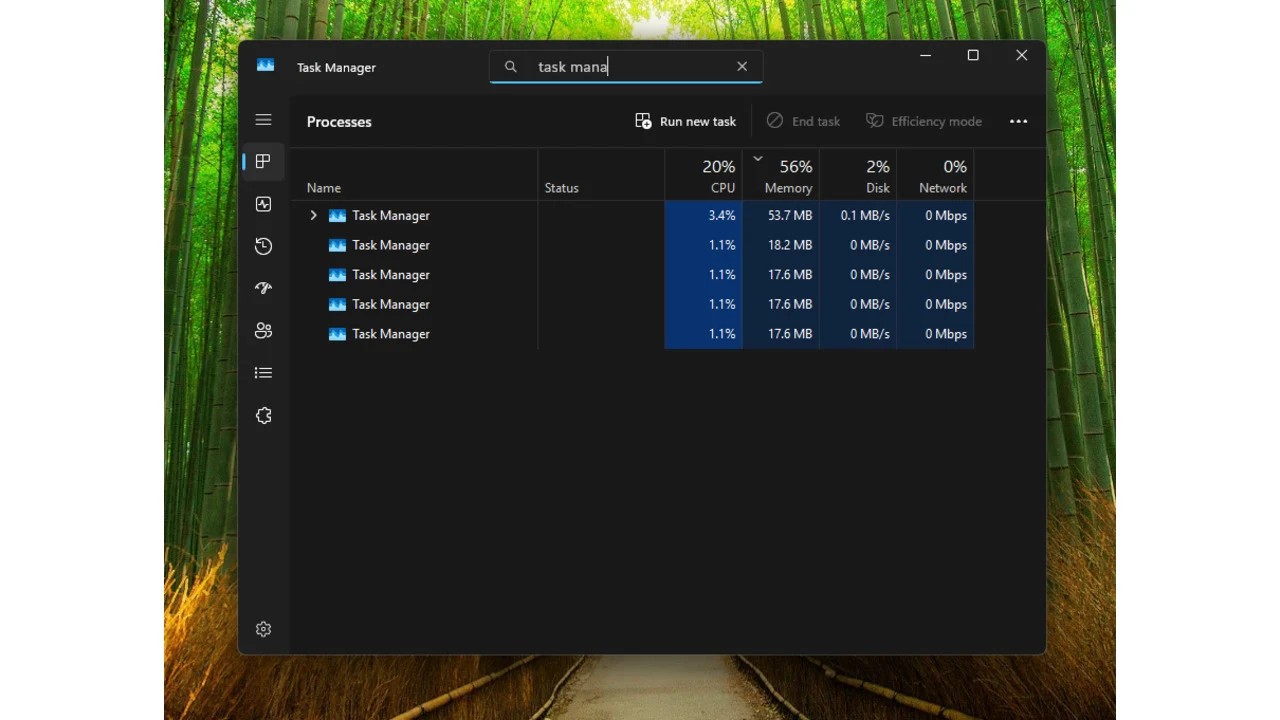
    1. The KB5067036 update for Windows 11 causes Task Manager to clone itself instead of closing when the “X” button is clicked, leading to multiple instances running in the background.

    2. Each additional Task Manager instance consumes memory, which can slow down system performance.

    3. Users can check if they’re affected by opening Task Manager and closing it with the “X” button to see if another instance appears.

    4. The temporary workaround is to avoid the “X” button and instead use “End Task” or the command “taskkill /im taskmgr.exe /f” in the command prompt to close Task Manager.

    5. Microsoft has not yet acknowledged this bug, despite it being verified by users.


    Microsoft’s Preview KB5067036 update for Windows 11 appears to have created a strange glitch that leads to multiple Task Manager instances running behind the scenes when you close it with the “X” button.

    Bug Replication

    According to Windows Latest, each time you click the “X” button to exit Task Manager, it merely clones itself. This creates an additional background process that eats up memory and could cause performance slowdowns.

    We verified this on a test machine and confirmed that the bug is still present. Microsoft has not yet recognized this problem.

    How to Check

    To find out if you’re impacted by this glitch, you can open Task Manager by right-clicking on the taskbar and choosing Task Manager, or by using the Ctrl+Shift+Esc combo on the keyboard, or the Ctrl+Alt+Del shortcut and selecting Task Manager from the list.

    Once you’re in, close the application using the “X” button and see if another instance appears in the running processes. If you frequently open Task Manager to monitor processes, this could lead to performance drawbacks since each instance consumes a bit of RAM, and that can accumulate quickly.

    Workaround Solutions

    Currently, the only temporary fix seems to be avoiding the “X” button and instead manually right-clicking on each Task Manager process to choose “End Task” for closing it. You can also execute the taskkill command by typing taskkill /im taskmgr.exe /f into the command prompt.

    Recently, Microsoft rolled out an emergency update this month that resolved issues with USB devices not being recognized in the Windows Recovery Environment.

    Source:
    Link


  • Samsung Internet Browser Now Available for PCs

    Samsung Internet Browser Now Available for PCs

    Key Takeaways

    1. Samsung Internet browser for Windows launches on October 30 in beta for U.S. and Korea, after 13 years on mobile.
    2. It is compatible with Windows 10 (version 1809 or later) and Windows 11, as well as ARM devices.
    3. Features include Smart anti-Tracking to block cookies and a Privacy dashboard to manage tracking.
    4. Galaxy AI integration offers Browsing Assist for summarizing and translating web pages.
    5. Supports data synchronization between Windows and Android for bookmarks, history, tabs, and Samsung Pass.


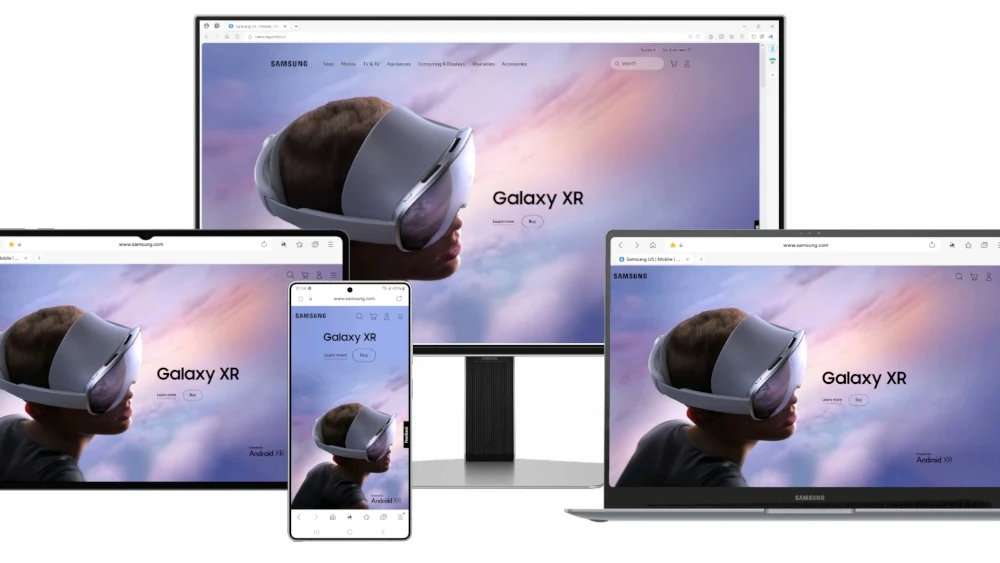
    Samsung has revealed that it is launching the Samsung Internet browser for Windows, marking a significant milestone 13 years after its introduction on mobile devices. The beta version will be available starting October 30, specifically for users in the U.S.A. and Korea, with a broader rollout planned for the near future. This new browser is compatible with Windows 11 and Windows 10 version 1809 or later, as well as devices powered by ARM.

    Features of Samsung Internet for PC

    Samsung Internet for PC brings along a variety of features that are similar to those found in the mobile version. Notably, it includes Smart anti-Tracking, which helps to block cookies and tracking software, along with a Privacy dashboard that allows users to manage disruptions and see how many trackers have been blocked daily. Another important aspect of this browser is the integration of Galaxy AI through the Browsing Assist feature, enabling the summarization and translation of web pages into different languages.

    Seamless Synchronization Across Devices

    Additionally, the browser supports data synchronization between Windows and Android, which means users can easily access their bookmarks, browsing history, open tabs, and Samsung Pass login credentials across multiple devices. With these capabilities, Samsung Internet for PC aims to enhance the browsing experience for Galaxy users seeking a smooth transition between their smartphones and computers—something many have anticipated for over a decade now.

    Source:
    Link


  • Free Alternatives to Affinity Photo, Designer, and Publisher

    Free Alternatives to Affinity Photo, Designer, and Publisher

    Key Takeaways

    1. Affinity Photo, Designer, and Publisher have been merged into a single free app, allowing easy switching between pixel, vector, and layout interfaces.

    2. The new Affinity app will always be free for basic functions, with paid AI features available through a Canva Pro subscription.

    3. One Canva Pro subscription grants access to AI features in both the Affinity app and Canva.

    4. Users can export creations directly into Canva, enhancing integration between the two platforms.

    5. The combined app allows for seamless use of tools across pixel and vector modes, simplifying project organization for print and web.


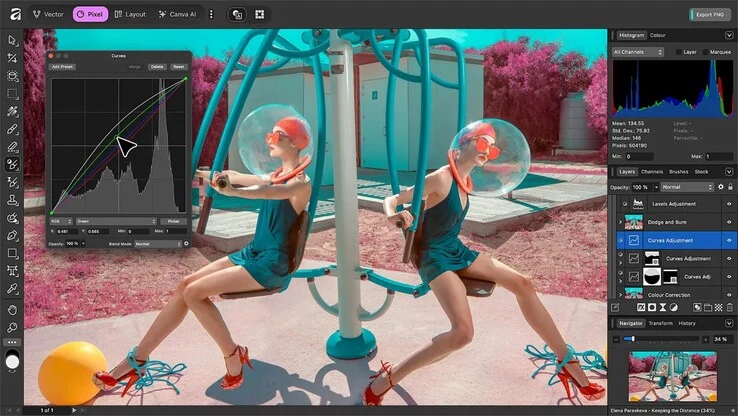
    Affinity Photo, Designer and Publisher have been combined into a new Affinity app, which is now available for free on the developer’s official site. This new app brings together the features of all three previous applications. Users can easily switch between pixel, vector, and layout interfaces using a button located in the top left corner of the screen.

    Enhanced Integration

    In the past, Affinity Publisher allowed some integration, but now, these three apps are totally merged. According to Serif Labs, the Affinity app will always be free, and there will be no subscription necessary for the basic functions. The only paid features are the AI tools, which are available through a Canva Pro subscription priced at $120 each year.

    Subscription Details

    Canva highlights that just one subscription is needed to access the AI features in both the Affinity app and Canva. Moving forward, Affinity will integrate even more closely with Canva, allowing users to directly export their creations into Canva. Those who choose to forego the AI features and Canva integration can still work offline without needing a subscription, similar to how the old apps functioned.

    Combining the three applications into one should provide benefits for users, as all tools can be utilized across the three modes, which can be switched at any moment. This makes it simpler to mix pixel and vector components and organize them as layouts for both print and web projects.

    Source:
    Link


  • Xiaomi 15 Global HyperOS 3 Stable Update Now Rolling Out

    Xiaomi 15 Global HyperOS 3 Stable Update Now Rolling Out

    Key Takeaways

    1. Xiaomi launched HyperOS 3 globally with the Xiaomi 15T and 15T Pro, but these models come with HyperOS 2 pre-installed.
    2. The Xiaomi 15 is now the third device to access HyperOS 3, specifically version 3.0.4.0.WOCEUXM, currently limited to Mi Pilot testers.
    3. The rollout for HyperOS 3 may take longer for the broader Xiaomi 15 user base, as distribution is currently restricted.
    4. The update includes Android security patches from October 1, 2025, addressing various security vulnerabilities.
    5. The download size for HyperOS 3.0.4.0.WOCEUXM is approximately 8.2 GB.


    Earlier this week, Xiaomi began its global software launch for HyperOS 3 with the Xiaomi 15T and Xiaomi 15T Pro. To provide some background, the company unveiled these devices last month along with the worldwide release of its new Android update. Nevertheless, both models come pre-installed with HyperOS 2, which is based on Android 15. Therefore, it is expected that these smartphones will eventually upgrade to Android 20, which is one version behind the pricier Xiaomi 15 (currently priced at $902 on Amazon).

    Update Availability

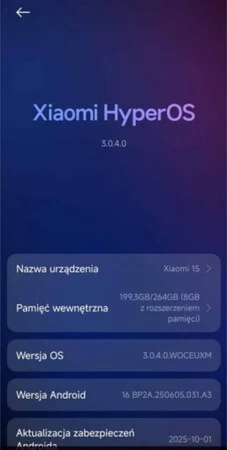
    Interestingly, the Xiaomi 15 has now become the third device that can access HyperOS 3 on a global scale. As per various reports, the update is labeled as HyperOS 3.0.4.0.WOCEUXM for users with the EU variant of the Xiaomi 15. Although this version is stable, sources like GSMArena have indicated that Xiaomi is limiting the distribution of HyperOS 3.0.4.0.WOCEUXM to its Mi Pilot testers at this stage.

    Rollout Timeline

    This means that it might take a little longer for Xiaomi to make HyperOS 3 available to a broader audience of Xiaomi 15 users. According to the screenshot below, HyperOS 3.0.4.0.WOCEUXM includes the Android security patches from October 1, 2025. For comprehensive information regarding the security vulnerabilities that these updates address, you can consult the relevant Android Security Bulletin.

    Download Size and More Info

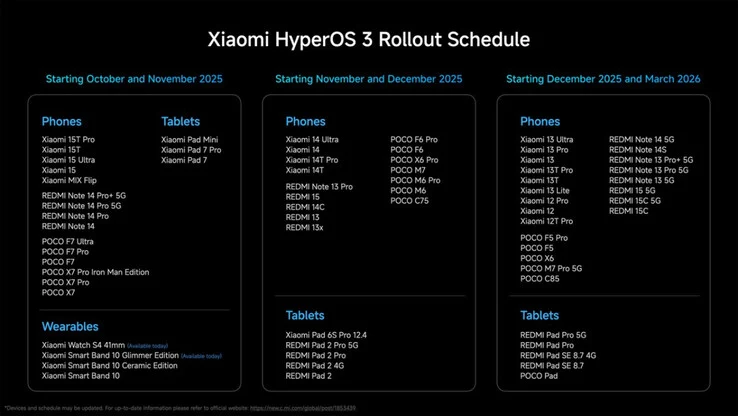
    Regarding HyperOS 3.0.4.0.WOCEUXM, GSMArena mentions that the update requires a download of approximately 8.2 GB. Additional insights about Xiaomi’s significant OS update are available in our initial article covering the launch of HyperOS 3. Furthermore, the company has disclosed its complete schedule for the HyperOS 3 global rollout, which we have included below for your reference.

    Source:
    Link


  • Memento Labs Confirms Government Use of Spyware on Windows Users

    Memento Labs Confirms Government Use of Spyware on Windows Users

    Key Takeaways

    1. Memento Labs’ CEO confirmed that their “Dante” malware was used in a phishing attack and developed for a government client.
    2. A phishing attack targeted Windows users in Russia and Belarus, luring them with invitations to a political and economic forum.
    3. The phishing attack aimed for international espionage, as stated by both Kaspersky and Memento Labs.
    4. The specific organization behind the phishing attack remains unclear, raising concerns about government misuse of surveillance tools.
    5. The situation parallels the Pegasus incident, highlighting risks associated with cybersecurity firms providing surveillance technology to governments.


    The CEO of Memento Labs, a company that creates spyware and surveillance technology, has confirmed that the “Dante” malware mentioned in a recent Kaspersky security report was indeed developed by Memento Labs and was utilized by what he referred to as a “government client.”

    Phishing Attack Details

    According to the Kaspersky report, a significant number of Windows users in Russia and Belarus experienced a complex phishing attack. Victims were led to believe they were invited to an international political and economic forum. By simply clicking the link in the email, the infection would begin, assuming they were using an updated version of Google Chrome. Those affected included individuals from universities, research organizations, and media companies.

    Espionage Intentions

    Kaspersky determined that the goal of this phishing attack was international espionage. This statement is supported by Memento Labs CEO Paolo Lazzi, who mentioned (through TechCrunch) that the phishing was carried out using their Dante spyware, and that the responsible party was a “government client.”

    Unclear Origins

    It is still not clear which specific organization was behind the phishing attack. Nevertheless, similar to the Pegasus incident, this situation highlights the problems that can arise when cybersecurity firms offer tools and services that could enable governments to monitor their own citizens or those in other nations.

    Source:
    Link


  • Philips Hue Update Enhances AI Assistant and Introduces Features

    Philips Hue Update Enhances AI Assistant and Introduces Features

    Key Takeaways

    1. Philips Hue app version 5.54 is currently available for Android users, with an iOS version coming soon.
    2. Hue Bridge Pro users can adjust MotionAware areas based on light levels and easily locate them in Room View.
    3. All users can view accessories, like the Smart Dimmer Switch, directly from the Room View.
    4. The Hue AI Assistant now recognizes English voice commands and supports multiple bridge setups via Google Home and Samsung SmartThings.
    5. The Hue Secure camera will automatically save 24 hours of video recordings for free.


    A fresh update of the Philips Hue app, version 5.54, has been released. At this time, it is only accessible for Android users, with an iOS version on the way soon. This update comes just weeks after the last version, 5.53, which introduced modifications related to MotionAware areas and accessories.

    New Features for Hue Bridge Pro Owners

    The first two updates mentioned in the release notes are exclusive to those with a Philips Hue Bridge Pro. These users can now adjust MotionAware areas to activate or deactivate based on the light level detected by a light sensor. This feature lets you set your lights to only respond to motion when it’s dark outside. Additionally, Hue Bridge Pro users can now easily locate MotionAware areas within the Room View. In a similar vein, all users can now view their accessories, including the Smart Dimmer Switch (currently priced at $30.99 on Amazon), right from the Room View.

    Enhancements for the Hue AI Assistant

    Another notable improvement in the Philips Hue app version 5.54 is for the Hue AI Assistant, located on the Home tab. This assistant now recognizes voice commands, albeit only in English at this moment. The company has mentioned that it is available in a limited number of countries, but has not provided more specifics. Furthermore, the Hue Secure camera will now automatically save 24 hours of video recordings without any charge. Lastly, there is now support for controlling multiple bridge setups via Google Home and Samsung SmartThings.

    Source:
    Link


  • Widgets Arrive on Android Auto for a Personalized Driving Experience

    Widgets Arrive on Android Auto for a Personalized Driving Experience

    Key Takeaways

    1. Google is developing a feature for Android Auto that allows users to place home screen widgets on their car’s display, enhancing personalization.
    2. Users will be able to select and resize widgets via the Android Auto app, occupying about 35-40% of the screen on the left side, while navigation controls remain on the right.
    3. The feature is in early development, allowing only one widget at a time and currently facing limitations with app compatibility.
    4. Some widgets, like Clock and Pixel Weather, work well, but interactive features are minimal and may cause errors.
    5. The timing of these updates coincides with Apple’s recent CarPlay widget functionality, with Google focusing on flexibility and compatibility for drivers.


    Google is developing a new feature that will enable users of Android Auto to place home screen widgets directly on their car’s display. This feature, currently known as “Earth” in the latest beta versions, brings a level of personalization to Android Auto that has been missing for a long time. It enhances the evolving design of the dashboard, which has seen gradual improvements over recent years, but has still kept a fairly static layout and interaction style.

    Widget Selection and Resizing

    Recent findings from the Android Auto 15.6 beta update by Android Authority reveal that users will soon have the ability to choose and resize widgets via the Android Auto app on their smartphones. These widgets will take up about 35 to 40 percent of the screen, located on the left side of the dashboard, while navigation or media controls remain on the right side. This design aims to provide quick access while keeping distractions to a minimum.

    Early Development Stage

    This feature is still in its early stages, which is evident since only one widget can be active at a time, replacing the existing one when a new selection is made. Users cannot mix widgets from different apps or add duplicates either. Additionally, some applications show an error message indicating that the widget is not accessible on Android Auto, suggesting that many developers are still updating their apps to work with the system.

    Some Widgets Function Well

    Nonetheless, several widgets are already functioning smoothly. The Clock and Pixel Weather widgets operate reliably, with the latter updating automatically to reflect live weather data when location permissions are granted. Other widgets, like Gemini and Google Keep, have limited functionality but currently open on the connected mobile device instead of within Android Auto. Interactive features are minimal for now. While basic playback controls in media widgets like Spotify work as intended, tapping on different parts of the interface can cause errors, highlighting the early stage of this feature.

    Expanding Toolset

    The addition of widget support enhances Android Auto’s existing features, such as taskbar shortcuts and media controls. This is one of the several upcoming enhancements identified in recent builds, which also suggest that Google is planning updates for Assistant shortcuts to better integrate with Gemini and a redesigned media widget that can handle multiple music apps simultaneously. This would enable drivers to swipe between active applications rather than having to switch them manually each time.

    Competitive Timing

    The timing of these updates is also noteworthy, as Apple has just rolled out widget functionality for CarPlay. Both companies are clearly aiming to give drivers more options for customizing their dashboards, though Google’s method seems to emphasize flexibility and compatibility with current Android applications. None of these features have been made available to the public yet, and it may take a while before they are included in stable releases.

    Source:
    Link


  • Xiaomi Eases HyperOS 3 Limits for Redmi, Note Phones with Caveat

    Xiaomi Eases HyperOS 3 Limits for Redmi, Note Phones with Caveat

    Key Takeaways

    1. Xiaomi has started the global rollout of its HyperOS 3 update, beginning with the Xiaomi 15T and Xiaomi 15T Pro.
    2. Older and mid-range Xiaomi smartphones may not receive HyperOS 3 until at least March 2026.
    3. The latest HyperOS 3 update removes coding restrictions, potentially allowing the Hyper Island feature on lower-cost models.
    4. Hyper Island should now be available on all smartphones included in the initial rollout schedules.
    5. Limitations exist for Hyper Island on devices with low RAM, with some animations turned off for those models.


    Xiaomi has begun rolling out its HyperOS 3 update worldwide, starting with the first group of devices. As previously mentioned, the Xiaomi 15T and Xiaomi 15T Pro are the initial devices eligible for HyperOS 3. This development isn’t surprising, given their recent launch.

    Future Updates for Other Devices

    At this moment, Xiaomi hasn’t promised to provide HyperOS 3 for older or mid-range smartphones until at least next month. This means that certain models from Xiaomi’s Poco and Redmi series might not receive the update until March 2026. Additionally, there have been indications that Xiaomi might not include its Hyper Island feature for devices like the Redmi Note 14 Pro Plus (currently priced at $415 on Amazon).

    Changes in the Code

    Nevertheless, a new change in the HyperOS 3 code implies that this might be changing. PaperKing13 has reported that version 3.0.23 of HyperOS removes the code that previously prevented Hyper Island from being available on Xiaomi’s lower-cost models. This update is said to extend the feature to devices with the older Control Center as well.

    Availability and Limitations

    As a result, Hyper Island should now be accessible on all smartphones included in the rollout schedules mentioned earlier. However, there are still some limitations regarding Hyper Island’s implementation on certain devices. According to PaperKing13, Xiaomi has turned off related animations on smartphones that have low RAM capacity. Specific details will likely remain unclear until HyperOS 3 is available on entry-level models like the Redmi 15 and Redmi 15C 5G, among others.

    Source:
    Link


  • Xiaomi Launches HyperOS 3 Globally with AI Tools and Hyper Island

    Xiaomi Launches HyperOS 3 Globally with AI Tools and Hyper Island

    Key Takeaways

    1. Xiaomi has launched HyperOS 3, its new operating system based on Android 16, featuring a new user interface and enhanced AI capabilities.

    2. The stable update is initially rolling out to the Xiaomi 15T and 15T Pro in Europe, with beta program participants likely receiving it first.

    3. Future updates for other devices, including the Xiaomi 15 series and Poco F7 series, are planned from October 2025 to March 2026.

    4. Key features include Hyper Island for notifications, AI tools for note writing, voice translation, noise reduction, and AI-powered photo search.

    5. System performance has improved by up to 30%, with faster app launches, better energy efficiency, and enhanced animations for smoother navigation.


    Xiaomi has started the global release of HyperOS 3, its new operating system based on Android 16. This update brings a new user interface, better performance, and enhanced AI features to devices from the Xiaomi, Redmi, and Poco brands.

    Initial Rollout

    The Xiaomi 15T and 15T Pro are the first to get the stable update, which is rolling out in Europe in phases. Users who took part in the global beta program are likely to be the first to receive this update. To see if the update is available, users can go to Settings > About Phone > System Update.

    Future Updates

    According to Xiaomi’s official timeline, more devices will get the update in the next few months. The Xiaomi 15 series, Xiaomi 15 Ultra, Redmi Note 14 series, Poco F7 series, and Poco X7 range are anticipated to receive HyperOS 3 between October and November 2025.

    Following that, devices like the Xiaomi 14 series, Poco F6 series, and various Redmi models will be updated between November and December. A third wave, from December 2025 to March 2026, will see older devices like the Xiaomi 12 and 13 series receive the upgrade.

    New Features and Improvements

    HyperOS 3 brings Hyper Island, which is Xiaomi’s version of a dynamic notification center that shows live activities and media controls at the screen’s top. This feature supports over 70 different services and lets users interact with notifications without needing to open apps.

    Another key feature is the AI tools, which include AI-assisted note writing using DeepThink mode for creating detailed content, AI voice translation for real-time conversations, and AI noise reduction for audio recordings. Additionally, the Gallery app now has AI-powered search that can recognize photos by their content, including special features for pets, which create albums automatically. Users also have access to a system-wide AI search to find files and apps, plus tools for image descriptions and summarizing content.

    Performance Enhancements

    Moreover, Xiaomi claims that system performance has improved by up to 30%, with app launch times enhanced by about 21%. The company also reports a 10% boost in energy efficiency, less frame loss during gaming sessions, and over 100 improved system animations for a smoother navigation experience.

    Source:
    Link


  • Amazon Plans Up to 30,000 Corporate Layoffs for Profit Growth

    Amazon Plans Up to 30,000 Corporate Layoffs for Profit Growth

    Key Takeaways

    1. Amazon is planning to lay off up to 30,000 corporate employees, primarily in operations, devices, services, and human resources.
    2. The layoffs are part of a broader cost-cutting strategy initiated under CEO Andy Jassy, aimed at improving operational efficiency and productivity.
    3. Affected employees will be notified next week, but exact details about severance packages and support for job searches are not yet available.
    4. The layoffs could lead to project delays, hiring freezes, and centralized internal services as the company seeks to streamline teams.
    5. More information about the specific teams impacted by the layoffs is expected to be released in the coming days.


    Amazon is gearing up for a big corporate shakeup that could lead to the loss of up to 30,000 office jobs, according to a report by Reuters, which cites sources in the know. The layoffs are projected to begin next week, mainly targeting corporate divisions like operations, devices, services, and human resources.

    Significant Workforce Impact

    If the numbers mentioned are accurate, these job cuts would make up a major part of Amazon’s corporate workforce. Reuters describes the total as being in the low tens of thousands and indicates that the teams affected will be notified as the company rolls out its plan. It’s important to mention that these insights come from unnamed sources, and Amazon has not issued any official statements at this moment.

    Broader Cost-Control Measures

    This potential layoff strategy follows previous job cuts across various sectors within Amazon, reflecting a wider trend of cost-cutting within the tech industry. Under the leadership of CEO Andy Jassy, the company has emphasized a need to streamline decision-making, cut down on red tape, and enhance productivity, possibly through automation and AI. Management has previously suggested that these changes could alter the structure of corporate teams.

    The layoffs are part of a larger attempt to improve operational efficiency and shift resources toward key initiatives. According to the sources, some positions might be combined or redefined, while others might be eliminated entirely. However, specifics regarding severance packages, support for finding new jobs, and precise timing were not detailed in the report.

    Financial Considerations

    While cutting jobs can significantly reduce payroll costs, it often comes with immediate restructuring expenses, potential interruptions for teams working on ongoing projects, and might even impact daily operations. Companies that engage in extensive layoffs typically use the savings to redirect funding toward important areas or investments.

    The impact of these layoffs will differ across various teams. Projects linked to long-term product strategies may face delays or cancellation, hiring freezes could be prolonged, and internal services might be centralized to minimize overlap in roles as the Seattle-based tech giant seeks to enhance overall efficiency.

    Traditionally, Amazon tends to inform employees about layoffs before making public announcements, so more information is likely to emerge in the coming days as the news spreads and teams begin to receive formal notifications. For workers and observers, the next few days should shed light on which parts of Amazon’s vast operations are most affected and how the e-commerce and data center giant plans to assist those impacted.

    Source:
    Link