Tag: Android update

  • Amazfit App Update Adds Features for More Smartwatch Users

    Amazfit App Update Adds Features for More Smartwatch Users

    Key Takeaways

    1. Zepp app version 10.0 is now available for Android users, previously exclusive to iOS.
    2. A new Badges section has been added, featuring awards for Personal Bests, Achievements, Challenges, and Masteries.
    3. The Badges feature is compatible with all Amazfit smartwatches, including the Balance 2.
    4. Enhancements to the Activities section aim to improve daily activity monitoring.
    5. The BioCharge algorithm has been improved, and the Device Page has been updated.


    Zepp app version 10.0 has been released for Amazfit smartwatch owners who use Android devices. This update, which became available in January 2026, was previously exclusive to iOS users at the Apple App Store.

    New Features for Android Users

    Now, Android users can download Zepp version 10.0 from the Google Play Store. One of the key new features in this version is the introduction of a Badges section, which is located in its own tab. This tab can be found in the app’s footer, positioned between ‘Workout’ and ‘Aura’. In the Badges section, users can explore a variety of exercise-related awards, organized into four different categories: Personal Bests, Achievements, Challenges, and Masteries. The Badges feature should work for Android users with all Amazfit smartwatches, including the Balance 2, which is currently priced at $299.99 on Amazon.

    Additional Improvements

    In addition to the new Badges feature, there are enhancements to the Activities section on the homepage, designed to better assist users in monitoring their daily activities. The BioCharge algorithm has reportedly been improved, although further details have not been disclosed, and the Device Page of the app has also been updated. Users can obtain the latest Zepp app version 10.0.7 from the Google Play Store.

    Source:
    Link


  • ColorOS 16 Now Available for Six New Oppo Phones

    ColorOS 16 Now Available for Six New Oppo Phones

    Key Takeaways

    1. Gradual Rollout of ColorOS 16: Oppo has started distributing ColorOS 16 to older models, including devices like the Reno series and Oppo F25 Pro, after initially releasing it for newer devices.

    2. Update Sizes and Versions: The update sizes vary by device, with Reno 13 receiving version 16.0.1.302 (approximately 3.68GB) and Reno 12 getting version 16.0.2.400 (about 3.98GB or 4.04GB).

    3. Visual and Performance Enhancements: ColorOS 16 features a new visual style inspired by nature, along with a Seamless Animation system to improve performance and responsiveness in app usage.

    4. Personalization Options: The new Flux Home Screen allows users to freely resize app icons and folders, with automatic layout adjustments, enhancing customization.

    5. Introduction of AI Features: The update includes AI Mind Space, providing quick access to generative AI tools for tasks like summarizing recordings and adjusting image lighting with the AI Portrait Glow feature.


    Oppo started the worldwide release of ColorOS 16 in November last year, with the first devices to experience this new Android 16-based update being the Oppo Find N5, Find N3 Flip, and Find X8 series. Since then, the Chinese manufacturer has been gradually and steadily broadening the availability of its latest software skin to more Oppo phones and tablets. After updating most of its 2025 device lineup, the company is now focusing on older models and has begun to distribute the new update to six additional Oppo smartphones.

    New Updates for Older Models

    According to confirmations from the company on the Oppo Community as well as various reports on Reddit and Facebook, stable ColorOS 16 is now being rolled out to the Oppo Reno 13, Reno 12, Reno 11 Pro, Reno 11, Reno 10 Pro Plus, and Oppo F25 Pro. As usual, the update is being released gradually, which means it might take several days or even weeks to reach all devices in different regions. If you haven’t received a push notification yet, you can manually check for it by navigating to Settings > System & Updates > Software Update.

    Details on Update Sizes

    The update for Reno 13 comes with version 16.0.1.302 and has a size of around 3.68GB, while Reno 12 is getting 16.0.2.400, which is about 3.98GB or 4.04GB, depending on the region. These devices were officially confirmed to receive ColorOS 16 in Q1 2026, so Oppo is indeed keeping its promise.

    Exciting New Features

    There are several thrilling changes and features awaiting Oppo users upgrading to ColorOS 16. The latest release builds on the previous version, showcasing a refreshed visual style inspired by nature’s “interplay of light and shadow,” providing the interface with a cleaner and more modern look. Oppo also focuses on improving everyday performance through its new Seamless Animation system, which aims to make app launches, multitasking, widget interactions, and overall navigation feel more fluid and responsive.

    For personalization, the new Flux Home Screen lets you resize app icons and folders freely into tall, wide, or large shapes, with the layout automatically adjusting around them. The Always-On-Display (AOD) has also been redesigned to align more closely with iPhone’s AOD implementation, allowing you to view your full wallpaper. Additionally, Oppo highlights the new AI Mind Space, serving as a hub for quick access to generative AI tools that can help summarize recordings, create creative writing, or use the new AI Portrait Glow feature to adjust lighting in your images with just a single tap.

    Source:
    Link


  • Xiaomi 15 Global HyperOS 3 Stable Update Now Rolling Out

    Xiaomi 15 Global HyperOS 3 Stable Update Now Rolling Out

    Key Takeaways

    1. Xiaomi launched HyperOS 3 globally with the Xiaomi 15T and 15T Pro, but these models come with HyperOS 2 pre-installed.
    2. The Xiaomi 15 is now the third device to access HyperOS 3, specifically version 3.0.4.0.WOCEUXM, currently limited to Mi Pilot testers.
    3. The rollout for HyperOS 3 may take longer for the broader Xiaomi 15 user base, as distribution is currently restricted.
    4. The update includes Android security patches from October 1, 2025, addressing various security vulnerabilities.
    5. The download size for HyperOS 3.0.4.0.WOCEUXM is approximately 8.2 GB.


    Earlier this week, Xiaomi began its global software launch for HyperOS 3 with the Xiaomi 15T and Xiaomi 15T Pro. To provide some background, the company unveiled these devices last month along with the worldwide release of its new Android update. Nevertheless, both models come pre-installed with HyperOS 2, which is based on Android 15. Therefore, it is expected that these smartphones will eventually upgrade to Android 20, which is one version behind the pricier Xiaomi 15 (currently priced at $902 on Amazon).

    Update Availability

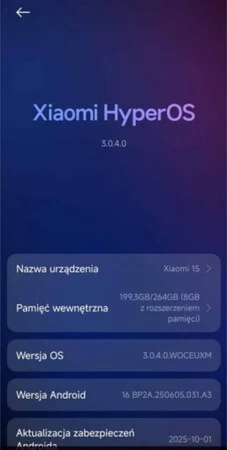
    Interestingly, the Xiaomi 15 has now become the third device that can access HyperOS 3 on a global scale. As per various reports, the update is labeled as HyperOS 3.0.4.0.WOCEUXM for users with the EU variant of the Xiaomi 15. Although this version is stable, sources like GSMArena have indicated that Xiaomi is limiting the distribution of HyperOS 3.0.4.0.WOCEUXM to its Mi Pilot testers at this stage.

    Rollout Timeline

    This means that it might take a little longer for Xiaomi to make HyperOS 3 available to a broader audience of Xiaomi 15 users. According to the screenshot below, HyperOS 3.0.4.0.WOCEUXM includes the Android security patches from October 1, 2025. For comprehensive information regarding the security vulnerabilities that these updates address, you can consult the relevant Android Security Bulletin.

    Download Size and More Info

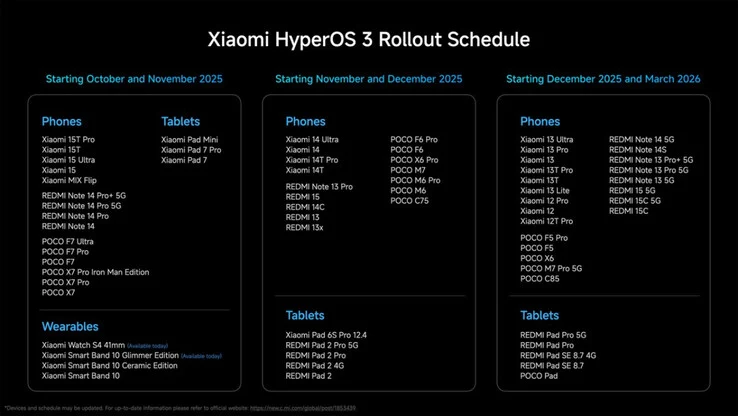
    Regarding HyperOS 3.0.4.0.WOCEUXM, GSMArena mentions that the update requires a download of approximately 8.2 GB. Additional insights about Xiaomi’s significant OS update are available in our initial article covering the launch of HyperOS 3. Furthermore, the company has disclosed its complete schedule for the HyperOS 3 global rollout, which we have included below for your reference.

    Source:
    Link


  • Samsung One UI 7 Release in July: New Gallery Icon Leaked

    Samsung One UI 7 Release in July: New Gallery Icon Leaked

    Samsung’s One UI is frequently recognized as one of the leading Android skins available. With the anticipation building for One UI 7, it seems the wait for a glimpse of this new software might be drawing to a close.

    Anticipated Beta Program

    Ice Universe, a dependable source for Samsung leaks, recently indicated that the One UI 7 beta program is likely to commence in late July or early August, barring any unforeseen delays. This prediction stands in contrast to another tipster, Tarun Vats, who forecasted a September rollout in the US, Korea, and Germany. Given Ice Universe’s reputable history, the earlier timeline appears more plausible.

    Inspired by iOS?

    Preliminary details about One UI 7 suggest it may incorporate elements from Apple’s iOS. Expected changes include an updated notification panel, a revamped quick settings section, and new quick actions on the lock screen.

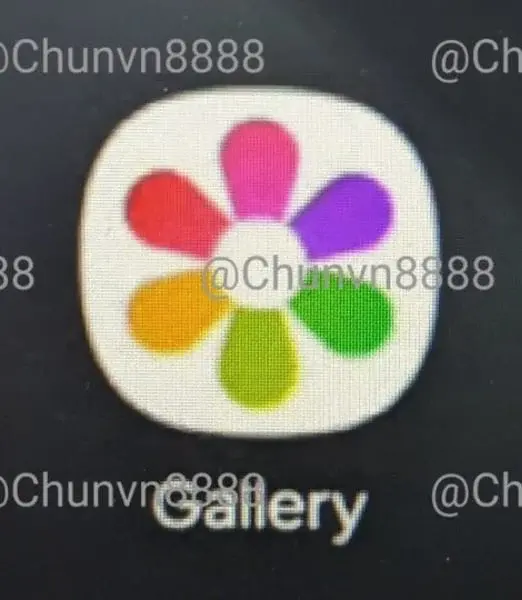
    Adding to the speculation, an image has emerged online, purportedly showing a redesigned Gallery app icon for One UI 7. Shared by @chunvn8888, the new icon moves away from the traditional monochrome design, opting for a more vibrant palette.

    Instead of the usual red background with white petal shapes, the new design features a white base with each petal in a different color, reminiscent of Google’s app icons.

    Icon Revamps and New Features

    This leak suggests Samsung might be overhauling other app icons as well. Similar updates could be expected for existing monochrome icons for apps like Email, Notes, and Camera. Additionally, there are murmurs about a native app-locking feature, akin to those found in other Android skins.

    Samsung’s annual SDC event, typically held in October, might serve as the platform for the stable release of One UI 7. Reflecting on last year’s schedule, Samsung unveiled One UI 6 at the SDC and completed the rollout within the same month.

  • Xiaomi 11T Pro Receives HyperOS Update – Latest News

    Xiaomi 11T Pro Receives HyperOS Update – Latest News

    Xiaomi has introduced its latest Android interface, HyperOS, for the Xiaomi 11T Pro model. This newly unveiled interface boasts enhanced visuals and animations, incorporating elements reminiscent of iOS design features like a universal blur effect and fresh lockscreen customization options, garnering positive reviews among users.

    Xiaomi 11T Pro Receives HyperOS Update

    The Xiaomi 11T Pro, previously operating on MIUI 14 based on Android 13, is now being upgraded to the Android 14-based HyperOS. Notably, this update will serve as the final one for the Xiaomi 11T Pro, having already received its third Android update, with the device originally launching on Android 11.

    HyperOS Arrival for Xiaomi 11T Pro

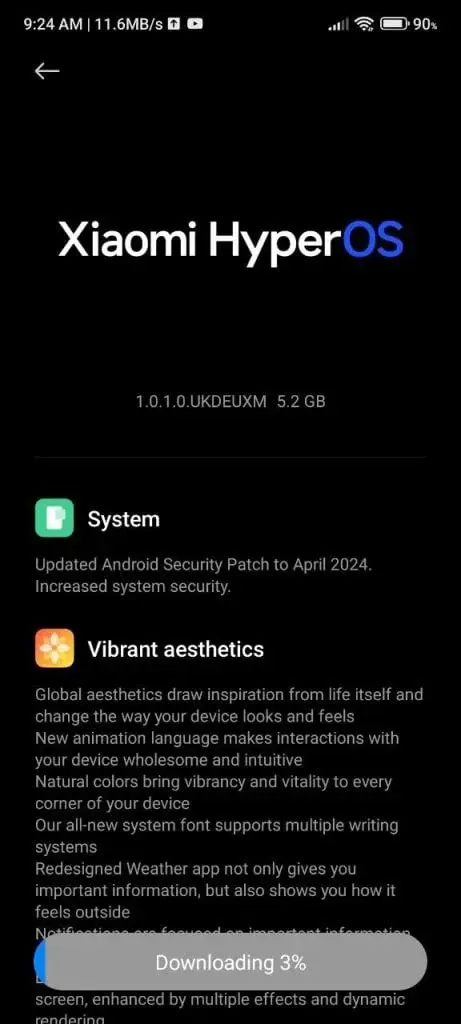
    Previously, it was announced that the Redmi K40 and K40 Plus models would receive the HyperOS update, and now the Xiaomi 11T Pro is joining the list. The latest system update from Xiaomi for the 11T Pro weighs in at 5.2GB and includes the April 2024 security patch. The update is identified with the version number OS 1.0.1.0 UKDEUXM.

    The rollout of the update has commenced for European devices and is expected to gradually reach other regions. Prior to this, the Mi 11 series was updated with HyperOS, and now the focus has shifted to the Mi 11T Pro. This update signifies the last for the Mi 11 series, showcasing Xiaomi's commitment to maintaining device relevance with four user interface upgrades and three significant Android updates. An image of the new interface was shared by Nightlake.

  • The latest Android 14 update is now available through Nothing OS 2.5 for Nothing Phone (1)

    The latest Android 14 update is now available through Nothing OS 2.5 for Nothing Phone (1)

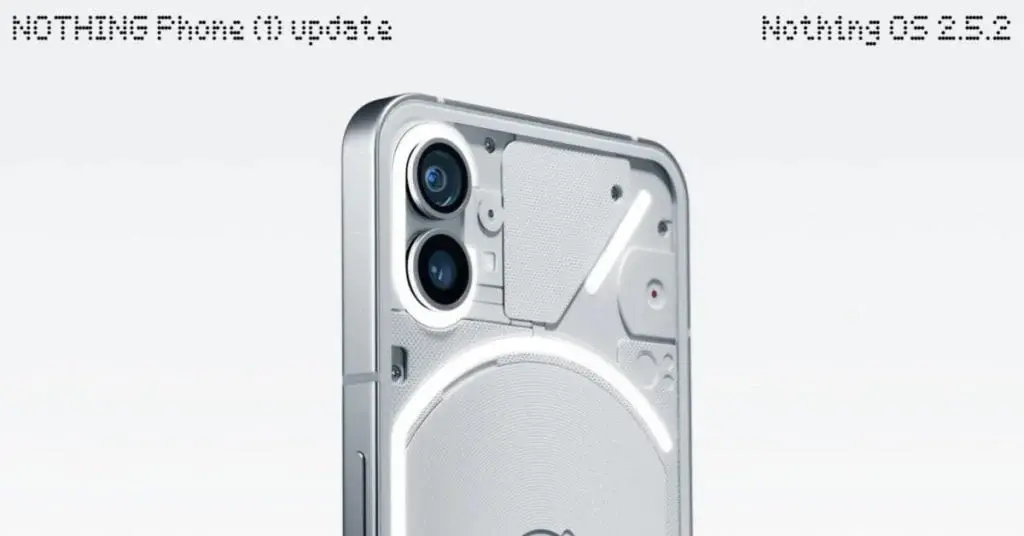
    The Nothing Phone is finally receiving its official Android 14 update, bundled with the Nothing OS 2.5 release. This update follows a month of beta testing and brings a variety of new features to the device.

    Android 14 Update Features

    With Android 14, users can expect deeper customization options for wallpapers, themes, and other visual elements. Additionally, the update enhances the phone’s signature Glyph Interface interaction, provides streamlined gestures and shortcuts, expands Quick Settings functionality with more informative tiles, and offers new and improved widgets for the home screen.

    How to Check for the Update

    Users can check for the update by navigating to their Phone’s settings menu (Settings > System > System Update). It’s important to note that the rollout is gradual and may take a few days to reach all devices.

    Changelog for the Nothing Phone Android 14 Update

    Customisation

    • Redesigned a joint Home Screen and Lock Screen customisation page and improved the edit wallpaper flow for a more comprehensive view of options.
    • New Atmosphere wallpaper effect. Transform your background photo into a dynamic wallpaper that brings motion to colours on your home screen. A seamless transition between your lock and home screens.
    • Introduced solid colour wallpapers for a cleaner Home Screen appearance.
    • Added a monochrome colour theme in the basic colour section.

    Glyph Interface

    • Get direct access to the Glyph Interface’s Music Visualisation feature (some of you may have already discovered it).
    • Improved overall Glyph light playback effect when synchronising with your device’s audio.
    • Added a new Glyph animation for when NFC is being used.
    • Improved the experience of Flip to Glyph.

    Gesture

    • Customisable double-press power button to quickly access a chosen feature. Just head to Settings > System > Gestures.
    • More Lock Screen shortcut options like: Do Not Disturb, mute, QR code scanner, and video camera.
    • Capture screenshots quickly with a three-finger swipe gesture.
    • New screenshot editor and menu, allowing for more advanced editing features and quick deletions.
    • Refreshed the back gesture arrow visual to be more in line with Nothing’s style.

    Quick Settings

    • Added support for switching ring modes in Quick Settings.
    • You can now directly set your network via Quick Settings without unlocking the device.
    • Updated Quick Settings layout and support to show more devices icons.

    New Widgets

    • Pedometer Widget: Track your daily steps directly from your home screen. Set goals and monitor your progress to stay motivated.
    • Media Player Widget: Displays the song currently playing. Control your music easily while on-the-move.
    • Screen Time Widget: Monitor and manage your daily screen time to maintain a healthy digital lifestyle.

    More Improvements

    • Optimised the experience of the Weather app and improved the notification of weather alerts.
    • Made it possible to set ringtone and notification sound volumes separately, with an updated volume control interface.
    • Automatically excludes the preview of the previous screenshot when taking continuous screenshots.
    • Improved the stability of the camera.
    • Enhanced the overall smoothness and responsiveness of the system for a more fluid user experience.
    • Enhanced system stability and improved battery life.
  • Android 14 Excitement Grows with OnePlus Open and January Patch

    Android 14 Excitement Grows with OnePlus Open and January Patch

    Software Update Released for OnePlus Open Foldable Phone

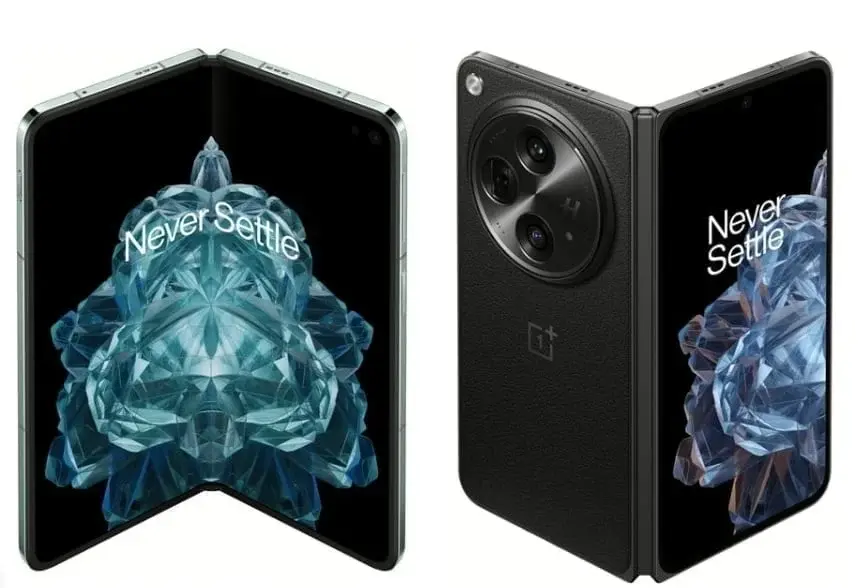
    The OnePlus Open foldable phone underwent a recent software update at the end of January. This particular update aimed to enhance the device’s security features and address various issues flagged by users. Identified as version CPH2551_13.2.0.301, the update occupies a file size of 459MB.

    Enhanced Touch Control Utilization and Fresh Multi-Tasking Capability

    An integral component of this update is the refinement of the foldable phone’s touch control functionality. Users can anticipate smoother and more prompt touch responses on their devices. Moreover, the update showcases a novel multi-tasking attribute enabling users to seamlessly drag and drop apps to supplant the current app within a three-way split view. Such an addition furnishes OnePlus Open users with a more coherent and user-friendly multi-tasking environment.

    Summary of the Most Recent Update

    The extensive summary of the most recent update encompasses:

    System

    • Enhancing system robustness.
    • Augmenting touch control functionality.
    • Introduction of the capability to drag and substitute the current app with a new one within a three-way split view.
    • Integration of the January 2024 Android security patch to bolster system security.
    • Rectification of a probable display anomaly in Quick Settings.
    • Elimination of the Background stream feature from the Smart Sidebar.

    Communication

    • Elevating the stability of network connections.

    Camera

    • Amplifying camera performance to enrich user experience.

    Anticipation for OxygenOS 14 and Android 14

    While this software update brings forth various enhancements, OnePlus Open users eagerly await the advent of OxygenOS 14 which stems from Android 14. OnePlus unveiled its most recent customized interface, OxygenOS 14, in September, incorporating novel features like File Dock, Content Extraction, and Smart cutout. Despite this, an official timeline is yet to be disclosed regarding the release of Android 14 on the OnePlus Open device. The commencement of the Open Beta 2 rollout in India signals that users may need to exercise patience for a few more weeks to partake in the latest operating system.

    Punctual Updates from OnePlus

    Despite the collective enthusiasm for Android 14, OnePlus remains steadfast in delivering timely updates for its inaugural foldable gadget. For OnePlus Open users, seamlessly locating the January update can be accomplished by navigating through Settings > About device > OxygenOS > Check for update. This ensures that users remain abreast with the latest enhancements and repairs tailored for their OnePlus Open foldable phone.