Key Takeaways
1. Affinity Photo, Designer, and Publisher have been merged into a single free app, allowing easy switching between pixel, vector, and layout interfaces.
2. The new Affinity app will always be free for basic functions, with paid AI features available through a Canva Pro subscription.
3. One Canva Pro subscription grants access to AI features in both the Affinity app and Canva.
4. Users can export creations directly into Canva, enhancing integration between the two platforms.
5. The combined app allows for seamless use of tools across pixel and vector modes, simplifying project organization for print and web.
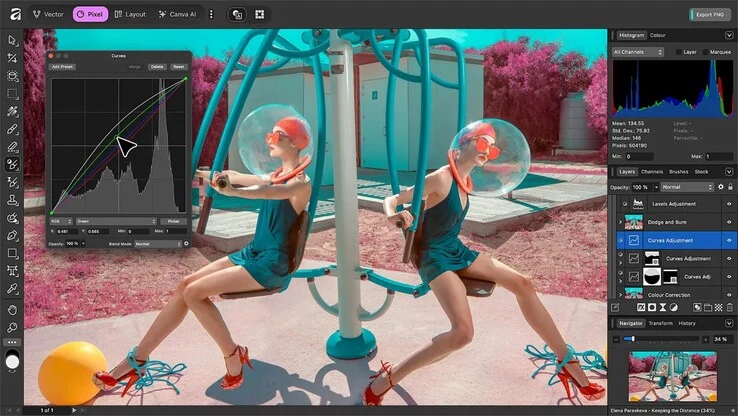
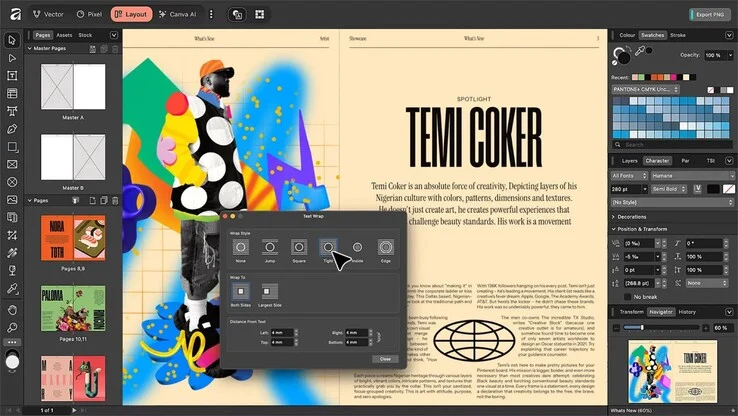
Affinity Photo, Designer and Publisher have been combined into a new Affinity app, which is now available for free on the developer’s official site. This new app brings together the features of all three previous applications. Users can easily switch between pixel, vector, and layout interfaces using a button located in the top left corner of the screen.
Enhanced Integration
In the past, Affinity Publisher allowed some integration, but now, these three apps are totally merged. According to Serif Labs, the Affinity app will always be free, and there will be no subscription necessary for the basic functions. The only paid features are the AI tools, which are available through a Canva Pro subscription priced at $120 each year.
Subscription Details
Canva highlights that just one subscription is needed to access the AI features in both the Affinity app and Canva. Moving forward, Affinity will integrate even more closely with Canva, allowing users to directly export their creations into Canva. Those who choose to forego the AI features and Canva integration can still work offline without needing a subscription, similar to how the old apps functioned.
Combining the three applications into one should provide benefits for users, as all tools can be utilized across the three modes, which can be switched at any moment. This makes it simpler to mix pixel and vector components and organize them as layouts for both print and web projects.
Source:
Link