Category: Software

  • Apple Maps to Introduce Advertisements Soon

    Apple Maps to Introduce Advertisements Soon

    Key Takeaways

    1. Apple may introduce advertisements in Apple Maps, allowing businesses to pay for top search placements.
    2. This advertising feature could be available as soon as next year, similar to paid placements in the App Store.
    3. Apple aims to enhance user experience with a potentially superior interface and plans to leverage AI for relevant search results.
    4. There are concerns about user backlash due to perceived greed, as previous ad integrations in Apple’s services faced criticism.
    5. While not officially confirmed, promoted search results in Apple Maps could be expected by 2026 if the initiative moves forward.


    Apple’s New Adventure in Advertising

    Apple appears to be heading into the world of advertisements within Apple Maps. As reported by Mark Gurman from Bloomberg, the tech giant based in Cupertino might soon enable businesses to pay for a top spot in search results in its navigation app.

    Ads on the Horizon

    Gurman suggests that this concept has been under consideration for several years now. He mentions that Apple could start incorporating ads in the Maps app “as soon as next year.” These ads would function similarly to the featured placement in App Store searches, where businesses can pay to have their app appear at the top of search results (with clear labeling as advertisements). Therefore, businesses would have the option to pay Apple to highlight their store, restaurant, or any other location when users search with specific keywords.

    A New User Experience?

    According to Gurman, Apple’s interface is expected to surpass “what Google and other companies offer inside of mapping services,” although he did not provide specific details. This means the interface’s quality may be a matter of personal opinion, as design is often subjective. Furthermore, Gurman notes that Apple plans to “leverage AI” to ensure search results remain “relevant and useful.” Apple’s version of AI, known as Apple Intelligence, has had mixed reviews from users, so it will be fascinating to see how it works when ads are added.

    Concerns About Greed

    Naturally, the main concern here is the notion of greed. Gurman highlights that Apple’s previous attempts to integrate ads into its services (like Apple TV and iCloud) have generally faced backlash from iPhone users. Given the high prices of Apple’s devices, this criticism seems justified.

    As of the latest updates, Apple Maps ads haven’t been officially confirmed, but if Apple decides to pursue this new revenue source, users might notice promoted search results in a 2026 update for Apple Maps.

    Source:
    Link


  • Starlink Network Speeds to Increase Drastically by 2025

    Starlink Network Speeds to Increase Drastically by 2025

    Key Takeaways

    1. Starlink’s download speeds increased over 50% in 2025, rising from 150 Mbps to over 200 Mbps, with some users experiencing speeds up to 400 Mbps.
    2. SpaceX launched 134 Starlink satellites in 2025, surpassing the previous year’s launches and improving network capacity.
    3. The new Starlink V2 mini satellites now constitute over 50% of the satellite constellation, enhancing overall performance.
    4. Significant firmware updates improved beam forming and ground station efficiency, leading to noticeable speed increases after fixing a major outage.
    5. Future Starlink V3 satellites, launching with the Starship 3 rocket, are expected to provide gigabit speeds by 2026, but currently, only the Performance dish can access these speeds.


    Starlink satellite Internet has seen a big boost in download speeds this year, thanks to a fast pace of satellite launches and ongoing software upgrades that enhance performance both in space and on the ground.

    Improved Speeds in 2025

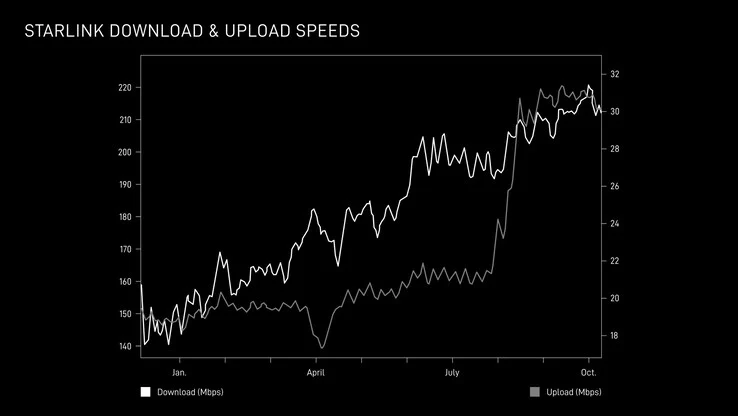
    The download speeds for Starlink have jumped over 50% over the year, climbing from a median of around 150 Mbps in January to more than 200 Mbps as of now. Similarly, the upload speeds have also increased, moving from 20 Mbps at the start of the year to over 30 Mbps currently.

    Peak Performance

    These numbers reflect the “peak-hour network-wide” averages, but many users are actually experiencing download speeds that can reach up to 300 Mbps or even 400 Mbps at certain times.

    As of October 21, SpaceX has successfully launched 134 Starlink satellites using the Falcon rocket, surpassing the total number of launches from last year. Users are noticing this increase in capacity through their Starlink standard dish terminal, which is currently available at a discount of 20% on Amazon.

    Satellite Advancements

    With the rapid launch of Falcon rockets, the new Starlink V2 mini satellites now make up over 50% of the entire constellation, playing a key role in boosting both download and upload speeds. SpaceX has also rolled out important firmware updates that significantly enhance beam forming in space and improve the efficiency of ground stations. One of these updates caused a significant outage in Starlink’s history, but once the problem was fixed, users reported a noticeable increase in speeds.

    The updates to the Starlink ground station software are also being conducted in anticipation of the new Starlink V3 satellites, which are as big as a Boeing 737 when fully deployed. Each V3 satellite launch with the forthcoming Starship 3 rocket will add 20 times the capacity compared to the current V2 satellites. This additional 60 Tbps of capacity from each V3 launch is expected to deliver gigabit speeds for Starlink by 2026. However, currently, only the expensive Performance dish can utilize these speeds. It’s uncertain whether the Starlink Standard Kit will also be upgraded to support download speeds of 1 Gbps or more for those users who need it and are willing to invest in gigabit satellite Internet.

    Source:
    Link


  • Huawei Devices Receiving HarmonyOS 6 Update Soon

    Huawei Devices Receiving HarmonyOS 6 Update Soon

    Key Takeaways

    1. HarmonyOS 6 is Huawei’s new software update, built entirely on its own kernel, moving away from Android reliance.
    2. Key features include a fresh design, customizable lockscreen, improved UI performance, and an AI personal assistant called XiaoYi.
    3. Enhanced security measures include proactive anti-fraud features and an anti-peep function to protect sensitive information.
    4. The initial beta rollout is in China for Huawei’s latest devices, with a closed beta for additional devices starting this month.
    5. There is no current information on a global release timeline for HarmonyOS 6, leaving users outside China waiting for updates.


    Following its announcement in June, Huawei has launched the public beta for its new software, HarmonyOS 6. This update is seen as the commercial version of what was previously called HarmonyOS NEXT, which is built entirely on Huawei’s own kernel and does not rely on Android (AOSP).

    Key Features and Design

    HarmonyOS 6 features a fresh design with new animations, options for customizing the lockscreen, and improved UI performance. The most significant change is the strong integration of AI. The new XiaoYi personal assistant serves as a ‘smart partner’ that can provide contextual information and perform tasks for you automatically. This includes handling complex, multi-step tasks, organizing research, and offering a special ‘Sees the World’ feature designed for visually impaired users.

    Enhanced Security Measures

    AI has also enhanced security with proactive anti-fraud measures that can identify scam calls, including those that use AI face-swapping techniques. Additionally, there’s an anti-peep feature that automatically conceals sensitive information when it senses someone else is looking at your screen. Furthermore, HarmonyOS 6 allows file sharing between Huawei and Apple devices, such as iPhones, iPads, and Macs.

    Availability and Future Updates

    The initial rollout is currently taking place in China, covering Huawei’s latest flagship smartphones, foldables, and tablets. Along with the public beta, Huawei has also started a closed beta for a different range of devices this month, including phones, laptops, tablets, and wearables. A third wave of updates is planned for November and December 2025.

    To access the beta, users with eligible devices must manually sign up. However, it’s important to note that this beta schedule is specific to China, as Huawei has made clear. The company has not yet shared any details regarding a global release timeline for HarmonyOS 6, meaning users outside of mainland China will need to wait for more information.


  • Samsungs Galaxy S21 FE Receives Final Major One UI Update

    Samsungs Galaxy S21 FE Receives Final Major One UI Update

    Key Takeaways

    1. Samsung has begun rolling out the One UI 8.0 update for the Galaxy S21 FE, marking the completion of its major OS upgrade cycle with Android 16.
    2. The update introduces new features, including a redesigned Samsung Internet browser, enhanced customization options, and improved automation in the Modes And Routines app.
    3. Users can expect security updates for at least another year, although the frequency has changed from monthly to quarterly.
    4. Some features from One UI 8 are not included in the Galaxy S21 FE update, such as the “Best Face” camera function and AI-driven wallpaper suggestions.
    5. The update rollout is currently taking place in Thailand and Vietnam, with a file size over 2GB, recommending a Wi-Fi connection for download.


    Samsung has started distributing the highly anticipated One UI 8.0 update for the Galaxy S21 FE, which introduces a variety of new features and enhancements. This update is a major milestone for users, marking the fourth significant One UI upgrade for this Fan Edition model and fulfilling Samsung’s commitment to software support. According to the company’s initial support plan, this Android 16-based update represents the final major OS version that the device will receive.

    Software History of the Galaxy S21 FE

    The software path for the Galaxy S21 FE began with its release in early 2022, which came with Android 12 (One UI 4.0) already installed. Later that same year, it received the Android 13 update, followed by Android 14 in late 2023. A few months ago, the phone was updated to Android 15, and now the rollout of the Android 16 build marks the end of its major upgrade cycle. However, this does not imply that the phone is left vulnerable. Users can expect security updates for at least another year. It’s also important to mention that Samsung has recently changed the S21 FE’s security update frequency from monthly to quarterly, so these updates will come less often.

    New Features in One UI 8.0

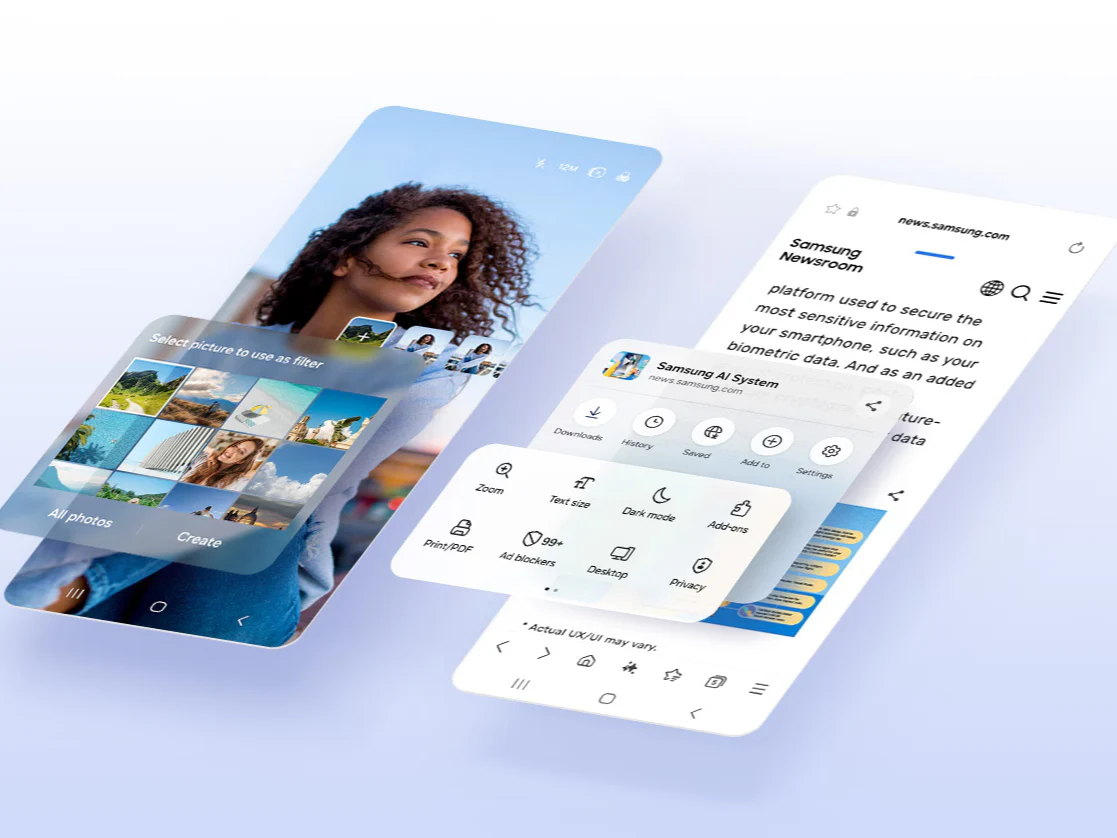
    One UI 8.0 introduces a number of improvements. Users will observe a refreshed design for the Samsung Internet browser, Quick Share, and the Weather app, which now boasts more lifelike visuals. The update also enhances customization options for the lock screen and Quick Panel. For those interested in automation, the Modes And Routines app has been upgraded to include more available actions and conditions, with new presets and the option to gather data from apps like Clock and Calendar. Other useful additions include a scientific calculator that now works in portrait mode and enhanced Samsung DeX support that allows for WQHD output.

    Features Not Included in the Update

    Although this update brings a lot of changes, it does not encompass all the new features of One UI 8. The S21 FE’s version misses several features, such as the “Best Face” camera function, AI-driven wallpaper suggestions from the Gallery, and the “Adaptive lock screen clock.”

    The rollout of the Android 16 update is currently underway for Galaxy S21 FE users in Thailand and Vietnam. The firmware is tagged with the version number G990EXXUIHYJ2 and contains the security patch from September 2025. The download size exceeds 2GB, so it’s advisable to use a Wi-Fi connection. If you’re located in these areas, you can check for the update by going to Settings, selecting Software update, and then tapping Download and Install. Once the file is downloaded, simply hit the Install now button to start the installation process.

  • Microsoft Releases Urgent Update for All Windows 11 Users

    Microsoft Releases Urgent Update for All Windows 11 Users

    Key Takeaways

    1. Microsoft issued an urgent update (KB5070773) to fix USB keyboard and mouse issues in Windows Recovery Environment (WinRE) after the October 2025 security update (KB5066835) disabled them.

    2. The problem affected Windows 11 versions 24H2, 25H2, and Windows Server 2025, limiting users’ ability to troubleshoot issues in WinRE.

    3. Users can obtain the fix via Windows Update or download it directly from the Microsoft Update Catalog.

    4. The issue was specific to the recovery environment and did not impact the normal functioning of USB devices in regular Windows sessions.

    5. Microsoft’s quick response aims to prevent future interruptions to recovery tools and encourages users who rely on WinRE to update immediately.


    Microsoft has issued an urgent update to address a situation that left numerous Windows 11 users unable to utilize their USB keyboards and mice in the Windows Recovery Environment. This problem surfaced after the installation of the October 2025 security update, KB5066835, which accidentally disabled USB input devices while trying to access WinRE. The Windows Recovery Environment is essential for troubleshooting when the operating system fails to start properly. Without support for USB inputs, users found themselves unable to navigate repair tools, making it difficult to fix issues unless they had Bluetooth or PS/2-connected devices available.

    Details on the Update

    Microsoft acknowledged the problem on its Windows release health dashboard, stating that it impacted both Windows 11 versions 24H2 and 25H2, in addition to Windows Server 2025. To fix this issue, the company has rolled out the KB5070773 emergency patch, which restores complete USB functionality in WinRE. Users are encouraged to obtain this fix via Windows Update or by downloading it directly from the Microsoft Update Catalog.

    Impact of the Issue

    The tech giant clarified that the problem was limited to the recovery environment and did not affect regular Windows sessions, where USB devices were still operational. They also indicated that the update is now fully available and aims to avert any future interruptions to recovery tools. This prompt resolution comes on the heels of several update-related challenges in recent months, but Microsoft’s swift action this time helped reduce the impact. If you frequently use the recovery environment for troubleshooting, it’s advisable to update right away to ensure your input devices function properly.

  • Amazon Acquires Creative Control of 007 Franchise for $20 Million

    Amazon Acquires Creative Control of 007 Franchise for $20 Million

    Key Takeaways

    1. Amazon invested $20 million for creative control over the Bond franchise, following their acquisition of MGM for $8.4 billion.
    2. Tensions exist between Amazon and Eon Productions regarding the direction of the Bond series, particularly the portrayal of the character.
    3. The Broccoli family retains a financial stake in the franchise through a joint venture agreement with Amazon.
    4. Denis Villeneuve is set to direct the next Bond film, with filming expected to start in 2027.
    5. Amazon CEO Jeff Bezos sought public opinion on the next Bond actor, with Henry Cavill being a popular choice among fans.


    Back in February, Amazon shared news about a new partnership with experienced producers Michael G. Wilson and Barbara Broccoli from Eon Productions. Recent tax documents revealed that Amazon invested $20 million to gain creative control over the direction of the Bond franchise.

    Strained Relations

    This announcement followed an alarming report from The Wall Street Journal, which indicated that the future of the Bond series was in doubt. There were issues between the family that controlled the fate of the iconic secret agent and Amazon, mainly revolving around the franchise’s direction.

    After Amazon acquired MGM for a whopping $8.4 billion, Eon Productions kept the creative reins of the franchise. Amazon obtained rights to produce and release the films but had no input on other matters. Decisions regarding the new Bond actor, following Daniel Craig’s final outing in No Time to Die, required Eon’s approval before this partnership was formed.

    Different Visions

    Reportedly, tensions were high as Broccoli and Amazon disagreed on what the secret agent represents in today’s film landscape. Broccoli supposedly believed that Bond should remain a British man, and was open to casting a person of color without caring about their sexual orientation. On the contrary, Amazon leaned towards well-known actors for the role and questioned whether portraying a violent, womanizing secret agent was beneficial for society in modern times. This came after the mixed reviews for Amazon’s earlier ambitious project, “The Rings of Power,” set in the Lord of the Rings universe.

    According to The Hollywood Reporter, the deal includes terms that ensure the Broccoli family will still have financial stake in the Bond franchise through the joint venture agreement. There might also be other components, like earnouts or stock options, that could influence the final sale price’s value. Reports suggested at the time that the overall worth might be closer to $1 billion.

    Future Plans

    The studio is currently focused on their next Bond film and is in the process of searching for the new Bond actor. Denis Villeneuve, known for Dune, will be directing, while David Heyman and Amy Pascal are producing, and Steven Knight is tasked with the writing. Amazon CEO Jeff Bezos had previously sought public opinion on who should take on the role, with a large majority favoring Henry Cavill. It’s well-known that Cavill auditioned for the 2006 film Casino Royale.

    The untitled film is anticipated to start filming in 2027, with a trailer possibly being released as early as 2028.

  • Elon Musk’s New Venture: Selling X Usernames for Millions

    Elon Musk’s New Venture: Selling X Usernames for Millions

    Key Takeaways

    1. Elon Musk faces challenges with Tesla’s declining figures but can leverage other ventures like SpaceX to counterbalance.
    2. Musk is focusing on enhancing his social media platform, X, by introducing a new username marketplace called the X Handle Marketplace.
    3. The X Handle Marketplace allows for the reassignment and sale of inactive or desirable usernames, starting with access for Premium organizations.
    4. Usernames on the marketplace could sell for prices ranging from $2,500 to over $1 million, categorized into priority and rare handles.
    5. Community reactions to the marketplace are mixed, with some praising it as innovative and others criticizing it for past policies against username selling.


    Elon Musk has been encountering some challenges recently, with Tesla experiencing a notable decline in its figures. Despite this, the tech mogul is in a rare situation to counterbalance weaker sectors by utilizing his other ventures. For example, SpaceX has just acquired a fleet of Cybertrucks, which they claim is for electrification efforts. However, some critics believe this move is primarily aimed at improving Tesla’s sales numbers.

    Focus on Social Media

    Currently, Musk seems to be redirecting his attention towards enhancing his social media platform, X. The company has made a formal announcement about the introduction of a new username marketplace. This platform, named the X Handle Marketplace, will facilitate the reassignment and sale of inactive or highly desirable usernames.

    The official debut occurred on October 19 through the @Xhandles account. According to X, this marketplace provides an “industry-first solution” for the organized redistribution of unused usernames. Initially, access will be available to Premium organizations, followed by Premium+ subscribers. Specific details about the exact launch date or the initial sales have not yet been revealed.

    Pricing and Market Potential

    As reported by the tech website WinFuture, some individual usernames could command seven-figure prices. Depending on various factors like popularity, length, or cultural significance, the prices might vary from approximately $2,500 to more than $1 million. X categorizes these handles into two groups: priority handles and rare handles.

    Reactions from the community are quite varied, as is often the case. Many view this initiative as an innovative approach to digital ownership, drawing parallels to domain trading and NFT marketplaces. Some even compare owning a rare handle to having a custom license plate. On the flip side, critics highlight the hypocrisy: just a couple of years ago, selling usernames could lead to suspension, whereas now X is establishing an official marketplace. Others express doubt regarding the unclear criteria for “inactivity,” the rental-like structure associated with priority handles, and the opacity surrounding pricing details.


  • Visualize Garmin Smartwatch Data Locally with Open-Source Tool

    Visualize Garmin Smartwatch Data Locally with Open-Source Tool

    Key Takeaways

    1. Garmin Connect is both an app and a web platform that visually interprets various data types.
    2. Garmin Grafana is an open-source tool with extensive customization options but requires a Docker container for installation.
    3. The software retrieves diverse data from Garmin’s servers, including oxygen saturation, step counts, and workout details.
    4. Data synchronization is automatic, eliminating the need for manual updates, and users can create customized heatmaps.
    5. Users can display data from two accounts simultaneously, but this requires setting up an additional database within the same influxdb instance.


    Garmin Connect serves as more than just an application; it also functions as a web platform that can visually interpret different kinds of data. On the other hand, Garmin Grafana is an open-source option that has been around for some time and is quite appealing due to its wide-ranging setup possibilities. However, getting this tool running takes a bit of work since the software only comes in the form of a Docker container. A script can ease the installation process, but it necessitates using Linux, which can be emulated on typical Windows computers.

    Data Retrieval Capabilities

    Essentially, this software pulls various supported data types from Garmin’s servers. Users can check information like oxygen saturation, step counts, stress and recovery metrics, and details about workout sessions. The open-source application promotes extensive customization options. For example, it allows users to design their own views and combine different metrics. Additionally, it’s possible to generate and calculate unique values, export data, and establish alerts.

    Automatic Synchronization

    Data is automatically pulled from Garmin at specific intervals, so there is no need for manual syncing. Users can also create heatmaps for activities like walking or sleep, although they must first customize these views. There’s even the option to show data from two users at the same time, but setting this up is a bit more complex, as it involves creating a second database within the same influxdb instance.

    Source:
    Link


  • Remove Bloatware with Flyoobe 1.40 During Windows 11 Installation

    Remove Bloatware with Flyoobe 1.40 During Windows 11 Installation

    Key Takeaways

    1. Flyoobe Overview: Flyoobe is a modular toolkit designed to give users more control over the Windows 11 installation experience, combining debloating and customization functions.

    2. Preventive System Cleanup: Version 1.40 introduces a system cleanup feature that allows users to deactivate and uninstall bloatware before the system launch, enhancing stability.

    3. AI Feature Removal: The tool focuses on eliminating Microsoft’s AI functionalities, like Copilot, allowing users to disable them to prevent resource drain and privacy concerns.

    4. Customization Options: Flyoobe offers four presets for customization, catering to different user needs while integrating debloating with hardware limitation bypass.

    5. Environmental Considerations: The bypass capability is promoted as eco-friendly, but users are warned about the risks of ignoring official system requirements, which may affect security and reliability.


    The ongoing addition of non-removable, resource-heavy features into Windows 11, like Microsoft’s AI assistant Copilot, has sparked the creation of various tools by developers aimed at removing these features.

    Flyoobe: A Modular Toolkit

    One such tool, Flyoobe, created by builtbybel, serves as a modular toolkit designed to restore significant control to users over the installation experience. The app (latest version: 1.40), which gets its name from the “out-of-box experience” (OOBE), combines the established functions of the popular Flyby11 upgrader assistant with a detailed debloater and customization toolkit.

    New Features in Version 1.40

    A notable addition in the recent release, version 1.40.564, is the capability for a preventive system cleanup. Builtbybel states that the new overview page displays all Microsoft OOBE applications and system elements, allowing users to specifically deactivate and uninstall bloatware right before the initial system launch. This proactive step helps to prevent the later removal of unnecessary software that is deeply embedded in the system, potentially enhancing stability compared to post-installation debloaters.

    Focus on AI Feature Removal

    Special emphasis is placed on eliminating AI functionalities. As Microsoft continues to integrate Copilot more into the OS, Flyoobe provides a direct means to stop this integration from happening. The tool allows users to turn off AI features completely, thus avoiding resource drain and possibly privacy-related telemetry actions right from the start.

    Customization Options

    The tool organizes its array of customization features into four selectable presets, tailored for varying user needs.

    The technical intricacy of Flyoobe lies in its blend of the Debloat method with Flyby11’s original purpose: bypassing hardware limitations. This utility still permits the installation of Windows 11 on hardware that isn’t officially supported by bypassing checks for TPM 2.0, Secure Boot, and non-qualified CPUs.

    Environmental Considerations

    Builtbybel promotes this bypass capability as an eco-friendly way to avoid premature electronic waste while enhancing user autonomy. However, users must proceed with caution, as ignoring official system requirements could result in issues like missing security updates or diminished system reliability. Therefore, those utilizing these features should be aware of the potential dangers.

    The integration of these two essential capabilities—hardware bypass and software debloat—into Flyoobe 1.40 establishes it as one of the most extensive configuration tools available for Microsoft’s operating system at present.

    Source:
    Link


  • Philips Hue App Update: Four New Features and Improvements

    Philips Hue App Update: Four New Features and Improvements

    Key Takeaways

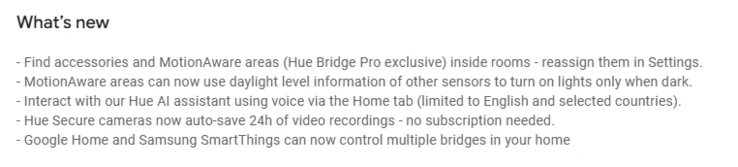
    1. The Philips Hue app version 5.53 enhances access to MotionAware areas for Hue Bridge Pro users.
    2. Users can create new MotionAware areas easily via the Settings tab and a three-dot menu.
    3. Reconnection guidelines for switches and sensors are now available in the device settings.
    4. The Room View feature has been upgraded to display switches, sensors, cameras, and MotionAware areas.
    5. A privacy zone option is now available for Hue Secure Video Doorbell users with a Plus plan.


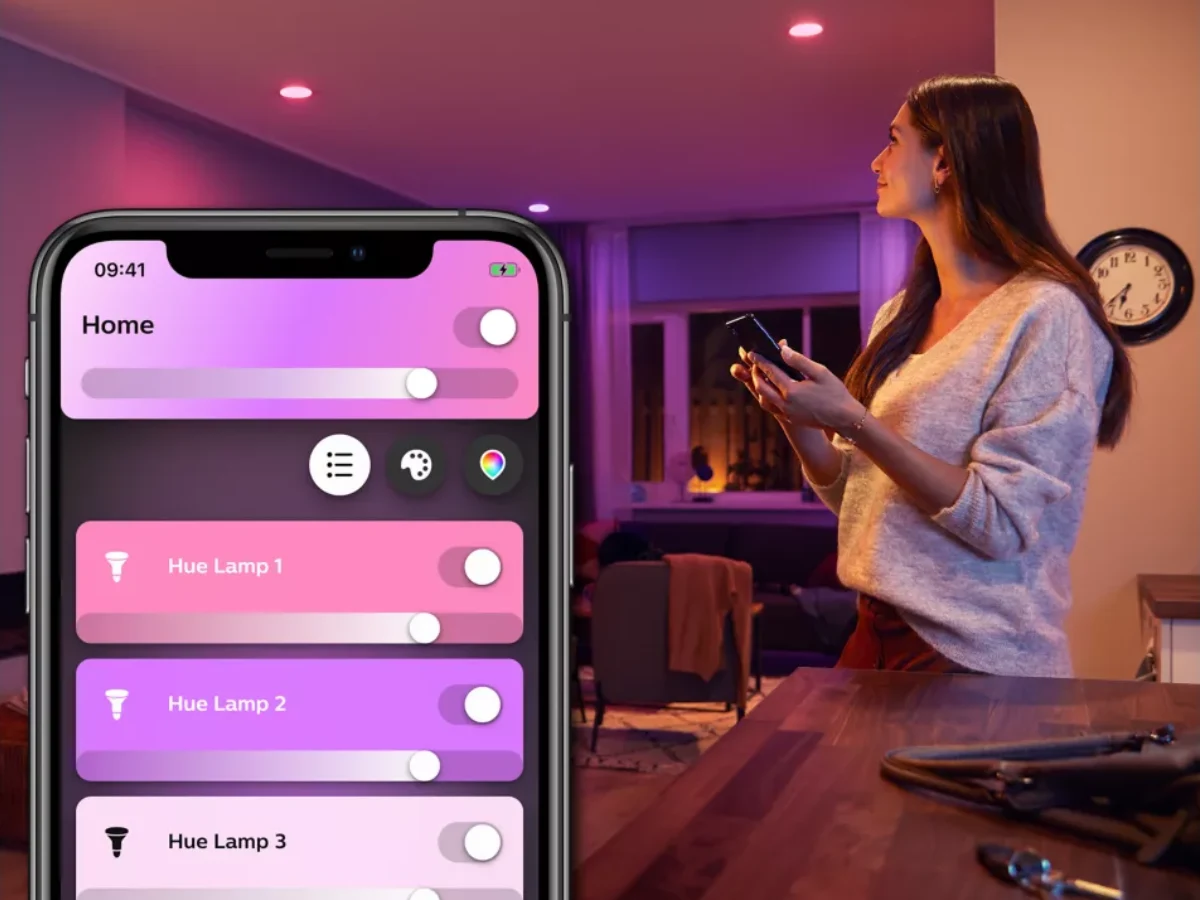
    The Philips Hue app has just released version 5.53 for those who use the brand’s smart home gadgets. This new update for both iOS and Android follows closely on the heels of version 5.52, which introduced the feature to export scenes to Apple Home using Matter, and also added support for the new Hue Secure Wired video doorbell, currently priced at $169.99 on Amazon.

    Enhancements for Hue Bridge Pro Users

    With the arrival of the Philips Hue app version 5.53, there’s a notable enhancement for users with the Hue Bridge Pro. This update simplifies the process of accessing your MotionAware areas. Just to recap, MotionAware allows clusters of smart lights to function as motion detectors. Now, you can easily find your MotionAware areas in the Settings tab, and create new areas by using the three-dot menu found in a specific room or zone. Also, there’s an improvement for those with switches or sensors; if you can’t reach these accessories, reconnection guidelines are available from the device’s settings screen.

    Additional Features Noted by Users

    Moreover, two additional updates, which are not detailed in the official release notes, have been noticed by Hueblog.com. The first improvement is the already mentioned Room View upgrade, which enables users to see switches, sensors, cameras, and MotionAware areas in each room. These features are now included alongside the existing lists of lights and scenes in Room View. The second new feature is the privacy zone option for users of the Hue Secure Video Doorbell who have a Plus plan, allowing you to obscure a portion of the image.

    Source:
    Link