Category: Computers

  • Modular Low-Profile Mechanical Keyboard with Num Pad and More

    Modular Low-Profile Mechanical Keyboard with Num Pad and More

    Key Takeaways

    1. Modular Design: The Naya Connect features a unique modular design, allowing users to customize their keyboard setup with various modules that connect around a central hub.

    2. Typing Experience: The Naya Type uses Kailh Choc V2 switches for a smooth and pleasant typing experience, distinguishing it in the low-profile mechanical keyboard market.

    3. Connectivity Features: The keyboard and modules utilize magnetic connections and proprietary pogo pins for seamless electrical links, with the Naya Type supporting both wired and wireless connectivity.

    4. Battery Life: The modules for the Naya Connect have battery capacities between 800 mAh and 1,500 mAh, with expected good battery life based on the Naya Create’s performance.

    5. Launch Offers: The Naya Connect will have special launch discounts for early buyers on its various components, with the Kickstarter campaign starting on January 13.


    Naya, the brand behind the Naya Create modular, ergonomic, and sleek wireless mechanical keyboard, is preparing for its upcoming product launch. This time, they are taking a more traditional approach, yet still keeping a modular element that enables users to customize the keyboard to fit their specific preferences and optimize their experience. The Naya Connect is set to be a low-profile wireless mechanical keyboard that will work with Naya’s range of modules designed for the Create. A recent announcement reveals that the Naya Connect will debut on Kickstarter on January 13, but the pricing can get tricky due to the keyboard’s modular design.

    Modular Design Features

    Unlike a typical low-profile mechanical keyboard, the Naya Connect offers a system of interconnected modules that can be arranged around a central hub. The primary components include either the Naya Type, which is a 75% low-profile mechanical keyboard, or the Naya Dock, a separate hub that accommodates one of the other input devices designed for the ergonomic wireless keyboard, the Naya Create. By default, the Naya Type functions as a wired mechanical keyboard; however, connecting it to a Dock and a module adds wireless features, similar to the Naya Create. The Dock itself has four extra keys beneath the input module, likely intended for macros or specific functions based on the module in use.

    Typing Experience

    The Naya Type is a compact 75% low-profile keyboard utilizing Kailh Choc V2 switches, which we have previously examined in the Iqunix Magi65 Pro (currently priced at $128.79 on Amazon). During our tests, these Kailh switches provided an impressively smooth typing experience along with a pleasant sound, which has been somewhat uncommon in the low-profile mechanical keyboard market until this point.

    Connectivity and Features

    Modules for the Naya Connect connect magnetically and use proprietary pogo pins for electrical links. Besides its modular design, the Naya Type includes several attractive features, such as a full aluminum casing only 14.9 mm thick with switches and keycaps. It also features a split space bar for better efficiency and unique shine-through polycarbonate keycaps for the white backlighting. When not being used wirelessly, the Naya Type connects via USB-C, and it comes with an easy-access hardware on/off switch.

    Naya promotes the Connect as a tool for enhancing productivity, so the expansion modules focus on productivity features. Some modules, such as the Float mentioned earlier, introduce innovative navigation or interaction methods for the keyboard or Dock hub. While additional modules might be available at launch, the current confirmed lineup for the Naya Connect module ecosystem includes:

    Battery and Firmware

    The Naya Dock does not appear to feature a built-in battery or antenna; however, the modules that attach to the Dock include wireless connectivity components, with battery capacities ranging from 800 mAh to 1,500 mAh. It remains uncertain how long the Naya Connect devices will operate on battery alone, but the Naya Create split keyboard is said to last about 80 days on a single charge, depending on the module in use. It’s reasonable to expect that the Type and Connect will offer good battery life, as they are less complex devices with fewer wireless components than the Create. The Naya Create runs on ZMK firmware, recognized for its high customizability and efficiency, and it is believed that the same Flow configuration tool will be utilized for the Naya Connect.

    Special Offers for Early Buyers

    Customers purchasing the Naya Connect devices will receive a special launch discount on the new Type low-profile keyboard, Multipad, 6-key module, and Dock through a VIP offer currently available on the Naya website. There is also a discount for existing modules when bought together with the Naya Connect Dock. The Naya Type keyboard starts at $99 with the VIP discount, but the standard MSRP will be $189. The Multipad has a VIP price of $44 with an MSRP of $69, the 6-key module is $29 for VIPs and $49 MSRP, while the Dock will be available for $39 for VIPs and $69 retail. Although these products are not available yet, the Kickstarter campaign will launch on January 13.

    Source:
    Link



  • DDR5 Memory Price Update and New Return Policy to Combat Scalpers

    DDR5 Memory Price Update and New Return Policy to Combat Scalpers

    Key Takeaways

    1. DDR5 memory prices have increased by 50% due to high demand from AI data centers, with prices more than double compared to last year.
    2. Framework will honor orders placed before the price increase announcement, and current prices for pre-built laptops and desktops will remain unchanged for now.
    3. AI data centers have extremely high memory needs, with one Nvidia GB300 rack requiring 20 TB of HBM3E and 17 TB of LPDDR5X memory.
    4. Framework has updated its return policy to prevent scalpers from exploiting lower memory prices, restricting returns on laptops purchased with memory.
    5. The GMKtec Evo-X1 mini PC, featuring 32 GB of DDR5 memory, is available at a promotional price of $800 on Amazon.


    The surge in enterprise demand, which is significantly driving advancements in AI, has led to a dramatic increase in DDR5 memory prices over the past few months. The data centers that are training the enormous large language models we’ve come to know have extremely high memory needs, which is creating substantial strain on DRAM supply chains.

    Framework’s Response to Price Increases

    Framework is also feeling the impact and has decided to transfer a part of the financial strain to consumers. In a recent announcement, the company indicated that the ongoing rise in DRAM prices has compelled them to increase the cost of their DDR5 memory modules by 50%. In fact, the price of DRAM modules has risen more than double compared to last year, making Framework’s price adjustment seem justifiable.

    Orders and Pricing Stability

    Additionally, any orders placed before this announcement will still be honored, and prices for pre-built laptops and the Framework Desktop will remain unchanged for now. While prices are anticipated to keep rising into the next year, Framework has clearly stated that if prices normalize, they will reverse the recent price hike.

    Memory Demands of AI Data Centers

    The blog post interestingly highlights how memory-hungry AI data centers are. For example, the Nvidia GB300 requires an astonishing 20 TB of HBM3E and 17 TB of LPDDR5X memory. That’s just one rack—an actual data center, like the one owned by Microsoft that’s set to open in 2026, will probably contain hundreds of thousands of these GB300 racks. This is enough memory for millions of laptops, quite literally.

    Updates to the Return Policy

    Furthermore, Framework has announced changes to their return policy aimed at combating scalpers. They believe these updates are essential to prevent scalpers from exploiting Framework’s lower-than-market memory prices. Thus, individuals who purchase Framework’s DIY laptops along with memory will not be able to return the laptop while still keeping the memory.

    Desktop Deals to Consider

    If you’re in the market for a powerful desktop or mini PC at a good price, it’s highly recommended to take a look at the GMKtec Evo-X1, which comes with 32 GB of DDR5 memory, now available on Amazon. This Ryzen AI HX 370-powered mini PC is currently being offered at an all-time low price of $800.

    Source:
    Link


  • Asus Zenbook Duo Revealed: Dual Batteries and Major Upgrades

    Asus Zenbook Duo Revealed: Dual Batteries and Major Upgrades

    Key Takeaways

    1. The latest Zenbook Duo OLED features Intel’s Arrow Lake technology, improving CPU and GPU performance and offering longer battery life.
    2. Asus plans to announce a new Zenbook Duo model for 2026 at CES on January 6 in Las Vegas.
    3. The 2026 model will include a newly designed hinge for enhanced durability.
    4. The laptop will have a dual battery setup, but details on its capacity compared to the previous model are unclear.
    5. Design updates include thinner display bezels, modified port arrangement, and a new keyboard accessory with a larger trackpad and recessed keys.


    The latest Zenbook Duo OLED made a great impression on us during our review at the beginning of the year (curr. $1,889 on Amazon). It comes with Intel’s Arrow Lake technology, which provides better CPU and GPU performance compared to its Meteor Lake predecessor. This new model also boasts much longer battery life. Now, Asus is hinting at a new version for 2026, which is set to be officially announced at CES 2026 on January 6 in Las Vegas.

    Exciting Features Ahead

    Asus has just released a brief 22-second video on social media. From this, we can already see some changes compared to the 2025 model. Right from the start, Asus mentions that the Zenbook Duo 2026 has a newly designed hinge, which they claim provides “next level durability.” Also, about ten seconds into the clip, they reveal that it will feature a dual battery setup. Whether this will enhance the current 75 Wh capacity from the previous year is still unknown.

    Design Improvements

    In addition, it appears that Asus has decreased the thickness of the display bezels compared to the 2025 version, and the arrangement of ports on the laptop seems to have been modified as well. There’s also a new keyboard accessory shown in the clip, which seems to include updates like a bigger trackpad and keys that are sunk in more. It’s likely that Asus will upgrade the Zenbook Duo to Intel’s Panther Lake platform, which should provide better efficiency and performance for this dual display laptop, alongside the physical upgrades.

    Source:
    Link


  • Top 3 Best-Selling Ryzen X3D CPUs on Amazon US in November

    Top 3 Best-Selling Ryzen X3D CPUs on Amazon US in November

    Key Takeaways

    1. AMD Ryzen CPUs dominated Amazon sales in November, with the top three revenue-generating processors being Ryzen X3D models.
    2. The Intel Core Ultra 9 285K significantly lagged behind AMD’s Ryzen 9 9950X3D, generating 499% less revenue.
    3. Performance tests show only a 3% to 4% difference between the Ryzen 9 9950X3D and the Core Ultra 9 285K, but the Ryzen offers about 30% better gaming performance.
    4. The Ryzen 7 9800X3D excels in gaming, outperforming both the Ryzen 9 9950X3D and the Core Ultra 9 285K in gaming efficiency.
    5. The Ryzen 7 7800X3D offers strong gaming performance at a lower price point ($369.99) compared to the more expensive Ryzen 7 9800X3D and Ryzen 9 9950X3D.


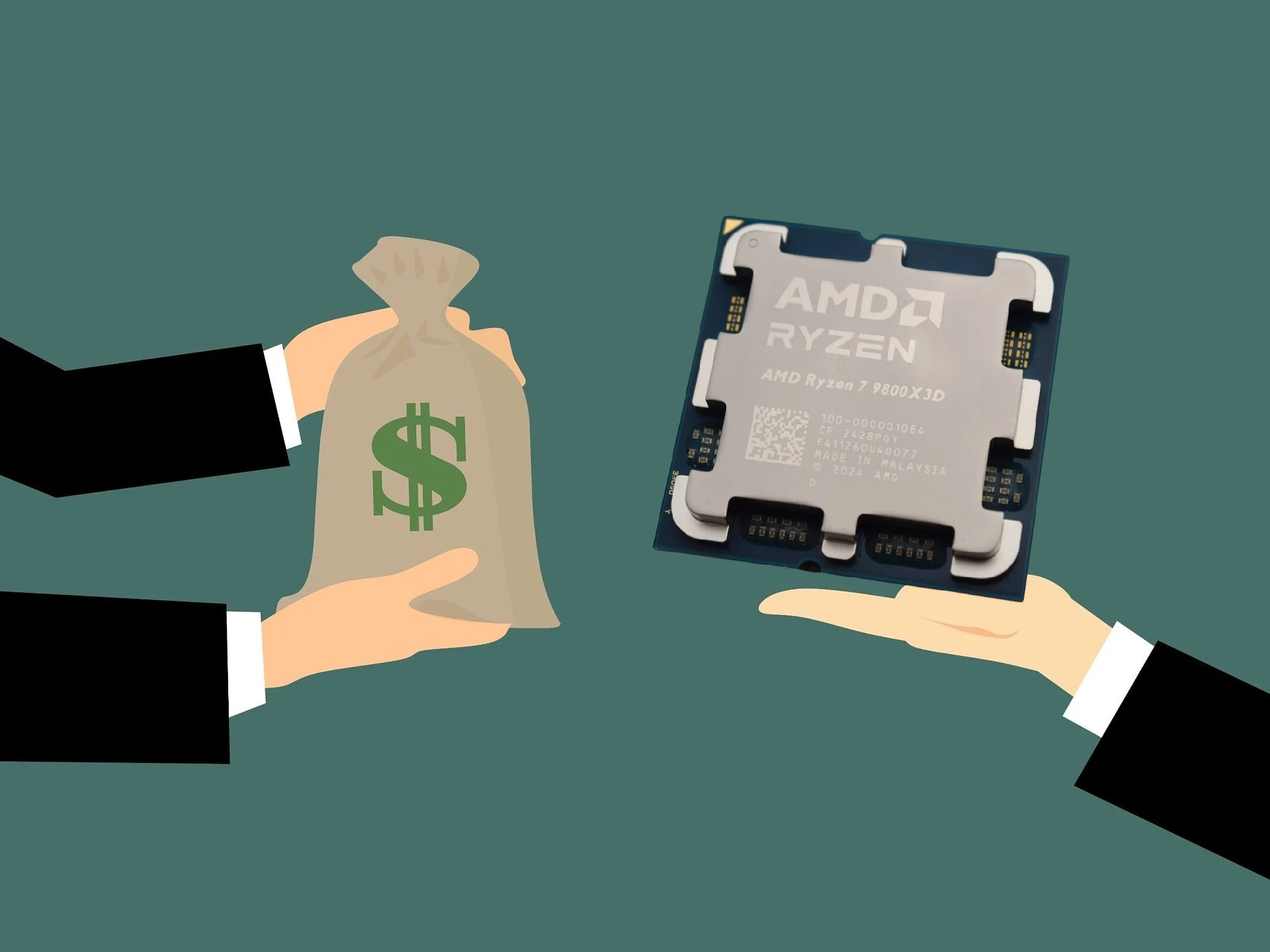
    November was said to be a great month for AMD in terms of consumer desktop CPUs on Amazon. Data from TechEpiphany shared on X shows that the top three CPUs by revenue were all AMD Ryzen X3D processors, listed in the following order:

    Intel’s Performance

    In contrast, Intel’s leading CPU in terms of revenue, the Core Ultra 9 285K, only reached around $524,990 according to TechEpiphany. This is rather disappointing, especially considering that the similarly priced Ryzen 9 9950X3D generated 499% more revenue for AMD. The revenue difference was an eye-popping 838% when comparing the Ryzen 7 9800X3D to the Core Ultra 9 285K.

    Performance Comparisons

    It is pretty clear why the Ryzen 9 9950X3D outperformed the Core Ultra 9 285K in sales when we examine their performance. Based on our review of the 16-core Ryzen processor, the performance gap between the Ryzen 9 9950X3D and the Core Ultra 9 285K is just 3% to 4% in the Cinebench 2024 single-core and multi-core tests. When you factor in about 30% better gaming performance, it is easy to understand why the Ryzen 9 9950X3D made significantly more money than the Core Ultra 9 285K (available on amazon.com).

    Gaming Dominance

    The Ryzen 7 9800X3D continues to dominate in gaming. Although it does not provide as much multi-core performance as the Ryzen 9 9950X3D or the Core Ultra 9 285K, it is faster and more efficient in gaming tasks.

    Lastly, the Ryzen 7 7800X3D is also a fantastic option for gamers. It ranks just behind the Ryzen 7 9800X3D and the Ryzen 9 9950X3D in gaming performance. Still, it is more efficient than both of those Zen 5 processors. Additionally, the Ryzen 7 7800X3D is currently priced at only $369.99 on Amazon, a much better deal compared to the $454.99 Ryzen 7 9800X3D and the $679.99 Ryzen 9 9950X3D.

    Source:
    Link


  • Why I Haven’t Started Self-Hosting: 4 Key Reasons

    Why I Haven’t Started Self-Hosting: 4 Key Reasons

    Key Takeaways

    1. Interest in Self-Hosting: The author is intrigued by self-hosting as a way to gain privacy and independence from large tech platforms.

    2. Time Constraints: Busy family life and other priorities make it difficult for the author to commit time to self-hosting projects.

    3. Cost Considerations: While self-hosting may reduce subscription costs, it can involve significant initial hardware investments and ongoing expenses, making it less cost-effective than it seems.

    4. Learning Curve: The complexity of fully diving into self-hosting can lead to a steep learning curve, requiring time and effort for setup and troubleshooting.

    5. Personal Reflection: The author recognizes their hesitation to start self-hosting as personal hurdles rather than strong arguments against it, viewing it as a potential hobby with learning benefits.


    As a person who cherishes privacy and enjoys tech, the idea of self-hosting captured my interest quite some time ago. Operating my own alternatives to platforms like Google Drive, Dropbox, iCloud, Netflix, and others seems like a fantastic way to liberate myself from the large services.

    Hardware is Not a Problem

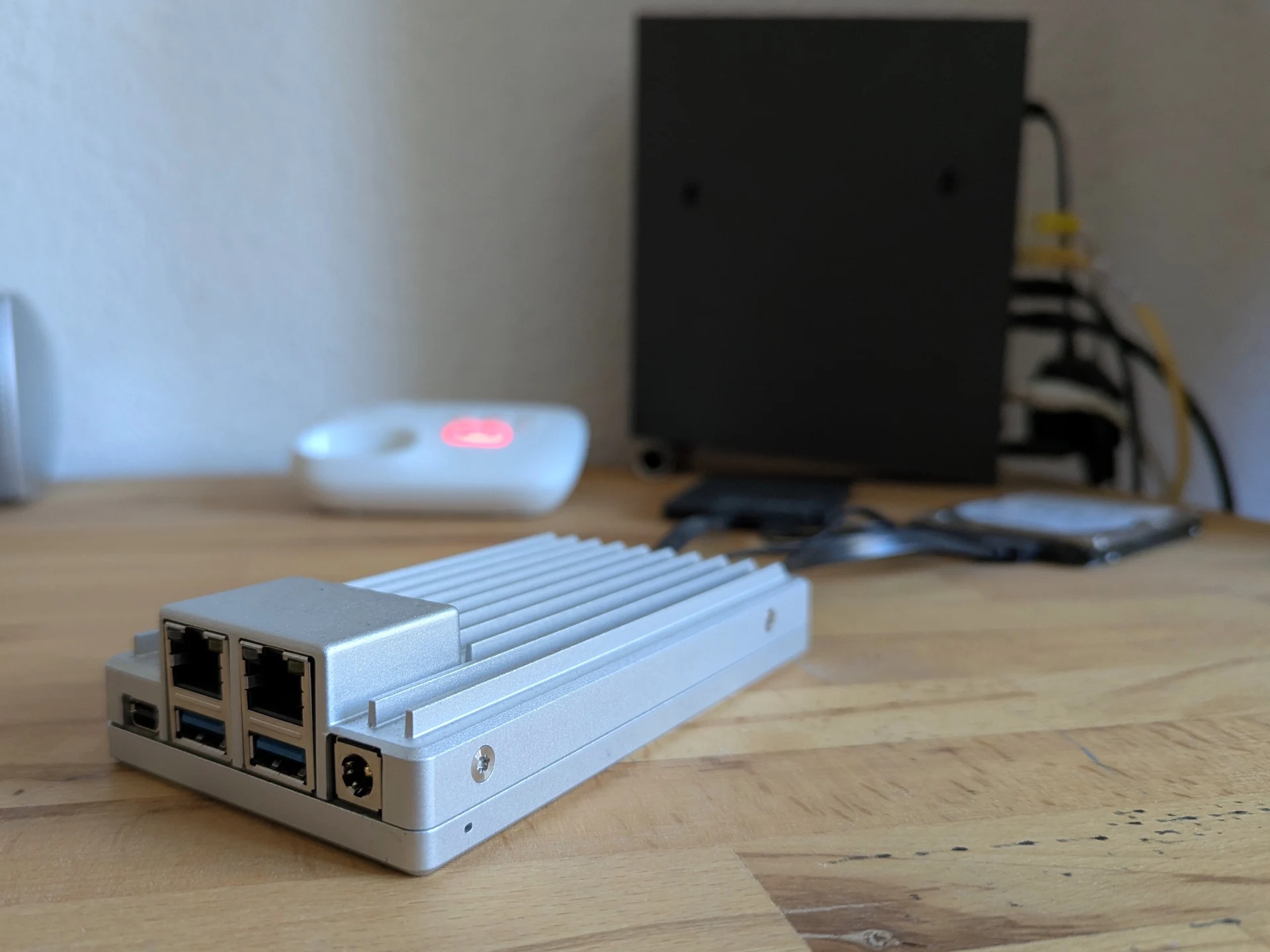
    I certainly don’t struggle with hardware. I have experience with running servers; actually, I’ve experimented with multiple home-server solutions from IceWhale, including the ZimaBoard 2 ($299, which is overpriced on Amazon). This gave me some real-world practice. To be honest, starting out doesn’t appear to be very difficult. However, I’ve never committed to it in a serious, ongoing manner during my personal time. So what’s holding me back? My reasons—or excuses—are as follows:

    Time Constraints

    As boring as it may sound, time is likely the main issue. With little kids at home, most of my hours after work are already accounted for. And on the rare occasions when I do find some free time, other priorities tend to take precedence.

    Self-hosting can indeed be beneficial, but let’s face it—most of the time, it’s more of a hobby than an actual need. Almost every category already has established services that are way more convenient. Do I really need a NAS, or is cloud storage just easier? Do I actually need a media server like Jellyfin loaded with movies I’ve already watched—will I really rewatch them often enough to make the huge storage they require worth it? Or will I end up choosing something new on a streaming platform anyway?

    Cost Considerations

    A common viewpoint is that self-hosting with open-source applications lowers subscription costs. That might be partly accurate, but first off, self-hosting is far from free. Beyond the initial hardware investment—plus the inevitable increase in storage requirements—there are ongoing electricity expenses that can accumulate. Additionally, I generally keep very few subscriptions. Otherwise, I might start losing track of my expenses, and I’m quite skeptical about subscription models overall. When you consider the time investment as a cost, self-hosting often ends up being less cost-effective than people suggest.

    Connecting a PC to your router via LAN to use it as network storage is relatively easy. However, diving into full self-hosting can be endless—things can escalate quickly. For instance, if you want to host a public website but your ISP doesn’t provide an IPv4 address, suddenly you’re spending hours looking into alternatives and workarounds, setting up accounts (like Tailscale, Cloudflare), and troubleshooting issues. The learning curve can rise rapidly, which connects back to my first point.

    Personal Reflection

    Am I just coming up with new reasons to avoid jumping in? Probably. I have a feeling I’ll start eventually—the desire to finally take action has been pestering me for way too long. These points aren’t arguments against self-hosting; they’re merely the personal hurdles that have kept me back up to now.

    I view self-hosting as a potentially enriching hobby—one that offers plenty of learning opportunities. And that doesn’t fit neatly into a cost-benefit analysis. It’s up to each individual to determine how much enjoyment they could gain from a hobby like this.

    Source:
    Link


  • Lenovo ThinkPad P1 Gen 8 Ditches AC Adapter for USB-C Charging

    Lenovo ThinkPad P1 Gen 8 Ditches AC Adapter for USB-C Charging

    Key Takeaways

    1. The ThinkPad P1 16 Gen 8 maintains the same design as Gen 7 but features upgraded internal components and a smaller 140 W USB-C AC adapter.
    2. CPU and GPU performance in the Gen 8 model is noticeably faster than the Gen 7, despite the reduced power rating of the adapter.
    3. The Gen 8 model’s performance indicates that the Gen 7 did not fully utilize its higher 170 W power limit.
    4. The larger 170 W adapter in the Gen 7 allows for faster charging under heavy loads compared to the Gen 8’s 140 W adapter.
    5. The universal USB-C AC adapter in the Gen 8 is preferred for portability over the bulkier proprietary adapters of older models.


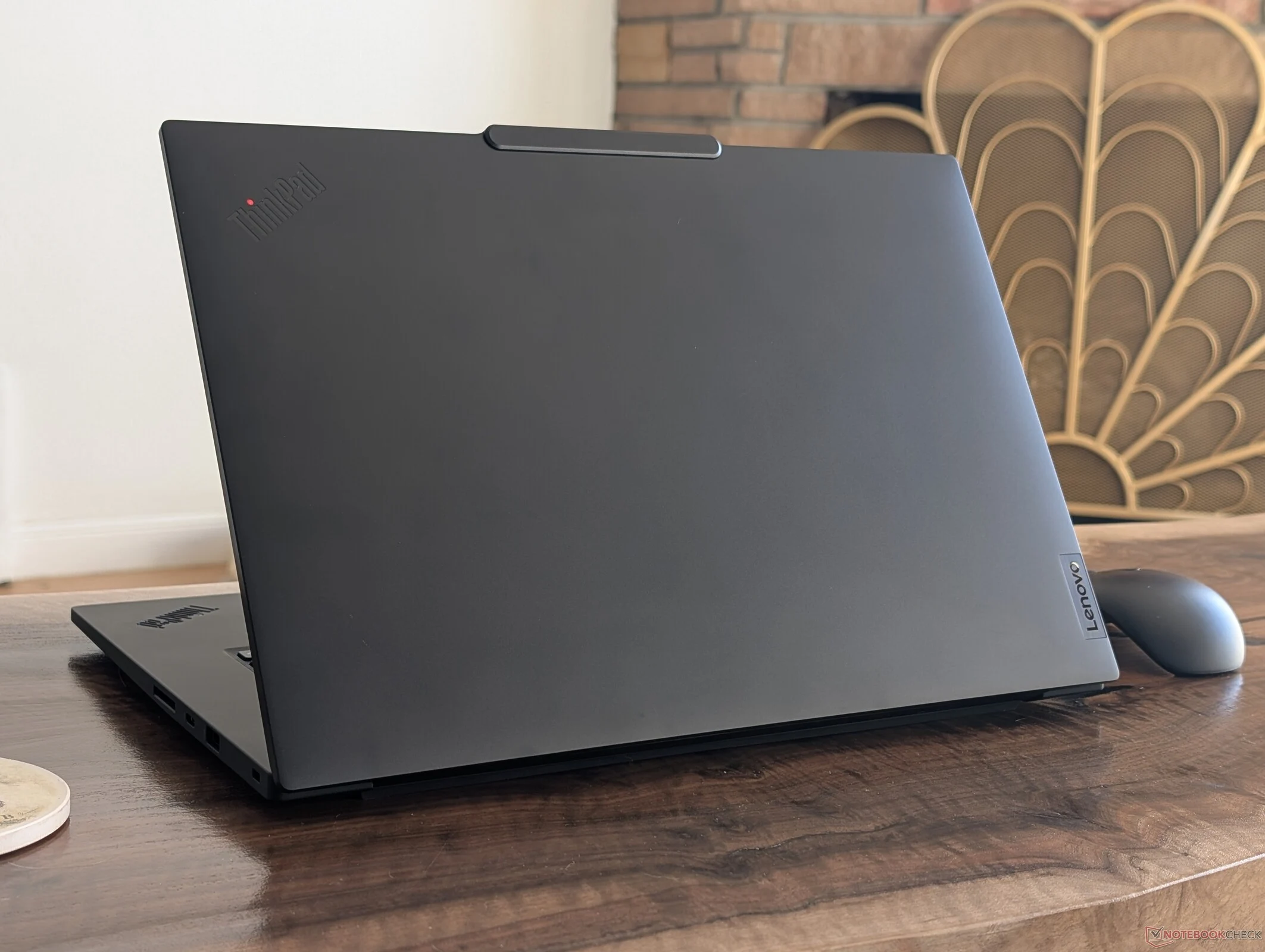
    The ThinkPad P1 16 Gen 8 is a mobile workstation designed for ultrathin portability while providing Core Ultra H performance and discrete Nvidia graphics options. It has the same external design and size as last year’s ThinkPad P1 16 Gen 7, but with upgraded internal components and a newer, smaller USB-C AC adapter. This new adapter is particularly noteworthy as it has a lower rating of 140 W compared to the 170 W of the previous model. Fortunately, the performance of the device does not seem to be affected by the reduced power rating.

    Performance Comparison

    In our assessment of the 2025 ThinkPad P1 16 Gen 8, we discovered that both CPU and GPU performances were notably quicker than those of the 2024 Gen 7 version, even with the smaller AC adapter in play, as demonstrated by the benchmarks shown below. It’s important to note that power usage remains roughly the same when handling demanding tasks, suggesting that last year’s Gen 7 model didn’t fully utilize the higher 170 W power limit for optimal performance.

    Charging Capabilities

    However, there is a significant benefit to the larger 170 W adapter. The ThinkPad P1 16 Gen 7 can charge more quickly when operating under heavy loads, since the larger adapter has extra power available for charging. In contrast, the newer Gen 8 model consumes between 120 W to 140 W when under stress, which is nearly the entire capacity of the 140 W USB-C AC adapter. Therefore, if the CPU is heavily utilized for long periods, charging would become very slow. Yet, for most travel and practical uses, we prefer the universal USB-C AC adapter over the bulkier proprietary ones that were previously standard on older ThinkPad models.

  • Droid Assists Astronauts in Moon Mission Revival

    Droid Assists Astronauts in Moon Mission Revival

    Key Takeaways

    1. NASA plans to send astronauts back to the Moon and establish a base there.
    2. The Mobile Autonomous Prospecting Platform (MAPP) rover will analyze lunar dust and geology during the Artemis IV mission.
    3. MAPP is equipped with scientific tools like the EDA and RESOLVE to study dust particles and their effects on the Moon’s surface.
    4. Understanding lunar dust is crucial for astronaut safety and preparing for future space missions, including those to Mars.
    5. While MAPP is not the first lunar rover, subsequent missions like the IM-3 mission in 2026 will continue lunar exploration efforts.


    NASA has been working for many years on plans to start sending astronauts back to the Moon, with hopes of setting up a base there soon. To make this happen, numerous studies are needed to gain a better understanding of the Moon. To assist with the first missions, a rover, which might remind some of a droid from the Star Wars films, will be used by astronauts.

    Introducing MAPP

    This rover, called MAPP (Mobile Autonomous Prospecting Platform), is created by Lunar Outpost and will be sent to the Moon during the Artemis IV mission. While one might picture astronauts being followed by a droid like in Star Wars, MAPP will serve a totally different purpose.

    Analyzing Lunar Dust

    MAPP won’t be battling foes; instead, it will analyze lunar dust and the geology of the Moon. It will carry the DUSTER tool, which includes the EDA (Electrostatic Dust Analyzer) and the RESOLVE tool (Relaxation SOunder and differential VoltagE). These devices will examine dust particles and their density, helping to understand how human activities might affect the Moon’s surface.

    NASA emphasizes the importance of these studies, stating they are crucial for recognizing and preparing for the risks associated with dust particles on space suits. Nicky Fox, the associate administrator of the Science Mission Directorate at NASA Headquarters in Washington, explained:

    The Role of Science in Space Exploration

    “The Apollo Era showed us that as humanity ventures further from Earth, our reliance on science to safeguard and sustain life on other planets increases. By sending these two scientific instruments to the lunar surface, our testing ground, NASA is paving the way for a guide to interplanetary survival that will ensure the health and safety of our spacecraft and human explorers as we embark on our grand adventure back to the Moon and eventually to Mars.”

    Although MAPP will not be the first rover to land on the Moon, as a second rover is planned for launch in 2026 as part of the IM-3 mission, caution is needed. Each mission carries a considerable risk of failure.

    Source:
    Link


  • Astronomers Reveal Rare Tatooine-like Exoplanet Orbiting Two Stars

    Astronomers Reveal Rare Tatooine-like Exoplanet Orbiting Two Stars

    Key Takeaways

    1. Astronomers discovered an exoplanet called HD 143811 AB b that resembles Tatooine from Star Wars.
    2. The exoplanet is located about 446 light-years away and orbits a double star every 320 years.
    3. Only a small percentage of known exoplanets orbit binary stars, making this discovery significant.
    4. The exoplanet was found in the archives of the Gemini South telescope using the GPI tool.
    5. Future upgrades to the Gemini Planet Imager may provide more insights into this unique planetary system.


    Star Wars has captured the imaginations of countless individuals globally, largely due to its distinct settings. Recently, astronomers have revealed photos of an exoplanet that resembles Tatooine, which emerged just 50 million years following the dinosaurs’ extinction.

    A Young Exoplanet

    This young exoplanet, identified by astronomers in 2025, is called HD 143811 AB b. It’s situated approximately 446 light-years away from our planet and completes an orbit around a double star every 320 years. In simpler terms, if we could travel to this world, its surroundings would mirror those of Tatooine from Star Wars. Jason Wang from Northwestern University commented on the significance of these images:

    “Among the 6,000 exoplanets we are aware of, a mere small percentage orbit binary stars. From those, we have only direct visuals of a few, which allows us to see both the binary and the planet itself. Capturing images of both the planet and its binary star is fascinating as it represents the only kind of planetary system where we can simultaneously track the orbit of both the binary star and the planet in the sky.”

    Observations Over the Years

    While these images are recent, the study of this system dates back several years. Astronomers actually found this exoplanet hidden in the archives of the Gemini South telescope, utilizing its GPI (Gemini Planet Imager) tool. This instrument operated from 2014 until 2022 before it was taken offline for upgrades. The next iteration of this device may assist scientists in gaining a deeper understanding of this system and allow for fresh observations of this remarkable exoplanet.

    Northwestern Now News

    Source:
    Link


  • Aaeon Launches Ultra-Compact UP Edge Mini PCs with Intel N355 CPU

    Aaeon Launches Ultra-Compact UP Edge Mini PCs with Intel N355 CPU

    Key Takeaways

    1. Aaeon has launched four new models in its UP series of Edge PCs ahead of CES 2026, including the UP TWL Edge, UP TWLS Edge, UP Squared TWL Edge, and UP Squared Pro TWL Edge.

    2. The ultra-compact models (UP TWL Edge and UP TWLS Edge) will run on Intel processors, with options including the powerful 8-core Intel Core 3 N355.

    3. The UP Squared Pro model supports AI accelerators and features dual 2.5GbE LAN ports, while both UP Squared models offer a variety of ports for connectivity.

    4. The compact UP Squared measures 9.5 x 9.5 x 5.5 cm, while the TWL Edge models are even smaller, with the Slim version at 3.8 cm in height.

    5. Pricing and availability details are not yet available, and potential buyers should contact Aaeon directly for more information.


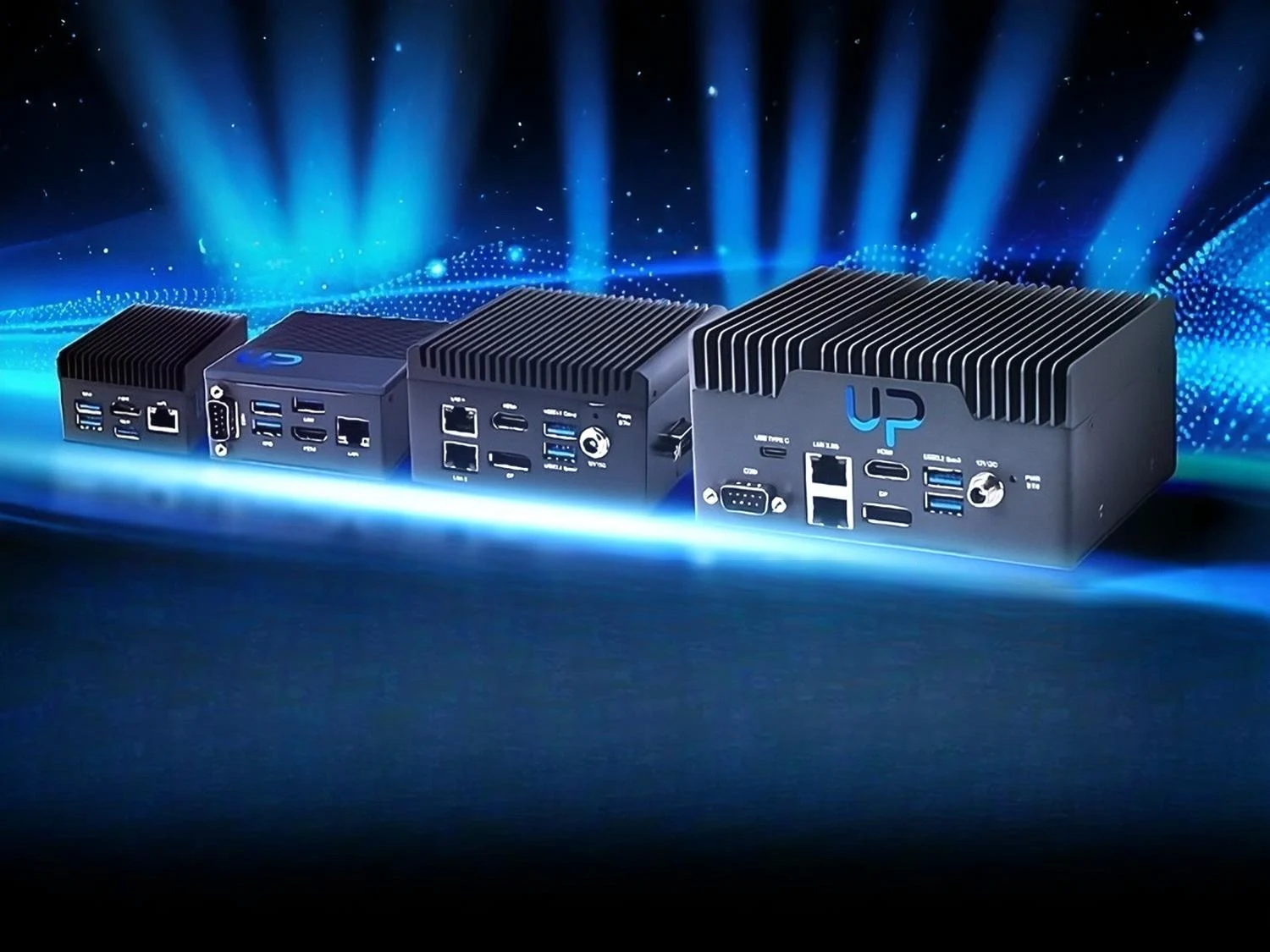
    Aaeon, a popular brand in the realm of industrial mini PCs and edge computing, has unveiled four new products in its UP series of Edge PCs ahead of CES 2026. While pricing details are not yet made public, potential buyers are encouraged to contact Aaeon directly for further information.

    New Mini PC Models

    The first two models are the ultra-compact UP TWL Edge and the sleeker UP TWLS Edge. These mini PCs are set to run on Intel processors, giving customers the choice between the 8-core Intel Core 3 N355, 4-core Intel N250, and 4-core Intel N150 CPUs.

    Among these options, the N355 stands out as the most potent, delivering performance comparable to the Core i5-10300H CPU in multicore synthetic benchmarks. This level of performance should be adequate for various industrial applications. The I/O capabilities include gigabit Ethernet, three USB 3.2 Gen 2 Type-A ports, an 8-pin GPIO, COM, and HDMI 1.4b. However, the TWL Edge does not offer GPIO or COM ports.

    Advanced Features of the UP Squared Series

    Next in line are the UP Squared TWL Edge and the UP Squared Pro TWL Edge. These systems are less compact and designed for more intensive workloads. The UP Squared Pro features three USB 3.2 Gen 2 ports, including two USB-A ports and one USB-C port.

    In contrast to the UP Squared, the Pro model can accommodate AI accelerators through its M.2 port. Additionally, a SATA port is available for storage purposes. It also includes a 40-pin GPIO connector and COM ports. Networking features are enhanced with dual 2.5GbE LAN ports.

    The UP Squared comes with a good variety of ports as well, featuring three USB 3.2 Gen 2, dual gigabit LAN, and dual COM (RS-232/422/485) ports. Networking needs can be met with the included M.2 2230 slot, while storage can utilize the M.2 2280 slot. Measuring just 9.5 x 9.5 x 5.5 cm, or 3.7 x 3.7 x 2.17 inches, this mini PC is notably compact. The TWL Edge and TWLS Edge are even smaller, with the Slim version measuring only 3.8 cm or 1.5 inches in height.

    Awaiting Pricing and Availability

    As noted earlier, the specifics regarding pricing and availability remain undisclosed. Since these are enterprise products, prices are likely to vary based on the volume of orders placed.

    For further information about each model, customers are encouraged to visit Aaeon’s official website. Casual users, however, might find better options with alternatives like the Beelink SER9 Pro AI mini PC, which is currently priced at $599 on Amazon and features the powerful Ryzen 7 H 255 APU.

    Source:
    Link


  • HyperDrive 80 Gbps USB4 v2 SSD Enclosure Launches from Hyper

    HyperDrive 80 Gbps USB4 v2 SSD Enclosure Launches from Hyper

    Key Takeaways

    1. The HyperDrive Next USB4 M.2 PCIe Enclosure offers a maximum speed of 80 Gbps using USB4 v2, with a capped transfer speed of 64 Gbps.
    2. It is compatible with M.2 drives in sizes 2230, 2242, 2260, and 2280, and features tool-free installation.
    3. The enclosure can accommodate AI accelerators and networking cards, providing up to 25 W of power.
    4. It is priced at $199.99 and is currently available for order on Hyper’s website.
    5. The HyperDrive Next USB4 M.2 PCIe Enclosure replaces the HyperDrive Next Portable, which had a maximum speed of 40 Gbps.


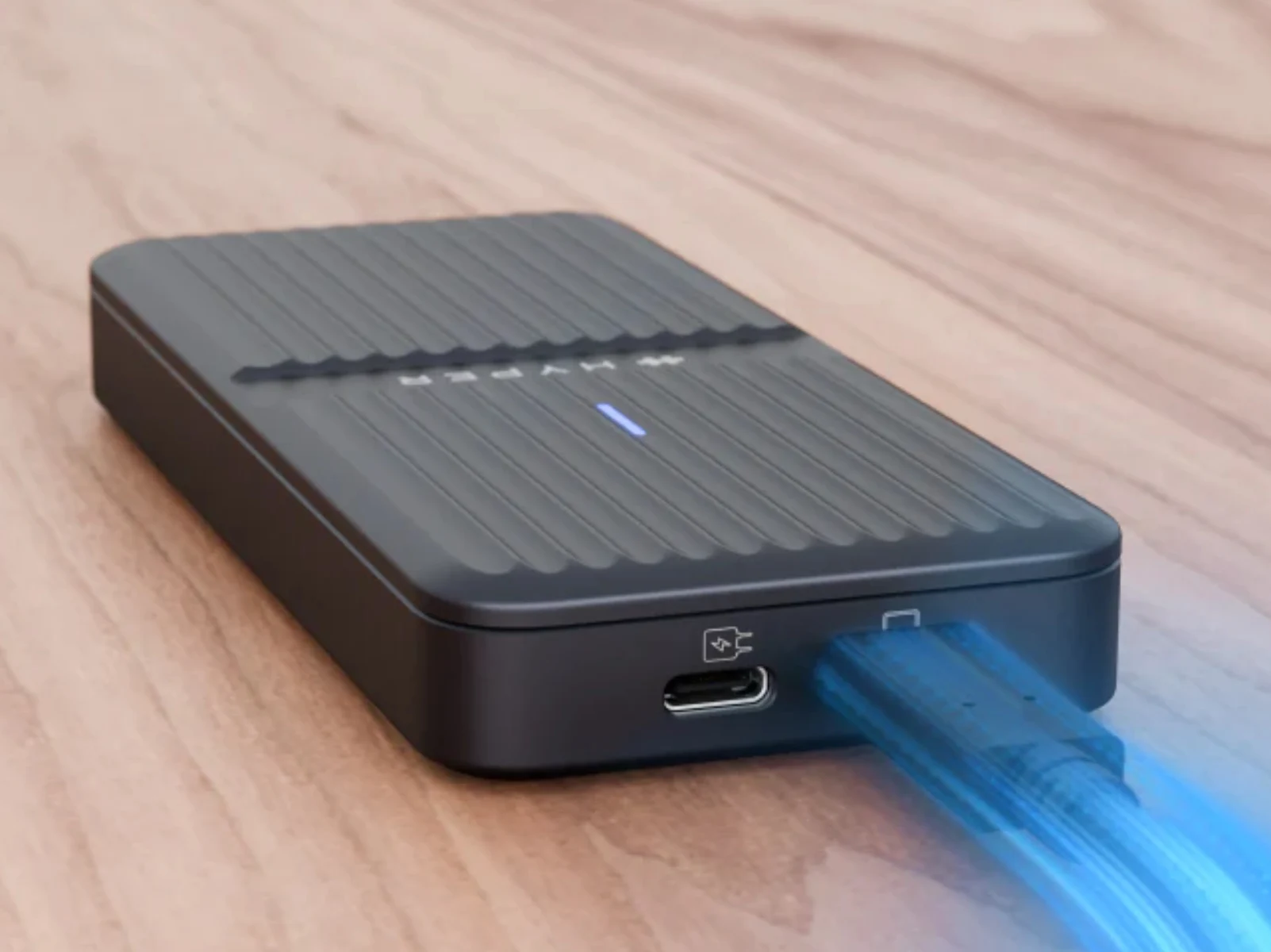
    Hyper has introduced the HyperDrive Next USB4 M.2 PCIe Enclosure after showcasing it last month. This new SSD enclosure takes the place of the HyperDrive Next Portable, which has a maximum speed of 40 Gbps using the USB4 standard, currently priced at $77.99 on Amazon.

    Enhanced Performance

    In comparison, the HyperDrive Next USB4 M.2 PCIe Enclosure utilizes USB4 v2 to achieve a bandwidth of up to 80 Gbps. Hyper states that this new enclosure offers “true PCIe Gen 4 x4 performance.” Nevertheless, the maximum transfer speed for the enclosure is capped at 64 Gbps, which means it doesn’t fully utilize the potential of its USB v2 bandwidth.

    Compatibility and Power

    Ignoring that limitation, the new enclosure is compatible with M.2 drives in sizes 2230, 2242, 2260, and 2280, and features a tool-free installation method. Furthermore, HyperDrive asserts that its enclosure can accommodate AI accelerators and networking cards as well. Additionally, the accessory provides up to 25 W of power, with 7.5 W coming from its host USB Type-C port.

    Ordering Information

    You can place an order for the HyperDrive Next USB4 M.2 PCIe Enclosure now for $199.99 directly from Hyper’s website. At this moment, Hyper claims to have the new SSD enclosure in stock and is prepared to ship immediately. However, it is not yet available from other retailers like Amazon. For further information, please visit Hyper’s website.

    Source:
    Link