Category: Computers

  • Geekom A9 Max Mini PC with Ryzen AI 9 Launching Soon

    Geekom A9 Max Mini PC with Ryzen AI 9 Launching Soon

    Key Takeaways

    1. Powerful Processor: The Geekom A9 Max features the AMD Ryzen AI 9 HX 370 processor with 8 cores, 16 threads, and a specialized NPU for AI tasks, delivering high performance.

    2. Advanced RAM and Storage: It includes 32 GB of DDR5 RAM and a minimum of 1 TB PCIe 4.0 SSD, with an option for additional storage via a second M.2 slot.

    3. Modern Connectivity Options: The A9 Max offers two USB4 ports, two HDMI 2.1 ports, multiple USB 3.2 Gen 2 ports, and two 2.5 Gbit Ethernet ports, supporting up to four monitors.

    4. Versatile Installation: The mini PC features a VESA mount for flexible installation options, either on a desk or wall.

    5. Upcoming Release: The Geekom A9 Max is expected to launch in the coming months, likely priced around $1,019 with potential sales below $1,000.


    Geekom has a vast selection of compact PC systems, several of which we’ve previously reviewed. Recently, the company unveiled the Geekom A9 Max, a new robust model that features cutting-edge technology and impressive AI capabilities.

    Powerful Processor

    At the core of this mini PC is the AMD Ryzen AI 9 HX 370, which is a state-of-the-art high-performance processor. It not only delivers exceptional computing power but also includes built-in AI features. This chip consists of 8 cores and 16 threads, along with a specialized NPU (neural processing unit) that can achieve up to 50 TOPS, tailored for AI tasks and acceleration. Additionally, the system comes with 32 GB of DDR5 RAM (5,600 MT/s) and a speedy PCIe 4.0 SSD offering a minimum of 1 TB of storage. There’s also the possibility to add more storage via a second M.2 slot (M.2-2230).

    Advanced Connectivity

    The A9 Max showcases modern connectivity options as well. It features two USB4 ports that support DisplayPort 1.4, along with two HDMI 2.1 ports for high-definition visual output, enabling the connection of up to four monitors at once. On top of that, there are several USB 3.2 Gen 2 ports and two 2.5 Gbit Ethernet ports available. Furthermore, an external graphics card can be connected through USB4 if needed. Other notable features inclue a VESA mount that allows for versatile installation on a desk or wall.

    Upcoming Release

    The Geekom A9 Max is anticipated to launch in the next few months. While the official price hasn’t been announced yet, it’s expected to be similar to its predecessor, the Geekom A8 Max, which originally retailed for around $1,019. However, there are often sales that can bring the price down to below $1,000.

    Geekom’s innovative approach continues to set them apart in the compact PC market, offering powerful solutions for both home and professional use.

    Source:
    Link


  • Intel Core Ultra 245HX Laptop CPU Beats Desktop in Benchmarks

    Intel Core Ultra 245HX Laptop CPU Beats Desktop in Benchmarks

    Key Takeaways

    1. The Intel Core Ultra 5 245HX laptop CPU shows impressive performance scores with 4,500 in single-core and 40,000 in multi-core tests, outperforming its predecessor by 25% and 37%, respectively.

    2. Unlike previous generations, the 55-watt Core Ultra 5 245HX laptop CPU is faster than the desktop variant, the 65-watt Core Ultra 5 245.

    3. The Core Ultra 5 245 has lower performance scores at 4,409 in single-core and 37,930 in multi-core compared to the 245HX, showing a shortfall of 2.7% and 5.3%.

    4. The 245HX has a maximum turbo power of 160 watts, surpassing the 121 watts of the Core Ultra 5 245, despite its lower base power.

    5. This scenario is unusual as it is rare for a laptop CPU to outperform a comparable desktop CPU, highlighting the advancements in laptop processing technology.


    The Intel Core Ultra 5 245HX laptop CPU has recently appeared on Passmark, showcasing its notable performance capabilities. What’s even more surprising is that this laptop CPU seems to surpass its desktop version, the Core Ultra 5 245 “Arrow Lake” CPU.

    Performance Scores Unveiled

    According to a report from TechPowerUp, the Core Ultra 245HX CPU has a single-core score of about 4,500 and a multi-core score reaching 40,000. This marks a significant improvement over its predecessor, the Intel Core i5-14500HX, showing enhancements of 25% in single-core performance and 37% in multi-core performance. However, the comparison with its desktop variant adds an intriguing twist.

    Desktop vs. Laptop: A Surprising Comparison

    In the previous generation, the Core i5-14500 “Raptor Lake” desktop CPU was about 9.6% and 8.9% quicker in single-core and multi-core tests compared to its laptop version, the Core i5-14500HX, as per Passmark. This time, though, the 55-watt Core Ultra 5 245HX laptop CPU is significantly faster than the desktop’s 65-watt Core Ultra 5 245. Thankfully, the 125-watt Core Ultra 5 245K, which is priced at $259.99 on Amazon, still leads the pack.

    Detailed Score Breakdown

    To get into specifics, the Core Ultra 5 245 achieves a score of about 4,409 in single-core and 37,930 in multi-core performance, indicating a shortfall of 2.7% in single-core and 5.3% in multi-core compared to the Core Ultra 5 245HX laptop chip. Interestingly, while the base power of the 245HX is lower than that of the 245, its maximum turbo power is an impressive 160 watts, which greatly exceeds the Core Ultra 5 245’s 121 watts. This contrasts with the Raptor Lake generation, where both the 14500 and 14500HX had nearly identical turbo power ratings.

    As a single benchmark, this information isn’t the definitive measure of performance. Real-world usage can tell a different tale, but it’s still rare to see a laptop CPU outshine a comparable desktop version.

    Source:
    link


  • Tech Industry Faces Recalls, Device Bans, and AI Tensions This Week

    Tech Industry Faces Recalls, Device Bans, and AI Tensions This Week

    Key Takeaways

    1. Alienware M16 laptops are reportedly experiencing serious issues, including catching fire and emitting smoke, primarily linked to the DC input area on the motherboard.
    2. Users have expressed frustration with Dell’s lack of response to the electrical malfunctions and warranty claim denials.
    3. Wikipedia has halted an AI experiment for article summaries after backlash from its editorial community, fearing it could damage the platform’s trustworthiness.
    4. Nintendo Switch 2 users are facing permanent bans for using MIG flash cartridges, raising concerns about the resale of banned consoles.
    5. Anker has recalled over 1.1 million PowerCore 10,000 power banks due to fire hazards from defective batteries, along with additional recalls for other models.


    Reports have emerged on Reddit and Dell’s support forums indicating that Alienware M16 laptops are experiencing issues like catching fire or emitting smoke. One Reddit user claims to have identified 17 separate incidents of electrical malfunctions, primarily linked to the DC input area on the motherboard. Some users have reported smoke coming from the keyboard, while others have observed arcs and melting near the power jack.

    Concerns from Users

    A forum member by the name of DCUPLINKUK, who seems to be contributing on Reddit, has pointed fingers at an “undersized DCIN ribbon,” which he claims cannot handle the power load of the system. Dell has not yet responded to these allegations on its community platform. Pictures shared by impacted users clearly show signs of thermal damage, and several users have expressed frustration that Dell denied warranty claims or replaced parts incorrectly.

    Wikipedia’s AI Experiment Halted

    In another development, Wikipedia has decided to retract an experimental initiative that aimed to place AI-generated summaries at the top of its articles due to a significant backlash from its editorial community. These summaries were produced using an open-weight language model from Cohere and were designed to enhance article accessibility for readers with different literacy levels. The Wikimedia Foundation had planned to include 10% of its mobile web traffic—potentially millions of users—in a two-week test.

    Editors responded with strong criticism. One contributor declared, “If this happened on Wikipedia, I’m done,” while others stressed that machine-generated, unchecked content could harm Wikipedia’s trustworthiness. Some contributors warned that this move might set back Wikipedia’s reputation to its earlier days when it was often regarded as unreliable by schools and academics.

    Nintendo Switch 2 Bans Users

    In a related issue, owners of the newly released Switch 2 are facing permanent bans after using MIG flash cartridges, which allow games to be loaded from a microSD card, often associated with backups or piracy. One user, known as YouTuber “Scattered Brain,” showcased how his console was barred from online services and the eShop after using a MIG cartridge, despite claiming he only loaded legally purchased games.

    Nintendo’s revised user agreement allows the company to brick devices that violate its terms. The company confirmed that error code 2124-4508 indicates a permanent online ban tied to the console itself, not the user’s account. This distinction raises concerns for the second-hand market, as resold consoles may be banned without the new buyer knowing.

    Anker Power Bank Recalls

    Anker has issued a recall for over 1.1 million PowerCore 10,000 (model A1263) power banks due to defects in their lithium-ion batteries that could cause overheating and fires. According to the U.S. Consumer Product Safety Commission (CPSC), there have been 19 reported incidents, which included two minor injuries and property damage exceeding $60,000.

    The affected units were made between January 2016 and October 2019 and sold via Amazon, Newegg, eBay, and Anker’s website. Anker is providing replacements or a $30 gift card for units that are back ordered.

    Additional Recall Information

    In addition to the first recall, Anker has announced another voluntary recall for five more power bank models while addressing the initial recall. The company cited defective cells from a single supplier and indicated that it has enhanced quality assurance protocols to identify such issues sooner. ZDNet highlighted that this represents at least four separate fire-hazard-related recalls within a year, with Anker yet to clarify the reasons for the ongoing battery failures.

    Consumers are encouraged to check the serial numbers on Anker’s support site and dispose of any affected batteries in accordance with local e-waste regulations.

    Impact on Digital Collections

    A report from GLAM-E (Galleries, Libraries, Archives, Museums – EuropeanaTech) reveals that web crawlers focusing on large language models (LLMs) are overwhelming digital collections across various museums, archives, and academic libraries. In some instances, this surge in traffic has caused websites to go offline or disrupted normal user services.

    The report compiled insights from numerous institutions, many of which operate on limited technical resources and staffing. When traffic from bots surges to 90-100% server utilization, it can lead to critical failures. GLAM-E cautioned that institutions with openly licensed content might be particularly at risk and that the trend is expanding in scope.

    The bots, designed to gather training data for AI models, often evade restrictions and lack transparency regarding their identity and purpose. Cultural heritage websites, which are meant to serve as public knowledge resources, are now facing increased operational pressures without compensation or means for recourse.

    Source:
    link

  • Alpha-One Mini PC: Run AI Locally – Available Now

    Alpha-One Mini PC: Run AI Locally – Available Now

    Key Takeaways

    1. The Pine64 Alpha-One is priced at $330 and is aimed at early adopters.
    2. It is powered by a SiFive P550 SoC with four cores clocking up to 1.8GHz and features a 20 TOPS NPU for enhanced AI capabilities.
    3. The mini PC comes with 32GB of RAM and a preinstalled 64GB eMMC module for running various LLMs locally.
    4. It features a passively cooled aluminum design, external WiFi antenna, and supports both wired and wireless networking options.
    5. Connectivity includes multiple USB ports and HDMI support for 4K resolution at 60Hz, along with an audio jack for microphones.


    We’ve talked about plenty of SBCs and mini PCs before, and now a new device is finally up for grabs. The EU version of the Pine64 Alpha-One is available directly from the manufacturer for $330, but it’s wise for potential buyers to check the shipping specifics first. The maker also claims this product is aimed at early adopters.

    Specifications and Performance

    This mini PC is built on the StarPro64-SBC and is powered by a SiFive P550 SoC. This RISC-V chip has four cores that can clock up to 1.8GHz. Additionally, it includes an NPU that offers a performance of 20 TOPS. While NPUs in current Intel or AMD chips are often more potent, the AI capabilities of the Alpha-One are still significantly better than many other single-board computers. This small machine also comes with 32GB of RAM and is intended to run various LLMs locally. The preinstalled 64GB eMMC module includes all the necessary software.

    Design and Connectivity

    The passively cooled SBC is encased in aluminum, which helps in dissipating heat via a heatpipe. For networking, users can connect through WiFi on both 2.4GHz and 5GHz bands, or utilize wired connections with two Gigabit Ethernet ports. The WiFi antenna is external. In addition, there are several USB ports for plugging in peripherals, and users can connect monitors through HDMI with support for 4K at 60Hz. Finally, the Pine64 Alpha-One features an audio jack that works with microphones.

    Source:
    link

  • Razer Thunderbolt 5 Dock: Expand Laptops with M.2 SSD & 3 Monitors

    Razer Thunderbolt 5 Dock: Expand Laptops with M.2 SSD & 3 Monitors

    Key Takeaways

    1. Razer’s new dock features Thunderbolt 5 technology with bandwidth up to 80 Gbps, peaking at 120 Gbps for monitors.
    2. It supports high-resolution displays, including an 8K monitor at 60Hz and three 4K screens at 144Hz, using a single cable.
    3. The dock offers 140 watts of charging power and includes an active fan for cooling, compatible with an M.2 PCIe 4.0 x4 SSD up to 8TB.
    4. Port configuration includes four Thunderbolt 5 ports, two USB-A ports, a Gigabit Ethernet port, a 3.5mm headphone jack, and a USB-C port, but lacks HDMI or DisplayPort.
    5. The Razer Thunderbolt 5 Dock Chroma is priced at $399, with a silver variant available for $389.


    In a recent announcement, Razer has introduced a new dock featuring Thunderbolt 5 technology alongside the Core X V2 eGPU enclosure. This new dock offers impressive bandwidth, reaching up to 80 Gbps, and can even peak at 120 Gbps when used with monitors. It is compatible with an 8K monitor running at 60Hz, a 4K display at 240Hz, or three 4K screens at 144Hz, all through a single cable linked to a laptop or gaming handheld.

    Charging and Cooling Features

    The dock provides charging capabilities of up to 140 watts for connected devices. To combat overheating during heavy usage, Razer has included an active fan that also helps maintain optimal temperatures for the M.2 SSD. This dock can accommodate an M.2 PCIe 4.0 x4 SSD with a maximum storage capacity of 8TB. It is also designed with RGB lighting along the bottom edge, which can be synced with other Razer products using Razer Chroma.

    Port Configuration

    On the right side of the dock, there is a UHS-II SD card reader. The remaining ports are positioned at the back of the device. This includes four Thunderbolt 5 ports, one of which connects to the computer, along with two USB-A ports, a Gigabit Ethernet port, a 3.5mm headphone jack, and a standard USB-C port. It’s important to note that the Razer dock does not include HDMI or DisplayPort options, although these can be utilized via appropriate adapters.

    The Razer Thunderbolt 5 Dock Chroma is currently priced at $399 and can be purchased from Razer’s official online store or on Amazon. A silver variant is offered for $10 less.

    Source:
    link


  • Commodore 64 Ultimate: New Edition with Modern & Classic Features

    Commodore 64 Ultimate: New Edition with Modern & Classic Features

    Key Takeaways

    1. The Commodore 64 Ultimate is a new version of the classic home computer, priced at $299.99, with shipping expected between October and November 2025.
    2. It is compatible with at least 99% of all 1980s and 1990s cartridges, games, and accessories, but uses an AMD Xilinx Artix-7 FPGA instead of the original processor.
    3. The system features 128 MB of DDR2 RAM, 16 MB of flash storage, and video output options through HDMI or DIN-8 connectors.
    4. Audio options include a 3.5mm jack and optical output, with built-in Ethernet and Wi-Fi connectivity; the keyboard has mechanical switches and RGB lighting.
    5. The package includes a USB stick with licensed video games, music, and demos, including a sequel to Jupiter Lander called Ascension.


    Historically, the Commodore 64 stands out as one of the most famous home computers. Now, there’s a new version called the Commodore 64 Ultimate that is up for pre-order. The price for this new edition is $299.99, and it is expected to ship between October and November 2025.

    Compatibility and Specifications

    The manufacturer claims that at least 99% of all cartridges, games, and accessories from the 1980s and 1990s will work with this system. It is worth noting that this model does not use the original processor; instead, it is powered by an AMD Xilinx Artix-7 FPGA. It comes equipped with 128 MB of DDR2 RAM and 16 MB of flash storage. Users can enjoy video output through HDMI or DIN-8 connectors, which lets them experience their favorite games on classic tube TVs. The system also supports USB storage devices and emulation for the cassette drive, which can be connected like a traditional data cassette or floppy disk drive.

    Audio and Connectivity Features

    For audio, it offers a 3.5mm jack and optical output via S/PDI, with both Ethernet and Wi-Fi built in. The keyboard maintains the original layout and features mechanical Gateron Pro 3.0 switches along with integrated RGB lighting. Additionally, the package includes a USB stick containing licensed video games, music, and demos, featuring a special sequel to Jupiter Lander called Ascension.

    Conclusion

    With this new release, Commodore aims to blend nostalgia with modern technology, ensuring that fans of the original Commodore 64 can enjoy their beloved games with updated features. The excitement around the Commodore 64 Ultimate is palpable, and many are eager to get their hands on it when it becomes available.

    Source:
    Link


  • Windows Laptops and Desktops Have Security Flaw for Unauthorized Login

    Windows Laptops and Desktops Have Security Flaw for Unauthorized Login

    Key Takeaways

    1. Vulnerability found in Windows Hello for Business, allowing identity theft by attackers with device access.
    2. “The Face Swap” attack exploits biometric data processing, enabling unauthorized access.
    3. Attackers with administrative rights can alter user biometric identifiers, fooling the system.
    4. Proof-of-concept demonstrated that attackers can impersonate other users on the same device.
    5. Microsoft has been informed, but a comprehensive fix may require a complete system redesign.


    A recent investigation by ERNW, a security research company based in Germany, has uncovered a vulnerability in Windows Hello for Business, which is Microsoft’s system for password-free authentication. This study was part of a project supported by Germany’s Federal Office for Information Security (BSI). The findings reveal that attackers who already have access to a device can take advantage of the system’s design to carry out identity theft.

    The Face Swap Attack

    The attack, called “The Face Swap,” exploits how Windows Hello processes biometric information. Rather than using a person’s biometric data for direct verification, the system unlocks a cryptographic key that is kept on the device. ERNW’s researchers discovered that someone who has administrative rights can reach and alter the database that connects a user’s identity to their biometric template.

    Proof-of-Concept Demonstration

    During their testing, the researchers managed to interchange the identifiers of two users who were registered in the system. This swap completely fooled the system; an attacker could simply sit in front of the camera, and Windows Hello would recognize their face, granting them access to the victim’s account, which includes all corporate network resources, files, and sensitive data.

    In simpler words, on any Windows computer equipped with Windows Hello that has more than one user profile, this security flaw enables anyone with admin rights to impersonate other users within that system.

    Disclosure and Future Implications

    ERNW has informed Microsoft about these vulnerabilities, but they believe that a comprehensive fix is improbable since it would necessitate a complete redesign of the system’s architecture. In another incident, ERNW also reported a significant flaw in Linux systems two weeks ago that allowed attackers unrestricted access to those systems.

    Source:
    link

  • Intel Titan Lake 2028: No More P-Cores, All-E-Core Design

    Intel Titan Lake 2028: No More P-Cores, All-E-Core Design

    Key Takeaways

    1. Intel plans to launch the Titan Lake series in 2028, featuring an impressive 100-core design focused on a single-core architecture based entirely on E-cores.

    2. The Razer Lake series, arriving in 2027, will be the last to use a mixed architecture of P-cores and E-cores, leading to a shift in Intel’s core design philosophy.

    3. Titan Lake’s all-E-core setup may include variations like dense 4C clusters and 2C clusters, optimizing performance-per-area (PPA) and performance-per-Watt (PPW).

    4. Nova Lake is expected to have a mixed core setup with 52 cores, while Titan Lake could potentially consist of two 48-core clusters and four low-power E-cores (LPE).

    5. The trend in the CPU/SoC market is shifting towards unified core designs, as seen with competitors like AMD and Qualcomm, which could influence Intel’s future architectures.


    Rumors about Intel’s future Nova Lake and Panther Lake architectures have started to emerge, and new information regarding the company’s plans for 2028 is also coming to light.

    Titan Lake’s Exciting Features

    If the whispers are correct, Intel is set to launch the Titan Lake series in 2028 featuring an astonishing…100 cores! Yes, you heard that right—one hundred cores! Unlike the current designs that use both P-cores and E-cores, Intel seems to be shifting towards a single-core architecture for this new lineup.

    This scoop comes from @Silicon_fly on X, referencing a leaked roadmap found on Zhihu.com that outlines Intel’s processor plans through 2028. The roadmap indicates that Razer Lake, arriving in 2027, will be the last to utilize the mixed P-core and E-core setup. Razer Lake will include Griffin Cove P-cores and Golden Eagle E-cores, serving as a small upgrade to Nova Lake, which is expected to launch next year.

    A New Direction for Core Design

    With the Titan Lake series, Intel appears to be moving towards an all-unified core design. Interestingly, the new cores will not include P-cores; rather, they will be entirely based on E-cores, likely evolved from the larger Arctic Wolf E-cores found in Nova Lake. This change could lead to improved performance-per-area (PPA) and performance-per-Watt (PPW).

    Any increase in die size and power consumption from using Arctic Wolf E-cores can be balanced out by enhanced PPA achieved through switching to a 14A process, without significantly raising the thermal design power (TDP). However, the new unified E-cores would still be more compact than the Coyote Cove and Griffin Cove P-cores used in Nova Lake and Razer Lake, respectively.

    Potential Variations in Core Clusters

    Although a unified core suggests an all-E-core setup, there could still be some differences within the architecture. @Silicon_fly theorizes that Intel might implement a mix of dense 4C clusters with shared L2 caches and 2C clusters that either share or have dedicated L2/L3 caches. Additionally, Titan Lake might incorporate a specialized core aimed at enhancing single-core performance.

    Given that Nova Lake is projected to have a 52-core setup featuring 16 P-cores, 32 E-cores, and 4 low-power E-cores (LPE), if Titan Lake truly abandons the large P-cores, it’s conceivable to see a 100-core design consisting of two 48-core clusters along with four LPE cores.

    All this remains speculative, of course, and there are still several generations to go before Titan Lake becomes a reality, so it’s wise to take this information lightly for now.

    Still, the details align with the current trends we observe in the CPU/SoC market. AMD has already adopted a mix of Zen 5 classic and Zen 5c compact cores in its Ryzen Strix Point APUs. MediaTek has shifted to an all-big core design, starting with the Dimensity 8400, which features a 1+3+4 configuration without efficiency cores. The flagship Dimensity 9400 SoC also utilizes a big core cluster in a similar fashion.

    Furthermore, Qualcomm has opted for a 2 Prime + 6 Performance all-Oryon architecture for its Snapdragon 8 Elite. It remains uncertain what Apple has planned for its upcoming A and M series chips, but the industry seems to be leaning more towards unified core clusters designed for various tasks rather than mixed architectures.

    Source:
    link


  • Minix Launches Affordable Mini PC with Intel Twin Lake CPU

    Minix Launches Affordable Mini PC with Intel Twin Lake CPU

    Key Takeaways

    1. Minix launched the NUC355 mini PC, powered by the Intel Core 3 N355 processor with 8 cores, offering better performance than the Intel N150.
    2. The NUC355 features improved graphics with Intel UHD Graphics that include 32 execution units, enhancing media playback and casual gaming experiences.
    3. It comes with a single configuration of 16 GB DDR5-4800 RAM and 512 GB PCIe 3.0 storage, supporting up to 4 TB of storage.
    4. The device includes multiple connectivity options, such as two USB 3.2 Type-C ports, WiFi 6, Bluetooth 5.2, and triple-display output capability.
    5. The initial price of the NUC355 is $399, but the release date has not been announced yet.


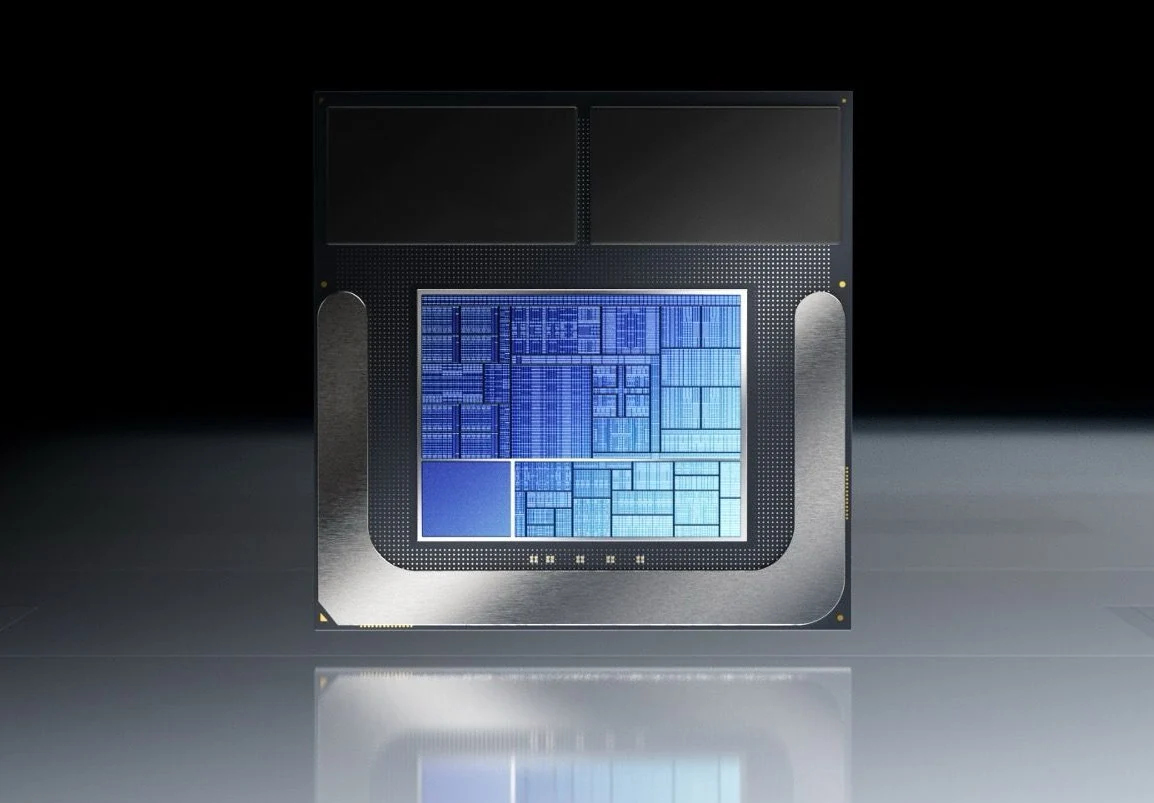
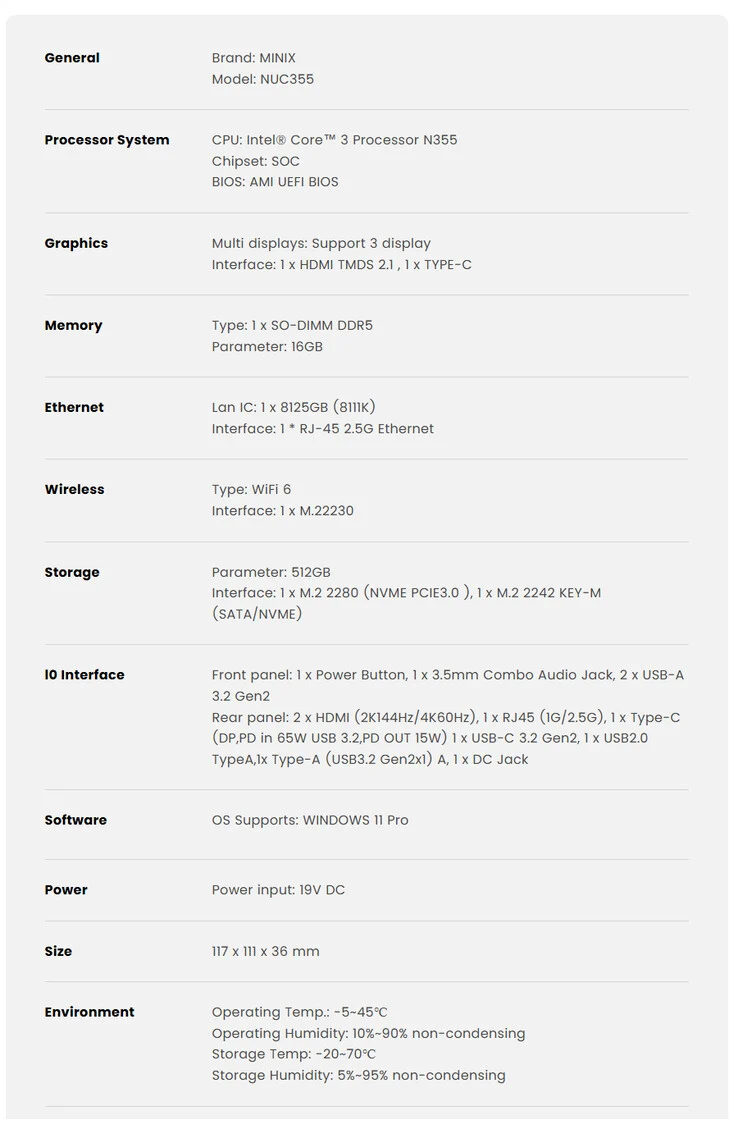
    Minix has launched a new mini PC called the NUC355. This device is powered by the Intel Core 3 N355, a processor from the Twin Lake series that is quite strong. With 8 cores, it offers more performance compared to systems equipped with the Intel N150.

    Improved Graphics Performance

    The company points out that the Intel Core 3 N355 comes with a more powerful integrated GPU than the Intel N150. Specifically, it includes UHD Graphics with 32 execution units (EUs), whereas the N150 has only 24 EUs. Minix claims that this enhancement makes the NUC355 a superior choice for watching media and casual gaming.

    Configuration and Storage Options

    Currently, the NUC355 is available in just one configuration, which pairs the Core 3 N355 processor with 16 GB of DDR5-4800 RAM and 512 GB of PCIe 3.0 storage. Although Minix hasn’t provided details on the upgradeability of the memory, they did mention that the system can support up to 4 TB of storage (currently, a 2 TB WD_BLACK SN850X is priced at $149.99 on Amazon).

    Connectivity Features

    In terms of connectivity, the Minix NUC355 offers a good selection of ports. Notably, it has two USB 3.2 Type-C ports, one of which supports full functionality, including DisplayPort and Power Delivery. The design of the new Minix mini PC features a compact size, measuring 117 x 111 x 36 mm. Other features of the NUC355 include WiFi 6, support for triple-display output, and Bluetooth 5.2. The initial price is set at $399, but Minix has not yet revealed when the device will be available for sale.

    Source:
    Link


  • Launch of $1,000 Wireless Ergonomic Split Mechanical Keyboard

    Launch of $1,000 Wireless Ergonomic Split Mechanical Keyboard

    Key Takeaways

    1. Ergonomic Design: The Naya Create features a low-profile split keyboard with a columnar staggered QWERTY layout and additional thumb keys to reduce hand movement and improve comfort.

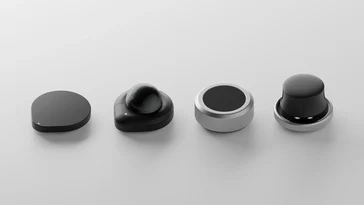
    2. Customizable Modules: Optional modules enhance functionality beyond typing, allowing users to tailor the keyboard experience to their needs while keeping hands on the keyboard.

    3. Wireless Connectivity and Battery Life: Supports Bluetooth, 2.4 GHz, or USB-C connectivity, with modules offering varying battery life—up to 80 days for smaller modules and around 100 days for larger ones.

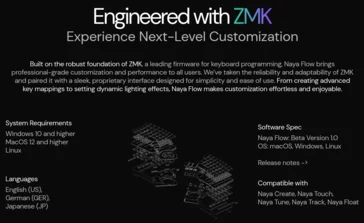
    4. High Customizability: Equipped with software based on ZMK firmware, users can customize key functions, layers, and macros, making it suitable for various creative professions.

    5. Pricing and Availability: The Naya Create is available for purchase starting at $509.99, with additional modules sold separately, after a successful Kickstarter campaign.


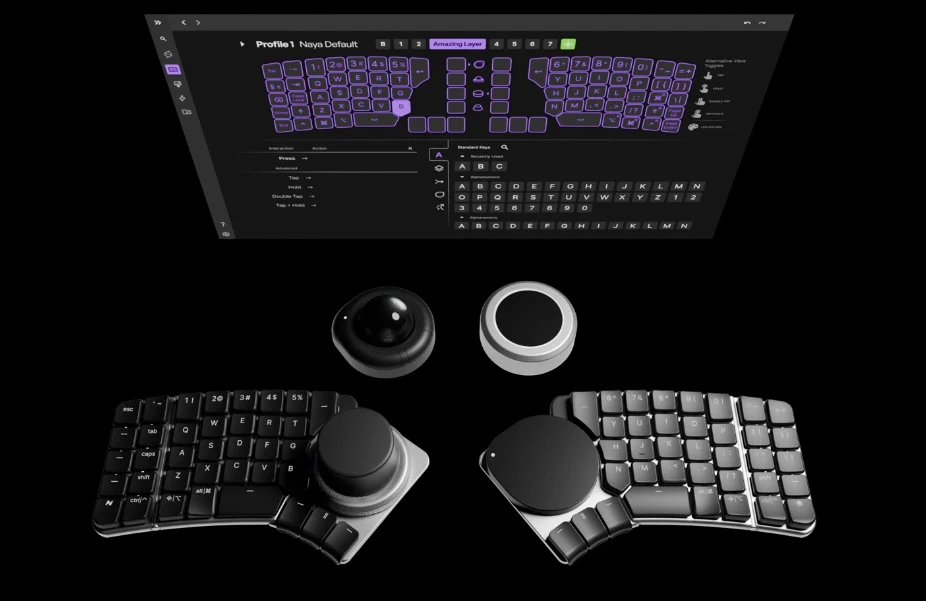
    The Naya Create introduces a fresh ergonomic split keyboard designed to address several ergonomic and productivity issues that standard keyboards often present. Unlike past ergonomic and low-profile keyboards we’ve looked at, the Naya Create allows for optional modules that enhance the keyboard’s use beyond mere typing, all while keeping your hands on the keyboard or even on the home row. The keyboard features a low-profile structure with a deck height of only 11.2 mm, thanks to Kailh Choc Mini switches, hinges on each half for tenting, and uniquely shaped keycaps.

    Pricing and Availability

    Recently, the Naya Create completed its Kickstarter campaign and is now available for purchase directly from the Naya website at a hefty starting price of $509.99 (though the suggested retail price is said to be $499.99). If you’re interested in the full experience, the Create with all additional modules currently costs $1,09.76, with extra modules sold separately.

    Layout and Connectivity

    Technically, the Create has a 65% layout, but with thumb clusters and two columns on each half, it totals 76 keys, making it closer to a 75% keyboard, minus the function row. The Naya Create supports wireless connectivity if you choose a module for each side of the keyboard, allowing connections through Bluetooth, 2.4 GHz, or USB-C. One of the key features of the Create is its high customizability, and Naya has developed unique customization software that builds on ZMK firmware to achieve this. Known for its efficiency, the ZMK firmware should result in good battery life. The battery life will vary depending on the modules used, with the Track and Touch modules having 800 mAh batteries, while the Tune and Float have larger 1,500 mAh batteries. Naya claims that the smaller modules provide up to 80 days of battery life, and the larger ones can last around 100 days.

    Ergonomics and Features

    The Naya Create employs a columnar staggered QWERTY layout designed to minimize movement between key presses. Each side includes three extra thumb keys to enhance ergonomics, allowing users to set up layers and macros tailored to their specific tasks. Moreover, the keyboard boasts per-key north-facing RGBW backlighting and shine-through keycaps, making it easier to see in low-light environments.

    Naya primarily aims to attract creative professionals, including CAD designers, photographers, programmers, and video editors, although anyone who spends significant time working at a keyboard may benefit from its ergonomic features, provided they can adapt to the new layout.

    Module Functionality and Software

    All modules feature Qi wireless charging capability, in addition to charging while connected to the keyboard, and they deliver various functionalities. Naya mentions that the Flow software for configuring the Create will eventually be available on Linux, but currently, downloadable versions are only offered for macOS and Windows. It remains uncertain whether Naya will contribute the necessary updates to ZMK to ensure compatibility with the open-source ZMK Studio.

    Source:
    Link