Category: Computers

  • Modder Creates 90s-Style All-Aluminium Framework Laptop

    Modder Creates 90s-Style All-Aluminium Framework Laptop

    Key Takeaways

    1. Flurples redesigned the Framework 13 laptop to improve typing experience with a custom low-profile mechanical keyboard and enhanced chassis.
    2. The project utilized premium materials, including CNC-cut aluminum and 3D printed components, to achieve a sleek appearance.
    3. The keyboard features Kailh Choc Sunset switches, MBK profile keycaps, and programmable rotary encoders, but is not hot-swappable for reliability.
    4. A custom internal USB hub was added, incorporating extra ports while maintaining the laptop’s original size, despite its complexity rendering it non-functional.
    5. The keyboard is equipped with custom QMK firmware, providing advanced configuration options for improved functionality.


    Flurples, a YouTube content creator famous for his unique cursed cardboard keyboard that sounds surprisingly good, is once again diving into the world of wild modifications. This time, he’s taken things to the next level by completely reconstructing a laptop to enhance the typing experience. He kicked off what he calls the Campus Laptop project with a standard Framework 13, whose keyboard provided a lackluster typing sensation and sound when compared to a standalone mechanical keyboard.

    Innovative Redesign

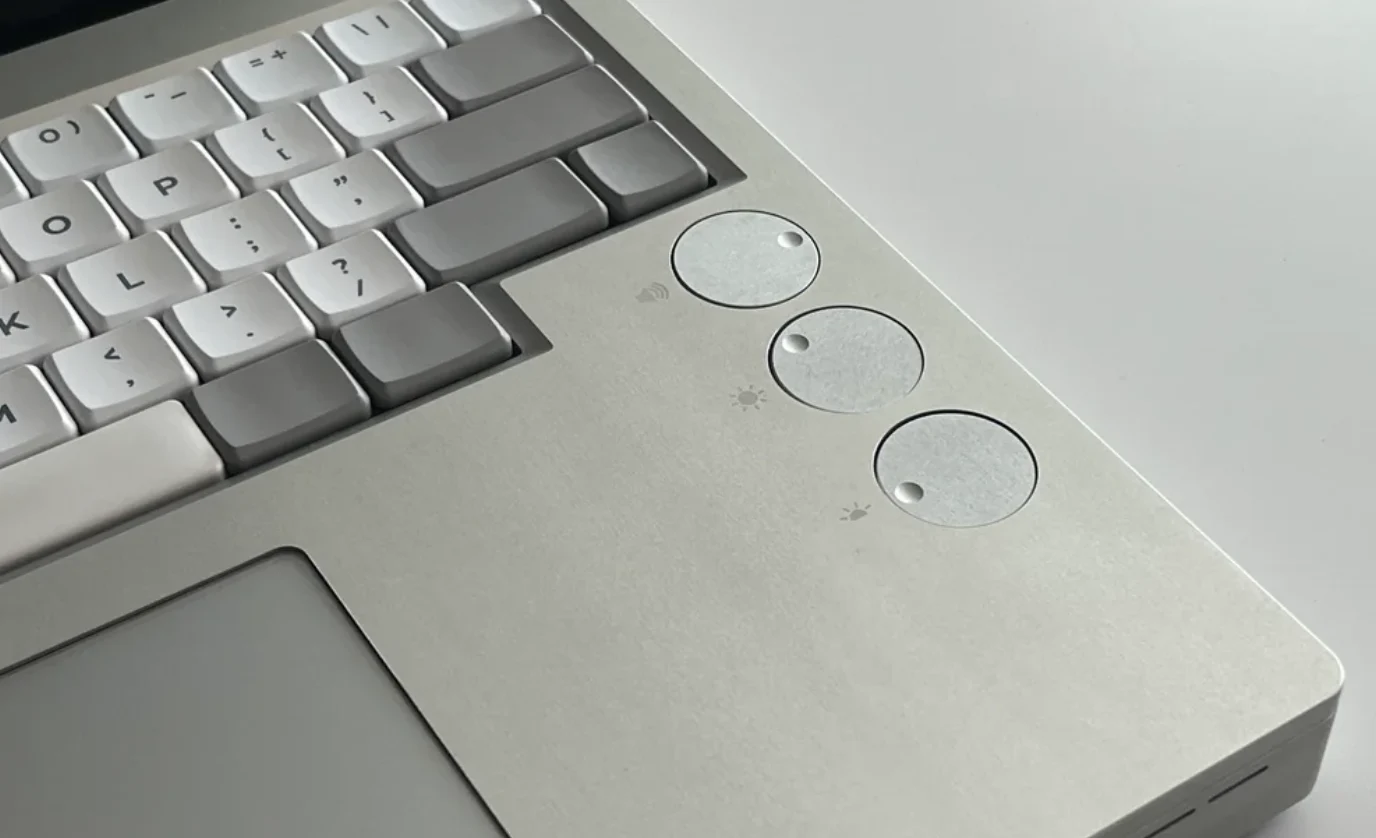
    To tackle this issue, the modder reversed engineered the Framework 13’s chassis, redesigning the entire bottom part while duplicating all the original mounting elements for components like the motherboard, battery, hinges, and trackpad. Additionally, the bottom housing needed to support the keyboard, which was mounted to the top section of the bottom case using a gasket top-mount design. Alongside adding a low-profile mechanical keyboard to the Framework laptop, Flurples also designed the space and mounting points for programmable rotary encoders. He had to modify the top case and hinge mounting points to fit the thicker bottom chassis.

    Premium Quality Parts

    The components were 3D printed to ensure they fit and looked good, but in the end, all the final parts, except for the display bezel, were made using CNC-cut aluminum, which gave the project a sleek and high-quality appearance.

    The mechanical keyboard used for the Framework Laptop is a fully customized design in a compact 60% HHKB layout, inspired by keyboards such as the HHKB Hybrid Type-S, which can be found for $259 on Amazon. It features Kailh Choc Sunset tactile switches and MBK profile keycaps, plus it manages three rotary encoders. A custom internal USB hub links the keyboard to the motherboard. This USB hub occupies the spot where one of the Framework Laptop 13’s USB-C expansion cards used to be, but Flurples ingeniously incorporated a microSD expansion slot, HDMI port, and USB port into the hub. As a result, the Campus laptop maintains the same size as the original model, despite the added hardware and bulkier design. Sadly, the complexity of the USB hub’s design meant that it couldn’t be made functional.

    Soldered Switches for Reliability

    The keyboard is not hot-swappable, meaning the switches are soldered in place. This decision was likely made to conserve space since hot-swap sockets would add extra thickness to the PCB’s back. Soldered keyboards also tend to be more reliable than their hot-swappable counterparts, which might have factored into this choice.

    The keyboard is equipped with custom QMK firmware, allowing for a high level of customization. Although it doesn’t have advanced Hall effect features like the Keychron K4 HE that we reviewed recently, it does provide advanced configuration options. Features such as multiple programmable layers, home row modifications, mod tap, and tap dance can enhance the functionality of smaller layouts like the HHKB.

    For more detailed insights, Flurples has covered several other aspects in his YouTube video detailing the design and building process, so be sure to check it out below. Ultimately, he ended up with a remarkably clean, albeit thick, Framework Laptop 13 that boasts significant improvements to the typing sound and feel, according to his own assessment.

    Source:
    Link


  • HP EliteBook 8 Flip G1i 13 vs EliteBook x360 830 G10: Which is Best?

    HP EliteBook 8 Flip G1i 13 vs EliteBook x360 830 G10: Which is Best?

    Key Takeaways

    1. Design Enhancements: The HP EliteBook 8 Flip G1i 13 is thinner, has more USB-C ports, and offers improved usability with a larger clickpad and keyboard font.

    2. Enhanced Charging Options: The new model supports charging from either side due to the additional USB-C port, unlike its predecessor.

    3. Active Stylus Storage: A built-in garage for the active stylus pen provides convenient storage, a feature missing in the previous model.

    4. Performance Upgrade: The transition to Arrow Lake-U CPUs results in a 50% increase in multi-thread performance while maintaining similar power consumption.

    5. Increased Battery Capacity: The battery size has grown from 51 Wh to 62 Wh, allowing for longer usage times.


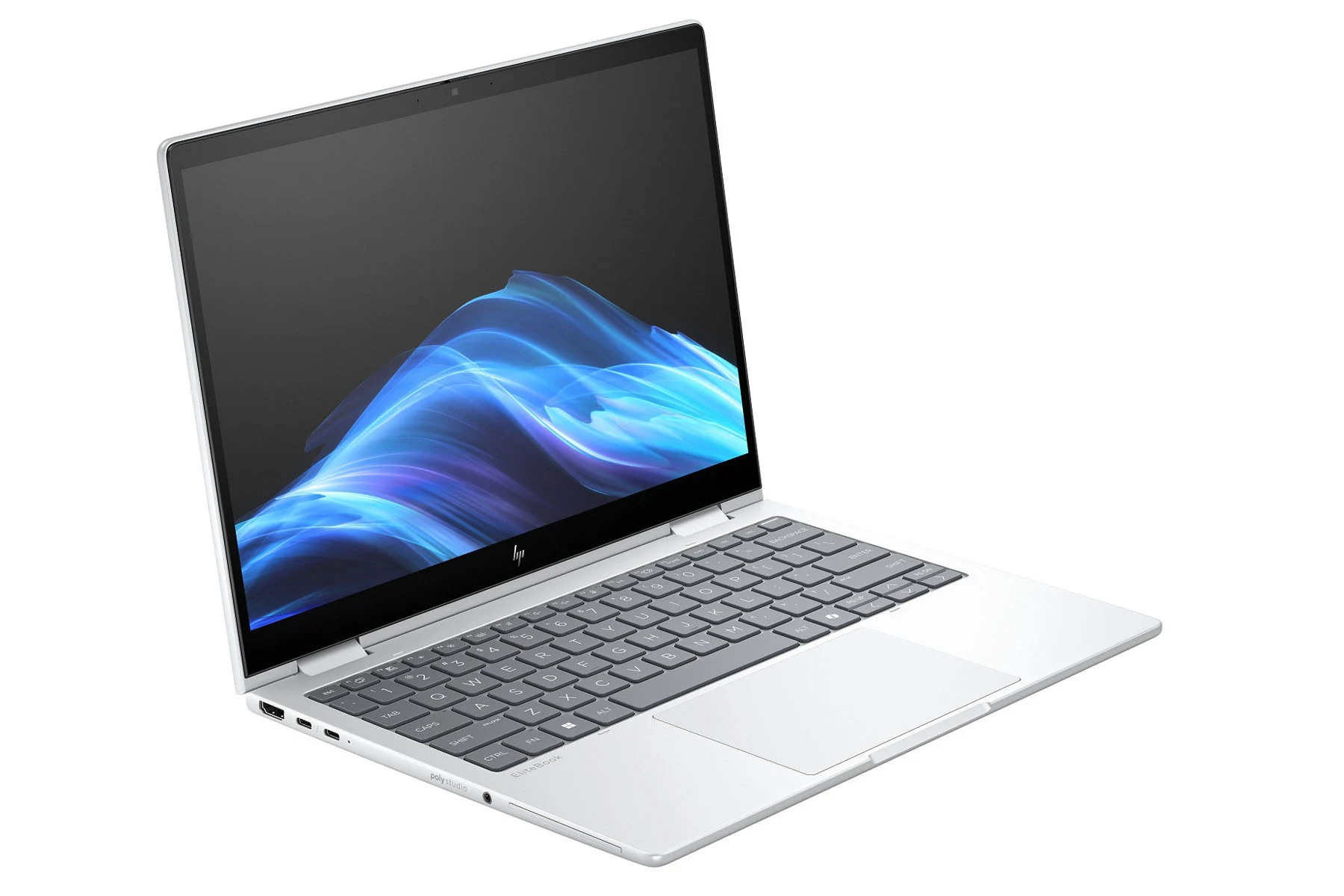
    The HP EliteBook 8 Flip G1i 13 convertible is now widely accessible, taking the place of last year’s EliteBook x360 830 G10. At a first glance, the two devices might seem identical due to their similar colors and materials, but the new model brings a whole lot of small updates that improve the overall user experience.

    Design Improvements

    On the outside, the new model is clearly thinner than its predecessor and comes with additional USB-C ports, while still offering optional support for nano-SIM cards and Smart Cards. The extra USB-C port is especially helpful as it allows charging from either side, unlike the EliteBook x360 830, which only supported left-side charging. Additionally, both the clickpad and the font on the keyboard keys have been enlarged this year for better usability. The active stylus pen also now has a new garage built into the laptop for easy storage, which was not available on the previous EliteBook x360 830 G10.

    Performance Boost

    Internally, the change from Raptor Lake-U to Arrow Lake-U CPUs has led to notable performance improvements while staying within similar power limits. Our tests indicate a raw multi-thread performance boost of about 50 percent, drawing only a few more watts from the mains. Furthermore, the battery capacity has increased from 51 Wh to 62 Wh, allowing for longer usage times.

    Overall Impressions

    While the device is great overall, there are still a few issues we have with the new convertible. Be sure to check out our review of the EliteBook 8 Flip G1i 13 to find out more about the advantages and disadvantages of HP’s latest subnotebook.

  • NASA’s New Discovery Offers Strong Evidence of Past Life on Mars

    NASA’s New Discovery Offers Strong Evidence of Past Life on Mars

    Key Takeaways

    1. NASA’s Perseverance rover collected rock samples from the “Bright Angel” formation in Jezero crater, labeled as “Sapphire Canyon” and “Cheyava Falls.”
    2. The rover discovered “leopard spots” containing iron-rich minerals, which may indicate past microbial activity in the area.
    3. The Bright Angel formation has high levels of organic carbon, sulfur, oxidized iron, and phosphorus, potentially supporting microbial life.
    4. The sedimentary rocks in the formation, made of clay and silt, are known to preserve traces of ancient life on Earth.
    5. Preliminary findings suggest that the formation of the observed spots may be linked to biological processes, offering hope for evidence of past life on other planets.


    The inquiry, “Are we alone?” has been a persistent topic within the realm of science. Researchers are determined to shed light on this deep question. A key player in this endeavor is NASA’s Perseverance rover.

    Rock Sample Collection

    In July 2024, Perseverance collected samples from a rock located in the “Bright Angel” formation, which is found in the Jezero crater. The Bright Angel formation features rocky outcrops along the edges of an ancient river valley known as Neretva Vallis. The NASA science team associated with Perseverance labeled the samples “Sapphire Canyon” and referred to the rock it was gathered from as “Cheyava Falls.”

    Discoveries on Cheyava Falls

    While on Cheyava Falls, Perseverance unveiled what the team termed “leopard spots.” Within these spots, two iron-rich minerals were identified: vivianite and greigite. The existence of these spots and their distinct makeup suggest potential chemical reactions that could indicate past microbial activities. Even though it’s possible that these spots formed without biological influence, a new study hints at a different possibility.

    The sedimentary rocks in the Bright Angel formation are abundant in organic carbon, sulfur, oxidized iron (rust), and phosphorus. These elements can serve as energy sources for microbial development. Scientists believe that as microbes consumed these energy sources, they left behind the spots observed on Cheyava Falls.

    Implications of Findings

    Additionally, the rocks in the Bright Angel formation are composed of clay and silt. On Earth, these materials often preserve traces of ancient microbial life. Furthermore, for the formation of these spots to have happened without biological assistance, specific high temperatures and acidic conditions would have been necessary. However, the rocks at Bright Angel do not display any evidence of having undergone these extreme conditions.

    At this point, nothing is definitively established. More research is on the horizon. Yet, these preliminary findings provide a glimmer of optimism in the quest for evidence of past life on other planets, as scientists have struggled to demonstrate that the formations resulted from inorganic processes.

    Source:
    Link


  • Geekom A9 Mega Launches Worldwide with AMD Ryzen AI Max+ 395

    Geekom A9 Mega Launches Worldwide with AMD Ryzen AI Max+ 395

    Key Takeaways

    1. Geekom launched the A9 Mega mini-PC shortly after releasing the A9 Max laptop.
    2. The A9 Mega is currently unavailable on retail sites and is being launched through Kickstarter with a $200 discount.
    3. The mini-PC is offered in one configuration with 128 GB of RAM, which is limited compared to competitors.
    4. It includes two M.2 2280 PCIe 4.0 slots and an M.2 2230 slot with Bluetooth 5.4/Wi-Fi 7 modem.
    5. The Kickstarter price for the A9 Mega is $1,899, with shipping expected by November 2025.


    Geekom has just launched its new mini-PC shortly after debuting its first laptops. Announced at the end of last month, the A9 Mega comes right after the A9 Max, which has been on sale for nearly a month. Interestingly, the A9 Mega is the commercial name for the previously unnamed mini-PC that came before the A9 Max’s official release.

    Availability Issues

    For some unexplained reason, Geekom hasn’t made the A9 Mega available on its retail site like it did with the A9 Max. Additionally, the new mini-PC is not found on third-party sites such as Amazon, where the A9 Max is currently listed for $999. Instead, Geekom is launching the A9 Mega through Kickstarter, offering a $200 discount on the eventual retail price.

    Specifications

    The A9 Mega is only being offered in one configuration, despite Geekom suggesting there would be various memory options alongside the AMD Ryzen AI Max+ 395 APU. At this moment, the A9 Mega comes with 128 GB of RAM, which is a limitation compared to similar mini-PCs like the GMKtec EVO-X2. It’s worth noting that the mini-PC has the following ports in its 171 x 171 x 70.9 mm chassis:

    Additionally, the A9 Mega features two M.2 2280 PCIe 4.0 slots and an M.2 2230 slot that comes with a Bluetooth 5.4/Wi-Fi 7 modem right out of the box. Currently, you can support the A9 Mega on Kickstarter for $1,899, which includes the Ryzen AI Max 395+ APU, 128 GB of RAM, and 2 TB of storage. As of now, Geekom is aiming to begin shipping units to Kickstarter backers by November 2025.

    Source:
    Link


  • NASA’s Mars Announcement: Two Major Errors You Missed

    NASA’s Mars Announcement: Two Major Errors You Missed

    Key Takeaways

    1. Nicola Fox mistakenly stated that the Milky Way galaxy is about 100 billion light-years across, while it is actually around 100,000 light-years wide.
    2. The observable universe is approximately 92 billion light-years in size, making Fox’s claim incorrect.
    3. Lindsay Hays claimed the rocks on Mars are about 350 billion years old, which exceeds the age of the universe itself, estimated at 13.8 billion years.
    4. The oldest confirmed fossils on Earth are about 3.45 billion years old, much younger than Hays’ claim.
    5. Joel Hurowitz, the lead author of the study, estimated the age of the Martian rocks to be between 3.2 and 3.8 billion years.


    Two days ago, NASA shared news that many people are calling the strongest hint yet of possible ancient microbial life on Mars, which is definitely thrilling for those who love astronomy. However, there are mistakes made by Nicola Fox, who is the associate administrator for NASA’s Science Mission Directorate, and Lindsay Hays, a senior scientist for Mars Exploration in NASA’s Planetary Science, that no one seems to be discussing.

    Misleading Measurements

    About 22 minutes and 35 seconds into the livestream, Nicola stated, “our galaxy is about a hundred billion light-years across,” which is a completely incorrect figure. This number exceeds the total size of the observable universe, which is around 92 billion light-years wide. The Milky Way, our galaxy, is thought to be about 100,000 light-years across. Did she confuse our galaxy with the whole universe, or mix up 100,000 with 100 billion? That’s a question that remains unanswered.

    Incorrect Claims

    Next, Lindsay Hays appeared around the 41:15 mark, claiming that the rocks containing the possible organic material were about 350 billion years old, which she noted is roughly the same age as Earth’s earliest fossils.

    This too is a figure that even the universe can’t claim. The universe is estimated to be 13.8 billion years old, which is more than 25 times younger than the age she mentioned. Additionally, the oldest confirmed fossils discovered on Earth are believed to be approximately 3.45 billion years old. Joel Hurowitz, who is the lead author of the study that NASA reported, only estimated the rocks to be between 3.2 and 3.8 billion years old.

  • DDR5 RAM Sticks with Built-in OLED Display for Enhanced Performance

    DDR5 RAM Sticks with Built-in OLED Display for Enhanced Performance

    Key Takeaways

    1. V-color and Gigabyte are launching innovative DDR5 memory modules with built-in OLED displays aimed at overclockers, gamers, and DIY enthusiasts.
    2. The XFinity+ memory modules come in kits of 32 GB, 48 GB, and 64 GB, achieving speeds up to 9,066 MT/s for Intel systems and 9,000 MT/s for AMD.
    3. The OLED display shows real-time data such as memory profile, capacity, speed, timings, voltage, and temperature, viewable during the POST phase.
    4. Compatibility with other motherboards and the need for additional connectors are currently uncertain; however, RGB lighting can be customized through the Gigabyte Control Center.
    5. Mass production of XFinity+ modules is set for Q3 2025, with initial availability on Newegg before a wider release on other platforms.


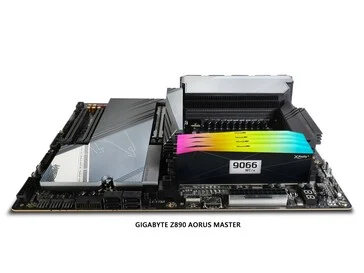
    We have noticed displays, whether OLED or LCDs, appearing on various devices like mice, keyboards, CPU coolers, and even fans. While some are quite beneficial, others may just be marketing tricks. However, V-color along with Gigabyte is optimistic that their innovative DDR5 memory modules featuring built-in OLEDs are going to be useful. These two companies have teamed up to enhance the XFinity series memory modules, which were first introduced at Computex earlier this year.

    Target Audience and Specifications

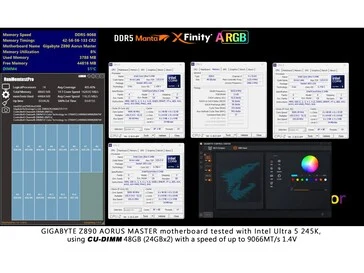
    These XFinity+ memory modules are aimed at “overclockers, gamers, and DIY enthusiasts,” and come in kits of 32 GB, 48 GB, and 64 GB. They are compatible with both Intel XMP and AMD EXPO profiles, achieving speeds up to 9,066 MT/s for Intel systems and 9,000 MT/s for AMD setups. The AMD modules offer slightly improved timings with CL26 for the 32 GB kit, while Intel’s modules have CL38 timings. Each kit will have one OLED display module along with one standard module, which is logical since only one will be fully visible. Additionally, there are plans to release four-module kits that will include two functional modules and two RGB filler ones.

    Features of the OLED Screen

    The OLED display is a small rectangle located on the right side of the memory module. It can display real-time information such as memory profile (Intel or AMD), capacity, speed, timings, voltage, and temperature. This information can be viewed even during the POST phase, without needing to boot into the operating system. When used with Gigabyte motherboards, these DDR5 modules need no extra connectors or cables.

    Compatibility and Availability

    It remains uncertain if the OLED display will work with other motherboards and if those would need additional connectors. These modules also feature RGB lighting that can be personalized through the Gigabyte Control Center.

    XFinity+ will come in both black and white colors. However, V-color has not disclosed the pricing for these kits yet, but mass production is set to start in Q3 2025. They will first be available exclusively on Newegg, followed by a wider launch on Amazon, the V-color website, and other platforms.

    Source:
    Link


  • Asus ProArt P16 Preview: RTX 5090 Laptop with 4K Lumina Pro OLED

    Asus ProArt P16 Preview: RTX 5090 Laptop with 4K Lumina Pro OLED

    Key Takeaways

    1. Enhanced Cooling and Performance: The new ProArt P16 features improved vapor chamber cooling, enabling it to support the AMD Ryzen AI 9 HX 370 and GeForce RTX 5090 Laptop GPU for better performance in creative tasks.

    2. Upgraded Display: The laptop now includes a new Lumina Pro OLED display that offers significantly improved brightness levels and supports 4K resolution, enhancing the experience for photo and video editing.

    3. Build Quality and Design: While the chassis is thicker and heavier than its predecessor, it maintains high build quality, similar to the ROG Zephyrus G16.

    4. Good Selection of Ports and Features: The ProArt P16 is equipped with a variety of ports, high-quality speakers, and excellent input devices, making it a well-rounded choice for creators.

    5. Future Comparisons and Testing: The upcoming review will compare the ProArt P16’s performance against the ROG Zephyrus G16 and Apple MacBook Pro 16, focusing on the effectiveness of the new GPU and processors.


    The Asus ProArt P16 is a sleek, high-quality laptop designed for creative professionals, utilizing the same chassis as the ROG Zephyrus G16 gaming laptop. We previously reviewed the 2025 model of the ProArt P16, which featured a 120 Hz OLED display (though it was only 2.8K resolution), exceptional build quality, and the RTX 5070 Laptop GPU. While it performed well, we wished for quicker GPU options.

    Improvements in Cooling and Performance

    Asus has taken our feedback to heart and has released a second iteration with enhanced vapor chamber cooling. This change closely aligns with the design of the Zephyrus G16. Consequently, the chassis is now a bit thicker and heavier, but it can now pair the AMD Ryzen AI 9 HX 370 with the GeForce RTX 5090 Laptop (24 GB VRAM), a notable boost for image and video editing tasks. Asus states that the maximum TGP is 120 Watts, and we are eager to compare its performance to the ROG Zephyrus G16. The laptop supports up to 64 GB of memory.

    Display Enhancements

    In addition to the upgraded GPU options, the ProArt P16 now features a new Lumina Pro OLED display. This is a tandem OLED screen with significantly improved brightness levels. Although we can’t share our specific measurements yet, the difference compared to the Zephyrus G16 (which has subpar HDR brightness) is visually noticeable. The two images below highlight this distinction nicely. The panel also supports 4K resolution, which again benefits picture and video editing.

    Overall Impressions and Future Testing

    All in all, our first impressions of the upgraded ProArt P16 are very encouraging. The combination of a faster GPU (with extra VRAM) and the new 4K tandem OLED screen with superior brightness could make this the ultimate laptop for creators. The P16 also boasts a good selection of ports, high-quality speakers, and excellent input devices. However, it may also compete strongly against the ROG Zephyrus G16, which will likely lag in display quality. We’re particularly interested to see how the two processors (Core Ultra 9 285H or Ryzen AI 9 HX 370) perform with the RTX 5090 Laptop GPU and how the new ProArt P16 stacks up against the Apple MacBook Pro 16 with M4 Pro and M4 Max.

    We will thoroughly test the new ProArt P16 over the next few weeks before we publish our review in October. In the meantime, check out our review of the ProArt P16 with the RTX 5070 Laptop for further insights. If you have any questions or suggestions for our upcoming review, don’t hesitate to leave a comment. Your feedback is greatly valued.


  • New PC Case Features Floating Design for Better GPU Cooling

    New PC Case Features Floating Design for Better GPU Cooling

    Key Takeaways

    1. darkFlash is a PC accessory maker founded in 2016 by DIY PC enthusiasts and gamers.
    2. The Floatron F1 m-ATX case features a unique floating design that improves GPU ventilation and lowers temperatures by 5-7 degrees.
    3. It supports up to 350 mm GPU clearance, 185 mm CPU cooler clearance, and allows for multiple fan configurations for optimal cooling.
    4. The case includes seamless glass panels for aesthetics and easy access through a clamshell design.
    5. Floatron F1 will be available in black and white options, but pricing and availability details are yet to be announced.


    You might not know about this PC accessory maker, but their latest m-ATX case is both unique and intriguing. Founded in 2016 by a team of DIY PC enthusiasts and gamers, darkFlash offers a range of products such as cases, power supplies, cooling equipment, keyboards, and mice. Their newest case, the Floatron F1, elevates the entire chassis, which allows for improved GPU ventilation and gives it a floating look, which explains its name.

    Unique Design Features

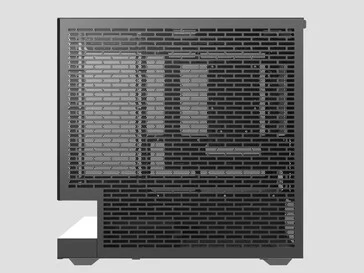
    The m-ATX case features what the company calls a floating extended base, claiming it can lower GPU temperatures by five to seven degrees. The front and side showcase seamless glass panels, while the other sides are filled with ventilation holes. Notably, the bottom has a height of 64 mm between the base and the chassis. Both the side glass panel and the rear panel adopt a clamshell design for convenient access.

    Specifications and Cooling Options

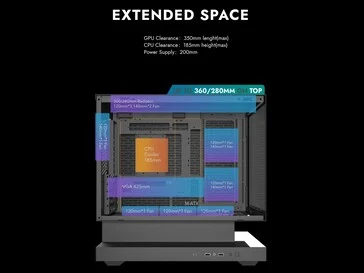
    The Floatron F1 supports a maximum GPU clearance of 350 mm and a CPU cooler clearance of 185 mm. It allows for the installation of up to nine 120 mm fans or five 140 mm fans. However, it appears that a radiator can only be fitted at the top, with a length of up to 360 mm. darkFlash recommends setting up three intake fans at the bottom with three exhaust fans at the top and an additional exhaust at the back. The two side fans can also act as intakes to assist the bottom three. The base can accommodate two 3.5-inch HDDs, and the rear of the motherboard plate can hold two SSDs. Additionally, the user-facing side of the base includes two USB 3.0 ports and one Type-C port.

    Availability and Color Options

    As of now, darkFlash has not disclosed any pricing or availability information for the Floatron F1. The case will be available in both black and white options, with the white featuring a combo color scheme. There is also a Black-Connect Edition, but it’s unclear what sets it apart from the standard black version.

    Source:
    Link


  • Lenovo Launches Powerful RTX ThinkPad Without Public Announcement

    Lenovo Launches Powerful RTX ThinkPad Without Public Announcement

    Key Takeaways

    1. The Lenovo ThinkPad T1g Gen 8 is a new model in the ThinkPad T series, which is not heavily promoted by Lenovo despite its launch.

    2. The design of the ThinkPad T1g Gen 8 closely resembles the ThinkPad P1 Gen 8, with the main difference being the type of graphics options available.

    3. Lenovo has shifted its strategy, now offering GeForce RTX graphics in the ThinkPad T1g Gen 8, whereas the P1 Gen 8 features professional RTX GPUs.

    4. The ThinkPad T1g Gen 8 may outperform the ThinkPad P1 Gen 8 due to its more powerful RTX 5070 graphics compared to the P1’s RTX Pro 2000.

    5. The ThinkPad T1g Gen 8 is available in select markets, with a starting price of around €3,000.


    The Lenovo ThinkPad T1g Gen 8…hold on, what? When did this model appear, and how come there are now eight versions? Plus, why hasn’t Lenovo said anything about it? This laptop is a fresh addition to the ThinkPad T series, which is one of the most famous ThinkPad laptop lines, yet it seems there’s hardly any promotion for it.

    For dedicated followers of Notebookcheck, the Lenovo ThinkPad T1g isn’t completely unknown, as we previously shared a leak about this new model. But until now, actual information was quite limited, and Lenovo didn’t mention it during their recent IFA 2025 announcements. However, things have changed now, as the Lenovo ThinkPad T1g Gen 8 is now listed in Lenovo’s PSREF specification database.

    Similar Design

    The images and specs reveal that the ThinkPad T1g G8 is almost identical to the newly revealed Lenovo ThinkPad P1 Gen 8, which is Lenovo’s top-tier, lightweight 16-inch workstation designed for CAD and AI tasks on the move. The key distinction lies in the graphics: while the Lenovo ThinkPad P1 Gen 8 comes with Nvidia RTX Pro GPUs, reaching up to the Nvidia RTX Pro 2000, the ThinkPad T1g Gen 8 will only have Nvidia GeForce RTX graphics options, including the Nvidia GeForce RTX 5060 and the Nvidia GeForce RTX 5070.

    Shift in Strategy

    In comparison to the previous ThinkPad P1 Gen 7 (which is sold on Amazon), both the GeForce and professional RTX GPUs were available under the P1 branding. However, it seems Lenovo has decided to change their strategy and go back to how things were a few years back. Initially, the ThinkPad P1 launched alongside the ThinkPad X1 Extreme that featured GeForce GPUs—now, the ThinkPad T1g will take on that role.

    Interestingly, it appears the ThinkPad T1g Gen 8 may actually outperform the ThinkPad P1 Gen 8, since the T1g offers the RTX 5070, which has more CUDA cores compared to the RTX Pro 2000, which is based on the RTX 5060. This wasn’t the case with the P1 Gen 7, as it had the option for the RTX 3000 level professional GPU.

    Availability and Pricing

    The Lenovo ThinkPad T1g Gen 8 is currently available in select markets, with a starting price around €3,000.

    Source:
    Link


  • Replace Samsung SK Hynix China Fab VEUs with Annual Licenses

    Replace Samsung SK Hynix China Fab VEUs with Annual Licenses

    Key Takeaways

    1. The U.S. is replacing VEU permissions with annual “site licenses” for Samsung and SK Hynix’s factories in China to limit upgrades and expansions.
    2. The new licenses will outline approved amounts of restricted tools, parts, and materials, adding more regulatory requirements.
    3. The shift aims to enhance U.S. oversight but complicates planning for companies due to unpredictable equipment needs.
    4. The change is part of the Trump administration’s effort to close perceived loopholes from the Biden era, emphasizing a stricter regulatory approach.
    5. Industry concerns include potential supply instability for DRAM and NAND, risking global shortages for smartphones and data centers.


    The U.S. is getting ready to switch from the current VEU permissions for Samsung and SK Hynix’s factories in China to annual “site licenses.” These licenses will outline approved yearly amounts of restricted tools, parts, and materials. The goal is to maintain the operation of existing factories while preventing any upgrades or expansions. The current VEUs will expire at the end of the year. South Korean officials see this new regulation as manageable but worry about the extra red tape it brings.

    Background of Export Restrictions

    The roots of these export restrictions can be traced back to 2022, when initial controls focused on advanced logic (about 16nm FinFET), DRAMs (18nm half-pitch), and 3D NAND (128 layers or more). During that time, the VEU system allowed Samsung and SK Hynix continuous approvals, as long as they adhered to certain monitoring and security requirements.

    Changes in Administration

    After these controls were put in place, waivers were granted during the Biden administration to facilitate operations. Now, the new Trump administration is working to eliminate what it believes are “loopholes” from the Biden era by cancelling VEUs and introducing annual site licenses.

    With the suggested new system, companies would only need to submit one application per year, detailing specific items and their amounts. This adjustment gives the U.S. more notice before shipments occur, yet it complicates planning for companies since they can’t predict when equipment might fail and require replacement parts. U.S. officials mention that urgent licenses can be processed quickly, but many industry players are skeptical of this.

    Industry Concerns

    These alterations bring up worries about the stability of DRAM and NAND supplies. If equipment breaks down during the year or new shipments are postponed, it could impact parts for smartphones and data centers, potentially causing global shortages. This policy once again places Seoul in a tricky position between its key ally and its largest trading partner.

    Source:
    Link