Category: Computers

  • Intel Nvidia Hammer Lake Leaks Large iGPU as Titan Lake Goes Mobile

    Intel Nvidia Hammer Lake Leaks Large iGPU as Titan Lake Goes Mobile

    Key Takeaways

    1. Intel and Nvidia are collaborating to integrate Nvidia’s RTX iGPUs into Intel’s x86 products, impacting both datacenter and consumer segments.
    2. The integration aims to enhance Intel’s existing Arc Graphics series rather than replace it.
    3. Intel’s roadmap has changed, focusing on Titan Lake mobile APUs with upgraded iGPUs and scrapping plans for Titan Lake desktop CPUs.
    4. The transition to Nvidia graphics in Intel’s products is expected to happen gradually, with a full shift potentially not occurring until 2029.
    5. The future of Intel’s Arc desktop GPUs remains uncertain as the company prepares for this transition.


    Intel’s collaboration with Nvidia to develop graphics solutions for x86 products is likely the most significant PC news of 2025. This partnership impacts not only Intel’s datacenter solutions but also its consumer segment, which includes laptop APUs and discrete desktop GPUs. Intel has stated that the integration of Nvidia’s RTX iGPUs in x86 Intel APUs is intended to enhance, rather than replace, Team Blue’s existing Arc Graphics series.

    Marketing or Reality?

    Nonetheless, Moore’s Law Is Dead suggests that this might be just a marketing strategy, as Intel is expected to fully transition to Nvidia GeForce RTX iGPUs with the introduction of Intel Hammer Lake. According to previous leaks from MLID, Intel plans to follow the Panther Lake mobile architecture with Nova Lake, Razer Lake, Titan Lake, and Hammer Lake. Initially, it was believed that all four architectures would use the LGA 1954 socket, which Intel is rumored to unveil with Nova Lake-S desktop CPUs in late 2026.

    Changes in Strategy

    Intel appears to have slightly altered its roadmap. MLID indicates that Team Blue has scrapped plans for Titan Lake desktop CPUs and is now solely focusing on Titan Lake mobile APUs that will feature “upgraded iGPUs.” These new iGPUs could potentially be Nvidia RTX variants, unlike those in Hammer Lake.

    MLID has also reported that Intel Hammer Lake products are now being “redefined” to feature a “new large and powerful iGPU” by 2029. This powerful iGPU is likely to be an Nvidia GeForce RTX iGPU, as an Nvidia insider informed MLID that Intel x Nvidia products will debut with Titan Lake at the earliest, and not before.

    Future Implications

    In simpler terms, we might witness Intel’s mobile and desktop APUs continue to utilize Arc iGPUs for several more years before transitioning to Nvidia graphics in 2029. The impact of this shift on Intel Arc desktop GPUs remains uncertain. MLID has provided an updated specification for the upcoming Arc B770, which we have discussed in a separate article.

    Source:
    Link



  • Asus ExpertCenter PB64: Mini PC with Core Ultra 7 & 64GB RAM

    Asus ExpertCenter PB64: Mini PC with Core Ultra 7 & 64GB RAM

    Key Takeaways

    1. The Asus ExpertCenter PB64 is designed for professional users and can handle advanced tasks with options for powerful Intel Core Ultra processors.
    2. It supports up to 64GB of memory and can accommodate three storage devices, including two M.2 2280 PCIe 4.0 SSDs and a 2.5-inch drive.
    3. The compact design (6.9 x 6.9 x 1.7 inches) allows for connection to four monitors, featuring multiple video output options including DisplayPort and USB-C.
    4. Users can customize the PC with additional ports like HDMI, extra DisplayPort, or COM port for specialized devices, along with various USB and audio connections.
    5. The ExpertCenter PB64 is not yet available on mainstream online shops, but similar models like the Asus ExpertCenter PN54 are available for around €900 in Europe.


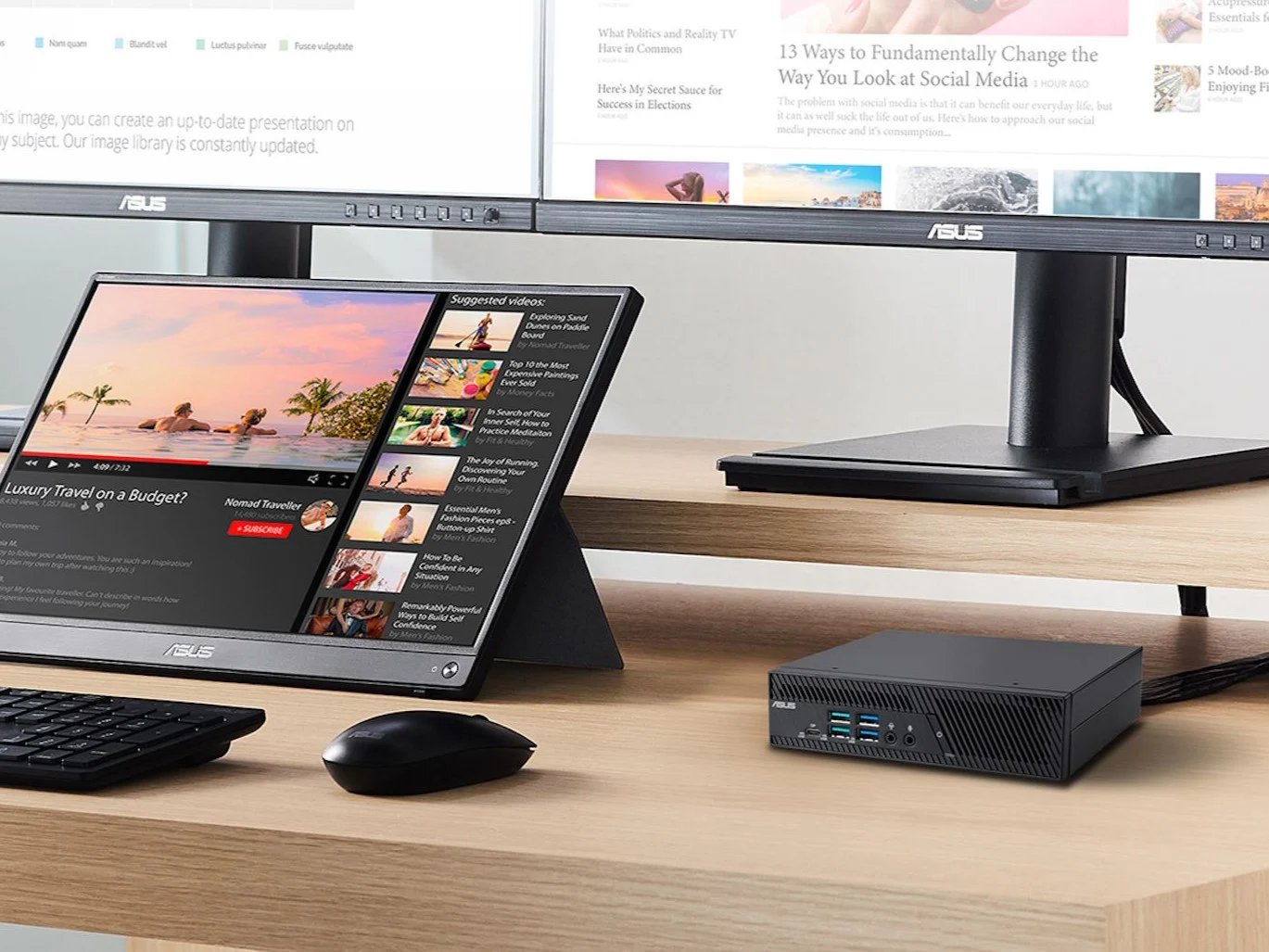
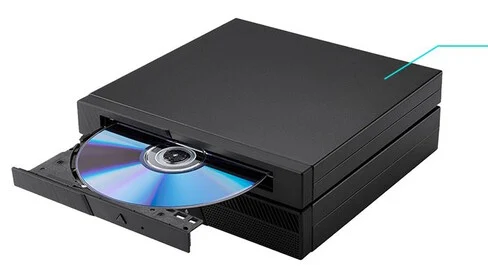
    Asus is a popular name in the gaming world, but it also has a presence in other areas, like business. The Asus ExpertCenter PB64 is aimed at professional users who need to equip an entire office. Depending on how it’s set up, this mini PC can handle more than just basic tasks, as it comes with options for Intel Core Ultra processors, including the Ultra 5 225, Ultra 5 235, Ultra 5 245, and even the Ultra 7 265. You can install up to 64GB of memory across two RAM slots, and it supports up to three storage devices. The mini PC can take two M.2 2280 PCIe 4.0 SSDs and also has space for a 2.5-inch drive that’s a maximum of 0.28 inches tall.

    Compact and Versatile Design

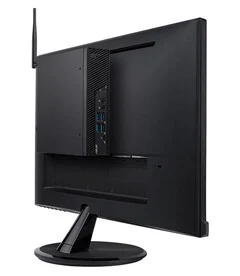
    The dimensions of the ExpertCenter PB64 are 6.9 x 6.9 x 1.7 inches, and it can be connected to four monitors simultaneously. To facilitate this, the desktop comes equipped with two DisplayPort 1.4 ports and one USB-C 3.2 Gen 2 port, which is capable of delivering up to 100 watts through USB PD. Additionally, there’s a USB 4 port located on the front. Depending on your needs, you can also order the mini PC with an extra HDMI 2.1 port, another DisplayPort 1.4, an additional Ethernet port with 2.5 Gbps, or a COM port that could be used for connecting devices like a scale. There are also USB-A 3.2 Gen 2 and Gen 1 ports, along with a 3.5mm audio jack. It’s possible to mount the PC on a monitor using a VESA mount as well. So far, the Asus ExpertCenter PB64 hasn’t appeared on mainstream online shops. In the meantime, fans of mini PCs might want to look at our review of the similar Asus ExpertCenter PN54, which retails for around €900 in Europe.

    Targeting Professionals

    Asus has made a name for itself not just in gaming, but also in various other markets. The ExpertCenter PB64 represents their push into the business sector, catering to professionals who require robust performance for office tasks. Depending on how you configure it, this mini PC goes beyond just handling basic word processing needs. It offers a choice of powerful Intel Core Ultra processors, such as the Ultra 5 225, Ultra 5 235, Ultra 5 245, and the more advanced Ultra 7 265. Memory options reach up to 64GB across two slots, and it supports three different storage drives. You can equip it with two M.2 2280 PCIe 4.0 SSDs, or even a 2.5-inch drive that has a maximum height of 0.28 inches.

    The compact size of the ExpertCenter PB64, measuring 6.9 x 6.9 x 1.7 inches, allows it to connect to four monitors, making it ideal for multitasking. It comes with two DisplayPort 1.4 ports and a USB-C 3.2 Gen 2 port capable of delivering up to 100 watts via USB PD, plus a USB 4 port on the front. Users can customize their setup with options like an HDMI 2.1 port, an additional DisplayPort 1.4, or even a COM port for specialized connectivity, such as to scales. It also includes USB-A 3.2 ports and a 3.5mm audio jack. The PC can be mounted on a monitor using VESA. Currently, the Asus ExpertCenter PB64 isn’t available on common online platforms, but for those interested in mini PCs, you might want to check out our review of the Asus ExpertCenter PN54, which is priced at about €900 in Europe.

    Source:
    Link


  • Ubiquiti Launches UNAS 2, UNAS 4, and New Pro Series Devices

    Ubiquiti Launches UNAS 2, UNAS 4, and New Pro Series Devices

    Key Takeaways

    1. The Ubiquiti UNAS 2 is a network-attached storage device that supports two 3.5-inch hard drives and connects via 2.5GbE, with PoE++ power options.
    2. It features a USB-C port for external storage connections and supports file systems like FAT32, exFAT, NTFS, and EXT4, but lacks hot-swapping and disk encryption.
    3. The UNAS 2 is priced at approximately $199 and is targeted as an entry-level NAS.
    4. For more storage, the UNAS 4 offers four bays and two M.2 SSD slots, priced at $379, but is currently not available for order.
    5. Ubiquiti has also introduced rack NAS models, including the UNAS Pro series, with prices ranging from $499 to $799, designed for network cabinets and varying in size and capacity.


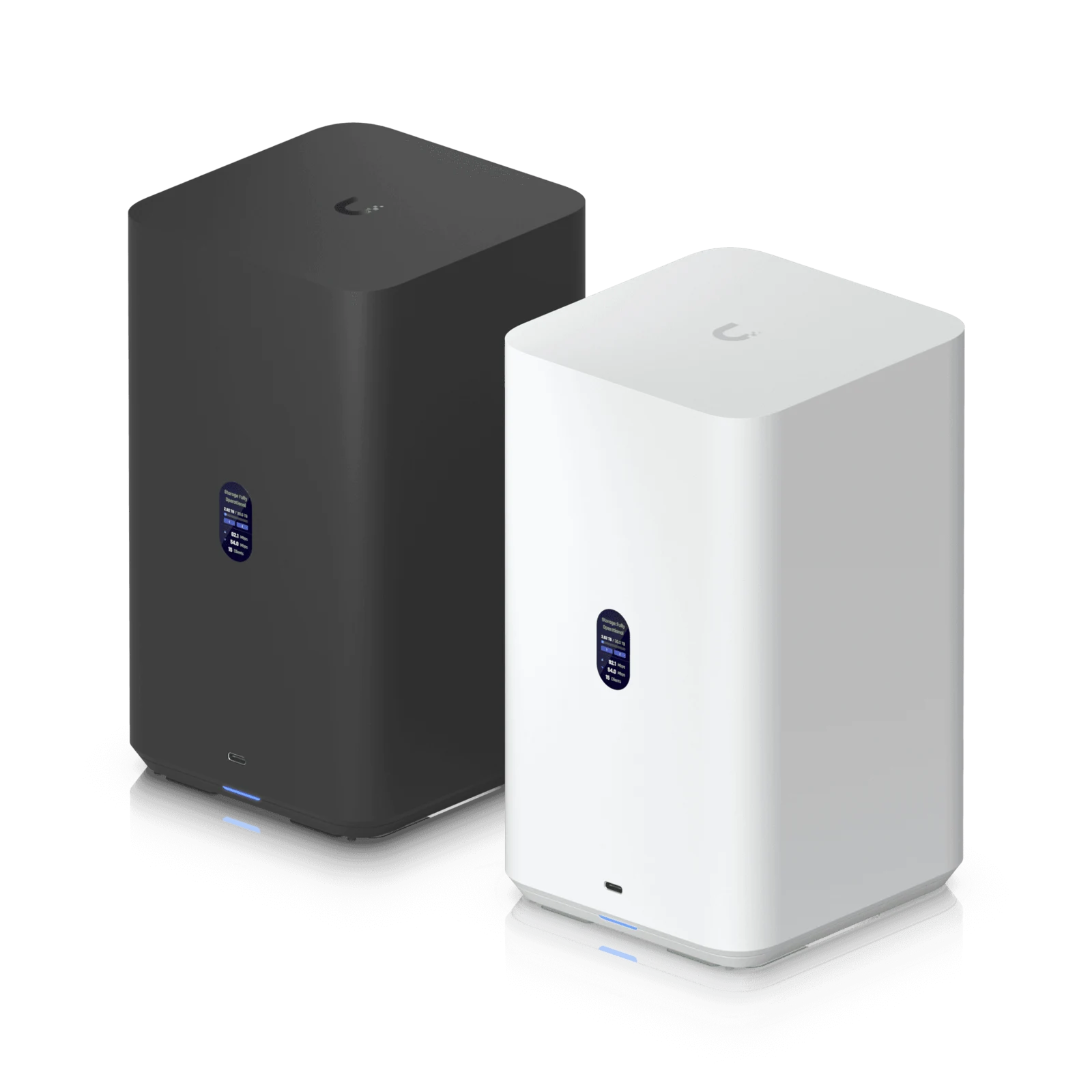
    Ubiquiti has made the official announcement of the UNAS 2, a new network-attached storage device. This device can hold two 3.5-inch hard drives that are placed into the case from below and connect to the network using 2.5GbE. Additionally, the NAS can be powered through PoE++ via the 2.5GbE port, so you might not need a power adapter all the time. Regardless, Ubiquiti provides one in the package. The NAS also supports SMB/CIFS and NFS for external access.

    Connectivity Options

    With a USB-C port offering 5Gbps, you can connect external storage devices, provided they are formatted in FAT32, exFAT, NTFS, or EXT4. True to Ubiquiti’s style, there is a small status display located on the front of the device. Being an entry-level NAS, the UNAS 2 lacks hot-swapping support, which might be tricky with its design anyway. Disk encryption is another feature that is not supported. For those who require these functionalities, Ubiquiti suggests looking at the pricier UNAS Pro models. The UNAS 2 is available for about $199 at the official online store of the brand.

    More Storage Options

    If you’re looking for more storage, you might consider the UNAS 4, which includes four bays and two M.2 SSD slots that can be accessed directly from the back. However, there isn’t an FAQ available yet for the UNAS 4. The power consumption for this model is considerably higher at 90 watts, so it necessitates either a PoE+++ switch or the included PoE power adapter. You can’t currently order the Ubiquiti UNAS 4, but it is priced at $379.

    Rack NAS Introductions

    In addition to the UNAS Pro 8, Ubiquiti has also launched new rack NAS solutions. Among these, the UNAS Pro features seven bays in a 2U form factor, only needing a mounting depth of around 13 inches or 33cm (excluding the power cable). This makes it suitable for network cabinets.

    The UNAS Pro 4 requires a bit more room at 15.7 inches or 40cm but only takes up 1U of height. This model can accommodate four 3.5-inch hard drives. The pricing for these rackmount NAS devices varies between $499 and $799. Currently, only the UNAS Pro with seven bays is available for purchase, while the other models are expected to be released in the fourth quarter of 2025.

    Source:
    Link


  • Cooler Master’s 3D Heat Pipe Tech: Affordable CPU Cooling Upgrade

    Cooler Master’s 3D Heat Pipe Tech: Affordable CPU Cooling Upgrade

    Key Takeaways

    1. Cooler Master introduced the Hyper 212 3DHP CPU cooler with a unique 3D heat pipe design for better heat distribution.
    2. The cooler has two variants: an ARGB version and a Black version, both with a 120 mm fan and a maximum noise level of 27 dBA.
    3. Performance testing will determine the effectiveness of the new design, as no temperature benchmarks have been provided yet.
    4. The Hyper 212 3DHP Black is priced at $30, while the price for the ARGB version is not yet disclosed.
    5. The cooler comes with an extended five-year warranty, three years longer than other Cooler Master air coolers.


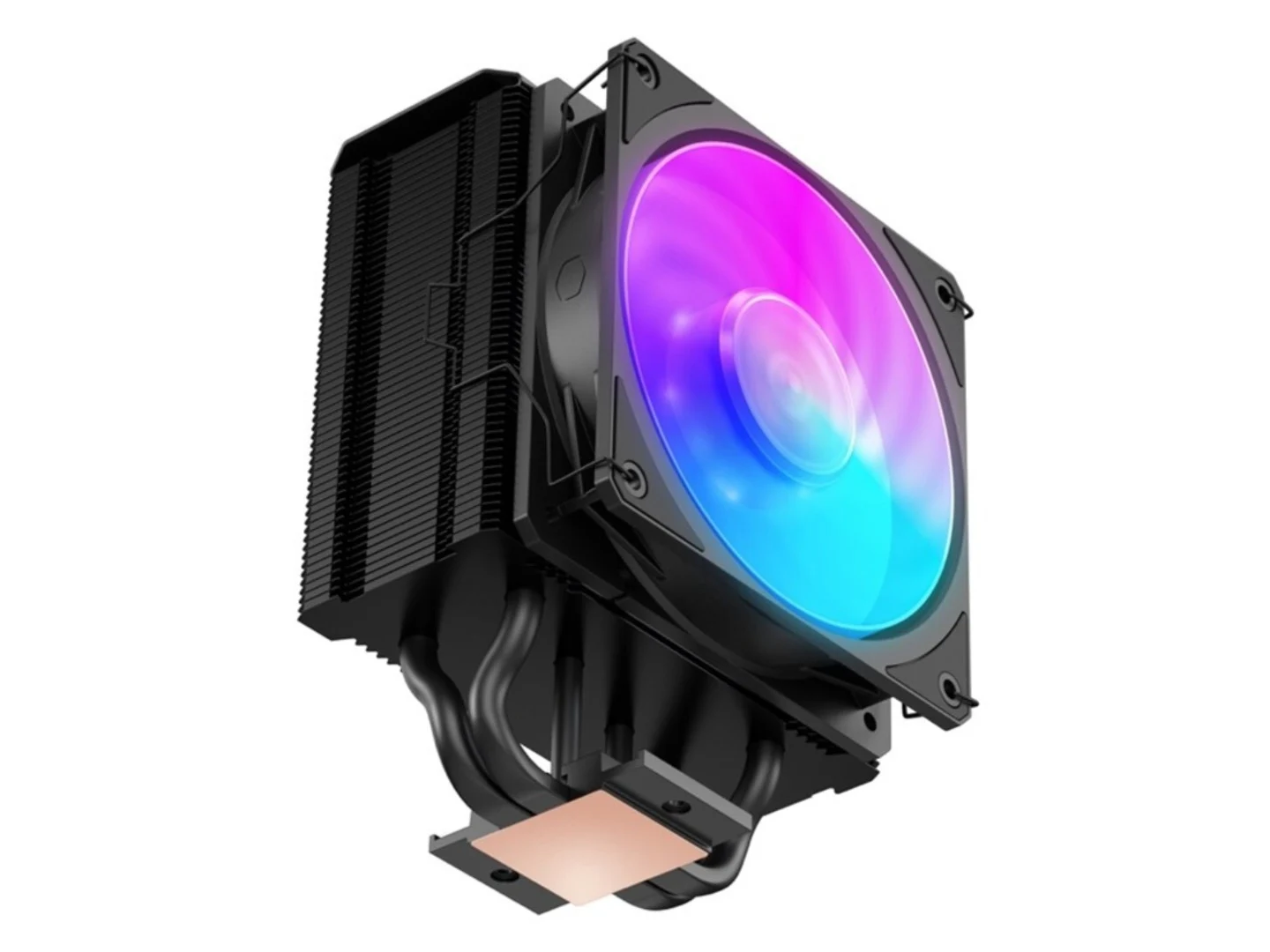
    There are several well-known brands in the CPU cooling space, and Cooler Master has been providing cost-effective air cooling solutions for many years. In its ongoing efforts, the company recently introduced the Hyper 212 3DHP CPU cooler, an enhanced version of the original Hyper 212 line featuring a 3D heat pipe system, during Computex. The cooler has been priced and will be available to customers shortly.

    Unique 3D Heat Pipe Design

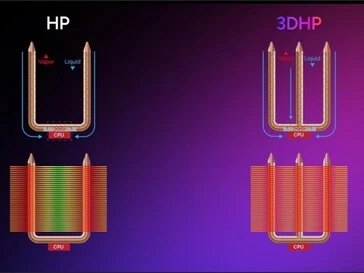
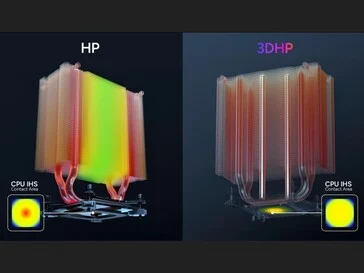
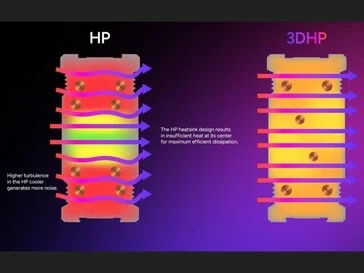
    The Hyper 212 3DHP comes with an innovative 3D heat pipe layout. Alongside the usual heat pipes that rise through the heatsink fin stack, there’s an additional set of heat pipes that run through the center. Cooler Master claims this design allows for a more even distribution of heat across the fin stack, preventing the two ends of the heatsink from absorbing most of the heat. The images below illustrate how this 3D heat pipe technology operates.

    Performance Testing and Variants

    On the surface, it’s a straightforward yet clever concept, but actual performance testing will reveal its true effectiveness. Cooler Master hasn’t provided any temperature benchmarks for comparison. However, it has mentioned that there will be two versions of the Hyper 212 3DHP air cooler: an ARGB variant and a Black variant. Both will share the same specifications, featuring a 120 mm fan capable of reaching up to 2,050 RPM and a maximum noise level of 27 dBA. The company is also offering an extended five-year warranty on these coolers, which is three years longer than its other air coolers.

    Pricing and Availability

    The price for the Hyper 212 3DHP Black is set at $30, which is the same as the standard Hyper 212 Black equipped with one 120 mm fan (currently priced at $25 on Amazon). The cost for the ARGB version has not yet been disclosed. While there is no confirmation on availability, customers can expect the coolers to start appearing at retailers and on the official website in the near future.

    Source:
    Link


  • IBR500: A Raspberry Pi Alternative with COM Port Connectivity

    IBR500: A Raspberry Pi Alternative with COM Port Connectivity

    Key Takeaways

    1. The IBR500 single-board computer offers two processor options: MediaTek Genio 510 and Genio 700, and runs on Yocto 5.15 or Android 14.
    2. It features 4 or 8 GB of LPDDR4X RAM and storage options of 64 or 128 GB of eMMC, with expandable storage via a USB 3.0 port.
    3. The device includes a COM port for industrial applications, six GPIO ports, and one I2C port for connecting external sensors and devices.
    4. Users can connect two monitors via HDMI, with support for 4K at 30 fps and 60 fps on the second monitor.
    5. AI capabilities are rated at up to 3.2 TOPS for real-time video analysis; however, pricing and availability details are currently unknown.


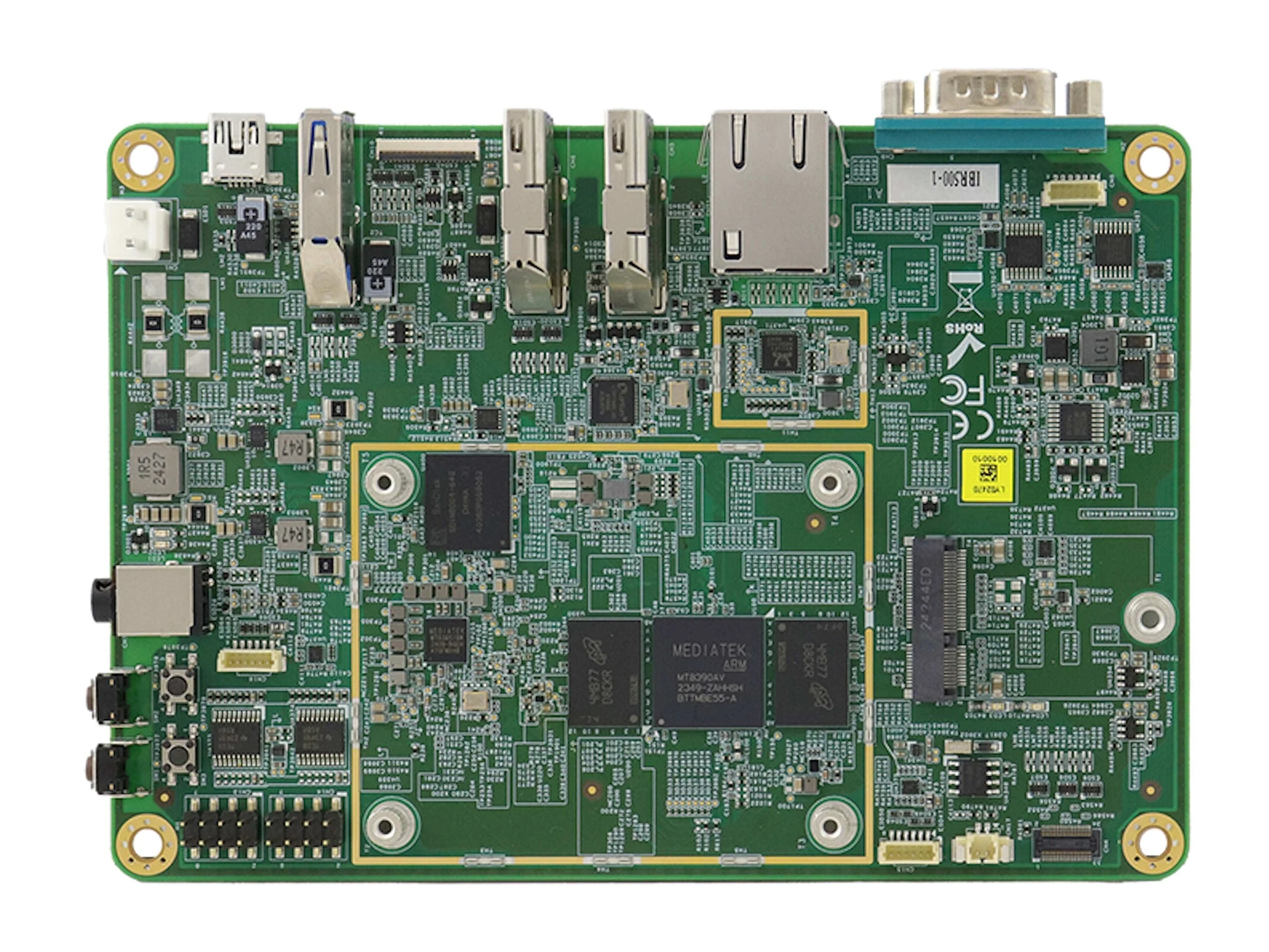
    A new single-board computer called the IBR500 is trying to capture customer interest. This device offers two different processor options: the MediaTek Genio 510 and the MediaTek Genio 700. It’s compatible with both Yocto 5.15 and Android 14. The IBR500 provides either 4 or 8 GB of LPDDR4X RAM, clocked at 3,733 MHz, along with storage options of 64 or 128 GB of eMMC. Users can expand storage through USB mass storage, thanks to one available USB 3.0 port. The network connection is solely wired, using Ethernet, although a wireless module can be added later with an M.2 2230 card (Key E).

    Industrial Use and Connectivity

    The IBR500 comes equipped with a COM port, which is quite important for industrial applications, allowing the connection of external devices such as measuring instruments. The dimensions of the board are 147 x 102 millimeters, and while it doesn’t have a large pin header, it does include six GPIO ports and one I2C port, enabling connections to various external sensors and actuators. Users can connect two monitors via HDMI, with one capable of displaying 4K content at 30 frames per second, while the other supports 60 frames per second. The AI capability is rated at up to 3.2 TOPS, enabling real-time analysis of video content.

    Availability and Pricing Information

    Currently, there is no information available regarding the pricing or availability of the IBR500.

    Source:
    Link


  • Apple’s Powerful Desktop Unable to Install Latest macOS Update

    Apple’s Powerful Desktop Unable to Install Latest macOS Update

    Key Takeaways

    1. Users with M3 Ultra Mac Studios are experiencing installation issues with macOS 26 Tahoe.
    2. The installation process fails at the final stages, reverting back to macOS Sequoia.
    3. Other Apple products, like the M4 MacBook Pro, can install macOS 26 Tahoe without issues.
    4. A potential cause for the problem may relate to the installer not recognizing the M3 Ultra’s Neural Engine.
    5. Apple is aware of the issue and is working on a solution.


    Despite its impressive capabilities, the M3 Ultra Mac Studio seems to have trouble with Apple’s newest operating system.

    Reports from users are filling up Apple’s Community forums, indicating that Mac Studios powered by the M3 Ultra can’t seem to install macOS 26 Tahoe, which was launched on September 15. The original poster, Boschje79, mentioned that the installation proceeds without any issues until the final stages, where the Mac Studio defaults back to loading macOS Sequoia instead of Tahoe.

    Users Share Their Frustrations

    Many users resonated with Boschje79’s experience, stating they, too, faced obstacles in updating their M3 Ultra Mac Studios. The problem appears to be confined to this specific setup, as individuals using other Apple products (like the M4 MacBook Pro 14, currently listed on Amazon for $1499) were able to install Tahoe without any problems.

    Another user, FilipOfficial, suggested that the installation failure might be linked to the installer not being able to recognize the M3 Ultra’s Neural Engine. The original thread included a panic message indicating that the installer couldn’t validate the Apple Neural Engine. At this time, it’s still unconfirmed whether this is the actual cause of the issue.

    Apple Working on a Solution

    Apple is aware of this issue and is actively pursuing a fix. However, for the moment, it appears that the most powerful desktop from Apple is stuck running slightly older software.

    Source:
    Link


  • Blackview MP100: New AMD Mini PC with 64GB RAM Now Available

    Blackview MP100: New AMD Mini PC with 64GB RAM Now Available

    Key Takeaways

    1. The Blackview MP100 mini PC features an AMD Ryzen 5 7430U processor and is priced starting at €222 on AliExpress, with no customs fees for EU customers.
    2. It has a compact size of 5 x 5 inches and can be mounted on a monitor using a VESA bracket, making it space-efficient.
    3. The mini PC comes in two configurations: one with 16GB RAM and a 512GB SSD, and another with 32GB RAM and a larger SSD for €277.
    4. Connectivity options include WiFi 6, Gigabit Ethernet, multiple monitor support via HDMI and DisplayPort, and several USB ports with high bandwidth.
    5. Upgradability is possible with an additional SSD and expandable RAM up to 64GB.


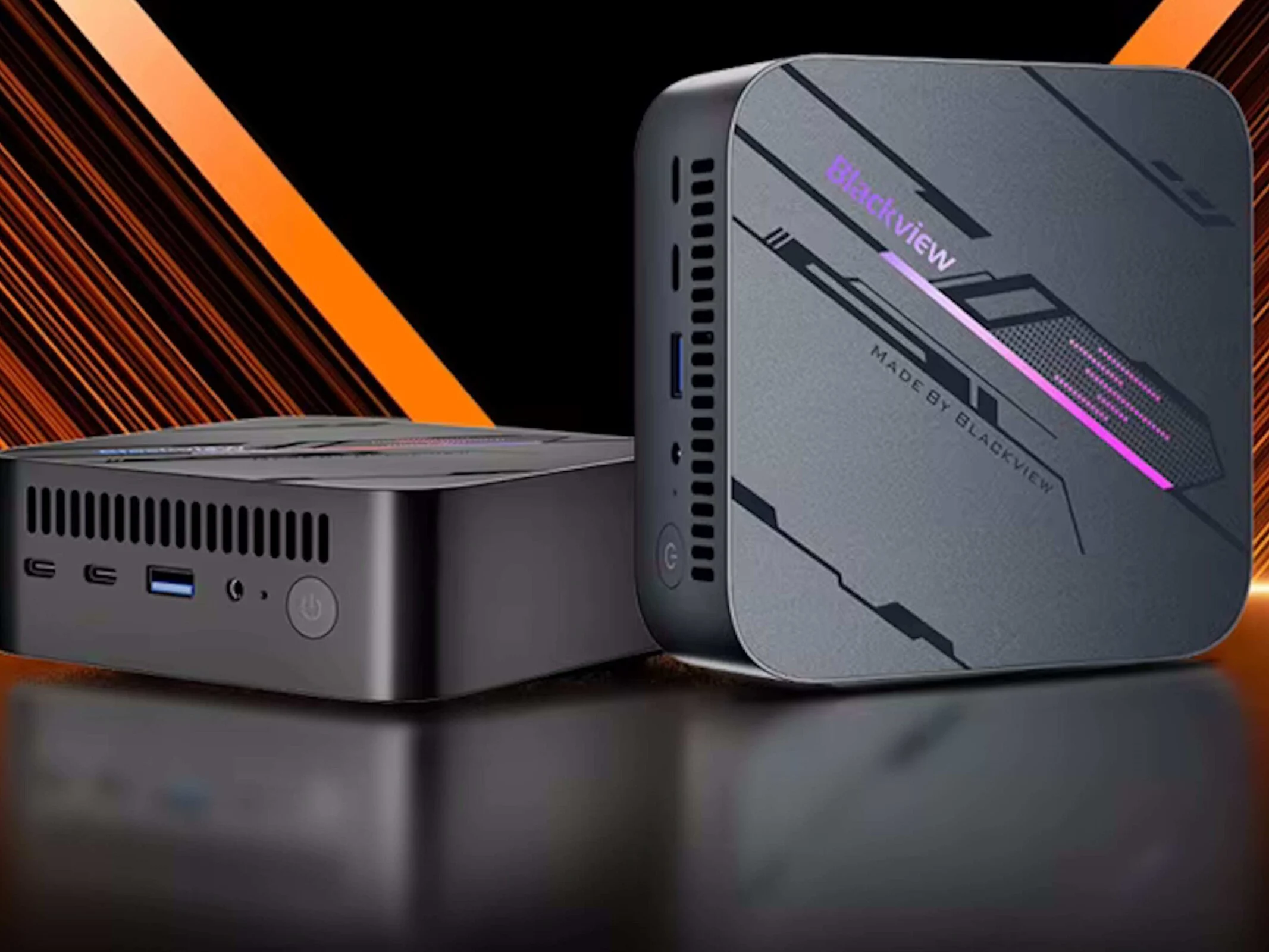
    Some people who love technology might recall the Blackview MP100. This mini PC now has a fresh model featuring an AMD Ryzen 5 7430U processor, and it can be found on AliExpress with prices beginning at €222. Customers located in the EU will enjoy the benefit of no customs or extra import charges since the device is shipped from France. However, if you encounter any issues with the product, claiming warranty might be a bit challenging. Nevertheless, the latest MP100 is available in two different setups. One variant includes 16GB of RAM and a 512GB SSD, while the other doubles the memory and storage for €277.

    Compact Size and Performance

    Measuring 5 x 5 inches and standing 1.8 inches tall, this mini PC is very small and can easily be attached to a monitor using a VESA bracket. The AMD Ryzen 5 7430U processor isn’t top of the line, but its six cores should be more than enough for most daily tasks. After purchase, you can add another SSD, and the 3,200MHz DDR4 RAM can be expanded to a maximum of 64GB.

    Connectivity Options

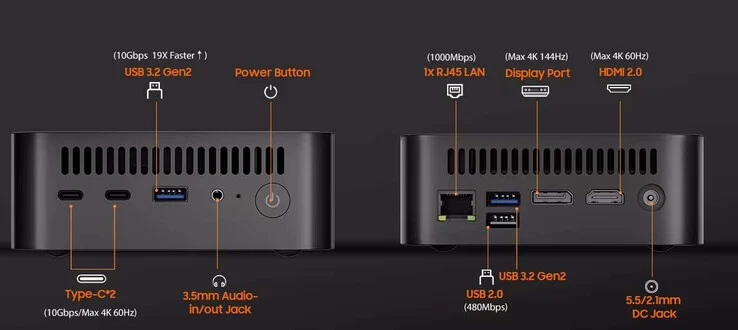
    You can connect to the internet through WiFi 6 or Gigabit Ethernet. Additionally, the Blackview MP100 supports multiple monitors simultaneously thanks to its HDMI and DisplayPort outputs. The two USB Type-C ports offer a bandwidth of 10Gbit/s and can also transmit a 4K 60Hz video signal. There are also two USB 3.2 Gen 2 Type-A ports with the same speed, along with a USB 2.0 port. To top it all off, the MP100 mini PC includes the standard 3.5mm headphone jack.

    Source:
    Link


  • Keychron Unveils Affordable Office Mice with Long Battery Life

    Keychron Unveils Affordable Office Mice with Long Battery Life

    Key Takeaways

    1. Keychron has launched gaming mice like the M7 8K and productivity mice such as the M6 8K, aiming for value and affordability.
    2. The new BM mouse series (BM25, BM24, BM22) offers budget-friendly options at $19.99, designed for lightweight and responsive use.
    3. All BM series models feature a symmetrical design, durable ABS shells, and PixArt PAW3212 sensors with up to 2400 DPI sensitivity.
    4. The BM series mice come with macro customization, remapping capabilities, and Bluetooth connectivity options, enhancing user experience.
    5. Unique design elements include the BM24’s nostalgic look, and different storage options for dongles among the BM models, highlighting their practical features.


    Keychron has recently entered the gaming mouse market, offering products like the Keychron M7 8K, which received a positive review for its all-around value. Additionally, they produce high-end productivity mice, such as the Keychron M6 8K, a compelling $70 alternative to the Logitech MX Master 3S. The M7 8K is priced at just $69.99 on Amazon. Now, Keychron is shifting focus to the budget-friendly segment of productivity mice with the introduction of the BM mouse series.

    Affordable Options for Productivity

    The Keychron BM25, BM24, and BM22 are designed to be cost-effective, lightweight, and responsive mice for users who need something dependable and easy to use. They are priced at only $19.99 directly from Keychron. Additionally, the BM25 can be purchased as part of a $34.99 bundle that includes either the Keychron B33 or B36 wireless scissor switch keyboard.

    Similar Designs and Specifications

    These three models—the Keychron BM22, BM24, and BM25—share a symmetrical design and have similar dimensions and internal components. All of them come with durable ABS shells, PixArt PAW3212 sensors that offer up to 2400 DPI sensitivity, and a maximum polling rate of 1,000 Hz. While they are primarily designed as office mice, they can also be used for casual gaming, provided you’re okay with their weight of 76–81 grams and the absence of textured coatings.

    Features and Connectivity

    For being budget mice, the Keychron B series is loaded with features. Each of the three models is compatible with Keychron Launcher, which allows for macro customization, remapping, and adjustments to polling rates and DPI settings. They also come with built-in storage for 2.4 GHz dongles and hardware toggles for changing connection modes. A push-button switch for Bluetooth pairing is included, and the middle top button is set to control DPI by default.

    Unique Styles and Design Elements

    While the BM25 and BM22 showcase distinct designs, the BM24 has a nostalgic look that resembles older Logitech gaming mice. Its main buttons and side panels are visually separated from the mouse body, set in rounded black sections.

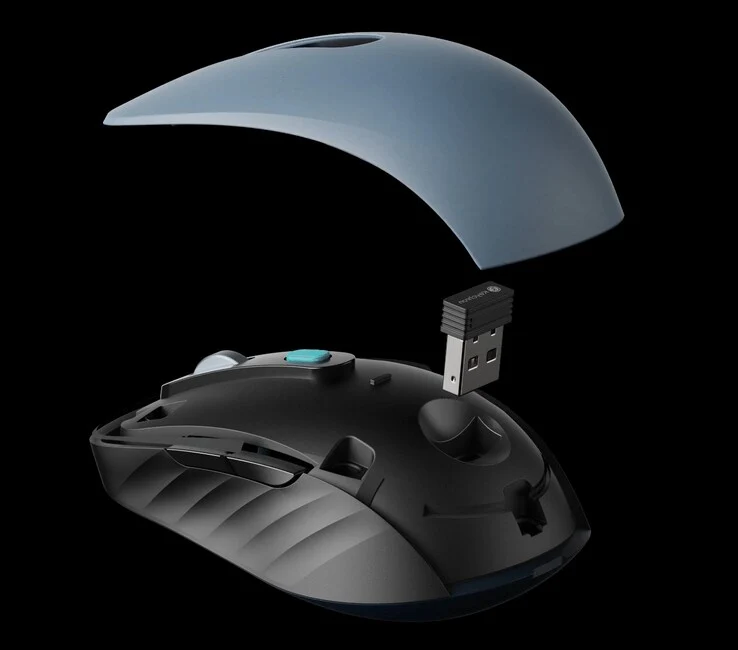
    In terms of storage, both the BM22 and BM24 have space for the dongle on the underside, whereas the BM25 features a magnetic top cover that easily reveals the dongle storage. You can find the BM series mice on Keychron’s official online store, and they are expected to be available on Amazon soon.

    Source:
    Link


  • AMD Launches Four New Ryzen Pro Desktop CPUs for Businesses

    AMD Launches Four New Ryzen Pro Desktop CPUs for Businesses

    Key Takeaways

    1. AMD has announced four new Pro-branded desktop CPUs designed for enhanced laptop offerings, with three based on the latest Zen 5 architecture.
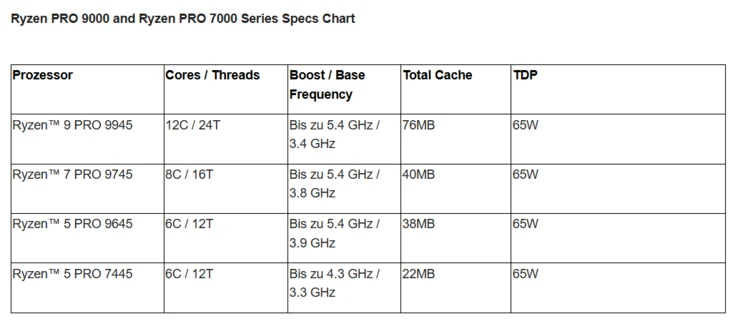
    2. The lineup includes Ryzen 9 Pro 9945, Ryzen 7 Pro 9745, Ryzen 5 Pro 9645, and Ryzen 5 Pro 7445, with specifications similar to their desktop counterparts.
    3. The Ryzen 9 Pro 9945 features 12 Zen 6 cores, 24 threads, and clock speeds of 3.4 GHz base and 5.4 GHz boost, while all models have a TDP of 65 W.
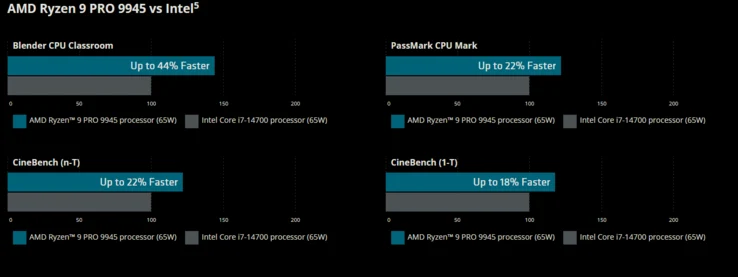
    4. AMD claims that the Ryzen 9 Pro 9945 outperforms Intel’s Core i7-14700K by approximately 18-24%.
    5. Pricing and availability details are not yet provided, but the CPUs are expected to launch with pre-built PCs before reaching the DIY market.


    AMD has introduced four new Pro-branded desktop CPUs to enhance its laptop offerings. An earlier leak indicated that AMD had four models planned, but currently, only three of the Zen 5 CPUs have been revealed. These processors are largely similar to their desktop versions, with additional features aimed at businesses. The lineup includes four models: Ryzen 9 Pro 9945, Ryzen 7 Pro 9745, Ryzen 5 Pro 9645, and Ryzen 5 Pro 7445, all of which have been officially announced. As their names suggest, three of them utilize the latest Zen 5 architecture, while one is built on Zen 4.

    Details on Each Model

    The Ryzen 9 Pro 9945 boasts 12 Zen 6 cores, 24 threads, a base clock speed of 3.4 GHz, a boost clock speed of 5.4 GHz, and a TDP of 65 W, making it similar to the Ryzen 9 9900X. The Ryzen 7 Pro 9745, on the other hand, is akin to the Ryzen 7 9700X, featuring base and boost clock speeds of 3.8 GHz and 5.4 GHz, respectively, also with a 65 W TDP.

    The Ryzen 5 Pro 9645 matches the specs of the Ryzen 5 9600X with its base/boost clock of 3.8/5.3 GHz and a TDP of 65 W. Finally, the Ryzen 5 Pro 7745 is likely to resemble the Ryzen 5 7600. All four models come equipped with a 2 CU integrated GPU and a Wraith Stealth cooler included in the package.

    Performance Expectations

    In terms of performance, AMD asserts that the Ryzen 9 Pro 9945 outperforms Intel’s Raptor Lake-based Core i7-14700K by approximately 18-24%. However, there are no details available regarding the pricing or availability of these CPUs. It’s anticipated that they will launch alongside pre-built PCs and eventually reach the DIY market.


  • LattePanda SBC: 4 x86 Cores, M.2 & PCIe in Raspberry Pi Size

    LattePanda SBC: 4 x86 Cores, M.2 & PCIe in Raspberry Pi Size

    Key Takeaways

    1. Compact Size and IO Options: The LattePanda IOTA is slightly larger than a Raspberry Pi, measuring 88mm by 70mm, but offers a wide range of IO options.

    2. Powerful Performance: It features an Intel Twin Lake N150 processor with 4 cores, capable of speeds up to 3.6GHz, and offers configurations of 8 GB or 16 GB LPDDR5 RAM.

    3. Diverse Connectivity: The board includes multiple connectivity options, such as USB 3.2 ports, Gigabit Ethernet, PCIe support, and the ability to connect to a 4K display.

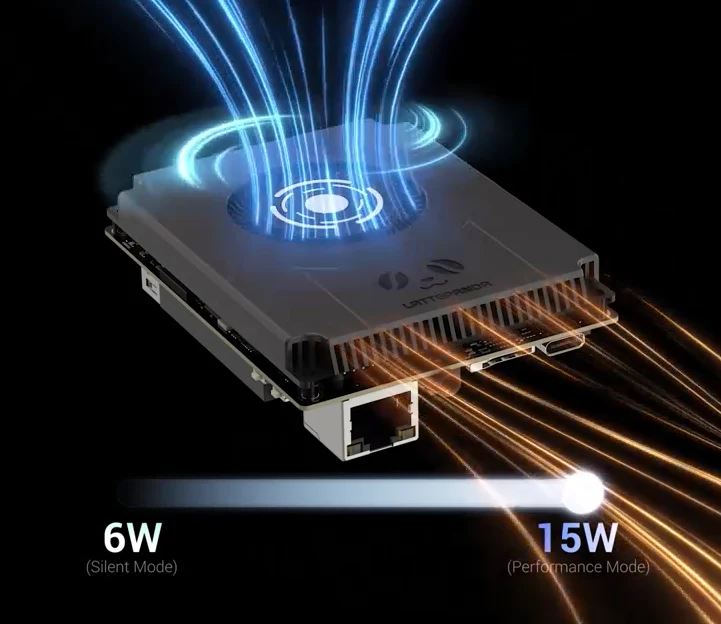
    4. Cooling and Power Options: The N150 processor has a configurable TDP of 6 to 15 Watts, allowing for flexible cooling solutions, and optional Wi-Fi modules can be added at the cost of the native M.2 slot.

    5. Potential Use Cases: It is suitable for industrial applications, server roles, and home lab setups, including tasks like running Windows or serving as a micro NAS.


    At 88mm by 70mm, the LattePanda IOTA is just a tad larger than a Raspberry Pi, but it offers an impressive selection of IO options.

    Specifications and Performance

    This board is powered by an Intel Twin Lake N150, featuring 4 cores and speeds that can hit 3.6GHz. You can choose between configurations of 8 GB or 16 GB of LPDDR5 RAM that runs at 4800MT/s, along with either 64 GB or 128 GB of onboard eMMC storage. The eMMC storage is built into the board, leaving a spare M.2 2230 slot available for extra storage, plus a USB 2.0 Micro SD slot.

    Connectivity Options

    Additionally, the board includes a standalone PCIe FPC connector that supports PCIe 3.0x, which allows you to add various components from extra M.2 storage to an external GPU, though it has similar limitations as the Raspberry Pi. You’ll find 3x 10 Gbps USB 3.2 Gen 2 Type A ports, Gigabit Ethernet, and the capability to support a single 4K display, with the option to connect another display via an eDP connector.

    In line with other development boards, the IOTA features a GPIO connector, controlled by an RP2040 MCU.

    Power and Cooling

    The Intel N150 has a configurable TDP that ranges from 6 to 15 Watts, enabling it to be cooled either passively or actively. Wi-Fi can be included as well, with choices for an Intel AX210 Wi-Fi 6E module or an Intel BE200 Wi-Fi 7 module, but opting for these will eliminate access to the native M.2 slot.

    Currently, the price is discounted to $166.80 for the 8 GB RAM and 64 GB eMMC version with a passive cooler and Wi-Fi 6E M.2 module, making the LattePanda IOTA a bit pricey. This is especially true when you look at other x86 boards from ODROID or similar models like the GMKtec MiniPC available on Amazon.

    Use Cases

    Nevertheless, the capability to run Windows with In-band ECC memory could make this device advantageous for industrial tasks or server roles where space is limited. In a home lab setup, it could also serve as a solid micro NAS when paired with an M.2-Key and SATA 3.0 expansion board.

    Source:
    Link