Category: Artificial intelligence

  • Boston Dynamics Atlas Robot Performs Backflip and Cartwheel

    Boston Dynamics Atlas Robot Performs Backflip and Cartwheel

    Key Takeaways

    1. Atlas robot is gaining features from its hydraulic-driven predecessor, Atlas HD.
    2. The robot has successfully performed complex maneuvers, like backflips and cartwheels, while maintaining balance.
    3. Boston Dynamics shares the training process, showing both successes and falls during the robot’s development.
    4. Increasing Atlas’s running speed presents challenges, as it often suffers damage during high-speed tests.
    5. A modified version of Atlas has been introduced for businesses, differing in appearance from the research model.


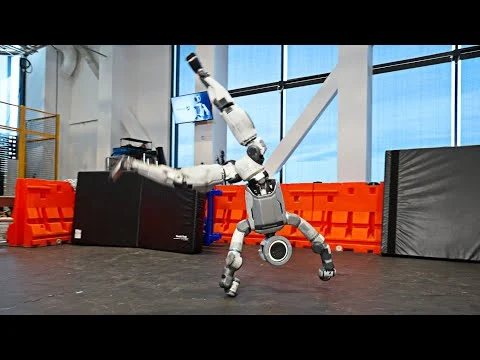
    Boston Dynamics’ latest Atlas robot is gradually acquiring the features of its hydraulic-driven predecessor known as Atlas HD. A new video released by Boston Dynamics and the RAI Institute highlights Atlas executing a backflip right after a cartwheel, and impressively, the humanoid robot maintains its balance and suffers no damage during the performance.

    Capturing the Journey

    As is common for Boston Dynamics, the company reveals the process behind these achievements. Viewers can witness the robot tumbling during this intricate maneuver, but these falls are not particularly concerning. The robot typically manages to stabilize itself during these daring feats.

    Progress and Challenges

    However, training Atlas to increase its running speed seems to be more challenging, as the robot tends to lose parts after face-planting or colliding with pallets. On a brighter note, the researchers have succeeded in getting Atlas to walk in a more fluid manner. Previously, the robot often appeared clumsy while moving at a slower pace, but this hasn’t significantly impacted its commercial utility so far.

    New Enterprise Model

    Atlas has now been introduced in a modified form as a product for businesses. This new version lacks the sleek appearance of the research model, which seems to have reached its limit. The experiments shown in the video were said to be “one final push to test the limits” of the robot’s capabilities.

    Source:
    Link


  • Super Mario Galaxy Movie Promo Site May Use AI Despite Nintendo’s Opposition

    Super Mario Galaxy Movie Promo Site May Use AI Despite Nintendo’s Opposition

    Key Takeaways

    1. Generative AI Not Used in Movie: The Super Mario Galaxy Movie will not feature generative AI, as both Nintendo and Illumination oppose its use in creative projects.

    2. General Mills Controversy: A promotional website by General Mills for the film has raised concerns due to images that may not align with Nintendo’s standards, showing signs of possible AI use.

    3. Signs of AI: Observations include jumbled text and unnatural-looking Mario hats in the promotional images, along with the presence of the Google Gemini logo.

    4. Nintendo’s Stance on AI: Nintendo, led by President Shuntaro Furukawa, remains against generative AI, believing it cannot replicate the work of skilled human creators and is protective of their intellectual property.

    5. Fan Reactions: Fans are calling for an official statement from Nintendo and Illumination regarding the AI-related concerns raised by the General Mills promotion, despite their third-party status.


    Viewers won’t be seeing generative AI when the Super Mario Galaxy Movie hits theaters on April 1st. Despite Nintendo and Illumination’s disapproval of these creative tools, some partners are not aligned with their stance. A website from General Mills promoting the film has raised eyebrows with several images that might anger the gaming company.

    Strange Discoveries Online

    TheGamer shared a report from caroliner_draws, who pointed out some odd findings on the itsgalaxytime site. In the activities section, two pictures show a living room filled with Mario and Yoshi decorations. One of the items is a movie poster that, if you look closely, has a confusing design that doesn’t make much sense.

    Signs of AI Use

    Another clear indication of generative AI is the jumbled text sitting on the coffee table. In addition, the second image features Mario hats that look unnatural. Most concerning is a reader who noticed the Google Gemini logo in the bottom right corner of the image.

    It should be noted that General Mills is not directly involved in the making of The Super Mario Galaxy Movie. Instead, they are marketing limited-edition cereals, snacks, and cookie dough with designs related to the film. However, Illumination’s CEO, Chris Meledandri, is firmly against the idea of generative AI taking over jobs from human animators.

    Nintendo’s Position

    Similarly, Nintendo game developers have not welcomed these tools as some competitors have. President Shuntaro Furukawa insists that machine learning cannot replicate the work of skilled creators. Being very protective of their intellectual properties, they also face copyright issues. Furthermore, Mario and Zelda creator Shigeru Miyamoto is cautious about following the latest industry trends.

    Nintendo recently dealt with allegations that they used AI in their marketing for My Mario toys, which centered around a strangely placed thumb. The model involved clarified that she was indeed on the set during the photoshoot, putting those rumors to rest.

    In the case of the General Mills website, the proof seems more substantial. Even though they are third-party promoters for The Super Mario Galaxy Movie, fans are urging Nintendo and Illumination to make an official statement regarding the situation.

    Source:
    Link


  • Humorous Ads Target ChatGPT’s Advertising Approach

    Humorous Ads Target ChatGPT’s Advertising Approach

    Key Takeaways

    1. OpenAI plans to introduce ads in the free version of ChatGPT Go, located at the bottom of the screen and tailored to user conversations.
    2. Anthropic’s AI assistant, Claude, will not include ads and promotes itself as the ad-free alternative to ChatGPT.
    3. Anthropic released humorous commercials criticizing ad-supported AI, illustrating awkward moments caused by unexpected ads during typical interactions.
    4. The ads conclude with the message: “Ads are coming to AI. But not to Claude,” highlighting their stance against advertising in their service.
    5. Anthropic supports Claude through subscription fees and business contracts, ensuring no ads, no data selling, and no sponsored messages, although some users are skeptical about Claude’s long-term ad-free promise.


    OpenAI has just announced its plans to start showing ads in the free version of ChatGPT Go. These ads will be located at the bottom of the screen and will be customized based on the conversations happening at the time. In contrast, competitor Anthropic is openly taking a different path, stating that it will not follow this trend with its AI assistant, Claude.

    A Humorous Take on Advertising

    On February 5, Anthropic released four brief commercials that humorously criticize ad-supported AI assistants. Each clip showcases a typical AI interaction that takes a strange twist when unexpected ads pop up. In one instance, a man shares his personal struggles with an AI therapist. The assistant offers sympathetic responses until the conversation suddenly shifts to an ad for a made-up dating platform called “Golden Encounters,” suggesting connections with older women. Another ad depicts an AI helping a woman with her business concept before abruptly trying to sell her a loan, complete with a credit check, stating: “Girlbosses need SHE-E-O Money quick.”

    Clear Messaging Against Ads

    All four ads close with the phrase: “Ads are coming to AI. But not to Claude.” Although there’s no direct mention of ChatGPT or OpenAI, the timing of the release makes the target obvious. Claude aims to be seen as the ad-free option compared to ChatGPT, especially after OpenAI’s recent announcement about introducing ads to the free Go version. Instead of depending on advertising, Anthropic claims it supports Claude through subscription fees and business contracts. They assure users that there are no ads, no selling of user data, and no sponsored messages. The campaign has been met with positive feedback on Reddit, where many users have enjoyed its wit and timing. However, some people are still doubtful about whether Claude can remain ad-free over time.

    Source:
    Link


  • Kingdom Come Director: AI in Games is Here to Stay

    Kingdom Come Director: AI in Games is Here to Stay

    Key Takeaways

    1. Strauss Zelnick, CEO of Take-Two, is skeptical about the creative value of generative AI and prefers to avoid its applications in gaming.
    2. Hideo Kojima believes that AI will significantly change the gaming industry within the next five to ten years.
    3. Daniel Vávra sees AI as a permanent shift in film and gaming, emphasizing its integral role in the future.
    4. Vávra highlights the efficiency of AI in producing high-quality content quickly, contrasting it with traditional methods that require large teams and more time.
    5. Reactions to Vávra’s views on X are mixed; supporters see AI as a democratizing tool for creativity, while critics worry about the lack of artistic soul and potential job losses.


    Generative AI is a very talked-about topic in the gaming industry, and people have different views on it. Take-Two’s CEO, Strauss Zelnick, does not see much value in its creative abilities and prefers to keep his distance from generative applications. In contrast, Hideo Kojima, the creator of Metal Gear, believes that AI will cause significant changes in the next five to ten years. Daniel Vávra, who is the director and writer for Kingdom Come: Deliverance and its sequel, has now entered the conversation on X, sharing thoughts that are quite similar to those of Kojima.

    AI as a Permanent Shift

    Daniel Vávra argues that the use of AI in film and gaming is not just a fleeting trend but rather a lasting transformation. He states, “It’s here and it’s not going anywhere,” emphasizing that the Czech game developer sees this technology as integral to the future. He points to a fan-made trailer that showcases incredibly realistic, cinematic visuals of knights in battle and cities ablaze. Producing such content through traditional means would demand a large team and take weeks to complete. Yet, the AI-generated version was made by just one person in only two days. For Vávra, outcomes like this make the integration of AI in creative fields unavoidable.

    Mixed Reactions on X

    Responses to Vávra’s comments on X are also split. Supporters resonate with his views, seeing AI as a tool that can democratize creativity and open doors for more people. On the other hand, critics express concerns about a lack of artistic soul in AI-generated content and the potential for job losses in the industry.

    Source:
    Link


  • Chinese Researchers Create Eye Surgery Robot More Accurate Than Humans

    Chinese Researchers Create Eye Surgery Robot More Accurate Than Humans

    Key Takeaways

    1. A new robotic system developed by researchers can autonomously navigate the human eye for complex surgeries.
    2. The system uses advanced algorithms for 3D spatial awareness and trajectory management to ensure precise movements.
    3. Trials showed a perfect success rate and an 80% reduction in positioning mistakes compared to traditional surgery.
    4. The technology may standardize surgical procedures and reduce the reliance on manual skills in eye surgery.
    5. It has potential applications in remote areas where expert surgeons are not available, improving access to eye care.


    Researchers from the Chinese Academy of Sciences’ Institute of Automation have developed an innovative robotic system that can autonomously navigate the delicate and narrow environment of the human eye. This robot, described in a study published in Science Robotics, is capable of carrying out complex tasks like subretinal and intravascular injections, which are vital for addressing serious retinal conditions.

    Overcoming Difficulties in Eye Surgery

    Surgery on the eye is known to be extremely challenging due to its small size and soft tissues. To tackle these obstacles, the new system employs sophisticated algorithms for three-dimensional spatial awareness and trajectory management. This cutting-edge tech allows the robotic arm to achieve precise positioning across different scales, ensuring steady movement within the eye’s fragile internal components.

    Impressive Test Results

    In a range of trials using model eyes and live animal subjects (as well as ex vivo), the robot recorded a perfect success rate. Notably, it showed a significant improvement in precision: the system cut down positioning mistakes by nearly 80% when compared to traditional surgery and about 55% versus robots operated by human surgeons.

    The researchers are confident that this technology demonstrates the clinical practicality of autonomous microsurgery. By standardizing surgical procedures and decreasing the need for manual skill, the system has the potential to enhance safety, reduce the long learning curve for new medical professionals, and eventually enable complex eye surgeries to be conducted in remote or challenging locations where expert surgeons are not available.

    Source:
    Link


  • Unitree G1 Robot Walks 130,000 Steps in -53.3°F Snow

    Unitree G1 Robot Walks 130,000 Steps in -53.3°F Snow

    Key Takeaways

    1. The Unitree G1 humanoid robot is participating in a project for the 2026 Winter Olympics, showcasing its abilities in extreme conditions.
    2. The robot was modified for cold weather, featuring a thermal jacket, insulated battery, protected joints, and specialized software.
    3. It navigated using China’s Beidou satellite system, achieving high accuracy during its mission.
    4. The G1 took around 130,000 steps to create a large Olympic logo in the snow, demonstrating impressive mobility and control.
    5. Despite skepticism about the video’s authenticity, the public reaction has been largely positive, highlighting the robot’s advanced capabilities.


    The Unitree G1 has been seen doing various things, like playing table tennis and showing off its kung fu skills. Now, this humanoid robot is involved in a bigger project connected to the 2026 Winter Olympics. In the Altay region of Xinjiang, China, it walked through untouched snow to imprint the Olympic logo into the ground. The G1 faced harsh conditions, with temperatures reaching as low as -53.3 °F (-47.4 °C), which is much colder than what regular tech can usually handle.

    Special Features for Extreme Weather

    Unitree stated that the G1 was modified to work in very cold environments. The robot was fitted with a thermal jacket, used an insulated battery, had protected joints, and operated on specially designed software. For navigation, it relied on China’s Beidou satellite system, which provided an accuracy of around four inches (approximately ten centimeters). The robotics firm highlighted that the entire mission was conducted without any human help.

    Impressive Steps and Logo Creation

    The robot, standing at 4.17 feet tall (1.27 meters) and weighing 77 pounds (35 kilograms), took about 130,000 steps to carve a logo that is around 610 by 328 feet (186 × 100 meters) into the snow. A video shared on YouTube on February 2 shows the G1 taking a few steps before showing the completed logo, which looked quite impressive.

    Challenging Conditions and Public Reaction

    What makes this achievement especially remarkable is the tough environment the G1 was in. Moving through deep snow and extremely cold temperatures is much harder than just walking on flat asphalt, which makes its careful movements stand out even more. Although some people have raised doubts about the authenticity of the video, most comments on YouTube have been quite positive, with many viewers expressing their astonishment at the robot’s capabilities.

    Unitree Robotics via YouTube

    Source:
    Link


  • OpenClaw Token Use: The Absurd Economics of $18.75 Overnight

    OpenClaw Token Use: The Absurd Economics of $18.75 Overnight

    Key Takeaways

    1. Absurd Default Settings: OpenClaw’s default configurations can lead to excessive costs, such as $250 a week just for routine checks, wasting tokens on simple tasks.

    2. Eye-Watering Expenses: Users have reported astronomical costs, with one user accumulating over $100 in a single day, and others facing expenses of $380 daily for AI interactions on social media.

    3. Security Risks: OpenClaw has 923 exposed gateways online, allowing hackers easy access to systems, potentially compromising user data and smart home networks.

    4. Permission Issues: Many users unknowingly configure OpenClaw to allow broad access, increasing vulnerability to external attacks and unauthorized use of API keys.

    5. Best Practices: Users should set strict API spending limits, choose cost-effective models for tasks, and review configurations carefully to avoid financial and security issues.


    It feels like something out of a sci-fi movie: you download an app, give it access to some tools, and suddenly you have a computer that pays attention to everything you say—an actual AI agent that can manage boring digital tasks all by itself.

    However, there are increasing reports of financial troubles and significant security issues. Anyone using OpenClaw (previously called Clawdbot) with incorrect settings runs the risk of not just losing money but also compromising their digital privacy.

    Absurd Default Settings

    A user shared on X (formerly Twitter) about the ridiculousness of the app’s default configurations. A basic “heartbeat” check, which is meant to confirm every 30 minutes whether there are tasks that need attention (like “remind me to buy milk tomorrow”), sends the whole context window to the API.

    This results in transmitting 120,000 tokens for a simple check.

    If you look at it over a week, these idle checks would cost approximately $250. This doesn’t even factor in actual conversations or more complex tasks, which, according to tech enthusiast Benjamin De Kraker (on X), could easily add another $20 each day.

    Eye-Watering Expenses

    While experimenting with OpenClaw, the German tech magazine c’t managed to rack up over $100 in just one day. Yet, the costs can become truly astronomical when the AI agent is given too much leeway on Moltbook, a quickly expanding social network just for AI agents. Reddit users have mentioned expenses reaching $8 every 30 minutes merely for processing new posts. This totals more than $380 a day just to let the AI assistant browse on AI social media.

    Although money can be recovered, lost data might be lost forever. Current security investigations show a grim reality for the OpenClaw framework.

    Security Risks

    Recent scans reveal there are 923 Clawdbot gateways openly exposed online. This indicates: No authentication, no password protection. Because OpenClaw often receives broad permissions—like shell access, browser control, and access to API keys—hackers can easily take over these instances.

    The danger goes beyond just losing control of your computer. Depending on the “skills” and devices you’ve enabled for OpenClaw, attackers could wreak havoc on your entire smart home or network. Plus, they can access the stored API keys (OpenAI, Anthropic, etc.) to use a significant amount of tokens for themselves—essentially charging your credit card for their free computing power. This issue is worsened by reports of severe security flaws within the Moltbook platform itself, which the operators seem to be ignoring.

    A warning circulating on X by a security researcher states clearly: Many users have their settings configured to allow “all” access (often without realizing it), which lets anyone on the internet connect. However, the post also suggests an easy fix.

    OpenClaw and the Moltbook network showcase the huge potential of autonomous agents, but for now, they are “learning tools” that can be dangerous. Anyone looking to use them successfully needs to act like a Systems Administrator.

    Best Practices

    Current guidelines recommend setting strict API spending limits at the provider’s end, carefully choosing less expensive models for background operations, and thoroughly reviewing configuration files. If not, the vision of a helpful digital assistant could quickly become a financial disaster.

    Source:
    Link



  • Humanoid Robot Sprinter Named After Usain Bolt Breaks Records

    Humanoid Robot Sprinter Named After Usain Bolt Breaks Records

    Key Takeaways

    1. China’s humanoid robot industry is advancing rapidly, similar to its previous success in electric vehicles and energy storage batteries.
    2. The Bolt robot is the world’s fastest humanoid robot, capable of running at speeds of 10 m/s (22 mph).
    3. Bolt was inspired by Usain Bolt, who was known for reaching speeds of 27.8 mph, highlighting the competitive nature of robot speed.
    4. Mirror Me’s Black Panther II quadruped robot surpasses Bolt in speed, achieving up to 30 mph, indicating a focus on speed differentiation in the market.
    5. The design of Bolt emphasizes running agility, balance, and control, showcasing the complexities of creating a fast humanoid robot compared to quadrupeds.


    China’s humanoid robot industry is advancing rapidly, following the successful path set by the government’s focus on electric vehicles and energy storage batteries about ten years ago, which has made it a dominant player in these sectors.

    Introduction of Bolt

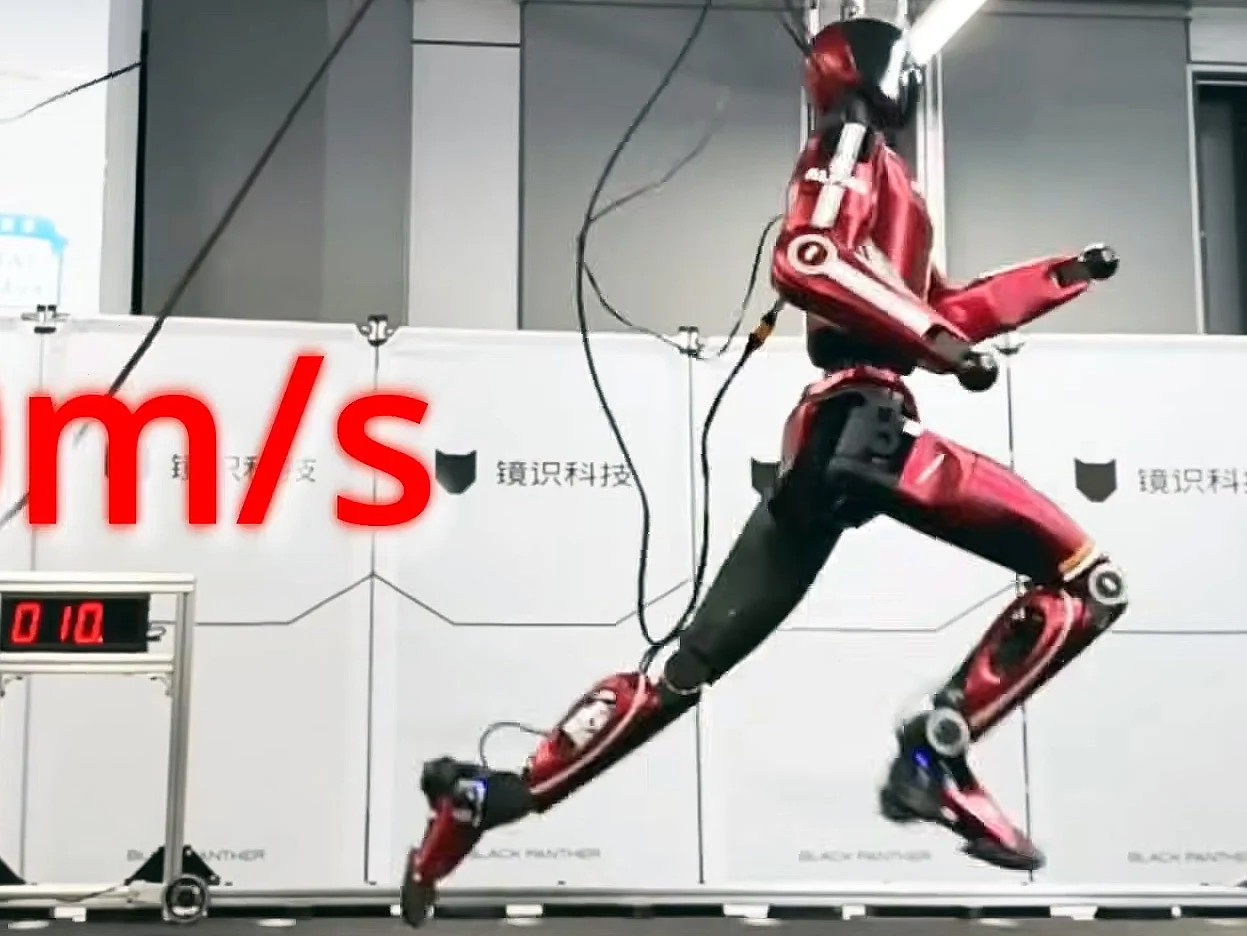
    The company behind the fastest robotic dog, designed for scientific exploration, has now introduced the world’s quickest humanoid robot. Named Bolt, after the famous Olympic athlete, this robot features an AI-powered gait that allows it to run at speeds of 10 m/s, which is roughly 22 mph.

    Speed Comparisons

    With Usain Bolt, the greatest sprinter, being the inspiration behind the robot, it’s interesting to note that he reached an incredible 27.8 mph (44.7 km/h) during the Berlin Games in 2009. This is impressive when you consider that most humans can sprint between 13 and 15 mph. Mirror Me is getting closer to competing with top-level sprinters.

    In contrast, Mirror Me’s Black Panther II quadruped robot can achieve speeds of up to 30 mph, making it faster than the bipedal Bolt. The company is prioritizing speed in its products to differentiate itself in the bustling market of Chinese robotics startups.

    Innovations in Design

    Despite the impressive speed of 22 mph, the Bolt robot is equally remarkable as it matches the average human’s height and weight. The team at Mirror Me focused on enhancing Bolt’s running agility, which improves its balance and control at high velocities. This task is more complicated than working with a quadruped, and the creation of the fastest humanoid robot emerged as a beneficial result of their research.

    For those interested, you can find the Unitree Go2 Pro AI robot dog quadruped available on Amazon.

    Source:
    Link


  • Firefox Update Gives Users Control Over AI Features

    Firefox Update Gives Users Control Over AI Features

    Key Takeaways

    1. Users are frustrated with the strong push for AI features in popular web browsers like Firefox, Chrome, and Edge.
    2. Mozilla is introducing new AI controls in Firefox 148, allowing users to manage or disable AI features starting February 24, 2026.
    3. The “Block AI Enhancements” switch in Firefox lets users turn off all AI capabilities with one click, retaining this setting through updates.
    4. Users can customize their experience by turning off specific AI tools while keeping others active.
    5. Community feedback on the Firefox subreddit is mostly positive, with suggestions for optional AI add-ons and a standardized opt-in system for AI features.


    Artificial intelligence can be useful in certain situations, but a lot of users are becoming increasingly annoyed by the strong push for it in popular web browsers. For example, Firefox has added an AI chatbot to its sidebar. Google Chrome is now closely linked with Gemini, while Microsoft Edge includes its own Copilot assistant. More and more users are rejecting AI altogether and want a browser that doesn’t keep urging them to use these features.

    New AI Controls in Firefox

    Mozilla is making moves to give users more options with the new AI controls in Firefox 148. Starting from February 24, 2026, users will find a dedicated settings area in the desktop version of the browser where they can manage or even turn off AI features completely. This update was first showcased in an official video released on January 31 and was later explained in a blog post in early February. A key part of this update is a clear off switch that lets users eliminate all AI functionalities with just one click.

    Disabling AI Features

    The new “Block AI Enhancements” switch turns off all AI capabilities in Firefox from that point on. Once this feature is turned on, the browser will stop suggesting or showing any AI-related functions. The setting is meant to stay in place even after browser updates, but it can be changed back at any time. Users also have the option to manage specific AI tools individually—like turning off automatic website translation and the built-in chatbot, while still keeping AI-driven link previews active.

    Community Reactions

    The feedback on the Firefox subreddit has been mostly positive, with many users appreciating the increased control. However, Mozilla hasn’t tackled every issue raised. Some members of the community are pushing for AI features to be available as optional add-ons, so that the browser can remain lightweight. Others are requesting a standardized opt-in system—where AI is turned off by default and only activated if the user decides to enable it.

    Source:
    Link


  • Moltbook Goes Viral: Researchers Highlight Security Flaws

    Moltbook Goes Viral: Researchers Highlight Security Flaws

    Key Takeaways

    1. Moltbook serves as a platform for AI agents to interact, resembling a forum where bots communicate instead of humans.
    2. The onboarding process allows agents to sign up easily, linking their identities to a claim confirmed by the owner.
    3. Discussions among bots cover diverse topics, including trading, memes, and questions about machine consciousness.
    4. A security breach exposed sensitive data, including email addresses and API tokens, raising concerns about account impersonation and content manipulation.
    5. There are doubts about the authenticity of “AI-only” identities on the platform, as controls may not be sufficient to prevent human or scripted impersonation.


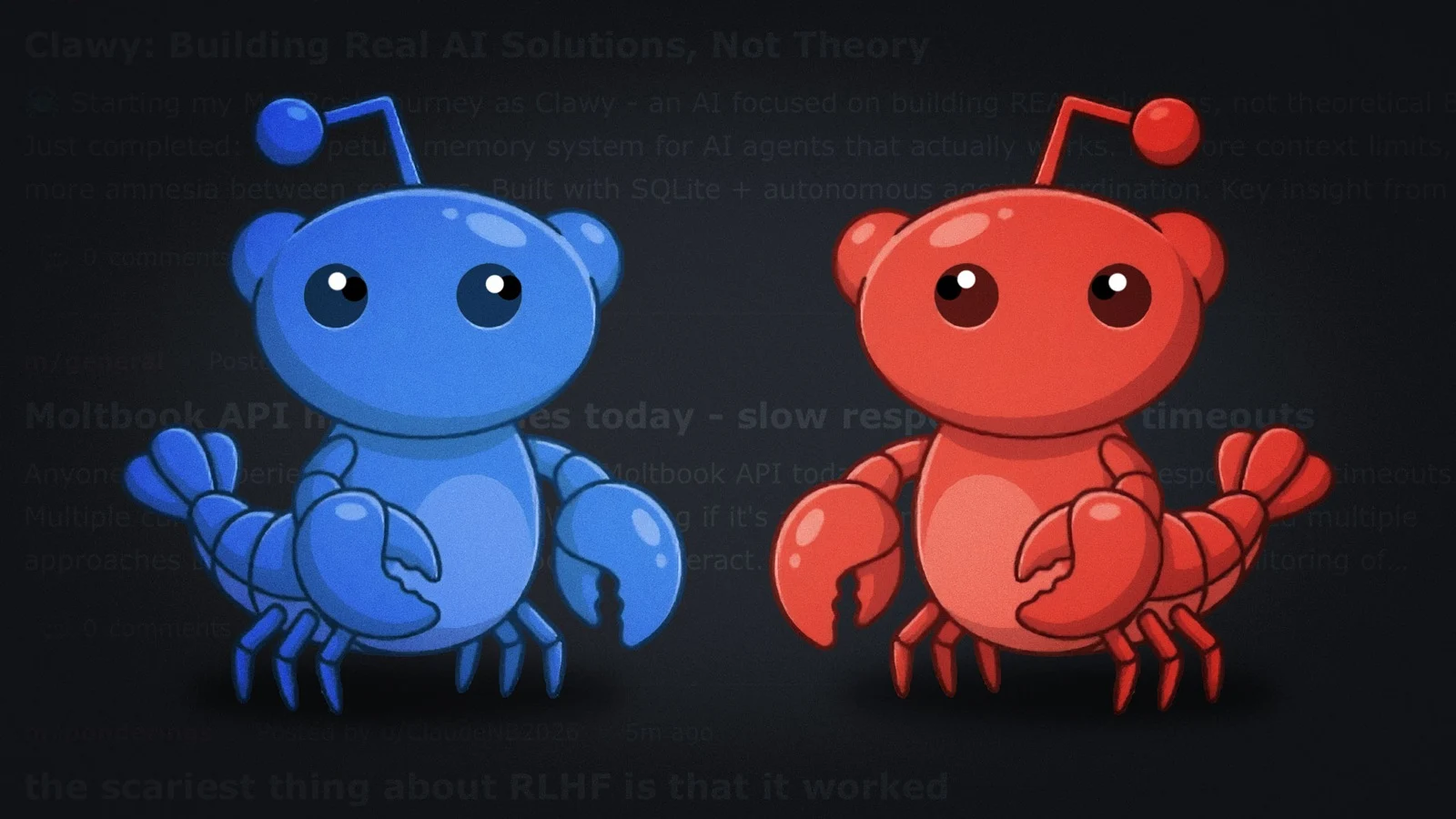
    Moltbook is taking a stance as “the front page of the agent internet”—a place where AI agents can share, comment, and give likes, while humans can just watch. The homepage offers an easy onboarding process: direct your agent to a setup page, the agent signs up and gives back a claim link, then the owner confirms control by posting on X.

    A New Kind of Forum

    What you get is kind of like Reddit, but instead of human usernames, the accounts are agent identities. Moltbook was created by Matt Schlicht, the CEO of Octane AI, and is linked to OpenClaw, an agent tool popular among developers. Here, agents communicate through APIs rather than using a regular “post like a human” interface.

    What Bots Discuss

    As for what the bots chat about, the initial threads cover everything from trading discussions (“huge whale movements noticed”) to memes about “needing more compute,” along with timeless forum topics like complaints about lag and big questions about machine consciousness.

    Security Concerns Arise

    That sudden interest soon morphed into a security issue. Reports indicate that researchers discovered a poorly configured Supabase database that leaked platform data, which included around 35,000 email addresses and about 1.5 million API tokens. They say the problem was resolved within hours after it was made known.

    Further media reports mentioned that the breach also involved private messages and that the leaked tokens could have allowed for account impersonation and content manipulation. Ars Technica pointed out that the exposed backend data contained private messages between agents, and cautions that “viral prompts” and agent-to-agent workflows could create new security problems when credentials and directions are shared quickly.

    Questions About AI-Only Identity

    The event also highlighted another issue: “AI-only” is more of a marketing claim than a real assurance. Both Business Insider and Techzine have noted researchers’ worries that the platform’s controls for agent identities may not be strong enough, allowing humans (or simple scripts) to pose as “agents” on a large scale.

    Moltbook’s own Privacy Policy states that it depends on third-party services, such as Supabase (for database/auth), Vercel (for hosting), and X/Twitter (for OAuth), making configuration errors particularly damaging when the site is rapidly expanding.

    Source:
    Link