Tag: DLSS

  • Final Fantasy 7 Rebirth Switch 2 Review: Performance Still a Mess

    Final Fantasy 7 Rebirth Switch 2 Review: Performance Still a Mess

    Key Takeaway

    – Performance improvements over demo, but frame rates still drop into the 20s during intense battles.
    – Docked mode uses DLSS upscaling from 540p to 1080p; handheld mode targets 576p with noticeable visual cutbacks.
    – Common issues include blurry textures, reduced draw distances, regular pop-in, and occasional crashes.
    – Despite drawbacks, most reviews consider the port a technical achievement given the hardware limitations.
    – Port’s 86 Metacritic average trails the PS5 version (92) and Remake Intergrade on Switch 2 (89).


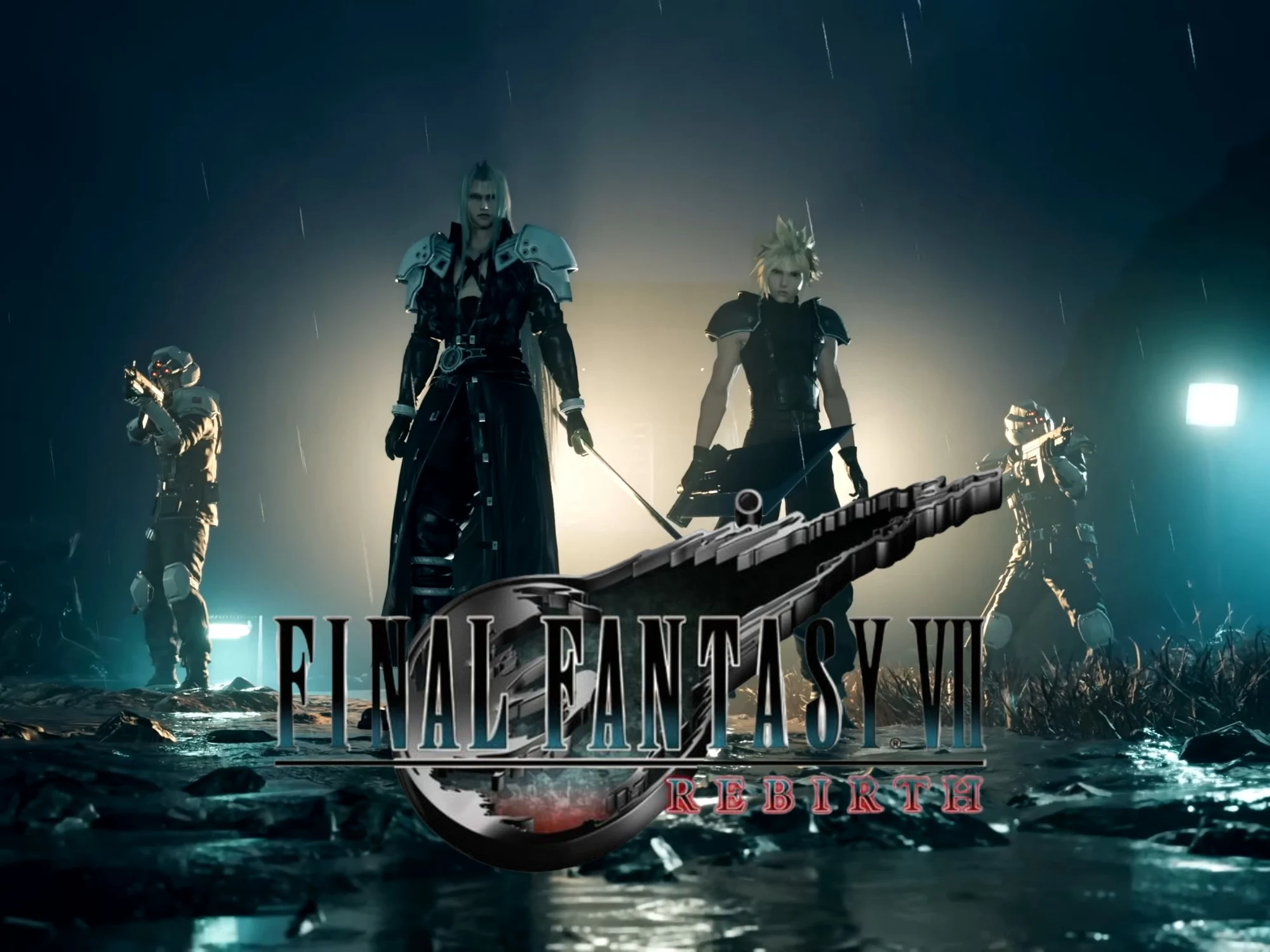
    Since the Final Fantasy 7 Rebirth Switch 2 port announcement, gamers have wondered how it would run on the handheld. A demo alleviated some fears, but also raised performance concerns. With reviews now out before the June 3rd release date, they give mixed impressions of visual quality and frame rates. Many players are crossing there fingers for a smooth experience, but early signs suggest a bumpy ride.

    Digital Foundry’s Technical Deep Dive

    Digital Foundry provided a detailed technical analysis of the Switch 2 game, noting gains over the demo. The demanding open-world RPG comes closer to maintaining its 30fps target. Stutters are less frequent, even in towns teeming with activity. That said, drops into the 20s still occur, particularly during intense battles. The outlet emphasized that while improvements where made, the game still struggles under heavy load.

    Resolution and Visual Cutbacks

    In docked mode, the title employs DLSS upscaling to boost resolution from 540p to a maximum 1080p. In handheld mode, Square Enix developers aim for a more modest 576p. Final Fantasy 7 Rebirth Switch 2 reviews highlight how cutbacks are especially apparent in the latter scenario. In either case, hair is pixelated, while NPCs and foliage have been stripped from some environments. This leads to a noticable drop in immersion when exploring the games lush landscapes.

    Harsh Criticism From Indy100

    Indy100 posted one of the most negative breakdowns of the game’s performance. Calling it “too ambitious” for the Nintendo console in its current state, the tester labels it as a “bit of a mess.” Textures often look blurry, with reduced draw distances showing the limitations of the hardware. More troubling, the journalist suffered multiple crashes during gameplay. They argued that the port feels rushed and unpolished compared to its PS5 counterpart.

    Pop-In and Enemy Glitches

    One common complaint in many Final Fantasy 7 Rebirth Switch 2 reviews is regular pop-in. Despite the optimization efforts detailed by director Naoki Hamaguchi, the glitches can be distracting when exploring. Breaking immersion, Nintendo Life also described how enemies on the horizon remain still until approaching at close range. This issue seems to plague both docked and handheld modes, making combat encounters feel less dynamic and more predictable.

    Overall Critical Reception

    Ultimately, even with performance drawbacks, most sites hail the port as a technical achievement. The Square Enix project stressed more powerful systems like the PS5 on its original 2024 release date. Yet, with an 86 Metacritic average, the port currently trails the PlayStation console version’s 92. Also, it’s slightly behind Remake Intergrade, which notched an 89 after its January debut on the handheld. Fans hoping for a flawless transition may need to adjust their expectations accordingly.
  • Forza Horizon 6 Reviews: Mostly Positive With Caveats

    Forza Horizon 6 Reviews: Mostly Positive With Caveats

    Key Takeaway

    – Stunning visuals, but the world feels “empty” with wide roads and sparse traffic, especially in Tokyo.
    – PC VRAM matters: 8 GB variants struggle to hit 60 FPS at 1080p with DLSS Quality + Extreme+RT; 16 GB variants are significantly faster, with ~12 GB VRAM usage at these settings.
    – Console performance is strong (Series X/S) with good visuals and smooth play, but pop-in exists and not all ray tracing features are present compared to PC.
    – Frame generation helps a lot: 4x FG can push FPS over 120, and the Extreme preset without RT + TAA gives around 64 FPS at 1080p—useful as a VRAM-friendly starting point.

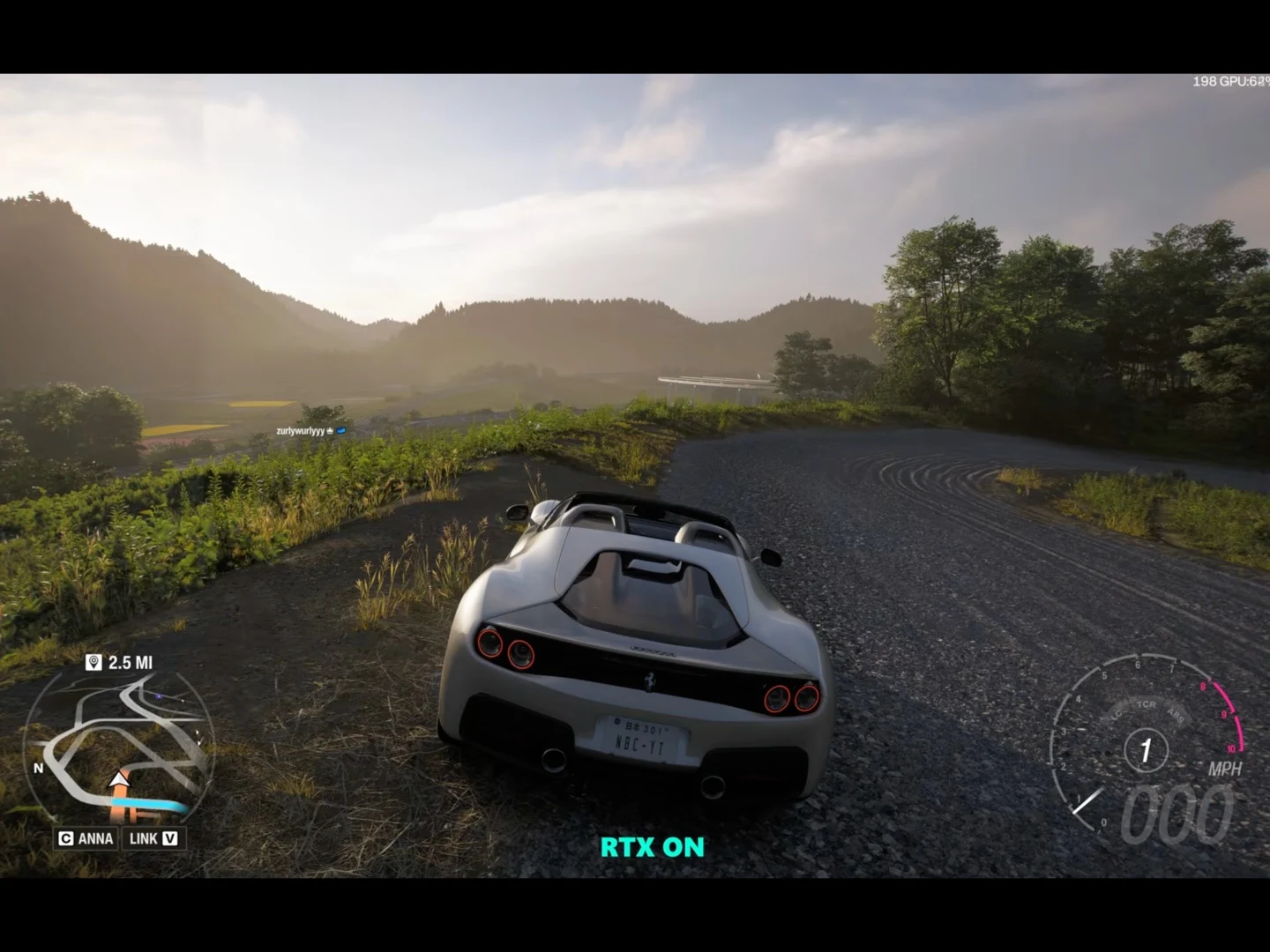
    Early reviews for Forza Horizon 6 are out, and for the most part, the game looks quite promising. In our first impressions video, we compared the performance on an RTX 5060 gaming laptop and one with an RTX 5090. The game is well-optimized (check out our benchmarks), looks stunning, and is fun to play, but there are some aspects that could leave racers wanting for more.

    Initial impressions

    With the review embargo lifted, several channels have released their reviews after testing the game for a couple of weeks. In Digital Foundry’s review, John mentions that the game is “beautiful but empty,” pointing to the wider roads with minimal traffic. While Tokyo has been recreated really well in Forza Horizon 6, the streets feel empty. This was the larger community’s feedback as well after the first gameplay footage dropped.

    Community reaction

    On Xbox consoles, both the Series X and S, the game looks and runs great. Pop-in is an issue, but not as much as Forza Horizon 5, John notes. Also, consoles don’t get the full ray tracing feature set when compared to the PC version. The Japan festival seems to have the exact same presentation as Forza Horizon 5’s Mexico festival.

    Platform differences

    For a more technical preview, Hardware Unboxed tested the game on 8 GB and 16 GB VRAM versions of an RTX 5060 Ti. The results were not very surprising as the 8 GB variant struggled to reach 60 FPS at 1080p with DLSS quality and the Extreme + RT (ray tracing) preset. However, the 16 GB variant was 56% faster with average framerates in the low 70s. At these settings, Forza Horizon 6 demands around 12 GB VRAM. We found similar results with our RTX 5060-powered Lenovo Legion 7a, with the game running at around 37 FPS at these settings.

    Technical notes

    That being said, the Extreme preset (without RT) + TAA looks pretty good and delivers a solid 64 FPS average at 1080p, so those with limited VRAM can use that as a starting point to tweak settings. Furthermore, FG (frame generation) helps greatly with 4x FG, pushing framerates to over 120 FPS.

    Performance takeaways

    Overall, Forza Horizon 6 is looking like a great addition to the series. It is releasing on May 19 on Xbox consoles and PC, and our first impressions come from Digital Foundry on YouTube and Hardware Unboxed on YouTube.

  • Final Fantasy 7 Remake Switch 2 Demo Beats Xbox Series S, PS4

    Final Fantasy 7 Remake Switch 2 Demo Beats Xbox Series S, PS4

    Key Takeaways

    1. The Switch 2 shows strong third-party support, with Final Fantasy 7 Remake performing well compared to Xbox Series S and PS4 versions.
    2. Frame rates on the Switch 2 remain stable around 30 fps, with fewer issues than previous versions, though handheld mode has more frame drops.
    3. The visuals are competitive with PS4 and even PS5/Series X, benefiting from DLSS technology for clearer images, despite some texture issues.
    4. The Switch 2 version often appears clearer than Xbox Series S, showcasing the advantages of its upscaling technology over others.
    5. A dedicated team for each platform during development has contributed to the game’s performance, but challenges may arise with upcoming titles like Final Fantasy 7 Rebirth.


    With the demo of Final Fantasy 7 Remake, the Switch 2 has made notable progress in gaining third-party support. An analysis from Digital Foundry reveals that the Nintendo version holds its own against the Xbox Series S and PS4 editions. Even gamers on PS5 and Series X may find that they need to make only slight sacrifices.

    Performance Insights

    Some may be doubtful about whether the specifications of the Switch 2 can handle such a demanding game from Square Enix. Thankfully, frame rates stayed close to 30 fps, showing fewer stutters compared to previous footage. While handheld mode does experience more frame drops, testers noted that the performance is still on par with the PS4 experience.

    Image Quality Comparison

    When it comes to image quality, this new port not only competes with the PS4 but also challenges the PS5 and Series X. Unique to this version, Nintendo’s console utilizes DLSS. Though it may be a lighter version of the upscaling technology, it produces surprisingly sharp visuals.

    In portable mode, the resolution upgrades from 720p to 1080p, but there’s some indication of Dynamic Resolution Scaling (DRS). Because of this, some textures can look softer at times. A significant downside of the Final Fantasy 7 Remake demo on Switch 2 is an overabundance of dithering, leading to shadows that are less defined compared to those seen on other consoles.

    Visual Quality in Action

    The static images provided by Digital Foundry show mostly clear textures on the handheld. However, during intense combat scenes, objects tend to display more jagged edges. Nevertheless, especially when docked, the increased pixel count at 1080p helps conceal these issues.

    Interestingly, the Switch 2 often appears cleaner than what the Xbox Series S produces. Microsoft’s less powerful console runs the game at 1440p in graphics mode, yet the handheld’s 1080p resolution comes out on top. The analysis attributes this success again to DLSS, which surpasses the TAA that Unreal Engine 4 relies on.

    Development and Future Challenges

    Naoki Hamaguchi, the director of the remake series, assigned dedicated teams for each platform. This decision seems to be beneficial, but Final Fantasy 7 Rebirth may present a greater challenge. Before players embark on the open-world adventure in that Switch 2 title, Remake Intergrade is set to launch on January 22nd.

    Digital Foundry YouTube.

    Source:
    Link


  • Nintendo Switch 2 to Feature Two Versions of Nvidia DLSS

    Nintendo Switch 2 to Feature Two Versions of Nvidia DLSS

    Key Takeaways

    1. The Nintendo Switch 2 will feature NVIDIA’s DLSS technology, including both a standard version and a lighter, performance-oriented version called “DLSS Light.”
    2. The standard DLSS mode closely matches the PC version, enhancing graphics quality but is limited to games upscaling to 1080p.
    3. “DLSS Light” offers a crisper image and can upscale beyond 1080p, but may show drawbacks during fast movements or intense action.
    4. The Switch 2 is the first portable console to natively support NVIDIA’s AI-driven upscaling technology, promising advancements in handheld gaming graphics.
    5. Nintendo’s collaboration with NVIDIA could lead to significant improvements in graphics standards for portable consoles, depending on how first-party developers optimize their games.


    Nintendo is gearing up to release its next-generation console, the Switch 2, which is equipped with various versions of NVIDIA’s latest DLSS (Deep Learning Super Sampling) technology. A recent analysis by tech expert Alex Battaglia from Digital Foundry reveals that the console supports two types of DLSS: a standard version and a lighter, performance-oriented alternative tailored to the unique hardware constraints of the hybrid handheld device.

    In-Depth Analysis of DLSS Performance

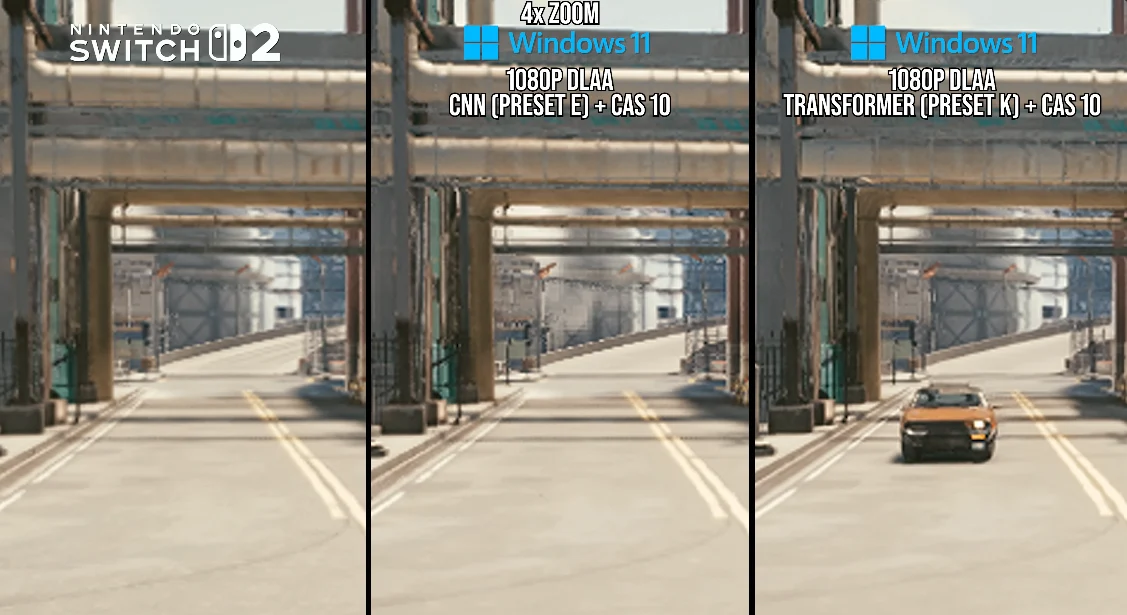
    In his comprehensive review, Battaglia looked into how DLSS performs in upcoming Switch 2 games that are currently either in development or testing phases, such as Cyberpunk 2077, Street Fighter 6, Hogwarts Legacy, Star Wars Outlaws, The Touryst, and Fast Fusion. His research indicated that the conventional DLSS mode operates nearly the same as the PC version’s CNN-based model, providing enhanced anti-aliasing during movement, smoother transitions during camera shifts, and a more consistent overall image. Nonetheless, this more robust model is presently restricted to games that upscale to a 1080p resolution, hinting at its higher processing requirements.

    Exploring the “DLSS Light” Option

    The alternate version, referred to as “DLSS Light,” is a more streamlined and less demanding implementation. It delivers a crisper still image and can upscale beyond 1080p, although its drawbacks become noticeable during camera movements or intense action sequences. In these moments, it temporarily turns off certain reconstruction methods and exposes unrefined pixels. Even with these compromises, this variant is said to use about half the frame-time of the full model, making it significantly more appropriate for high-resolution upscaling within the power limits of the Switch 2.

    To back up his results, Battaglia consulted an unnamed developer who is knowledgeable about the console’s DLSS setup, and this source confirmed that both versions are available in the development environment. This information implies that the Switch 2’s GPU can handle multiple DLSS formats, which could allow developers to select the configuration that best aligns with their game’s performance goals.

    A New Era for Handheld Gaming

    The Switch 2 is set to be the first portable gaming device that will natively support NVIDIA’s AI-driven upscaling technology, representing a significant advancement in how portable systems manage demanding graphics. Up to this point, only third-party developers have utilized DLSS on the device, likely due to the fact that Nintendo’s internal engines have not incorporated it yet. However, once Nintendo’s first-party developers start optimizing their games for the hardware, the outcomes could redefine the standards for graphics in portable consoles.

    It’s still uncertain whether “DLSS Light” will become the go-to standard for the Switch 2 or remain an option for select titles. But one thing is undeniable: Nintendo and NVIDIA are creating significant buzz with their collaboration, pushing boundaries in the gaming industry.

    Source:
    Link


  • Borderless Gaming 1.0 Revamp: DLSS-like Upscaling for All Games

    Borderless Gaming 1.0 Revamp: DLSS-like Upscaling for All Games

    Key Takeaways

    1. Borderless Gaming enables borderless full-screen mode for easier task switching on Steam.
    2. Version 1.0 features a new user interface and an improved engine for better game compatibility.
    3. The update allows for managing niche games and introduces app containers for personalized backgrounds and upscaling support.
    4. Upcoming features include BGUS, an upscaling algorithm, and BGFG, a frame generation technology.
    5. New profiles in Version 1.0 allow users to set game presets, control window sizes, mute sound, and lock the cursor, while consuming fewer resources and functioning offline.


    Borderless Gaming is a popular utility for gamers on Steam. It focuses on allowing games to run in a borderless full-screen mode, which makes it easier for players to switch between the game and other tasks. Although the software hasn’t received many updates lately, it appears that the developers have increased their efforts. The recent release of Version 1.0 comes with promises of more feature-rich updates in the near future.

    New Features in Version 1.0

    The latest version introduces several changes, including a revamped user interface that gives the tool a fresh and modern look. A key improvement is the new engine, which has reportedly been built from the ground up to enhance compatibility with a wider range of games.

    Enhanced Game Compatibility

    The developers assert that Borderless Gaming can now manage even the “most niche games” that users might try to run. Additionally, the update has brought in app containers, which allow users to play games with personalized backgrounds and also includes upscaling support.

    Upcoming Features

    The team behind Borderless Gaming has also indicated that a future version will feature BGUS, an upscaling algorithm that aims to provide DLSS-like enhancements for any game. They have also mentioned BGFG, a frame generation technology that will be included in future updates. With these advancements, Borderless Gaming could become a strong rival to Lossless Scaling, another third-party application.

    Returning to Version 1.0, this update adds profiles that let users set presets for individual games. This will improve control over window sizes, enable sound muting, and lock the cursor within the window. Moreover, the new engine is designed to consume fewer resources, and the application can now function offline. For more detailed information, you can check the patch notes available on Steam.

    Source:
    Link


  • Nintendo Switch 2 Performance May Improve with DLSS in 2026

    Nintendo Switch 2 Performance May Improve with DLSS in 2026

    Key Takeaways

    1. The Switch 2 is more powerful than the original Switch, but still lags behind current-gen consoles like the PS5.
    2. Performance issues have been reported with games like Elden Ring and Borderlands 4 on the Switch 2.
    3. The Switch 2 supports Nvidia DLSS, which may help improve game performance in the future.
    4. Limited distribution of dev kits to developers may contribute to the performance challenges faced by Switch 2 games.
    5. Nintendo may release more dev kits soon, potentially leading to better-optimized games for the Switch 2.


    Nintendo spent a long time creating the Switch 2. The end result is a console that improves upon the original Switch in nearly every way possible. Even though the Switch 2 is significantly more powerful than its older version, there remains a noticeable gap in performance when compared to current-generation consoles like the Sony PS5. This performance gap, particularly in handheld mode, becomes very clear when playing modern AAA titles.

    Performance Challenges

    For example, reports indicate that Elden Ring doesn’t run well on the Switch 2. Likewise, Borderlands 4 is said to have trouble functioning on the device. This clearly shows that, similar to the original Switch, developers will need to invest a lot of work into ensuring their games run smoothly on the Switch 2.

    Upcoming Improvements

    Luckily, Nintendo appears to have anticipated these challenges, since the Switch 2 is compatible with Nvidia DLSS. According to a recent rumor from NashWeedle, the dev kits for the Switch 2 have received updates for DLSS. This means that more games for the Switch 2 are expected to incorporate DLSS by 2026, which should help tackle some of the performance issues.

    While NashWeedle also mentioned various other information, mainly about future game releases, the rumor regarding DLSS is especially significant. It seems that Nintendo didn’t distribute many dev kits to game developers, including some prominent AAA studios. This might shed light on the performance issues seen in Switch 2 games, as developers may not have the right hardware for testing.

    Future Prospects

    There’s a chance that in the next few months, Nintendo will send out more dev kits to additional studios. Coupled with the expected use of DLSS, games coming to the Switch 2 could be much better optimized.

    Source:
    Link


  • Metal Gear Solid 3 Remake Stuttering Blamed on Unreal Engine 5

    Metal Gear Solid 3 Remake Stuttering Blamed on Unreal Engine 5

    Key Takeaways

    1. Metal Gear Solid 3 remake is set for release on August 28th, but gamers are concerned about frame rate issues and stuttering in Unreal Engine 5 games.
    2. Other recent titles, like Mafia: The Old Country, also show poor visual quality, raising questions about game optimization by developers.
    3. Unreal Engine 5 is popular among developers for its cost-effectiveness and advanced features like ray tracing, despite its performance challenges.
    4. Players may use AI upscaling technologies like DLSS and FSR to improve frame rates, but these can cause blurriness and visual artifacts.
    5. Reviews indicate that even powerful gaming PCs may struggle with stuttering in the Metal Gear Solid 3 remake, and the game’s large storage requirement has frustrated some gamers.


    The release date for the Metal Gear Solid 3 remake is set for August 28th, yet gamers are already worried about frame rate problems. Initial reviews have mentioned issues with stuttering that can affect games built on Unreal Engine 5. The content creator Synth Potato pointed out that numerous titles using this engine face performance challenges. Many followers have expressed their dissatisfaction by replying to a popular social media post.

    Recent Game Issues

    In addition to the Metal Gear Solid 3 remake, Synth Potato mentioned other recent games like Mafia: The Old Country, which also experience poor visuals. Some critics argue that developers fail to optimize their games for consoles or standard PC setups. However, the passionate gamer feels it’s improbable that so many skilled programmers are at fault. The real issue seems to be Unreal Engine 5, which more studios are starting to depend on.

    Reasons for Using Unreal Engine 5

    Developers have the option to choose not to use Epic Games’ engine, but it often proves to be more cost-effective than building a custom solution from scratch. Moreover, it offers advantages such as ray tracing and global illumination. Both game publishers and hardware makers utilize these features to attract gamers.

    Potential Solutions and Performance Analysis

    Given that Unreal Engine 5 games can heavily tax gaming systems, players might look towards AI upscaling methods to improve frame rates. While technologies like DLSS and FSR can help, they sometimes lead to blurriness or visual artifacts. This downside was evident in Digital Foundry’s technical review of the Metal Gear Solid 3 remake. They noted that with PSSR on the PS5 Pro, the game appears to look worse on that console. Adding to the letdown, the frame rates were generally better in the more affordable PS5’s performance mode.

    The updated classic from Konami might perform better on certain desktops and laptops. Reviews of the Metal Gear Solid 3 remake indicate that stuttering can still be an issue even with mid-range GPUs. However, many PC gamers with strong hardware find the 60 fps limit too restrictive and are unimpressed by the 100 GB storage requirement.

    Source:
    Link


  • Nvidia App Beta Adds Global DLSS Overrides for RTX 4000 GPUs

    Nvidia App Beta Adds Global DLSS Overrides for RTX 4000 GPUs

    Key Takeaways

    1. Nvidia is simplifying DLSS feature activation across all compatible games using global toggles in the Nvidia App.
    2. The beta version of the Nvidia App now supports Smooth Motion on RTX 4000 GPUs, previously only available on RTX 5000 cards.
    3. Users must update to GeForce Game Ready Driver version 581.08 and opt-in for the beta version via the Nvidia App settings.
    4. The DLSS override toggle allows gamers to enable new DLSS features globally instead of for each game individually.
    5. The new feature generates an extra frame between two rendered frames and is compatible with various upscalers, but only for DX 11, DX 12, and Vulkan games.


    Nvidia is simplifying the process of enabling DLSS features for all compatible games through the Nvidia App by introducing various global toggles. Furthermore, the latest beta version of the Nvidia App has rolled out support for Smooth Motion on RTX 4000 GPUs, a feature that was previously exclusive to RTX 5000 cards.

    Update Requirements

    To utilize these new capabilities, users must update their GeForce Game Ready Driver to version 581.08. They also need to opt-in for the beta version from the Nvidia App by navigating to Settings > About. A stable non-beta version is set to be released next week and will update automatically.

    DLSS Overrides

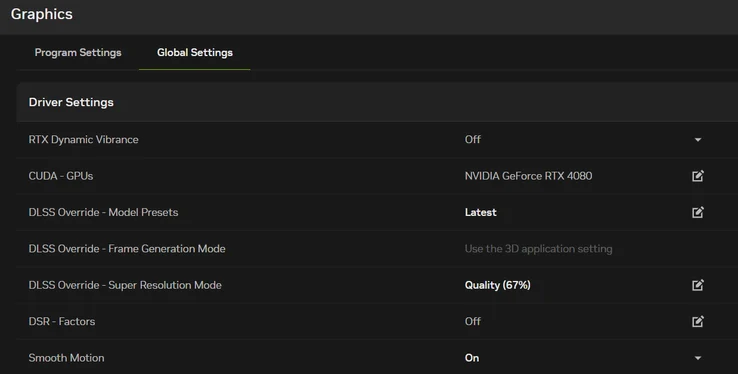
    With the introduction of the DLSS override toggle in Graphics > Global Settings, gamers can now enable the newest DLSS features across all supported titles (including future releases) instead of adjusting settings for each game individually. Here’s a brief overview of the global overrides that are available for activation:

    Users can conveniently check the status of their DLSS overrides through the Alt + Z overlay by going to Statistics > Statistics View > DLSS.

    Additional Features

    This new feature is particularly beneficial for titles that lack DLSS Frame Generation, as it generates an extra frame between two already rendered frames. It can also be activated from the Global Graphics Settings tab and functions without any upscalers. It is compatible with DLSS Super Resolution, FSR, or XeSS. However, please note that it is only applicable to DX 11, DX 12, and Vulkan games. Additionally, users must ensure that Hardware-accelerated GPU Scheduling is enabled in the Windows 11 Display settings.

    Source:
    Link


  • Nintendo Switch 2 Can Run Xbox Series S Games, Says Game Developer

    Nintendo Switch 2 Can Run Xbox Series S Games, Says Game Developer

    Key Takeaways

    1. Eoin O’Grady claims the Nintendo Switch 2 performs similarly to the Xbox Series S in handheld mode but slightly underperforms without DLSS technology.
    2. The Switch 2 features a Tegra T239 SoC with 46 Ampere Tensor Cores and custom DLSS upscaling, enhancing its image quality and performance.
    3. The Switch 2’s octa-core ARM Cortex-A78C CPU is slightly more powerful than the PS4’s CPU, making it competitive for modern gaming.
    4. Games running at 60 FPS on the Series S should be easily ported to the Switch 2, while CPU-heavy games may require extra optimization.
    5. Impressive ports on the Switch 2, like Street Fighter 6 and Cyberpunk 2077, demonstrate its technical capabilities, with some games outperforming the Series S.


    Virtuos’s Eoin O’Grady has made some daring statements regarding the performance of the Nintendo Switch 2. He claims that in handheld mode, the Switch 2 offers performance similar to the Xbox Series S. But when NVIDIA’s DLSS technology comes into play, the situation changes.

    Insights from Eoin O’Grady

    In a conversation with WCCFtech, Eoin O’Grady, who is the Technical Director at Black Shamrock (a part of Virtuos), provided insights into the performance of the Switch 2. He compared it with both the Xbox Series S and the PS4. He stated that the performance of the Switch 2 is slightly under that of the Series S in handheld mode.

    Performance Features

    Thanks to the Tegra T239 SoC that the Switch 2 uses, which includes 46 Ampere Tensor Cores, it also features custom DLSS upscaling that enhances image quality and performance. According to O’Grady, “In terms of GPU, the Switch 2 is a bit under the Series S; this is especially clear in handheld mode. However, the Series S lacks support for technologies like DLSS, which the Switch 2 has. This makes their GPU capabilities quite comparable overall.”

    CPU Comparisons

    On the CPU side, the Switch 2 stands up well against the PS4, equipped with an octa-core ARM Cortex-A78C CPU, which is slightly more powerful compared to the PS4’s octa-core AMD Jaguar x86-64 CPU.

    While the Switch 2’s ARM CPU might seem like a limitation, O’Grady notes that many modern games rely heavily on the GPU, particularly if they are well-optimized. This suggests that games running at 60 FPS on the Series S should be relatively easy to port to the Nintendo Switch 2. The only issue seems to be with CPU-heavy games, which can still be transitioned with some extra optimization. O’Grady elaborated:

    “Any game that runs at 60 FPS on the Series S should easily be ported to the Switch 2. Also, a 30 FPS game from the Series S that relies on the GPU should transfer well. However, games that involve complex physics, animations, or other CPU-demanding features might face difficulties in achieving 30 or 60 FPS or may need extra optimization during the porting process.”

    Impressive Game Ports

    The Nintendo Switch 2 has already showcased some remarkable ports that highlight its technical strengths. For instance, the port of Street Fighter 6 for the Switch 2 not only matches the performance of the Xbox Series S but also delivers superior texture and image quality. Additionally, CD Projekt RED’s Switch 2 adaptation of the graphically demanding Cyberpunk 2077 runs smoothly at 30 FPS in Quality mode and 40 FPS in Performance mode.

    Source:
    Link

  • Nintendo Switch 2 Beats Xbox Series S in Street Fighter 6 DLSS

    Nintendo Switch 2 Beats Xbox Series S in Street Fighter 6 DLSS

    Key Takeaways

    1. The Nintendo Switch 2 launched with popular titles like Cyberpunk 2077 and Street Fighter 6, showcasing its capabilities.
    2. Street Fighter 6 on Switch 2 utilized NVIDIA’s DLSS technology, achieving better performance than the Xbox Series S.
    3. The console improves game resolution from 960x540p to 1080p while maintaining a sub-60fps frame rate.
    4. The Switch 2 offers superior texture quality compared to Xbox Series S, with features more aligned to PS4 but lacking some PS5 visual effects.
    5. DLSS technology is also used in Cyberpunk 2077, providing sharp textures and improved performance modes, reinforcing the Switch 2’s enhanced performance promise.


    The Nintendo Switch 2 made its debut with a wide array of popular multiplatform games, including beloved titles like Cyberpunk 2077 and Street Fighter 6. Street Fighter 6 exceeded expectations with a remarkable port that utilized NVIDIA’s DLSS technology, sometimes outperforming the Xbox Series S. This marks a significant achievement for both Nintendo and Nvidia, showcasing the impressive capabilities of the Nintendo Switch 2.

    Performance Analysis

    Digital Foundry conducted a thorough examination of Street Fighter 6’s performance on the Switch 2, focusing on its graphical quality and frame rate. The console elevates the game’s native resolution of 960x540p to a much better 1080p, thanks to DLSS, while maintaining a frame rate that stays within an acceptable sub-60fps range.

    Image Quality

    NVIDIA’s AI-enhanced upscaling technology has significantly improved since its early days, providing clear image sharpness and stability without ruining the user experience. The image quality is so remarkable that it even surpasses Microsoft’s Xbox Series S, which runs at native 1080p using Capcom’s less effective upscaling method.

    Texture Quality

    The Switch 2 also enjoys enhanced texture quality compared to the Xbox Series S, delivering high-resolution textures for clothing, stages, and skin, credited to its slightly greater 9GB of VRAM against the Series S’s 8GB. The visual quality of the Switch 2 is more aligned with the PS4 version, although it lacks some of the more flashy visual effects found on the PS5. It might gain from Nvidia’s recent announcements about better texture compression and memory efficiency, making its latest DLSS features significantly more powerful.

    Additional Titles

    The Switch 2 utilizes DLSS not just in Street Fighter 6 but also in the third-party launch title Cyberpunk 2077, which pushes the console to its limits. The game offers a 30FPS Quality mode and a 40FPS Performance mode, both upscaled to 1080p, whether docked or handheld. Even with strong upscaling in both modes, the texture quality remains sharper than that of the Xbox Series S and is comparable to the PS5 version.

    This demonstrates that the Switch 2’s custom NVIDIA Tegra T239 chipset, featuring 48 Tensor and 48 RT cores, partially fulfills the promise of delivering up to ten times the performance of the original Switch, largely due to its impressive improvements from DLSS technology.

    Source:
    Link