Category: Software

  • Amazfit App Update Adds Features for More Smartwatch Users

    Amazfit App Update Adds Features for More Smartwatch Users

    Key Takeaways

    1. Zepp app version 10.0 is now available for Android users, previously exclusive to iOS.
    2. A new Badges section has been added, featuring awards for Personal Bests, Achievements, Challenges, and Masteries.
    3. The Badges feature is compatible with all Amazfit smartwatches, including the Balance 2.
    4. Enhancements to the Activities section aim to improve daily activity monitoring.
    5. The BioCharge algorithm has been improved, and the Device Page has been updated.


    Zepp app version 10.0 has been released for Amazfit smartwatch owners who use Android devices. This update, which became available in January 2026, was previously exclusive to iOS users at the Apple App Store.

    New Features for Android Users

    Now, Android users can download Zepp version 10.0 from the Google Play Store. One of the key new features in this version is the introduction of a Badges section, which is located in its own tab. This tab can be found in the app’s footer, positioned between ‘Workout’ and ‘Aura’. In the Badges section, users can explore a variety of exercise-related awards, organized into four different categories: Personal Bests, Achievements, Challenges, and Masteries. The Badges feature should work for Android users with all Amazfit smartwatches, including the Balance 2, which is currently priced at $299.99 on Amazon.

    Additional Improvements

    In addition to the new Badges feature, there are enhancements to the Activities section on the homepage, designed to better assist users in monitoring their daily activities. The BioCharge algorithm has reportedly been improved, although further details have not been disclosed, and the Device Page of the app has also been updated. Users can obtain the latest Zepp app version 10.0.7 from the Google Play Store.

    Source:
    Link


  • Android 17 Beta 1 Release Delayed Indefinitely: What to Know

    Android 17 Beta 1 Release Delayed Indefinitely: What to Know

    Key Takeaways

    1. Google is working on Android 17 beta 1, rumored to feature significant visual improvements.
    2. The beta version’s release date has shifted, leaving users uncertain about when testing will begin.
    3. A message on Reddit indicated the beta was expected soon, but Google has confirmed it will not be released on February 11.
    4. Users expressed skepticism about the launch due to the recent Android 16 QPR3 release and Google’s typical update schedule.
    5. Eligible Pixel device owners need to be patient, as no revised timeline for the Android OS release has been provided.


    Google has been working on Android 17 beta 1, which is rumored to include some significant visual improvements. On February 10, Google announced that the beta version was coming soon, but it seems the timeline has shifted. The exact release date for the operating system has not been provided, leaving users uncertain about when they can start testing it and the reason for the delay.

    Release Timing Updates

    According to a message on the official r/android_beta subreddit, the Android 17 beta 1 was expected to be released soon. Although the post didn’t specify a precise time, many anticipated it would be available around 1 PM EST on February 11. However, it appears that Google has encountered some issues. Android Authority has reported that a representative said the rollout will “actually be coming soon, not today.”

    Skepticism About the Launch

    Even with the original announcement, some users were doubtful about whether Android 17 beta 1 would actually come out today, considering how recent the Android 16 QPR3 release was. One user remarked that Google usually prefers to have a gap of about a week between updates. They suggested that a more realistic release date might be February 18, or possibly even February 23, as the company typically favors Mondays or Wednesdays for major updates.

    Those who own eligible Pixel devices will need to exercise a bit more patience for the upcoming Android OS. Since Google hasn’t provided a revised timeline, it’s difficult to determine how long they will have to wait.

    Source:
    Link


  • GitLab Urges Update for High-Risk Flaws in Repositories and Services

    GitLab Urges Update for High-Risk Flaws in Repositories and Services

    Key Takeaways

    1. GitLab has released patch updates (versions 18.8.4, 18.7.4, and 18.6.6) for high-severity security issues in its Community Edition (CE) and Enterprise Edition (EE) platforms.
    2. A critical vulnerability (CVE-2025-7659) in GitLab’s Web IDE could allow unauthenticated attackers to capture access tokens and access private repositories.
    3. The updates fix multiple denial-of-service vulnerabilities, including CVE-2025-8099 and CVE-2026-0958, which could crash servers and drain system resources.
    4. Additional security fixes address cross-site scripting and injection vulnerabilities, along with medium and lower-severity flaws in Markdown processing and authorization.
    5. Upgrading to the latest version is crucial for security, and administrators should expect some downtime during the patch process, especially for single-node installations.


    GitLab has put out new patch updates that tackle several high-severity security issues affecting its Community Edition (CE) and Enterprise Edition (EE) platforms. The updates are now available as versions 18.8.4, 18.7.4, and 18.6.6. The company is urging all self-managed installations to upgrade without delay. GitLab has already implemented the patched versions, and customers using GitLab Dedicated don’t need to take any steps.

    Critical Vulnerabilities Addressed

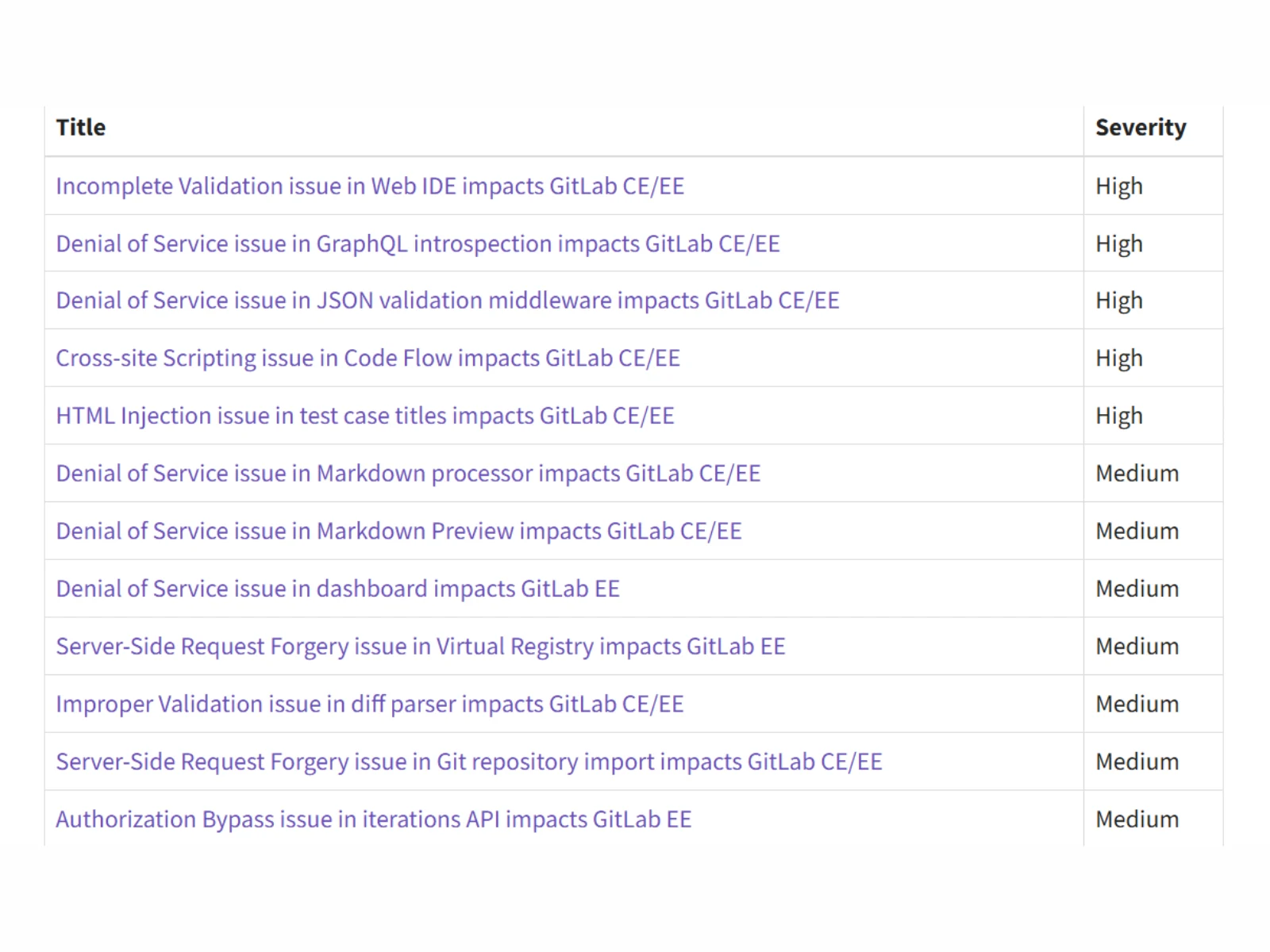
    One of the most significant problems fixed is CVE-2025-7659, a high-severity vulnerability (CVSS score of 8.0) related to inadequate validation within GitLab’s Web IDE. GitLab mentions that this flaw could let unauthenticated attackers capture access tokens and potentially access private repositories. The patch also addresses multiple denial-of-service vulnerabilities, such as CVE-2025-8099, which could allow attackers to crash servers through repeated GraphQL queries, and CVE-2026-0958, which could drain system resources by skipping JSON validation middleware.

    Additional Security Fixes

    The update also resolves cross-site scripting and injection vulnerabilities like CVE-2025-14560 and CVE-2026-0595. These issues could enable attackers to inject harmful scripts or alter content under certain scenarios. Moreover, various medium-severity vulnerabilities related to Markdown processing, dashboards, and server-side request forgery (SSRF) have been fixed, along with several lower-severity flaws in authorization and validation.

    GitLab clarifies that the affected versions encompass all builds from various release branches prior to the newly launched patches. The firm points out that details on security vulnerabilities are usually disclosed 30 days after a fix has been issued. The organization stresses that upgrading to the latest supported version is vital for keeping deployments secure.

    Impact on Availability

    The patch release also includes database migrations, which might temporarily affect availability. For single-node installations, some downtime is anticipated during the upgrade, while multi-node deployments can finish the update without downtime if they follow the suggested upgrade protocols.

    GitLab typically adheres to a regular patch release timetable twice a month but can issue extra updates when critical vulnerabilities are found. The company recommends that administrators check release notes, test upgrades in staging environments, and apply the latest patches as quickly as possible to minimize potential exploitation risks.

    Source:
    Link


  • iOS 26.3 Update: Easier Switch to Android & Third-Party Watches

    iOS 26.3 Update: Easier Switch to Android & Third-Party Watches

    Key Takeaways

    1. iOS 26 is a free update for compatible iPhones, focusing on bug fixes and security improvements.
    2. Users can now transfer various data from iPhones to Android devices, including photos, passwords, texts, and contacts.
    3. The data transfer process utilizes a direct WiFi connection between the iPhone and the Android device.
    4. Third-party earbuds can now automatically pair with iPhones when activated nearby, similar to AirPods Pro.
    5. Notifications can be sent to third-party smartwatches, but these devices will require their own updates to support the feature.


    Apple has rolled out iOS 26, which is a free update available for all compatible iPhones. This version works on the iPhone SE (2nd generation), iPhone 11, and all later models. According to Apple’s official notes, the update mainly includes bug fixes and enhancements for security.

    Hidden Changes in iOS 26.3

    Yet, there are significant updates in iOS 26.3 that Apple hasn’t highlighted. Due to pressure from the EU, it now allows users to transfer a variety of data from an iPhone to an Android device. This transfer can start when setting up the Android smartphone and covers photos, passwords, texts, notes, apps, and saved contacts. Even if you use an eSIM, you can transfer your phone number.

    New Pairing Features

    For this data transfer, Apple employs a direct WiFi connection to the Android phone. Additionally, thanks to the EU’s influence, third-party earbuds can now pair automatically with an iPhone when they are activated nearby, similar to the functionality of AirPods Pro, which are priced at $209 on Amazon.

    Notifications for Smartwatches

    Furthermore, it’s important to mention that notifications can now be sent to third-party smartwatches, like Pebble, allowing them to handle notifications like an Apple Watch. However, smartwatches will need their own updates to take advantage of this feature.

    Source:
    Link


  • Android 17 Beta Launch Date Revealed: Closer Than Expected

    Android 17 Beta Launch Date Revealed: Closer Than Expected

    Key Takeaways

    1. Google is skipping the developer preview stage and going directly to the beta phase for Android 17.
    2. The Android 17 beta, codenamed “Cinnamon Bun,” is expected to launch around February 18.
    3. Android 17 is built on Android 16 QPR and includes bug fixes and improvements, with potential visual upgrades.
    4. Pixel users in the Android Beta Program will receive the update automatically, while those wanting to stay on the stable version must opt out before the beta launches.
    5. Downgrading from the beta will wipe all user data, and a secure method to exit the beta without data loss will be available only at the end of the beta period.


    Google seems to have made some major changes to how it rolls out updates. For the very first time, they are skipping the developer preview stage and going straight to the beta phase. This was recently confirmed in the official Reddit group r/android_beta, which stated that the Android 17 beta is likely to be launched soon. This change is part of the new canary build model. With this model, developers are working directly on the main branch of development, which helps to cut down on internal testing time and allows beta versions to be released more quickly. Reports indicate that the Android 17 beta could kick off around February 18.

    Details on Android 17

    Android 17, codenamed “Cinnamon Bun,” is built on the solid foundation of Android 16 QPR – Quarterly Platform Release. Up to this point, Google has not shared much information about the specific updates included in this version. Officially, the company is only mentioning “the latest bug fixes and improvements to stability and performance.” Nevertheless, there are rumors that Android 17 might bring some significant visual upgrades. These potential changes could feature more visible blur effects and a clearer distinction between the notification shade and Quick Settings. The overall look may start to resemble designs found in systems like Apple’s iOS or Xiaomi’s HyperOS. However, these updates are causing mixed feelings, especially among long-time Android fans who favor the classic appearance of the platform.

    How to Get the Update

    For anyone with a Pixel device who is signed up for the Android Beta Program, Android 17 Beta 1 will be delivered automatically as an OTA update. Users who want to stay on the stable Android 16 QPR3 version must opt out of the beta program before the beta launches. Once the beta is out, Google will provide a “downgrade OTA,” but it’s advised against installing it as it is said to wipe all user data completely. A secure method to exit the beta program without losing any data will only be available again toward the end of the beta period, which is anticipated to be around June 2026.

    Source:
    Link


  • Windows 11 February 2026 Update: KB5077181 & KB5075941 Fix Bugs

    Windows 11 February 2026 Update: KB5077181 & KB5075941 Fix Bugs

    Key Takeaways

    1. Microsoft released cumulative security updates for Windows 11 on February 10, 2026, with KB5077181 for versions 24H2 and 25H2, and KB5075941 for version 23H2.
    2. Secure Boot certificates will begin expiring in June 2026, and users are advised to follow Microsoft’s guidance to avoid potential issues.
    3. KB5077181 includes fixes for full-screen gaming eligibility and connectivity issues with WPA3-Personal Wi-Fi networks.
    4. KB5075941 addresses a problem where computers using Virtual Secure Mode might restart instead of shutting down or hibernating after updates.
    5. The February 2026 release also features updates such as expanded Cross-Device Resume, improvements to Windows MIDI Services, and adjustments to Narrator verbosity controls.


    Microsoft has put out its cumulative security updates for Windows 11 as of February 10, 2026. For users on Windows 11 versions 24H2 and 25H2, the update is designated as KB5077181, which upgrades the operating system to Builds 26100.7840 (for 24H2) and 26200.7840 (for 25H2).

    Updates for Windows 11 23H2

    As for Windows 11 version 23H2, Microsoft has released KB5075941, which raises the OS to Build 22631.6649. Both of these updates come packed with this month’s security patches and also include some “non-security updates” from the previous optional preview release, depending on the version track you’re on.

    Important Secure Boot Information

    In the release notes for the two updates, Microsoft has highlighted a critical upcoming deadline for Secure Boot maintenance. The Secure Boot certificates that are utilized by most Windows devices are set to begin expiring in June 2026. Microsoft cautions that devices might face issues “if not updated in time” and directs users and organizations towards its guidance for Secure Boot preparation.

    On the 24H2/25H2 versions, Microsoft has stated that it is using this month’s servicing to further its phased rollout strategy. The quality updates for Windows now include targeting data that helps identify which devices are ready to receive new Secure Boot certificates, with the certificates being distributed only after there are “sufficient successful update signals.”

    Fixes and Improvements in Updates

    Within KB5077181, Microsoft points out several fixes, including resolving a full-screen gaming eligibility problem and addressing a bug that could prevent connections to certain WPA3-Personal Wi-Fi networks following a previous update. They have also announced that updated AI components (Image Search, Content Extraction, Semantic Analysis, and a Settings Model) are now at version 1.2601.1268.0, as detailed in the release notes.

    At the time of writing, Microsoft has indicated that it is not aware of any issues with KB5077181.

    For the Windows 11 version 23H2 update, Microsoft has mentioned a change regarding Secure Boot/Boot Manager: on devices that already have the Windows UEFI CA 2023 certificate within the Secure Boot signature database (DB), the update will replace the older 2011-signed bootmgfw.efi with the 2023-signed version. They also warn that resetting the DB or toggling Secure Boot could lead to a “Secure Boot violation” and notes that recovery media is a potential solution in rare cases.

    Additional Fixes in KB5075941

    KB5075941 also addresses a commonly discussed problem where some computers using Virtual Secure Mode (VSM) might restart instead of shutting down or entering hibernation after receiving security updates from January 13, 2026, onwards.

    Similar to the package for 24H2/25H2, Microsoft asserts that there are no known issues with KB5075941 at the time of this publication.

    BleepingComputer has reported that the February 2026 Patch Tuesday release also includes feature updates that are rolling out progressively. These updates feature expanded Cross-Device Resume, enhancements to Windows MIDI Services, additional controls for Narrator verbosity, and adjustments to Smart App Control behavior. It is important to note that, like many Windows features, the availability of these updates can vary depending on your device, configuration, and rollout status.

    Microsoft support: KB5077181

    Microsoft support: KB5075941

    BleepingComputer

    Source:
    Link


  • Android 16 QPR3 Beta 2.1 Now Available for Google Pixel Devices

    Android 16 QPR3 Beta 2.1 Now Available for Google Pixel Devices

    Key Takeaways

    1. Android 16 QPR3 Beta 2.1 was released on February 10, 2026, for supported Pixel devices, featuring automatic updates and quick installation.
    2. The update maintains the January 5, 2026 security patch level and does not provide a specific list of fixes, focusing instead on stability and usability improvements from Beta 2.
    3. Supported devices include Pixel 6, 6 Pro, 6a, 7, 7 Pro, 7a, Pixel Fold, Pixel Tablet, Pixel 8, 8 Pro, 8a, and the Pixel 9 and 10 families.
    4. Switching between beta and production versions requires a complete device reset, so users should back up their data beforehand.
    5. Google encourages users to report issues via the Issue Tracker and Android Beta Feedback app, and suggests checking release notes for known issues before submitting new reports.


    Google has released Android 16 QPR3 Beta 2.1 for the Pixel beta track, on February 10, 2026. If you’re part of the program, you can expect this update to appear automatically, install swiftly, and then be done with it.

    Device Specifications

    According to Google’s notes, the majority of supported devices are marked as CP11.251209.009.A1. The Pixel 6 Pro, Pixel 6, Pixel 6a, Pixel 7 Pro, and Pixel 7 are specifically noted on CP11.251209.009. The update maintains the same security patch level from January 5, 2026, identifies Google Play services version 25.47.33, and still lists emulator support as “TBA.”

    Update Details

    Here’s the thing: the Beta 2.1 update is essentially just a label set—date, builds, patch level, and Play services—without any specific list of fixes for Beta 2.1 in the official notes. So if you’re hoping for a tidy changelog that says “fixed X, fixed Y,” you won’t find it.

    For a bit of background, Google does explain what Beta 2 was aiming to address in the same document, highlighting a range of stability and usability improvements, such as crashes, freezes, battery management, connectivity problems (like slow Wi-Fi and missed calls), along with some UI issues. This context pertains to Beta 2, not a definitive fix list for Beta 2.1, but it gives insight into the type of challenges this QPR3 version has been focusing on.

    Supported Devices

    Google lists support for Android 16 QPR3 beta on Pixel 6, 6 Pro, 6a, 7, 7 Pro, 7a, Pixel Fold, Pixel Tablet, Pixel 8, 8 Pro, 8a, along with the Pixel 9 family (including Fold), and lastly the Pixel 9a and the Pixel 10 family (including Fold). It’s also important to note that once you join the beta program, your phone will receive constant OTA beta updates until you decide to leave the program.

    If you like to do things manually, Google suggests using the Android Flash Tool as the recommended method for flashing.

    Important Considerations

    Google is quite clear on this point: switching from the production version to beta, or back again, necessitates a complete device reset that wipes all user data. Always remember to back up your data first!

    Additionally, Google makes OTA images available for QPR beta builds and promotes them as a useful option for testing—and, in certain situations, for restoring a device after a troublesome OTA update.

    For reporting any issues, Google directs testers to the Issue Tracker and the Android Beta Feedback app included in preview builds. It also recommends checking the release notes and looking at “top open issues” before submitting a new report, to avoid submitting something that’s already been reported.

    Source:
    Link


  • Microsoft 2026 Deadline for Secure Boot Certificate Expiration

    Microsoft 2026 Deadline for Secure Boot Certificate Expiration

    Key Takeaways

    1. Initial Secure Boot certificates from 2011 will start expiring in June 2026, with all expiring by October 2026.
    2. Microsoft is rolling out new 2023 certificates through regular Windows updates, but some devices may require firmware updates from OEMs.
    3. Devices will still boot normally after expiration, but will lose new protections related to the boot process and updates for vulnerabilities.
    4. Microsoft is transitioning to new certificate authorities and signing updates for Secure Boot components, with guidance for managed devices to implement updates.
    5. Users should not disable Secure Boot as a workaround, and additional resources for support and guidance are available from Microsoft.


    Microsoft is alerting Windows users and IT administrators that the initial Secure Boot certificates that were issued back in 2011 will begin to expire in June 2026, with more expirations occurring through October 2026. The company has started to roll out new 2023 certificates to affected systems via regular Windows updates for many devices.

    Important Updates

    This information was shared in Microsoft’s Patch Tuesday release notes on January 13, 2026, for Windows 11 (KB5074109), specifically under the section titled “Windows Secure Boot certificate expiration.” Here, Microsoft highlights the June 2026 start date and directs users to resources for preparation.

    On February 10, 2026, Microsoft also released KB5079373, which discusses what the expiration entails and confirms that most devices will receive updates automatically. However, some may need firmware updates from the original equipment manufacturer (OEM).

    Booting After Expiration

    Microsoft explains that devices that hit the expiration date will still boot as usual and continue to get standard Windows updates. The main change is that systems without the new certificates won’t gain new protections for the early boot process. This includes updates linked to Windows Boot Manager, Secure Boot databases, revocation lists, and fixes for any newly found vulnerabilities in the boot chain.

    In a broader explanation regarding Secure Boot certificates (KB5062710), Microsoft similarly warns that while everyday usage might seem unaffected, affected machines will gradually lose protection as new threats at the boot level appear.

    Transition to New Certificates

    In its IT guidance, Microsoft lists three Secure Boot certificates that have been in use since the era of Windows 8 and Windows Server 2012, stating they will start to expire in June 2026 and will all be expired by October 2026.

    Microsoft is transitioning devices to certificate authorities from 2023, including new sources for signing updates to the Secure Boot database and Windows boot components. Some environments might need to add separate 2023 certificates depending on what trust is required (like trust related to Option ROM).

    Consumer and Managed Devices

    For the majority of consumer PCs, Microsoft asserts that the new certificates should come through Microsoft-managed updates. However, it warns that some systems might need an OEM firmware update for the new certificates to be applied correctly. Microsoft also discourages users from disabling Secure Boot as a workaround.

    For managed fleets, Microsoft’s guidance provides strategies to inventory, monitor, and implement the updates (including through Intune, Group Policy, and registry methods) before the June 2026 deadline.

    Reports from third-party sources indicate that Microsoft is considering this a “generational refresh” of the boot trust chain, with updates now being delivered via regular Windows servicing for supported devices.

    Source:
    Link


  • Venus Lava Tunnel Formed by Volcanic Eruptions Discovered

    Venus Lava Tunnel Formed by Volcanic Eruptions Discovered

    Key Takeaways

    1. Venus is often called Earth’s twin but has extremely harsh and severe conditions.
    2. Studying Venus is difficult due to thick clouds, but the Magellan spacecraft mapped its surface using radar technology from 1990 to 1992.
    3. A recent study suggests the discovery of a possible lava tunnel near the Nyx Mons volcano, challenging previous beliefs about Venus being geologically inactive.
    4. This potential lava tunnel would be the second identified on Venus, but further observations are needed to confirm its size and composition.
    5. Ongoing research, including future missions like EnVision, aims to enhance our understanding of Venus’s geological activity.


    Considered the twin sister of Earth, Venus is an extremely harsh planet with severe conditions. Nevertheless, astronomers have been examining this planet for many years, and recently, by looking at data from decades ago, they found a possible lava tunnel formed by volcanic activity.

    Difficulty in Study

    Studying Venus is quite challenging due to the thick clouds that shroud its surface. However, between 1990 and 1992, the Magellan spacecraft successfully created a map of Venus’s surface using radar technology that transmitted radio waves down to the planet. Scientists were then able to gauge how long it took for these signals to bounce back, which allowed them to form a detailed representation of the planet’s topography.

    New Findings

    A recent study published on February 9 in the journal Nature Communications looked into surface collapses brought on by rockfalls. One of these collapses is found near the Nyx Mons volcano, and it might be a lava tunnel that stretches several dozen kilometers.

    This finding calls into question previous ideas that Venus is a geologically inactive world. Moreover, if this discovery is verified, it would mark the second lava tunnel identified on the planet. Still, more observations and studies are necessary, especially with probes like EnVision, to figure out the tunnel’s exact size and what it’s made of.

    Future Research

    Nature Communications’ findings could reshape our understanding of Venus and its geological activity. Further research will help clarify the mysteries surrounding this inhospitable yet fascinating planet.

    Source:
    Link


  • Home Assistant App Update: 10+ New Features and Improvements

    Home Assistant App Update: 10+ New Features and Improvements

    Key Takeaways

    1. New version 2026.2 of the Home Assistant app for iOS has been released, following version 2026.1.
    2. Users can now add entities directly to Apple Watch, CarPlay, or Widgets from the dashboard.
    3. A new optional Quick search gesture has been introduced for better efficiency.
    4. Enhancements have been made to the entity picker, download manager, and WebRTC camera player, along with edge-to-edge drawing on the Dashboard.
    5. The app will no longer refresh automatically after five minutes of inactivity.


    A fresh update for the Home Assistant app on iOS has been released. The new version, 2026.2, comes about a month after the previous version 2026.1, which introduced enhancements for CarPlay and the Control Center.

    New Features

    With the 2026.2 update, users can now add entities directly from their dashboard to their Apple Watch, CarPlay, or Widgets. An exciting addition is a new optional Quick search gesture, allowing for more efficient usage. Furthermore, there is a “mute response” option available when utilizing the Assist function.

    Improvements and Settings

    According to the release notes, this version also features enhancements to the entity picker, download manager, and the WebRTC camera player; however, specific details on these improvements have not been provided by Home Assistant. Another notable change is a new setting that allows for edge-to-edge drawing on the Home Assistant Dashboard. Additionally, the app will no longer refresh automatically after five minutes of not being used.

    For those interested in the complete change log for the Home Assistant iOS app version 2026.2, it’s available in the screenshot below. To get this update, simply head over to the Apple App Store.

    Home Assistant via Apple App Store.

    Source:
    Link