Category: Software

  • Discord to Require ID or Face Scans for Some Servers in March

    Discord to Require ID or Face Scans for Some Servers in March

    Key Takeaways

    1. Starting in March, all Discord users must provide ID verification to access 18+ servers, using video selfies or identity documents.
    2. Users who do not complete the verification will have access restricted, with blurred channels and limited messaging features.
    3. Age restrictions apply only to servers with 18+ content, and Discord will monitor non-compliant communities.
    4. An automated age inference model will be introduced, but its effectiveness is still uncertain.
    5. Discord assures users that personal information will be protected, with identity documents deleted quickly, despite past security concerns involving third-party vendors.


    Starting in March, every Discord user will need to provide ID verification or they won’t be able to access servers meant for older audiences. The company shared this information in a press release, stating that users can submit either video selfies or identity documents. The aim of this is to foster a safer space for teens, but there are worries about the security of this sensitive data.

    Impact on Features

    If users don’t finish the verification process, channels meant for 18+ users will show up as blurred. Also, messaging features like voice chats will be restricted. The app intends to direct direct messages from unknown users into a different inbox to enhance safety.

    Age-Restricted Servers

    Not every Discord server has age restrictions, so this update might not impact all users. However, if a community shares 18+ content, the administrators are required to implement age restrictions. Failing to do so could lead to Discord monitoring the activity and taking measures on its own.

    Automated Age Inference

    In an effort to simplify things, Discord is set to introduce an automated “age inference model.” It’s still unknown how well this background system will work at identifying a user’s age.

    Discord has been under pressure to safeguard vulnerable users from predators. To prevent lawsuits and bans, it’s gearing up to roll out these changes worldwide. The platform already required extra verification in Australia and the UK due to new legal requirements.

    User Confidentiality

    The blog post aims to calm users regarding the privacy of their personal information. Short videos that estimate users’ ages will only be stored on phones or the devices used for capture. The company asserts that “Identity documents submitted to our vendor partners are deleted quickly— in most cases, immediately after age confirmation.”

    Despite this assurance, critics may not be easily convinced, especially since those vendors were targets of a hacking attempt. In October 2025, a data breach involving third parties may have exposed government IDs of 70,000 individuals. Full names, email addresses, and IP addresses were also potentially at risk from malicious actors.

    Enhanced Security Measures

    Following this incident, Discord committed to adding security measures to protect its users’ information. The new ID verification requirements will put these measures to the test when they start in March.

    Source:
    Link


  • Philips Hue Introduces New App Tool for Smart Lighting Control

    Philips Hue Introduces New App Tool for Smart Lighting Control

    Key Takeaways

    1. The Philips Hue app version 5.60.1 supports AI assistant in Spanish, German, and Dutch.
    2. New functionalities for Hue Secure wired cameras and the Hue Secure Wired video doorbell were introduced.
    3. Users can now manage automations directly from a Room or Zone in the app.
    4. A new Automations section was added to the Room or Zone View for better organization.
    5. The latest version of the Philips Hue app is available on the Apple App Store and Google Play Store.


    In the latest update of the Philips Hue smartphone app, a surprise feature has appeared. The app’s version 5.60.1 for both iOS and Android started being made available to users in late January 2026. According to the change log, this update introduced support for the AI assistant in Spanish, German, and Dutch. Additionally, it included new functionalities for those using the Hue Secure wired cameras and the Hue Secure Wired video doorbell, which is currently priced at $169.99 on Amazon.

    New Automation Features

    With the arrival of version 5.60.1, a previously discussed enhancement for automations is now part of the Philips Hue experience. Updates for the Philips Hue Bridge v2 and the Bridge Pro in January 2026 were reported to be setting up a new tool that would enable users to manage automations right from a Room or Zone in the app. This feature was successfully integrated into the Philips Hue app with version 5.60.1.

    Room or Zone View Enhancements

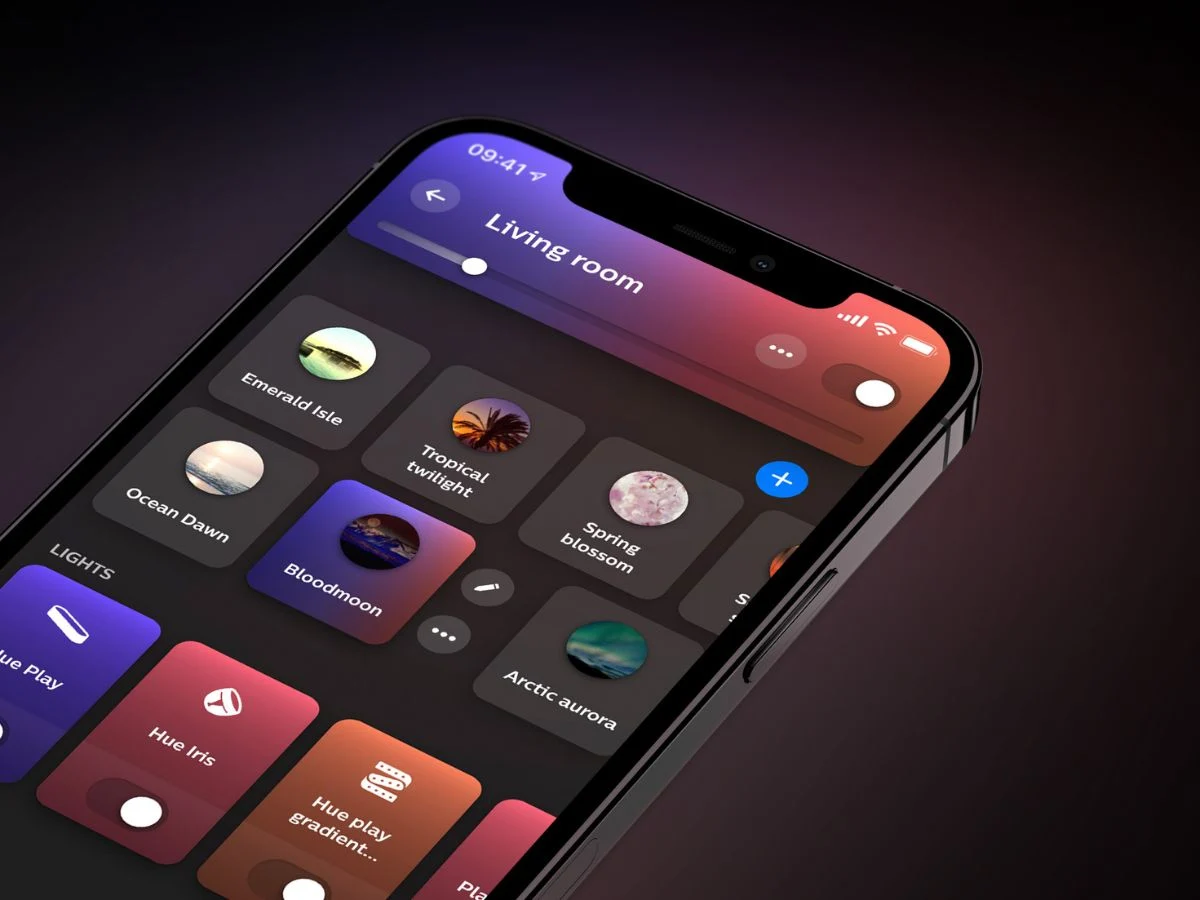
    In the Room or Zone View, the layout remains similar for the first three sections: My Scenes (your saved scenes), Lights (the connected devices), and Controls (the connected accessories). Below these, a new Automations section has been added, displaying all automations associated with that specific Room or Zone. If you wish to rearrange the new Room or Zone View, you can do it by selecting (…) > Edit Room > Order.

    It’s not clear why this particular feature was absent from the release notes for the Philips Hue app version 5.60.1. Users can get the most recent version of the Philips Hue app from the Apple App Store or the Google Play Store.

    Source:
    Link


  • Home Assistant 2026.2 Launches New Power Distribution Card

    Home Assistant 2026.2 Launches New Power Distribution Card

    Key Takeaways

    1. The Home Dashboard is now the default view for all new installations, known as ‘Overview’, with an option to switch back to ‘Overview (legacy)’.
    2. A new card in the For You section displays new devices found by Home Assistant.
    3. Users can now organize devices by room using the ‘Assign area’ feature in the Devices section.
    4. The term ‘Add-ons’ has been changed to ‘Apps’ to clarify the distinction from other integrations.
    5. New integrations include Cloudflare R2, Prana heat recovery systems, and HDFury HDMI devices, along with a new distribution card for tracking power usage.


    Home Assistant version 2026.2 has been released. This new version of the open-source smart home automation tool comes about a month after the 2026.1 update, which introduced more specific triggers and a revamped Settings page.

    New Features and Changes

    In Home Assistant 2026.2, the Home Dashboard is now the default view for all new installations, referred to as ‘Overview’. For those who liked the old layout, they can switch back to ‘Overview (legacy)’ by selecting it in Settings > Dashboards. A fresh card has been added to the For You section, which shows any new devices found by Home Assistant. Additionally, in the recently added Devices section, users can now quickly organize devices by room with the ‘Assign area’ feature.

    Updates to App Terminology

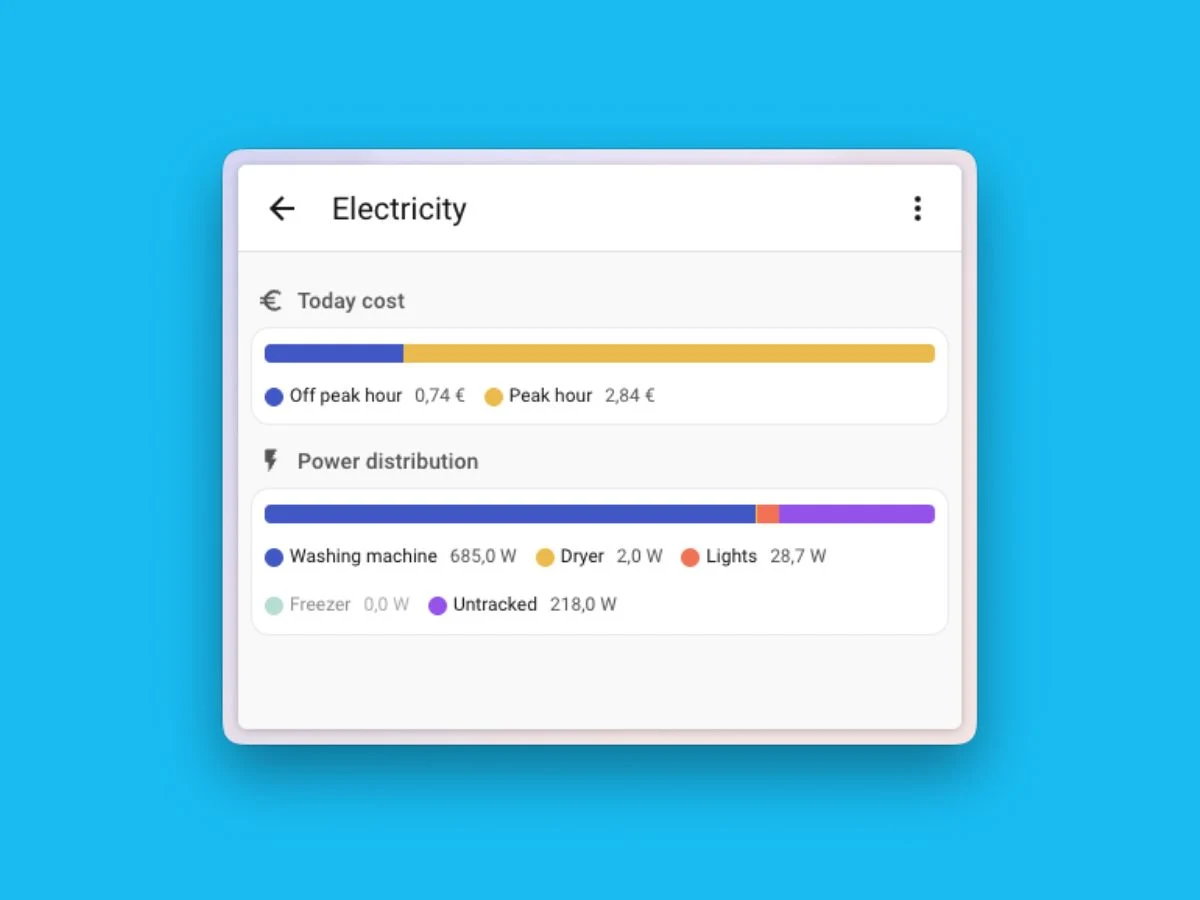
    Another significant update in Home Assistant 2026.2 is the change of ‘Add-ons’ to ‘Apps’. The company explains this is to clearly separate these standalone applications from other integrations. There’s also a new Quick search option, which can be activated with Ctrl + K on Windows and Linux, or ⌘ + K on macOS. Moreover, the new distribution card allows users to track how power is distributed across different devices and appliances directly from their dashboard. New integrations in this release include Cloudflare R2, Prana heat recovery ventilation systems, and HDFury HDMI video processing devices like the VRROOM (currently priced at $599 on Amazon).

    Source:
    Link


  • Garmin Releases New Update for Pro Smartwatches with Improvements

    Garmin Releases New Update for Pro Smartwatches with Improvements

    Key Takeaways

    1. Garmin has been developing the v21.xx public beta for over six weeks without switching to stable software.
    2. The removal of certain functions in Beta Version 21.22 indicates more updates are still needed.
    3. Recent beta updates show limited changes, suggesting Garmin is nearing completion of v21.xx development.
    4. About 50% of eligible smartwatches received alerts for Beta Version 21.22, indicating progress in the update process.
    5. Future updates are expected, as Garmin continues to enhance device features through ongoing beta developments.


    In other words, Garmin has been working on v21.xx public beta for over six weeks now. However, the company doesn’t appear to be nearing a switch of v21.xx builds to its stable software line. The removal of Aviation, Dive, and ECG functions in Beta Version 21.22 suggests that Garmin still has more v21.xx beta updates in the pipeline.

    Changes Indicate Progress

    The low number of modifications seen in recent beta updates implies that Garmin is making progress towards completing the v21.xx beta development. This time, Garmin only reports fixing a problem that prevented Fenix 8 Pro smartwatches from getting GPS signals in CIQ applications. Allegedly, about 50% of qualifying smartwatches have received alerts to download Beta Version 21.22. Therefore, we anticipate Garmin to wrap up its automatic update process in the coming days.

    Looking Ahead

    Garmin’s plans remain somewhat unclear, but the continuous beta updates hint at ongoing developments. Users are encouraged to stay tuned for future updates, as more features may be added. The gradual rollout of Beta Version 21.22 indicates that the company is working diligently to enhance their devices.

    Source:
    Link


  • Microsoft Addresses Windows 11 Issues to Restore User Trust

    Microsoft Addresses Windows 11 Issues to Restore User Trust

    Key Takeaways

    1. Microsoft is focusing on enhancing the core performance and reliability of Windows 11 through a new strategy called “swarming.”
    2. The company will reallocate engineers to address significant “pain points” in Windows 11, prioritizing system performance and user experience.
    3. Recent update-related challenges have caused frustration among users and IT administrators, prompting the need for this strategic shift.
    4. Microsoft aims to fix basic problems, such as boot failures and UI inconsistencies, to improve everyday performance and stability.
    5. The effectiveness of the swarming approach will be evaluated based on upcoming updates and whether they reduce issues and enhance component responsiveness.


    Microsoft is putting more focus on enhancing the core performance and reliability of Windows 11. They are adopting a strategy called “swarming,” which involves gathering different teams to quickly address significant issues. This decision comes after a challenging start to 2026 for Windows updates and is part of Microsoft’s efforts to regain user trust.

    Redirecting Engineering Efforts

    In the next few months, Microsoft will be reallocating engineers to tackle “pain points” within Windows 11 using their swarming method. Pavan Davuluri, the president of Windows and Devices, informed various reporters that they aim to enhance aspects that are “meaningful for people.” Key areas of focus include system performance, reliability, and the general Windows experience.

    Addressing Update Issues

    The swarming strategy follows a series of update-related challenges that have annoyed both users and IT administrators. Notably, during January’s Patch Tuesday for Windows 11, there were issues documented in Microsoft’s release health information. For instance, KB5074109 (Windows 11 24H2/25H2) caused problems when opening or saving files to cloud services like OneDrive or Dropbox, which was later addressed in an out-of-band update.

    Fixing Basic Problems

    Reports also highlight boot-failure issues that arose from systems that did not install the December 2025 security update properly, leaving them in a problematic state. This illustrates how servicing issues can accumulate over time with monthly updates. Media sources mention that Microsoft might prioritize fundamental fixes, such as resolving persistent UI inconsistencies and improving everyday performance in areas like File Explorer. The focus seems to be shifting from major features to enhancing stability and usability, especially since Windows 11 has faced criticism for bugs and inconsistent performance.

    Microsoft has yet to release a detailed public plan for its swarming approach. The most tangible indication of progress will be whether upcoming cumulative updates lead to fewer regressions and better responsiveness in commonly used components, like File Explorer, which often receives complaints. If Microsoft highlights these reliability improvements in their official release notes or health updates, it will be an easy way to see if this is a lasting quality improvement or just a temporary fix in response to recent patch issues.

    Source:
    Link


  • Microsoft Update Issues Worsen: Shutdown Bug Affects Windows 10 VSM

    Microsoft Update Issues Worsen: Shutdown Bug Affects Windows 10 VSM

    Key Takeaways

    1. Microsoft identified a shutdown and hibernation issue in some PCs after the January 13, 2026 security update for Windows 11 23H2 (KB5073455).
    2. The problem affects certain Secure Launch-capable PCs with Virtual Secure Mode (VSM) enabled, causing them to restart instead of shutting down or hibernating.
    3. An out-of-band update (KB5077797) fixes the issue for some Secure Launch devices, but not for those with VSM turned on.
    4. Affected systems include Windows 11 23H2 and specific Windows 10 versions, while AMD and ARM64 processors are not impacted.
    5. Microsoft plans to address the VSM issue in a future update, and a temporary workaround is to use the command `shutdown /s /t 0`.


    Microsoft has recognized a problem where some PCs are unable to shut down or go into hibernation, instead opting to restart. This issue first appeared following the January 13, 2026, security update for Windows 11 23H2, identified as KB5073455 (OS Build 22631.6491).

    Issue Details

    According to Microsoft’s Windows release health notes, this behavior can also be seen on certain Secure Launch-capable PCs that have Virtual Secure Mode (VSM) enabled, after installing any updates released on or after January 13, 2026.

    For users of Windows 11, the shutdown and hibernation problem is categorized under KB5073455, and it indicates that an out-of-band update (KB5077797, OS Build 22631.6494) fixes the issue for some Secure Launch devices, though it does not apply to those Secure Launch-capable PCs with VSM turned on.

    Update Timeline

    On January 13, 2026, an update identified as KB5073724 (OS Builds 19045.6809 and 19044.6809) noted the same issue where certain Secure Launch-capable PCs with VSM enabled might restart rather than shut down or hibernate. Then, on January 24, 2026, update KB5078131 (OS Build 17763.8281) for Windows 10 Enterprise LTSC 2019 reiterated the restart behavior related to VSM and referenced a fix to come.

    Microsoft’s release health dashboard clearly identifies affected client systems as Windows 11 23H2 and Windows 10 (22H2, LTSC 2021, and LTSC 2019), and importantly, it mentions that the issue does not impact AMD or ARM64 processors in the outlined scenarios.

    Future Fixes and Workarounds

    Microsoft has stated that the variant involving VSM will be addressed in an upcoming Windows update. Meanwhile, both Microsoft and third-party sources have suggested using the command shutdown /s /t 0 as a temporary solution for those who cannot immediately apply the relevant out-of-band updates.

    Source:
    Link


  • Philips Hue App Update: AI Assistant Now Available for More Users

    Philips Hue App Update: AI Assistant Now Available for More Users

    Key Takeaways

    1. The Philips Hue app version 5.60.1 includes bug fixes and enhancements for smart home devices.
    2. The app’s AI assistant now supports Spanish, German, and Dutch, in addition to English.
    3. Users can interact with the AI assistant using voice or text commands for personalized lighting suggestions.
    4. New features for wired cameras allow users to set custom motion detection zones for smart lights.
    5. The Hue Secure Wired video doorbell now lets users choose their preferred chime sound for visitors.


    A fresh update for the Philips Hue app is here. The new version, 5.60.1, comes out almost a fortnight after the last one, version 5.59. This update includes slight bug fixes and enhancements for users of the brand’s smart home devices.

    New Language Support

    With the launch of version 5.60.1, the Philips Hue app’s AI assistant now supports three additional languages: Spanish, German, and Dutch. This feature began its rollout in June 2025, initially only available in English. The assistant can suggest lighting scenes or create personalized lighting effects based on your preferences. Users can interact with the assistant through voice or text commands in the chat.

    Enhanced Camera Features

    Another notable addition is for Philips Hue wired cameras, such as the Secure Wired camera (currently priced at $122.99 on Amazon Marketplace). Users can now establish a custom motion detection zone that activates linked smart lights. This can be specifically set for people, pets, or cars. To adjust this feature, navigate to Camera settings > Trigger lights > Trigger area. Furthermore, those with the Hue Secure Wired video doorbell can now select the chime sound that greets their visitors. To choose your preferred sound, go to Doorbell settings > Doorbell sound.

    You can easily get the Philips Hue app version 5.60.1 for iOS via the Apple App Store, or for Android through the Google Play Store.

    Source:
    Link


  • Stable HyperOS 3 Launches for 20 New Redmi and Xiaomi Devices

    Stable HyperOS 3 Launches for 20 New Redmi and Xiaomi Devices

    Key Takeaways

    1. Xiaomi has started the final phase of its HyperOS 3 rollout, delivering stable Android updates to over a dozen devices.
    2. The update includes 20 additional devices, including older flagship models and mid-range Redmi Note phones.
    3. Key devices receiving updates include the Xiaomi 12, Xiaomi 12S series, and several Redmi tablets and smart TVs.
    4. The stable HyperOS 3 update for certain models is likely based on Android 15, but offers a similar experience to that of Android 16.
    5. The global rollout of HyperOS 3 is ongoing and expected to continue until March, with many popular devices still waiting for updates.


    Xiaomi has started the last stage of its HyperOS 3 rollout, delivering the stable Android update to over a dozen devices. The company shared this news in an official post on its MIUI community forums in China, signaling the end of its domestic HyperOS 3 rollout that initially began in October.

    New Devices Added

    In this final phase, Xiaomi is bringing HyperOS 3 to 20 additional devices, which include older flagship models dating back to 2021, mid-range Redmi Note phones, several Redmi tablets, and smart TVs. The latest update revitalizes 2021 flagships such as the Xiaomi 12 and Xiaomi 12S series, along with the Redmi Note 12T Pro, Redmi Note 15R, Redmi 14C, Redmi Civi 3/2, Redmi K50 Ultimate Edition, and the Redmi Pad Pro series (Xiaomi 15 Pro currently priced at €697 at TradingShenzhen).

    List of Devices Receiving Updates

    Here’s the full list of devices that are set to receive the stable update:

    Although the official announcement does not specifically mention it, the stable HyperOS 3 build for the Xiaomi 12T Pro, Xiaomi 12S series, Redmi Note 12T Pro, and Xiaomi Civi 3 and 2 is likely based on Android 15 instead of the newest Android 16 base. Nonetheless, the overall software and user experience should remain quite similar to devices that run the Android 16 version, as most of the key features and visual updates of HyperOS 3 are not directly tied to the Android version. These older models should receive a comparable software experience, featuring the new iPhone-like Hyper Island, iOS-inspired lockscreen designs, system-level performance improvements that are said to enhance UI fluidity and app launch speeds, along with AI-driven writing and image editing tools.

    Global Rollout Still Ongoing

    While this announcement effectively concludes the HyperOS 3 rollout for Chinese versions, the global rollout is still in progress and is anticipated to last until March, with many popular devices still awaiting their updates.

    Source:
    Link


  • Windows 11 Shutdown Bug: KB5073455 Update Issues Confirmed

    Windows 11 Shutdown Bug: KB5073455 Update Issues Confirmed

    Key Takeaways

    1. A confirmed issue prevents some systems from shutting down or hibernating after installing the January 13, 2026, Windows security update KB5073455 for Windows 11 version 23H2.
    2. The problem is linked to the Secure Launch feature, which uses virtualization-based security to protect against firmware threats during startup.
    3. KB5073455 is mainly available for Enterprise and IoT editions of Windows 11 version 23H2, limiting its reach to consumer PCs.
    4. A fix for affected Windows 10 systems was included in out-of-band updates KB5077797 and KB5078132, with the latter also available for devices that installed earlier related updates.
    5. KB5078132 is cumulative, containing improvements from both KB5073455 and KB5077797, along with additional fixes for app responsiveness issues related to cloud storage.


    Microsoft’s Windows release health dashboard has identified a confirmed problem where some systems do not shut down or go into hibernation. Instead, they restart after the installation of the January 13, 2026, Windows security update KB5073455 for Windows 11 version 23H2.

    Secure Launch Affected

    The feature involved, known as Secure Launch, utilizes virtualization-based security to protect systems from firmware threats during the startup process. This issue is particularly relevant for users who rely on this feature for added security.

    Limited Availability

    It’s worth noting that KB5073455 is primarily available for Enterprise and IoT editions of Windows 11 version 23H2, which significantly limits the number of consumer PCs that will receive the update through standard channels.

    Additionally, Microsoft has pointed out that PCs capable of Secure Launch with Virtual Secure Mode (VSM) turned on are also affected by this issue. They have indicated that a resolution for the VSM situation will come in a future Windows update.

    Affected Systems

    The problem also impacts Windows 10 systems. Microsoft confirmed that a fix for devices using Secure Launch (excluding the VSM case) was included in an out-of-band update on January 17, 2026: KB5077797 (OS Build 22631.6494). This update is only accessible through the Microsoft Update Catalog.

    Moreover, Microsoft stated that the same fix can be found in another out-of-band update released on January 24, 2026: KB5078132 (OS Build 22631.6495). This update is available via Windows Update for devices that installed one of the January updates related to this problem.

    Cumulative Fixes

    Microsoft emphasizes that KB5078132 is cumulative, meaning it contains protections and improvements from both KB5073455 (January 13) and KB5077797 (January 17), along with additional fixes, such as addressing an app unresponsiveness issue linked to cloud storage workflows.

    This situation has certainly posed challenges for Microsoft, but they appear to be gearing up for a new update release in the near future.

    Source:
    Link


  • Ubiquiti UniFi Network 10.1 Introduces WiFi Roaming Tracking

    Ubiquiti UniFi Network 10.1 Introduces WiFi Roaming Tracking

    Key Takeaways

    1. Simplified High-Availability Setup: UniFi Network 10.1 makes high-availability configurations easier with step-by-step guidance for administrators.

    2. Failover Verification Feature: A new feature simulates outages to verify that the network setup is functioning correctly.

    3. WiFi Doctor Tool: This tool helps identify and fix potential configuration issues in the WiFi network.

    4. Device Tracking: Administrators can monitor devices as they roam within the WiFi network, providing insights into their connections to access points.

    5. Enhanced Control Options: New features allow better management of access point density, integration of satellite uplinks like Starlink, and improved device tagging and broadcasting capabilities.


    With the arrival of UniFi Network 10.1, Ubiquiti’s network software is introducing several new features. The company has concentrated on making high-availability setups more straightforward, allowing for easier configuration. The controller software now assists administrators by guiding them through each step. Additionally, a failover verification feature has been added to test the setup by simulating an outage, ensuring everything is working correctly.

    New WiFi Features

    The update also brings a host of enhancements related to WiFi. A new tool called WiFi Doctor aims to fix potential configuration problems. Furthermore, UniFi Network 10.1 introduces the ability to track devices as they roam within the WiFi network. This means that administrators can visually monitor the “roaming journey” of clients, showing which access points they connect to. This feature is particularly useful for smartphones and other mobile devices that frequently change their locations.

    Enhanced Control Options

    These updates provide administrators with additional control options, such as managing access point density within a business or making adjustments to guide clients toward different access points. Furthermore, improvements have been made regarding the integration of satellite uplinks, specifically with signal strength information. More precisely, this includes the integration of Starlink, allowing users to view the firmware status of Starlink hardware directly within UniFi Network 10.1.

    Moreover, new tags for devices on the network have been introduced, along with the option to broadcast access point names. Around a dozen bugs have also been fixed. Currently, UniFi Network 10.1.83 is in the release candidate stage, and all changes can already be found in the associated changelog.

    Ubiquiti is continually working to provide better solutions for network management, making it easier for users to ensure their networks are running smoothly.

    Source:
    Link