Category: Software

  • New Android 17 Design Revealed in Leaked Screenshots

    New Android 17 Design Revealed in Leaked Screenshots

    Key Takeaways

    1. Android 17 features a new transparent design aesthetic, similar to Apple’s iOS 26 “Liquid Glass” style.
    2. The volume control panel and shutdown menu will adopt a see-through backdrop for better readability.
    3. Users can customize transparent sections with their chosen accent color.
    4. Screen recording will include a floating window for settings and a recording timer in the status bar.
    5. Users can lock app icons by pressing and holding them, with some icons receiving a new design.


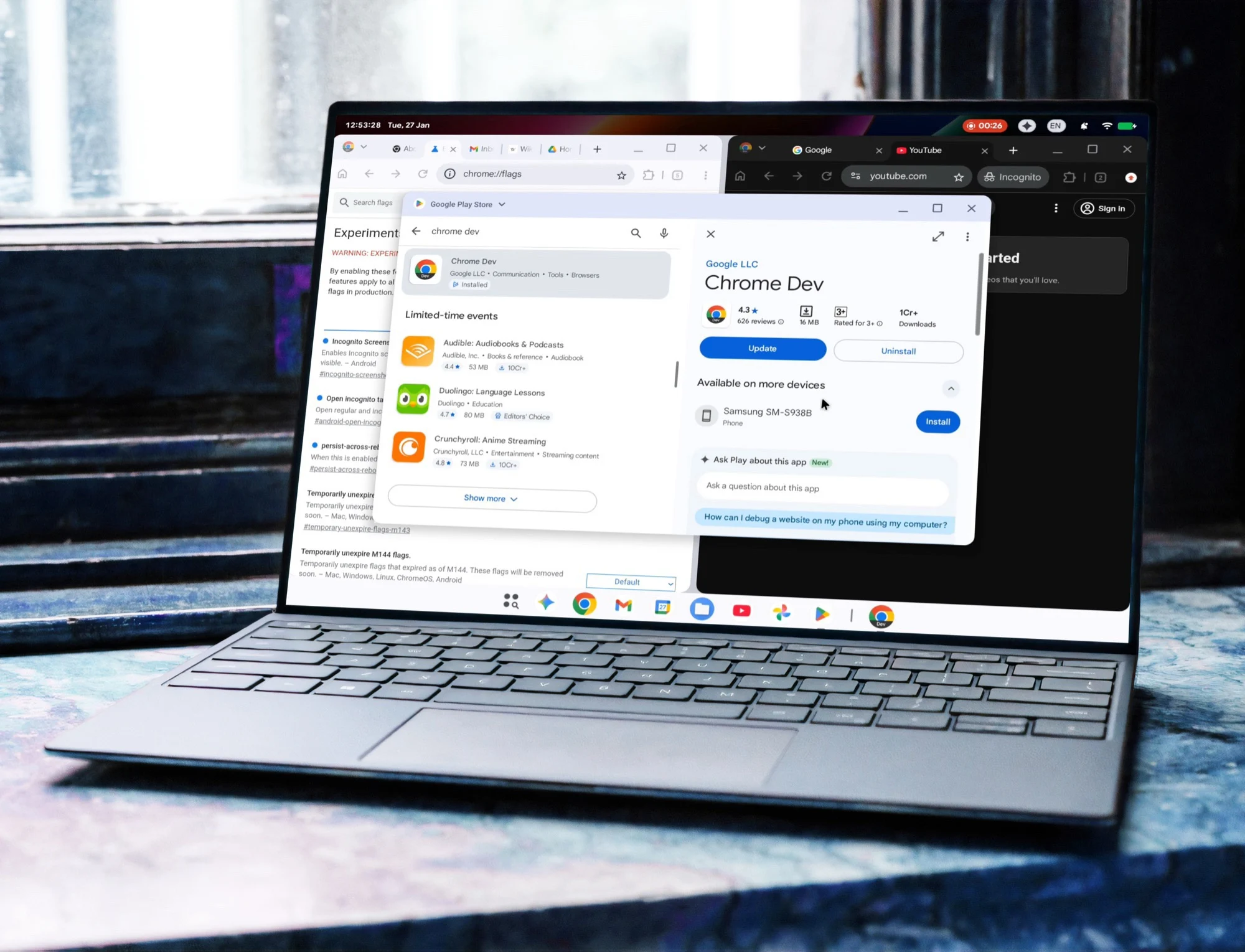
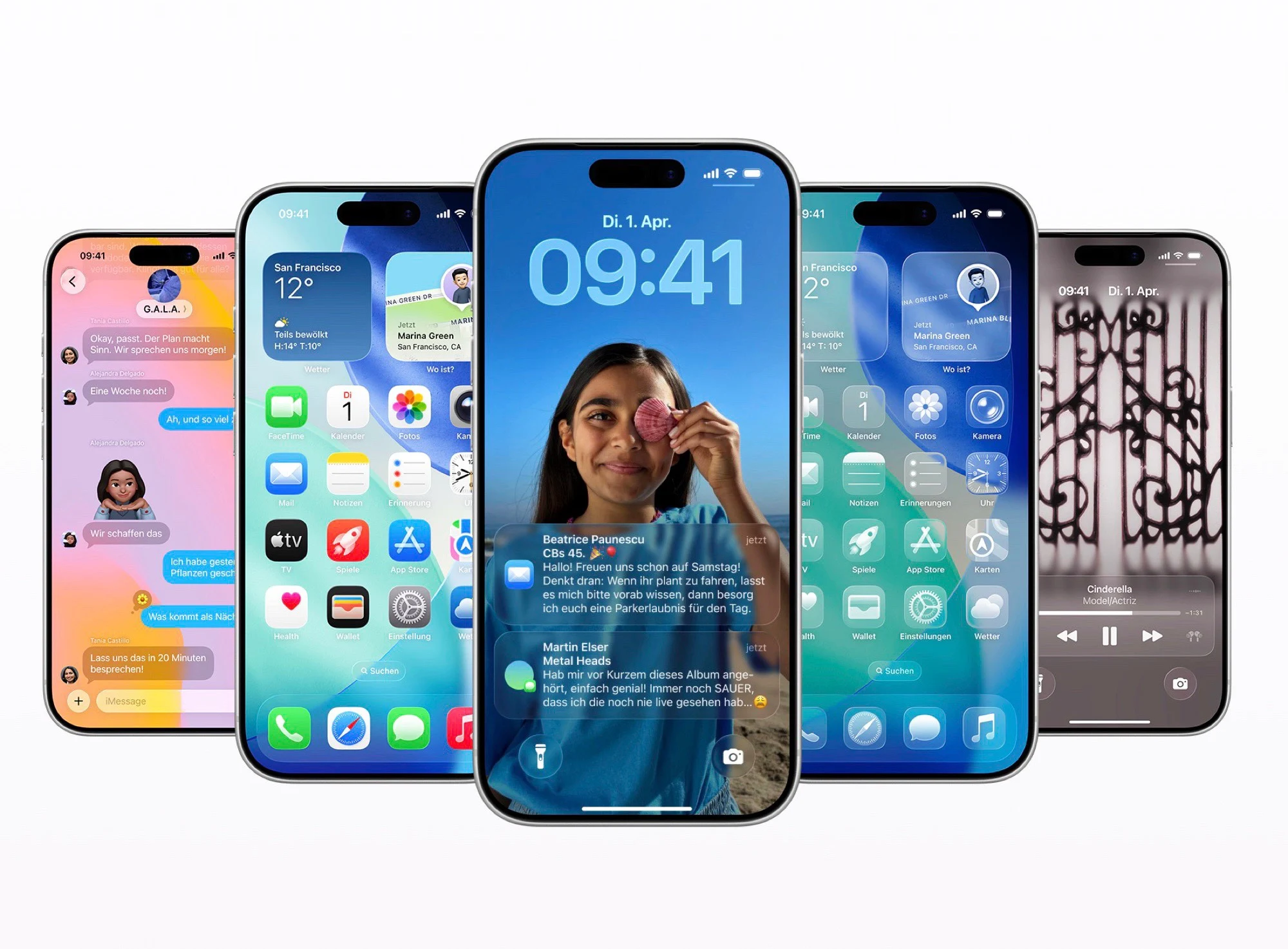
    After the recent leaks about Android 17’s new design, Android Authority and 9to5Google have managed to get a hold of several screenshots from the leaker @romashka, which are said to display an early beta version of Android 17. Much like Apple’s iOS 26 with its “Liquid Glass” style, Google appears to be shifting towards a more transparent aesthetic in its upcoming software.

    Notable Design Changes

    This fresh design method is quite evident in the volume control panel. Unlike the previous solid background, the new interface features a slightly see-through backdrop, with elements behind it being more blurred than seen on Apple devices. This change aims to enhance the readability of the information. Users can personalize these transparent sections with the accent color they choose.

    The volume slider and the shutdown menu for the phone will also adopt this transparent design. Following Android 16’s introduction of transparency in areas like Quick Settings, it seems Google is planning to extend this visual style to additional segments of the Android 17 operating system.

    Updates to Screen Recording

    In addition, Google is making changes to the screen recording feature. With Android 17, users will be able to modify settings through a floating window, while a recording timer will be visible in the status bar. By pressing and holding an app icon, users can also lock that particular app in Android 17. Some app icons are set to receive a new look as well. Although not much information is available about the new features of Android 17, mobile gamers can likely anticipate various enhancements.

    Source:
    Link


  • Bumpy TikTok Handover Leaves US Cut Off from Global Market

    Bumpy TikTok Handover Leaves US Cut Off from Global Market

    Key Takeaways

    1. TikTok’s US operations transitioned to TikTok USDS Joint Venture LLC on January 23, 2026, but faced significant issues post-handover.
    2. A new privacy policy requires US users to agree to expanded data collection, including exact location tracking and user activities beyond the app.
    3. Technical difficulties arose after the transition, with users experiencing login issues and delays in video uploads, attributed to a data center power outage.
    4. The new management promises to maintain interoperability for US users while retraining the algorithm with local data to mitigate security concerns.
    5. There is uncertainty about the app’s appeal after replacing the original ByteDance algorithm with an American alternative.


    The transfer of TikTok’s US operations to the newly formed TikTok USDS Joint Venture LLC occurred on Friday, January 23, 2026, signaling a significant moment for the short video platform. Despite the involvement of partners like Oracle, Silver Lake, and Abu Dhabi’s MGX, the transition has not gone as planned. While President Donald Trump hails the arrangement as a victory, numerous media sources in the US are highlighting serious technical glitches alongside backlash against the updated terms of service.

    Privacy Policy Changes

    According to The New York Times, users in the US will now be required to agree to a modified privacy policy upon their first login. This new policy allows the app to gather not only approximate locations but also exact locations of users, given the necessary permissions. Additionally, the scope of data collection for targeted ads has greatly increased, incorporating user activities beyond the TikTok app itself. Future interactions with generative AI will also be recorded and analyzed systematically.

    Technical Difficulties After Handover

    The first weekend following this ownership transition saw a host of technical challenges. Reports from The Verge noted that users faced difficulties logging in and uploading their videos. Many users found their clips stuck in a review process for extended periods, while users outside the US did not encounter similar issues. TikTok USDS attributed these complications to a power outage at a data center in the US, though rumors are circulating online about potential censorship linked to ongoing protests in Minneapolis.

    Promises of Interoperability

    One of the main commitments from the new management is to maintain interoperability, allowing US users to access global content. However, the algorithm for US users will undergo a complete retraining using local data to address security worries regarding Chinese influence. It remains uncertain whether the app will keep its distinctive appeal once the original ByteDance algorithm is replaced with an American alternative.

    Source:
    Link


  • WhatsApp Could Introduce Paid Subscription for Ad-Free Experience

    WhatsApp Could Introduce Paid Subscription for Ad-Free Experience

    Key Takeaways

    1. WhatsApp is preparing to launch a paid subscription service to eliminate ads, found in the latest beta version.
    2. The platform has been funded mainly by its parent company, Meta, and is currently showing ads in status updates and channels.
    3. Users may have the option to pay a monthly fee of €4 to access an ad-free experience while keeping essential features free.
    4. The subscription service targets users who want a seamless experience without distractions from ads or channel suggestions.
    5. The timeline for the public release of this paid service is currently unclear.


    The messaging platform WhatsApp seems to be getting ready to launch a paid subscription service that will eliminate ads. A recent report from WABetaInfo revealed that code hints related to this feature have been found in the latest WhatsApp beta for Android, version 2.26.3.9. This indicates that users might soon have the choice between a free version with ads and a paid, ad-free alternative.

    Financing Model Changes

    Up to now, WhatsApp has mainly been funded through its connection with its parent company, Meta. Recently, some users have started seeing advertisements; however, these ads currently do not show up in private conversations and are restricted to status updates and channels located in the updates section. Meta claims these ads are not personalized or targeted, meaning that a user discussing their pet cat won’t receive ads for cat food. On their business site, Meta is already advertising the potential to reach over 1.5 billion people with these ads.

    Subscription Details

    For those who prefer not to see ads, there may be an option to pay a monthly fee of €4. The essential features of WhatsApp, including messaging and calling, will likely remain free for all users. As it stands, ads will still appear in status updates, and users may still encounter channel suggestions occasionally. This could prove to be quite distracting for many individuals.

    Target Audience

    The subscription service appears to target users who appreciate a seamless experience while checking status updates or navigating their channels. It is also anticipated that the paid service will remove the previously mentioned channel suggestions. A screenshot indicates a monthly cost of €4, although it’s possible this is just a temporary figure. It remains uncertain when or if this new WhatsApp update will be available to the general public.

    Source:
    Link


  • Windows 11 KB5074109 Update Causing Boot Failures

    Windows 11 KB5074109 Update Causing Boot Failures

    Key Takeaways

    1. Boot Failure Issue: The January 2026 Windows 11 security update KB5074109 has caused some computers to experience UNMOUNTABLE_BOOT_VOLUME errors, leading to complete boot failures.

    2. Limited Reports: The problem appears to affect a small percentage of devices running Windows 11 versions 24H2 and 25H2, as noted in community reports.

    3. Microsoft Investigation: Microsoft is investigating these boot issues but has not identified the exact cause or provided a hotfix yet.

    4. Recovery Recommendations: Users facing boot problems are advised to use the Windows Recovery Environment (WinRE) or external media to repair or revert their systems.

    5. Caution Advised: Users whose systems are functioning normally should remain calm, but system administrators may be more cautious with updates until a reliable solution is provided by Microsoft.


    Microsoft’s January 2026 Windows 11 security update KB5074109 has been associated with a significant problem beyond just crashes and application malfunctions: some computers are experiencing complete boot failures, displaying a UNMOUNTABLE_BOOT_VOLUME blue screen.

    Limited Reports of Boot Failures

    As noted in Microsoft’s internal status documents, which have been compiled by community sources like AskWoody, along with recent findings from BleepingComputer and Windows Central, there are “limited number of reports” indicating that Windows 11 devices running on version 24H2 and 25H2 encounter a UNMOUNTABLE_BOOT_VOLUME error after applying the January 13 security updates related to KB5074109.

    In these instances, the computers do not reach the login page, instead getting stuck in a loop that leads to a BSOD. This situation leaves users needing to recover their systems through the Windows Recovery Environment (WinRE) or by using external media.

    Ongoing Investigation by Microsoft

    Microsoft is currently looking into these boot issues and has stated that they appear to only impact a small percentage of devices. However, the company has not yet identified the precise cause of the UNMOUNTABLE_BOOT_VOLUME problem nor released a specific hotfix. Their public health pages primarily address issues like Remote Desktop failures, black screens, and crashes of cloud applications that are linked to KB5074109 and the January out-of-band updates.

    For now, Microsoft recommends that users facing the UNMOUNTABLE_BOOT_VOLUME issue follow the same steps as for other boot problems: utilize WinRE and standard recovery methods to either repair or revert the system. This involves booting from either the recovery environment or installation media, trying to repair the file system, and, when feasible, uninstalling the January security update before Windows starts.

    No Need for Alarm

    For those whose computers are still functioning properly after the KB5074109 update, there’s no reason to panic. However, this new stop-code problem highlights the vulnerability of the January Windows 11 update process. With emergency hotfixes, rollback issues, and now complete boot failures, many system administrators will approach KB5074109 with heightened caution until Microsoft provides a fully reliable cumulative update.

    Source:
    Link


  • Android 17 Features Transparent Design with Apple Liquid Glass

    Android 17 Features Transparent Design with Apple Liquid Glass

    Key Takeaways

    1. Android 17 will feature a “blur” appearance with transparent overlays, replacing solid-color backgrounds.
    2. The design aims to enhance readability by softening visuals and allowing better visibility of background apps.
    3. The focus of Android 17 is more on aesthetics rather than significant changes to core functionalities.
    4. The OS will include design elements influenced by the Apple iPhone, such as differentiated notifications based on swipe direction.
    5. Major updates for gaming experiences are expected, with the rollout anticipated to start in June.


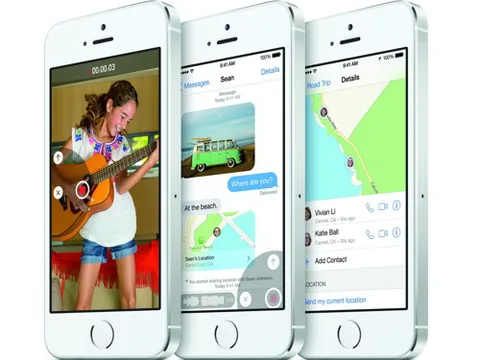
    According to the most recent details from 9to5Google, which seem to come from an internal beta of Android 17, the new operating system will have a “blur” appearance. Google is reportedly planning to swap out solid-color backgrounds across the system for transparent overlays that will soften the visuals behind them. This design choice closely resembles the “Liquid Glass” look of the Apple iPhone 17, though it appears that Google might not adopt the same level of style as Apple.

    Enhancements for Readability

    Google might enhance clarity by blurring objects a bit more or darkening them slightly. The idea behind the transparency is to make navigating the OS simpler, allowing users to view which app is running in the background even when the quick settings menu is visible. This design approach is expected to be applied to various components of the operating system, including the volume controls and battery indicators. These components will continue to be influenced by the user’s selected accent color.

    Focus on Aesthetics

    As per 9to5Google, the emphasis of the new OS appears to be on looks rather than making substantial changes to the basic functionalities. Earlier reports have hinted that Google is also taking cues from the Apple iPhone in other aspects, like differentiating notifications and quick settings based on whether the user swipes down from the left or right side of the screen. Additionally, Android 17 is likely to see major updates aimed at improving gaming experiences. The update is expected to roll out sometime starting in June.

    Source:
    Link


  • Windows 11 KB5074109 Issues Grow as Microsoft Releases Urgent Update

    Windows 11 KB5074109 Issues Grow as Microsoft Releases Urgent Update

    Key Takeaways

    1. Microsoft released an emergency fix (KB5078127) for Windows 11 to address issues from the January Patch Tuesday updates.
    2. The update specifically targets problems with Outlook Classic and cloud storage apps like OneDrive and Dropbox.
    3. Some users are facing challenges in uninstalling the previous update (KB5074109) due to error 0x800f0905, complicating the rollback process.
    4. KB5078127 is being widely distributed via Windows Update and is relevant for users experiencing instability in Outlook and cloud apps.
    5. The update may not immediately resolve all issues from the January patch series, and further updates may be needed for complete stabilization.


    Microsoft has rolled out a new emergency fix for Windows 11, targeting issues that arose from the January Patch Tuesday updates. The new update, known as KB5078127, is designed to tackle problems linked to the January 2026 security updates, which have led to a significant number of user complaints.

    Focus on Outlook and Cloud Apps

    This update specifically addresses issues affecting Outlook Classic and applications that rely on cloud storage. Earlier updates in January caused unpredictable behavior in Outlook and cloud-related apps like OneDrive and Dropbox, leading to functionality problems for some users. KB5078127 aims to restore the normal operation of these applications.

    The patch also focuses on Outlook Classic POP/PST scenarios, especially for users who have their email archives saved in cloud folders.

    Rollback Complications

    Adding to the confusion, some users of Windows 11 are experiencing difficulties when attempting to remove KB5074109. They are encountering error 0x800f0905, a servicing stack or component store issue that can prevent the uninstall process. This leaves affected devices in a difficult situation, forcing users to either endure an update that causes app malfunctions or resort to more complex repair methods.

    This patch isn’t just a simple update for better user experience. The January Windows 11 update cycle has been particularly problematic, with several regressions leading to significant user disruptions. Microsoft has had to issue fixes outside its regular schedule, and Windows Central describes KB5078127 as the second emergency out-of-band update responding to this ongoing issue.

    Update Availability

    If you have faced the January issues, particularly with Outlook Classic instability or problems with cloud-based applications, this update is particularly relevant for you. Microsoft is distributing it widely through Windows Update, meaning that some users may receive it even if they haven’t experienced issues yet.

    While KB5078127 is a step in the right direction, it may not resolve all complaints related to KB5074109 immediately. There are still ongoing reports of issues within the January patch series, including challenges with rollbacks, and it might take an additional cumulative update for everything to stabilize completely.

    Source:
    Link


  • Fix Windows 11 KB5074109 Uninstall Error 0x800f0905

    Fix Windows 11 KB5074109 Uninstall Error 0x800f0905

    Key Takeaways

    1. The January 2026 KB5074109 security update for Windows 11 is causing significant issues, including black screens, app crashes, and Outlook freezing.
    2. Users attempting to uninstall the update are facing a rollback failure with error 0x800f0905, which halts the process.
    3. Microsoft has not provided a specific fix for the uninstall failure, leading users to seek workarounds like using a System Restore point or a Windows Update repair installation.
    4. Ongoing issues include disrupted S3 sleep mode on older computers and persistent errors when launching apps, particularly with Outlook Classic.
    5. Microsoft acknowledges the problems with KB5074109 but advises users to wait for a resolution if their computer is functioning well.


    The Windows 11 KB5074109 security update from January 2026 is turning into a nightmare for many users. After Microsoft informed those impacted that it was okay to remove the update, which caused black screens, app crashes, and Outlook freezing, some are now experiencing issues where the rollback fails with error 0x800f0905.

    Uninstall Challenges

    As reported by Windows Central, users attempting to uninstall KB5074109 on their Windows 11 devices are encountering the 0x800f0905 error, which is related to the servicing stack or component store. This error completely halts the uninstall process, leaving users in a tough spot. They are forced to either hold on to a problematic update that disrupts apps and sleep mode or look for more extreme solutions.

    Workarounds and Recommendations

    At this moment, Microsoft has not provided a specific fix for the uninstall failure. Nevertheless, tech experts and support documents are suggesting a few potential workarounds. These include utilizing a System Restore point, if available from before the update, performing a “Fix problems using Windows Update” repair installation that retains apps and files, and then attempting to uninstall the update again. It’s important to remember the usual advice to create a complete backup before trying these methods.

    Ongoing Issues

    Meanwhile, reports of complications from KB5074109 keep piling up. Users with older computers are finding that the update disrupts S3 sleep mode, leading their screens to go blank without actually entering low-power sleep, which often necessitates a hard reboot. Others are still facing 0x803F8001 errors when launching apps, and Outlook Classic is freezing, particularly when mail archives are stored in OneDrive or other cloud locations.

    In the meantime, the situation remains chaotic: Microsoft still classifies KB5074109 as the official Windows 11 January 2026 security update and has acknowledged various regressions. They suggest uninstalling it if users are severely impacted, but some can’t even roll back smoothly without encountering yet another error. If your computer is functioning well, it might be best to wait patiently for a resolution.

  • NASA Uses Blockchain Technology for Safer Flights

    NASA Uses Blockchain Technology for Safer Flights

    Key Takeaways

    1. NASA is implementing a blockchain system to protect critical flight data, including flight plans and aircraft registration details.
    2. Blockchain technology enhances security by creating a decentralized database, reducing the risk of unauthorized access or data alteration.
    3. A team of researchers tested the blockchain system on an Alta-X drone, successfully simulating real-world flying scenarios.
    4. The tests indicate that the blockchain framework can improve security for airspace operations.
    5. NASA aims to adapt this technology for high-altitude operations and Urban Air Mobility initiatives while continuing to learn from initial tests.


    Cyber criminals are becoming more intelligent. However, NASA is managing to stay ahead of them. They have created a blockchain system designed to protect flight data. This flight data consists of flight plans, aircraft registration details, and telemetry information. It’s essential to safeguard this data to ensure the safety of airspace operations.

    Enhanced Security Measures

    While existing protection systems have been effective at securing flight data, blockchain technology provides even greater safety. Essentially, blockchain acts as a shared, decentralized database. This means that no single entity has control over the data. Each update is logged, validated, and can only be seen by authorized users. Consequently, the risk of unauthorized access or alteration to flight data is significantly lowered.

    Testing the New System

    The group of researchers involved in the project tested the blockchain technology on an Alta-X drone, which was equipped with a computer, radio, GPS, and battery. This drone setup allowed them to recreate real-world flying scenarios, including a separate ground station. Their experiments showed that the blockchain system can indeed improve security for airspace operations.

    NASA is optimistic that their blockchain framework and cybersecurity measures can be adapted for high-altitude operations above 60,000 feet and for Urban Air Mobility initiatives. Still, NASA researchers plan to keep learning from this initial test as they prepare for its use in future air vehicles.

    Source:
    Link


  • Windows 11 KB5074109 Update: Microsoft Recommends Rollback

    Windows 11 KB5074109 Update: Microsoft Recommends Rollback

    Key Takeaways

    1. Users are dissatisfied with the January 13, 2026, cumulative update (KB5074109) for Windows 11, reporting system instability and issues after installation.

    2. Complaints include black screens and display problems, especially for users with NVIDIA graphics hardware, leading some to revert to Safe Mode for uninstallation.

    3. Applications, including Windows tools and Outlook, are failing to open or displaying error codes, with specific issues noted for Outlook users with PST files in OneDrive.

    4. Microsoft released urgent out-of-band updates to address some issues, but reports of black screens and app-launch failures persist for Windows 11 versions 24H2 and 25H2.

    5. Experts recommend uninstalling the update if experiencing instability, while cautioning that reverting may increase security risks; users should stabilize their systems first before reapplying fixes.


    Microsoft’s January 13, 2026, cumulative update for Windows 11 has been met with increasing dissatisfaction from users. They claim their systems became unstable right after they installed it. The update, known as KB5074109, upgrades Windows 11 25H2 and 24H2 to OS builds 26200.7623 and 26100.7623 and incorporates security enhancements and reliability fixes, notably a power fix for devices equipped with a Neural Processing Unit (NPU).

    Uninstalling the Update

    As more complaints surfaced, Microsoft’s support guidance and public troubleshooting discussions began to suggest that uninstalling the update was an acceptable solution for those affected. Various Windows communities have reported multiple recurring issues linked to the January update, with some problems seemingly specific to certain setups.

    Several users have encountered unexpected black screens or display issues following the update installation, particularly among those using NVIDIA graphics hardware. In some serious instances, users were forced to revert to Safe Mode or the Windows recovery environment to uninstall the update and regain normal startup functionality.

    Application Issues

    Reports also indicated that applications would not open and displayed error codes like 0x803F8001. This included Windows applications such as Notepad and Snipping Tool, as well as third-party programs and software from vendors. Microsoft has recognized problems impacting “classic” Outlook since the January 13 updates. The company noted that users with POP account profiles, especially those with PST files that are stored in OneDrive, may experience Outlook freezing and failing to close properly, which can hinder the app from reopening correctly.

    For affected Outlook users, Microsoft has shared workarounds, including relocating PST files from OneDrive or utilizing different access methods until a permanent solution is provided.

    Emergency Updates

    Following Patch Tuesday, Microsoft released urgent out-of-band updates addressing specific regressions, including issues related to Remote Desktop sign-in failures and certain shutdown problems on Windows 11 23H2. Nevertheless, reports from users regarding black screens and app-launch failures on Windows 11 24H2 and 25H2 persist. Some users also mentioned issues with sleep and resume functionality on particular hardware. These power-state reports differ by device and setup, and Microsoft has not broadly confirmed them like it has with the Outlook POP/PST problem.

    If your PC is functioning properly after the January update, many experts recommend keeping it installed to benefit from the latest security fixes and protections included in the monthly release.

    If you noticed stability issues immediately after installing KB5074109, such as black screens, ongoing app failures, or hangs in Outlook Classic, uninstalling the update is now widely regarded as a temporary measure while Microsoft develops a more comprehensive solution. The typical removal process can be done through Settings, under Windows Update history, followed by a system restart. If the system fails to boot normally, the update can also be uninstalled from the Windows recovery environment.

    Microsoft and several security experts continue to caution that reverting a security update could heighten the risk of vulnerabilities. However, for users experiencing frequent crashes or unusable productivity applications, the practical advice has become clearer: stabilize your machine first, then reapply fixes when Microsoft releases a corrected version.

    Source:
    Link


  • Garmin Premium Device Software Update Adds Exciting New Features

    Garmin Premium Device Software Update Adds Exciting New Features

    Key Takeaways

    1. New play mode “On Course Practice” added, allowing experimentation on over 42,000 golf courses.
    2. Users can now choose specific holes to play and turn off the Lie Penalty in Home Tee Hero mode.
    3. Improved access to buttons for mulligan, replay, and previous shot metrics in Home Tee Hero.
    4. Introduction of a keyboard simulator feature for use with third-party software via Bluetooth.
    5. Software version 4.80 is automatically available for users and can be manually updated through device settings.


    Garmin has introduced software version 4.80 for the Approach R50, a portable golf launch monitor and simulator. This device, aimed at assisting golfers in enhancing their skills, received its last software update, version 4.60, about three months ago.

    New Features in Version 4.80

    With the arrival of software version 4.80, users can enjoy several exciting new features. A fresh play mode called On Course Practice has been added, enabling you to experiment with different shots on more than 42,000 golf courses. Users now have the ability to pick which hole to play while in a Home Tee Hero round, and the option to turn off the Lie Penalty in this mode is also available. Additionally, the buttons for mulligan, replay, and metrics from the previous shot can now be accessed in Home Tee Hero.

    Enhanced Functionality

    Garmin has also introduced a new keyboard simulator feature for the Approach R50. This feature can be utilized when the device is connected via Bluetooth to a computer that runs third-party simulator software. Moreover, there is a new setting for measurement units for putting, along with a retail demonstration mode.

    Update Availability

    Software version 4.80 is accessible for all Garmin Approach R50 users (currently priced at $4,999.99 on Amazon). The update will automatically install when the device connects to Wi-Fi. Alternatively, you can manually start the update by navigating to Menu > Settings > Software Update > Download and Install.

    Source:
    Link