Tag: Windows 11

  • Microsoft Strengthens Local Account Restrictions in Windows 11 Setup

    Microsoft Strengthens Local Account Restrictions in Windows 11 Setup

    Key Takeaways

    1. Microsoft prefers users to create online accounts during Windows 11 installation, discouraging local accounts.
    2. The initial setup now requires an internet connection, making it harder to bypass sign-in.
    3. Microsoft believes offline accounts may lead to users missing important setup steps.
    4. The OOBE screens promote Microsoft 365 and OneDrive, ensuring users engage with these services.
    5. New beta builds include features like an improved dark mode, which will be available in the stable version later.


    Microsoft has made it very clear that it prefers users not to create local accounts when installing Windows 11. The company has pointed out the downsides it sees in offline accounts, mainly focusing on the syncing feature.

    Changes to Initial Setup

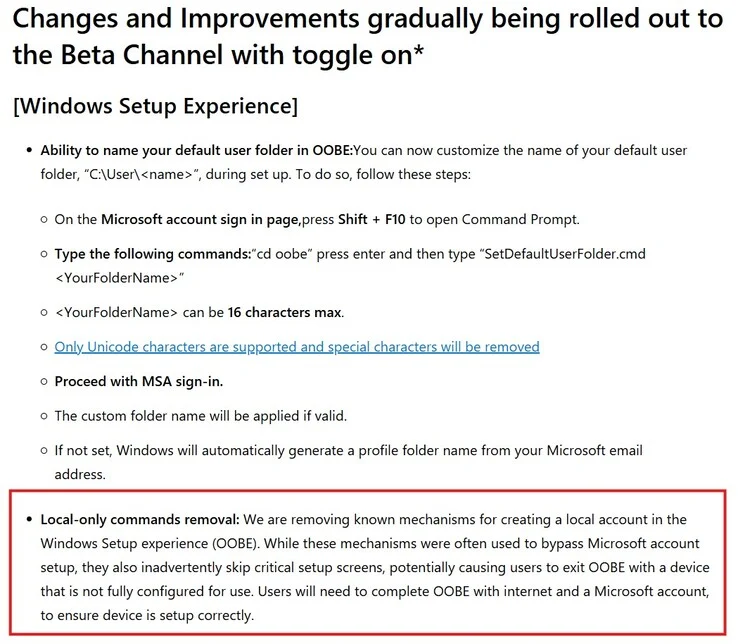
    In earlier versions, Microsoft had blocked the widely-used OOBEbypassnro command, which let users skip part of the initial setup. This provided a way to create an offline account. Now, the company has firmed up its position on this issue.

    As revealed with the latest preview builds, the initial setup of Windows 11 now mandates an internet connection. This change has made it tougher to bypass the sign-in requirement during the out-of-box experience (OOBE).

    Microsoft’s Rationale

    The company argues that users might “accidentally skip important setup screens” if they attempt to bypass the sign-in requirement. Microsoft also claims that creating an offline account results in the PC being “not fully ready for use.”

    Interestingly, during the OOBE screens, Microsoft promotes its Microsoft 365 plan and encourages users to set up their OneDrive. These new restrictions seem to ensure that users don’t skip over these steps while configuring their Windows 11 PC (Geekom AX8 Max mini PC currently priced at $529 on Amazon).

    New Features in Beta Builds

    Of course, these new restrictions are not the only changes in the new beta builds. Microsoft has also introduced useful features, such as an improved dark mode. All of these updates will eventually be available in the stable version of Windows 11, following a few rounds of testing by the company.

    Source:
    Link


  • Windows 11 Brings Back Video Wallpapers Feature

    Windows 11 Brings Back Video Wallpapers Feature

    Key Takeaways

    1. Microsoft is testing a new feature in Windows 11 that allows users to set video wallpapers in formats like MP4 and MKV.
    2. This feature is reminiscent of the Windows DreamScene, which enabled video wallpapers but was removed after Windows Vista.
    3. DreamScene’s removal has led to the rise of third-party apps, such as Wallpaper Engine, for dynamic desktop backgrounds.
    4. The reintroduction of video wallpapers may indicate a shift in Windows’ approach to user customization, blending old and new features.
    5. User response to this feature will be crucial in determining its popularity and impact on desktop personalization.


    Microsoft is experimenting with a fresh feature for Windows 11 that enables users to have video wallpapers. This new option, available in the most recent Windows 11 builds, permits individuals to use video formats such as MP4 or MKV as their desktop background.

    A Nod to the Past

    In a recent tweet, it was noted that some older users might recall Windows DreamScene from years ago. This was a built-in feature that allowed people to set videos as their wallpapers, but it was only available until Vista. Unfortunately, DreamScene was taken out in Windows 7 and has not been officially reinstated since. In the meantime, apps like Wallpaper Engine have gained traction and mostly taken the place of DreamScene. Ironically, due to Microsoft’s choices, many contemporary users may not even be aware that dynamic backgrounds were once a standard feature in Windows.

    Modern Alternatives

    As the tech landscape has evolved, various third-party tools have filled the gap left by DreamScene. These alternatives provide users with flexibility and vibrant options for personalizing their desktops. The reintroduction of video wallpapers could signal a shift in how Windows approaches user customization, potentially blending old and new features for a more dynamic experience.

    With this new feature on the horizon, it will be interesting to see how users respond and whether it’ll gain traction like its predecessor. There’s a good chance that many will embrace the change and enjoy the vividness that video wallpapers can bring to their digital workspace.

    Source:
    Link


  • Microsoft and Phison Refute SSD Failure Claims After Windows 11 Update

    Microsoft and Phison Refute SSD Failure Claims After Windows 11 Update

    Key Takeaways

    1. SSD malfunctions linked to recent Windows 11 update have raised concerns for Microsoft and Phison.
    2. Phison conducted over 4,500 hours of testing but could not replicate the SSD failure issue.
    3. Microsoft found “no connection” between the SSD failures and the August 2025 Windows 11 security update.
    4. Initial complaints primarily came from users in Japan, with some reports from other countries.
    5. Phison recommends using a heatsink or thermal pad on SSDs to prevent overheating during demanding tasks.


    The latest news regarding SSD malfunctions tied to the most recent Windows 11 update has caught the eye of both Microsoft and Phison. For those who might not know, several users have experienced issues where their drives became unreachable while trying to perform large, continuous file transfers.

    Update from Phison

    Phison, the manufacturer of SSD controllers, recently provided an update on this situation. The company stated that they couldn’t recreate the problem, after more than 4,500 hours of testing combined. This evaluation included conducting 2,200 test cycles across various drives.

    Microsoft’s Findings

    Microsoft has shared a similar update regarding the situation. They reported that they found “no connection” between the SSD failures and the Windows 11 security update from August 2025. The conclusions drawn by both companies are not unexpected, considering the issue wasn’t as prevalent as some other Windows-related problems that have occurred in the past.

    Regional Reports

    It is important to note that the initial complaints originated from users in Japan. As pointed out by @Necoru_cat on X, the Japanese version has been updated since these reports surfaced. This might suggest that the SSD failure issue is primarily affecting the Japanese version of Windows 11, although some users from other countries have also reported similar problems.

    Phison, however, has not completely disregarded the issue. The company mentioned that they will “closely monitor the situation.” Furthermore, they advise users to install a heatsink or thermal pad on their SSDs when handling demanding tasks (2 TB Samsung 990 Pro with heatsink curr. $169.99 on Amazon). This measure could help maintain performance and reduce the risks of overheating and related malfunctions.

    Source:
    Link


  • Microsoft Introduces Spotify Cross-Resume for Android and Windows 11

    Microsoft Introduces Spotify Cross-Resume for Android and Windows 11

    Key Takeaways

    1. Microsoft is introducing a feature similar to Apple’s Handoff for Windows 11 Insiders, starting with Spotify.
    2. Users can resume Spotify songs or podcasts on their PC through a “Resume Alert” on the taskbar.
    3. Clicking the alert will automatically download the Spotify app from the Microsoft Store if it’s not already installed.
    4. To access this feature, users must enroll in the Windows Insider Program and install the Microsoft Link to Windows app on their Android device.
    5. Users need to enable access to their Android phone in Windows 11 settings for full functionality, with plans for more app support in the future.


    Microsoft is slowly introducing its version of Apple’s Handoff to Windows 11 Insiders. This initiative is starting with users in the Dev and Beta channels, allowing them to easily continue using their favorite apps across Android and Windows 11 devices.

    Starting with Spotify

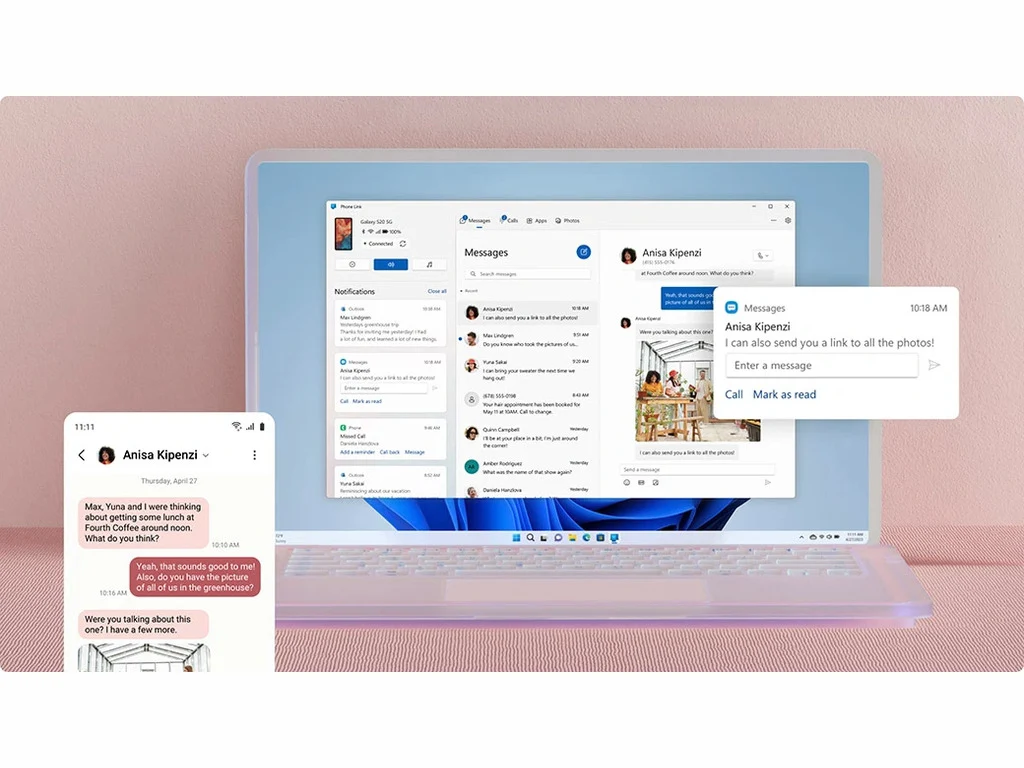
    Initially, Insiders can pick up where they left off with songs or podcasts on the Spotify app for Android, with plans to add support for more applications soon. To take advantage of this feature, simply start listening to a song or podcast on Spotify, and a “Resume Alert” will appear on your taskbar. By clicking on this alert, the Spotify desktop app will launch, enabling you to switch to your PC.

    Installing the App

    If you don’t have the Spotify app on your desktop, clicking the alert will trigger an automatic download from the Microsoft Store. To ensure this works, you must be logged into the same account on both your phone and your computer.

    Getting Started with Windows Insider Program

    To access this feature, you’ll need to enroll in the Windows Insider Program. Begin by opening the settings on your Windows 11 device, then select “Windows Update.” Look for “Windows Insider Program,” click on “Get Started,” and follow the prompts.

    After signing up, go to the Play Store on your Android device and download the Microsoft Link to Windows app. Log in with your Microsoft account and follow the necessary steps.

    Enabling Access

    You must also allow access to your Android phone by navigating to Windows 11 Settings, selecting “Bluetooth and devices,” then “Mobile devices.” Switch “Allow this PC to access your mobile devices” to On, and click on “Manage devices” to link your Android phone.

    The rollout of this feature is happening gradually, so you might have to wait for it to become available for your account. Microsoft is also encouraging developers to incorporate this functionality into their apps, with support for additional applications coming soon.

    Source:
    Link


  • Phison Addresses SSD Failures Related to New Windows 11 Update

    Phison Addresses SSD Failures Related to New Windows 11 Update

    Key Takeaways

    1. The Windows 11 update KB5063878 is causing issues with SSDs during large file transfers, especially those with Phison controllers.
    2. File transfers larger than 50 GB may render affected SSDs unrecognized and inaccessible after a restart.
    3. Some SSDs can recover after rebooting, but those with Phison controllers may not be recoverable.
    4. Phison is aware of the issue and is reviewing the affected controllers, but has not provided specific reasons for the failures.
    5. Users are advised to avoid large file transfers and postpone updates KB5063878 and KB5062660 until a firmware update is available.


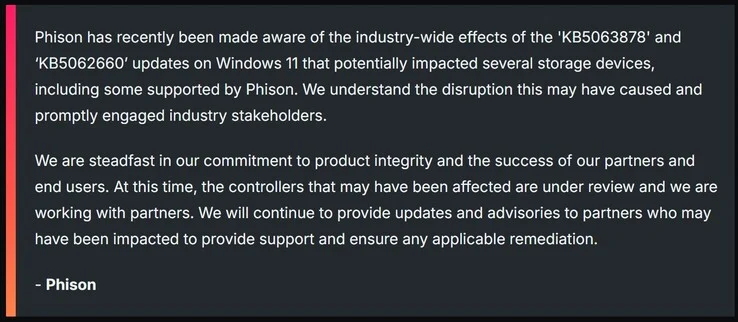
    The recent update for Windows 11, identified as KB5063878, seems to be causing problems with SSDs during large file transfers. According to tests conducted by users in Japan, SSDs that use Phison controllers are particularly affected by this issue. Microsoft has not yet responded to these reports, but Phison has released a statement addressing the problem.

    Details of the Issue

    For those who haven’t seen our previous reports, the problem arises when a file transfer larger than 50 GB is attempted on a Windows 11 device that has been updated. Based on internal tests, many of the affected SSDs become unrecognized by the system, and after a restart, the drives may become inaccessible.

    Recovery and Acknowledgment

    In tests done by user @Neoru_cat, it was found that some SSDs could recover after a reboot. However, SSDs using Phison controllers may not be recoverable at all. Phison has confirmed that they are aware of the SSD failure issue linked to the latest Windows 11 update.

    Although Phison did not provide specific reasons for the failures, they assured that the affected controllers are currently being reviewed. The non-affected 2 TB WD_Black SN7100 is priced at $129.9 on Amazon. Phison also indicated that they will share updates once their investigation yields results.

    Future Steps

    It’s possible that Phison may release a firmware update following the investigation, but they are unlikely to provide direct support to customers. This support will probably come from their partners instead. Until a firmware update is available, it’s advisable to avoid large file transfers on devices that have the latest Windows 11 update. Additionally, if the KB5063878 and KB5062660 updates have not been installed yet, it may be wise to hold off on those updates.

    Source:
    Link


  • Windows 11 Upgrade for Older Models: TPM 2.0 Not Required

    Windows 11 Upgrade for Older Models: TPM 2.0 Not Required

    Key Takeaways

    1. Windows 10’s life cycle ends this fall, prompting many users to switch to Windows 11.
    2. TPM 2.0 is required for key security features in Windows 11, but upgrade offers are being sent to devices without it.
    3. Users are receiving upgrade prompts for Windows 11 24H2 on older devices with TPM 2.0 disabled.
    4. Microsoft has not officially commented on the unexpected upgrade offers, leaving the situation unclear.
    5. Upgrading to Windows 11 without TPM 2.0 is possible but not recommended due to potential security risks.


    With Windows 10’s life cycle coming to an end this fall, many users are about to switch to Windows 11. The official requirement states that TPM 2.0 is necessary to enable security features such as device encryption and Windows Hello. However, there are increasing instances where updates to Windows 11 are being offered on older devices that lack TPM 2.0.

    Upgrade Offers for Older Devices

    As reported by Günther Born’s blog, BornCity, both personal and business users are getting upgrade prompts for Windows 11 24H2, even when TPM 2.0 is turned off in the UEFI settings. For instance, a Lenovo IdeaPad S145-15IWL user received a notification for the upgrade, despite having TPM 2.0 disabled. In March 2025, some company admins noted that their Windows 10 machines were being upgraded to Windows 11 24H2 without their approval, even though they were using WSUS for managing updates.

    Importance of TPM 2.0

    TPM 2.0 is a specialized security chip that offers cryptographic functions and safeguards key system processes. Microsoft views TPM 2.0 as vital for securely using Windows 11. Therefore, the upgrade notifications seen on older devices without TPM may introduce security vulnerabilities.

    Uncertainty Ahead

    So far, Microsoft has not released an official comment regarding this situation. It’s possible that the unexpected upgrade prompts could stem from a glitch in the updating process. The stated system requirements remain the same, meaning TPM 2.0 is still officially needed.

    It is still uncertain if Microsoft plans to ease the system requirements for Windows 11 in the future or if the current observations are simply temporary issues. For now, users on older devices should be aware that upgrading to Windows 11 without TPM 2.0 is feasible but not officially advisable.

    Source:
    Link


  • Windows 11 Update Causes SSD Failures During Heavy Transfers

    Windows 11 Update Causes SSD Failures During Heavy Transfers

    Key Takeaways

    1. Microsoft released a new Windows 11 update (KB5063878) to fix security vulnerabilities.
    2. Users are experiencing issues with SSDs during large file transfers over 50 GB, leading to SSD inaccessibility.
    3. SSDs with Phison NAND controllers are particularly affected, but other models like SanDisk Extreme Pro are also experiencing problems.
    4. The issue appears to be less widespread compared to other Windows problems, with few user complaints reported.
    5. Users are advised to avoid large file transfers or consider delaying the update if they have SSDs with Phison controllers.


    Microsoft has just rolled out a new update for Windows 11, known as KB5063878, featuring build number 26100.4946. According to the patch notes, this update aims to fix security vulnerabilities within the operating system. However, users are reporting that it may be causing problems with SSDs during heavy file transfers.

    File Transfer Problems

    According to a user on X, @Necoru_cat, the issue arises when users try to transfer files that are larger than 50 GB continuously. The operating system seems to fail in recognizing the SSD after a prolonged transfer period. If the computer is restarted, the SSD may become inaccessible. The user conducted some tests and found that SSDs utilizing Phison NAND controllers are particularly affected, though not all SSDs are experiencing this issue.

    SSDs Affected

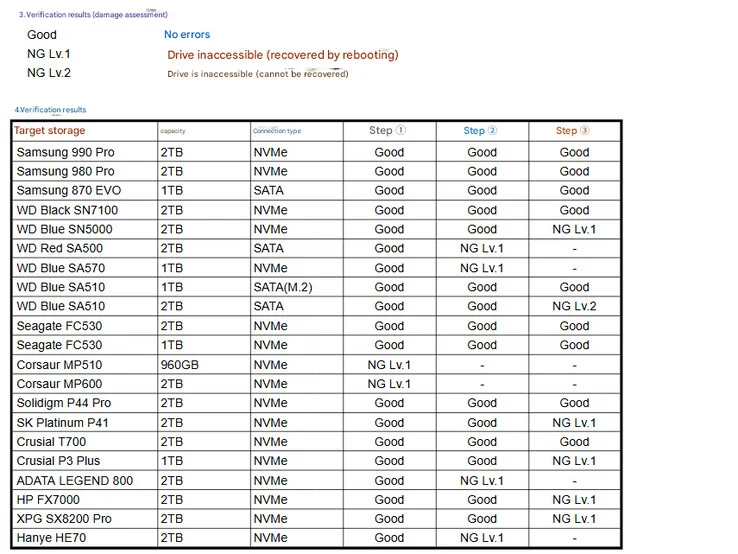
    A Japanese news site, NichePCGamer, has also covered the problem and provided a list of SSDs that are reportedly encountering issues with the Windows 11 KB5063878 update. The list indicates that it’s not just SSDs with Phison controllers that are affected; it also includes other models, such as the SanDisk Extreme Pro. @Necoru_cat later mentioned that some SSDs may become inaccessible due to this glitch, but they can often recover after a reboot. Those SSDs include:

    Currently, the issue appears to be less common compared to other significant Windows-related problems, as there aren’t many user complaints appearing on public forums. It’s important to note that both Microsoft and SSD manufacturers have not yet confirmed this issue related to the Windows 11 update. Users with both updated systems and SSDs featuring Phison controllers should refrain from making large file transfers over 50 GB. It might be wise to hold off on updating to KB5063878 or to revert to the previous version if the update has already been applied.

    Source:
    Link


  • AMD CPUs Surpass 40% in Steam Survey, Intel Falls Below 60%

    AMD CPUs Surpass 40% in Steam Survey, Intel Falls Below 60%

    Key Takeaways

    1. AMD CPUs now account for over 40% of PCs on Steam, marking a significant rise as Intel’s share drops below 60%.
    2. Nvidia’s RTX 5070 leads the new 50-series graphics cards with a market share of 1.32%, while AMD’s Radeon 9000 series has not yet appeared in the report.
    3. 16 GB of system RAM remains the most common configuration, but the share of PCs with 32 GB has risen to 35.15%.
    4. Windows 11 (64-bit) powers 59.9% of surveyed systems, while Windows 10’s share declines to 35.19% ahead of its support ending in October 2025.
    5. Linux usage has increased to 2.89%, reaching its highest level in years.


    The July 2025 report from Steam’s hardware and software survey marks a significant change for processors on the platform. For the first time, AMD CPUs are found in just over 40 percent of all participating PCs, while Intel’s share has dropped below 60 percent. This is a stark difference from the approximately 77 percent market share Intel had five years ago. The rise of AMD can mainly be linked to the success of its 3D V-Cache processors like the Ryzen 7 9800X3D, which offers strong gaming performance at competitive prices, thus taking away from Intel’s dominance.

    Graphics Card Trends

    The trends in graphics card adoption are also quite dynamic. Nvidia’s mid-range Blackwell series is gaining traction quickly, with the RTX 5070 now leading the new 50-series, capturing a 1.32 percent market share, which is an increase of 0.33 percentage points in just one month. The RTX 5060 follows with a share of 0.60 percent. Overall, Nvidia still holds a strong position, with 73.94 percent of all discrete GPUs in the survey branded by them. On the other hand, AMD’s latest Radeon 9000 series based on RDNA 4 is not yet visible in Valve’s report; neither the RX 9070 nor the RX 9060 has reached the reporting threshold, possibly due to supply issues or slow adoption rates.

    Memory Configurations

    Memory setups are changing too. While 16 GB of system RAM remains the most common choice at around 42 percent of PCs, the percentage of machines with 32 GB has climbed to 35.15 percent, thanks to a monthly increase of 0.78 percent. On the graphics front, 8 GB of VRAM remains the standard (33.66 percent), but cards offering 12 GB have surged to 19.22 percent of the total, making it the fastest-growing category last month.

    Operating System Shifts

    Operating system data continues to favor Microsoft’s latest version. Windows 11 (64-bit) is now powering 59.9 percent of the surveyed systems, which is a slight rise of 0.06 percent in July. Meanwhile, Windows 10 has seen a decline to 35.19 percent as its support will end in October 2025. Linux usage has also seen an uptick, reaching 2.89 percent, its highest level in years.

    In summary, the July data illustrates that Steam’s user base is steadily moving toward newer hardware and software, although the pace may not be overly fast or dramatic.

    Source:
    Link


  • Brave Browser Disables Windows Recall Screenshot Feature

    Brave Browser Disables Windows Recall Screenshot Feature

    Key Takeaways

    1. Brave will disable Windows 11’s Recall screenshot feature by default to protect user privacy.
    2. Recall captures screenshots every few seconds and stores them unencrypted, raising security concerns.
    3. Microsoft has made changes to Recall, allowing users to opt-out and excluding certain applications from its use.
    4. Brave has modified its code to classify all browsing windows as private, preventing Recall from capturing any activity.
    5. The Recall feature will be available soon in the public release of Windows 11, but Brave users can toggle it on if desired.


    Brave is not happy with Windows 11.

    The privacy-centric browser Brave will, by default, stop the Recall screenshot feature of Windows 11. This contentious Microsoft feature captures screenshots of a user’s screen every few seconds, which has angered many because it could be used as a backdoor into people’s private activities.

    Background on Recall

    Recall was introduced last May to assist Windows users in reverting their PC to an earlier state. One of the tools used for this purpose was an automatic screenshot feature that recorded instances of a user’s active screens every few seconds, saving these images. However, these screenshots were stored in an unencrypted format, making it easy for other software (including malware) and malicious users to see a record of everything users did on their computers.

    Changes to the Recall Feature

    Microsoft has since backed off from the mandatory use of Recall, although users can still choose to enable it. Part of this rollback allowed software developers to exclude their applications from Recall. Moreover, Microsoft has indicated that Recall will not take screenshots of web browsing windows classified as “private” by the system (like Chrome’s Incognito mode).

    To ensure Recall does not take pictures of users’ browsing habits, the developers of Brave have modified the browser’s code to mark all browsing windows as private, at least from the operating system’s viewpoint. Therefore, all Brave browser windows will be exempt from Recall’s scanning.

    Future Updates

    This feature is activated by default and has already been implemented in Brave’s Nightly builds. It is set to reach the stable version in the upcoming weeks.

    Users who still wish to use Recall while on Brave can easily enable the feature again through a simple toggle in the browser’s settings.

    Currently, Windows Recall is limited to Preview builds but is anticipated to be available in the public release of Windows 11 shortly.

    Source:
    Link

  • WhatsApp Moves to Microsoft WebView2, Drops Windows 11 App

    WhatsApp Moves to Microsoft WebView2, Drops Windows 11 App

    Key Takeaways

    1. WhatsApp Beta on Windows 11 has transitioned to a WebView2-based framework, aligning it more with WhatsApp Web.
    2. The user interface resembles the previous app, but performance has decreased significantly.
    3. The new version operates as a desktop container running multiple processes, making it less efficient than the former native app.
    4. The WebView2 version uses about 30% more RAM compared to the native application, affecting reliability and user experience.
    5. This change allows Meta to manage a single code base for all app versions, but it compromises WhatsApp’s performance and attractiveness.


    A recent update for WhatsApp Beta on Windows 11 has replaced the original desktop application with a bulkier Microsoft WebView2-based framework. This change aligns the experience more closely with WhatsApp Web, resulting in the loss of numerous performance improvements that came with the native UWP (Universal Windows Platform) version.

    User Interface Changes

    As noted by Windows Latest, although the user interface closely resembles that of the previous native app, there are notable differences, primarily in performance which has slowed down. Microsoft’s new WebView2, utilized in Microsoft Edge, is based on the open-source Chromium project.

    Performance Drawbacks

    The latest WhatsApp Beta seems to function as a desktop container that executes web code, similar to how it operates in Edge. This shift means that the former native app, which was lightweight and used a single process, has been replaced. The new web-based version operates several processes in the background, which can be less efficient.

    Resource Usage

    According to tests conducted by Windows Latest, the WebView2 version consumes approximately 30% more RAM than the native application. The native version was not only more dependable but also provided superior notifications and a more seamless user interface. Moreover, it managed calls and screen sharing far more effectively.

    Despite the lack of official explanation for this transition, using WebView2 simplifies the process for Meta by allowing them to manage a single code base for all app versions. However, this change results in WhatsApp appearing less appealing than it did previously and consuming more system resources.

    Source:
    Link