Tag: Windows 11

  • Microsoft Apps Get Security Updates Until 2028 Despite Windows 10 Phaseout

    Microsoft Apps Get Security Updates Until 2028 Despite Windows 10 Phaseout

    Key Takeaways

    1. Windows 10 support will officially end on October 14, 2025, but Microsoft 365 Apps will continue to work on Windows 10 after this date.
    2. Microsoft recommends upgrading to Windows 11 to avoid potential performance and reliability issues.
    3. Security updates for Microsoft 365 on Windows 10 will be provided for three years after end of support, until October 10, 2028.
    4. Businesses are advised to upgrade to Windows 11 or consider alternative operating systems to protect sensitive data.
    5. Alternatives to Windows 11 include Linux distributions like Mint and ChromeOS Flex, which offer different features and security updates.


    The end of support for Windows 10 is coming up quickly. While it’s obvious that some users will need to update to Windows 11, Microsoft keeps surprising us with little changes regarding the end of support for the operating system. Recently, they added a new note about Microsoft 365 on their support webpage.

    Updates to Microsoft 365 Support

    Previously, the support page indicated that Microsoft 365 apps would be unsupported from October 14, 2025, meaning users would need to switch to Windows 11 to keep using them. Microsoft has now modified this message and included a new note that eases this restriction a bit:

    Support for Windows 10 will officially cease on October 14, 2025. Following this date, if you have Microsoft 365 Apps installed on a Windows 10 device, they will keep working as they did before. Still, Microsoft highly recommends upgrading to Windows 11 to prevent potential performance and reliability problems in the future.

    Security Updates After Support Ends

    To help ensure your security while moving to Windows 11, Microsoft will provide security updates for Microsoft 365 on Windows 10 for three years after the end of support, wrapping up on October 10, 2028.

    Businesses should not let their guard down, as it is wise to upgrade to Windows 11 or consider installing a different operating system due to the importance of company data. For personal users who don’t use their Windows 10 PC for sensitive tasks like online banking, but rather for gaming or basic office work, this might give them some extra time before they need to make the switch.

    Alternatives to Windows 11

    If you really prefer not to upgrade to Windows 11, you might want to consider Linux alternatives like Mint. It has a similar aesthetic to MacOS or Windows and is considered secure thanks to regular updates. Another option is switching to ChromeOS Flex, although this operating system is primarily web-based and resembles the Chrome browser with all its extension features.

    Source:
    Link
  • Microsoft Urges Windows 10 Users to Upgrade to TPM 2.0 PCs

    Microsoft Urges Windows 10 Users to Upgrade to TPM 2.0 PCs

    Key Takeaways

    1. Windows 10 still holds a significant market share of 54.2%, compared to Windows 11’s 42.69% as of March 2025.
    2. Many users are hesitant to upgrade to Windows 11 due to the TPM 2.0 requirement, which older PCs may not meet.
    3. Microsoft is actively encouraging users to upgrade their hardware to support Windows 11.
    4. A recent blog post by Microsoft highlights the benefits of TPM 2.0, focusing on enhanced data security and software integrity.
    5. Microsoft is making it more difficult for users to bypass TPM 2.0 requirements, emphasizing their push for upgrades.


    While Windows 11 is slowly becoming more popular, Windows 10 still has a large number of users. According to Statcounter, as of March 2025, Windows 10 holds about 54.2% of the market share, whereas Microsoft’s latest operating system has a share of 42.69%.

    Reasons for Hesitation to Upgrade

    Many users of Windows 10 are delaying their upgrade to Windows 11 because of the TPM 2.0 requirement, which many older PCs do not fulfill. For a considerable time, Microsoft has been urging these users to upgrade their hardware and switch to the new OS, and it appears the company is still committed to this cause.

    Microsoft’s Recent Efforts

    Recently, Microsoft released a specific blog post explaining what TPM 2.0 is and its advantages. The post emphasizes that PCs equipped with TPM 2.0 can provide enhanced data security, better integrity of the software and firmware, and advanced security features.

    Even if Microsoft doesn’t directly state it, the blog post seems to draw a comparison between the user experience and security features of Windows 10 and Windows 11. As the end-of-support date for Windows 10 approaches, it’s reasonable to expect more posts discussing TPM 2.0 and Windows 11 in the future.

    Ongoing Push for Upgrade

    It’s also important to mention that Microsoft has made previous attempts to persuade users to upgrade through updates on their support pages. For instance, the company removed the official guide for bypassing TPM 2.0, making it harder for users with older computers to install Windows 11.

    Source:
    Link

  • Microsoft Boosts Copilot AI with Personalized Podcasts and More

    Microsoft Boosts Copilot AI with Personalized Podcasts and More

    Key Takeaways

    1. Customized Podcasts: Copilot can generate personalized podcasts based on user interests, enhancing entertainment and learning through audio.

    2. Deep Research Capability: The AI can perform in-depth research and tackle complex questions step-by-step, similar to human reasoning, using various web sources.

    3. Real-Time Assistance: Copilot offers real-time help by observing users’ environments, aiding Windows users with desktop management, file organization, and task completion.

    4. Memory and Personalization: With user permission, Copilot remembers past conversations and personalizes experiences, offering summaries, reminders, and suggestions.

    5. Task Management Features: The new Actions feature allows Copilot to assist with booking flights, making reservations, and other tasks to simplify users’ lives.


    Microsoft has made enhancements to its Copilot AI chatbot, adding new features that boost its capability to respond to inquiries, entertain users, and retain all the information it has discussed.

    Customized Podcasts and Deep Research

    Now, Copilot can generate tailored podcasts based on users’ personal interests and topics, which is great when someone wants to be entertained or learn through audio. The AI is also equipped to perform in-depth research, meaning it can handle complex questions by working through issues step-by-step, similar to how a human might approach them. It uses information from various sources on the web and its ability to mix different answers together to produce useful reports.

    Real-Time Assistance for Users

    For those using mobile devices, the AI can observe the user’s environment in real-time, helping to answer questions. Windows users get an extra benefit as the AI can view their desktop, assisting them in adjusting settings, managing files, searching for information, and engaging with content to help users complete tasks and projects.

    Remembering Conversations and Personalization

    Copilot is now capable of remembering every chat and interaction, with the user’s permission, along with all relevant information. This feature enables the AI to create pages that summarize personal thoughts and notes on various discussions and projects. Users are also able to personalize the AI’s avatar for a more customized experience.

    Moreover, the chatbot can automatically provide reminders and suggestions based on what it has learned about the user’s life. This includes the ability to search for deals on items that users wish to purchase. The new Actions feature allows the AI to handle tasks like booking flights and making dinner reservations for the user.

    Microsoft Copilot is available for free on the Windows 11 operating system, Edge web browser, smartphone apps, and online platforms. Readers who are unfamiliar with using Copilot can check out a guide available on Amazon before trying the AI chatbot on any computer that runs Windows 11, such as the Surface Laptop Copilot+ PC available on Amazon.

    Source:
    Link

  • Intel Unison App for Android and iOS to Shut Down in June

    Intel Unison App for Android and iOS to Shut Down in June

    Key Takeaways

    1. Intel Unison app allows iPhone and Android users to link their phones to Windows PCs for calls, SMS, notifications, and file transfers.
    2. Intel announced the discontinuation of the Unison app, with service ending for most platforms by June 2025.
    3. Lenovo Aura computer users will retain access to the app throughout 2025.
    4. The app features include linking tablets as second screens and controlling them with a PC’s keyboard and mouse.
    5. Initially limited to select Intel Evo computers, Unison expanded compatibility to more devices running Windows 11 by early 2023.


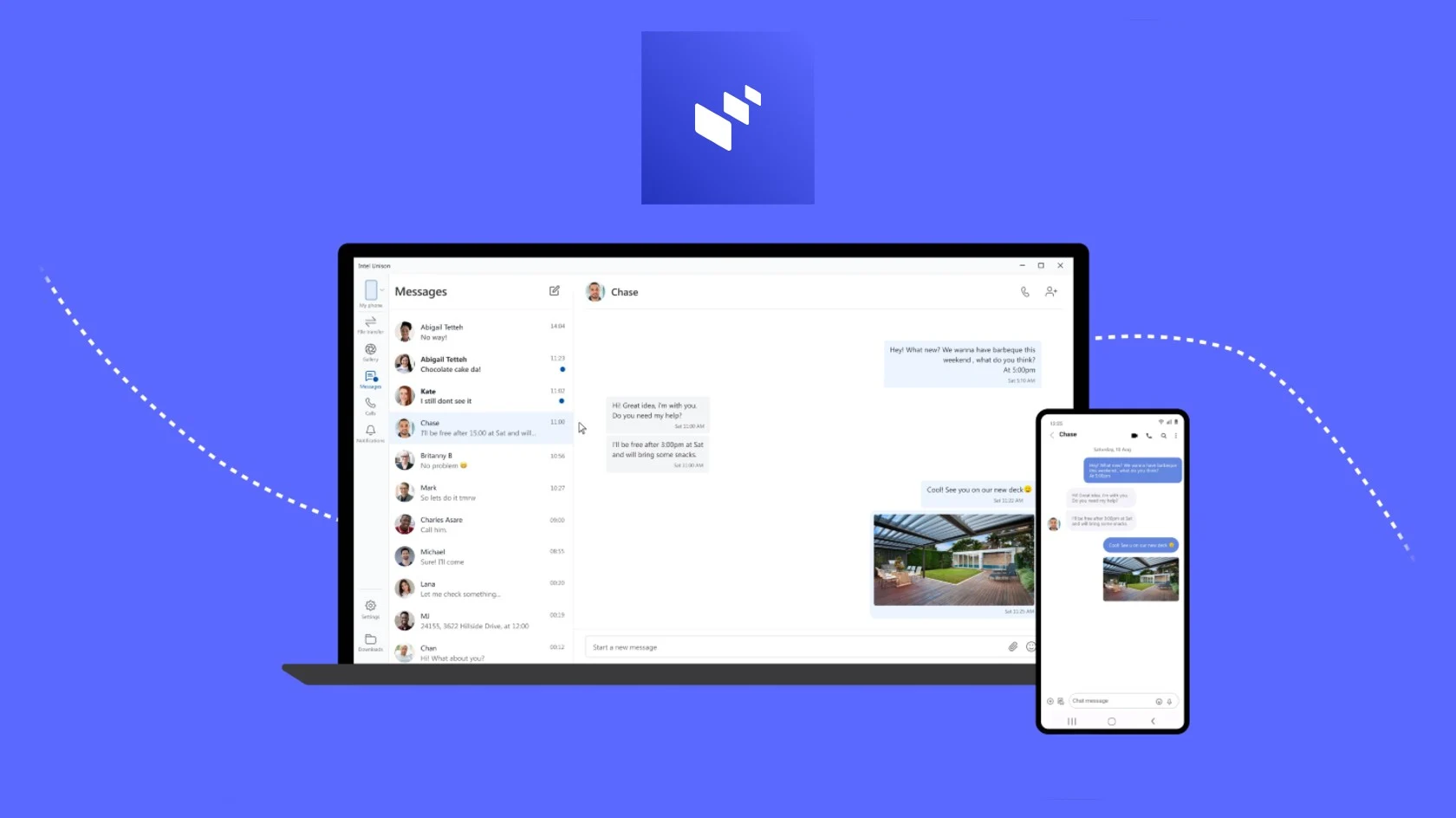
    A few years back, Intel revealed the Intel Unison application, which enabled users of both iPhones and Android devices to link their phones to a Windows PC. Once connected, individuals were able to make and receive calls, send and receive SMS messages, get app notifications on their computer, browse their phone’s gallery on the PC, and seamlessly transfer files between the two devices. However, Intel has now announced plans to discontinue the app.

    Service Discontinuation Announcement

    According to an initial report from Neowin, Intel has placed a notice on both the Microsoft Store and App Store listings for Intel Unison, stating that the app will be discontinued soon and that the service will conclude for most platforms by the end of June 2025. Nevertheless, users who have a Lenovo Aura computer will continue to have access to the service throughout 2025.

    Intel has not shared any reasons behind the decision to phase out the app. This move might catch many off guard, as the app was seen as quite helpful and often functioned better than Microsoft’s own Windows Phone Link.

    Features and Compatibility

    Besides the features mentioned earlier, the Intel Unison app also permitted users to link their tablets, allowing them to function as a second screen with a compatible PC. Additionally, users could control their tablet using the keyboard and mouse from the PC via Universal Control.

    When it was first introduced in 2022, the app was only available for select Intel Evo computers. However, by early 2023, Intel Unison expanded its compatibility to more PCs, including those powered by ARM, provided they were running Windows 11, had at least 4GB of RAM, and possessed Bluetooth and internet connectivity.

    Source:
    Link

  • Windows 11 25H2 Update: Key Details Revealed

    Windows 11 25H2 Update: Key Details Revealed

    Key Takeaways

    1. Microsoft is working on a Windows 11 update (likely called 25H2) to fix issues like USB printer glitches and a bug in factory resetting.
    2. The update will improve the “About” section in settings to show hardware details like CPU type and memory size.
    3. A new virtual keyboard mode will mimic a gamepad layout, aiding touchscreen users, especially on Surface tablets.
    4. New features will be rolled out gradually, unlike immediate bug fixes.
    5. The anticipated launch for the update is between September and October 2025.


    The software company from Redmond is hard at work on a fresh update for Windows 11, with some information already shared. One of the key fixes includes addressing a frustrating problem where USB printers using the IP printing feature would randomly print a page with text. Currently, the update hasn’t been given an official code name, but following the usual naming pattern, it’s probable that it will be referred to as 25H2.

    Fixes and Improvements

    As per the official statement, Microsoft plans to tackle multiple issues. Besides fixing the printer glitch, they will also resolve a bug that arises when resetting Windows 11 to factory settings. This bug is found in build version 26200, but it mistakenly shows as 26100.

    New Features on the Horizon

    Alongside these fixes, Microsoft is introducing new features as well. In the updated “About” section of the settings, users will be able to see crucial hardware details such as the CPU type and memory size. Microsoft mentions that this feature aims to give new users a quick snapshot of their hardware capabilities.

    Another highlight is the introduction of a new mode for the virtual keyboard, which can now mimic a gamepad layout. This could especially help users with Surface tablets, which are frequently utilized through their touchscreen.

    Rollout Timeline

    However, unlike the bug fixes, these new features are not likely to be available right away. They will be rolled out gradually over time. Windows Latest is also pondering whether this update will be a completely new platform (codenamed Selenium) or an enhanced version of 24H2 (codenamed Germanium).

    Given previous update schedules, it’s anticipated that Windows 11 25H2 might launch between September and October 2025.

    Source:
    Link

  • Windows 11 May Introduce New FAQ Section for PC Hardware

    Windows 11 May Introduce New FAQ Section for PC Hardware

    Key Takeaways

    1. Microsoft is developing a new FAQ section for Windows 11 to address common PC hardware questions.
    2. The FAQ will be part of the About page in the System settings menu, featuring questions about Windows version, GPUs, and RAM recommendations.
    3. This FAQ section is not visible by default, indicating it is still in the testing phase.
    4. Microsoft suggests using a GPU with over 4GB of VRAM for better performance in gaming and video editing.
    5. The recommendation for RAM is to have more than 8GB for tasks beyond basic web browsing and emailing.


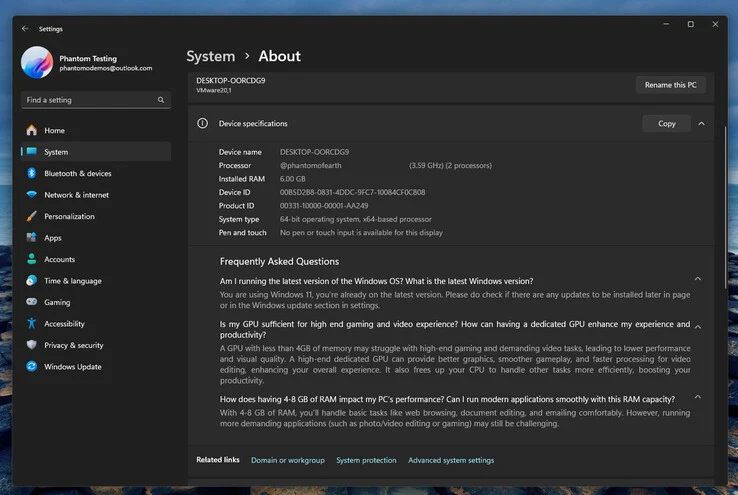
    Microsoft seems to be working on a new FAQ area to address common questions about PC hardware in Windows 11. This information was found in the latest Dev build by user @phantomofearth on Blusky Social (as reported by The Verge). This user maintains a specialized account that focuses on dissecting the newest Windows Insider builds.

    FAQ Section Details

    The new section will be part of the About page located within the System settings menu. Right now, there are three questions included: one about the latest Windows version, another concerning GPUs, and a third that recommends the optimal amount of RAM for various tasks.

    These inquiries are shown under your device’s specifications, which detail the hardware of your system. It is not clear if this list will vary based on hardware setups or if it will remain constant across all devices.

    Visibility and Testing Stage

    Interestingly, this list is not visible by default, even in the Dev build, indicating that it might still be in the early phases of testing.

    In the responses, Microsoft advises using a GPU that has over 4GB of VRAM for enhanced performance in gaming and video editing applications. There is a possibility that this section could also feature notifications regarding upcoming system updates.

    RAM Recommendations

    Moreover, Microsoft recommends having more than 8GB of RAM for tasks beyond just web browsing, document reading, or emailing. @phantomofearth also pointed out that this feature is currently concealed in Dev builds with version numbers 26120.3576 and 22635.5090.

    Source:
    Link


  • Rumored Xbox Handheld Device Expected to Launch This Year

    Rumored Xbox Handheld Device Expected to Launch This Year

    Key Takeaways

    1. The Xbox handheld, codenamed “Keenan,” is expected to launch later this year, but Microsoft will not produce it themselves.
    2. A well-known manufacturer like Asus, Lenovo, or MSI will handle the hardware development, with Microsoft creating a simplified version of Windows 11 for it.
    3. The handheld will feature a special Xbox button for adjusting settings like fan speed and refresh rate.
    4. The choice of chip for the device remains uncertain, with options including AMD’s Ryzen Z2 and Intel’s Lunar Lake series, but performance is not expected to be groundbreaking.
    5. Microsoft is also working on a next-generation console to succeed the Xbox Series X, set for release alongside a fully developed Xbox handheld in 2027.


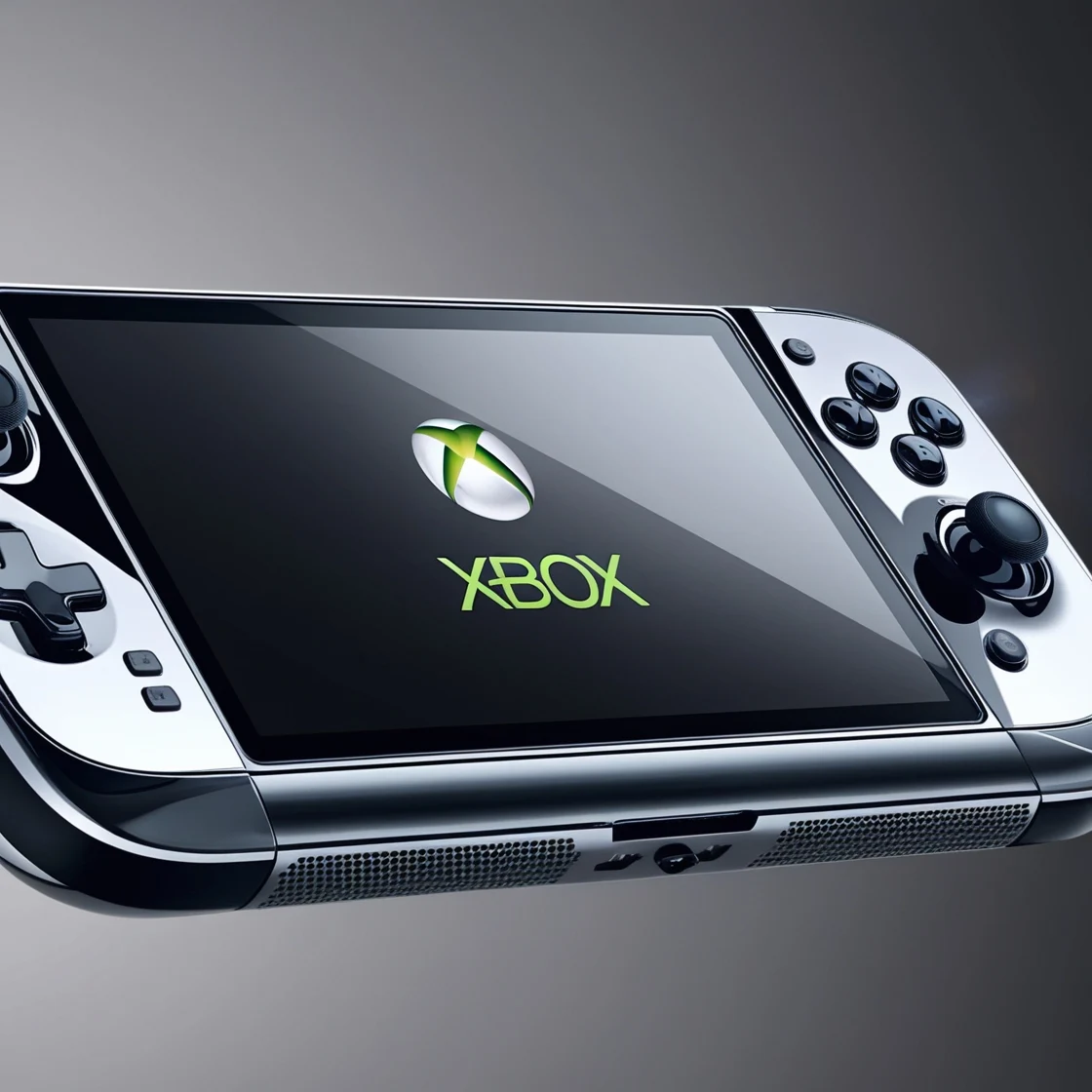
    Rumors regarding an Xbox handheld have been circulating for quite a while now, and they are not something new. Recently, Jez Corden from Windows Central added some exciting details to the story with his latest scoop. The handheld, which is referred to by the code name “Keenan,” is expected to be released later this year. However, it seems that Microsoft won’t be the one to actually produce it.

    Hardware Development Insights

    It looks like a well-known manufacturer, such as Asus, Lenovo, or MSI, will handle the hardware development. Microsoft is planning to assist in creating a simplified version of Windows 11 that will be free from unnecessary software. Additionally, there will be a special Xbox button included, allowing users to adjust settings like fan speed, TDP, refresh rate, and more. Basically, this handheld is just a more efficient version of a typical handheld device, featuring software tweaks from Microsoft, along with a stamp of approval as an Xbox accessory.

    Chip Selection Mystery

    The biggest question still remains about which chip will power this device. Microsoft has a selection of options to choose from, including AMD’s Ryzen Z2 Go, Ryzen Z2, Ryzen Z2 Extreme, and Intel’s Lunar Lake or Arrow Lake-H series. In a post, Jez suggested that it might be the standard Z2, but that is not confirmed yet. Regardless, it is unlikely to achieve record-breaking performance, especially if it utilizes the anticipated Hawk Point-based Ryzen Z2.

    Future Console Plans

    Jez also mentions that Microsoft is working on its next-generation console, which will take over from the Xbox Series X. This new console is expected to be released alongside the first true handheld from Xbox that is developed entirely from scratch in 2027. This upcoming console is rumored to feature a combination of an AMD Zen 5 CPU and UDNA 1 (previously known as RDNA 5) GPU. There have been discussions about incorporating 3D V-Cache as well, but that technology might be reserved for Sony’s PlayStation 6.

    Source:
    Link

  • Microsoft Encourages Windows 11 Installation via Support Page Updates

    Microsoft Encourages Windows 11 Installation via Support Page Updates

    Key Takeaways

    1. Microsoft is actively encouraging users to upgrade to Windows 11 by highlighting its benefits on their support site.
    2. Windows 11’s market share has increased to 42.07%, while Windows 10 has decreased to 54.79%, indicating a trend of users switching to the new OS.
    3. The new feature Smart App Control in Windows 11 helps protect against unwanted software by blocking unsigned applications.
    4. Smart App Control has improved with updates, enhancing its effectiveness in safeguarding PCs.
    5. A clean installation of Windows 11 is required to use Smart App Control, along with enabling optional diagnostic data during setup.


    It appears that Microsoft is really pushing hard to encourage users to migrate to Windows 11. Recently, the company made some updates to its support site to show off the advantages that the new operating system offers. It looks like these efforts are starting to pay off, as more users are moving from Windows 10 to the latest OS.

    Windows Market Share Changes

    According to Statcounter, Windows 11 now holds 42.07% of the overall desktop Windows market share, which is a significant rise from 26.68% in March of last year. In contrast, Windows 10 now occupies 54.79% of the market, down from 69.07% in March 2024, showing a clear trend of users switching to the newer version.

    New Features to Attract Users

    Microsoft is aiming to attract users who are particularly careful about the applications installed on their computers. Specifically, the company has updated one of its support pages again, focusing on how to safeguard PCs against unwanted software. The new guide now points out that Windows 11 includes a feature called Smart App Control.

    Smart App Control, as Microsoft explains, is powered by cloud security and is capable of blocking unsigned and potentially harmful software. Initially, this feature wasn’t very effective, but with subsequent updates, it has improved in protecting computers from unwanted applications.

    Installation Requirements

    However, it’s important to note that to use Smart App Control, a clean installation is necessary. This means that simply upgrading from Windows 10 to Windows 11 won’t suffice. Additionally, during the setup process, users must enable optional diagnostic data for the feature to work properly.

    Source:
    Link

  • Misleading Microsoft Edge Uninstall Guide Removed After Backlash

    Misleading Microsoft Edge Uninstall Guide Removed After Backlash

    Key Takeaways

    1. Microsoft has removed guides from its support site, including one for installing Windows 11 on unsupported systems.
    2. The “How to Uninstall Microsoft Edge” page was misleading, focusing on criticizing Google Chrome rather than providing uninstall instructions.
    3. After public feedback, Microsoft removed the misleading Edge uninstall guide and replaced it with a page that offers more information on Edge.
    4. The updated page includes brief descriptions of Microsoft Edge’s latest features to discourage users from switching to Chrome.
    5. Uninstallation steps for Microsoft Edge differ based on user location, with specific methods for users in the EU and those outside it.


    Microsoft has been busy lately removing guides from its official support site. Recently, they took down a guide that instructed users on how to install Windows 11 on systems that aren’t supported. Now, they’ve also eliminated a page that claimed to be an uninstall guide for Edge.

    The Edge Uninstall Guide

    This support page was titled “How to Uninstall Microsoft Edge,” but it didn’t actually provide any real instructions for uninstalling the browser. Instead, it focused on criticizing Google Chrome while highlighting features that Edge offers but Chrome does not.

    After people pointed out the misleading nature of this uninstall guide, Microsoft removed it quietly. The previous link now leads to a different page that doesn’t pretend to provide uninstall instructions. While the title may no longer be misleading, it still doesn’t meet the search intent for those keywords.

    Updated Page Information

    The new page does include helpful links that aim to give users more information on Microsoft Edge. For instance, it features brief descriptions of the latest updates, which may help keep users from switching to Chrome.

    If you’re looking for actual steps on uninstalling Microsoft Edge, the process is quite straightforward. Users in the EU can follow these easy steps:

    Uninstallation Steps

    For individuals outside the EU, the uninstallation process involves a different method. Here’s one of the simple ways for users outside the EU:

    Source:
    Link