Tag: Microsoft Copilot

  • Nintendo Leak Reveals AI Push as Switch 2 Games Reject Tools

    Nintendo Leak Reveals AI Push as Switch 2 Games Reject Tools

    Key Takeaway

    – Nintendo employees resisted Microsoft Copilot integration, fearing it could replace staff or worsen job security.
    – A Nintendo security breach (allegedly by SHADOWBYT3$) leaked 859 MB of internal TINYpulse feedback, including these concerns.
    – Nintendo of America was impacted, but first-party Switch 2 development in Japan remains unaffected by the breach.
    – President Shuntaro Furukawa has publicly expressed caution about using generative AI for creative work, citing copyright and IP risks.
    – Despite internal resistance, Nintendo appears to be exploring AI tools like Copilot for productivity, not for game asset generation.


    Nintendo’s Reluctance Meets Reality

    Nintendo has been reluctant to embrace generative AI in Switch 2 game developement. Still, the technology seems to play a role in the gaming giant’s offices. A Nintendo security breach has revealed that employees resisted the arrival of Microsoft Copilot.

    Breach Details and Employee Concerns

    As Kotaku reports, on June 13th, the hacker group SHADOWBYT3$ allegedly stole 859 MB of data from the company. The information originates from TINYpulse, a cloud-based platform where employees share concerns. The perpetrators unsuccessfully demanded a $2 million ransom to stop any leaks. Nintendo has since acknowledged the incident, denying that any sensitive customer data was at risk.

    After failing to censor some messages, SomeoneIDK posted a handful of comments on social media. Much of the communication centers on integrating Microsoft Copilot into workflows. One example reads, “I am a little worried about the push for the Copilot AI tool.” Another individual feared that staff would be “replaced by AI slop.”

    • The Nintendo employees regret that the company didn’t consider their feedback.
    • Although the authenticity of the messages isn’t conclusive, several security experts believe TINYpulse was compromised.

    Regional Divisions and Leadership Stance

    It’s important to note that the breach involves Nintendo of America. The bulk of developement for first-party Switch 2 games happens in Japan, with NOA focused more on publishing and marketing. Leadership has also expressed caution about employing generative AI creatively.

    Furukawa’s Caution and Industry Comparisons

    Protective of his IPs, President Shuntaro Furukawa cited reservations about copyright infringement. He doesn’t anticipate artists relying on machine learning to generate assets in the near future. On the other hand, Xbox envisions AI tools having a greater impact on its studios. Sony PlayStation also has pending patents suggesting it could eventually replace some developers.

    Based on the SHADOWBYT3$ breach, Nintendo is using options like Copilot to boost productivity. Regardless, as with game developers, the workers worry about their job security.
  • Microsoft warns: Don’t rely on Copilot for critical tasks

    Microsoft warns: Don’t rely on Copilot for critical tasks

    Key Takeaway

    1. Microsoft centrally brands all AI products as “Copilot,” aiming to integrate these tools into daily life and professional workflows, including Windows 11 and GitHub.
    2. There is a disconnect between marketing claims of increased productivity and cautious legal language emphasizing verification and entertainment purposes.
    3. The broad branding of “Copilot” across different applications creates confusion and risks damaging credibility due to varying terms of use and perceived reliability.

    Microsoft’s AI Strategy: A Broad Vision

    Microsoft has been really pushing its artificial intelligence lately, especially through the launch of several new products like Copilot+ PCs, Microsoft 365 Copilot, and other business tools all under the Copilot brand umbrella. They also deeply integrate this assistant into Windows 11, aiming to make Copilot an essential part of both daily life and work environments. Its presence is felt across different platforms, reflecting the company’s ambition to embed AI into everyday technology.

    Marketing vs. Reality in Terms of Service

    At Microsoft, every AI-related product seems to be branded as ‘Copilot.’ But there’s a twist. For example, on GitHub, Copilot is also making an appearance. The company’s marketing suggests that Copilot can handle tasks and make content faster, which sounds impressive. Yet, the actual Terms of Service for Microsoft 365 Copilot are quite cautious—they say things like it’s for entertainment purposes only. This stark difference between shiny marketing and reserved legal text causes some confusion.

    Public Perception and Confusion

    Because of this, people often dismiss Microsoft 365 Copilot as a joke or just a gimmick in forums and media. The big problem here is that the terms applying to the chatbot version don’t necessarily cover all the other tools labeled as Copilot, like business apps or paid services—they each have their own rules. Clarifying these differences becomes tricky, and many users get mixed signals about what Copilot can really do.

    Risks of Brand Blurring

    Microsoft’s decision to use the same name for both entertainment and productivity tools puts them into a tricky spot. When folks hear ‘Copilot,’ they may think it’s unreliable or just for fun, especially since the free versions are associated with negative perceptions. The marketing attempts to promote Copilot’s features gets muddled when the fine print emphasizes its unreliability, which isn’t a good look for the enterprise side of things.

    Legal Terms and User Expectations

    In the end, the legal notices — the Terms of Use — for Microsoft Copilot are pretty clear about its limitations. They emphasize that it’s not to be fully trusted for critical tasks. This legal language creates a gap between what consumers are told and what they can really expect, leading to misunderstandings. For businesses considering these tools, it’s important to read the fine print before relying too much on what marketing promises.

    Sources
  • AMD Unveils Ryzen AI 400 Desktop Processors with 50 TOPS NPU

    AMD Unveils Ryzen AI 400 Desktop Processors with 50 TOPS NPU

    Key Takeaways

    1. AMD introduced the Ryzen AI 400 Series for desktops and Ryzen AI PRO 400 Series for mobile devices at MWC 2026, supporting Microsoft Copilot+ experiences natively.

    2. The Ryzen AI 400 Series features a 50 TOPS XDNA 2 NPU, Zen 5 CPU cores, and AMD RDNA 3.5 integrated graphics for enhanced AI performance and user privacy.

    3. The series includes 5W “G” models for desktops and 35W “GE” versions for compact devices, both with identical core setups but varying power specifications.

    4. High-performance options include the Ryzen AI 7 450G and PRO 450G with 8 cores and 16 threads, while mid-tier models like the Ryzen AI 5 440G and 435G offer solid performance with 6 cores and 12 threads.

    5. Availability of the Ryzen AI 400 Series processors begins in Q2 2026 through major OEMs such as HP, Lenovo, and Dell.


    AMD has recently revealed that it’s expanding its Ryzen AI lineup at MWC 2026 with the introduction of the Ryzen AI 400 Series for desktops and the Ryzen AI PRO 400 Series for mobile devices. This marks the first time that desktop and laptop processors have been created to natively support Microsoft Copilot+ experiences, which previously were only available on laptops using Snapdragon technology.

    Powerful Specs for Enhanced Performance

    The Ryzen AI 400 Series will come equipped with a 50 TOPS XDNA 2 NPU, featuring Zen 5 CPU cores and AMD RDNA 3.5 integrated graphics. These components are built to operate AI assistants and large language models locally, enhancing user privacy and decreasing the reliance on cloud-based services.

    Variants for Different Needs

    The series includes 5W “G” models alongside lower-power 35W “GE” versions, both featuring identical core setups (CPU cores, GPU, NPU capabilities). The distinction lies solely in their power specifications. The G variant is tailored for desktops and high-performance PCs, while the GE variant is meant for compact mini PCs, SBCs, and COM Express modules.

    High-Performance Options

    Among the offerings, the Ryzen AI 7 450G and PRO 450G stand out with 8 cores and 16 threads, reaching boost clocks of up to 5.1 GHz and equipped with Radeon 860M graphics. The mid-tier Ryzen AI 5 440G and 435G models have 6 cores and 12 threads, paired with Radeon 840M graphics for solid performance.

    In addition to their desktop range, AMD has also introduced the Ryzen AI PRO 400 Series mobile processors tailored for enterprise-grade mobile workstations, such as laptops and tablets. The flagship Ryzen AI 9 HX PRO 470 boasts 50 TOPS of AI performance, offering a 30% increase in multithreaded capabilities compared to its rivals, along with impressive all-day battery life.

    Availability and Partnerships

    AMD has indicated that both the desktop and mobile workstations featuring the new Ryzen AI 400 Series processors are set to be available starting in Q2 2026 through major OEMs like HP, Lenovo, and Dell.

  • LG TVs Introduce Unrequested Microsoft Copilot App Feature

    LG TVs Introduce Unrequested Microsoft Copilot App Feature

    Key Takeaways

    1. Major tech companies are rapidly integrating AI features into products, even when not necessary.
    2. LG TV users are frustrated with the new Microsoft Copilot app that cannot be fully uninstalled.
    3. The integration of Copilot in LG TVs was anticipated but lacks clear benefits for users.
    4. Competitors like Samsung are also adopting Microsoft’s AI assistant in their products.
    5. LG already offers its own AI services, raising questions about the motivation for integrating a rival AI.


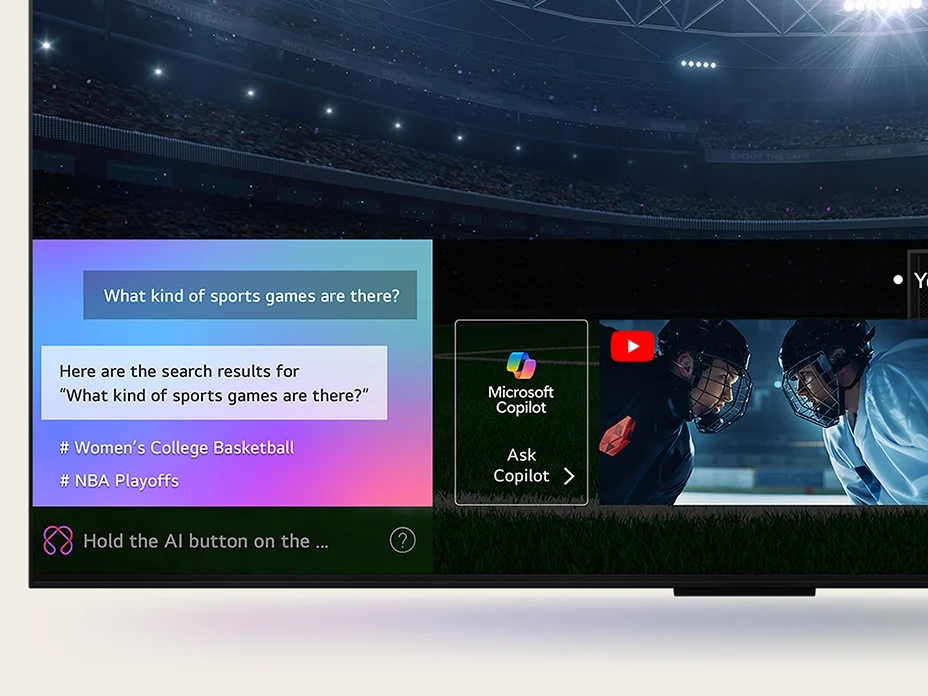
    There has been a significant trend towards integrating AI into various products in recent years, with major technology companies racing to incorporate AI features into items that previously functioned perfectly well without them. Search engines are now focused on AI-generated summaries, smartphone makers are making vague claims about on-device intelligence, and Microsoft has even launched a new series of PCs featuring a special AI key. Just when it felt like your living room was safe from the buzz around generative AI, LG has begun incorporating Microsoft’s Copilot AI into its smart TVs.

    Unwanted Features

    According to several LG TV users, a recent update to WebOS has added a Microsoft Copilot app to the homescreen. Similar to other preinstalled system apps, this one can’t be fully deleted or uninstalled, leaving users with the option to only hide it. Many LG TV owners took to Reddit to express their annoyance, with a post in r/mildlyinfuriating receiving over 35,000 upvotes and numerous comments criticizing LG for adding yet another unnecessary app to an already cluttered smart TV interface.

    Expectations vs. Reality

    This development was somewhat anticipated. LG had announced at CES 2025 in January that it would integrate Microsoft Copilot, but they didn’t elaborate on how this would function or benefit users, only vaguely mentioning that it would help them “efficiently find and organize complex information using contextual cues.”

    Competitors Join the AI Craze

    LG isn’t alone in adopting Copilot; Samsung has already integrated Microsoft’s AI assistant into its 2025 TV models, which includes Micro RGB, OLED, The Frame Pro, and The Frame series, along with the M7, M8, and M9 monitors.

    Currently, the Copilot app on LG TVs offers limited functionality, mainly directing users to the web version of Copilot. The anticipated deeper integration that would provide context-aware recommendations has yet to materialize, and users were not particularly asking for it in the first place. It’s likely that this will continue to be the case.

    LG’s Own AI Services

    LG already has a range of its own AI offerings, such as an AI chatbot, AI Voice ID, and AI Concierge, which makes it seem unlikely that they would prioritize a rival AI service over their own. This situation raises questions about the motivation behind this integration, suggesting that it might be aimed at boosting Microsoft’s growth metrics through undisclosed agreements.

    Source:
    Link


  • Durabook Launches Rugged R10 2-in-1 Laptop with Intel Core Ultra 7

    Durabook Launches Rugged R10 2-in-1 Laptop with Intel Core Ultra 7

    Key Takeaways

    1. Durability: The R10 2-in-1 laptop is designed to withstand six-foot drops, water jets, dust, and extreme temperatures (-29°C to 63°C), meeting military standards (MIL-STD-810H, MIL-STD-461G).

    2. Advanced Processing Power: It features Intel Core Ultra 5 or 7 processors with onboard AI capabilities, offering configurations up to 32 GB RAM and 2 TB SSD storage.

    3. High-Quality Display: The laptop includes a 10.1-inch TFT LCD touchscreen with a brightness of 1,000 nits, supporting Microsoft Pen Protocol for stylus input.

    4. Comprehensive Connectivity: Equipped with Wi-Fi 7, Bluetooth 5.4, multiple USB ports, Ethernet, dual SIM support, and options for a barcode reader, ensuring versatile connectivity.

    5. Lightweight and Portable: Weighing only 1.2 kg (2.6 lbs) with compact dimensions (265 x 189.5 x 21.2 mm), the R10 is easy to transport for various rugged environments.


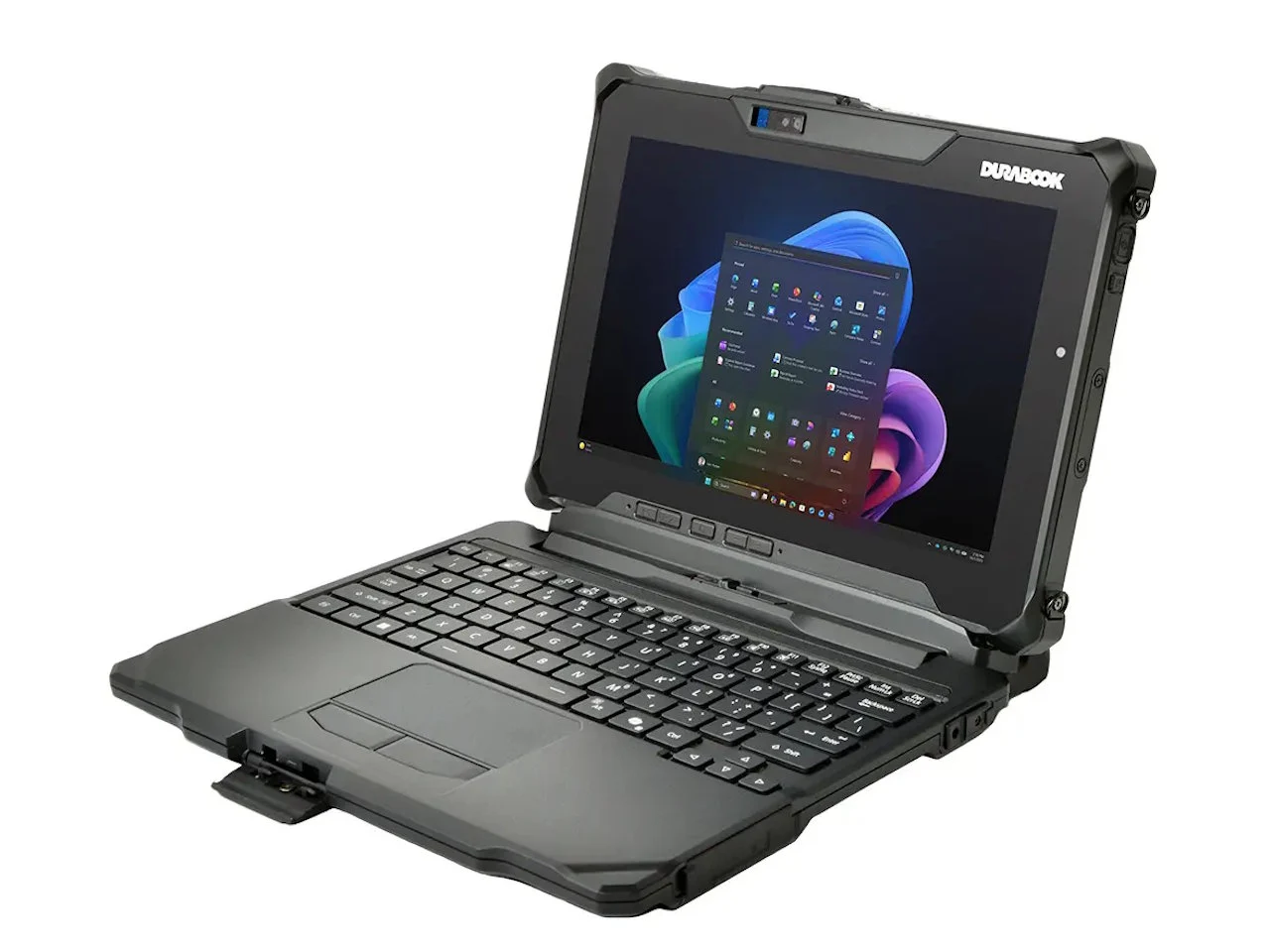
    Durabook has unveiled the R10 2-in-1 laptop, which features a detachable keyboard ideal for rough conditions.

    Built to Withstand Tough Conditions

    The R10 is engineered to endure six-foot drops, exposure to water jets and dust, and extreme temperatures ranging from -29°C to 63°C (-20°F to 145°F). It meets several military standards, including MIL-STD-810H, MIL-STD-461G, C1D2 ANSI, and has an IP66 rating, making it suitable for hazardous settings.

    Advanced Technology Inside

    This Microsoft Copilot+ laptop is equipped with Intel Core Ultra 5 or Core Ultra 7 processors, which come with powerful NPUs capable of operating onboard AI chatbots and various services. Users can opt for configurations that include an Ultra 7 268V CPU, 32 GB of LPDDR5X RAM, and a 2 TB NVMe PCIe SSD. A standard feature is the 1,000-nit 10.1-inch TFT LCD WUXGA (1920 x 1200) touchscreen that supports Microsoft Pen Protocol active pens.

    Connectivity and Features

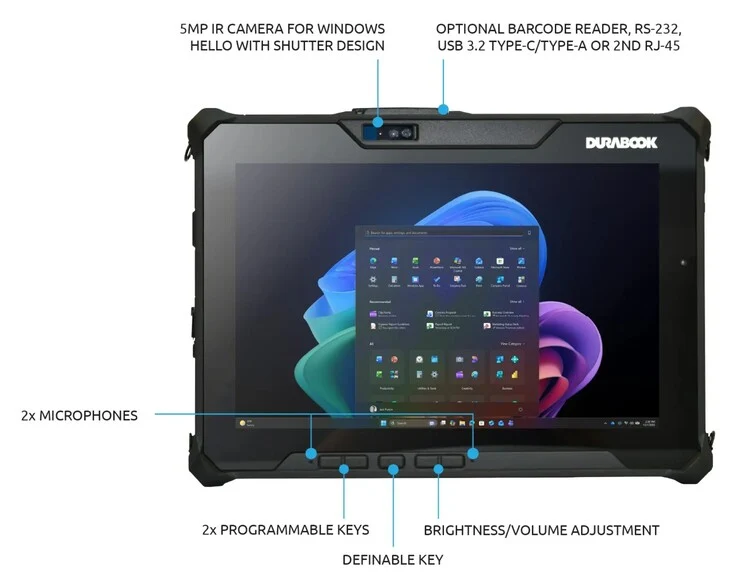
    Every unit is outfitted with 10/100/1000 Ethernet, Wi-Fi 7, and Bluetooth 5.4. It also includes a 5 MP front IR camera and an 11 MP rear AF camera with flash, a speaker, and dual microphones for video conferencing. For connectivity, it has a USB-C/Thunderbolt 4 port, a USB-A 3.2 Gen2 port, an audio input/output jack, a microSD card slot, a 20-pin docking connector, and dual SIM support (Nano SIM & eSIM). Additional features like a barcode reader can be added as options.

    The Durabook R10 dimensions are 265 x 189.5 x 21.2 mm (10.4 x 7.5 x 0.8 in.) and it weighs 1.2 kg (2.6 lbs.). Pricing is available for businesses upon request, with rugged tablets usually ranging from $1,500 to $2,500 based on the chosen configuration.

    Source:
    Link


  • Data Theft via Invisible Text: ChatGPT and AI Vulnerabilities

    Data Theft via Invisible Text: ChatGPT and AI Vulnerabilities

    Key Takeaways

    1. Researchers revealed a new attack technique called AgentFlayer at the Black Hat USA 2025 security conference, targeting AI systems like ChatGPT, Microsoft Copilot, and Google Gemini.

    2. The attack involves hiding text in a document using a white font on a white background, allowing AI systems to read the hidden instructions while remaining invisible to users.

    3. The method enables covert data exfiltration by directing the AI to encode stolen information into a URL, allowing data transfer to attackers’ servers without detection.

    4. OpenAI and Microsoft have issued updates to address these vulnerabilities, but other companies have been slower to respond, with some viewing the exploits as “intended behavior.”

    5. The attack poses a significant risk as it does not require user action for data compromise and leakage, highlighting the need for better security measures in AI systems.


    At the Black Hat USA 2025 security conference held in Las Vegas, a novel technique for tricking AI systems like ChatGPT, Microsoft Copilot, and Google Gemini was revealed by researchers. This method, called AgentFlayer, was created by Zenity researchers Michael Bargury and Tamir Ishay Sharbat. A press release detailing these discoveries was made public on August 6.

    The Method Behind the Attack

    The idea behind this attack is quite straightforward: it involves hiding text within a document using a white font on a white background. Though invisible to the naked eye, AI systems can read this hidden text without problems. Once the document reaches its target, the trap is set. If this file is used in a prompt, the AI ignores the original task and instead executes the covert instruction, which involves searching connected cloud storage for access credentials.

    Data Exfiltration Techniques

    To steal the data, the researchers used another method: they directed the AI to encode the stolen details into a URL and fetch an image from there. This approach allows for the stealthy transfer of data to the attackers’ servers without raising any red flags.

    Zenity proved that this attack is effective in real-world situations:

    Fortunately, OpenAI and Microsoft have already issued updates to fix these vulnerabilities after the researchers notified them. However, other companies have been slower to respond, with a few even referring to the exploits as “intended behavior.” Researcher Michael Bargury highlighted the seriousness of the problem, saying, “The user doesn’t need to do anything to get compromised, and no action is needed for the data to be leaked.”

    Source:
    Link


  • AI Workforce Impact: Jobs Most Likely to Be Replaced Revealed

    AI Workforce Impact: Jobs Most Likely to Be Replaced Revealed

    Key Takeaways

    1. AI Applicability Score: The study calculated an “AI applicability score” to measure how well Microsoft Copilot assists with various job tasks and their success rates.

    2. Core Task Performance: Occupations that involve essential tasks like gathering information, writing, and clarifying ideas receive higher applicability scores due to Copilot’s effective assistance.

    3. Top Job Categories: The leading jobs identified are mainly in sectors like sales, office support, media, and education, which focus on information creation and sharing.

    4. Limitations in Physical Tasks: Jobs requiring physical skills or direct human interaction, such as nursing and manual labor, ranked lower in AI applicability.

    5. Current AI Strengths: Generative AI excels in language processing, data retrieval, and structured guidance, suggesting its immediate impact is strongest in roles centered on information exchange.


    A recent study analyzing 200,000 interactions in the U.S. with Microsoft Copilot has mapped these chats to various work tasks as defined in the U.S. O*NET database. The study then connects these tasks to specific job categories. The researchers calculated an “AI applicability score” which indicates how frequently Copilot assists with the tasks of different occupations, how often these tasks are successfully completed, and how well these tasks are represented in job descriptions.

    High Scores for Core Tasks

    Occupations achieve a high applicability score when Copilot effectively aids in completing essential tasks that constitute a significant portion of that job. For instance, tasks like gathering information, writing text, and clarifying ideas tend to have high completion rates. Consequently, jobs that heavily involve these activities usually rank higher on the list.

    Leading Jobs Based on Data

    According to the data from the study, the top ten jobs identified are primarily related to creating, customizing, or sharing information. These roles are typically found in sectors such as sales, office support, media, and education, among other fields that require substantial knowledge. In contrast, jobs that focus on physical tasks, manual labor, or operating machinery—like nursing assistants, massage therapists, and roofers—are ranked much lower.

    Generative AI today performs exceptionally well with tasks that require language, data retrieval, and organized guidance. However, it falls short in areas that necessitate hands-on abilities or direct interaction with people. Although technology may evolve and expand its capabilities over time, the data currently indicates that its most significant immediate effects will be felt in positions where the exchange of information is the main focus.

    Source:
    Link

  • Microsoft Boosts Copilot AI with Personalized Podcasts and More

    Microsoft Boosts Copilot AI with Personalized Podcasts and More

    Key Takeaways

    1. Customized Podcasts: Copilot can generate personalized podcasts based on user interests, enhancing entertainment and learning through audio.

    2. Deep Research Capability: The AI can perform in-depth research and tackle complex questions step-by-step, similar to human reasoning, using various web sources.

    3. Real-Time Assistance: Copilot offers real-time help by observing users’ environments, aiding Windows users with desktop management, file organization, and task completion.

    4. Memory and Personalization: With user permission, Copilot remembers past conversations and personalizes experiences, offering summaries, reminders, and suggestions.

    5. Task Management Features: The new Actions feature allows Copilot to assist with booking flights, making reservations, and other tasks to simplify users’ lives.


    Microsoft has made enhancements to its Copilot AI chatbot, adding new features that boost its capability to respond to inquiries, entertain users, and retain all the information it has discussed.

    Customized Podcasts and Deep Research

    Now, Copilot can generate tailored podcasts based on users’ personal interests and topics, which is great when someone wants to be entertained or learn through audio. The AI is also equipped to perform in-depth research, meaning it can handle complex questions by working through issues step-by-step, similar to how a human might approach them. It uses information from various sources on the web and its ability to mix different answers together to produce useful reports.

    Real-Time Assistance for Users

    For those using mobile devices, the AI can observe the user’s environment in real-time, helping to answer questions. Windows users get an extra benefit as the AI can view their desktop, assisting them in adjusting settings, managing files, searching for information, and engaging with content to help users complete tasks and projects.

    Remembering Conversations and Personalization

    Copilot is now capable of remembering every chat and interaction, with the user’s permission, along with all relevant information. This feature enables the AI to create pages that summarize personal thoughts and notes on various discussions and projects. Users are also able to personalize the AI’s avatar for a more customized experience.

    Moreover, the chatbot can automatically provide reminders and suggestions based on what it has learned about the user’s life. This includes the ability to search for deals on items that users wish to purchase. The new Actions feature allows the AI to handle tasks like booking flights and making dinner reservations for the user.

    Microsoft Copilot is available for free on the Windows 11 operating system, Edge web browser, smartphone apps, and online platforms. Readers who are unfamiliar with using Copilot can check out a guide available on Amazon before trying the AI chatbot on any computer that runs Windows 11, such as the Surface Laptop Copilot+ PC available on Amazon.

    Source:
    Link

  • Incase Launches Ergonomic Split Keyboard to Prevent Injuries

    Incase Launches Ergonomic Split Keyboard to Prevent Injuries

    Incase has introduced a new keyboard called the Compact Ergonomic Keyboard, aimed at helping people avoid injuries while typing. This keyboard promotes proper wrist alignment and has a special Copilot key that activates the AI features in Microsoft Windows 11, Office, and Edge, enhancing work efficiency.

    Benefits of Microsoft Copilot

    With Microsoft Copilot, users can enjoy several AI-driven features that save time. These include summarizing meetings, clarifying complex subjects, offering gaming advice, and assisting with online shopping. By pressing the dedicated Copilot key on the keyboard, users can access the AI assistant without delay.

    Ergonomic Design Features

    The Compact Ergonomic Keyboard is crafted in collaboration with Microsoft, drawing on years of ergonomic research. The unique design features a split layout, angling the keys towards each hand, which helps keep the wrists straight and minimizes the risk of repetitive strain injuries (RSIs) from prolonged typing.

    Other Specifications

    Even though it has a compact structure, the Incase Compact Ergonomic Keyboard offers a cushioned palm rest and maintains full-sized keys, ensuring that users’ fingers have enough room to type comfortably. The keyboard connects wirelessly via Bluetooth 4.0 to as many as three devices running Windows 8.1, 10, or 11. It operates on two AAA batteries that last for up to 36 months. The keyboard dimensions are 13 x 8.6 x 1.2 inches (33.0 x 21.8 x 3.0 cm), and the key travel is 0.05 inches (1.3 mm).

    The Incase Compact Ergonomic Keyboard (SKU MI9-00001) is set to launch in early 2025, available through the Incase website and on Amazon for a suggested retail price of $119.99. suggested retail price of $119

    Source: Link


    Image 1
  • Tech Firms Shift from Green Energy as AI Demand Soars

    Tech Firms Shift from Green Energy as AI Demand Soars

    AI usage has rapidly expanded recently, leading tech giants like Microsoft to consider nuclear energy. This shift is driven by the rise of generative AI chatbots, such as OpenAI’s ChatGPT, and integrated AI tools like Microsoft CoPilot in Windows 11. The surge in demand for data center power is so significant that wind and solar energy alone cannot fulfill it.

    Future Power Demand

    According to McKinsey & Company, the demand for power in data centers is expected to rise from 3.7 percent of total power consumption in the US to 11.7 percent by the decade’s end. Morgan Stanley also predicts that global CO2 emissions will increase from 200 million tons to 600 million tons due to the expansion of data centers.

    In Memphis, Tennessee, a data center that trains and runs the Grok 3 AI from X seeks to raise its power needs from 50 MW to 150 MW. This amount of power could supply electricity to around 80,000 homes. Additionally, the facility consumes 30,000 gallons of water daily from underground wells for cooling purposes.

    The Energy Challenge

    The energy requirements of AI models stem from the vast number of calculations needed to answer user queries. Researchers from the University of California, Riverside, in collaboration with the Washington Post, found that generating a simple 100-word email using OpenAI’s GPT-4 AI necessitates a bottle of water for cooling and enough electricity to run 14 light bulbs for an hour.

    Constructing power plants and electrical transmission systems is a slow process. Many energy companies are already dealing with shortages of power distribution units, switchgear, and transformers, leading to delays that can exceed a year. Power generation in various regions near current data centers is either at capacity or nearing it, causing rolling blackouts in areas like California.

    Nuclear Energy as a Solution

    In response, tech firms are increasingly looking to nuclear power to satisfy their electricity needs for AI data centers. These nuclear plants can produce large quantities of energy without requiring as much land as solar and wind farms. Additionally, nuclear energy isn’t reliant on sunlight or wind conditions.

    Microsoft is not only funding the development of a new nuclear power facility but has also invested in restarting a reactor at the notorious Three Mile Island nuclear power plant, which was the site of a nuclear meltdown in 1979. This incident released radioactive gases into the atmosphere, marking it as the most severe nuclear disaster in the US, although it is less catastrophic compared to the Chernobyl and Fukushima disasters.

    Waste Disposal Concerns

    Nuclear power stations in the US produce highly dangerous radioactive waste. Regrettably, the government has yet to determine a long-term disposal solution for this waste following the cessation of funding for the Yucca Mountain nuclear waste repository during the Obama administration.

    For those looking to make a positive impact on the environment, purchasing a solar panel kit (like one available on Amazon) can help charge laptops and phones using solar energy. AI enthusiasts may also consider running AI LLM models on solar-powered laptops at home, instead of relying on nuclear-powered data centers.

    Sources include McKinsey & Company, WSJ, Washington Post, Constellation Energy, MIT Technology Review, Time, CBS Evening News on YouTube, Nuclear Energy Institute, and The Register.


    Image 1
    Image 1
    Image 1