
Tag: LG TVs

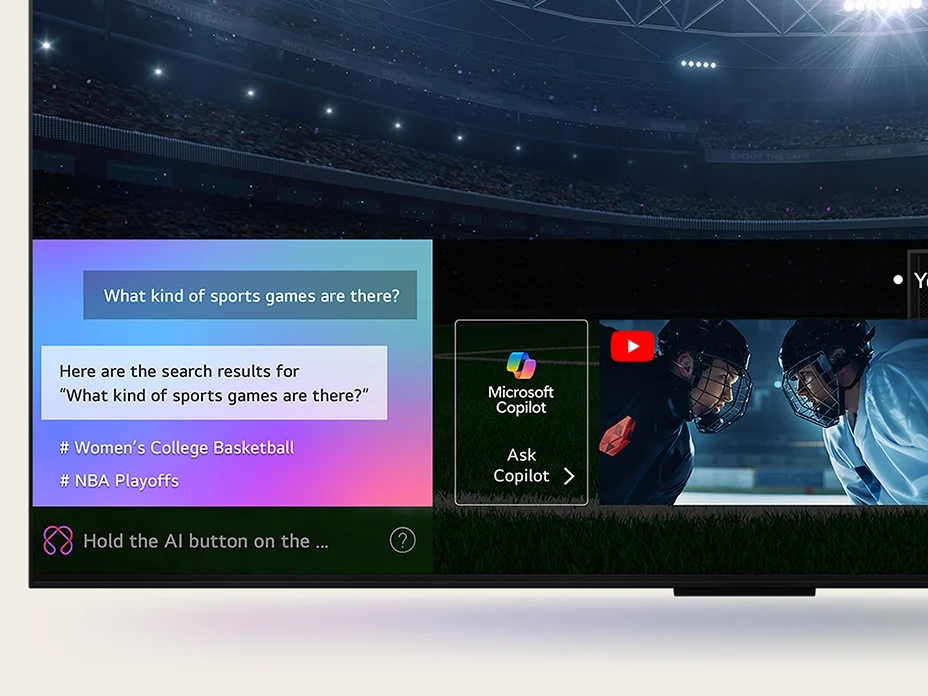
  • LG TVs Introduce Unrequested Microsoft Copilot App Feature

    LG TVs Introduce Unrequested Microsoft Copilot App Feature

    Key Takeaways

    1. Major tech companies are rapidly integrating AI features into products, even when not necessary.
    2. LG TV users are frustrated with the new Microsoft Copilot app that cannot be fully uninstalled.
    3. The integration of Copilot in LG TVs was anticipated but lacks clear benefits for users.
    4. Competitors like Samsung are also adopting Microsoft’s AI assistant in their products.
    5. LG already offers its own AI services, raising questions about the motivation for integrating a rival AI.


    There has been a significant trend towards integrating AI into various products in recent years, with major technology companies racing to incorporate AI features into items that previously functioned perfectly well without them. Search engines are now focused on AI-generated summaries, smartphone makers are making vague claims about on-device intelligence, and Microsoft has even launched a new series of PCs featuring a special AI key. Just when it felt like your living room was safe from the buzz around generative AI, LG has begun incorporating Microsoft’s Copilot AI into its smart TVs.

    Unwanted Features

    According to several LG TV users, a recent update to WebOS has added a Microsoft Copilot app to the homescreen. Similar to other preinstalled system apps, this one can’t be fully deleted or uninstalled, leaving users with the option to only hide it. Many LG TV owners took to Reddit to express their annoyance, with a post in r/mildlyinfuriating receiving over 35,000 upvotes and numerous comments criticizing LG for adding yet another unnecessary app to an already cluttered smart TV interface.

    Expectations vs. Reality

    This development was somewhat anticipated. LG had announced at CES 2025 in January that it would integrate Microsoft Copilot, but they didn’t elaborate on how this would function or benefit users, only vaguely mentioning that it would help them “efficiently find and organize complex information using contextual cues.”

    Competitors Join the AI Craze

    LG isn’t alone in adopting Copilot; Samsung has already integrated Microsoft’s AI assistant into its 2025 TV models, which includes Micro RGB, OLED, The Frame Pro, and The Frame series, along with the M7, M8, and M9 monitors.

    Currently, the Copilot app on LG TVs offers limited functionality, mainly directing users to the web version of Copilot. The anticipated deeper integration that would provide context-aware recommendations has yet to materialize, and users were not particularly asking for it in the first place. It’s likely that this will continue to be the case.

    LG’s Own AI Services

    LG already has a range of its own AI offerings, such as an AI chatbot, AI Voice ID, and AI Concierge, which makes it seem unlikely that they would prioritize a rival AI service over their own. This situation raises questions about the motivation behind this integration, suggesting that it might be aimed at boosting Microsoft’s growth metrics through undisclosed agreements.

    Source:
    Link


  • Nintendo Switch 2 HDMI Connectivity Issues in Docked Mode

    Nintendo Switch 2 HDMI Connectivity Issues in Docked Mode

    Key Takeaways

    1. HDMI Signal Loss Issues: Nintendo Switch 2 users are facing HDMI signal loss, black screens, and flickering when connected to LG TVs in docked mode, especially with HDR turned on.

    2. HDR Tone Mapping Problems: The interaction between Switch 2’s HDR output and LG TVs’ tone mapping settings is causing visual glitches; users are advised to switch to the HGiG setting for better results.

    3. Support from YouTube and Forums: Channels like HDTVTest and forums such as NintendoLife confirm that adjusting TV tone mapping to HGiG can resolve HDR color issues and recommend using “Ultra High Speed” HDMI cables.

    4. Potential Fixes: Disabling the 120Hz refresh rate on the Switch 2 and connecting the dock directly to the TV may help reduce signal loss and flickering.

    5. Uncertain Compatibility Issue: The root cause of the problems remains unclear, with Nintendo support unaware of widespread issues and suggesting repairs or replacements for affected users.


    Nintendo Switch 2 users are experiencing a lot of problems with HDMI signal loss recently, especially when they connect their console in docked mode to LG TVs. Many players are reporting issues like black screens, flickering, and messages saying “invalid format,” particularly when HDR is turned on. The most common problems seem to happen when the source-based tone mapping isn’t used on LG TVs, according to various users and developers.

    Issues with HDR Output

    From the conversations among users, it appears that the way the Switch 2’s HDR output interacts with LG’s default tone mapping settings may be causing these issues. When HDR is activated without making sure the TV’s tone mapping mode matches, it can create visual glitches. This problem has been mentioned by both gamers facing these issues and analysts who are responding to questions in the discussion. One user suggests changing the LG TV’s HDR Tone Mapping to the HGiG setting, which could not only fix the signal stability problems but also enhance HDR image quality, no matter which console is being used. This might be a crucial step for LG TV owners who have the Switch 2 (curr. $449 on Amazon).

    Confirmation from YouTube and Forums

    YouTube channels like HDTVTest and forums such as NintendoLife are backing up these claims, showing visual comparisons before and after adjusting the TV’s tone mapping to HGiG, which fixed the HDR color issues. The same sources advise using only “Ultra High Speed” HDMI cables to prevent further compatibility problems.

    Other Potential Fixes

    Additionally, some users found that disabling the 120Hz refresh rate in the Switch 2 settings effectively stops signal loss and screen flickering. Although this restricts the console to lower refresh rates, it is seen as one of the easiest solutions. A few users also mentioned that connecting the Switch 2 dock directly to the TV, instead of using intermediary devices like HDMI switchers or soundbars, might be beneficial.

    At this point, it is still uncertain whether this is a compatibility issue between Nintendo or LG firmware, since users have reported that Nintendo support seems unaware of any widespread problem and are directing affected customers towards repair or replacement options. We will keep an eye on this situation for any updates from Nintendo in the future.

    Source:
    Link

  • Philips Hue Sync TV App Enhances Smart Lighting for More TVs

    Philips Hue Sync TV App Enhances Smart Lighting for More TVs

    Key Takeaways

    1. Philips Hue Sync TV app now available for LG TVs in multiple countries.
    2. The app synchronizes Philips Hue smart lights with TV content for an immersive experience.
    3. Compatible devices include gaming consoles, set-top boxes, and popular streaming services.
    4. The app supports various image formats, including 4K, 8K, HDR10, and Dolby Vision.
    5. Pricing options include a one-time payment of $129.99 or a monthly subscription of $2.99.


    Signify has revealed that the Philips Hue Sync TV application is now accessible for LG televisions in numerous countries across the globe. This update allows Philips Hue smart lights to synchronize with the visual content displayed on LG TVs, creating a more immersive experience whether you are watching movies or playing video games. The Philips Hue smart lights that are compatible with this feature include the Play Light Bar, which is currently priced at $89.99 on Amazon.

    Dynamic Lighting Effects

    The Philips Hue Sync TV application is designed to produce dynamic lighting effects, altering both brightness and color to align with what’s being shown on the screen. The app can be utilized with various devices such as gaming consoles, set-top boxes, streaming sticks, and popular streaming services like Netflix and Disney+. It supports several image formats, including 4K, 8K, HDR10, and Dolby Vision. This smart TV app is available for LG TVs that are manufactured from 2024 onward and run on webOS version 24 or higher.

    Pricing and Availability

    It’s important to remember that the Philips Hue Sync TV app is not free. Users can opt for a one-time payment of $129.99/€129.99 or choose a monthly subscription that enables access to the app on up to three televisions, costing $2.99/€2.99 per month. The app is available in countries such as the US, the UK, Canada, Australia, and the Netherlands. A complete list of regions where the Philips Hue Sync TV app can be used is provided below.

    Source:
    Link