Tag: Windows 11

  • Windows 11 Now Lets You Share Audio with Multiple Devices

    Windows 11 Now Lets You Share Audio with Multiple Devices

    Key Takeaways

    1. New Feature: Windows has introduced a “Shared Audio” feature in the quick settings menu, allowing users to stream audio to multiple devices simultaneously.

    2. Device Selection: Users can choose one or more audio devices, such as Bluetooth headphones or wired speakers, for simultaneous audio playback.

    3. Enhanced Usability: This feature addresses a limitation of Windows, which previously required third-party apps for multi-device audio support.

    4. Compatibility Questions: There are uncertainties about the feature’s compatibility with Auracast and its ability to connect different types of devices at once.

    5. Future Updates: Microsoft has not officially announced the feature, but it may be included in upcoming stable releases of Windows 11 if testing is successful.


    As mentioned by the X user @phantomofearth, there’s a fresh feature called “Shared Audio” that has shown up in the quick settings menu right next to the “Project” button.

    Selecting Audio Devices

    When users turn this on, they are asked to choose one or more audio devices—like Bluetooth headphones or wired speakers—and start streaming audio to them all at the same time.

    So far, Windows has not allowed playing audio on multiple devices at the same time without the help of third-party applications, such as OBS. This new feature seems to be aimed at making it easier for users since its rivals already provide this kind of capability.

    Compatibility Concerns

    It’s still unclear if the Shared Audio feature will work with Auracast or if it will let users connect different types of devices at once, like Bluetooth earbuds, hearing aids, and wired headphones. The present stable version of Windows 11 does support Bluetooth LE audio, which allows for two compatible devices to be connected at the same time, although there are some limitations. Users usually have to download specific drivers, and the Settings menu currently only permits sequential connection of devices. The new Shared Audio feature is expected to make it easier to select multiple devices at once.

    Future Releases

    It’s quite interesting that Microsoft hasn’t made any official statement about this new option—not even in their Insider blogs. If the testing phase goes well, the Shared Audio feature will probably show up in future stable versions of Windows 11.

    Source:
    Link

  • Linux Desktop Gains 5% US Market Share: 2025 Could Be The Year

    Linux Desktop Gains 5% US Market Share: 2025 Could Be The Year

    Key Takeaways

    1. Linux Market Share Growth: Linux has reached 5.03% of the desktop operating system market share in the U.S. as of June 2025, showing a steady increase from previous years.

    2. Decline of Windows: Microsoft Windows has seen a significant decline in market share, dropping 13% over the past decade, with Windows 10’s share decreasing to 42.11% by June 2025.

    3. User Dissatisfaction: Many Windows users are frustrated with Microsoft’s ad integration and features like Copilot, while macOS remains limited to expensive Apple hardware.

    4. Linux as a User-Friendly Alternative: Linux distributions are focusing on user-friendliness and customization, offering a free, privacy-focused alternative that can run popular applications through compatibility layers.

    5. Emerging Gaming Options: Linux gaming has improved with tools like Proton and support from Valve, making many AAA titles accessible, while gaming-specific distributions are gaining popularity among gamers.


    The phrase “The year of the Linux desktop” has become a meme that reflects the growing acceptance of Linux as a competitive operating system for consumers, rivaling Windows and macOS. Each year since 1998 has been claimed to be the year for Linux on desktops, yet that promise has not materialized.

    A Shift in Trends?

    However, this might be about to change. Recent data from StatCounter for June 2025 reveals that Linux has captured 5.03% of the desktop operating system market share in the United States from May 2024 to June 2025. Microsoft Windows continues to lead the market with a significant 63.2% share, but this figure represents a 13% decline compared to the previous decade.

    Among the various versions of Windows, Windows 11 makes up 54.72% of the market, while Windows 10, which was at 56.04% until February 2025 and peaked at 66.69% in December 2024, has now dropped to 42.11% by June 2025.

    Apple’s Position

    Apple’s OS X holds a respectable 16.57% of the market, while the newer macOS only has 7.72%. Together, Apple’s operating systems make up 24.29%, still significantly behind Windows.

    The rise in Linux’s market share is notable, now exceeding the “Unknown” category at 4.76%. Chrome OS is trailing with only 2.71%. Over the last few years, Linux has seen consistent growth in desktop usage, moving from 2.76% in 2022 to 3.12% in 2023, 4.44% in 2024, and now 5.03% in 2025.

    Long Road to Growth

    It took Linux two decades to achieve a 1% desktop market share in 2011, and another ten years to reach 2%. According to ZDNet, which favors the US Federal Government Website and App Analytics over StatCounter, 23% of Linux users visit federal websites (this includes Android and Chrome OS), while 11.7% of visitors use macOS. Windows 10 and Windows 11 users make up 15.7% and 15.3%, respectively.

    Windows 10 will reach its end-of-support date on October 14, 2025, although Microsoft is now providing options for extended security updates (ESUs) for an additional year. Many users with Windows 10 on capable hardware are unable to upgrade to Windows 11 due to its TPM requirement, which can be bypassed, but the methods are not officially endorsed by Microsoft.

    User Frustrations

    Windows users are unhappy with Microsoft’s strategy of pushing ads and integrating Copilot into nearly all features of the OS, affecting even basic applications like Paint and Notepad.

    Conversely, macOS remains restricted to the pricey hardware it comes with. Although there are unofficial methods to install macOS on non-Apple computers, Apple’s transition to its own silicon has nearly eliminated support for x86 Macs. The forthcoming macOS Tahoe will be the last version to support Intel CPUs, and installing macOS on non-Apple hardware is against Apple’s EULA.

    Moreover, the process of creating a Hackintosh is not simple and often involves a steep learning curve.

    Linux as an Alternative

    Many users perceive this gap as an opportunity for Linux. It is free, emphasizes privacy, offers vast customization options, and can perform better than Windows on similar hardware.

    Distributions like Ubuntu, Mint, and Fedora are working hard to make Linux more user-friendly, while compatibility layers such as WINE enable Linux users to run popular applications like Microsoft Office with ease.

    Interestingly, Microsoft has its own distribution called CBL-Mariner for Azure, which it also utilizes for the WSLg backend with WSL 2, allowing native Linux applications with graphical interfaces to run on Windows.

    The Gaming Landscape

    While gaming has traditionally been a stronghold for Windows, tools like Proton and Valve’s efforts to promote Linux gaming via the Steam Deck and Steam OS have made many popular AAA titles accessible on Linux without significant losses in performance or visual quality.

    Source:
    Link


  • Windows 11 25H2 Update Lets Users Uninstall Bloatware and Apps

    Windows 11 25H2 Update Lets Users Uninstall Bloatware and Apps

    Key Takeaways

    1. Bloatware Issue: Users of new Windows 11 devices often face excessive bloatware, complicating the removal of built-in Microsoft apps.

    2. 25H2 Update Testing: Insiders report that the upcoming Windows 11 25H2 update allows easier deletion of certain Microsoft apps, like Media Player and Notepad, through a new removal option.

    3. User Limitations: The update’s benefits are limited; it requires Group Policy Editor, unavailable in Windows 11 Home, and only EU users can remove the Edge browser due to legal restrictions.

    4. Update Benefits: The 25H2 update will be distributed as an enablement package, potentially improving installation times and user control over the operating system.

    5. Performance Claims: Microsoft has made claims about performance improvements in Windows 11, but the actual impact of bloatware removal on speed remains uncertain.


    A frequent issue raised by users of new prebuilt desktops or laptops is the excessive bloatware that comes with Windows 11. While getting rid of third-party applications is usually simple, dealing with Microsoft’s own apps can be trickier. The soon-to-be-released Windows 11 25H2 update might provide a solution, but there are some important considerations.

    Testing the Update

    Insiders who are trying out the Windows 11 update found that they can delete apps like Media Player, Notepad, and those related to Xbox. Typically, users have to use PowerShell, which isn’t the easiest tool to navigate. However, some computers will now have an option called Remove Default Microsoft Store Packages. Locating this shortcut may take some searching through the Windows Components > App Package Deployment menus.

    Limitations for Users

    Sadly, not every user will be able to take advantage of the 25H2 update. It requires the Group Policy Editor, which is not included in Windows 11 Home without additional steps. Even those who own Windows 11 Pro and Enterprise editions won’t have complete authority over the default apps. Thanks to the Digital Markets Act, only users in the EU can remove the Edge browser. These restrictions are challenges that third-party tools like Geek Uninstaller can help overcome.

    Potential Benefits of the Update

    Although many users may find it hard to remove unwanted apps, the Windows 11 update could bring other benefits. The update will be distributed as an enablement package, meaning that many changes are already set up and just need to be turned on. This could help with the long installation times that users have complained about with Windows 11 24H2. Released in October 2024, that major update also brought several issues, such as problems with AutoHDR and inconsistent network connectivity.

    Microsoft has recently made some debated statements about performance improvements in Windows 11. Even if removing the bloatware doesn’t enhance the speed of PCs, some users will at least gain greater control over the operating system.

    Source:
    Link

  • Windows 11 Surpasses Windows 10 as Leading Desktop OS

    Windows 11 Surpasses Windows 10 as Leading Desktop OS

    Key Takeaways

    1. Windows 11 has become the most popular desktop operating system, holding a 52% market share as of July 2025, surpassing Windows 10 at 44.59%.

    2. The growth of Windows 11 has been gradual, increasing from less than 10% in 2022 to 36% in 2024, with over 400 million devices using it by October 2023.

    3. Strict hardware requirements for Windows 11 have slowed its adoption, as many older computers do not meet the new criteria, despite a free upgrade option for Windows 10 users.

    4. Windows 10 will lose mainstream support on October 14, 2025, but users can receive an additional year of free security updates if they meet specific conditions.

    5. Microsoft aims to encourage more users to switch to Windows 11 by emphasizing security, cloud integration, and ongoing support before Windows 10’s final phase.


    Microsoft has hit a big milestone in its journey to phase out Windows 10. Windows 11 has now taken the lead as the most popular desktop operating system around the world. As per the latest statistics from StatCounter, Windows 11 boasts a 52% share of all desktop Windows PCs as of July 2025, while Windows 10 has dropped down to 44.59%. This shift occurs nearly four years after the launch of Windows 11 and just a few months before Windows 10’s support comes to an end.

    Growth of Windows 11

    The rise of Windows 11 has been slow yet consistent. The operating system had less than 10% of the market by 2022, increased to 28% in 2023, and then reached 36% in 2024. The data from October 2023 showed that Windows 11 was installed on over 400 million devices. However, this growth was significantly slower compared to Windows 10’s launch, which hit the 400 million mark within just a year. In contrast, Windows 11 took twice that time. It was only in 2025, as Microsoft pushed harder before Windows 10’s retirement, that Windows 11 began to close the gap more rapidly.

    Hardware Challenges

    One key factor for the slower adoption has been the strict hardware requirements of Windows 11. Even though Microsoft provided a free upgrade option for Windows 10 users, many older machines didn’t meet the new CPU and security criteria, leaving millions unable to upgrade. Recently, Microsoft has increased efforts to promote hardware upgrades, including more noticeable full-screen alerts encouraging users to transition to compatible systems.

    Support Timeline

    Looking forward, Windows 10 is set to leave mainstream support on October 14, 2025. Microsoft has made an additional year of free security updates available to users who log in with a Microsoft account and back up their Documents folder to OneDrive. For those who choose not to do this, there’s an option to pay $30 or use Microsoft Rewards points for updates.

    In spite of some hesitance and a slower uptake compared to Windows 10, Windows 11 is now securely established as the leading desktop operating system. Microsoft is counting on its emphasis on security, cloud integration, and continued support to encourage more users to make the change before Windows 10’s final phase.

    StatCounter via Windows Central

    Source:
    Link


  • Windows 12 Release Delayed by at Least One Year

    Windows 12 Release Delayed by at Least One Year

    Key Takeaways

    1. Windows 11 version 25H2 is set to launch in late 2025, with Insiders already testing initial builds.
    2. Security updates for Windows 11 Home and Pro will last 24 months post-launch, while Enterprise and Education editions will receive updates for 36 months.
    3. Users of Windows 10 can access an additional year of security updates with a simple method.
    4. The focus of the 25H2 update is on improving stability and quality, rather than introducing many new features.
    5. 25H2 is an “enablement update,” allowing for a quick installation process by activating existing features in version 24H2.


    Microsoft is getting ready to launch Windows 11 version 25H2, which is a major update for its operating system. Insiders can already try out the initial builds of this version, which is set to be widely available in the latter part of 2025. People using the earlier version, Windows 10, can access an additional year of security updates from Microsoft by employing a fairly simple method, which we will explain here.

    Update Details

    In a recent blog entry, Microsoft’s Jason Leznek shared insights about the upcoming update for Windows 11. He specified that security updates for both the Windows 11 Home and Pro editions will be assured for 24 months following the launch of 25H2, while the Enterprise and Education editions will receive updates for 36 months. Additional features will be rolled out over time after the update is released. This suggests that the company is currently concentrating on enhancing Windows 11, even though development on the next Windows version, likely Windows 12, is already in progress.

    Future Expectations

    As a result, users will need to be patient for a while longer before a new version of Windows arrives. Presently, it seems that private users might have to wait until October 2027, while businesses could be looking at October 2028 (assuming 25H2 launches at the end of Windows 10 support in mid-October 2025). There’s a good chance that Microsoft might push back this deadline again next year.

    Focus on Stability

    The main goal of this update is to enhance stability, improve quality, and resolve issues rather than roll out a multitude of new features. Windows 11 25H2 is anticipated to launch around the same time as the conclusion of support for Windows 10 in October 2025, facilitating a smooth transition for users to the newer operating system.

    25H2 is termed an “enablement update”, indicating that many of its new features are already embedded in the code of version 24H2 and can be activated with a minor update. This design aims to provide a particularly swift and efficient installation process that should not take longer than a typical monthly security update.

    Source:
    Link

  • Microsoft: Windows 11 Claims 2.3x Speed Boost Over Windows 10

    Microsoft: Windows 11 Claims 2.3x Speed Boost Over Windows 10

    Key Takeaways

    1. Upgrading to Windows 11 offers a more secure operating system and a cleaner user interface, as well as better compatibility with AI-driven applications.
    2. Microsoft claims that Windows 11 PCs can be up to 2.3x faster than Windows 10 PCs, but this is based on a potentially misleading benchmark comparing different Intel processor generations.
    3. Actual performance may vary depending on device settings, with many experts suggesting that a fairer comparison involves similar hardware for both operating systems.
    4. Users may face significant costs when upgrading to Windows 11, especially if their current hardware does not meet the new system requirements.
    5. Microsoft has introduced the Extended Security Updates (ESU) program, extending support for Windows 10 until October 14, 2025, to help users transition.


    Microsoft has recently shared a blog post that talks about the advantages of upgrading from Windows 10 to Windows 11. The company claims that users will have a more secure operating system with a cleaner user interface and better compatibility with applications driven by AI. However, the claim that “Windows 11 PCs are up to 2.3x faster than Windows 10 PCs” is what has caught the most attention. Critics quickly pointed out that this statement is based on a possibly misleading benchmark.

    Benchmark Details

    The article mentions a Geekbench 6 multi-core test in the footnotes. Yet, the comparison is made between different Intel processor generations. Windows 10 PCs equipped with 6th, 8th, and 10th-generation CPUs are compared to Windows 11 systems that use 12th and 13th-generation processors. As noted by PC Gamer, some of these CPUs are up to nine years older than Intel’s newest offerings.

    Performance Variability

    The benchmark from December 2024 adds a note that actual performance can differ based on the device and its settings. Still, many observers feel that a fairer comparison would involve Windows 10 and Windows 11 PCs with the same hardware. Unfortunately for Microsoft, most comparisons show that the performance boost with the new operating system is quite small.

    Microsoft may be getting anxious to persuade users who have not yet upgraded to Windows 10. Gamers would be eager for the promise of 2.3x better performance, but they are smart enough to recognize that the new OS isn’t as groundbreaking as it sounds. Furthermore, these users have pointed out that the cumbersome nature of Windows 11 focuses on features that do not necessarily enhance frame rates.

    Upgrade Costs

    For those who do not frequently upgrade their PC’s hardware, the transition also brings along considerable costs. Customers who have a legitimate Windows 10 license can move to Windows 11 without any extra charges. However, the requirements for Windows 11 exclude older processors that lack support for TPM 2.0 and Secure Boot. Consequently, some users find themselves needing to buy new desktops or laptops that come with Windows 11 already installed.

    Microsoft has recently rolled out the Extended Security Updates (ESU) program. This initiative will prolong support for Windows 10 for an additional year. Otherwise, security updates will cease on October 14, 2025, which could leave PCs exposed to malware threats.

    Source:
    Link


  • Extend Your Windows 10 Experience: Microsoft’s Three Options

    Extend Your Windows 10 Experience: Microsoft’s Three Options

    Key Takeaways

    1. Windows 10 support ends on October 14, 2025, prompting users to transition to Windows 11.
    2. Windows 10 remains widely used, with 53% of computers globally still running this version.
    3. Extended Security Updates (ESU) will be available for individual users for $30, allowing an extra year of usage.
    4. Windows Backup can be used for free synchronization of data with the Microsoft cloud.
    5. The Microsoft Rewards program allows users to earn points for activities, which can be used for subscription benefits.


    Since it was introduced, Windows 10 has fulfilled the hopes of its users while providing state-of-the-art features. Yet, this service is set to end on October 14, paving the way for Windows 11. Microsoft has come up with three plans to extend your experience with the current version, ensuring you still get regular updates.

    Impact on Users

    This change will have significant implications for millions. As per StatCounter, Windows 10 remains the most prevalent version globally, with 53% of computers using this software. Moreover, Microsoft faces challenges in encouraging users to shift to Windows 11, particularly given the technical requirements that must be met to run this new software. Essentially, some users may find their computers inadequate for supporting this version.

    Options for Users

    As the deadline of October 14, 2025, draws nearer, the company has opted to provide various solutions for those who are still undecided. Consequently, the special Extended Security Updates (ESU) program, initially designed for businesses, will now be accessible to individual users. Specifically, for a fee of $30, you can gain an additional year of Windows 10 usage. Keep in mind, however, there won’t be any more extensions, and you’ll need to decide when the deadline arrives. For business users, the price is $61 per user.

    Alternative Solutions

    Another helpful option is utilizing Windows Backup. This feature allows you to synchronize your data with the Microsoft cloud, enabling you to access the ESU program without any costs involved.

    Finally, you might want to consider the Microsoft Rewards program. This initiative lets users earn points through activities like searching on Bing, playing Xbox games, or buying software from the official store. In this scenario, subscribing to the program requires just 1,000 reward points.

    In conclusion, the transition to Windows 11 appears unavoidable for all users, even after October 14, 2025. Consequently, millions will need to make a decision to ensure they enjoy enhanced security on a daily basis.

    Source:
    Link

  • Windows 11 Smart App Control Blocks Unknown Executables Before Launch

    Windows 11 Smart App Control Blocks Unknown Executables Before Launch

    Key Takeaways

    1. Smart App Control (SAC) enhances Windows 11’s security by checking apps before they run, preventing untrusted code from executing.
    2. SAC uses a “guilty until proven innocent” approach, blocking unknown or unsigned files based on reputation and machine learning.
    3. The combination of SAC and Microsoft Defender improves security by minimizing initial attacks while still providing reactive scanning for known threats.
    4. SAC may lead to better system performance by reducing the need for ongoing background scanning of active processes.
    5. SAC operates alongside Defender; if SAC blocks a file, it cannot be overridden, ensuring a layered security system.


    Windows 11 enhances Microsoft’s security features with Smart App Control (SAC), which checks apps before they run and prevents untrusted code from executing. This feature works together with traditional antivirus solutions like Microsoft Defender, which continues to watch for known malware. By combining a proactive security measure with a well-established reactive scanner, the operating system seeks to minimize both initial attacks and ongoing threats.

    Traditional Antivirus Approach

    Regular antivirus programs operate on an “innocent until proven guilty” basis. They permit files to execute and then search for harmful patterns using signature databases, heuristic evaluations, and behavior tracking. Regular updates to definitions help maintain high detection rates, but zero-day or polymorphic threats might bypass signatures until suspicious activity is noted. This method is effective for addressing known dangers but can lead to delays in stopping threats after execution.

    Smart App Control’s Method

    Smart App Control flips this approach on its head. Before an executable file is allowed to run, SAC checks Microsoft’s cloud reputation service, verifies the developer’s digital signature, and employs machine-learning models trained on extensive collections of trusted and harmful software. If the file’s reputation is unknown, and it is unsigned or deemed potentially harmful, the operating system outright blocks it. This means that every new program is seen as “guilty until proven innocent,” effectively preventing many attacks at the delivery stage rather than waiting for them to activate.

    SAC’s ability to prevent unknown binaries from loading means there’s no longer a need for ongoing background scanning of active processes. Consequently, Microsoft’s internal tests indicate a slight performance improvement over traditional scanners, which utilize CPU resources to inspect files in real-time. At the same time, Defender handles tasks that SAC does not cover, such as macro analysis or script checks, thus providing a comprehensive system without overlapping functions.

    Restrictions and Benefits

    SAC goes through a preliminary evaluation period; if it disrupts regular tasks, Windows will disable it permanently unless the system is re-installed. Similarly, once SAC is turned off, it cannot be easily switched back on. Developers and advanced users who depend on unsigned or custom builds might find these limitations counterproductive, while managed enterprise groups could gain from the more stringent default settings.

    Crucially, SAC is intended to function alongside Microsoft Defender, not replace it. If SAC blocks a file, that decision is final and cannot be overridden. Defender still manages deeper forensic functions, malware removal, and scans for archived content already present on the disk. In this layered approach, SAC lessens exposure, while Defender addresses any issues that slip through or predate the current session.

    Source:
    Link

  • Microsoft Launches Edit: Free Command-Line Text Editor for x64 Windows

    Microsoft Launches Edit: Free Command-Line Text Editor for x64 Windows

    Key Takeaways

    1. Microsoft has launched Edit, a free command-line text editor for 64-bit Windows 11.
    2. Edit includes familiar features from the 32-bit version of MS Editor, along with additional capabilities.
    3. The user-friendly menu system resembles Notepad, making it easy for new users to navigate.
    4. Advanced features include word wrapping, regex search, and the ability to open multiple files simultaneously.
    5. MS Edit is available for download on GitHub, and additional resources for MS-DOS commands can be found on Amazon.


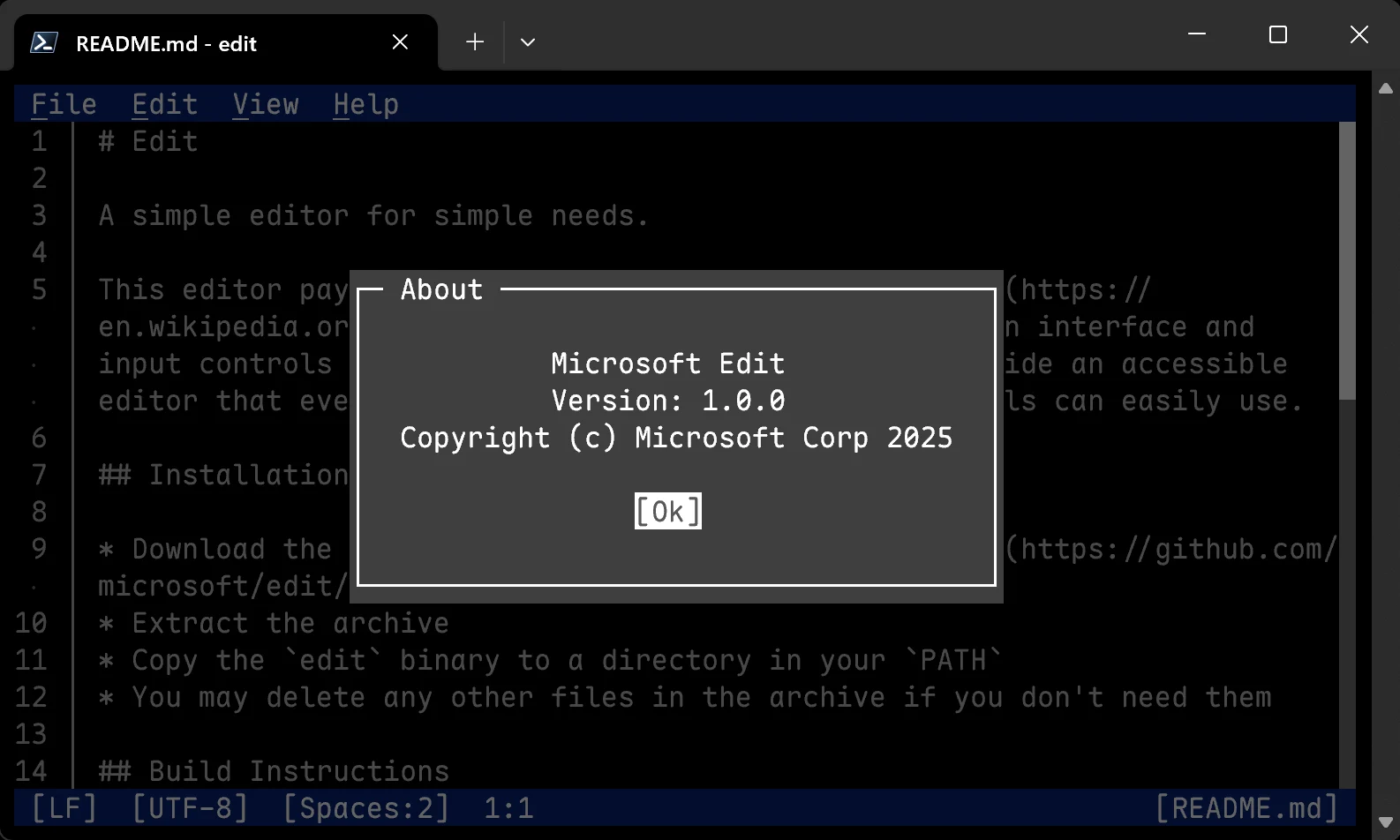
    Microsoft has introduced Edit, a free command-line text editor specifically designed for 64-bit (x64) versions of Windows 11.

    Similar Features to Previous Versions

    This new editor offers similar text editing functions to the 32-bit version of MS Editor, which was available for 32-bit (x86) Windows 10 and older systems, but comes with additional features. While users of Windows 11 can utilize Notepad for editing any text file, those working through the command line need to exit the command prompt or PowerShell to access that application.

    User-Friendly Menu System

    For those who are new, there’s no need to memorize complex keyboard shortcuts since Edit employs a menu layout akin to Notepad, featuring options like File, Edit, View, and Help at the top. Because Edit operates within a Command Prompt in Windows 11, it also includes mouse support to simplify menu navigation and file selection.

    Advanced Editing Capabilities

    The text editor supports word wrapping for lengthy lines of code and allows for the use of regular expression (regex) searches to locate text in extensive documents. Users can open multiple files at the same time; however, the first release does not provide a side-by-side view for two files.

    If you want to build or download MS Edit, it’s available on GitHub right now. For those who might have forgotten how to execute MS-DOS commands, there’s a helpful book available for purchase on Amazon. Additionally, enthusiasts interested in experiencing real MS-DOS on an 8086 CPU can check out a handheld PC that’s also sold on Amazon.

    Source:
    Link

  • Xbox Games Rumored to Play on Windows PCs with Official Emulator

    Xbox Games Rumored to Play on Windows PCs with Official Emulator

    Key Takeaways

    1. Xbox games may soon be playable on Windows PCs through emulation, according to rumors linked to an upcoming Xbox showcase.
    2. Microsoft is reportedly developing an Xbox emulator that could allow a wider range of Xbox games, including those not currently available on PC, to be played on Windows.
    3. This emulator initiative is seen as crucial for game preservation, enabling players to enjoy older titles without complex modifications.
    4. The concept of “Xbox Everywhere” is highlighted, suggesting a broader strategy for Xbox gaming across different platforms.
    5. The Xbox app on Windows 11 has improved, potentially benefiting upcoming handheld devices, with discussions of a “Big Picture Mode” feature similar to Steam’s.


    In a new YouTube video shared by eXtas1s, there’s a suggestion that Xbox games may soon be available to play on Windows PCs through emulation. While much of this is still uncertain and largely speculative, it aligns with earlier comments from Xbox staff like Sarah Bond, who indicated their interest in initiating a program for game preservation and archiving.

    Rumors and Speculation

    The rumors have surfaced just ahead of the Xbox showcase scheduled for June 8th and stem from Microsoft’s continuous work on backward compatibility and game archiving. Sources suggest that Microsoft is developing an Xbox emulator for Windows that would enable players to enjoy titles from earlier Xbox consoles on PCs using x64 emulation. This initiative could expand beyond the current backward compatibility program, allowing a wider array of Xbox games to be playable on PCs. It might even include games that haven’t been officially made available for PC or those that are not part of the current list of backward-compatible titles.

    The Importance of Game Preservation

    Creating such an emulator could be crucial for preserving the vast library of Xbox games, enabling users to keep enjoying their purchased titles on modern systems without the need for complex file adjustments or third-party modifications. Additionally, this would represent a significant move toward the concept of “Xbox Everywhere.” For those who prefer gaming on an Xbox console, the Series X is still available for purchase on Amazon.

    Improvements to Xbox App

    JezCorden has mentioned on BlueSky that the Xbox app on Windows 11 has recently improved in both appearance and performance, which could be advantageous for upcoming handheld devices like the Asus ROG Ally 2. Xbox CEO Phil Spencer was among the first to share this opinion, which might be seen as a form of endorsement. eXtas1s also suggested that the app could introduce a feature called “Big Picture Mode,” similar to what Steam offers. This would be beneficial for handheld devices and simplify access to the Xbox game library on other Windows platforms.

    Source:
    Link