Tag: MacOS

  • Nvidia RTX 5090 Works on macOS with Tiny Corp’s Custom Driver

    Nvidia RTX 5090 Works on macOS with Tiny Corp’s Custom Driver

    Key Takeaway

    1. A new open-source driver from Tiny Corp enables Nvidia Blackwell GPUs to connect with macOS Macs via Thunderbolt 5 or USB4, reintroducing Nvidia hardware into the Mac ecosystem.
    2. The setup currently uses a custom kernel extension and Tiny Grad compiler, resulting in lower performance compared to native Metal or CUDA solutions.
    3. While performance is modest now, the project holds significant potential for future optimization, especially in improving kernel efficiency for heavy compute tasks.

    Apple and Nvidia had a fallout many years ago, which left Mac users without official GPU support. This break up killed CUDA support on macOS, making developers and researchers turn to Apple’s Metal framework. But now, a new open-source driver from Tiny Corp has changed the game, reintroducing Nvidia Blackwell hardware to the Mac environment.

    Introduction to the Tiny GPU Project

    The project utilizes a special kernel extension called Tiny GPU. It permits external GPUs such as the RTX 5090, with its 32 GB VRAM, to connect directly with Apple Silicon Macs over Thunderbolt 5 or USB4. This significant tech advancement bypasses the need for virtual machines, streamlining the connection process. In a demo shown by Alex Ziskind, the RTX 5090 successfully paired with a Mac Mini M4 Pro, which retails at approximately $1399 on Amazon, featuring 24 GB RAM and 512 GB storage (note: price may vary).

    Performance and Current Limitations

    Though the connection is stable, the current software is still in early phases. The driver is dependent on the Tiny Grad compiler rather than native Metal or CUDA, leading to noticeable performance limitations during heavy calculation tasks. When testing with the Llama 3.1 8B model, the setup managed about 7.48 tokens each second. While offering compatibility benefits, it’s considerably slower than the native Metal-based Llama CPP, which is nearly ten times faster on similar hardware, Alex explains.

    Future Potential and Usage

    Nonetheless, the major value of this project lies in its future prospects for optimization. The main bottleneck now isn’t the Thunderbolt 5 cable—which transfers model weights efficiently—but the efficiency of automatically generated kernels. For simple chat functions, the Blackwell setup performs quite well, providing time-to-first-token speeds that are three to four times quicker than native Metal solutions.

    Installation and Practical Use

    The setup involves approving a system extension and running a Docker-based compiler pipeline. Although this isn’t yet a replacement for streamlined Metal workflows, it marks the first operational solution in years. It offers a promising glimpse into future possibilities for Nvidia GPU support on macOS.

    Alex Ziskind discusses this project extensively on his YouTube channel, demonstrating its potential and progress.


    Sources

  • GameSir GameHub: Play Steam PC Games on Mac Easily

    GameSir GameHub: Play Steam PC Games on Mac Easily

    Key Takeaways

    1. GameSir’s GameHub app allows users to play PC games on Android devices and connect their Steam accounts.
    2. GameHub will soon be available on macOS, enabling Mac users to play Windows and Steam games.
    3. The macOS version will include control over game settings like AI image upscaling, graphics performance, color mode, and VSync mode.
    4. No specific release date has been announced for the macOS version, but it is expected to launch “soon.”
    5. The iOS version of GameHub does not have the PC emulator feature and only serves as a calibration tool for GameSir controllers.


    GameSir’s GameHub is a well-liked app that includes a PC emulator function, enabling users to enjoy PC games on their Android devices. The app allows users to connect their Steam accounts to their devices, providing access to their game library. Recently, GameSir has shared news that the app will soon be available on a new platform.

    GameHub’s Expansion to macOS

    An announcement made on its official X account indicates that GameHub will soon be available for macOS. With this new addition, users will be able to play Windows and Steam games on their MacBook, iMac, Mac Studio, Mac Mini, and iMac.

    Features and Control Options

    An image shared in the announcement reveals that GameHub for Mac will offer users control over various game settings. This includes the ability to adjust features like AI image upscaling (super-resolution), graphics performance, color mode, and VSync mode. Although GameSir has not specified a release date, the announcement mentions it is “coming soon”.

    There is also a GameHub app for iOS; however, unlike the Android version, it lacks the PC emulator feature and only serves as a calibration tool for GameSir controllers. Unfortunately, there is no information about when or if PC emulation will be added to the iOS version.

    Source:
    Link


  • Hobbyist Transforms MacBook Pro into Theremin Using Hidden API

    Hobbyist Transforms MacBook Pro into Theremin Using Hidden API

    Key Takeaways

    1. Hobbyist coders often focus on what they can create rather than why they create it.
    2. Sam Henri Gold discovered a hidden API in macOS that detects the angle of a MacBook lid.
    3. He developed an application that displays the lid angle and plays a sound when the lid is moved.
    4. His tweet about the project went viral, attracting suggestions for new features from the community.
    5. While the application may not serve a practical purpose, it highlights the excitement of exploring hidden technology.


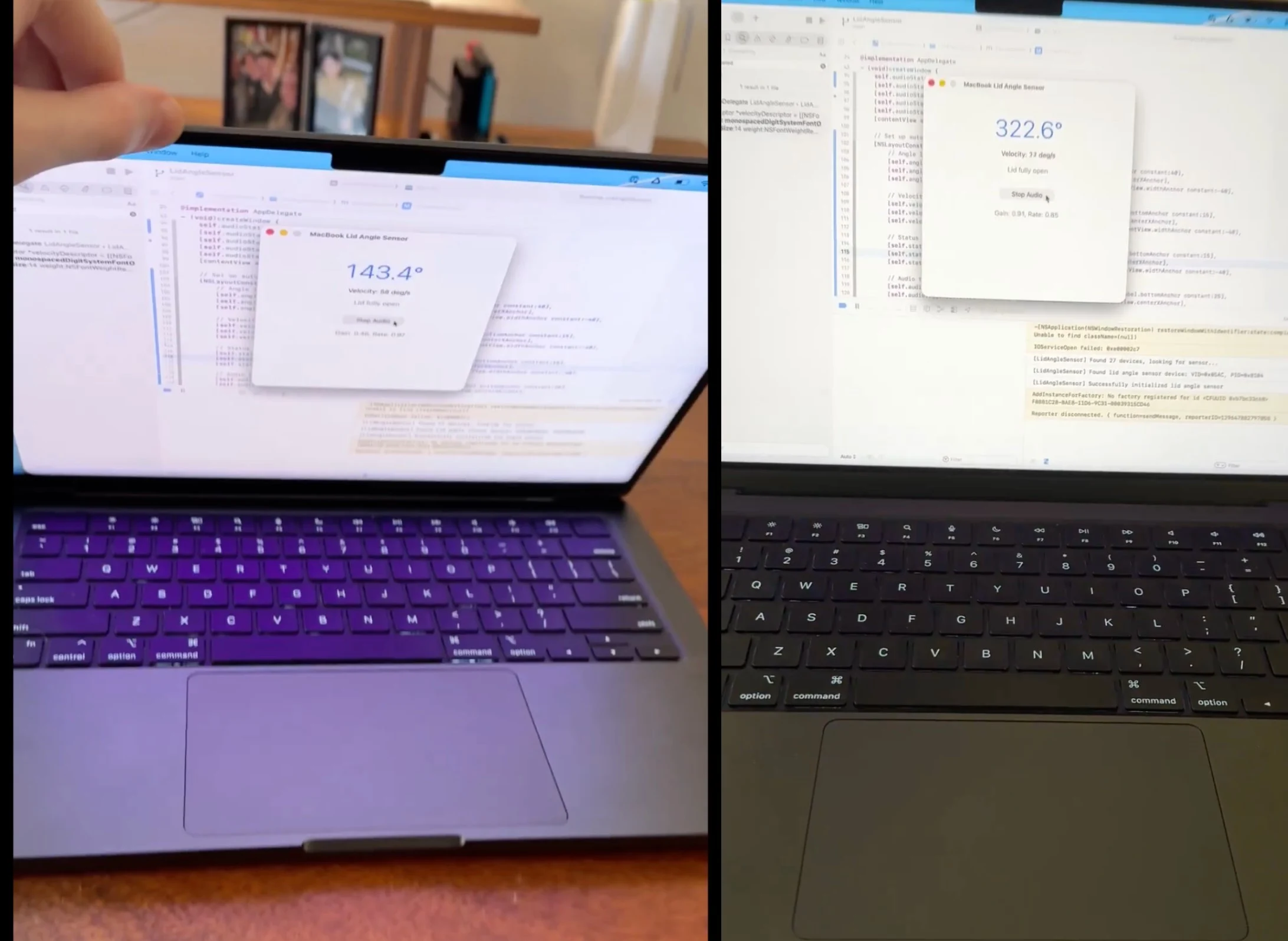
    Hobbyist coders often don’t think about the big question of “why” – they just do things because they can. One such engineer and tinkerer, known as Sam Henri Gold on Twitter/X, admits he has “too much free time.” He stumbled upon a secret API in macOS that can detect the angle of the lid on a MacBook.

    Sam’s Discovery

    It’s not exactly clear how Sam was able to use this API, but he managed to create a complete application that not only shows the lid angle but also plays a sound when the lid is moved. The sound he picked for this project is actually quite fitting – it mimics the creaking of a wooden door opening or closing.

    Going Viral

    The tweet about his creation has gained a lot of attention, with many people suggesting features, like musical instruments or a Pac-Man controller. In response, Sam chose to add a theremin simulator, which sounds just as one would expect. Does it have any real usefulness? Not really, but the thrill of finding hidden APIs is definitely exciting, especially for those who enjoy exploring beyond the surface.

    Source:
    Link


  • Linux Desktop Gains 5% US Market Share: 2025 Could Be The Year

    Linux Desktop Gains 5% US Market Share: 2025 Could Be The Year

    Key Takeaways

    1. Linux Market Share Growth: Linux has reached 5.03% of the desktop operating system market share in the U.S. as of June 2025, showing a steady increase from previous years.

    2. Decline of Windows: Microsoft Windows has seen a significant decline in market share, dropping 13% over the past decade, with Windows 10’s share decreasing to 42.11% by June 2025.

    3. User Dissatisfaction: Many Windows users are frustrated with Microsoft’s ad integration and features like Copilot, while macOS remains limited to expensive Apple hardware.

    4. Linux as a User-Friendly Alternative: Linux distributions are focusing on user-friendliness and customization, offering a free, privacy-focused alternative that can run popular applications through compatibility layers.

    5. Emerging Gaming Options: Linux gaming has improved with tools like Proton and support from Valve, making many AAA titles accessible, while gaming-specific distributions are gaining popularity among gamers.


    The phrase “The year of the Linux desktop” has become a meme that reflects the growing acceptance of Linux as a competitive operating system for consumers, rivaling Windows and macOS. Each year since 1998 has been claimed to be the year for Linux on desktops, yet that promise has not materialized.

    A Shift in Trends?

    However, this might be about to change. Recent data from StatCounter for June 2025 reveals that Linux has captured 5.03% of the desktop operating system market share in the United States from May 2024 to June 2025. Microsoft Windows continues to lead the market with a significant 63.2% share, but this figure represents a 13% decline compared to the previous decade.

    Among the various versions of Windows, Windows 11 makes up 54.72% of the market, while Windows 10, which was at 56.04% until February 2025 and peaked at 66.69% in December 2024, has now dropped to 42.11% by June 2025.

    Apple’s Position

    Apple’s OS X holds a respectable 16.57% of the market, while the newer macOS only has 7.72%. Together, Apple’s operating systems make up 24.29%, still significantly behind Windows.

    The rise in Linux’s market share is notable, now exceeding the “Unknown” category at 4.76%. Chrome OS is trailing with only 2.71%. Over the last few years, Linux has seen consistent growth in desktop usage, moving from 2.76% in 2022 to 3.12% in 2023, 4.44% in 2024, and now 5.03% in 2025.

    Long Road to Growth

    It took Linux two decades to achieve a 1% desktop market share in 2011, and another ten years to reach 2%. According to ZDNet, which favors the US Federal Government Website and App Analytics over StatCounter, 23% of Linux users visit federal websites (this includes Android and Chrome OS), while 11.7% of visitors use macOS. Windows 10 and Windows 11 users make up 15.7% and 15.3%, respectively.

    Windows 10 will reach its end-of-support date on October 14, 2025, although Microsoft is now providing options for extended security updates (ESUs) for an additional year. Many users with Windows 10 on capable hardware are unable to upgrade to Windows 11 due to its TPM requirement, which can be bypassed, but the methods are not officially endorsed by Microsoft.

    User Frustrations

    Windows users are unhappy with Microsoft’s strategy of pushing ads and integrating Copilot into nearly all features of the OS, affecting even basic applications like Paint and Notepad.

    Conversely, macOS remains restricted to the pricey hardware it comes with. Although there are unofficial methods to install macOS on non-Apple computers, Apple’s transition to its own silicon has nearly eliminated support for x86 Macs. The forthcoming macOS Tahoe will be the last version to support Intel CPUs, and installing macOS on non-Apple hardware is against Apple’s EULA.

    Moreover, the process of creating a Hackintosh is not simple and often involves a steep learning curve.

    Linux as an Alternative

    Many users perceive this gap as an opportunity for Linux. It is free, emphasizes privacy, offers vast customization options, and can perform better than Windows on similar hardware.

    Distributions like Ubuntu, Mint, and Fedora are working hard to make Linux more user-friendly, while compatibility layers such as WINE enable Linux users to run popular applications like Microsoft Office with ease.

    Interestingly, Microsoft has its own distribution called CBL-Mariner for Azure, which it also utilizes for the WSLg backend with WSL 2, allowing native Linux applications with graphical interfaces to run on Windows.

    The Gaming Landscape

    While gaming has traditionally been a stronghold for Windows, tools like Proton and Valve’s efforts to promote Linux gaming via the Steam Deck and Steam OS have made many popular AAA titles accessible on Linux without significant losses in performance or visual quality.

    Source:
    Link


  • Cyberpunk 2077 Launches Thursday on macOS with FSR and Path Tracing

    Cyberpunk 2077 Launches Thursday on macOS with FSR and Path Tracing

    Key Takeaways

    1. Release Date and Edition: Cyberpunk 2077 will launch for macOS on July 17, 2025, with the Ultimate Edition including the Phantom Liberty expansion available on the Mac App Store.

    2. Purchase Options: Players can buy the Mac version of the game through multiple platforms, including Steam, GOG, and the Epic Games Store.

    3. System Requirements: Macs must have at least an Apple M1 chip and 16 GB of RAM to run the game, with tailored graphics presets for each Apple M-series chip.

    4. Enhanced Features: The macOS version will support HDR, Spatial Audio, AMD FidelityFX Super Resolution, frame generation, and Apple’s MetalFX upscaling technology.

    5. Full Feature Set: The game is expected to include all features from the PC version, including built-in benchmarking tools, enhanced photo mode, and possibly real-time ray tracing on powerful Apple chips.


    Cyberpunk 2077 is set to launch for macOS on Thursday, July 17, 2025. The Ultimate Edition, which comes with the Phantom Liberty expansion, will be available on the Mac App Store at the time of release. Additionally, players can buy the Mac version through Steam, GOG, and the Epic Games Store. CD Projekt Red has highlighted that this version is natively designed for macOS, featuring various technical improvements.

    System Requirements

    To run the game, Macs need to have at least an Apple M1 chip and 16 GB of RAM. CD Projekt Red has included a graphics preset for each Apple M-series chip, allowing gamers to quickly set the best graphics options without hassle. However, it remains uncertain what resolution, frame rate, and graphics quality can be achieved with older models. Cyberpunk 2077 on macOS will also support HDR, Spatial Audio, and AMD FidelityFX Super Resolution, along with frame generation. There is also support for Apple’s MetalFX upscaling technology.

    Features and Improvements

    The game is anticipated to include all the features available in the PC version, such as built-in benchmarking tools and the enhanced photo mode that was added with patch 2.3. Real-time ray tracing is also likely to be available on Apple’s most powerful chips. A video showcasing the Mac version is embedded below. Originally released in December 2020, Cyberpunk 2077 received significant acclaim from critics, achieving a Metascore of 86 out of 100.

    Source:
    link


  • iPads with macOS: Apple Exec Says It Will Diminish Their Uniqueness

    iPads with macOS: Apple Exec Says It Will Diminish Their Uniqueness

    Key Takeaways

    1. Recent updates to iPadOS introduced true window management and resizing options, enhancing multitasking capabilities.
    2. Apple has no plans to release a full version of macOS for iPad, as iPadOS is designed for touch functionality.
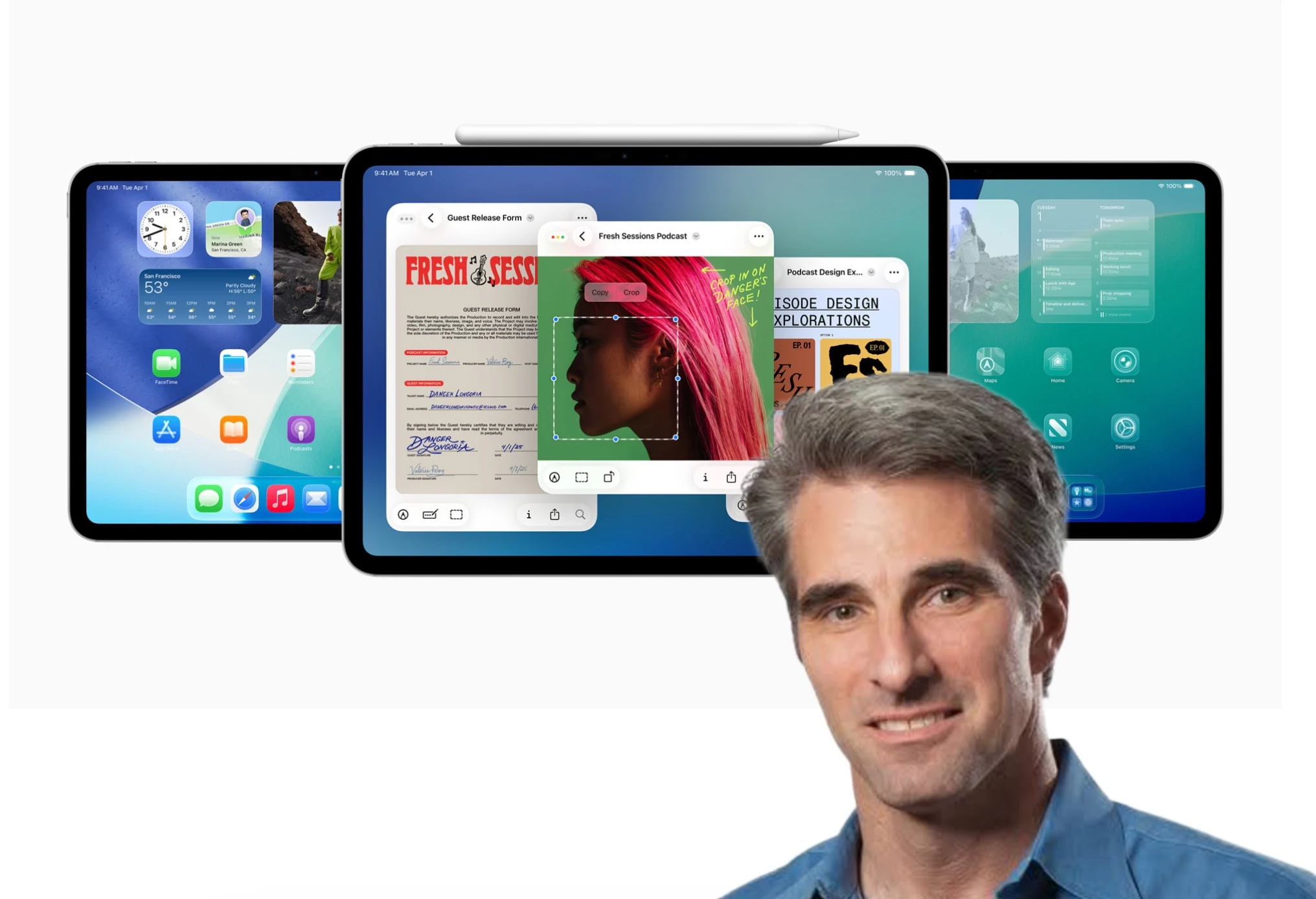
    3. Craig Federighi emphasized that running macOS on iPads would detract from the iPad’s unique features.
    4. iPadOS balances user-friendliness with more advanced features for users who want to explore complex workflows.
    5. Apple aims to keep iPad and Mac distinct, catering to different user needs and experiences.


    Apple iPad lovers have long voiced their frustrations about the absence of desktop-level software features. Recently, many of these users felt a surge of excitement during last week’s WWDC, where significant enhancements to iPadOS multitasking were unveiled. For the first time, iPad users can enjoy true window management and resizing options, thus narrowing the divide between macOS and iPadOS just a bit more.

    Why No macOS on iPad?

    Nonetheless, some individuals might be curious about why Apple hasn’t rolled out a full version of macOS for the iPad, especially since both systems share similar architecture. In a recent conversation with Rafael Zeier, Craig Federighi, Apple’s software chief, shed light on this topic. He explained that iPadOS is specifically crafted for touch functionality, whereas macOS simply isn’t suited for that. He also mentioned that running macOS on iPads would “take away what makes iPad special.”

    Keeping It Simple Yet Complex

    The design of iPadOS preserves the device’s user-friendly nature while also offering those who seek more sophisticated features the ability to explore them at their own speed, maintaining a balance between simple and complex workflows.

    Since Apple has never indicated a desire to make macOS work with touch input, Craig’s comments are quite logical. For the foreseeable future, iPads will stick to touch operation, whereas Macs will keep using traditional input methods. The revamped window management system in iPadOS does a commendable job of bridging the gap. Furthermore, it appears that Apple is keen on keeping the two platforms distinct enough to justify their separate identities, each catering to different types of users.

    Source:
    Link

  • Stellar Data Recovery Professional for MacOS Review: Is it Worth Considering?

    Stellar Data Recovery Professional for MacOS Review: Is it Worth Considering?

    Virtual data has evolved into a crucial aspect of modern life, and failing to back it up can put you at risk of losing valuable information. If this scenario resonates with you, then it might be worth considering the Stellar Data Recovery for MacOS tool. Following the triumphant release of the Windows Data Recovery Tool, Stellar has now introduced a utility tailored for Mac users. The new Stellar Data Recovery for Mac is designed to seamlessly operate across both the latest and older versions of the operating system. Continuous enhancements in compatibility with new macOS releases and bug fixes for existing versions are an integral part of each update. In this article, we delve into a comprehensive review of the most recent iteration of the Stellar Mac Data Recovery software.

    Compatibility and Features

    The Stellar Data Recovery for Mac is engineered to work harmoniously with a wide range of macOS versions, ensuring that users with varying system configurations can benefit from its functionality. Whether you are using the most recent macOS iteration or an older version, this tool is crafted to cater to your data recovery needs effectively. The utility not only offers a user-friendly experience but also provides a robust set of features to facilitate the retrieval of lost or deleted data seamlessly.

    Performance and User Experience

    One of the standout aspects of the Stellar Data Recovery for Mac is its performance efficiency and user-centric design. With each update, the software aims to enhance its speed and reliability, ensuring that users can swiftly recover their data without encountering unnecessary delays or complications. The intuitive interface further elevates the user experience, making it easier for individuals, regardless of their technical expertise, to navigate through the recovery process seamlessly.

    Conclusion

    In conclusion, the Stellar Data Recovery for Mac stands out as a reliable and feature-rich solution for individuals seeking to recover lost or deleted data on their macOS devices. With its consistent updates, broad compatibility, and user-friendly interface, this utility proves to be a valuable asset for safeguarding your virtual data and ensuring that you can retrieve it effectively whenever the need arises. Whether you are a casual user or a tech-savvy individual, the Stellar Mac Data Recovery software caters to a diverse range of users, making it a versatile and essential tool in the realm of data retrieval and protection.