Category: Software

  • US Senator: UK’s Investigatory Powers Act Threatens Encryption

    US Senator: UK’s Investigatory Powers Act Threatens Encryption

    Key Takeaways

    1. Senator Ron Wyden is concerned about the UK’s Investigatory Powers Act (IPA) and its threats to American privacy and security.
    2. The IPA’s gag rules hinder transparency, preventing companies from acknowledging technical capability notices related to surveillance.
    3. Corporate responses to the IPA vary, with Apple limiting Advanced Data Protection in the UK, while Google and Meta maintain different stances on encryption.
    4. The IPA could lead to U.S. user data being stored in the UK and allow for spyware installation, creating vulnerabilities for U.S. citizens.
    5. U.S. officials are investigating whether the UK’s actions against Apple violate the CLOUD Act, with increasing political pressure to address encryption policy conflicts.


    A recent inquiry by Senator Ron Wyden shows growing concern in Washington about the surveillance laws in the United Kingdom. In a letter directed to Director of National Intelligence Tulsi Gabbard, Wyden requested a public evaluation of the national-security threats posed by Britain’s Investigatory Powers Act (IPA) and its confidential “technical capability” orders aimed at American tech companies. He cautioned that any foreign request for an encryption back-door could jeopardize American privacy and create more routes for hostile cyber entities.

    Oversight Complications

    The IPA’s gag rules make it hard to monitor. Those who receive a technical-capability notice might not even be able to acknowledge its existence, leaving both Congress and the public in the dark about which companies are involved and how they are responding. Apple informed Wyden’s team that it would be unable to confirm or deny such a notice, while Google gave a similar answer when asked for more information.

    Different Corporate Responses

    Responses from companies vary widely. Apple’s Advanced Data Protection (ADP) is still opt-in globally, but since it is turned off by default, only a small number of users are taking advantage of fully encrypted iCloud backups. After a UK request earlier this year, Apple took down ADP for new customers in Britain and required existing users to turn off the feature during a brief grace period. On the other hand, Google offers encrypted Android backups by default but chose not to disclose whether it had been approached by London, later emphasizing that no back-door is present in its products. Meta firmly denied any request to compromise the encryption of WhatsApp or Messenger.

    Broader Implications of the IPA

    Wyden’s letter asserts that the IPA’s influence goes beyond just decryption. The law could potentially force businesses to covertly keep new U.S. user data on British territory and allow for “equipment interference” actions that would install spyware on devices—actions that would put both U.S. officials and citizens at risk of foreign surveillance. The senator argues that these scenarios create fundamental vulnerabilities instead of just random privacy issues.

    U.S. officials are looking into whether the UK order against Apple breaches the CLOUD Act, which prohibits British investigators from demanding data from Americans or individuals in the United States. Political pressures are also increasing: Vice President J.D. Vance and other legislators have urged London to withdraw its demands amid worries of a larger conflict over encryption policies.

    Source:
    Link
  • MBox D9: Versatile Secondary Display with Multiple Configurations

    MBox D9: Versatile Secondary Display with Multiple Configurations

    Key Takeaways

    1. MBox is seeking crowdfunding for its new secondary display, the D9, priced at $79 (originally $129), with shipping expected in November 2025.
    2. The D9 features a 9.2-inch ultrawide display with a resolution of 1,920 x 464 pixels and connects via USB-C, not HDMI.
    3. Users can customize the D9’s content through software, enabling various setups like widgets, photos, and animations without coding skills.
    4. Additional uses for the D9 include displaying system metrics, stock updates, and song lyrics, with support for both portrait and landscape modes.
    5. The D9 is compatible with an open-source development environment, allowing for further customization and easier switching between views.


    Following the debut of the DS5, MBox is now looking for financial backing for its newest secondary display via crowdfunding. The recently introduced MBox D9 is priced at $79 (not including shipping), reduced from its original price of $129, and is anticipated to begin shipping in November 2025. However, interested supporters should be cautious of the typical financial risks that come with crowdfunding projects before they decide to buy.

    Features of the D9

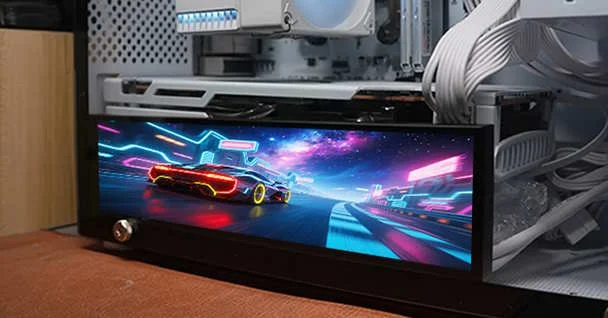
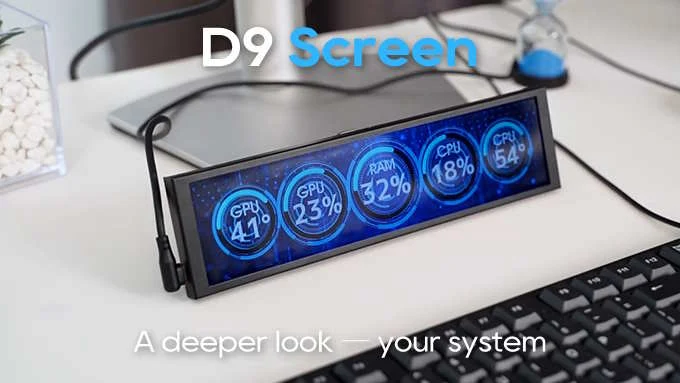
    The D9 boasts a 9.2-inch ultrawide display with a resolution of 1,920 x 464 pixels. Instead of using HDMI, it connects to other devices through USB-C, which means it isn’t meant to act as a standard external monitor. The content shown on the D9 is regulated through software. This application provides a variety of setup options and a graphical interface, allowing users to adjust their secondary display without needing any coding skills. For example, the screen can be set up to display various widgets or content like photos and animations.

    Additional Uses

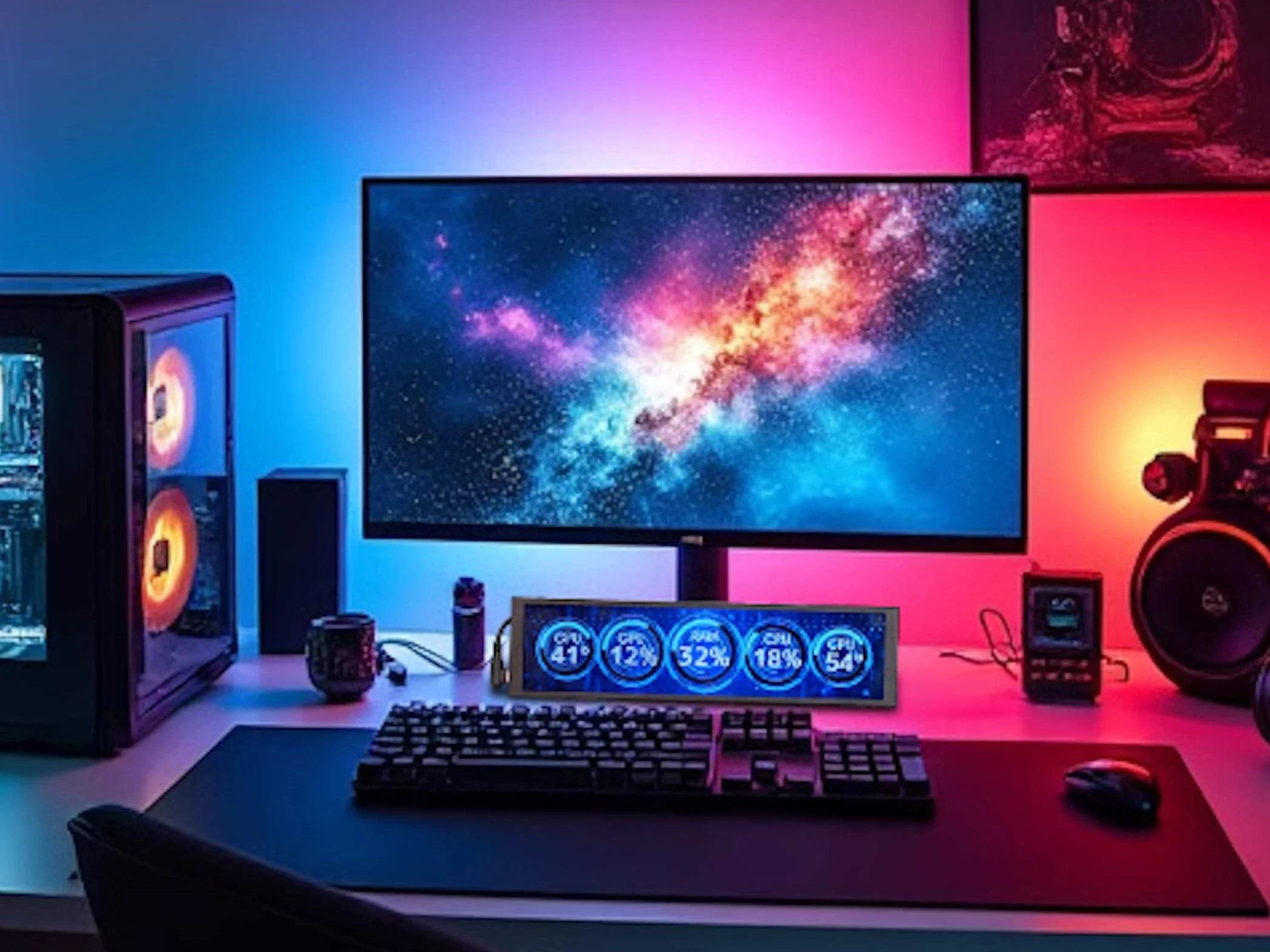
    There are also other potential uses, such as showcasing different system metrics (like CPU usage and temperature), stock market updates, or even song lyrics. The MBox D9 can be used in both portrait and landscape modes and is compatible with an open-source development environment, creating even more chances for customization. There are shortcuts to make switching between different views easier.

    Source:
    Link


    MBox D9: Versatile Secondary Display with Multiple Configurations

    MBox D9: Versatile Secondary Display with Multiple Configurations


  • Anker App Update Introduces New Features for Solix Users

    Key Takeaways

    1. Anker app version 3.10.0 is now available for iOS, marking its second release in July 2025.
    2. New features include disaster event checking for Solix home backup users and multi-device login capability.
    3. The app now supports the newly launched Anker Solix P1 Meter.
    4. The Anker Solix Solarbank 3 Pro received an update introducing a new wake-up feature for charging.
    5. The release date for version 3.10.0 on Android is still unknown, with the last update being version 3.9.1.


    Anker has unveiled a new update for its iOS application. The latest version, 3.10.0, marks the second release in July 2025 for customers using the brand’s devices. The previous significant update took place at the end of June, which introduced compatibility with the new Solix F3000 portable power station and provided in-app access to the Anker Solix store.

    Features for Users

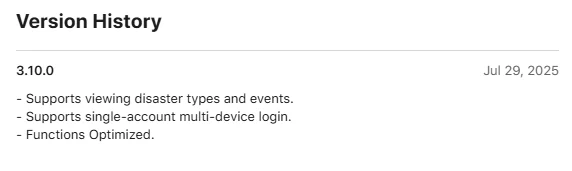
    The Anker app version 3.10.0 includes two notable enhancements. The first improvement is for those using Solix home backup solutions. Users can now check various disaster types and events within the app, likely tied to the current weather monitoring tools. The second addition is the capability for single-account multi-device login. In the past, if users tried to log into the app on a second device, they would be logged out from the first one. Now, individuals can stay logged in on multiple devices, which could be helpful for those who share their accounts with friends or family.

    Optimization and New Devices

    The release notes conclude by mentioning that several unspecified functions have been improved. Additionally, it has been noted that the newly launched Anker Solix P1 Meter is now available in the app. Moreover, the Anker Solix Solarbank 3 Pro is receiving its software update version 1.0.0.24. This update introduces a new wake-up feature for sleep mode, allowing the battery to charge when it senses photovoltaic energy being sent to the grid. Users can install this Solarbank 3 Pro update through the Anker app.

    Availability

    You can now get the Anker app version 3.10.0 for iOS on the Apple App Store. It’s unclear when the version 3.10.0 will be released for Android users; the last update for Android, version 3.9.1, was made available on July 28th. That update only indicated that there were “Function Optimized.”

    Source:
    Link


  • Microsoft Teams Introduces Immersive VR Events with Avatars

    Microsoft Teams Introduces Immersive VR Events with Avatars

    Key Takeaways

    1. Microsoft has introduced Immersive Events in Teams, allowing virtual reality meetings with 3D avatars and environments.
    2. Teams functions similarly to Zoom and has replaced Skype as a meeting platform.
    3. Event planners can use no-code tools to easily customize virtual settings with 3D objects and streamline participant seating.
    4. The 3D interaction enhances the connection and shared experiences among participants.
    5. Future updates will enable users to experience Immersive Events in 3D with Meta Quest headsets.


    Microsoft has rolled out Immersive Events to Teams in a public preview, allowing users to have virtual reality meetings featuring 3D avatars and environments reminiscent of Second Life, although the avatars lack lower bodies. This immersive feature can be accessed on both PCs and Macs.

    Similar to Zoom

    Teams operates like Zoom, providing a platform for professionals and students across the globe to arrange meetings and connect online. Additionally, it has taken the place of Skype, which is no longer in use.

    No-Code Tools for Customization

    Event planners can utilize no-code tools to incorporate 3D objects into their virtual settings, including chairs, starting viewpoints, text, media, and social ice-breakers. With just one click, all participants can be moved to their designated seats, thus saving time when beginning meetings or classes.

    Enhanced Connections in 3D

    The interaction among avatars in a 3D space through Immersive Events enhances the feeling of connection and shared experiences for participants, as stated by Microsoft. In the future, users will also be able to experience Immersive Events in 3D using Meta Quest headsets.

    For those puzzled by Microsoft’s decision to exclude legs from the 3D avatars, they can still find them in Second Life. You can learn more about Second Life by checking out this book on Amazon, along with another book detailing the history of online metaverses available there.

    Source:
    Link

  • Starlink Download Speeds Surge After Recent Satellite Network Glitch

    Starlink Download Speeds Surge After Recent Satellite Network Glitch

    Key Takeaways

    1. The longest Starlink outage occurred on July 25, affecting many users for at least 2.5 hours.
    2. The outage was caused by issues with key internal software services that manage the core network.
    3. Starlink operates over 100 gateways in the U.S. to enhance Internet service in remote areas.
    4. SpaceX is upgrading ground stations for upcoming V3 satellites, which will significantly increase data capacity.
    5. Despite the outage, some users experienced improved download speeds afterward, suggesting a positive network enhancement.


    Starlink Internet interruptions are quite rare, as the network has mostly remained stable since SpaceX began launching its initial Starlink satellites into orbit.

    A Surprising Outage

    Therefore, the longest Starlink outage since its launch took many by surprise on Friday, July 25. Many of its six million users across the US and worldwide experienced a lack of satellite Internet for at least 2.5 hours, with some being affected for even longer.

    For the first time, Starlink issued a global outage alert on its website and managed to fix the problem relatively quickly for most users on the same day. SpaceX expressed its regret and explained that the issue was due to “key internal software services that operate the core network,” possibly pointing to the largest ground network supporting a satellite constellation ever created.

    Technical Infrastructure

    In the United States, Starlink runs over 100 gateways, each equipped with 150 antennas, to help eliminate dead zones and enhance ping for users in remote areas and rural settings. These antennas are produced in Redmond, WA, and are designed to channel the satellite Internet signal through the country’s extensive fiber optic infrastructure, thus enhancing coverage, reducing latency, and stabilizing connections.

    SpaceX is currently upgrading its ground stations in anticipation of launching its V3 satellites, which promise to deliver 10 times the data throughput of the current models, reaching up to 1 Tbps. For context, the Starlink Mini dish has a maximum speed of 100 Mbps, while only the Performance dish can utilize gigabit speeds. With each launch of V3 satellites in 2026, SpaceX plans to add 60 Tbps of network capacity, necessitating a new generation of terrestrial gateways to support this growth.

    Stability Concerns

    Regrettably, the ground-based network of Starlink can sometimes create instability, as was evident during the recent lengthy outage. A memo from SpaceX shared with suppliers revealed that a software update sent to the Starlink gateways overloaded their hardware, causing the network to stop processing data packets while the core update was being implemented.

    Although SpaceX provided the usual explanations and reassurances that they had learned from this incident, users of Starlink began to observe a surprisingly positive change over the weekend. After the outage, some users reported that their download speeds increased by three times or more, suggesting that the unfortunate update to the gateways was not merely a bug fix, but rather a significant network enhancement.

    Source:
    Link

  • Xiaomi Adds New Phones to End-of-Life List Amid HyperOS 3 Focus

    Xiaomi Adds New Phones to End-of-Life List Amid HyperOS 3 Focus

    Key Takeaways

    1. Xiaomi has stopped development on HyperOS 2 and will not provide major updates for it.
    2. HyperOS 3 is in focus for future updates, with no confirmed release date yet.
    3. Certain older models will receive the Android 16 update, but many smartphones will not get HyperOS 3 support.
    4. The anticipated Android 16 update is expected to improve user interface and overall system performance.
    5. Beta testing for HyperOS 3 may start later this year, with the stable version likely launching with the Xiaomi 16 series.


    Xiaomi has allegedly halted development on HyperOS 2, which was originally launched as a skin for Android 15. Recently, with the 2.3 update, the company has introduced Android 16 for certain devices. However, it’s HyperOS 3 that is set to introduce significant changes.

    No More Updates for HyperOS 2

    This shift in focus means that there will be no major updates aimed at improving HyperOS 2. Xiaomi has not yet revealed a definite release date for the stable version of HyperOS 3, but some older models are anticipated to receive the forthcoming Android 16 update.

    End-of-Life Announcements

    In related news, Xiaomi has disclosed the end-of-life timelines for various smartphones. These newly listed models are set to receive their last security updates in September 2025, after which they will no longer receive any official updates. The devices affected include:

    Many of these smartphones did not even get the HyperOS 2 update, indicating they are definitely off the list for HyperOS 3 support. The anticipated Android 16 update for Xiaomi devices is expected to feature a more polished user interface, aiming to deliver a better user experience.

    Performance Enhancements Expected

    The update is also predicted to enhance overall system performance, with improved visual effects and smoother transitions compared to HyperOS 2. Rumors suggest that Xiaomi might commence beta testing for HyperOS 3 later this year, with the stable version likely launching alongside the Xiaomi 16 series.

    Source:
    Link

  • Apple Set to Introduce Age Restrictions for App Store

    Apple Set to Introduce Age Restrictions for App Store

    Key Takeaways

    1. Online age checks are gaining attention and will impact platforms like Reddit and X (formerly Twitter).
    2. These measures aim to protect younger users from dangerous content and may be integrated into a new App Store interface.
    3. Age verification could occur when downloading social media or health-related apps to prevent access to violent content.
    4. New regulations may lead to age-specific versions of apps to comply with these age checks.
    5. Information about these initiatives comes from a reliable leak account, suggesting plans may be tailored for the Chinese market.


    Online age checks are getting a lot of attention today, as they are set to impact many parts of the internet, including platforms like Reddit and X (previously known as Twitter).

    Intended Protection

    These measures are meant to safeguard younger users from potentially dangerous content and are reportedly on their way to being included in a new App Store interface.

    The age verification might be triggered when a user attempts to download a new social media application or apps related to health.

    Preventing Access to Violent Content

    Furthermore, this initiative could aim to block minors from viewing “violent” content, which could apply to certain games available online.

    Over time, we might see various age-specific versions of the same app as a result of these new regulations.

    Leaked Information

    These claims have surfaced from a leak account that is usually reliable and, interestingly, often shares information on Weibo—hinting that Apple’s new plans could be tailored specifically for the Chinese market.

    This comes at a time when Apple has had to ease some of its rules, particularly those about payment methods for apps and what apps can perform functions like internet browsing on iPads and iPhones.

    Source:
    Link

  • Brave Browser Disables Windows Recall Screenshot Feature

    Brave Browser Disables Windows Recall Screenshot Feature

    Key Takeaways

    1. Brave will disable Windows 11’s Recall screenshot feature by default to protect user privacy.
    2. Recall captures screenshots every few seconds and stores them unencrypted, raising security concerns.
    3. Microsoft has made changes to Recall, allowing users to opt-out and excluding certain applications from its use.
    4. Brave has modified its code to classify all browsing windows as private, preventing Recall from capturing any activity.
    5. The Recall feature will be available soon in the public release of Windows 11, but Brave users can toggle it on if desired.


    Brave is not happy with Windows 11.

    The privacy-centric browser Brave will, by default, stop the Recall screenshot feature of Windows 11. This contentious Microsoft feature captures screenshots of a user’s screen every few seconds, which has angered many because it could be used as a backdoor into people’s private activities.

    Background on Recall

    Recall was introduced last May to assist Windows users in reverting their PC to an earlier state. One of the tools used for this purpose was an automatic screenshot feature that recorded instances of a user’s active screens every few seconds, saving these images. However, these screenshots were stored in an unencrypted format, making it easy for other software (including malware) and malicious users to see a record of everything users did on their computers.

    Changes to the Recall Feature

    Microsoft has since backed off from the mandatory use of Recall, although users can still choose to enable it. Part of this rollback allowed software developers to exclude their applications from Recall. Moreover, Microsoft has indicated that Recall will not take screenshots of web browsing windows classified as “private” by the system (like Chrome’s Incognito mode).

    To ensure Recall does not take pictures of users’ browsing habits, the developers of Brave have modified the browser’s code to mark all browsing windows as private, at least from the operating system’s viewpoint. Therefore, all Brave browser windows will be exempt from Recall’s scanning.

    Future Updates

    This feature is activated by default and has already been implemented in Brave’s Nightly builds. It is set to reach the stable version in the upcoming weeks.

    Users who still wish to use Recall while on Brave can easily enable the feature again through a simple toggle in the browser’s settings.

    Currently, Windows Recall is limited to Preview builds but is anticipated to be available in the public release of Windows 11 shortly.

    Source:
    Link

  • Apple Launches Public Beta for iOS 26, macOS 26, watchOS 26

    Apple Launches Public Beta for iOS 26, macOS 26, watchOS 26

    Key Takeaways

    1. Apple’s significant OS updates for iPhones, iPads, Macs, and Apple Watches will roll out in September, with public beta versions available now.
    2. Users can join the Apple Beta Program to explore updates for free, but should back up data and avoid using beta on essential devices due to potential bugs.
    3. The updates feature a redesigned user interface called “Liquid Glass,” with transparency effects and a revamped camera app on iPhones.
    4. iPadOS 26 introduces “true” multitasking, while macOS 26 emphasizes gaming with a new “Games” app and updated graphics interface.
    5. The Apple Beta Program allows users to test new features early, but caution is advised when using beta software.


    Apple is set to roll out its significant operating system updates for iPhones, iPads, Macs, and Apple Watches in September. Meanwhile, these updates are already accessible as public beta versions, allowing users to explore them for free. To participate, simply register for the Apple Beta Program and turn on beta updates on your Apple device by navigating to System Settings, then General, and selecting Software Update.

    Once you’ve signed up, you can download the beta version of the new operating system just like you would with a standard update. However, keep in mind that beta updates often contain bugs, so it’s wise to back up your data before proceeding with the installation. It’s also best to avoid installing a beta OS on devices that you depend on daily. In this piece, we’ll outline which iPhones, iPads, Macs, and Apple Watches are compatible with the upcoming operating systems.

    Redesigned User Experience

    The updates primarily focus on introducing a completely overhauled user interface known as “Liquid Glass.” Apple has increased the use of transparency effects to add depth and modernize the overall appearance. Additionally, the iPhone will feature a revamped camera app and the capability to translate speech system-wide with Apple Intelligence, even during video calls. The new “Games” app is designed to act as a launcher for games and a platform for chatting with friends, much like Steam. There’s also Visual Intelligence, which can examine on-screen objects and respond to queries about them, similar to Google’s Circle to Search feature.

    Enhanced Multitasking and Gaming

    With iPadOS 26, iPads will finally support “true” multitasking, allowing multiple app windows and more adaptable background processes. Surprisingly, macOS 26 puts a strong emphasis on gaming, adding the “Liquid Glass” design along with a games overlay, the “Games” app, and the updated Metal 4 graphics interface. Lastly, watchOS 26 brings a feature called “Workout Buddy” to the Apple Watch, a voice assistant specially tailored for workout sessions.

    Join the Apple Beta Program

    To get started with the Apple Beta Program, simply visit the official Apple website to sign up. This way, you can experience the latest features before they are officially released. Remember, though, to approach beta testing with caution and ensure your important data is backed up!

    Source:
    Link


  • Snapchat’s New Feature Alerts Friends When You Arrive Home Safe

    Snapchat’s New Feature Alerts Friends When You Arrive Home Safe

    Key Takeaways

    1. Home Safe feature automatically notifies friends when you reach home.
    2. Friends receive a single alert, reducing the need for constant check-ins.
    3. Users control who receives Home Safe alerts based on location sharing.
    4. Alerts are triggered automatically upon arrival at home.
    5. Users must define their home location on the Snap Map to use the feature.


    Snapchat is introducing a new feature called Home Safe, designed to help you inform your loved ones when you have safely reached your home.

    Easy Alerts for Friends

    Expanding on its current location features, Home Safe allows you to automatically notify your friends in a chat, eliminating the need for you to remember to send a message manually.

    While various apps offer real-time location sharing, these alerts mean your friends won’t have to constantly check in on your journey. According to Snap, the notification is sent just once and will turn off automatically after that.

    Control Your Notifications

    You have full control over who gets these alerts. The notifications can only be directed to friends with whom you are already sharing your location, allowing you to choose specifically who will receive the Home Safe alert.

    An alert is triggered when the app determines that you have reached your home destination.

    Setting Up Home Safe

    To take advantage of this feature, you must first define your home location on the Snap Map. You can do this by tapping your Bitmoji and selecting “My Home.”

    Once your location is saved, you can click the Map icon in your chats and press the “Home Safe” button when you start heading back home.

    Source:
    Link