Tag: Microsoft Teams

  • Microsoft Warns Windows 11 KB5079473 May Disrupt Sign-Ins

    Microsoft Warns Windows 11 KB5079473 May Disrupt Sign-Ins

    Key Takeaways

    1. Microsoft acknowledged an issue with certain PCs after the March 2026 Windows 11 cumulative update KB5079473, affecting Microsoft account sign-ins across various apps.
    2. The problem is identified in Windows 11 versions 24H2 and 25H2, specifically OS Builds 26100.8037 and 26200.8037, released on March 10, 2026.
    3. Users may encounter error messages suggesting they need internet access, even when connected, during sign-in attempts for apps like Microsoft Teams, OneDrive, and Word.
    4. The issue is limited to Microsoft account sign-ins, and organizations using Entra ID for app authentication are not affected.
    5. As a temporary workaround, Microsoft recommends restarting devices while connected to the internet to restore connectivity and avoid recurring issues.


    Microsoft has acknowledged a new issue impacting certain PCs following the March 2026 Windows 11 cumulative update KB5079473. The company stated that some users might face difficulties logging in with a Microsoft account across various apps after the update is applied. The support documentation from Microsoft identifies KB5079473 for Windows 11 versions 24H2 and 25H2 as OS Builds 26100.8037 and 26200.8037, which were issued on March 10, 2026.

    Update on the Issue

    On March 20, 2026, various media outlets reported that Microsoft updated its Windows release health information to recognize the problem. The reports indicate that this issue can affect applications like Microsoft Teams Free, OneDrive, Microsoft Edge, Excel, Word, and Microsoft 365 Copilot whenever they require a Microsoft account for signing in.

    Error Messages and Connectivity Problems

    According to Microsoft, devices that are impacted might display an error message indicating that internet access is needed, even if the PC is already connected. External sources have quoted Microsoft explaining that sign-in attempts may show messages resembling: “You’ll need the Internet for this. It doesn’t look like you’re connected to the Internet.” Furthermore, it seems the issue is associated with a specific network connectivity condition activated after the update was installed.

    Microsoft clarifies that this issue is confined to sign-in actions involving Microsoft accounts only. The same release health update mentioned by outside media states that organizations utilizing Entra ID for app authentication are not experiencing this particular issue.

    Suggested Workaround

    While a permanent solution is being developed, Microsoft has advised affected users to restart their devices while connected to the internet. The company asserts that this can restore the connectivity state and help stop the issue from happening again. However, Microsoft cautions that restarting without an active internet connection may lead the device back to the same problematic state.

    KB5079473 was rolled out as part of Microsoft’s March Patch Tuesday for supported Windows 11 versions. Microsoft’s support documents verify the update and build numbers, and the newly recognized sign-in issue adds to an increasing number of complaints following this month’s release.

    Source:
    Link


  • Microsoft Teams Introduces Immersive VR Events with Avatars

    Microsoft Teams Introduces Immersive VR Events with Avatars

    Key Takeaways

    1. Microsoft has introduced Immersive Events in Teams, allowing virtual reality meetings with 3D avatars and environments.
    2. Teams functions similarly to Zoom and has replaced Skype as a meeting platform.
    3. Event planners can use no-code tools to easily customize virtual settings with 3D objects and streamline participant seating.
    4. The 3D interaction enhances the connection and shared experiences among participants.
    5. Future updates will enable users to experience Immersive Events in 3D with Meta Quest headsets.


    Microsoft has rolled out Immersive Events to Teams in a public preview, allowing users to have virtual reality meetings featuring 3D avatars and environments reminiscent of Second Life, although the avatars lack lower bodies. This immersive feature can be accessed on both PCs and Macs.

    Similar to Zoom

    Teams operates like Zoom, providing a platform for professionals and students across the globe to arrange meetings and connect online. Additionally, it has taken the place of Skype, which is no longer in use.

    No-Code Tools for Customization

    Event planners can utilize no-code tools to incorporate 3D objects into their virtual settings, including chairs, starting viewpoints, text, media, and social ice-breakers. With just one click, all participants can be moved to their designated seats, thus saving time when beginning meetings or classes.

    Enhanced Connections in 3D

    The interaction among avatars in a 3D space through Immersive Events enhances the feeling of connection and shared experiences for participants, as stated by Microsoft. In the future, users will also be able to experience Immersive Events in 3D using Meta Quest headsets.

    For those puzzled by Microsoft’s decision to exclude legs from the 3D avatars, they can still find them in Second Life. You can learn more about Second Life by checking out this book on Amazon, along with another book detailing the history of online metaverses available there.

    Source:
    Link

  • Enhanced Microsoft Integration in Mercedes-Benz Vehicles

    Enhanced Microsoft Integration in Mercedes-Benz Vehicles

    Key Takeaways

    1. Mercedes-Benz is partnering with Microsoft to enhance digital features in vehicles, targeting business users.
    2. The new MB.OS system will transform Mercedes cars into mobile offices, appealing to employees eligible for company vehicles.
    3. The updated Teams app allows users to join video meetings while driving, with features to reduce distractions and improve privacy.
    4. Microsoft Intune integration will enable secure access to work accounts, distinguishing between personal and business data.
    5. An API for Microsoft 365 Copilot will introduce generative AI features in vehicles, enhancing productivity for users on the go.


    Mercedes-Benz is enhancing its partnership with Microsoft to introduce fresh digital features to its automobiles. The goal is to create a comprehensive package aimed at businesses. The upcoming MB.OS operating system represents a significant leap toward transforming Mercedes vehicles into mobile offices. This could serve as a strong incentive for employees, especially those who qualify for company vehicles, to select a Mercedes in the future.

    Next-Gen Innovations

    Leading the charge is the new Mercedes-Benz CLA, which will debut with the fourth-generation MBUX infotainment system. This will be the first Mercedes model designed with advanced Microsoft integration specifically for business users.

    Enhanced Functionality

    A crucial feature of this updated integration is the revamped Teams app. Users will have the capability to join video meetings while driving, utilizing the in-car camera. Mercedes assures that this feature adheres to applicable legal standards. When the camera is turned on, any shared material and presentations will be automatically concealed from the driver to reduce distractions. Additionally, the camera can be turned off at any moment to guarantee greater privacy control.

    The renewed Teams app also brings a fresh dashboard that allows users to check their upcoming meetings directly in their cars. This makes it faster to access contacts, and the chat feature has been improved for on-the-go use. Integrated voice control aids in text entry, and users can join meetings directly from their calendars without needing extra devices.

    Cloud-Based Solutions

    Another significant advancement is the incorporation of Microsoft Intune into MB.OS. This cloud-based system enables users to log in securely with their work accounts and easily toggle between personal and work applications. Companies gain the advantage of a clear distinction between personal and business data, along with simplified management of access rights. IT managers can centrally establish and oversee security protocols for vehicles, just like they would for smartphones or laptops. This integration will support applications such as Notes and Calendar and is set to launch in both Europe and the US.

    Mercedes-Benz is also gearing up to introduce an API for Microsoft 365 Copilot, which will integrate features of generative AI into its cars. By using voice commands, drivers will be able to summarize emails, access customer details, or prepare for upcoming meetings. This integration is anticipated to be the first of its kind in a production vehicle. Mercedes asserts it will greatly improve productivity for users constantly on the go.

    Through these advancements, Mercedes-Benz aims to transform its vehicles into fully functional workspaces, extending the capabilities of both commercial and home offices. Whether this initiative will be successful remains uncertain, but it is evident that these features are crafted for sophisticated business clients who prioritize ease, connectivity, and security.

    “Our collaboration with Microsoft leads the industry, making it simpler for our clients to maintain productivity while traveling. By embedding the latest Microsoft workspace tools, like Microsoft Teams, into our new MB.OS operating system, we have designed an intuitive and safe user experience that enhances efficiency and cuts down distractions,” states Ola Källenius, CEO of Mercedes-Benz Group.

    Source:
    Link

  • Microsoft to Shut Down Skype: What You Need to Know

    Microsoft to Shut Down Skype: What You Need to Know

    Key Takeaways

    1. Microsoft plans to shut down Skype in May 2025, as revealed in developer code.
    2. Skype was acquired by Microsoft in 2011 for $8.5 billion, but the app’s popularity declined over time.
    3. Inconsistent updates and lack of clear direction led to missed opportunities against competitors like FaceTime and Google Hangouts.
    4. Microsoft shifted focus to Teams in 2017, positioning it as a collaboration tool integrated into Windows 11.
    5. The potential shutdown of Skype marks the end of its over 20-year journey in the communication space.


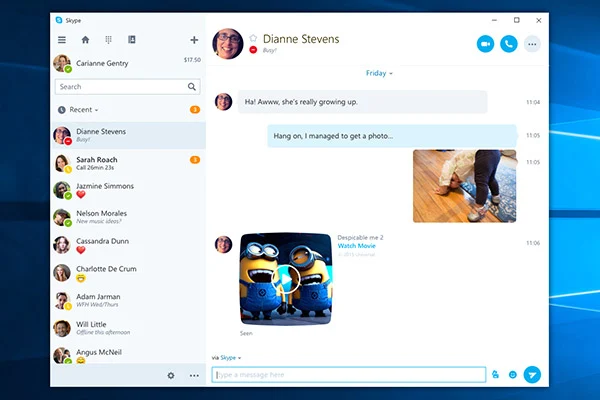
    Skype, a once hugely popular app for video calls, looks to be coming to a close. A reader from XDA Developers found out that Microsoft intends to shut down the app in May 2025. This information was discovered in a note within the code of a developer version of Skype.

    Once a Leader in Communication

    Skype, which debuted in 2003, enjoyed a period of great popularity among users who loved its voice and video calling features, as well as file sharing capabilities. In 2011, Microsoft spent $8.5 billion to acquire Skype, hoping to integrate it into its communication services. After this purchase, Microsoft decided to phase out Windows Live Messenger, further putting its hope into Skype’s future.

    Missed Opportunities and Stiff Competition

    Unfortunately, Microsoft’s lack of a clear direction and inconsistent updates caused it to miss the chance to make Skype the top platform for communication and entertainment. By the time Windows 10 was integrated in an effort to revitalize Skype’s declining user count, it was already facing strong rivals like Apple’s FaceTime, Google Hangouts, and Slack. In 2016, Microsoft opted to revert to the traditional app version for Windows 10 instead of continuing with the UWP format.

    The Shift to Teams

    In 2017, Microsoft refocused its efforts on Teams, a new platform that builds on Skype’s technology. The name itself indicates a shift in purpose, as the company markets it as a solution for team collaboration. Microsoft showed its belief in Teams by embedding it within Windows 11 from the very start of the OS’s launch, aiming to take on Slack directly.

    Microsoft has yet to confirm the news officially, but it seems that 2025 could very well mark the end of Skype’s more than 20-year journey.

    Source:
    Link


  • DeepL Voice: Real-Time Translation for Business Conversations

    DeepL Voice: Real-Time Translation for Business Conversations

    DeepL has introduced two innovative services aimed at businesses under the new DeepL Voice brand – DeepL Voice for Conversations and DeepL Voice for Meetings. These services provide instant translations between speakers of various languages including Dutch, English, French, German, Italian, Japanese, Korean, Polish, Portuguese, Russian, Spanish, Swedish, and Turkish.

    Competing in Language Translation

    DeepL is becoming a serious rival to Bing Translator and Google Translate in the field of language translation. It provides an alternative that sometimes excels in capturing the subtleties of dialogue from one language into another. The latest offerings from the company utilize AI technology to engage in real-time voice translation, positioning themselves as strong competitors in the voice translation sector.

    Meeting Integration Features

    Voice for Meetings can seamlessly integrate with Microsoft Teams, allowing attendees to express themselves freely while real-time translated captions appear for everyone involved. Every conversation is translated, captioned, and transcribed for ease of use, and there is no restriction on the number of participants in any meeting. All languages available can also be spoken during such gatherings. For personal interactions, Voice for Conversations allows for live translations during one-on-one discussions using smartphones that run on Apple iOS (iOS 17 or later) and Android (OS 8.0 or later).

    Data Security Commitment

    DeepL guarantees that all data collected during meetings will be erased after the session, and it will not utilize any dialogue for enhancing its AI models. The service complies with ISO 27001 standards, ensuring robust data security.

    For travelers using a Samsung device, they can purchase Samsung Galaxy Buds FE earbuds for an easy listening experience of live translations facilitated by Samsung Interpreter.

    Source: Link,Link

  • Microsoft’s Potential Launch of Surface Pro 10 and Surface Laptop 6 on March 21

    Microsoft’s Potential Launch of Surface Pro 10 and Surface Laptop 6 on March 21

    Microsoft is gearing up to launch the Surface Pro 10 and Surface Laptop 6 with significant display upgrades, shifting to OLED panels. According to a report by Windows Central, these new devices are expected to hit the market on March 21st.

    OLED Display Upgrade

    OLED screens are gaining traction in the premium laptop segment due to their ability to provide rich blacks, vibrant colors, and enhanced contrast. Microsoft, which has yet to embrace OLED technology for its laptops, is now making the leap with the upcoming Surface models. This transition to OLED panels will not only improve display quality but also enable support for HDR content.

    Enhanced Features and Specifications

    Both the Surface Pro 10 and Surface Laptop 6 are rumored to be offered in versions powered by Intel and Qualcomm processors. The Intel variants are likely to feature the latest Intel Core Ultra processors focusing on AI capabilities, set for an April launch. On the other hand, the Arm-based models are expected to utilize the Qualcomm Snapdragon X Elite chip, with an anticipated release in June.

    Design Updates

    While the Surface Pro 10 is expected to maintain the design essence of its predecessor, it will come with enhancements such as an upgraded wide-angle webcam featuring Studio Effects and an integrated NFX reader. In contrast, the Surface Laptop 6 is speculated to undergo a more significant redesign, featuring smaller display bezels, rounded corners, and a new haptic touchpad. The device will also offer an expanded port selection, including two USB-C connections, a USB Type-A port, Surface Connect, and a dedicated Copilot key integrated into the keyboard.

    Windows “AI Explorer”

    In addition to hardware upgrades, a new feature named “AI Explorer” is anticipated to debut with the 2024 Windows 11 update. This feature, an advanced version of Copilot, will track user activity on the computer, allowing every interaction to be searchable using natural language. AI Explorer aims to comprehend vague requests and offer contextual assistance. For instance, it could suggest editing options when an image is opened, enabling users to issue simple commands for specific edits like background removal.

    These forthcoming devices, such as the Surface Pro 10 and Surface Laptop 6, are expected to be among the first to leverage the capabilities of AI Explorer.


    Microsoft's Potential Launch of Surface Pro 10 and Surface Laptop 6 on March 21
  • Brief Service Disruption Resolved by Microsoft Teams

    Brief Service Disruption Resolved by Microsoft Teams

    Microsoft Teams experienced a temporary service interruption recently, causing some disruption for users. However, the issues were quickly resolved, and the number of reported incidents decreased significantly throughout the day. At its peak, there were over 14,000 incidents reported on Downdetector.com, a website that monitors online service disruptions. But by the evening, this number had dropped to around 1,600, indicating a significant recovery.

    A Networking Issue

    The problem arose from a networking issue that affected a specific part of the Teams service. Microsoft acknowledged the challenge they faced in their failover operation, which is designed to ensure a quick recovery for users, particularly those in North and South America.

    Dependence on Digital Tools

    Microsoft Teams, a crucial tool for professionals for online meetings, chatting, and file sharing, is part of the Microsoft 365 suite. This recent outage serves as a reminder of our dependence on digital tools for business communication. It highlights the importance of having reliable and efficient systems in place to avoid disruptions in our work.

    Importance of Preparedness

    In response to the service interruption, Microsoft quickly switched to a backup system to restore functionality for users. This incident underscores the importance of preparedness in our digital infrastructure. Having robust backup systems and plans in place is crucial to minimize downtime and ensure business continuity.

    Constant Evaluation and Improvement

    This event in the digital realm emphasizes the need for constant evaluation and improvement of our digital tools. As we rely more and more on these tools for our professional lives, interruptions like these serve as a reminder of the importance of enhancing our digital resilience. It is essential to continually assess and enhance the reliability and efficiency of our digital systems to avoid future disruptions.

    In conclusion, while the temporary service interruption on Microsoft Teams caused some inconvenience for users, the prompt response from Microsoft and the subsequent recovery indicate the effectiveness of their backup systems. However, this incident also serves as a reminder of the need for constant evaluation and improvement in our digital tools to ensure seamless business communication and continuity.

  • More Students and Teachers to Benefit from Microsoft’s Expansion of Copilot Access, Empowering Learning with AI

    More Students and Teachers to Benefit from Microsoft’s Expansion of Copilot Access, Empowering Learning with AI

    Microsoft Education has recently announced the launch of several new AI tools that are specifically designed for schools. These tools, including an expanded Copilot for Microsoft 365, a collaboration app called Loop, and an AI-powered Reading Coach, have been developed to enhance the learning experiences of students.

    Starting from January 1, 2024, a larger number of individuals, including students and teachers who utilize free Microsoft services, will have access to Copilot. Institutions such as The University of Hong Kong and The University of Manchester have already adopted this tool, and Microsoft has made it easier for other schools to acquire Copilot as well.

    Loop, an AI-powered app, is set to be included in Microsoft 365 plans starting from March 2024. The purpose of this app is to facilitate collaboration between students and teachers, enabling them to work together on projects in a unique and innovative manner.

    The Reading Coach is another notable tool introduced by Microsoft Education. This tool utilizes generative AI to assist individuals in improving their reading skills. It is designed to adapt to each person's reading level, offers dynamic story creation, and provides valuable feedback on reading proficiency.

    In addition to these tools, Microsoft is also introducing new AI features for teachers who use Microsoft Teams for Education and Microsoft Reflect. These features, expected to be released later this year, are intended to help teachers save time and customize their teaching methods to suit the needs of each student.

    In order to ensure the safe and responsible use of these AI tools, Microsoft has developed the AI for Educators Learning Path on Microsoft Learn. This learning path serves as a comprehensive guide for teachers and students, providing them with the necessary knowledge and skills to effectively utilize these tools.

    Overall, the introduction of these new AI tools by Microsoft Education signifies a significant step towards enhancing the educational experience for students and teachers alike. With the integration of AI technology, Microsoft aims to create a more collaborative and personalized learning environment that fosters growth and development.

  • Microsoft Reveals AI PC Standards: 8GB RAM Insufficient

    Microsoft Reveals AI PC Standards: 8GB RAM Insufficient

    Earlier this month during CES, prominent laptop and PC manufacturers introduced their upcoming line of devices set to enter the market very soon.

    A significant portion of these releases comprised laptops showcasing the most recent AMD or Intel processors, emphasizing the incorporation of AI capabilities. Preceding the market debut of these laptops, Microsoft delineated the criteria that define an AI-driven laptop.

    Microsoft’s Criteria for AI-Enabled Laptops

    Per TrendForce, Microsoft now stipulates that laptops embedded with AI functionalities ought to possess a minimum of 16 GB of RAM. This directive aims to stimulate an increased demand for DRAM, thereby potentially diminishing the popularity of devices equipped with 8 GB of RAM.

    Proximity of AI Applications to Devices

    This phenomenon forms part of a broader trend wherein AI applications progressively move closer to the locations where we interact with our devices, transcending the realm of large-scale servers. Projections indicate a substantial expansion in the global AI server market, foreseeing an influx exceeding 1.6 million units coupled with a growth rate of 40%.

    Imperative of High Performance in AI-Centric PCs

    Regarding these AI-focused PCs, a prerequisite for viability is the ability to execute a minimum of 40 trillion operations per second (TOPS). This criterion has effectively catalyzed a vigorous competition among manufacturers of computer chips.

    Intensification of the Chip Industry Contest

    Currently, Qualcomm’s Snapdragon X Elite stands as the solitary chip meeting the 45 TOPS benchmark essential for operation. While Intel’s Meteor Lake and AMD’s Ryzen 8040 marginally fall short, the imminent release of the AMD Ryzen 8050 and Intel’s Lunar Lake—anticipated to debut by the latter half of 2024—show promise in meeting the specifications.

    By adhering to regulations promptly, Qualcomm has positioned itself advantageously for product promotion. The inaugural "Windows AI Ultrabooks" will integrate the Snapdragon X Elite, with major players such as Dell, Lenovo, and HP gearing up to develop products leveraging Qualcomm’s technology. This development presents a challenge for Intel and AMD, traditionally dominant in the PC market.

    Ramifications on Memory Technology

    The guidelines set forth by Microsoft will also engender shifts in the type of memory technology employed. The shift towards LPDDR5x from the prevailing DDR SO-DIMM modules will take place due to its superior data transmission capabilities essential for AI tasks. Industry analysis by TrendForce indicates that approximately 30-35% of the PC DRAM demand will transition to LPDDR, a figure expected to escalate in tandem with increasingly stringent AI PC prerequisites.

  • Microsoft’s Accessible AI Assistant Benefits Regular Users

    Microsoft’s Accessible AI Assistant Benefits Regular Users

    Microsoft Releases Consumer Iteration of Copilot Utilizing OpenAI’s ChatGPT Technology

    In a groundbreaking move within the AI sector, Microsoft has unveiled a consumer-friendly version of Copilot, driven by OpenAI’s ChatGPT technology. Priced at $20 monthly, this fresh release offers a more cost-effective and user-friendly option compared to its predecessor, which was tailored to larger enterprises at $30 per user each month with a minimum subscription requirement of 300 users. The removal of the mandatory subscription threshold now allows small businesses and individuals unrestricted access to the AI assistant.

    Addressing the Escalating Demand for AI Tools

    The launch of a consumer edition of Copilot by Microsoft underscores the company’s recognition of the surging desire for AI tools across a broader spectrum of users. Seamlessly integrated with Microsoft Office, this version empowers users to harness AI for a multitude of tasks including data synthesis, content generation, and answering queries within applications such as Word, Excel, and PowerPoint. This incorporation is especially compelling as it blends the advanced capabilities of AI with everyday productivity tools, making AI a pragmatic component of both professional and personal endeavors.

    Promoting the Democratization of AI Technology

    By extending its AI assistant to individual consumers and smaller enterprises, Microsoft is not solely executing a strategic maneuver but also championing the democratization of AI technology. This initiative aims to render AI more accessible and valuable to a wider array of users. Moreover, Microsoft intends to introduce a tool for developing topic-specific Copilots, catering to the diverse requirements of its user base.

    Distinctive Advantage through Office Integration

    Despite the comparable pricing and features of Microsoft’s recent offerings with OpenAI’s ChatGPT Plus, the integration of Copilot with Office bestows upon it a unique edge. Users can seamlessly employ AI capabilities within their familiar productivity suite, heightening their efficiency and output.

    Deliberations on Data Privacy

    It is crucial to note that Microsoft’s stance on data privacy varies between its consumer and corporate iterations of Copilot. For the consumer version, Microsoft plans to retain a portion of data for model refinement and augmentation. Nevertheless, this practice raises apprehensions about user privacy and the utilization of personal data.

    Final Thoughts

    In summary, Microsoft’s rollout of a consumer-grade Copilot with OpenAI’s ChatGPT technology signifies a momentous stride towards democratizing AI tools. With its integration into Microsoft Office, AI becomes more attainable and functional for professional and personal usage. While the fresh offering competes with similar products in terms of price and functionality, the Office integration confers a unique advantage. Nonetheless, users should prudently ponder the data privacy implications linked to Microsoft’s retention and application of personal data.