Category: Software

  • GhostBSD 25.02: FreeBSD 14.3 with Enhanced Hardware Support

    GhostBSD 25.02: FreeBSD 14.3 with Enhanced Hardware Support

    Key Takeaways

    1. Introduction of the Gershwin community desktop environment, inspired by OS X and designed with GNUstep.
    2. Built on FreeBSD 14.3-RELEASE, featuring improved hardware detection for AMD and Nvidia graphics cards, and enhanced WiFi compatibility.
    3. Automatic clearing of /tmp is now a default feature, along with various bug fixes and translation updates.
    4. The Software Station now shows when package conflicts are resolved, and the boot environment manager has improved performance.
    5. Users can choose from Gershwin Community Preview, XFCE edition, or vanilla version, with a minimum system memory requirement of 8 GB and 15 GB disk space needed.


    While the unseen updates that affect the security, performance, and hardware compatibility of the latest GhostBSD are significant, those curious about what’s fresh in the version tagged 25.02-R14.3p2 should begin with Gershwin. This newly introduced community desktop environment offers a visual experience reminiscent of OS X, thanks to its GNUstep design. Although it is still in the early preview phase, Gershwin integrates smoothly with system tools and allows users to run non-GNUstep applications.

    System Improvements

    Built upon FreeBSD 14.3-RELEASE, GhostBSD 25.02-R14.3p2 features automatic detection for AMD Radeon HD 8790M and Radeon HD 8240 Kabini, alongside enhanced detection for the Nvidia RTX 4000/5000 series, plus improved compatibility with WiFi firmware. Now, automatic clearing of /tmp is a default feature. A variety of bug fixes have also been included, as well as updates and corrections for multiple translation files. The Software Station now indicates when package conflicts are resolved, and the boot environment manager has improved its performance in deleting outdated environments.

    Additional Options

    You can find the complete changelog on this website. In addition to the Gershwin Community Preview ISOs, users looking to explore different options can also download the XFCE edition or the vanilla version. It’s important to note that the minimum system memory requirement for all three editions is 8 GB. The disk space utilized for a fully equipped desktop distro is quite reasonable, amounting to 15 GB.

    Source:
    Link


  • Google Introduces QR Code Verification in Messages Beta

    Google Introduces QR Code Verification in Messages Beta

    Key Takeaways

    1. Google is introducing a new QR code method for verifying secure messaging, replacing the old 80-digit code system.
    2. The updated feature is available in the Messages beta app for devices running Android 9 or newer.
    3. Users must join the Google beta program via the Play Store to access the new verification feature.
    4. To verify encryption, users can scan each other’s QR codes through the “Security and privacy” tab in the app.
    5. A worldwide rollout of this feature is planned by 2025, with future support for third-party messaging apps.


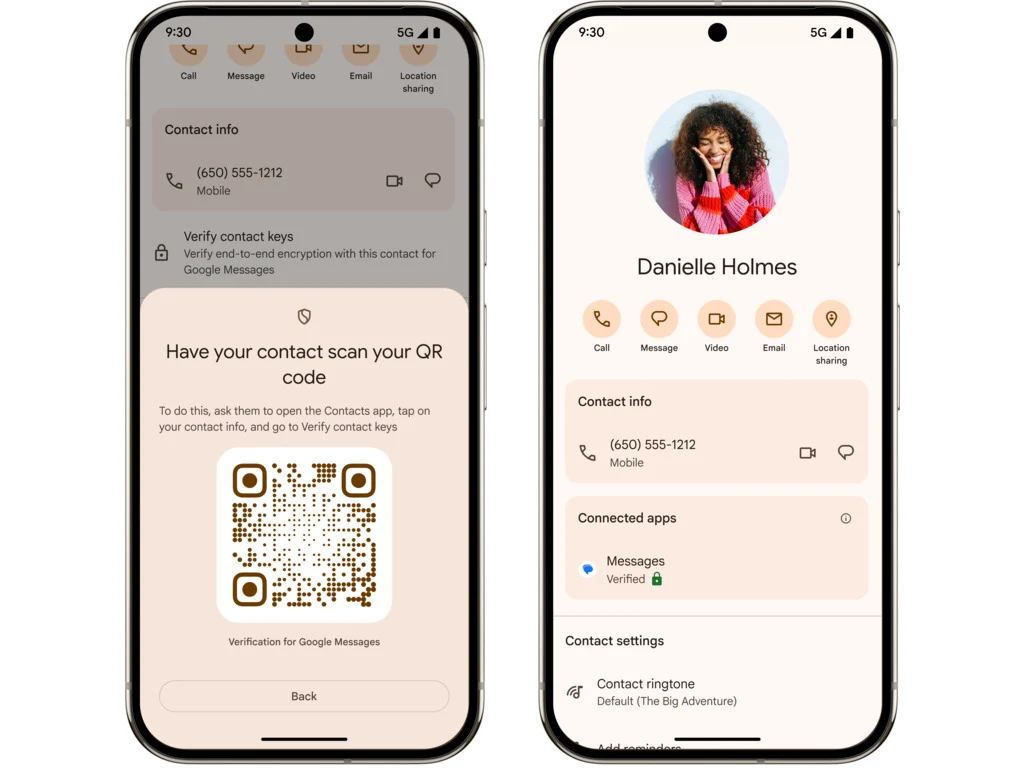
    Google is rolling out a new way to make sure you’re messaging the right person in the Messages beta. This replaces the old method of using an 80-digit code to confirm secure encryption with a contact.

    Simplified Verification Process

    The updated QR code method makes things easier for users. Now, you can simply ask the other person to scan your QR code, and you can do the same for them. This feature is currently being made available in the Messages beta app for devices that run on Android 9 or newer.

    Joining the Beta Program

    As noted by 9to5Google, to get access to this new feature, you will need to enroll in Google’s beta program. You can do this by going to the Google Messages app page on the Play Store, scrolling down, and clicking the “Join” button found in the “Become a beta tester” section.

    After signing up, you should receive an update for your Messages app. To use the new feature, tap on a conversation and then select your contact’s name to open their details page. Scroll down to find the end-to-end encryption card and select “Verify encryption.”

    Security Options Available

    This will take you to a new “Security and privacy” tab where you can choose “Verify keys for this contact.” If you tap on this, you’ll see the option to “Scan the QR code,” and they can do the same. Google is planning for a worldwide rollout by 2025, and it aims to also include support for third-party messaging apps once it’s fully launched.

    Source:
    Link


  • Microsoft Introduces Spotify Cross-Resume for Android and Windows 11

    Microsoft Introduces Spotify Cross-Resume for Android and Windows 11

    Key Takeaways

    1. Microsoft is introducing a feature similar to Apple’s Handoff for Windows 11 Insiders, starting with Spotify.
    2. Users can resume Spotify songs or podcasts on their PC through a “Resume Alert” on the taskbar.
    3. Clicking the alert will automatically download the Spotify app from the Microsoft Store if it’s not already installed.
    4. To access this feature, users must enroll in the Windows Insider Program and install the Microsoft Link to Windows app on their Android device.
    5. Users need to enable access to their Android phone in Windows 11 settings for full functionality, with plans for more app support in the future.


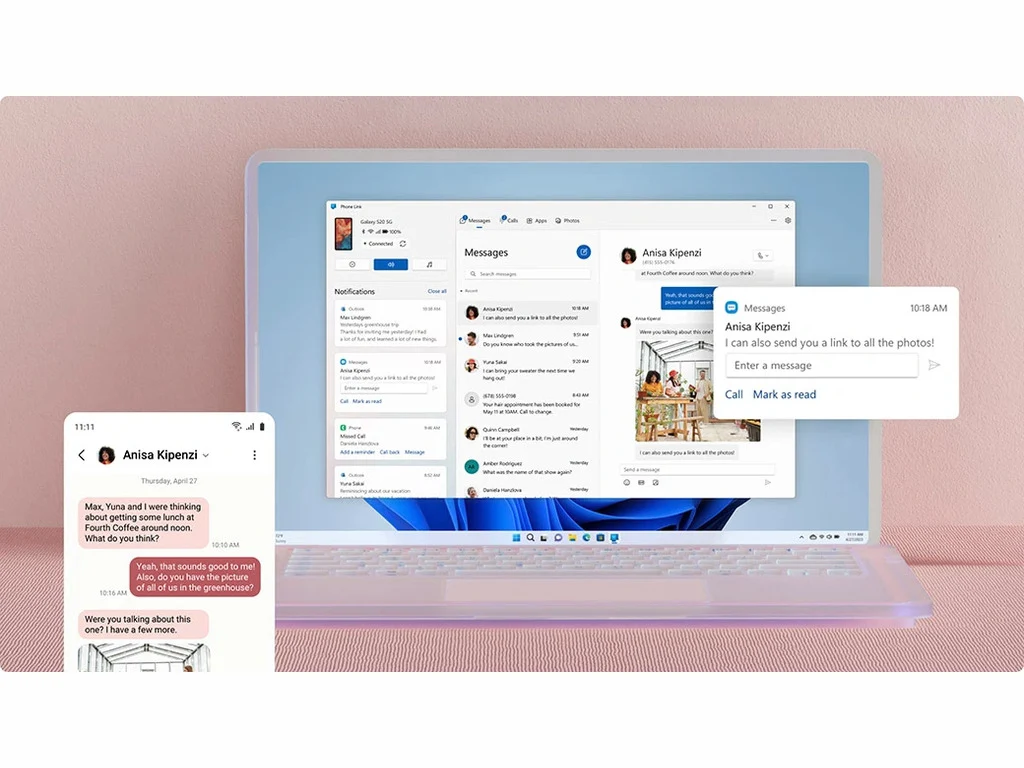
    Microsoft is slowly introducing its version of Apple’s Handoff to Windows 11 Insiders. This initiative is starting with users in the Dev and Beta channels, allowing them to easily continue using their favorite apps across Android and Windows 11 devices.

    Starting with Spotify

    Initially, Insiders can pick up where they left off with songs or podcasts on the Spotify app for Android, with plans to add support for more applications soon. To take advantage of this feature, simply start listening to a song or podcast on Spotify, and a “Resume Alert” will appear on your taskbar. By clicking on this alert, the Spotify desktop app will launch, enabling you to switch to your PC.

    Installing the App

    If you don’t have the Spotify app on your desktop, clicking the alert will trigger an automatic download from the Microsoft Store. To ensure this works, you must be logged into the same account on both your phone and your computer.

    Getting Started with Windows Insider Program

    To access this feature, you’ll need to enroll in the Windows Insider Program. Begin by opening the settings on your Windows 11 device, then select “Windows Update.” Look for “Windows Insider Program,” click on “Get Started,” and follow the prompts.

    After signing up, go to the Play Store on your Android device and download the Microsoft Link to Windows app. Log in with your Microsoft account and follow the necessary steps.

    Enabling Access

    You must also allow access to your Android phone by navigating to Windows 11 Settings, selecting “Bluetooth and devices,” then “Mobile devices.” Switch “Allow this PC to access your mobile devices” to On, and click on “Manage devices” to link your Android phone.

    The rollout of this feature is happening gradually, so you might have to wait for it to become available for your account. Microsoft is also encouraging developers to incorporate this functionality into their apps, with support for additional applications coming soon.

    Source:
    Link


  • Students Use TI-Nspire CX II to Fly CoDrone Edu and Learn Python

    Students Use TI-Nspire CX II to Fly CoDrone Edu and Learn Python

    Key Takeaways

    1. Robolink and Texas Instruments have partnered to teach drone programming using TI Nspire CX II calculators and CoDrone Edu mini drones.
    2. The CoDrone Edu is compact, lightweight, and has a flight time of up to 8 minutes with a communication range of 164 ft.
    3. TI Nspire CX II calculators feature a 3.2-inch LCD display, support multiple programming languages, and are approved for standardized tests.
    4. Students can learn Python programming by downloading a module onto their calculators and connecting to the drone’s controllers.
    5. A menu-driven function lookup system is available to help students reduce coding errors while programming drones.


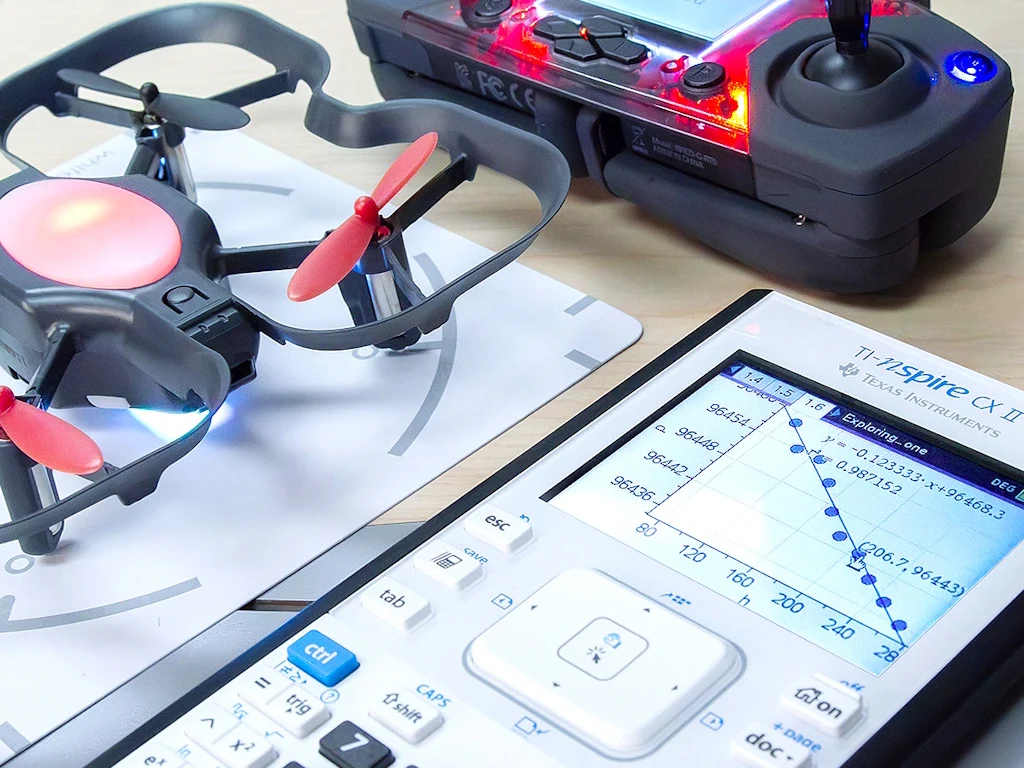
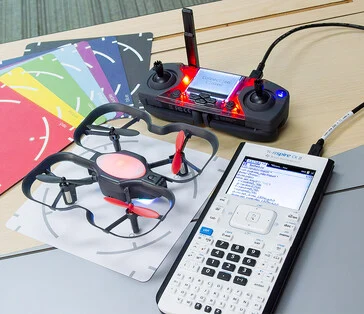
    Robolink has teamed up with Texas Instruments to provide students with a way to learn drone programming using just the TI Nspire CX II graphing calculators (available for purchase on Amazon) and CoDrone Edu mini drones.

    CoDrone Edu Specifications

    The CoDrone Edu is compact, measuring 5.5 x 5.5 x 1.4 inches (138.5 x 138.5 x 34.8 mm) and weighs a mere 2 oz. (57 g). It can fly for up to 8 minutes and has a communication range of 164 ft. (50 m). Recharging it takes about an hour, and the batteries can be changed out easily, with additional sets for sale. A dozen drones can be bought for $3,999, while a single drone is priced at $249; however, prices may change based on how many are bought.

    TI Nspire CX II Features

    The TI Nspire CX II graphing calculators feature a 320 x 240 3.2-inch LCD display, 64 MB of RAM, and 90 MB of internal storage. They run on a specialized ARM9-26EJ-S SoC and support a variety of programming languages like Python and TI-Basic. These calculators are commonly found in classrooms due to their approval for use in standardized tests like the SAT and ACT. Educational institutions can order packages of drones to integrate with these calculators.

    Learning Python with Drones

    Many schools have chosen Python as a straightforward programming language to help students get started with coding software. Students just need to download the Python module onto their calculators and connect them to the drone’s controllers to begin programming. There’s also a menu-driven function lookup system, which aids in reducing coding mistakes when writing Python code.

    Source:
    Link


  • Philips Hue App Update Introduces New Useful Tool

    Philips Hue App Update Introduces New Useful Tool

    Key Takeaways

    1. Philips Hue app version 5.49 introduces a new feature for setting up automations with accessories like the Hue Smart Dimmer Switch.
    2. Users can preview their selected scene on smart lights before saving it using the ‘Show preview’ toggle.
    3. This update comes just two weeks after the previous version, which added customized scene suggestions and a new logo.
    4. The new AI Assistant for Philips Hue will launch in more countries by the end of August 2025.
    5. The iOS version of the Philips Hue app 5.49 is available on the Apple App Store, while the Android version will be released soon.


    Philips Hue has begun releasing an update for its mobile applications. The new version, 5.49, comes just two weeks after the last update, which introduced customized scene suggestions and a new Hue logo.

    New Features Unveiled

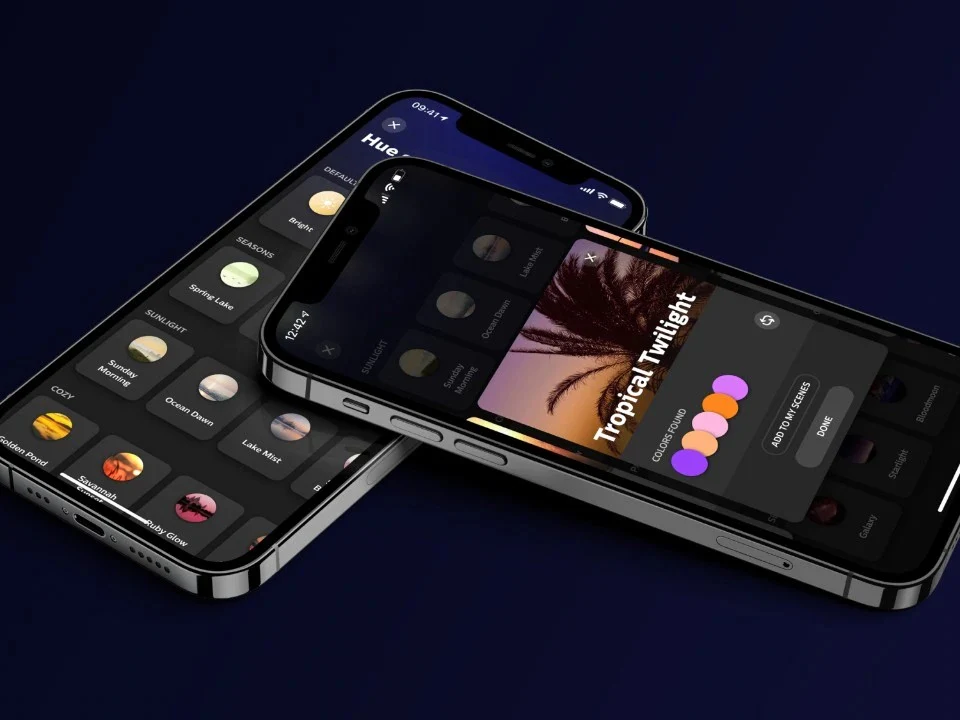
    In the latest Philips Hue app version 5.49, there’s a fresh feature for setting up automations. This option is also available when users are adding a new accessory, such as the Hue Smart Dimmer Switch (currently priced at $22.99 on Amazon). Users can now see a preview of their chosen scene on their smart lights before saving it. This can be adjusted using the ‘Show preview’ toggle located at the bottom of the scene selection screen during setup (illustrated below).

    Upcoming Changes

    This seems to be the only update in version 5.49. Nevertheless, the brand’s new AI Assistant is set to launch in more countries globally by the end of August 2025. You can download the Philips Hue app version 5.49 for iOS from the Apple App Store. As of now, it hasn’t been released on the Google Play Store; the Android version should be available in the next few days.

    Source:
    Link


  • Windows 11 Upgrade for Older Models: TPM 2.0 Not Required

    Windows 11 Upgrade for Older Models: TPM 2.0 Not Required

    Key Takeaways

    1. Windows 10’s life cycle ends this fall, prompting many users to switch to Windows 11.
    2. TPM 2.0 is required for key security features in Windows 11, but upgrade offers are being sent to devices without it.
    3. Users are receiving upgrade prompts for Windows 11 24H2 on older devices with TPM 2.0 disabled.
    4. Microsoft has not officially commented on the unexpected upgrade offers, leaving the situation unclear.
    5. Upgrading to Windows 11 without TPM 2.0 is possible but not recommended due to potential security risks.


    With Windows 10’s life cycle coming to an end this fall, many users are about to switch to Windows 11. The official requirement states that TPM 2.0 is necessary to enable security features such as device encryption and Windows Hello. However, there are increasing instances where updates to Windows 11 are being offered on older devices that lack TPM 2.0.

    Upgrade Offers for Older Devices

    As reported by Günther Born’s blog, BornCity, both personal and business users are getting upgrade prompts for Windows 11 24H2, even when TPM 2.0 is turned off in the UEFI settings. For instance, a Lenovo IdeaPad S145-15IWL user received a notification for the upgrade, despite having TPM 2.0 disabled. In March 2025, some company admins noted that their Windows 10 machines were being upgraded to Windows 11 24H2 without their approval, even though they were using WSUS for managing updates.

    Importance of TPM 2.0

    TPM 2.0 is a specialized security chip that offers cryptographic functions and safeguards key system processes. Microsoft views TPM 2.0 as vital for securely using Windows 11. Therefore, the upgrade notifications seen on older devices without TPM may introduce security vulnerabilities.

    Uncertainty Ahead

    So far, Microsoft has not released an official comment regarding this situation. It’s possible that the unexpected upgrade prompts could stem from a glitch in the updating process. The stated system requirements remain the same, meaning TPM 2.0 is still officially needed.

    It is still uncertain if Microsoft plans to ease the system requirements for Windows 11 in the future or if the current observations are simply temporary issues. For now, users on older devices should be aware that upgrading to Windows 11 without TPM 2.0 is feasible but not officially advisable.

    Source:
    Link


  • ESA to Automate Crash Avoidance for 1.2M Orbital Debris with CREAM

    ESA to Automate Crash Avoidance for 1.2M Orbital Debris with CREAM

    Key Takeaways

    1. CREAM is an ESA initiative launched in 2020 to prevent satellite collisions in Earth’s orbit.
    2. The project aims to automate collision threat evaluation and avoidance strategies for satellite operators.
    3. CREAM seeks to improve coordination among satellite operators by creating a connected network.
    4. The system can send collision alerts and suggest mediation for disputes between active satellites.
    5. Future plans include pilot usage on the ground and in-orbit demonstrations as a digital payload on other satellites.


    Collision Risk Estimation and Automated Mitigation (CREAM) is an initiative from ESA aimed at preventing satellites from crashing into each other in Earth’s orbit. Launched in 2020, this project is currently in the phase of testing on the ground.

    The Challenges of Space Operations

    Operators in space often deal with the difficult job of evaluating collision threats, planning how to avoid them, collaborating with other operators, and managing communication issues and misinterpretations. These responsibilities are not only time-consuming but also come with a lot of challenges.

    Automation to the Rescue

    CREAM aims to streamline and automate this process, easing the load for operators. The system is intended to identify possible collisions and devise prompt avoidance strategies. It will aid in decision-making and facilitate coordination among satellite operators by establishing a network that connects all key participants.

    Future Benefits and Developments

    In addition, the CREAM project could assist in resolving disputes when two active satellites are involved, even suggesting mediation services for disagreements. Although it is still in the ground-testing phase, the system is capable of sending out collision alerts, formulating practical avoidance strategies, and aiding in the coordination between involved parties.

    The next significant milestone for CREAM is the pilot usage phase, which will integrate technologies on the ground to enable effective decision-making. Future plans include missions where the system will operate as a digital payload on other satellites, known as “piggyback missions,” followed by a dedicated in-orbit demonstration to thoroughly evaluate its functionalities.

    Source:
    Link


  • Check Point Discovers Windows Kernel Vulnerability in Rust Code

    Check Point Discovers Windows Kernel Vulnerability in Rust Code

    Key Takeaways

    1. Check Point identified critical vulnerabilities in Microsoft Windows, including one that can crash systems.
    2. The vulnerability involves a kernel component, which has extensive access to hardware and applications.
    3. Rust, a programming language aimed at improving safety, is related to the disclosed kernel vulnerability.
    4. This is the first publicly disclosed vulnerability of its kind in a Rust kernel component.
    5. Windows users are urged to urgently review and update their systems to protect against potential attacks.


    Check Point has identified some vulnerabilities in the Microsoft Windows operating system this month, one of which is particularly critical as it permits attackers to crash systems.

    Critical Kernel Vulnerability

    The vulnerable software is a kernel component, providing a higher level of access compared to regular applications. The kernel serves as the core of the operating system, with extensive access to hardware and all active applications. Any software operating within the kernel holds the ability to access data and controls that regular applications cannot reach.

    The Role of Rust in Software Development

    Rust is a programming language that was created back in 2006, with its first stable version released in 2015 (find out more about Rust in this book on Amazon). Much like Ada, which was introduced in 1977, Rust aims to reduce safety problems, such as memory leaks from poorly written code, which are more common in C++.

    Check Point believes this Rust kernel component flaw is the first publicly disclosed vulnerability of its kind. This finding serves as a reminder for security professionals to always consider that all modern software may have vulnerabilities and to implement zero-trust practices consistently (discover more about it in this book on Amazon).

    Urgent Update Needed for Windows Users

    Windows users are strongly advised to manually review and update their systems right away to stop hackers from causing disruption (Navigate to Settings > Windows Update > Check for Updates).

    Source:
    Link


  • Free Windows 10 LTSC Downgrade with Updates Until 2032

    Free Windows 10 LTSC Downgrade with Updates Until 2032

    Key Takeaways

    1. Windows 10 support ends on October 14, 2025, with no more security or feature updates after that date.
    2. Users can transition to Windows 10 IoT Enterprise LTSC 2021 using UpDownTool, which ensures no data loss during the switch.
    3. Windows 10 IoT Enterprise LTSC 2021 has mainstream support until January 2027 and extended support until January 2032, but lacks features like the Microsoft Store and Cortana.
    4. Microsoft licenses Windows 10 LTSC only to organizations through volume licensing agreements; private use without a license may violate terms.
    5. Users have the option to upgrade to Windows 11 or join the Extended Security Updates program, though the latter is a temporary and costly solution.


    The deadline for Windows 10 support is coming up quickly on October 14, 2025. After this date, Microsoft will stop giving any security or feature updates.

    Transition to Windows 10 IoT Enterprise LTSC 2021

    As reported by PCWorld, you can still get support until 2032 by using UpDownTool, which is available for free on Technixstuff. This tool lets users easily move from Windows 11 or older versions of Windows to Windows 10 IoT Enterprise LTSC 2021 in just a few clicks. Best of all, it promises that no data, programs, or drivers will be lost during the switch.

    Mainstream Support Details

    Microsoft has stated that this LTSC edition, which was initially made for industrial and embedded systems, will still have mainstream support until January 2027 and extended support until January 2032. IT Magazine notes that this version is missing the Microsoft Store, Cortana, and many background services since it is designed to be a more compact and stable option.

    Licensing Restrictions

    Even though the setup and use of this edition is simple, IT Magazine highlights that Microsoft only grants Windows 10 LTSC licenses to organizations through volume licensing agreements. Attempting to use it privately or without a proper license can lead to violations of terms and conditions, which is at your own risk.

    UpDownTool offers a solution for users looking to fill the gap after Windows 10 support ends, particularly for those who value stability over new features. However, many users still have the official choice of upgrading to Windows 11 or participating in the Extended Security Updates program, though the latter is just a temporary fix that incurs costs.

    Source:
    Link


  • SpaceX Launches New Starlink Satellites with Paid Pause Feature

    SpaceX Launches New Starlink Satellites with Paid Pause Feature

    Key Takeaways

    1. SpaceX launched 24 Starlink V2 Mini satellites, expanding its satellite internet service to over 7,760 functioning satellites.
    2. A new paid “Standby Mode” was introduced, costing US $5 or €5 per month for unlimited low-speed data.
    3. Users can no longer pause their service for free; cancellation may prevent reactivation if service capacity is reached.
    4. The US $10 Roam plan has been discontinued, leaving users to choose between more expensive plans or Standby Mode.
    5. Unused data blocks will not roll over when an account is set to Standby, limiting user flexibility.


    SpaceX has broadened its satellite internet service by launching 24 Starlink V2 Mini satellites from the Vandenberg Space Force Base in California on August 14, 2025. The Falcon 9 rocket took off at 1:05 a.m. EDT (0505 GMT), putting the satellites into a polar low Earth orbit. This mission was the 144th successful landing of a Falcon 9 first stage on the droneship named “Of Course I Still Love You” and is part of the fast expansion of the Starlink network, which now boasts over 7,760 functioning satellites. This launch follows SpaceX’s recent service expansion to Somalia and Israel, with more markets in the Middle East awaiting regulatory approval.

    New Pricing Model Introduced

    In conjunction with the launch, Starlink has swapped its free pause option for a paid “Standby Mode” costing US $5 or €5 per month. This new feature allows for unlimited low-speed data at approximately 0.5 Mbps, which is good enough for messaging and light email but not suitable for streaming or video calls. This update affects Roam, Residential, and Priority customers in the United States, much of Europe, and Canada, while Enterprise and certain promotional accounts remain unaffected.

    Changes in Subscription Policies

    Before this, users were able to pause their service without any charges and could quickly resume full speeds. Now, if users decide to cancel their service rather than use Standby Mode, they might not be able to reactivate their accounts if their area has reached its service capacity. This has caused notable dissatisfaction among owners of the portable Starlink Mini dish, who often bought it for occasional or seasonal use. Many feel that paying US $60 a year for limited connectivity diminishes the product’s original pay-as-you-go charm.

    Removal of Low-Cost Plans

    Additionally, this change coincides with the discontinuation of the US $10 Roam plan, which allowed lighter users to keep their service at a lower price. After the current billing cycles finish, subscribers will need to decide between the pricier plans, the new Standby Mode, or total cancellation. Any unused data blocks will not roll over if the account is set to Standby, which further restricts user flexibility.

    Source:
    Link