Tag: AMD Radeon

  • GhostBSD 25.02: FreeBSD 14.3 with Enhanced Hardware Support

    GhostBSD 25.02: FreeBSD 14.3 with Enhanced Hardware Support

    Key Takeaways

    1. Introduction of the Gershwin community desktop environment, inspired by OS X and designed with GNUstep.
    2. Built on FreeBSD 14.3-RELEASE, featuring improved hardware detection for AMD and Nvidia graphics cards, and enhanced WiFi compatibility.
    3. Automatic clearing of /tmp is now a default feature, along with various bug fixes and translation updates.
    4. The Software Station now shows when package conflicts are resolved, and the boot environment manager has improved performance.
    5. Users can choose from Gershwin Community Preview, XFCE edition, or vanilla version, with a minimum system memory requirement of 8 GB and 15 GB disk space needed.


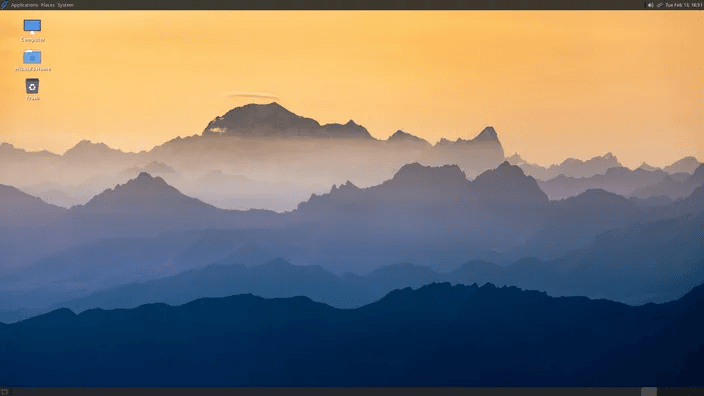
    While the unseen updates that affect the security, performance, and hardware compatibility of the latest GhostBSD are significant, those curious about what’s fresh in the version tagged 25.02-R14.3p2 should begin with Gershwin. This newly introduced community desktop environment offers a visual experience reminiscent of OS X, thanks to its GNUstep design. Although it is still in the early preview phase, Gershwin integrates smoothly with system tools and allows users to run non-GNUstep applications.

    System Improvements

    Built upon FreeBSD 14.3-RELEASE, GhostBSD 25.02-R14.3p2 features automatic detection for AMD Radeon HD 8790M and Radeon HD 8240 Kabini, alongside enhanced detection for the Nvidia RTX 4000/5000 series, plus improved compatibility with WiFi firmware. Now, automatic clearing of /tmp is a default feature. A variety of bug fixes have also been included, as well as updates and corrections for multiple translation files. The Software Station now indicates when package conflicts are resolved, and the boot environment manager has improved its performance in deleting outdated environments.

    Additional Options

    You can find the complete changelog on this website. In addition to the Gershwin Community Preview ISOs, users looking to explore different options can also download the XFCE edition or the vanilla version. It’s important to note that the minimum system memory requirement for all three editions is 8 GB. The disk space utilized for a fully equipped desktop distro is quite reasonable, amounting to 15 GB.

    Source:
    Link


  • Affordable RX 9060 Outperforms RTX 5050, Matches RTX 5060

    Affordable RX 9060 Outperforms RTX 5050, Matches RTX 5060

    Key Takeaways

    1. The AMD RX 9060 non-XT is a toned-down version of the RX 9060 XT, designed primarily for system integrators.
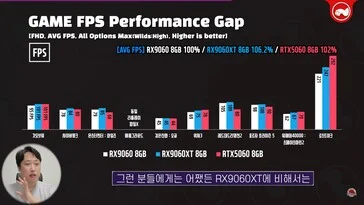
    2. Performance tests show the RX 9060 is nearly on par with the RTX 5060 and about 6% slower than the RX 9060 XT at 1080p with high settings.
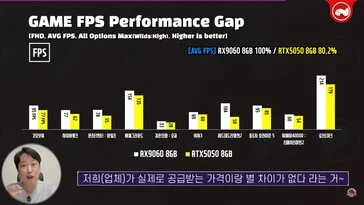
    3. The RX 9060 is approximately 20% faster than the underperforming RTX 5050, making it a better choice for budget gamers.
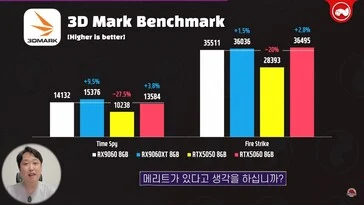
    4. Benchmark scores indicate the RX 9060 is 38% and 25% faster than the RTX 5050 in 3DMark Time Spy and Fire Strike, respectively.
    5. For 1080p gaming in 2025, investing in a GPU with 16 GB VRAM, like the RX 9060 XT, is recommended over the RX 9060.


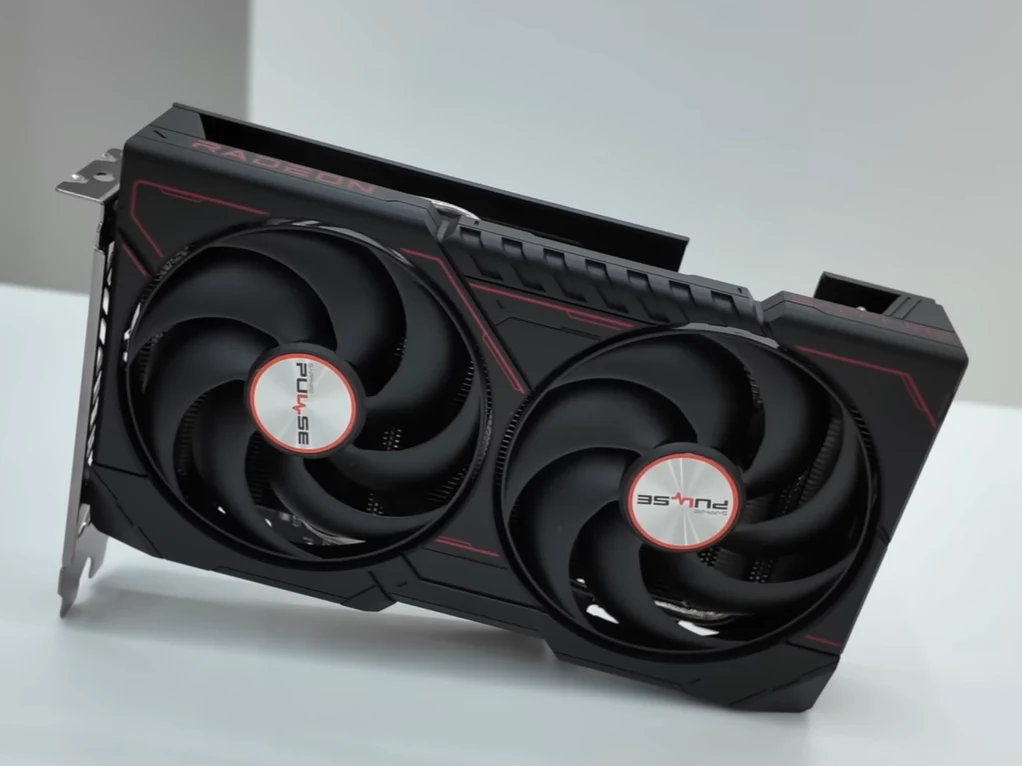
    Last week, AMD unveiled the RX 9060 non-XT. This graphics card seems to be made exclusively for system integrators and is a toned-down version of the RX 9060 XT 8 GB. As a result, the RX 9060 lacks some power compared to the RX 9060 XT. Thanks to some performance evaluations conducted by a South Korean website, we now have a clear understanding of how much less performance the RX 9060 delivers when placed next to the RX 9060 XT.

    Performance Testing Insights

    Technosaurus put the RX 9060 through its paces against the RTX 5050, RTX 5060, and RX 9060 XT 8 GB. The GPUs were tested with both a budget Ryzen 5 7500F and the top-performing gaming CPU, the Ryzen 7 9800X3D. The results showed that the RX 9060 held its ground.

    In games like God of War 2018, Cyberpunk 2077, and Warhammer 4000: Space Marine 2, the RX 9060’s performance is nearly on par with the RTX 5060, with the latter being just 2% quicker than the RX 9060. In contrast, the RX 9060 XT manages to be about 6% faster than the RX 9060 non-XT. These performance metrics were captured at 1080p with the highest settings applied.

    Competitive Edge

    When compared to the $249 RTX 5050, the RX 9060 looks quite impressive. Reports suggest that the RX 9060 is roughly 20% faster than the RTX 5050. The RTX 5050 has received poor reviews, as it provides just enough performance for 1080p gaming but is considered a letdown from Nvidia in 2025. The RX 9060, while not the fastest option available, seems to overshadow the RTX 5050. The only advantage for the RTX 5050 is its wide availability, while the RX 9060 might only be released in limited quantities for pre-built gaming rigs.

    Benchmark Results

    In addition, Technosaurus ran 3DMark Time Spy and Fire Strike tests on the RX 9060. The card achieved a score of 14,132 in Time Spy and 35,511 in Fire Strike. This indicates that the RX 9060 is about 38% and 25% quicker than the RTX 5050 in these benchmarks, respectively. However, it does fall short against the RTX 5060, which outperforms the RX 9060 by around 4% and 3% in Time Spy and Fire Strike, respectively.

    To sum up, if the pre-built gaming PCs with the RX 9060 are priced reasonably, or if AMD opts to price the card competitively compared to the RTX 5050, it could be a solid GPU for certain users. Nonetheless, investing in an 8 GB VRAM GPU in 2025 isn’t advisable. Therefore, if budget allows, 16 GB options like the RX 9060 XT should remain your go-to for 1080p gaming.

    Source:
    Link


  • GhostBSD 24.10.1: Netflix in Chromium Plus Fixes and Updates

    GhostBSD 24.10.1: Netflix in Chromium Plus Fixes and Updates

    FreeBSD-based GhostBSD has released version 24.10.1, and this update doesn’t feature major advancements like the previous version, 24.07.1, where Eric Turgeon and his team made significant enhancements by utilizing the FreeBSD PKGBSD system. The key highlight of this release is the addition of Netflix support in the Chromium web browser. Several packages have also been updated, and various bugs have been resolved.

    Key Changes in GhostBSD 24.10.1

    In GhostBSD 24.10.1, some notable changes include the removal of UFS from custom installations and the new ability to mark certain packages as vital. Additionally, the base packages have been updated to align with the most recent FreeBSD code updates, and there is now driver support for AMD Radeon R5, R6, and FirePro devices. For more detailed information, the full release notes are accessible through the link provided in the Source(s) section at the bottom of this article.

    System Requirements and Updates

    The XFCE edition has also received updates. The system requirements for both the standard and community builds remain unchanged. Those who are considering trying GhostBSD for the first time should be aware that it only supports 64-bit processors, and a complete system installation needs 15 GB of free disk space. Additionally, the minimum system requirements include 4 GB of RAM and a network card.

    Source: Link

  • AMD’s Radeon PRO W7700 Graphics Card: A New Player in the Professional Graphics Arena

    AMD’s Radeon PRO W7700 Graphics Card: A New Player in the Professional Graphics Arena

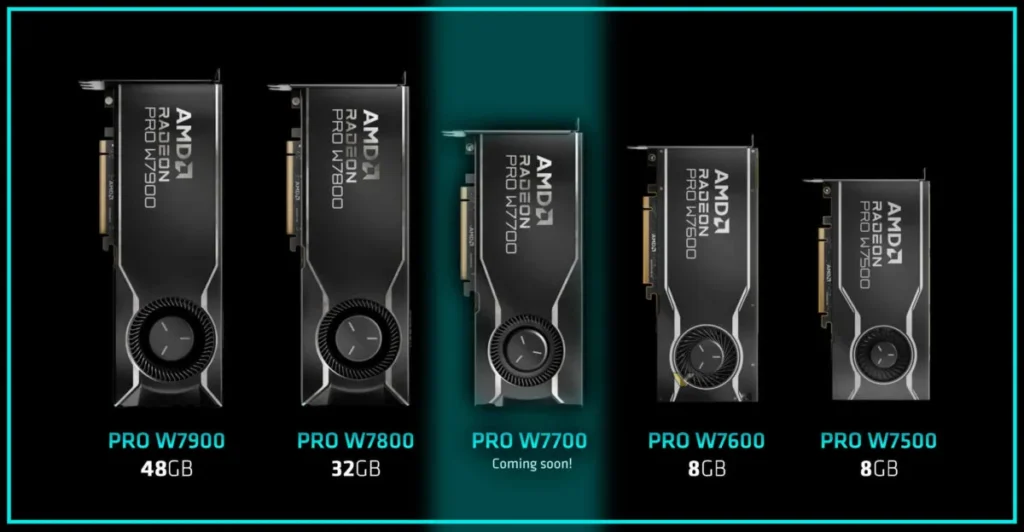
    The tech landscape is brimming with excitement as AMD unveils a teaser of its upcoming professional graphics card, the Radeon PRO W7700, enriched with 16GB of VRAM. This addition to AMD’s Radeon PRO W7000 series is believed to bring a fresh cooler design, albeit retaining the recognizable blower design inherent to the series.

    Spotlight on Radeon PRO W7700

    The Radeon PRO W7700 emerges as a promising contender in the professional graphics domain, positioned between the higher-end W7800 and the more affordable W7600 models. Rumors swirling around the tech sphere hint at a possible launch on November 21, propelling enthusiasts and professionals into a state of eager anticipation.

    AMD's Radeon PRO W7700 Graphics Card: A New Player in the Professional Graphics Arena
    PRO W7700


    Unique Design Features

    The cooler design of the W7700 is touted to be distinct, veering away from the traditional design seen in its series counterparts. This innovative design, coupled with the familiar blower style, is expected to offer efficient cooling solutions, vital for maintaining optimal performance during intensive graphical tasks.

    Pricing and Performance

    Pricing is a critical aspect that could determine the W7700’s appeal among its target audience. The W7800 and W7600 are priced at $2,499 and $599 respectively, paving the way for the W7700 to occupy the middle ground. This pricing strategy could potentially cater to a wider range of professionals, offering a harmonious blend of cost and performance.

    AMD's Radeon PRO W7700 Graphics Card: A New Player in the Professional Graphics Arena
    PRO W7700


    Final Thoughts

    The Radeon PRO W7700 is a testament to AMD’s continuous endeavor to bridge the gap between high-end performance and affordability. As the tech community waits with bated breath for its official release, the W7700 is poised to carve a niche for itself in the professional graphics card market.


    Source: XDA-Developers, VideoCardz