Category: Computers

  • Raspberry Pi 5 NAS Board with RAID and Fast Ethernet

    Raspberry Pi 5 NAS Board with RAID and Fast Ethernet

    Key Takeaway

    1. The Radxa Taco V1.61 uses the Raspberry Pi Compute Module 5 instead of a standard single-board computer, supporting storage and networking functionalities.
    2. It features dual Ethernet ports (1 Gbps and 2.5 Gbps), an M.2 2230 slot for wireless cards, and supports up to five storage drives (HDDs or SSDs).
    3. The device includes a microSD slot for OS installation, supports RAID configurations, and provides GPIO headers and USB 3.2 ports for additional connectivity.

    Introducing the Radxa Taco V1.61

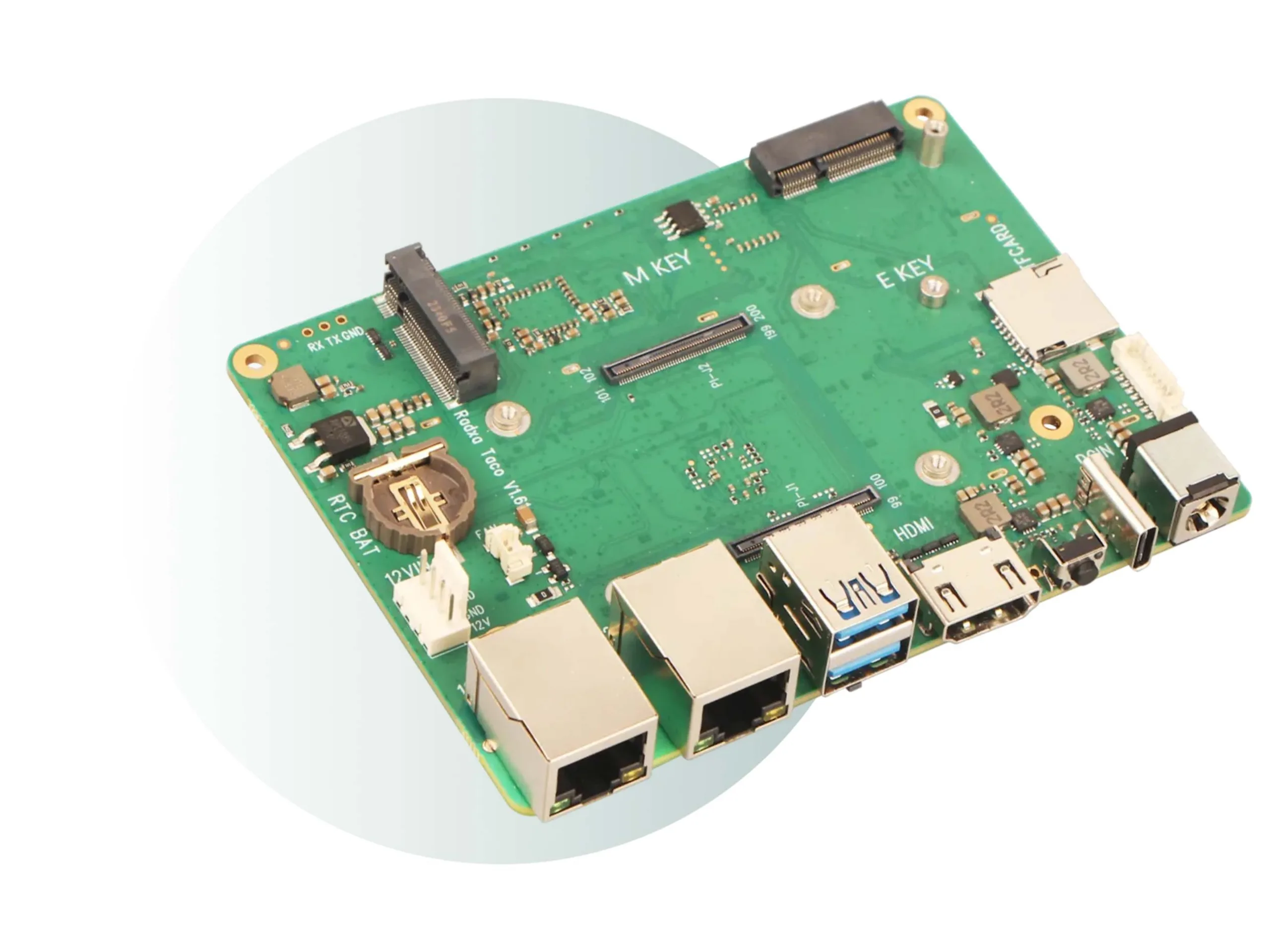
    The Radxa Taco keep catching eyes due to its resemblance to other single-board computers, but the newest model, the V1.61, is now up for preorder. Price wise, it tags in at $65, and this does not include the Raspberry Pi Compute Module 5. Instead of the typical all-in-one SBC design, it incorporates the Raspberry Pi Compute Module 5, making it unique in its connectivity and storage options.

    Features and Connectivity

    This board packs a punch with two Ethernet ports, one providing up to 1 Gbps, and the other reaching 2.5 Gbps, breaking away from the typical Gigabit Ethernet limit. Even traditional HDDs can fully utilize these speeds, which is pretty significant. For wireless needs, there’s an M.2 2230 slot to support Wi-Fi and Bluetooth cards, greatly enhancing its networking flexibility. It is planned to support five storage devices simultaneously — be it 3.5-inch hard drives, 2.5-inch drives from laptops, or SATA SSDs, so users have many options.

    Additional Components & Usage

    It’s equipped with a microSD card slot, which is typically used to install the operating system, giving a lot of freedom but also the user’s responsibility for managing it. The board supports RAID configurations including 0, 1, 5, and 10, immensely useful for data redundancy or performance. Also, it has GPIO headers for other customizations and two USB 3.2 Gen 1 ports perfect for connecting external storage devices or peripherals.

    Conclusion and Thoughts

    Overall, the Radxa Taco V1.61 is a versatile option for those looking for a customizable SBC that can handle multiple drives and network connections efficiently. At the budget pricing point of $65 plus the Raspberry Pi Compute Module 5, it offers an affordable solution for advanced users needing extensive storage and connectivity options. This board is a promising addition to the market, especially for multimedia, network, or storage projects.
    Sources

  • Secondary Display for MacBook Pro & Air with Slide-Out Mechanism

    Secondary Display for MacBook Pro & Air with Slide-Out Mechanism

    Key Takeaway

    1. External displays like the SpectraSlideOut enhance productivity by expanding screen space and can stay attached during transport for convenience.
    2. The SpectraSlideOut is designed to fit around specific MacBook models, mainly 13-inch to 15-inch versions, with limited compatibility.
    3. The device draws power from the notebook’s battery, eliminating the need for an additional power source, and is available in ABS or aluminum versions.
    4. The prototype is launching via an Indiegogo campaign on April 28, with details on pricing and technical specs yet to be announced.

    Affordable Add-on Laptop Displays

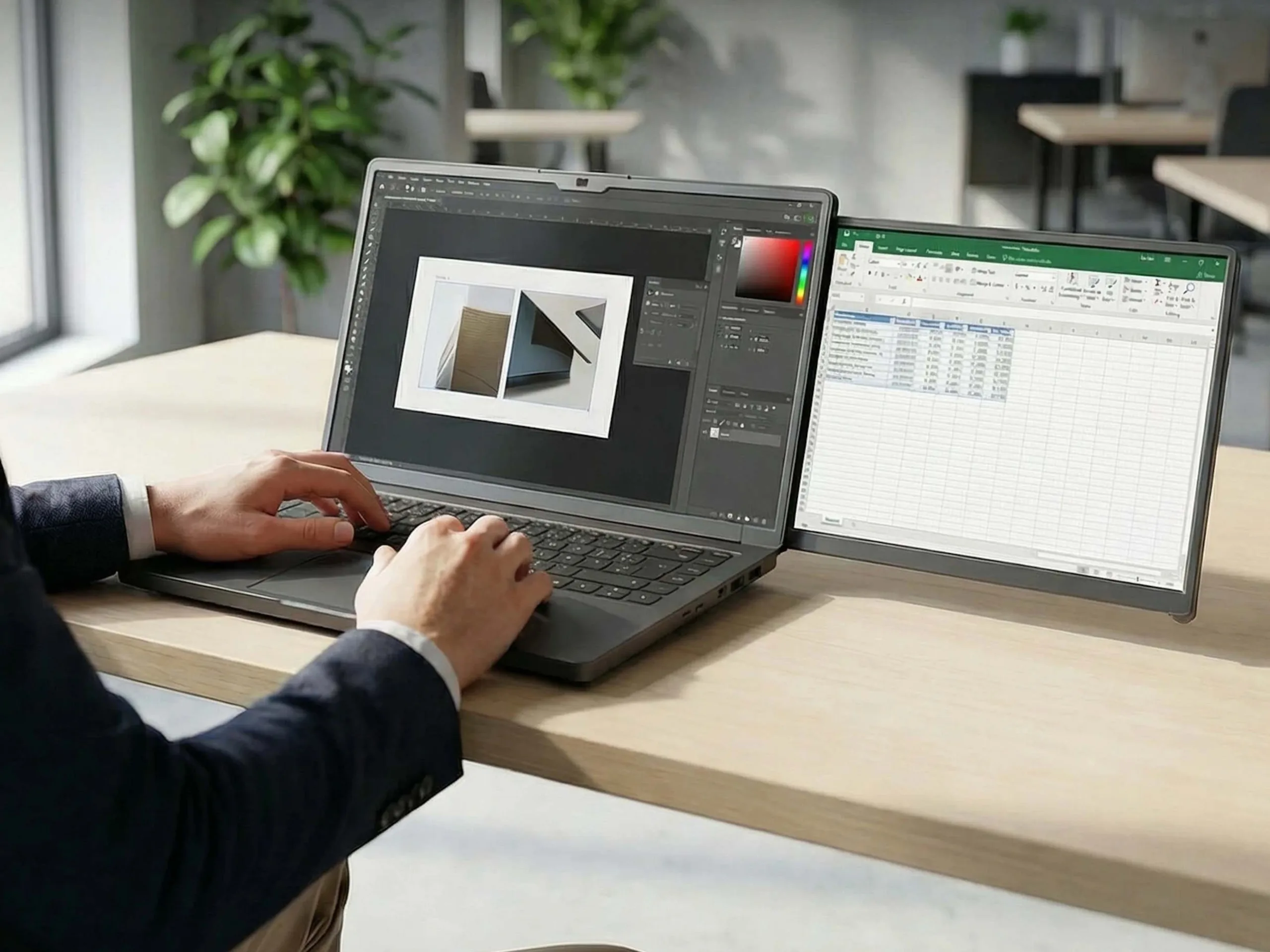
    There are some kinda low-cost add-on screens for laptops that you can find at Amazon and similar stores. These screens are either placed beside the laptop or attached to the main screen. This addition can make a big difference by giving you more screen space, which is super helpful for working efficiently.

    Introducing the SpectraSlideOut

    The SpectraSlideOut is a new kind of external display with an rather odd design. Basically, it’s a case that wraps around your notebook like a second layer of skin. It’s handy because you can keep it attached while moving around, so you don’t need to remove it when you’re done with a quick work session. Plus, it seems to fit securely, which is always a good thing. They’re offering it on Indiegogo in two types: one made from ABS plastic and the other from aluminum.

    Compatibility and Limitations

    Of course, not every laptop can use the SpectraSlideOut. Initially, it will be compatible with the 14-inch MacBook Pro (M4), 13-inch models, and the 15-inch and 13-inch MacBook Air (M3/M2), along with some older 15-inch Air versions. Just be aware, adding this accessory will make your laptop noticeably thicker and probably heavier. Luckily, it won’t need its own battery or power supply because it gets power from the laptop’s own battery. The specific technical details and pricing are still unknown. The Indiegogo campaign should start on April 28.


    Sources

  • Claude code successfully cracks FreeBSD in under four hours

    Claude code successfully cracks FreeBSD in under four hours

    Key Takeaway

    1. A critical vulnerability (CVE-2026-4747) was identified in FreeBSD’s RPCSEC_GSS module, allowing for exploitation via stack buffer overflow.
    2. Security researcher Nicholas Carlini, supported by Anthropic’s AI model Claude, demonstrated that the vulnerability could be exploited within four hours, with AI potentially creating working exploits even faster.
    3. The widespread reliance on FreeBSD by major companies (IBM, Nokia, Apple, etc.) and its presence in popular consumer devices and services underscores the high impact of this security flaw.
    4. The rapid development of automated exploit tools is accelerating timeline expectations for security response, reducing traditional patch cycles from weeks to hours.

    A security researcher by the name of Nicholas Carlini has recently discovered a significant flaw in the FreeBSD operating system. Supported by Anthropic’s AI model Claude, he was able to find and exploit this flaw in just four hours. Interestingly, Claude actually managed to create a working exploit of its own. This security issue has been officially registered under the CVE-2026-4747 number.

    Impact on Industry and Popular Tech

    FreeBSD is a critical component for many technological solutions worldwide, used across different sectors. It forms the backbone for major corporations like IBM, Nokia, Juniper Networks, and NetApp, aiding them in building their tech infrastructure. Moreover, Apple’s macOS shares parts of its architecture with FreeBSD, showing just how widespread its influence is.

    Inclusion in Consumer Devices and Services

    When it comes to entertainment, the influence of FreeBSD can be seen in popular gaming consoles such as the PlayStation 3, PlayStation 4, and Nintendo Switch. Furthermore, cloud-based services like Netflix and messaging platforms like WhatsApp depend heavily on this system’s architecture. The vulnerability lies within the RPCSEC_GSS module, which handles Kerberos authentication on Network File System (NFS) servers.

    Technical Details of the Exploit

    The exploit used a technique called a stack buffer overflow. Basically, this involves writing data into a memory segment that isn’t large enough, causing neighboring memory space to get overwritten. Rumor from upcoming info from Anthropic, called “Mythos,” suggests that exploiting such flaws could now happen even faster, taking less than a few hours.

    The Changing Pace of Cybersecurity Threats

    The rapid identification and utilization of vulnerabilities are reshaping the field of IT security. Unlike traditional patching processes, which often take several weeks after a security alert before updates are installed, automated exploits these days can be deployed within hours. This drastic change pushes organizations to rethink how they defend their systems.

    References and Further Reading

    • CVE-2026-4747
    • AI Just Hacked One Of The World’s Most Secure Operating Systems | Forbes
    • Anthropic’s next model could be a ‘watershed moment’ for cybersecurity. Experts say that could also be a concern | CNN
  • NASA Uses Microsoft Hardware and Faces Outlook Challenges in Space

    NASA Uses Microsoft Hardware and Faces Outlook Challenges in Space

    Key Takeaway

    1. Minor technical issues, including sanitation system water levels and false leak alarms, were quickly resolved without impacting the mission.
    2. A remote troubleshooting of a Microsoft Surface Pro glitch demonstrated the feasibility of long-distance IT support during deep-space missions.
    3. NASA’s reliance on commercial off-the-shelf devices, like Microsoft Surfaces, provides practical and psychological benefits for astronauts during lunar missions.

    Recent Updates from Artemis II

    As the Artemis II mission is ongoing, there are some minor issues that came up during the mission. During the latest press conference, they mentiond that som small technical problems popped up but were fixed in no time. These issues seem to be nothing serious or to worry about, and they could very well happen on Earth as well.

    Technical Problems With the Spacecraft

    The first problem had to deal with the sanitation system onboard. It was found out that the water level was not enough, which caused the pumps to stop working. Just before the ship was about to make a crucial engine burn to get into lunar orbit, a leak alarm went off. But it was just a false alarm—a false reading caused by a fan that was slightly out of position messing with a pressure sensor. Nothing major, but it sure got some attention.

    Software Glitches Onboard

    Now, here’s a problem that anyone who uses computers might understand. Commander Reid Wiseman’s Microsoft Surface Pro was acting up. Two Outlook apps were running at the same time, and both weren’t working properly. This, however, had nothing to do with the rockets systems, just a pesky tech hiccup. The mission control back on Earth had to troubleshoot remotely, which was pretty impressive considering they were much farther away from the spacecraft than usual—probably the longest remote connection ever for support like that. It took about an hour but finally, they managed to fix the Outlook issues by reloading some files. Even though Outlook was showing offline, it did not cause any real problems for the mission.

    Why They Use Common Hardware

    The hardware used is mostly off-the-shelf stuff, which is really practical. NASA has a habit of using tablets that have styluses because they are easier for astronauts to use with bulky gloves. The Microsoft Surface has become a common choice, although they have looked into other options like iPads too. This equipment is mainly used for routine things, such as planning and communication, not for the critical flight systems. The important systems run on special hardware that is designed to withstand cosmic radiation and other space hazards.

    Psychological and Practical Reasons for Using Familiar Tech

    Using familiar devices also help reduce stress for astronauts since it makes their work simpler and more predictable. Space missions can be pretty stressful and complicated, so having reliable and easy-to-use gadgets can make a big difference. The software glitches, although annoying, did not affect the overall communication with mission control. Everything outside went smoothly, confirming that such minor technical issues are manageable and not a threat to the mission’s success.

    Sources
  • Why the Older AMD ThinkPad Is a Great Choice Before the T14 Gen 7

    Why the Older AMD ThinkPad Is a Great Choice Before the T14 Gen 7

    Key Takeaway

    1. The Lenovo ThinkPad T14 Gen 7 AMD offers improvements like repairability and a larger 75 Wh battery but is expected to be priced significantly higher than the current Gen 6 model.
    2. The current ThinkPad T14 Gen 6 AMD remains a strong choice, offering good performance and nearly 14 hours of battery life at around $1,200.
    3. Upgrading to the Gen 7 AMD version may not provide enough value, as it features only a CPU refresh (Ryzen AI 400 vs. Ryzen AI 300) and increased costs, making the older model a better deal for now.

    Upcoming Lenovo T Series ThinkPads and Their Potential

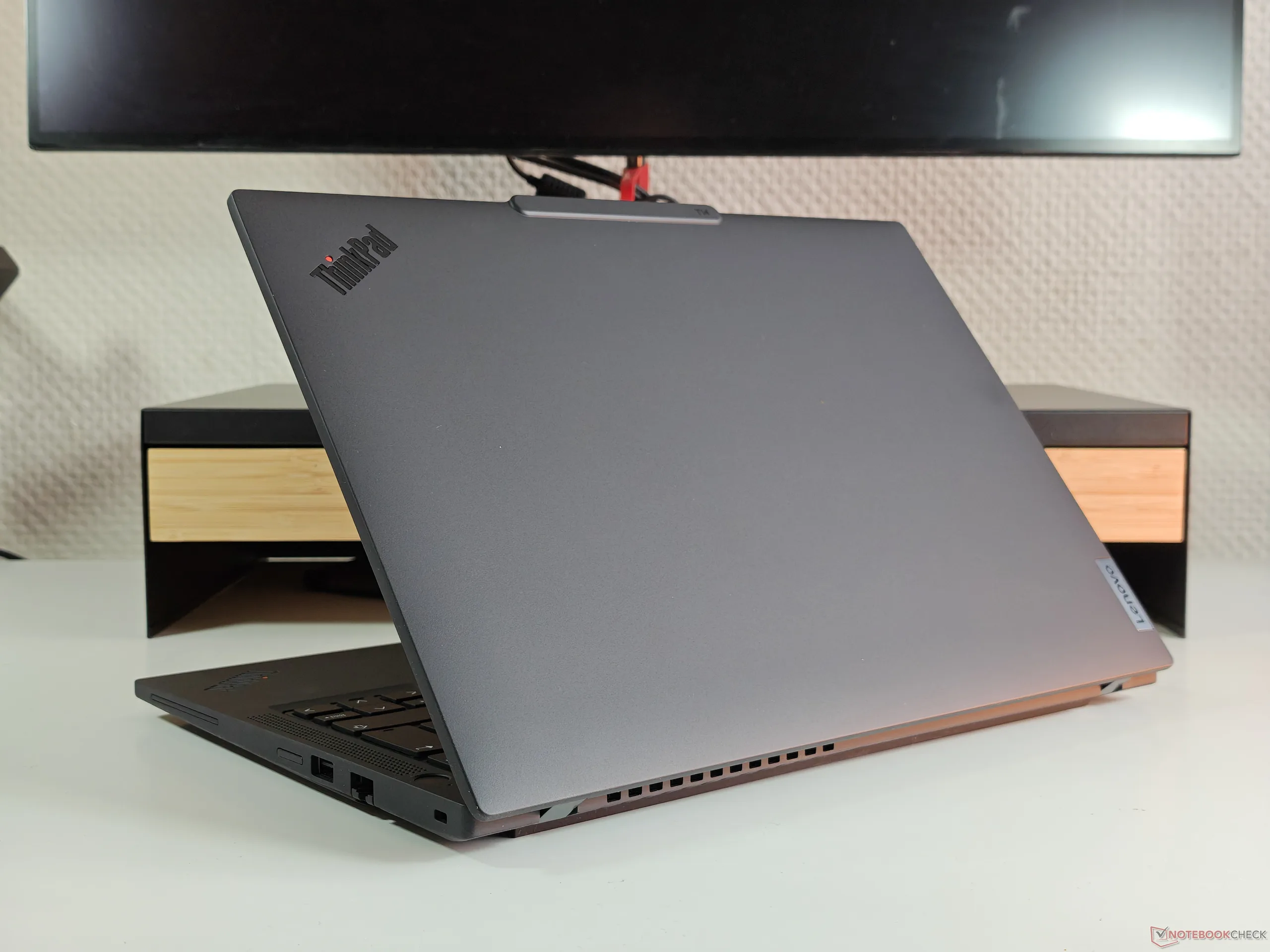
    Lenovo’s new T series ThinkPads, which they have been succesful with over many years, are getting a new refresh soon. These laptops, especially popular among large business users, will feature a more repair-friendly design and a bigger 75 Wh battery. These improvements alone make the 2026 models appealing, particularly the AMD version of the Lenovo ThinkPad T14 Gen 7 with its latest Panther Lake processors and LPCAMM2 memory.

    Key Upgrades And Why To Consider Them

    But hold on, there’s a offbeat reason just not to jump on the new models right now. Simply their pricing! The new machines will probably come with a hefty price tag, making the current generation still a very good deal. The previous model, the ThinkPad T14 Gen 6 from 2025, we reviewed it extensively and found that it still holds up well in performance, and more importantly, battery life, lasting nearly 14 hours in our tests.

    • The 2025 version is still priced as a current release, with a version selling for approximately $1,200.
    • This version runs on a Ryzen AI 7 Pro 350 CPU, which is quite capable for most tasks.

    Cost Considerations for New vs Older Models

    The newer T14 Gen 7 AMD isn’t cheap, especially as prices for RAM and other components sharply increase. Although the 75 Wh battery might be a real plus for frequent travelers or road warriors, the latest Ryzen AI 400 CPUs are just minor upgrades from the Ryzen AI 300 series. The upgrade’s real value seems limited unless you need the newest hardware.

    Final Advice: Buy Before The Price Goes Up

    Therefore, our recommendation is to purchasing a ThinkPad T14 Gen 6 AMD now, while you still can, before it’s out of stock or prices escalate. The new T14 Gen 7 AMD, despite promising upgrades, may turn out to be very expensive and perhaps not worth the extra money yet.

    Sources
    • Samsung Galaxy Book6 Pro: Is the $2100 Price Worth It for a Multimedia Laptop

      Samsung Galaxy Book6 Pro: Is the $2100 Price Worth It for a Multimedia Laptop

      Key Takeaway

      1. The Galaxy Book6 Pro features a 16-inch OLED display with improved brightness but is hampered by limited CPU options, specifically a less powerful Intel Core Ultra 7 356H SKU.
      2. The model’s performance is underwhelming compared to less expensive rivals, especially for gaming, due to its weaker iGPU.
      3. The high starting price (~$2100) and limited SKU offerings make it less attractive, with expectations of discounts based on past Galaxy Book sales.

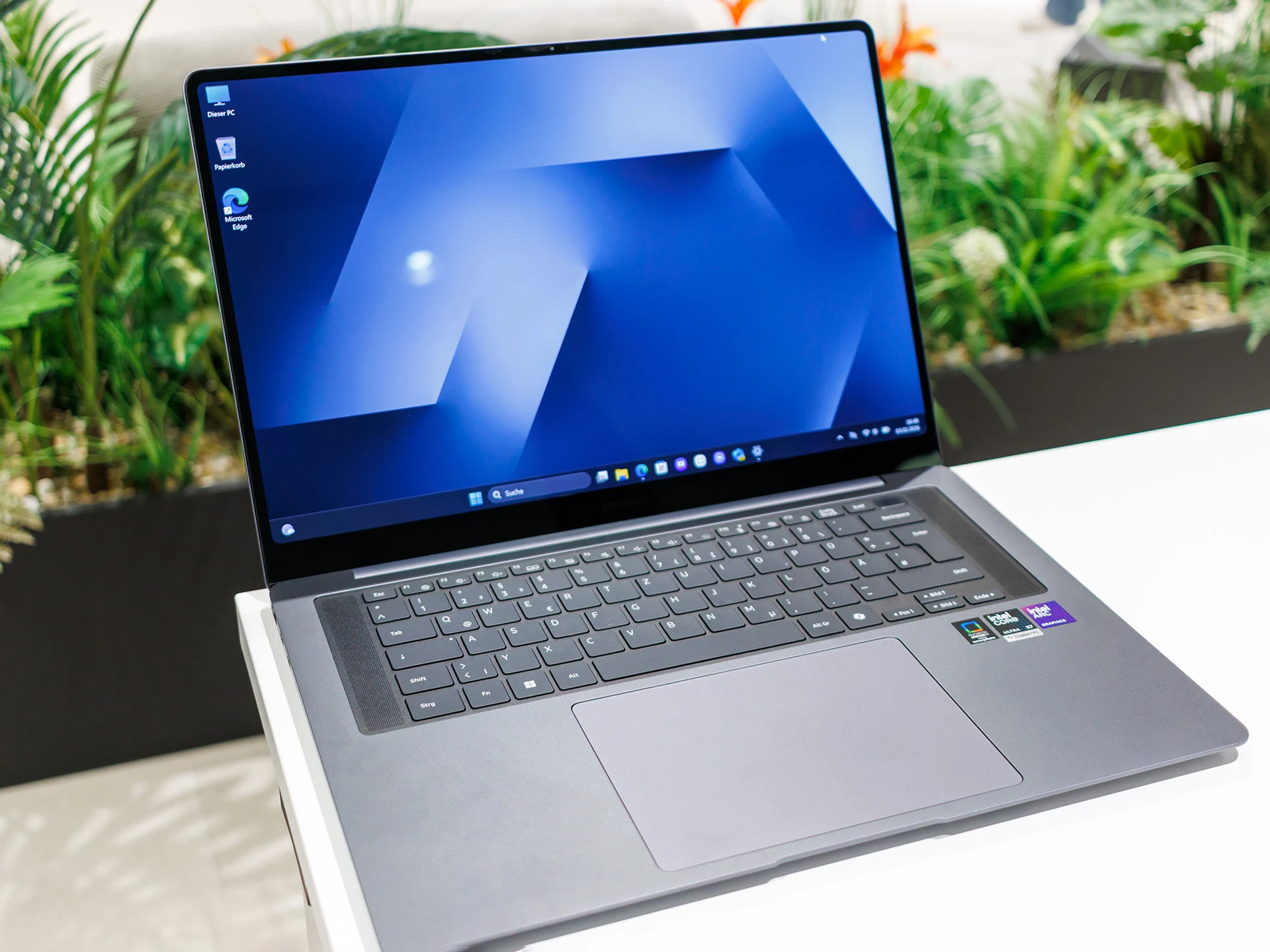
      Samsung’s latest Galaxy Book6 Pro presents a big, 16-inch screen that aims to be an everyday companion for users. The device runs on Intel’s newest Panther Lake processors, promising improved performance and efficiency. Additionally, it features a newly designed OLED display that finally offers increased brightness compared to earlier models. While the overall review was positive, some disappointed with the processor options considering the hefty retail price of $2100.

      Processor Choices and Performance

      The specific SKUs available for this model are equipped with the Panther Lake Core Ultra 7 356H, which only includes the less capable iGPU with 4 Xe cores. This configuration performs noticeably slower than the newer Arc B390 iGPU, which is a notable step-up in graphics speed. It’s quite confusing why Samsung decided to only provide one SKU with the more powerful iGPU, especially given the high price tag. The new iGPUs brought by the Panther Lake generation are designed to offer better efficiency, yet the smallest ones are even less powerful than legacy Meteor Lake iGPUs, which is quite puzzling.

      Pricing and Competitor Options

      If you are willing to spend more, around $2400, there will be a premium model, but it is not out yet. This leaves the current Galaxy Book6 Pro in a tricky spot when it comes to performance comparison, as rivals like the Asus Zenbook S16 equipped with Ryzen 4000 series CPUs and Radeon 880M graphics tend to outperform it, especially for gaming tasks. These competitors offer a better value for the price, making the Galaxy Book6 Pro less attractive for power users or gamers.

      Summary of Pros and Cons

      • The Galaxy Book6 Pro offers a solid overall package with a large, bright OLED display.
      • The high price may not be justified given the hardware options and performance.
      • Previous Galaxy Book models often went on discounts, and similar deals might be expected now.

      In conclusion, although Samsung’s new Galaxy Book6 Pro delivers a good user experience, its price point and limited processor options could turn potential buyers away. For more detailed insights, please refer to our full review of the new model.

      Sources
      • Boost Laptop Speed for $3 with Google’s New USB Dongle

        Boost Laptop Speed for $3 with Google’s New USB Dongle

        Key Takeaway

        1. The Google ChromeOS Flex USB dongle, costing $3 and limited to 3,000 units, can rejuvenate outdated laptops by allowing quick installation or booting without data loss.
        2. ChromeOS Flex requires fewer resources, significantly speeding up older laptops with a typical boot time under six seconds.
        3. The OS relies heavily on internet connectivity, with limited offline functionality, primarily supporting cloud-based services like Google Docs and Gmail.

        New ChromeOS Flex USB Dongle Now Available

        After being announced early this March, the new Google ChromeOS Flex USB dongle is now ready for make a purchase. This small device can be grabbed from Back Market for just 3 dollars, which is quite cheap considering its purpose. The company, along with Google, markets this dongle as a way to revive those old notebooks that might otherwise be discarded, claiming it can breathe new life into them.

        Specifications and How It Works

        The device itself is a 16 GB USB stick with ChromeOS Flex installed on it. When you plug it into a laptop, you got two options it can do: either install ChromeOS Flex directly on your device or boot from the USB stick without affecting your existing data. The whole process is supposed to be quick, taking less than five minutes to finish. This way, even an outdated machine can feel much more modern and quick again.

        Performance and User Experience

        The most impressive thing about ChromeOS Flex on an older laptop is its lightweight nature—it needs way fewer resources compared to Windows or macOS. Google mentions that a laptop running ChromeOS Flex can boot up in under six seconds, which is pretty fast. Plus, all updates happen automatically in the background, so users don’t have to worry about manually updating their system or interruptions.

        Limitations and Supported Devices

        Though ChromeOS Flex sounds great, it does have some limitations. Since it relies heavily on cloud services, an internet connection is pretty much a necessity. Without connection, only few functions work, such as using Google Docs, browsing files, or accessing Gmail. On a support webpage, there’s a list of laptops officially compatible with ChromeOS Flex, which includes older models like some MacBook Airs, Asus Vivobook, Dell Inspiron, and LG Gram, among others.


        Sources

      • HP Launches 14-Inch Laptops with Up to 64GB RAM and 1100 Nit OLED Screen

        HP Launches 14-Inch Laptops with Up to 64GB RAM and 1100 Nit OLED Screen

        Key Takeaway

        1. HP’s new OmniBook Ultra 14 series shifts from AMD to Intel and Qualcomm processors for 2026 models, offering configurations up to the Core Ultra X9 388H or Snapdragon X2 Elite X2E-90-100.
        2. The display features a 14-inch 2.8K OLED with a 120 Hz VRR refresh rate, 500 nits SDR, and 1,000 nits HDR brightness.
        3. Pricing varies widely depending on the configuration, with high-end models reaching over $2,400, influenced significantly by RAM, storage options, and processor choices.

        Introduction to the New OmniBook Ultra 14 Series

        HP has finally Initiated the transition from last year’s OmniBook Ultra 14 to the newer 2026 fresh lineup. In this latest versions, they shift their focus from AMD to Intel and Qualcomm processors, marking a big change in their product strategy. These new models, previewed in January, are told to feature options like the Core Ultra X9 388H and the Snapdragon X2 Elite X2E-90-100 which were announced during CES 2026.

        Features and Display

        The upgraded 14-inch laptops are packed with impressive specifications such as support for up to 64 GB of RAM and flaunt a 2.8K OLED screen. This display, mirroring the recent Lenovos, comes with a 120 Hz VRR refresh rate and brightness levels hitting 500 nits in SDR and 1,000 nits for HDR, offering a vivid visual experience that will surely attract tech enthusiasts. The contrasts in configurations cater to different user needs making the line quite versatile.

        Pricing Details and SKU Differences

        The pricing differs greatly depending on whether you choose Snapdragon or Panther Lake options. On Best Buy, the Snapdragon Ultra 14 costs a hefty $2,049 with a Snapdragon X2 Elite X2E-90-100, 32 GB RAM, and 1 TB storage. In contrast, the Panther Lake models start at $1,699 with a Core Ultra 7 356H, 16 GB RAM, and 512 GB storage, offering a more budget-friendly entry point. But, matching a Panther Lake SKU with similar specs hikes up the costs, often hitting over $2,300 to $2,400.

        Upgrades and Additional Costs

        Note that boosting the RAM from 32 GB to 64 GB alone costs HP around $500, and upgrading the SSD to 2 TB would add approximately $180 extra. Switching to the more powerful Core Ultra X9 388H for additional graphics capabilities like Arc B390 increases the price by about $80 compared to the Core Ultra 9 386H. As per HP’s info, these models will soon be available in European markets, making them more accessible to international buyers.


      • Lenovo Launches New 14-Inch Laptop with Snapdragon X2 Elite and 1100 Nits OLED Screen

        Lenovo Launches New 14-Inch Laptop with Snapdragon X2 Elite and 1100 Nits OLED Screen

        Key Takeaway

        1. The Lenovo Yoga Slim 7x (14Q8Y11) features a 14-inch OLED display with options up to 120 Hz and high brightness levels, with varying performance based on resolution.
        2. The new model is powered by a Snapdragon X2 Elite or Plus chipset with up to 32 GB of RAM and a 70 Wh battery, supporting over a day’s battery life.
        3. Pricing varies significantly by region, with the US starting at $1,739.99, notably higher than initial expectations, and other regions such as the UK and Eurozone having different configurations and starting prices.

        Introduction of Lenovo Yoga Slim 7x

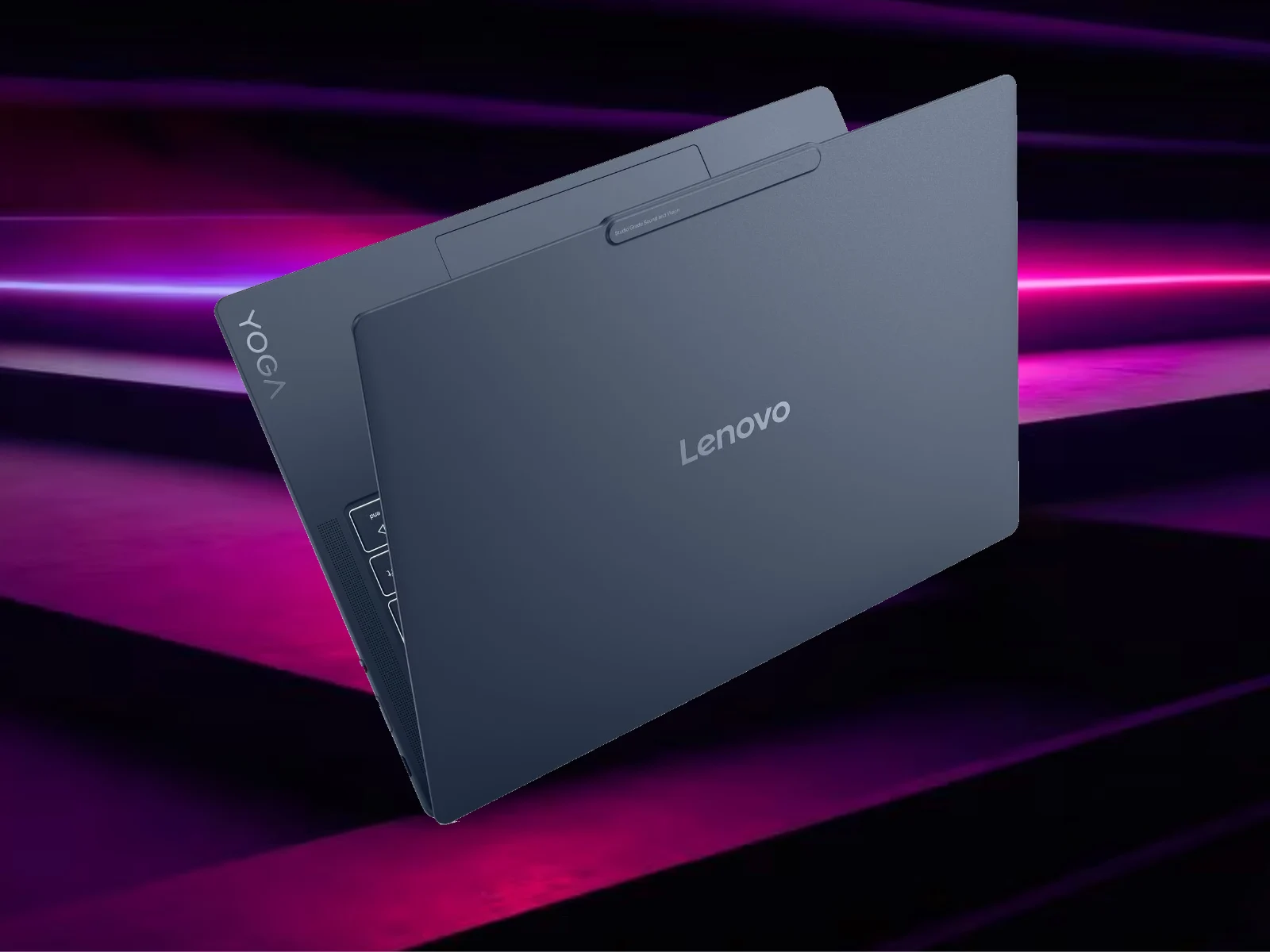
        Lenovo quietly announced their latest compact machine, the Yoga Slim 7x. This 14-inch laptop is a successor, replacing the previous Yoga Slim 7x model that showed up about two years ago. If you check prices, it roughly costs $919 on Amazon. The new model was also teased earlier this year during CES 2026, giving enthusiasts a sneak peek before the official release.

        Design and Display

        Designed for portable power, the Yoga Slim 7x (14Q8Y11) features an OLED screen size of 14 inches. The display options include a 1800p (2.8K) OLED, which provides vibrant visuals but drains battery life faster, and a 1200p screen. The OLED technology delivers deep blacks and bright colors, enhancing media experiences.

        However, it is important to note some differences in refresh rates and brightness levels. The lower-resolution 1200p models max out at 60 Hz with 400 or 500 nits in HDR, while the 2.8K variants jump to 120 Hz and up to 1,100 nits in HDR mode, but Lenovo charges an extra $60 for this upgrade.

        Technical Specifications and Pricing

        The laptop comes equipped with a Snapdragon X2 Elite X2E-88-100 chipset and packs 32 GB of RAM, elevating its performance for multitasking and demanding applications. The pricing starts at $1,739.99 in the United States, landing outside initial expectations that had suggested a lower price of around $949.99. In countries like Canada, it costs CAD 2,419, while in the UK and Ireland, prices are £1,050 and €1,200, respectively.

        Elsewhere in Europe, starting prices vary: €1,399 in Germany and €1,599 in France. Australian consumers see the model at AUD 2,269. Overall, the price difference across regions reflects the local market conditions and available configurations.

        Final Thoughts

        Overall, the Yoga Slim 7x stands out as a premium ultrabook with high-end features and a sleek design. Its OLED display and powerful hardware make it an attractive choice for users seeking desktop-class performance in a portable form. Despite the higher cost in some markets, Lenovo’s promises of long battery life and high-quality display options still appeal to many.


      • Modder Gets Intel Bartlett Lake CPU to Post on Z790 with AI-Edited BIOS

        Modder Gets Intel Bartlett Lake CPU to Post on Z790 with AI-Edited BIOS

        Key Takeaway

        1. A PC modder managed to get Intel’s OEM-only Bartlett Lake CPU to partially run on a consumer Z790 motherboard through BIOS modifications with AI assistance.
        2. The BIOS was rewritten from scratch to inject the missing CPU microcode, enabling the CPU to be recognized at POST.
        3. Despite recognition at POST, the system still encounters issues booting into the OS or passing the initial black screen, indicating incomplete compatibility.
        4. Intel and Asus potentially could block this workaround with firmware updates, but the mod demonstrates the hardware’s potential beyond official support.

        Modding Intel’s Bartlett Lake CPU for Consumer Motherboards

        With some hardware tinkering, a modder in the PC community has managed to get Intel’s latest OEM-only Bartlett Lake CPU somewhat running on a consumer-grade Z790 motherboard. He managed this with nothing but some BIOS tinkering with the help of Claude AI.

        First Signs of Success

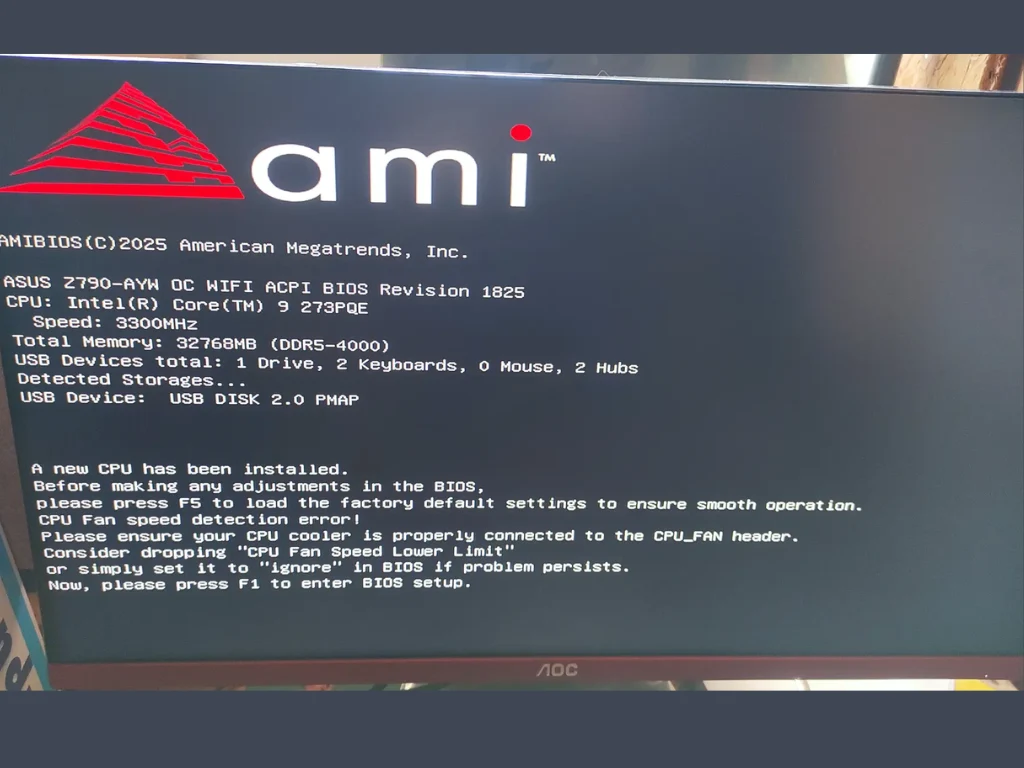
        To his surprise, he reached the POST screen, which displayed the correct CPU name and proved that, with the right BIOS, Bartlett Lake CPUs could technically run on standard consumer boards. However, the system didn’t make it past the POST screen.

        Details about the Bartlett Lake CPU

        For context, the modder got his hands on a top-of-the-line Intel Core 9-273PQE Bartlett Lake CPU, which was launched a few weeks ago specifically for workstations and AI applications. The Bartlett Lake CPU features 12 high-performance cores with 24 threads, operating at a base clock of 3.4 GHz that ramps to 5.9 GHz on a single core or maintains a stable 5.3 GHz across all cores. It also includes 36 MB of L3 cache and supports up to 192 GB of DDR5-5600 memory, fitting into the LGA1700 socket. Interestingly, Intel never intended these CPU for gaming PCs because Z790 boards lack the microcode and firmware support, but this modder pushed the limits.

        The Hack: BIOS Modding & AI Assistance

        The modder, known as “kryptonfly,” shared his progress on Overclock.net after installing the Bartlett Lake CPU into his Asus Z790 motherboard. After inserting the 273PQE CPU, he employed Claude AI to help rewrite the BIOS entirely from scratch. Somehow, the process injected missing microcode, pulling data from official Asus boards that support Bartlett Lake CPUs in industrial and AI setups, which is pretty limited space.

        Outcome & Future Possibilities

        He claimed, “Almost there! The 273PQE is recognized. Claude edited 100% of the BIOS, no module replacement at all.” Photos of the BIOS splash screen confirmed some progress, showing recognition of the CPU. He later added in a follow-up that “It correctly showed the first BIOS screen… It’s still a black screen if I press F1, but at least the CPU is recognized!” Still, errors and a black screen after POST are barriers he’s working through.

        Potential Firmware Solutions

        • Intel or Asus might release a firmware update to fix the microcode and support issues, making this process easier and more accessible.
        • Until then, modders like kryptonfly continue to experiment and find loopholes to make OEM-only hardware work on consumer motherboards.

        Community and Future Prospects

        While the hack isn’t complete yet and still faces hurdles, it showcases the ingenuity within the PC modding community. The possibility of running Enterprise-grade CPUs on consumer hardware opens doors for enthusiasts and researchers to explore new frontier of hardware compatibility. Nevertheless, it’s clear that hardware manufacturers could lock this down with quick firmware patches if they choose to—yet, the battle between open tinkering and strict protections continues.

        Sources