Author: GizNews

  • Logitech’s First Portable Mouse: $80

    Logitech’s First Portable Mouse: $80

    Key Takeaway

    – Folds in half (130-degree hinge) for genuine pocketability
    – $79.99, with silicone grip and durable hinge tested for 15 years of daily use
    – Touch panel with scroll, forward/back buttons, and 4K DPI optical sensor
    – Charges in 1 minute for 22 hours of use, folds to turn off (no power button)
    – Connects to up to 3 devices via a single pairing button


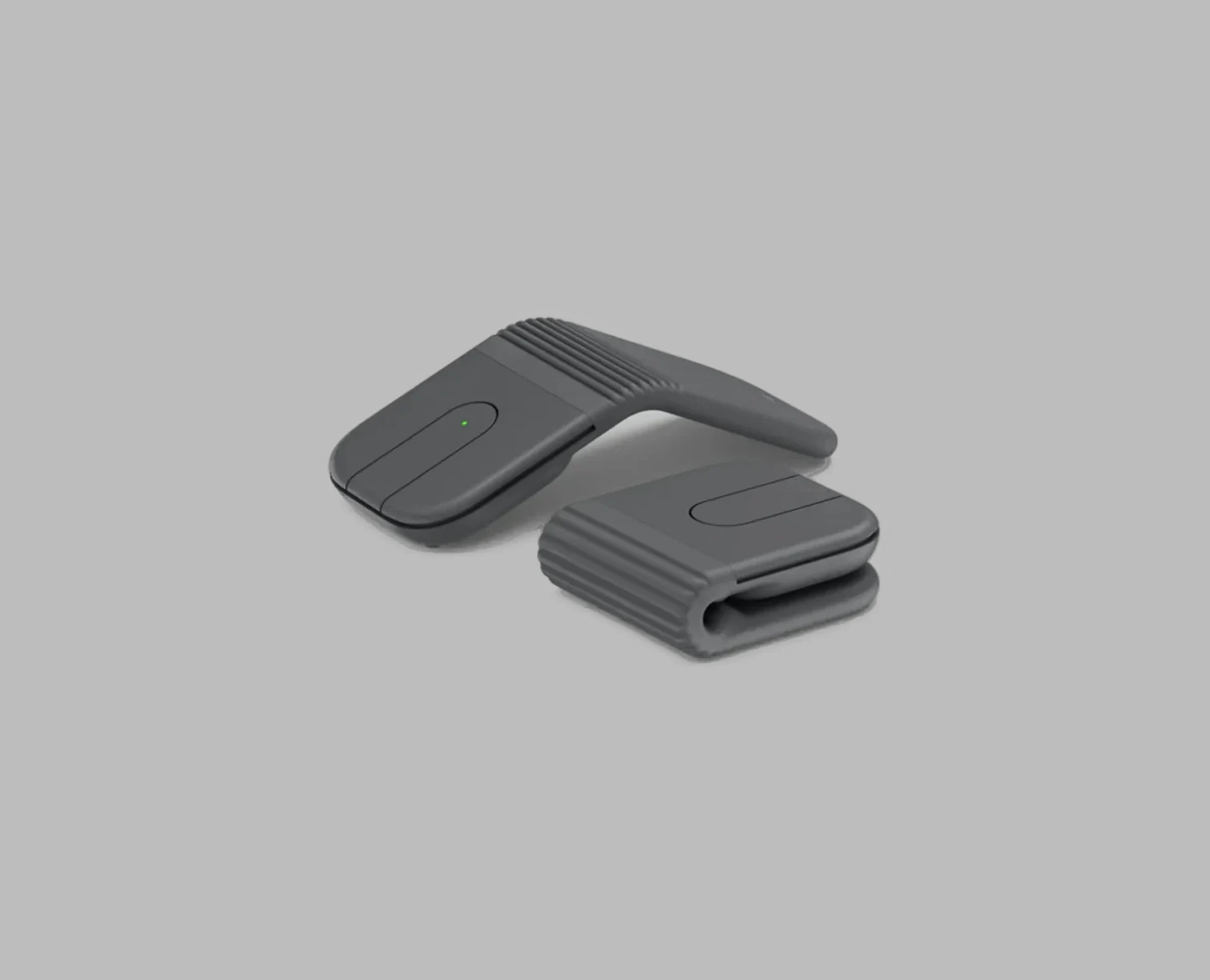
    Logitech has finally announced its new ultraportable travel mouse, the Mobi Fold, after some marketing images leaked earlier to give the game away

    The mouse does what the name suggests, it folds in half along a hinge that can pivot about 130 degrees, bringing the device down to a size that makes it genuinely pocketable. It costs $79.99 and comes in graphite, off-white, lilac and sand.

    Anyone who’s used Microsoft’s Surface Arc Mouse will be familiar with the arch shape of the Mobi Fold but the two have different approaches to the fold

    The Arc Mouse folds completely flat to fit in a bag, whereas the Mobi Fold is more like a clamshell phone in that it closes shut rather than laying flat. Logitech claims the hinge has been tested for 15 years of daily use, a specific assertion that’s worth holding the company to.

    The silicone provides some grip and helps cushion a fall. When folded, the Mobi Fold is a little more than three-quarters of an inch tall and about 2.6 inches by 2.5 inches across

    It’s a little heavier than Logitech’s own Pebble Mouse 2 at 79g, but it’s significantly smaller.

    A full charge is said to power the Mobi Fold for up to a month, according to Logitech

    If the battery’s almost dead, a one-minute quick charge gives you up to 22 extra hours of use. There’s no dedicated power button; instead, you’ll fold the mouse in half to turn it off.

    The underside houses a 4K DPI optical sensor and a single button for connecting and cycling between up to three paired devices

    On top, the two main mouse buttons flank a multifunction touch panel. Swiping that panel scrolls through pages and documents, and the speed of that scroll can be changed between a fast zip and a slower line-by-line movement in Logi Options Plus software. The top and bottom edges of the panel also act as two additional clicky buttons — forward and back by default when browsing, though both are remappable in the app.

    One thing worth knowing: the touch panel stays active even while you’re picking the mouse up to fold it, but the physical buttons cut out before you close it

    The Mobi Fold is headed for a global release, though the company has not announced a specific shipping date beyond the product reveal.

    Sources
  • Bambu Lab X2D Review: Dual Nozzle Cuts Print Time & Waste

    Key Takeaway

    – Two-nozzle printing drastically reduces waste: 20g vs 70g per 12g model.
    – Skipping priming saves time but severely degrades print quality; Bambu Lab advises against it.
    – Dual nozzles enable multi-material printing (e.g., water-soluble supports) without sacrificing part quality.
    – Printing time with both nozzles is 2.7 hours vs 5.8 hours with a single nozzle.
    – Multi-material zero waste is impossible with current technology, but waste reduction is significant.


    The Bambu Lab X2D’s tool head, featuring two distinct nozzles, was already explored in a comprehensive examination. Now, lets put that idea back into the bigger picture of 3D printing. Essentially, this is about multi-filament printing – making different colours or types of filament in one single run. Cheaper printers can do this too. The basic concept is simple: The filament gets cut, the old stuff is pulled out of the tube feeders by a filament dryer that also feeds, and then new material is pushed into the extruder.

    How a 3D Printer Actually Works

    At this stage, we need a brief detour into how 3D printers generally operate. We will keep it deliberately simple and somewhat model-like, not too technical. A 3D printer doesn’t sit still in a static balance; it moves in flow. It’s a dynamic system that needs time to settle after turning it on or when temperature or material conditions shift. Think of a garden hose, where you only get a steady stream a little while after opening the tap, and you sometimes have to twist the nozzle to make the jet better.

    Priming vs. Purging Explained

    The hot end goes through a start-up phase. After heating, there is a brief priming period where filament continuously reaches the hot end and the melt and pressure conditions stabilize; only then does extrusion become repeatable. Priming is different from purging. Purging is always needed when you change filament because the molten material already inside the hot end cannot be removed just by retracting it. In the photos, you can see the change between grey and white in the filament droplet during this middle phase. This difference between priming and purging is also fundamentally important for the X2D.

    It is this exact difference between priming and purging that matters with the X2D. Purging can be skipped completely, but priming cannot, because only one print nozzle can work at a time. In our test with the Multicolor-3D-Benchy from 3Designs, the X2D shows it is clearly better when both nozzles are used. If both nozzles are used, the 12-gram model only creates around 20 grams of waste, which is almost all from the purging tower. If only one nozzle is used and the filament has to be changed and the nozzle flushed repeatedly, about 70 grams of waste is made for every 12 grams of the real model – 52 grams are from flushing.

    Print Time and Waste Numbers

    This also fully hits the printing time. With just one nozzle, the printing time goes up from 2.7 to 5.8 hours. Two things to keep in mind: We used standard settings and the actual numbers likely depend a lot on the specific model being printed. The logical question is whether you can skip the priming process. If you could, the priming tower would not be needed and the printing time would drop to just 1.7 hours when using both nozzles.

    Should You Skip Priming?

    In our test, skipping priming didn’t make sense. Bambu Lab correctly advises against it, because it causes a big drop in print quality. Printing without priming would likely need systems with two fully independent tool heads – a specialist solution. Beyond saving material, two nozzles open up other options. For instance, printing support structures in a different material lets you use cheaper filament for supports. The PVA sold by Bambu Lab (meant for supports) is not cheap. The trick is that PVA is water-soluble, so support structures dissolve in a water bath instead of being removed by hand. That is also best seen as a specialist case.

    Does the X2D allow multi-material printing with no waste? No. That shortfall is not really due to the machine itself but more to the underlying technology. Still, waste can be cut down a lot and print time shortened, so the multi-nozzle system is both useful and efficient. As shown in the review, using both nozzles does not necessarily lower print quality – parts can still look like they were made as one single piece. The fact that the second nozzle does not support TPU and has a lower maximum speed, for example, was not a big limitation in practice. Setting up two-nozzle prints in the software is very easy, and the software suggests sensible groupings.


    Sources

  • Schenker Connect 15: From €1,000 to €1,600 Laptop

    Schenker Connect 15: From €1,000 to €1,600 Laptop

    Key Takeaway

    – Starting price is now ~€1,000 (up from €965), with Wi-Fi 7, CPU, and display included as standard.
    – RAM and storage upgrades cause the biggest price jumps: +€175 for 16GB RAM, +€355 for 32GB RAM, up to +€183 for a 1TB SSD.
    – LTE module costs an extra €79; a Secured-Core PC Level 3 option adds €29.
    – You can save €50 by choosing a 24-month warranty instead of the default 36-month warranty.
    – A fully configured review unit (32GB RAM, 1TB SSD, Windows) reaches roughly €1,655—expensive for an office laptop.


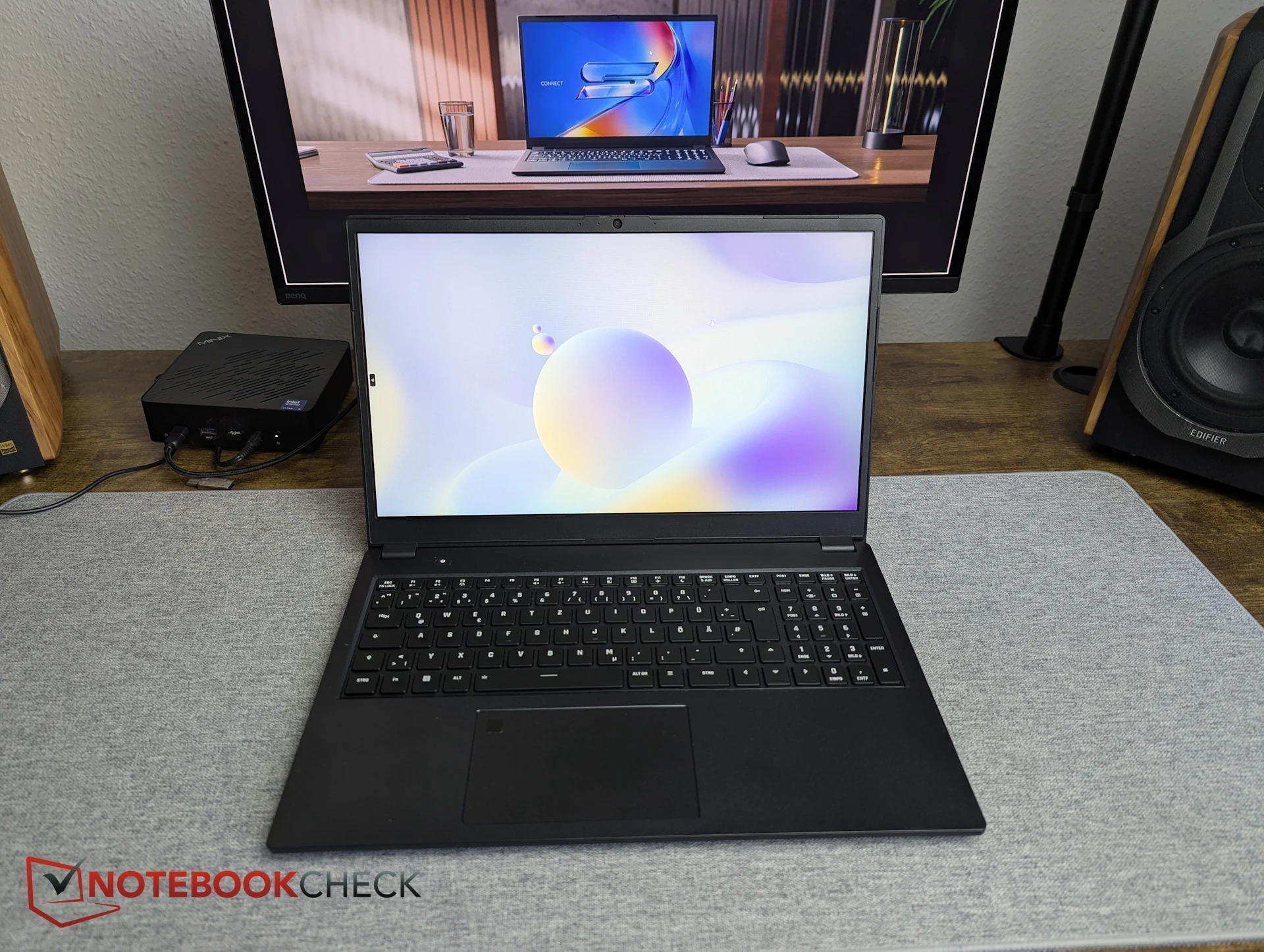
    The highly configurable business and enterprise laptop Schenker Connect 15 can be set up on bestware.com starting at 965 Euro. But what does that actually include—are LTE, smartcard support, Wi-Fi 7, and other features still part of the base package, with only RAM reduced? We spent some time configuring the system on bestware.

    Price Changes and Core Features

    Since our last visit, Schenker appears to have slightly increased prices. Instead of €965, the base configuration now shows €998.99, meaning the entry point is effectively around €1,000. The good news first: Wi-Fi 7 also appears to be included in the starting configuration at no extra cost. The same applies to the CPU and display—there are simply no alternative options available.

    Saving on the Warranty

    There is even a way to save on warranty. By default, Schenker provides a 36-month warranty on this business laptop. Those willing to accept 24 months instead can reduce the price by €50. In that case, the Connect 15 starts at €948.99.

    Add-On Features and LTE

    Unsurprisingly, the LTE module is one of the add-on features that comes at an additional cost. The Huawei ME906s module adds €79. Companies and other interested buyers can also select a Secured-Core PC Level 3 setup for €29.

    Dramatic Memory Price Jumps

    The most dramatic price jumps currently come from memory choices. The base configuration includes only 8 GB of DDR5 RAM. Upgrading to 2x 8 GB already increases the price by €175—an extreme jump for just one additional 8 GB module. Our review unit was equipped with 2x 16 GB DDR5 RAM, which adds a hefty €355 on top of the base price.

    Storage Costs and Final Summary

    Similar price jumps apply to storage. The base model comes with just 500 GB. Moving up to 1 TB costs at least €75 more, depending on the SSD model. The Samsung 990 Pro with 1 TB used in our review unit adds around €183.

    In summary, the Schenker Connect is not a low-cost business laptop. However, the premium price is not driven primarily by its core feature set. With only 8 GB of RAM and a 500 GB SSD, benchmark results would likely differ significantly compared to our test configuration. Our review setup would currently cost around €1,616—and that doesn’t even include the operating system. With a pre-configured Windows installation (without a license) the price jumps to a final 1.655 Euro, which is hardly inexpensive for an office laptop.


    Sources

    • 1666 Amsterdam Faces Backlash Over ‘Oversight’

      1666 Amsterdam Faces Backlash Over ‘Oversight’

      Key Takeaway

      – Generative AI use in games triggers backlash, especially when unannounced.
      – 1666 Amsterdam faced criticism for AI-generated in-game portraits and marketing assets.
      – The developer called it an “oversight” and promised no AI in the full game.
      – Public perception is shaped by how and why AI is used, not just its presence.
      – The controversy undermines positive reception, even for veteran developers like Patrice Desilets.


      Generative AI and the Backlash

      Generative AI in games seems to be becoming more common, but the way it is used is what defines public perception. The newly announced 1666 Amsterdam is the latest victim of backlash after the devs admitted to featuring content created by AI in there free prologue. This has caused quite a stir among gamers who feel tricked by the inclusion of these assets.

      The Prologue and It’s AI Assets

      1666 Amsterdam was showcased at Summer Game Fest, where the Creative Director at Panache Digital Games, Patrice Desilets, announced a free prologue out on Steam and Epic Games Store. Said prologue, as it turns out, uses some generative AI assets, and fans were quick to spot them. Not just the game, some of the marketing assets were also AI-generated. Panache Digital Games took to X to admit and apologize for the use of AI. They claimed it was a mistake.

      Oversight or Intentional Choice?

      As per the post, some in-game portraits and external marketing assets were, in fact, AI-generated and made there way to the prologue. The team is calling it an oversight and promising that the full game will not include any assets generated by AI. Many are questioning wether this was truly an oversight or a calculated move that backfired.

      What should have been a glorious return to making games for Desilets has turned out to be a dissapointment for fans. Desilets was one of the great minds behind the original Assassin’s Creed games and had to fight for years to bring his original IP, 1666 Amsterdam, to the public. Now, fans are upset with the use of AI and are accusing the team of intentionally using it for there game, and then calling it an oversight. How this will effect the full game release remains to be seen.

      • Prologue is free on Steam and Epic Games Store
      • AI assets included portraits and marketing material
      • Full game will not feature AI generated content
      • Creative Director Patrice Desilets previously worked on Assassin’s Creed
      Sources
    • Vectron X: Siemens digital locomotive with apps & CarPlay

      Vectron X: Siemens digital locomotive with apps & CarPlay

      Key Takeaway

      – The Vectron X features an integrated “CarPlay-like” system with an App Store and 11.6-inch Smartscreen for simplified operations.
      – Remote Start allows the locomotive to boot up and prepare for operation ahead of time.
      – Near real-time operational data transmission enables predictive maintenance.
      – Interfaces are open to third-party providers for app development.
      – The Vectron X is a digitalized variant of the existing Vectron platform, which has sold 3,000 units in various configurations.


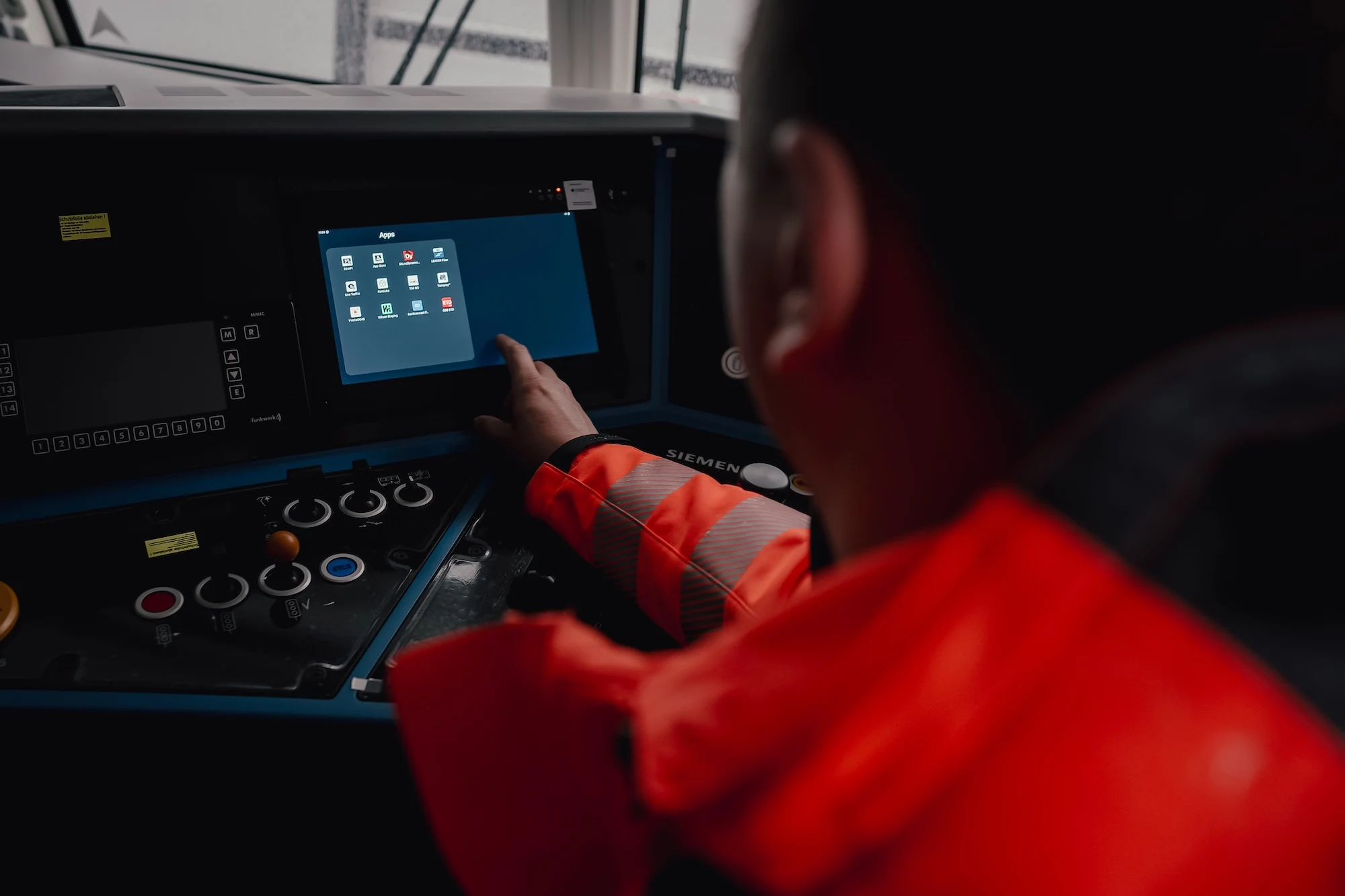
      Siemens has unveiled a more heavily digitalized variant of its Vectron locomotives, the Vectron X. The digitalized locomotive offers additional features that, according to Siemens Mobility, are designed to simplify the operation of Vectrons while also enhancing “operational transparency.” To achieve this, the new locomotive features a “CarPlay-like solution” including an App Store, which is displayed on an 11.6-inch monitor referred to as the Smartscreen.

      Apps and Interface Inside the Cab

      The rationale behind this is to make apps that train drivers previously used on smartphones and tablets directly available inside the locomotive itself. As examples, Siemens mentions apps for scheduling or specialized tools within a rail transport company. Route information is also intended to be displayable on this screen. Siemens promises simpler operation and, consequently, increased efficiency in the operational workflows of a rail transport company.

      Open App Store and Remote Start

      The interfaces are also planned to be open to third-party providers, allowing for the creation of a true App Store. As another feature, the Vectron X is said to support booting up a locomotive remotely. Via Remote Start, the locomotive will thus be able to get itself ready for operation ahead of time. Furthermore, the Vectron X is designed to transmit operational data in near real-time, thereby supporting features like predictive maintenance.

      Sales Numbers and Configurations

      According to Siemens, 3,000 locomotives have already been sold of the Vectron, which hauls both freight trains and high-speed trains like the ICE L. The Vectron is available in various configurations, ranging from different multi-system locomotives and hybrid locomotives (diesel + overhead catenary) to the upcoming battery-equipped Vectron.

      Build-to-Order and Exceptions

      The Vectron X builds upon this, meaning it should likewise be available in different configurations. For now, this is just an announcement. Rolling stock in rail operations is typically manufactured to order only, which is comparable to the aviation industry. Siemens’ Mireo Smart trainsets are one of the few exceptions, as they are actually pre-produced, “off-the-shelf” products.


      Sources

    • Astronomers Detect Black Hole Winds at 30% Light Speed

      Astronomers Detect Black Hole Winds at 30% Light Speed

      Key Takeaway

      – Black hole winds in quasar J2318 reach 30% of light speed (201.2 million mph).
      – Quasar J2318 is 3 billion light-years away with a mass of 1.7 billion Suns.
      – The wind speed is equivalent to a “Category 79 hurricane” — vastly beyond Earthly storms.
      – Winds consist of high-speed matter, not atmospheric air.
      – Discovery used Sloan Digital Sky Survey data, improving understanding of black holes.


      Mysterious cosmic winds break records

      In the universe, many objects remain mysterious and poorly understood by astronomers, such as black holes. But recently, astronomers have discovered a black hole with winds reaching up to 30% of the speed of light, or about 201.2 million miles per hour. This finding realy challanges our understanding of extreme physics.

      The quasar J2318 and its supermassive black hole

      These winds were detected in a quasar, which is a bright core of a galaxy fed by a supermassive black hole. Thus, this quasar, named J2318, is located about 3 billion light-years from Earth, and according to astronomers, its mass is estimated to be about 1.7 billion times that of the Sun. That is an absolutly colossal size.

      Category 79 hurricane? Not quite

      However, while its mass is already remarkable, the speed of its winds is also impressive, as Lucas Seaton explains: “In terms of its speed, this quasar’s wind could be called a category 79 hurricane. Every category of hurricane is about 20% faster than the category below it. Calling it Category 79 gives an idea of just how fast it is, but of course this wind is unlike anything on Earth.”

      Indeed, these are not winds like those found on Earth, as they are composed of matter propelled at high speeds. And that’s not all, because in order to detect this phenomenon, astronomers used data from the Sloan Digital Sky Survey (SDSS). These measurments required high-precision instruments.

      What this means for science

      As a result, while this discovery highlights the power of black holes, it also allows researchers to better understand these celestial objects, which remain mysterious and poorly understood. And there is no doubt that further studies will be conducted in the near future. The data continues to inspire awe.


      Sources

    • Apple WWDC reveal: interesting but not typical Apple

      Apple WWDC reveal: interesting but not typical Apple

      Key Takeaway

      – Apple cut specific audio frequencies (3kHz-6kHz) during WWDC when “Siri” was mentioned to prevent device activations
      – The tactic was largely ineffective, as many viewers reported their Apple devices still woke up during the livestream
      – This frequency-muting approach is not unique; Amazon used a similar method for “Alexa” in 2017, and other brands do it too


      Apple’s WWDC Tweak: Keeping Siri at Bay

      Apple made some interesting tweaks so that you could have an uninterrupted WWDC livestream. To avoid countless Apple device activations, the Cupertino giant tweaked frequencies when ‘Siri’ or ‘Siri AI’ was mentioned. How efficient those tweaks were is questionable at best, as pointed out by viewers.

      The Frequency Cutting Technique

      A user named ‘luuk de leest’ shared on X that during the keynote, Apple cut out 3kHz, 4kHz, 5kHz, and 6kHz frequencies every time the phrase ‘Siri’ was mentioned. This was done to avoid unnecessary activations on the viewers’ devices. The user shared a spectrogram screenshot showing blank spots in the claimed frequencies when ‘Siri’ was mentioned. Furthermore, they mention HomePods in particular, but the tweak should have affected all devices in the ecosystem.

      It Didn’t Quite Work Out

      Unfortunately, it didn’t really work as intended, and several commenters mentioned that their iPhones, iPads, MacBooks, and even HomePods were woken up several times during the keynote. It is possible that without the tweak, the activations may have been even worse.

      Not a New Trick in the Book

      As interesting as it is, this tweaking is not new. Apple isn’t the first or the only one doing this, as back in 2017, it was found that Amazon did the same with its commercials when ‘Alexa’ was mentioned. Other brands do it as well, to prevent unnecessary smart speaker activations.


      Sources
    • Oppo Mini-Flagship Fails: Huge Potential Wasted by Poor Efficiency

      Key Takeaway

      – High idle power consumption (~3W) undermines the 7,025 mAh battery’s potential.
      – Falls short of the Find X9 Pro’s runtime despite similar chipset and larger battery.
      – Nearly 10 hours longer web-surfing endurance than Samsung Galaxy S26.
      – Less efficient than larger Find X9 with identical battery capacity.
      – Lack of low-load optimization prevents the phone from being a true endurance champion.


      Oppo Is Squandering Great Potential

      Oppo is squandering great potential with its Find X9s Pro in terms of endurance due to a lack of efficiency at low system load. Although the 7,025 mAh battery looks like a real highlight on paper, the Find X9s Pro cannot match the fantastic runtimes of the Find X9 Pro in our review. The mini flagship powered by the Dimensity 9500, is simply too wasteful in idle mode with the the energy available.

      Power Consumption Figures Expose the Problem

      The power‑consumption figures in our idle measurements clearly expose the efficiency problem. While other top smartphones from Oppo, such as the Find X9 or even the significantly larger Find X9 Pro, remain below 2 watts in idle mode, the Find X9s Pro consumes noticeably more energy. Our Geekbench and GFXBench measurements, taken with the display brightness adjusted to 150 cd/m², clearly indicate the lack of optimization.

      Idle Mode Results Are Alarming

      In idle mode, the Find X9s Pro consumes around 3 watts, more than three times as much power as the large flagship model, the Find X9 Pro, which is also powered on MediaTek’s Dimensity 9500. However, the Find X9s Pro’s extra-large battery only partially conceals its inefficiency. In our web surfing battery test, the Oppo phone delivers a really good stamina for the compact smartphone class. Compared to the Samsung Galaxy S26, the Find X9s Pro lasts almost 10 hours longer.

      However, due to the high power consumption at low system load, Oppo is giving away valuable screen‑on time that could have made the mini‑flagship a true endurance champion. Even the larger flagship model, the Find X9, with an identical battery capacity but larger OLED screen, lasted longer in our battery test.

      Pricing and Specs

      All information and measurement data on the Find X9s Pro can be found in our review of the Oppo phone. Prices for the compact flagship start at around $940 from our loan partner Trading Shenzhen.

      Sources
    • Tarkov Creator Details Fragmentary Order Differences

      Tarkov Creator Details Fragmentary Order Differences

      Key Takeaway

      – Fragmentary Order is a space-based extraction shooter with maps five times larger than typical *Escape from Tarkov* locations.
      – The game features a long-term session model allowing players to stay in the same raid for one to two hours, with no requirement to extract.
      – It includes drivable vehicles and multiple game modes, including a PvE-focused mode at launch.
      – The game is grounded in reality, depicting a possible future with maps on Earth, Venus, and a partially terraformed Mars.


      New Details on Fragmentary Order

      Following it’s big reveal back in March, the head of Rant Gaming studio, Nikita Buyanov, has now shared alot more information regarding Fragmentary Order. Just like his previous big project, Escape from Tarkov, the upcomming game is also an extraction shooter, though this time it is set in the vast reaches of space. But this is not simply Tarkov with a space skin; the developer claims it is considerably more ambitious in its scope.

      Comparing Scale and Setting

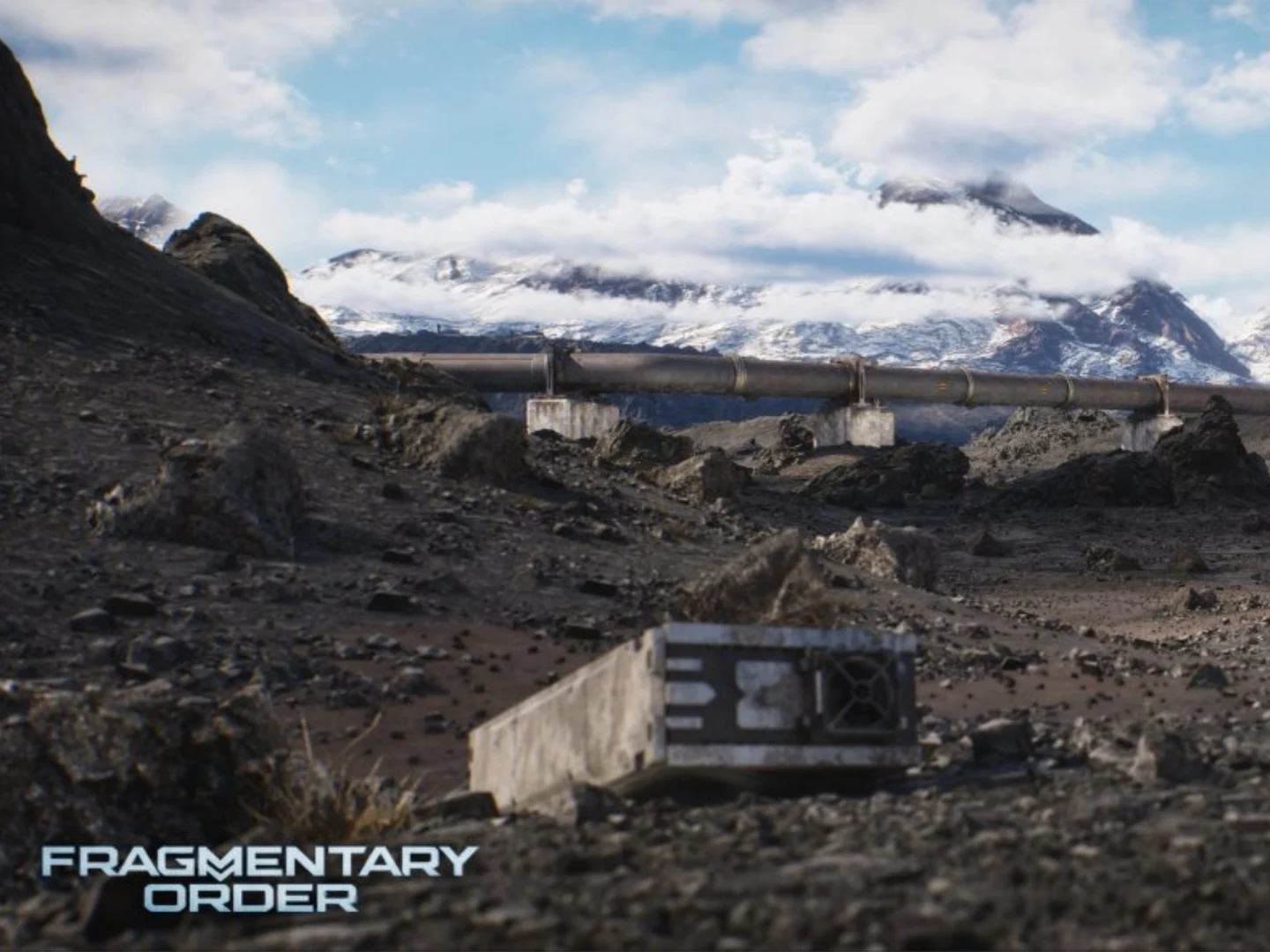
      Speaking directly with Insider Gaming, Nikita provided some fresh details and even a few new screenshots of Fragmentary Order. Starting with the sheer magnitude of the game world, he explained the maps are “like five times more larger than a typical Tarkov location.” Players can anticipate a variety of different maps, including locations set on Earth, the planet Venus, a massive space station, and more environments besides. The studio has already shown off the Blue Mars map, which depict’s a partially terraformed version of the red planet.

      A Grounded Future and New Mechanics

      In his interview, the developer elaborated that Fragmentary Order remains grounded in reality, offering a plausible take on what humanitys future could actually look like. Discussing the core differences that separate this title from Tarkov, Nikita stated that the whole thing is based on a long-term session model, which will allow players to stay inside the same raid for one or even two full hours. Even though it has extraction shooter elements, players dont necessarily have to extract at all if they dont want to. The game will also contain drivable vehicles for the first time.

      Sandbox Modes and Availibility

      There are going to be multiple game modes comming to Fragmentary Order, all of which aim to create a more open and sandbox environment for the player. While it is mostly categorised as a PvPvE game, there will be a dedicated PvE-focused game mode available right at launch. For the time being, it remains unclear exactly when players will be able to get thier hands on the very first playable build, but Nikita believes it will be out there quite soon. The team wants it to be perfectly playable and enjoyable for both hardcore Tarkov veterans and total newcomers alike.


      Sources

    • Belkin UltraCharge Pro 25K 158W Power Bank Launch Deal

      Belkin UltraCharge Pro 25K 158W Power Bank Launch Deal

      Key Takeaway

      – 25,000mAh capacity with up to 158W total output, sufficient to charge a 14-inch MacBook Pro
      – Integrated 140W braided USB-C cable, plus an additional USB-C and USB-A port for multi-device charging
      – Features a digital display, 15W passthrough charging, and a 2-year warranty with $2,500 Connected Equipment Warranty
      – Priced at $84.99 after a limited-time $15 discount in the US (also available in China for ~$78)
      – A higher-capacity 27,000mAh version exists with 240W max output and a top-mounted display for $149.99


      New Power Bank From Belkin Hits Market

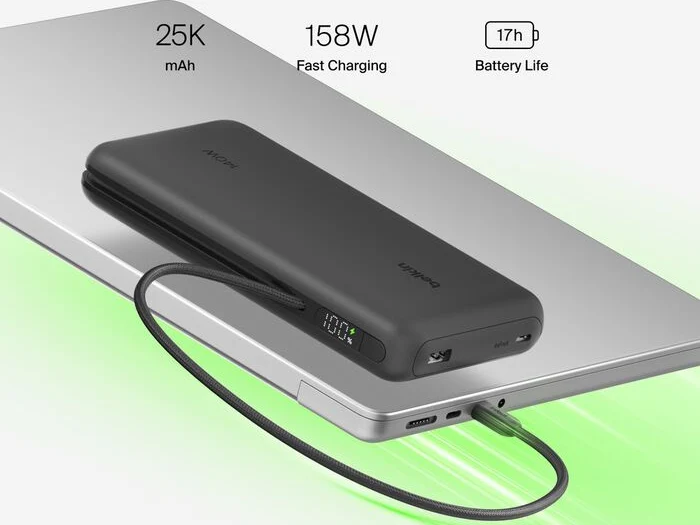
      Belkin has started selling a fresh power bank in the US and China which is capable of charging many devices including a 14-inch MacBook Pro at up to 158W. It also contains a quite sizable battery capacity and arives with a discount. The new power bank features an braided USB-C cable that is built-in and can charge at 140W, it also has a other USB-C port and a USB-A port, and when it is connected to three devices all at once, the power banks maximum power output is 158W.

      Battery and Display Features

      If you couldnt deduce from the name, the power bank holds a 25,000mAh battery capacity, and Belkin claims that it can give up to 17 extra hours for a MacBook Pro 14. The power bank includes a digital display on the side which shows remaining battery capacity and indicates when it is charging. Another feature of the power bank is its support for 15W pass-through charging.

      Dimensions and Warranty Details

      The Belkin UltraCharge Pro Laptop Power Bank 25K measures 164 × 89 × 26.2 mm and weighs 590g, and they describes it as TSA Carry-on compliant. It also says they offer a 2-year warranty and a $2500 Connected Equipment Warranty which means Belkin will repair or replace a users electronic device(s) if they get damaged by an electrical charge while properly connected to the power bank, up to $2500.

      • Price tag of $99.99 with a $15 discount bringing it down to $84.99
      • Available on Amazon for a limited time
      • Available to buy now in Black, but product images show Beige and White too
      • In China the power bank is cheaper at ¥529 ($78/€68)

      Alternative Version with Higher Capacity

      If 25,000mAh is to small, there is a version of the Belkin UltraCharge Pro Laptop Power Bank with a 27,000mAh capacity. It also has an integrated USB-C cable that can deliver up to 140W, but its maximum shared output is higher at 240W and its display is placed at the top. They say its available in Charcoal, and Belkin has put a $149.99 price tag on it.

      Sources